9.1.4 Agent Capability Levels
Learning Objectives
After completing this section, you will be able to:
- Describe the capability boundaries of different Agents using a layered approach
- Distinguish the differences between “can answer,” “can use tools,” and “can complete tasks in multiple steps”
- Choose a more suitable system form based on task complexity
- Practice judging the required capability level for a task with a small example
Why do we need to grade Agents?
Because the word “Agent” is too easy to overstate
Some systems only:
- Can call a single tool
Other systems can:
- Plan multiple steps
- Remember state
- Coordinate multiple tools
If we call them all Agents, many concepts get mixed together.
The value of grading is to describe system capability more honestly
It helps you answer:
- What exactly can this system do?
- Is it a stable workflow or a flexible intelligent agent?
- Which layer is the problem most likely in?
A practical capability grading framework
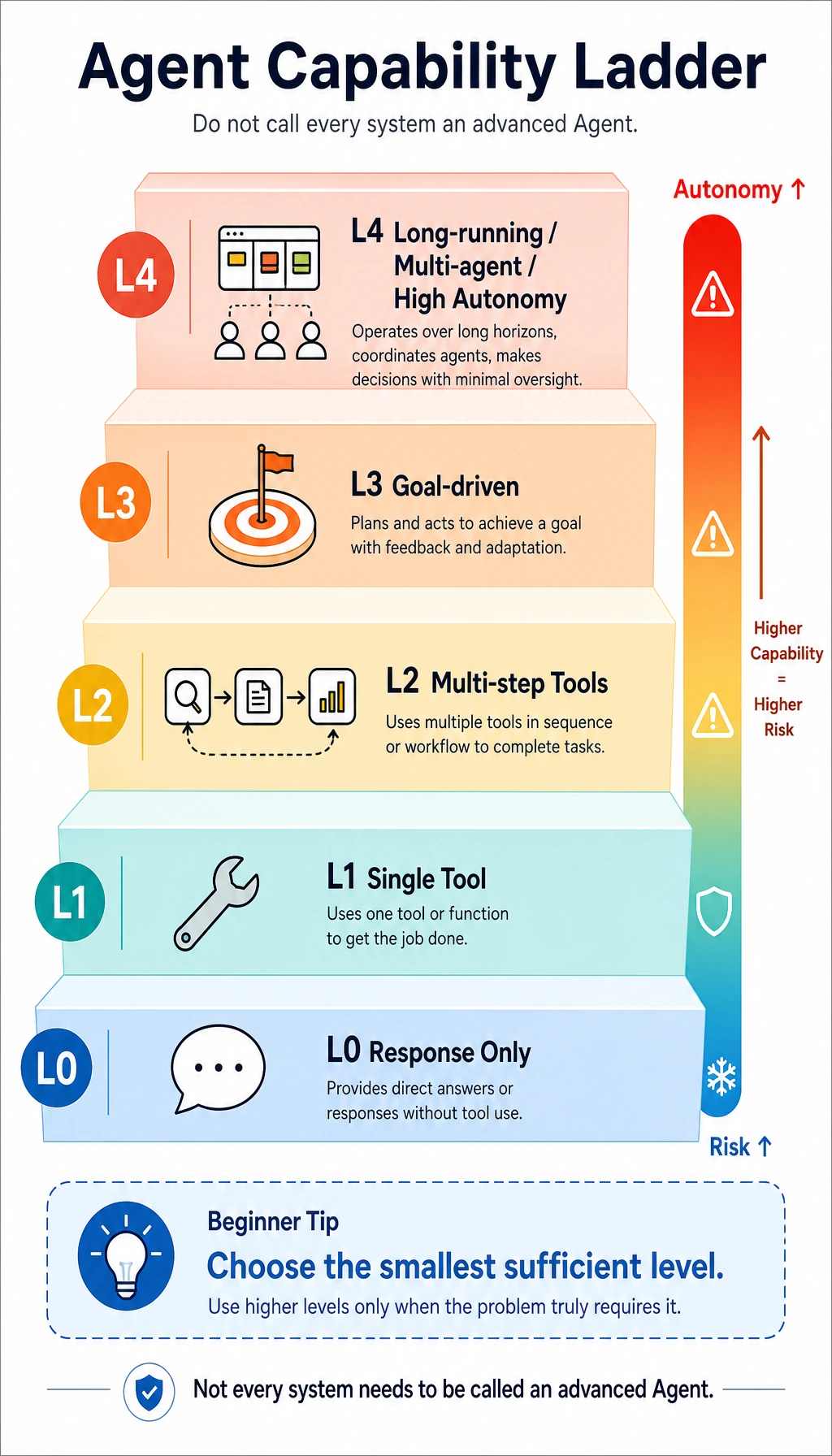
L0: Pure response type
Features:
- Generates answers based on input
- Basically does not actively call tools
- More like a chat model
Examples:
- General Q&A bot
- Pure Prompt generator
L1: Single-tool execution type
Features:
- Can choose one tool based on the question
- Responds directly after one call
Examples:
- Weather lookup assistant
- Calculator assistant
- One-time retrieval Q&A
One level higher
L2: Multi-step tool coordination type
Features:
- Performs two or more actions
- Can decide the next step based on intermediate results
Examples:
- First check the order, then check the refund policy, then give a conclusion
- First search for information, then summarize it into a report
L3: Goal-driven type
Features:
- Receives a higher-level goal
- Organizes an execution flow on its own
- May include state management and failure retry
Examples:
- Automatic research assistant
- Automatic data analysis assistant
- Automatic code-fixing flow
Higher capability usually means higher risk
L4: Long-running / multi-Agent / high autonomy
Features:
- Can run long task chains
- May coordinate multiple tools and multiple sub-Agents
- Has memory, planning, and reflection mechanisms
These systems sound the coolest, but they are also the hardest to engineer.
Higher capability does not mean better suited for your task
Because improved capability often comes with:
- Higher cost
- Harder debugging
- More possible failure paths
So the right mindset is usually not “the higher, the better,” but:
Use the smallest level that is just enough.
A quick capability level reference table
| Level | Core capability | Typical systems |
|---|---|---|
| L0 | Pure response | Chat Q&A |
| L1 | Single tool call | Weather / calculation / one-time retrieval |
| L2 | Multi-step execution | Check first and then calculate, search first and then write |
| L3 | Goal-driven | Research assistant, data analysis assistant |
| L4 | Long-running autonomy / multi-Agent | Complex automation team systems |
A small exercise: assign levels to tasks
Runnable example
tasks = [
    "Answer: What is RAG?",
    "Check Beijing weather",
    "First check the refund policy, then decide whether I qualify",
    "Automatically generate a weekly report based on sales data and send an email"
]

def recommend_level(task):
    task_lower = task.lower()
    if "first check" in task_lower and "then" in task_lower:
        return "L2"
    if "automatically generate a weekly report" in task_lower or "send an email" in task_lower:
        return "L3"
    if "check" in task_lower:
        return "L1"
    return "L0"

for task in tasks:
    print(task, "-> recommended capability level:", recommend_level(task))
Expected output:
Answer: What is RAG? -> recommended capability level: L0
Check Beijing weather -> recommended capability level: L1
First check the refund policy, then decide whether I qualify -> recommended capability level: L2
Automatically generate a weekly report based on sales data and send an email -> recommended capability level: L3
Of course, this is a simplified version, but it helps you build a very practical habit:
First determine which capability level the task needs, then decide how the system should do it.
How do you upgrade from a lower level?
From L0 to L1
The key is to add:
- Tool interfaces
- Parameter generation
- Filling tool results back into the response
From L1 to L2
The key is to add:
- Intermediate state
- Multi-step execution
- Dependencies between actions
From L2 to L3
The key is to add:
- Task decomposition
- Sub-goal management
- Error recovery
The higher you go, the more it feels like building a “small operating system.”
How do you avoid “overstating capability” in engineering?
Set boundaries for the system first
For example:
- How many steps can it execute at most?
- How many tools can it call at most?
- Which tasks must be confirmed by a human?
Launch with the minimum necessary capability first
Many systems actually only need:
- L1 or L2
If you jump straight to L4, you often end up with:
- Too complex
- Too expensive
- Too unstable
Common beginner misconceptions
Thinking tool use automatically means an advanced Agent
Being able to call one tool is usually at most L1.
Thinking more steps automatically means smarter
More steps sometimes just means more error paths.
Piling up architecture without distinguishing task levels
This is one of the reasons many Agent projects are hard to ship.
Summary
The most important takeaway from this section is:
An Agent’s capability is not a switch; it is a continuous range of levels.
Once you learn to grade capability, it becomes easier to make safe architectural decisions, and you are less likely to be misled by the phrase “fully autonomous intelligent agent.”
Exercises
- Make a list of 5 tasks and decide whether each one is better suited for L0, L1, L2, or L3.
- Think about a real project of yours: why might it not need to go all the way to L3 / L4?
- If a system often calls the wrong tool, which capability layer is more likely to have the problem?