9.4.2 Memory System Overview
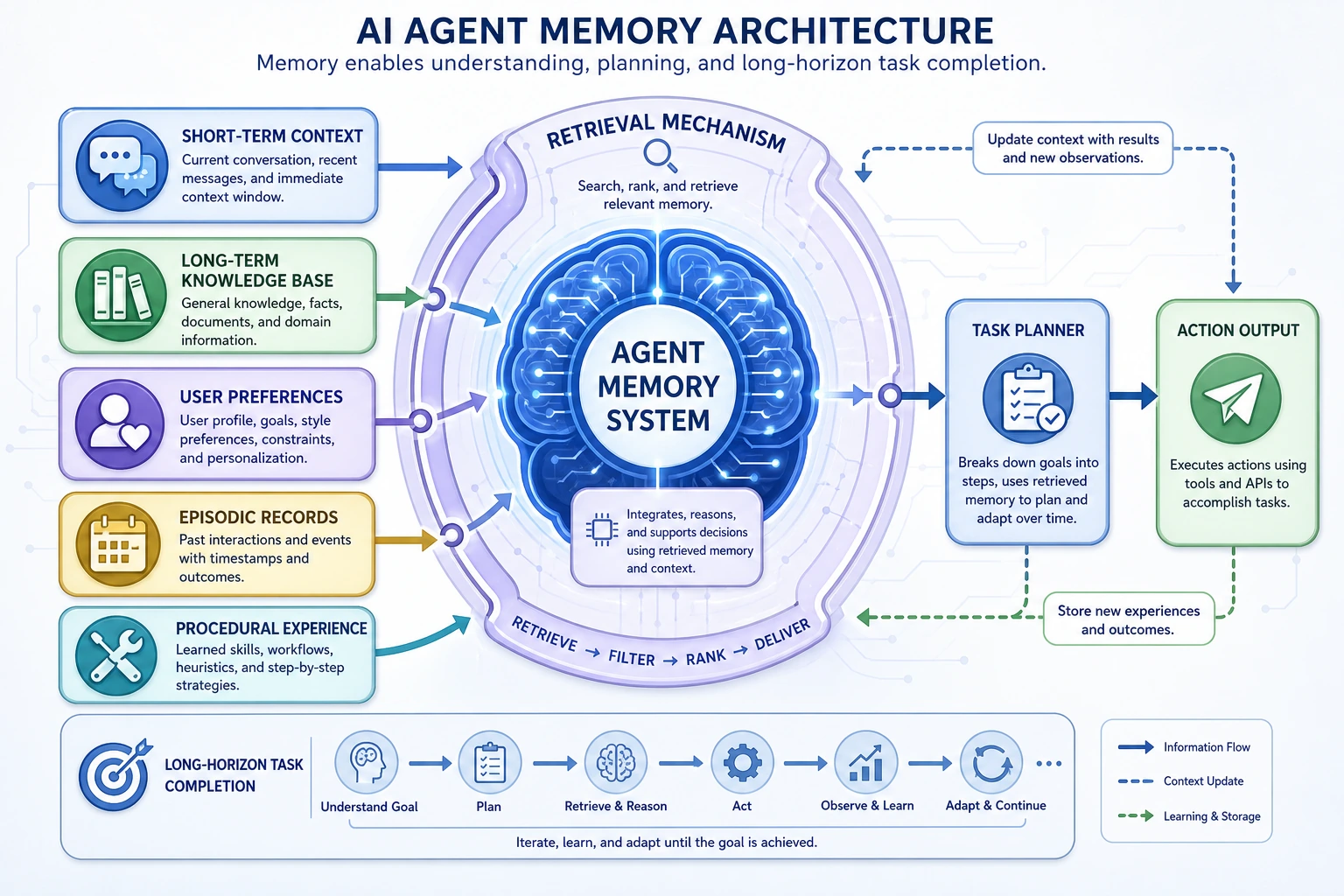
Many Agent systems may seem smart at first, but once a task gets longer and the conversation has more turns, they reveal a fundamental problem:
They do not remember what they were just doing.
So a memory system is not a “nice to have.” It is a key layer that helps an Agent move from a one-shot responder to a system that can handle ongoing tasks.
Learning Objectives
- Understand why an Agent needs memory, not just a context window
- Distinguish between short-term, long-term, episodic, and procedural memory
- Understand a minimal multi-layer memory structure
- Build the right intuition that “more memory is not always better”
- Know what problem each of the next sections is trying to solve
First for Beginners / Deeper Understanding for Advanced Learners
If you are new, keep one sentence in mind for now: Agent memory is not about stuffing all chat history back into the model. It is about storing the current task, long-term preferences, past experiences, and reusable workflows in layers, and using them when needed.
If you have already built Agent projects, you can go further and think about: which information should be written into long-term memory, when it should be read, how to prevent short-term noise from polluting long-term facts, and whether memory really improves task completion.
Why Does an Agent Need Memory?
Without memory, the system is like rebooting every time
Suppose the conversation between a user and an Agent goes like this:
- “I want to check the refund policy”
- “Focus mainly on the time range”
- “If I’ve already completed 30%, can I still get a refund?”
If the system only looks at the last sentence each time:
“If I’ve already completed 30%, can I still get a refund?”
it is actually missing a lot of important context.
So what does the memory system solve?
It solves:
- How to keep the current task coherent
- How to selectively retain past information
- How to use that retained information for future decisions
In one sentence:
A memory system helps an Agent resist the feeling of “starting over from scratch” at every step.
Memory Does Not Mean “Stuff All History In”
A common misunderstanding
When many people hear “memory,” their first thought is:
- Store all historical messages
- Feed everything back into the model when needed
But this usually leads to:
- Exploding token cost
- Higher latency
- Too much noise
- Important information getting buried instead
What a memory system really needs to do is filter and organize
So a memory system is not just “store more stuff.” It is:
Under a limited budget, keep the most valuable information and organize it in the right way.
This is very similar to human memory:
- We do not remember everything exactly as it happened
- Instead, we compress, select, and summarize
First Build a Complete Map
Common memory layers
| Memory Type | What It Is Like | What It Mainly Solves |
|---|---|---|
| Short-term memory | A workbench | Current task context |
| Long-term memory | An archive | Stable information across turns |
| Episodic memory | Task experiences | What happened in the past |
| Procedural memory | An operation manual | How to do a class of tasks |
One sentence to remember first
- Short-term memory: what is happening in this task right now
- Long-term memory: what this user / system is like over time
- Episodic memory: a record of one specific past experience
- Procedural memory: a reusable workflow for getting things done
These four types of memory are not always all needed, but together they form a very practical framework for thinking.
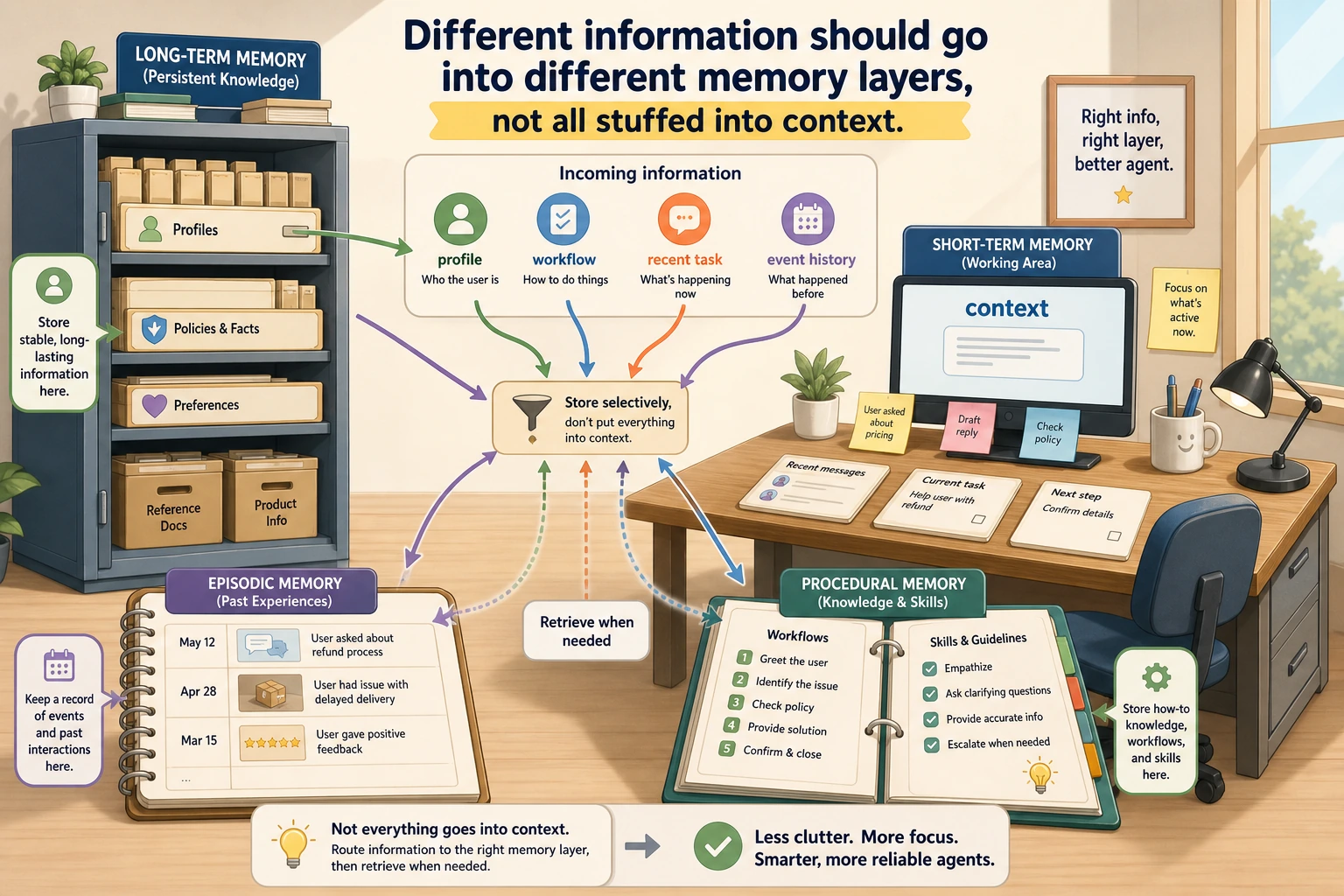
This diagram is not asking you to build all four kinds of memory at once. It is there to help you decide “which layer should this information go into?” Current task goes to short-term, stable preferences go to long-term, a single experience goes to episodic, and reusable workflows go to procedural.
Short-Term Memory: The Work Area for the Current Task
What does it usually store?
- The most recent few turns of conversation
- The current task goal
- Intermediate tool results
- Which step the system is currently on
Why is it the first thing that matters?
Because the failures users notice most often come from short-term memory mistakes:
- The system forgets what it just said
- It checks the same tool result again and again
- It overturns a decision that was already made in the previous step
That is also why the next section will focus specifically on short-term memory first.
Long-Term Memory: Information That Still Matters Across Turns
What does it usually store?
For example:
- User preference: likes concise answers
- User background: a Python beginner
- Project context: currently building a RAG system
The biggest difference from short-term memory
Short-term memory serves “this one task.” Long-term memory serves “similar situations in the future.”
So long-term memory is more like an archive than a current workbench.
What Are Episodic Memory and Procedural Memory?
Episodic memory
You can understand it as:
A specific past experience that actually happened.
For example:
- “Last time the user asked about refunds, it turned out they could not get one because they were beyond 7 days”
It is more like a record with both time and event context.
Procedural memory
You can understand it as:
A set of steps for doing something that has already been proven useful.
For example:
- “When handling a refund issue, first check the order, then check the policy, then judge eligibility”
This is more like an experienced workflow than a single event.
Why do we need to distinguish these two?
Because:
- Episodic memory is more like “what I experienced”
- Procedural memory is more like “what I learned to do”
These two types of memory directly affect an Agent’s ability to transfer knowledge to new situations.
A Minimal Multi-Layer Memory Example
The example below is simple, but it helps you quickly build an intuition for a “multi-layer memory structure.”
memory = {
    "short_term": {
        "messages": ["I want to check the refund policy", "Focus mainly on the time range"],
        "current_goal": "Determine refund eligibility"
    },
    "long_term": {
        "user_preference": "Responses should be concise",
        "skill_level": "Python beginner"
    },
    "episodic": [
        "Last time handling a refund issue, the user could not get a refund because their learning progress was too high"
    ],
    "procedural": {
        "refund_workflow": ["Check order", "Check policy", "Judge eligibility", "Return conclusion"]
    }
}

print(memory)
Expected output:
{'short_term': {'messages': ['I want to check the refund policy', 'Focus mainly on the time range'], 'current_goal': 'Determine refund eligibility'}, 'long_term': {'user_preference': 'Responses should be concise', 'skill_level': 'Python beginner'}, 'episodic': ['Last time handling a refund issue, the user could not get a refund because their learning progress was too high'], 'procedural': {'refund_workflow': ['Check order', 'Check policy', 'Judge eligibility', 'Return conclusion']}}
What does this code really teach?
It teaches you this:
Memory is not a single bucket. It is a multi-layered information structure with different responsibilities.
If everything is mixed into one pile of text, the system will become harder and harder to use.
The Most Common Trade-offs in Memory System Design
How much should you remember?
- Too little: the system easily forgets
- Too much: the system becomes confused and costs go up
Should you store raw text or summaries?
- Raw text: more complete details
- Summary: saves context space
When should you write and when should you read?
Not all content is worth writing into long-term memory. And you do not need to read all long-term memories every time you answer.
So the key to a memory system is not just “store,” but also:
- Write strategy
- Retrieval strategy
- Cleanup strategy
An Important Engineering Reminder
A memory system is not better just because it is more complex.
In many projects, what you really need at the beginning is simply:
- A short-term message window
- A bit of structured state
If you start with:
- Vector-based long-term memory
- Multi-layer episodic summarization
- Procedural memory graphs
you may end up making the system far too complex.
So a safer principle is usually:
Start with the smallest usable memory, then upgrade gradually.
The Most Common Mistakes for Beginners
Thinking of memory as “chat log archiving”
That is only a very shallow layer.
Focusing only on storage, not on retrieval and usage
If you store something but never bring it back at the right time, the memory is not really working.
Not distinguishing between short-term and long-term
This will eventually cause:
- Confused current state
- Long-term preferences polluted by short-term noise
What Is Most Worth Showing in a Memory System
If you turn a memory system into a portfolio project, what is most worth showing is not “I stored a lot of historical records,” but rather:
| What to Show | Description |
|---|---|
| Memory layers | Which parts are short-term state, which are long-term preferences, which are episodic records or workflow experience |
| Write rules | What information is worth saving, and what should stay only in the current task |
| Read rules | Before answering or acting, how the system selects relevant memories |
| Error cases | Which memories caused confusion, and how they were corrected or cleaned up later |
| Effect comparison | What changes in task coherence or success rate with memory versus without memory |
This will show that you understand “memory engineering,” not just simple chat log archiving.
The Learning Loop for This Section
| Layer | What You Should Be Able to Do |
|---|---|
| Intuition | Explain why an Agent needs to resist “starting over from scratch at every step” |
| Structure | Distinguish what short-term, long-term, episodic, and procedural memory are responsible for |
| Engineering | Explain why write, read, and cleanup strategies are important |
| Project | Design an Agent demo with memory layers and error cases |
Summary
The most important thing in this section is not memorizing the four memory names, but grasping the main thread:
The essence of a memory system is to let an Agent avoid starting from zero every time across steps, turns, and tasks.
A truly useful memory system is usually not the one that “stores the most,” but the one that has clear layers, well-designed write/read strategies, and can genuinely support decision-making.
Exercises
- Using your own project scenario, give one example of short-term memory and one example of long-term memory.
- Think about this: if a user changes requirements several times in a short period, which information should stay in short-term memory instead of long-term memory?
- Try designing a simple “procedural memory” workflow, such as a step-by-step checklist for “handling an order refund.”
- Explain in your own words: why is the hard part of a memory system not just storage, but selection and organization?