
9.9.5 Cost Optimization
Learning Objectives
Section titled “Learning Objectives”- Understand the main components of Agent cost
- Learn how to estimate the cost of a task chain with a minimal example
- Understand why caching, routing, truncation, and retry control can save a lot of money
- Build the awareness that “cost optimization is not a single trick, but an end-to-end strategy”
Where Does an Agent Usually Spend Money?
Section titled “Where Does an Agent Usually Spend Money?”Model token cost
Section titled “Model token cost”The most direct layer is:
- Input tokens
- Output tokens
The longer the context and the more steps there are, the higher the cost.
Tool and external dependency costs
Section titled “Tool and external dependency costs”For example:
- Search API
- Vector retrieval
- Third-party APIs
- Code execution environments
These may not be billed by token, but they are still real costs.
Retry and failure costs
Section titled “Retry and failure costs”A failure does not just mean “no result”; it also means:
- Money has already been spent on one call
- A retry may be triggered, adding more cost
So runtime strategy and cost optimization are naturally coupled.
Why Is It Harder to “Read the Bill” for an Agent Than for a Normal Chat?
Section titled “Why Is It Harder to “Read the Bill” for an Agent Than for a Normal Chat?”Because one user request may be broken into many internal calls
Section titled “Because one user request may be broken into many internal calls”For example, a user asks only:
- “Can I get a refund for this order?”
The system may internally do:
- One tool-selection inference
- One order-status query
- One policy retrieval
- One amount calculation
- One final response generation
If retries are involved, the cost grows even more.
So cost accounting should be based on the “task chain,” not a single call
Section titled “So cost accounting should be based on the “task chain,” not a single call”This perspective is very important:
- The user sees 1 request
- The system actually runs 5–10 actions internally
Cost optimization must focus on the entire chain.
First, Run a Minimal Cost Estimator
Section titled “First, Run a Minimal Cost Estimator”This example breaks one Agent task into several cost parts:
- Model token cost
- Tool call cost
- Extra retry cost
PRICES = {    "small_model": {"input_per_1k": 0.001, "output_per_1k": 0.002},    "large_model": {"input_per_1k": 0.01, "output_per_1k": 0.03},}
TOOL_PRICES = {    "search_api": 0.002,    "vector_retrieval": 0.0005,    "sql_query": 0.0002,}

def llm_cost(model_name, input_tokens, output_tokens):    price = PRICES[model_name]    return (        input_tokens / 1000 * price["input_per_1k"]        + output_tokens / 1000 * price["output_per_1k"]    )

def task_cost(task):    total = 0.0
    for call in task["llm_calls"]:        total += llm_cost(call["model"], call["input_tokens"], call["output_tokens"])
    for tool in task["tool_calls"]:        total += TOOL_PRICES[tool]
    return round(total, 6)

baseline_task = {    "llm_calls": [        {"model": "large_model", "input_tokens": 1800, "output_tokens": 300},        {"model": "large_model", "input_tokens": 1400, "output_tokens": 220},    ],    "tool_calls": ["search_api", "vector_retrieval"],}
optimized_task = {    "llm_calls": [        {"model": "small_model", "input_tokens": 700, "output_tokens": 120},        {"model": "large_model", "input_tokens": 900, "output_tokens": 180},    ],    "tool_calls": ["vector_retrieval"],}
print("baseline_cost =", task_cost(baseline_task))print("optimized_cost =", task_cost(optimized_task))
Expected output:
baseline_cost = 0.0501optimized_cost = 0.01584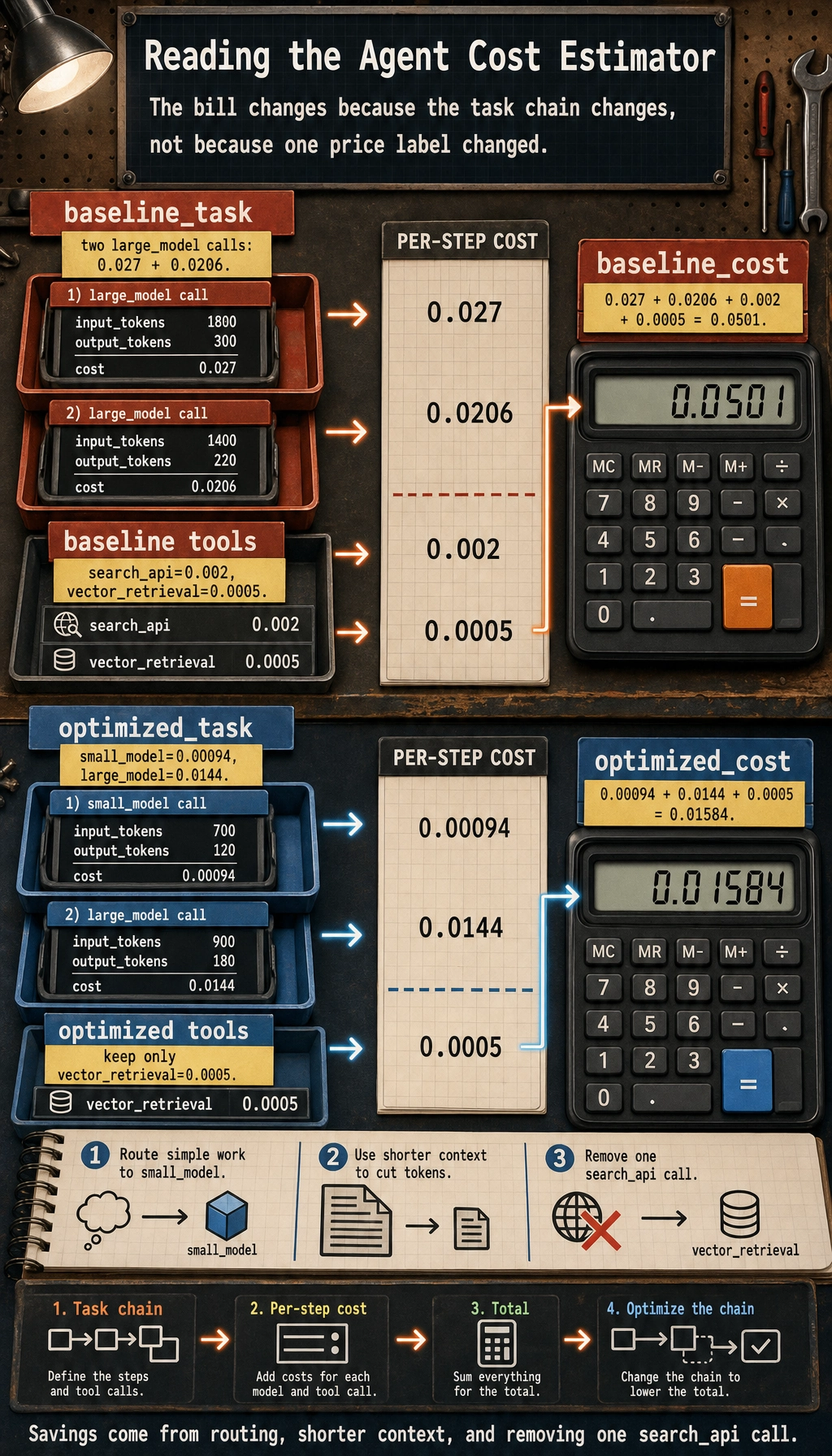
What is this code mainly trying to show you?
Section titled “What is this code mainly trying to show you?”Not a specific price, but how cost is composed:
- Which model calls are the most expensive
- Which tool calls also add up to a non-trivial amount
- Why the cost drops significantly after optimization
Why is “use a small model to screen first, then let a large model answer precisely” often effective?
Section titled “Why is “use a small model to screen first, then let a large model answer precisely” often effective?”Because many requests do not need the most expensive model to participate throughout the whole process. A common pattern is:
- Small model for routing / filtering
- Large model only for the truly complex parts
Why can reducing one search_api call be so valuable?
Section titled “Why can reducing one search_api call be so valuable?”Because external API unit prices can sometimes be high, and they also increase latency and retry risk.
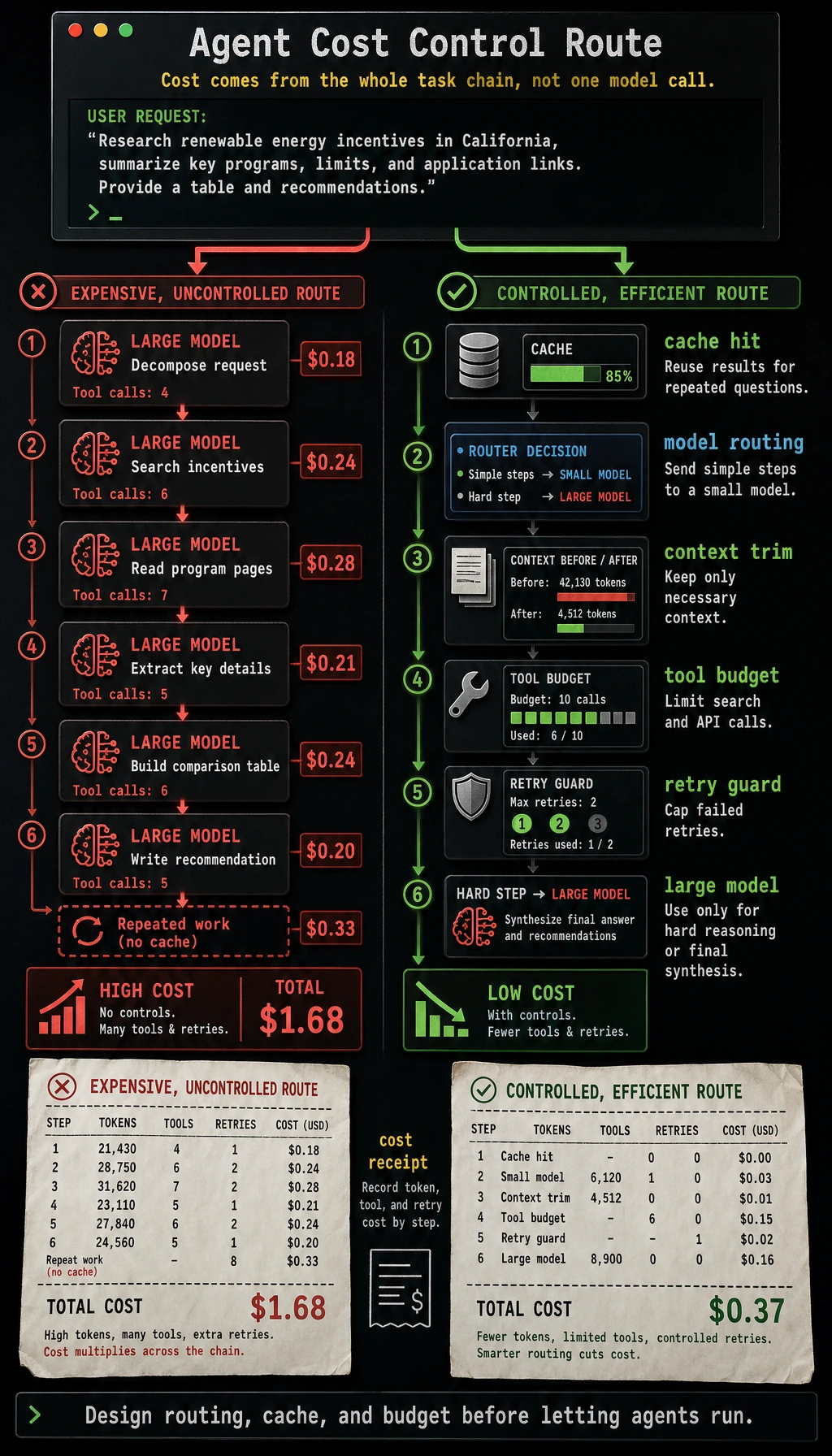
Five Common Directions for Cost Optimization
Section titled “Five Common Directions for Cost Optimization”Shorten the context
Section titled “Shorten the context”The most direct methods are usually:
- Remove irrelevant history
- Compress long context
- Summarize early
Multi-tier model routing
Section titled “Multi-tier model routing”Common pattern:
- Simple requests -> small model
- Complex requests -> large model
Caching
Section titled “Caching”Good for:
- Frequently repeated questions
- Read-only tool results
- Fixed policy content
Deduplicate tool calls
Section titled “Deduplicate tool calls”A lot of an Agent’s money is not actually spent on “necessary tool calls,” but on:
- Re-checking the same thing repeatedly
Control failures and retries
Section titled “Control failures and retries”If failures or retries happen too often, the bill can quickly become misleading.
A Very Practical Example of Cache Savings
Section titled “A Very Practical Example of Cache Savings”cache = {}
def cached_lookup(query, raw_cost=0.002): if query in cache: return {"source": "cache", "cost": 0.0} cache[query] = True return {"source": "api", "cost": raw_cost}
queries = ["refund policy", "refund policy", "certificate rules", "refund policy"]total_cost = 0.0
for query in queries: result = cached_lookup(query) total_cost += result["cost"] print(query, "->", result)
print("total_cost =", total_cost)Expected output:
refund policy -> {'source': 'api', 'cost': 0.002}refund policy -> {'source': 'cache', 'cost': 0.0}certificate rules -> {'source': 'api', 'cost': 0.002}refund policy -> {'source': 'cache', 'cost': 0.0}total_cost = 0.004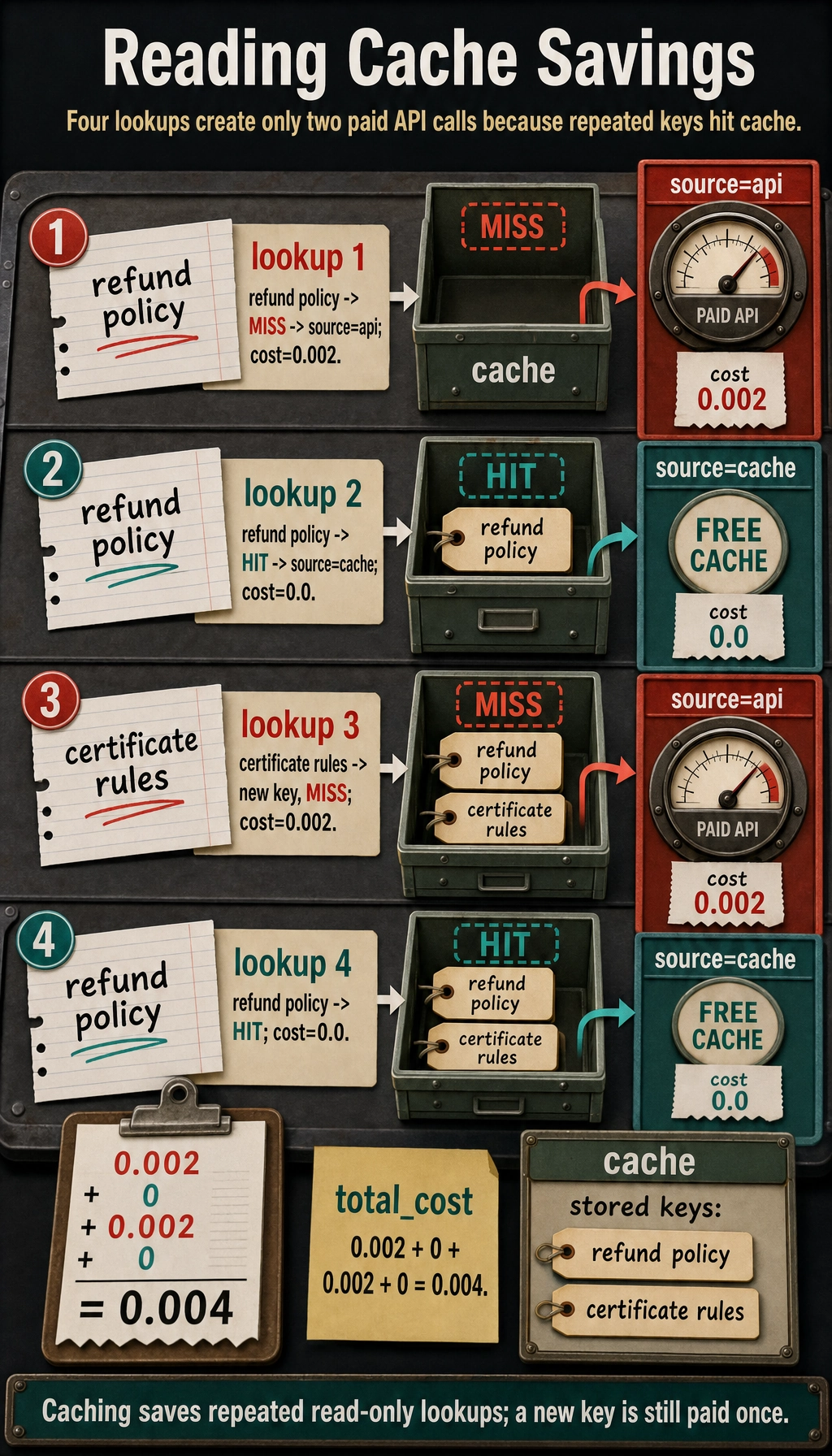
Although this code is simple, it already reflects one core fact in real engineering:
- If you do not cache high-frequency repeated requests, you will keep burning money
The Most Common Cost Optimization Pitfalls
Section titled “The Most Common Cost Optimization Pitfalls”Mistake 1: Thinking that switching to a cheaper model alone counts as optimization
Section titled “Mistake 1: Thinking that switching to a cheaper model alone counts as optimization”If the pipeline design does not change, tool calls remain messy, and retries are still out of control, a lower model price may not save the overall bill.
Mistake 2: Always chasing the lowest cost
Section titled “Mistake 2: Always chasing the lowest cost”If saving money causes:
- A significant drop in accuracy
- Higher latency instead
- Complex requests to fail
then it is not real optimization.
Mistake 3: Not building a per-request cost profile
Section titled “Mistake 3: Not building a per-request cost profile”If you do not know:
- Which types of requests are the most expensive
- Where the expense is coming from
then later optimization is basically blind guessing.
Evidence to Keep
Section titled “Evidence to Keep”Keep this page’s proof of learning as a small evidence card:
- Runtime
- queues, workers, state store, tool services, and model endpoint
- Persistence
- checkpoints, event log, memory store, and recovery path
- Ops Signal
- latency, cost, error rate, trace coverage, and saturation
- Failure Check
- stuck run, duplicate action, partial failure, or runaway cost
- Recovery Action
- resume, rollback, cancel, human handoff, or degrade gracefully
Summary
Section titled “Summary”The most important idea in this lesson is to build an end-to-end cost view:
Agent cost optimization is not as simple as “make the model a bit cheaper.” It also means optimizing context length, model routing, tool calls, cache hits, and failed retries.
When you start breaking costs down by task chain instead of only looking at a single model call, optimization becomes truly effective.
Exercises
Section titled “Exercises”- Add one more cost item for “extra model calls caused by retries” to the example, and see how the total changes.
- Think about which requests are suitable for direct cache hits, and which requests must be computed in real time.
- Why is multi-tier model routing usually more suitable for production systems than “always use a large model”?
- If a pipeline has very high accuracy but unusually high cost, which part would you inspect first?
Solution approach and explanation
- Add retry-driven model calls as
retry_count * cost_per_callor as a separate row by model tier. This often reveals that unstable tools and weak prompts quietly create extra model cost. - Cache direct factual lookups, repeated retrieval results, stable policy snippets, and deterministic transformations. Do not cache user-private, rapidly changing, or approval-sensitive results without a clear invalidation rule.
- Multi-tier routing is better than always using a large model because many requests are simple, repetitive, or tool-bound. Save the expensive model for ambiguous, high-risk, or synthesis-heavy cases.
- If accuracy is high but cost is unusually high, first inspect repeated tool calls, overly long context, unnecessary large-model routing, retries, and generation steps that could be cached or shortened.