9.10.3 Project: Data Analysis Agent
The real value of a Data Analysis Agent is not:
- helping you calculate the average
But rather:
Can it connect “read data -> analyze -> explain conclusions” into a reproducible chain?
That is why this kind of project is especially good for showing multi-step tool coordination and intermediate states.
Learning objectives
- Learn how to define the minimum project scope for a Data Analysis Agent
- Learn how to connect data input, statistical computation, and explanatory output into a closed loop
- Learn how to use a minimal example to demonstrate “reproducibility”
- Learn how to package this topic into a strong one-page portfolio project
First, build a map
A Data Analysis Agent is easier to understand as “read data -> compute statistics -> form interpretation -> provide visualization suggestions”:
So what this section really wants to solve is:
- Why a Data Analysis Agent is not just “good at calling pandas”
- Why a reproducible intermediate process is more important than a final one-line conclusion
How should we narrow the project topic?
It is recommended to start with:
- reading a small table
- calculating a few core statistics
- generating an insight summary based on those statistics
Rather than starting with:
- an automatic BI platform
- a fully automated report factory
A more beginner-friendly overall analogy
You can think of a Data Analysis Agent as:
- an analysis assistant that first computes, then explains, and can also suggest how to visualize the data
Its difference from a regular calculator is not:
- calculating faster
But rather:
- organizing numbers into conclusions with explanatory power
First run a minimal data analysis loop
This example will:
- Read a small sales table
- Compute total sales and category averages
- Give a simple analytical conclusion
sales = [
    {"category": "course", "amount": 299},
    {"category": "course", "amount": 199},
    {"category": "book", "amount": 59},
    {"category": "book", "amount": 79},
    {"category": "service", "amount": 499},
]


def summarize_sales(rows):
    total = sum(row["amount"] for row in rows)

    grouped = {}
    for row in rows:
        grouped.setdefault(row["category"], []).append(row["amount"])

    per_category_avg = {
        category: round(sum(values) / len(values), 2)
        for category, values in grouped.items()
    }

    top_category = max(per_category_avg, key=per_category_avg.get)

    return {
        "total_amount": total,
        "per_category_avg": per_category_avg,
        "insight": f"{top_category} has the highest average order value.",
    }


result = summarize_sales(sales)
print(result)
Expected output:
{'total_amount': 1135, 'per_category_avg': {'course': 249.0, 'book': 69.0, 'service': 499.0}, 'insight': 'service has the highest average order value.'}
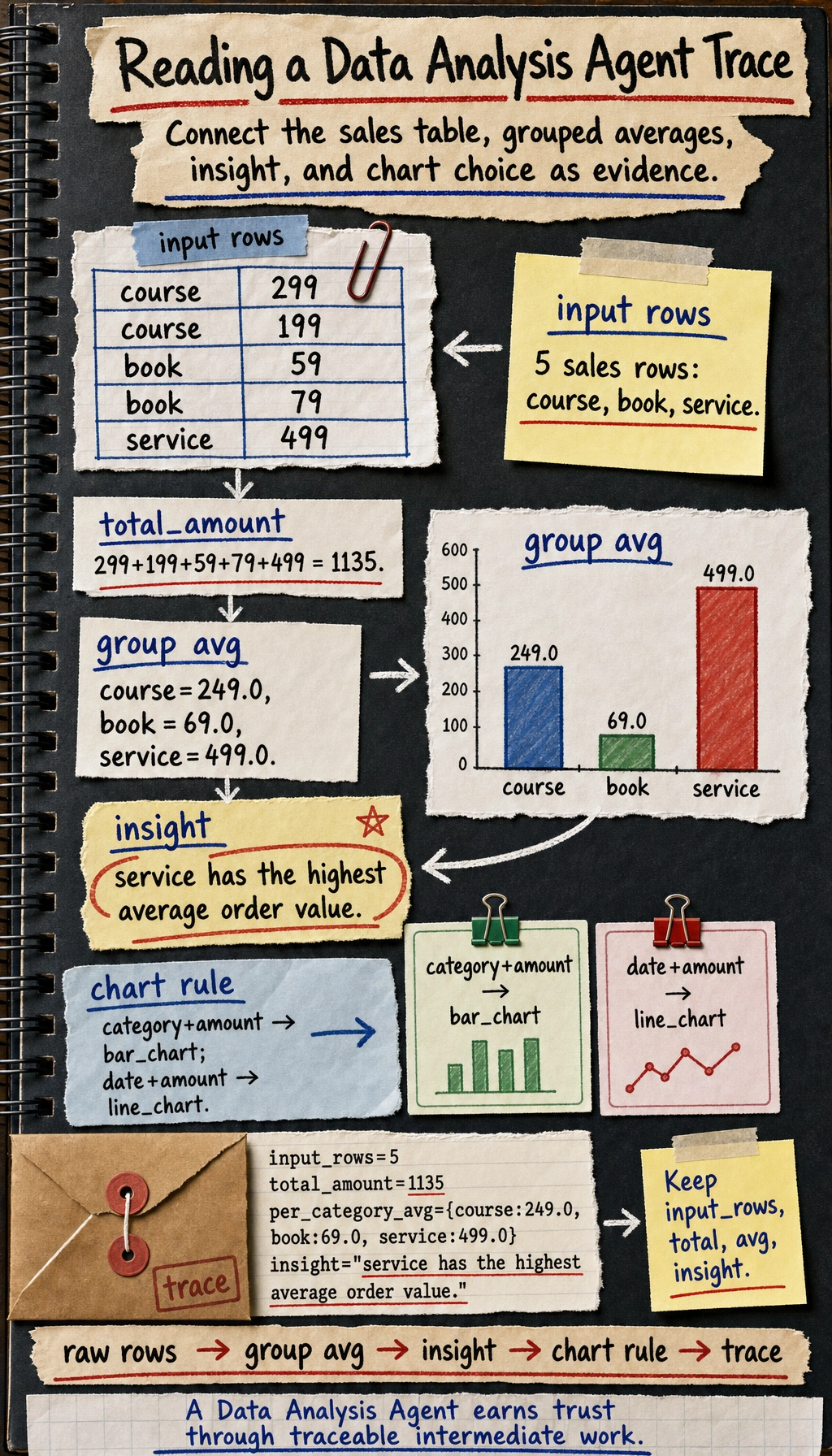
Use the image to read the printed dictionary as evidence: raw rows feed grouped averages, the highest average becomes the insight, and the chart rule turns the same fields into a presentation suggestion.
Why is this already very project-like?
Because it does not only do “computation”, it also does:
- input data
- intermediate statistics
- output conclusions
This is already the smallest data analysis workflow.
Why is insight especially important?
Because users are usually not trying to look at raw numbers, but want:
- conclusions with explanatory power
This is exactly the difference between a Data Analysis Agent and a regular calculator.
A beginner-friendly project checklist to remember first
| Step | What should you confirm first |
|---|---|
| Input data | Are the field meanings clear |
| Intermediate statistics | Are the calculation rules consistent |
| insight | Do the conclusion and the numbers match |
| Chart suggestions | Does the chart type fit the data shape |
This table is especially useful for beginners because it compresses “Data Analysis Agent” back into a workflow that can be checked step by step.
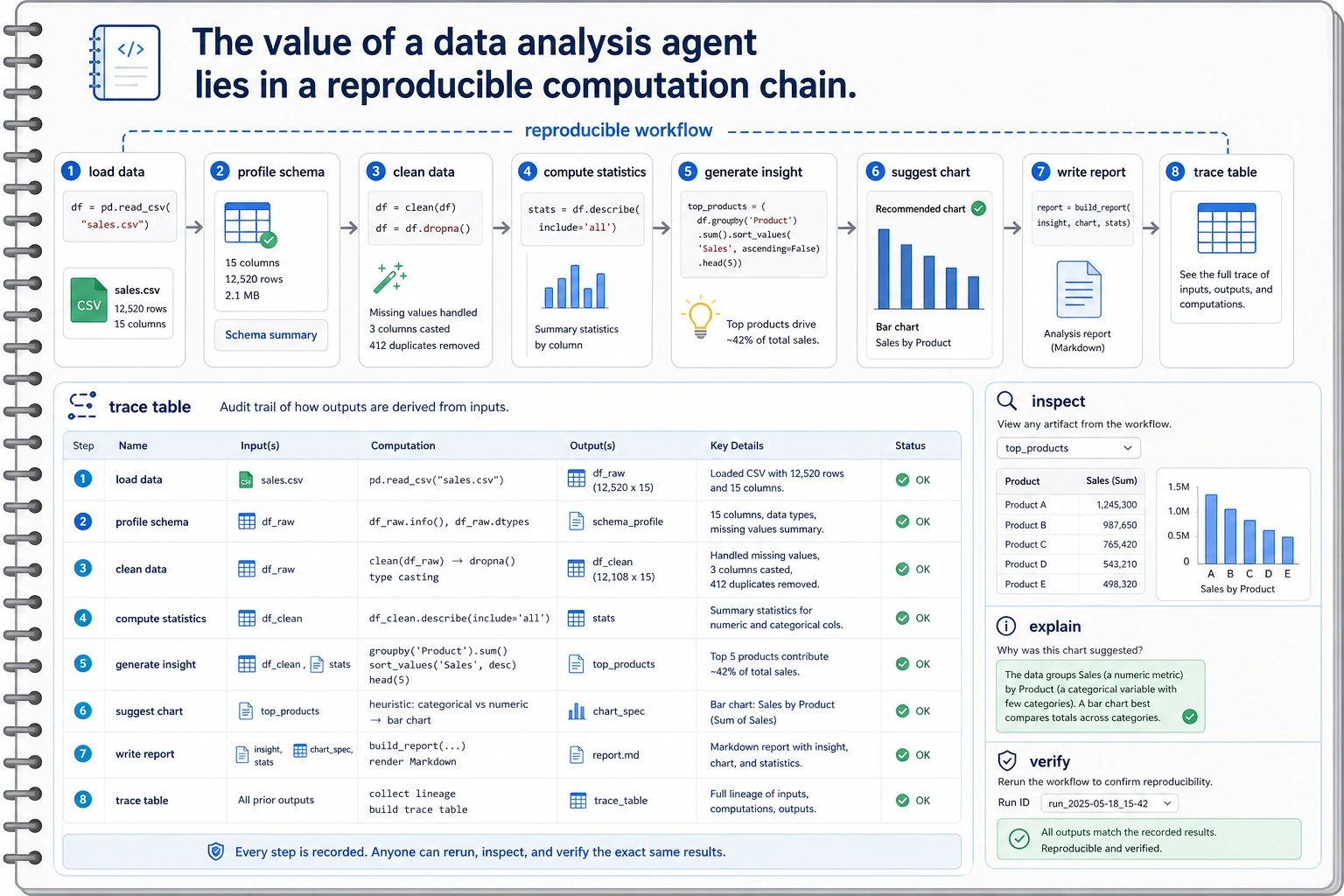
Read this diagram using a notebook mindset: load data, profile schema, compute statistics, generate insight, suggest chart, write report. Every conclusion should be traceable back to the intermediate computation results.
What should a portfolio-level Data Analysis Agent show?
What does the input data look like?
It is best to make clear:
- fields
- sample size
- missing value status
Intermediate computation results
For example:
- summary statistics
- grouped results
- trend judgments
Final explanation
For example:
- which product category performed best
- which time period fluctuated the most
Chart suggestions
Even if you do not generate charts directly, you can still output:
- whether a bar chart or a line chart should be used
This makes the project feel closer to a real analysis assistant.
Add a minimal “chart recommender”
def suggest_chart(columns):
    if "date" in columns and "amount" in columns:
        return "line_chart"
    if "category" in columns and "amount" in columns:
        return "bar_chart"
    return "table"


print(suggest_chart(["category", "amount"]))
print(suggest_chart(["date", "amount"]))
Expected output:
bar_chart
line_chart
What value does this small module provide?
It shows that the project is not just “doing arithmetic”, but is gradually moving toward:
- analysis
- explanation
- visualization suggestions
Let’s look at a minimal “analysis trace” example
Continue in the same file or Python session, because this block reuses sales and result.
trace = {
    "input_rows": len(sales),
    "total_amount": result["total_amount"],
    "per_category_avg": result["per_category_avg"],
    "insight": result["insight"],
}

print(trace)
Expected output:
{'input_rows': 5, 'total_amount': 1135, 'per_category_avg': {'course': 249.0, 'book': 69.0, 'service': 499.0}, 'insight': 'service has the highest average order value.'}
This example is especially suitable for beginners because it helps you see:
- where the real value of a Data Analysis Agent project lies
- often in whether the process can be verified
The most common pitfalls
Misunderstanding the fields
This is a typical fatal problem for Data Analysis Agents. If the field meanings are misunderstood, the entire workflow may be led astray.
Only showing the conclusion, not the intermediate process
This makes the project feel like a black box and makes it hard to build trust.
Only handling the happy path
If you do not show:
- missing values
- outliers
- inconsistent calculation rules
the project will feel unrealistic.
How do you polish it into a portfolio-level page?
Suggested structure
- Raw data example
- Intermediate statistics table
- Insight summary
- Chart suggestions
- Error cases
One highlight worth adding
Show:
- raw data
- intermediate computations
- final conclusions
as a single trace. This will be much stronger than pasting only a result.
A beginner-friendly evaluation table to remember first
| Dimension | What is the most important first question |
|---|---|
| Correctness | Are the numbers calculated correctly |
| Reproducibility | Can the intermediate process be traced back |
| Interpretability | Do the conclusions match the statistics |
| Presentation | Do the chart suggestions naturally fit the conclusions |
This table is especially useful for beginners because it breaks “Is the Agent project good?” into a few more concrete judgments.
Summary
The most important thing in this section is to build a portfolio-level judgment:
The real highlight of a Data Analysis Agent is not whether it can call pandas, but whether it can organize input data, intermediate computations, and final insights into a reproducible analysis loop.
As long as that loop is clear, this project is very well suited to showing your understanding of multi-tool Agents.
If you turn this into a portfolio project, what is most worth showing?
What is usually most worth showing is not:
- a single analytical conclusion
But rather:
- A raw data example
- Intermediate statistical results
- How the insight was generated
- Why the chart suggestion was made that way
This makes it easier for others to see:
- that you understand the analysis loop
- not just that the Agent said something
Suggested version roadmap
| Version | Goal | Delivery focus |
|---|---|---|
| Basic version | Run the minimal loop | Can input, process, and output, with one set of examples preserved |
| Standard version | Form a presentable project | Add configuration, logs, error handling, README, and screenshots |
| Challenge version | Approach portfolio quality | Add evaluation, comparison experiments, failure sample analysis, and next-step roadmap |
It is recommended to finish the basic version first; do not chase a large, all-in-one solution from the start. For each version upgrade, write into the README what new capability was added, how it was verified, and what problems still remain.
Exercises
- Add a
datefield to the example data and expand the project into a simple time-trend analysis. - Think about why “reproducibility” is especially important for a Data Analysis Agent.
- If the conclusions do not match the numbers, which layer is most likely to be the problem?
- If you were presenting this as a portfolio project, which part would you design to be the most eye-catching?