9.2.6 Advanced Planning Strategies [Optional]
The Plan-and-Execute approach in the previous section already split long tasks into sequential steps. But real complex tasks are often not a straight line — they look more like a graph:
- Some steps must happen first
- Some steps can run in parallel
- Some steps need rollback or replanning after failure
So in this section, we will take one more step forward:
Advanced planning is not about writing a longer checklist; it is about turning task relationships into a graph.
Learning objectives
- Understand why complex tasks need dependency graphs instead of just linear steps
- Understand the role of parallelism, critical paths, and resource limits in planning
- Use a runnable example to understand a minimal DAG scheduler
- Understand the difference between advanced planning and ordinary Plan-and-Execute
Why is a linear plan sometimes not enough?
Because in real tasks, many steps are not “A first, then B, then C”
For example, when preparing a research report, you may need to:
- Gather product materials
- Gather user feedback
- Read historical data
These steps do not necessarily have to be done strictly in sequence. If you force them into a straight line, the plan will feel:
- Too long
- Inefficient
- Hard to express real dependencies
The most important problem in advanced planning
It is not “how many steps to list,” but rather:
- Which steps depend on which prerequisites
- Which steps can run in parallel
- Which steps are on the critical path
In other words, the object of advanced planning is more like:
- A task graph
An analogy: a construction blueprint, not a to-do list
An ordinary plan is like a checklist. Advanced planning is more like a construction blueprint:
- Which tasks can start at the same time
- Which tasks must wait for inspection or approval
- Which tasks, if delayed, affect the whole project
Three concepts you will see most often in advanced planning
Dependencies
If task B must wait for the result of task A, then we have:
A -> B
For example:
- First fetch data, then clean data
- First complete analysis, then write the report
Parallelism
If two tasks do not depend on each other, they can, in theory, be done at the same time.
This means:
- Total time may be reduced
- But scheduling becomes more complex
Critical path
The critical path is:
- The longest dependency chain that determines the total execution time
Not all tasks are equally important. The nodes that actually slow down the overall progress are often the ones on the critical path.
First, run a real DAG scheduling example
The code below does something very representative:
- Given task dependencies and durations
- Schedule tasks with a limit of 2 workers
- Output what is running at each time point
This will help you build the most important intuition in advanced planning:
- A plan is not just a sequence; it is a combination of resources and dependencies
tasks = {
    "collect_policy_docs": {"deps": [], "duration": 2},
    "collect_user_cases": {"deps": [], "duration": 3},
    "summarize_policy": {"deps": ["collect_policy_docs"], "duration": 2},
    "analyze_cases": {"deps": ["collect_user_cases"], "duration": 2},
    "draft_report": {"deps": ["summarize_policy", "analyze_cases"], "duration": 2},
}


def schedule(task_graph, workers=2):
    completed = set()
    running = []
    timeline = []
    time = 0

    while len(completed) < len(task_graph):
        # First, finish the tasks that end at this time point
        just_finished = [task for task, end_time in running if end_time == time]
        if just_finished:
            for task in just_finished:
                completed.add(task)
            running = [(task, end_time) for task, end_time in running if end_time != time]

        # Find currently executable tasks
        available = []
        for task, meta in task_graph.items():
            if task in completed:
                continue
            if any(task == running_task for running_task, _ in running):
                continue
            if all(dep in completed for dep in meta["deps"]):
                available.append(task)

        # Assign idle workers
        free_slots = workers - len(running)
        for task in available[:free_slots]:
            end_time = time + task_graph[task]["duration"]
            running.append((task, end_time))

        timeline.append(
            {
                "time": time,
                "running": [task for task, _ in running],
                "completed": sorted(completed),
            }
        )

        if len(completed) == len(task_graph):
            break

        time += 1

    return timeline


timeline = schedule(tasks, workers=2)
for item in timeline:
    print(item)
Expected output:
{'time': 0, 'running': ['collect_policy_docs', 'collect_user_cases'], 'completed': []}
{'time': 1, 'running': ['collect_policy_docs', 'collect_user_cases'], 'completed': []}
{'time': 2, 'running': ['collect_user_cases', 'summarize_policy'], 'completed': ['collect_policy_docs']}
{'time': 3, 'running': ['summarize_policy', 'analyze_cases'], 'completed': ['collect_policy_docs', 'collect_user_cases']}
{'time': 4, 'running': ['analyze_cases'], 'completed': ['collect_policy_docs', 'collect_user_cases', 'summarize_policy']}
{'time': 5, 'running': ['draft_report'], 'completed': ['analyze_cases', 'collect_policy_docs', 'collect_user_cases', 'summarize_policy']}
{'time': 6, 'running': ['draft_report'], 'completed': ['analyze_cases', 'collect_policy_docs', 'collect_user_cases', 'summarize_policy']}
{'time': 7, 'running': [], 'completed': ['analyze_cases', 'collect_policy_docs', 'collect_user_cases', 'draft_report', 'summarize_policy']}
What should you focus on in this code?
The key is not the syntax details, but these three things:
- Tasks are not a linear list, but a
depsgraph - Only tasks whose dependencies are satisfied can enter
available - The number of workers limits concurrency
Together, these three things form the most important real-world constraints in advanced planning.
Why must draft_report be last?
Because it depends on:
summarize_policyanalyze_cases
So even if you have more workers, it still cannot start before its prerequisites are ready.
This shows that advanced planning is not “the more tasks, the more parallelism.” It depends on the structure of the dependency graph itself.
What happens if you change workers from 2 to 1?
You will see that the plan becomes much longer. This helps you understand:
- Planning is not only a logic problem
- It is also a resource problem
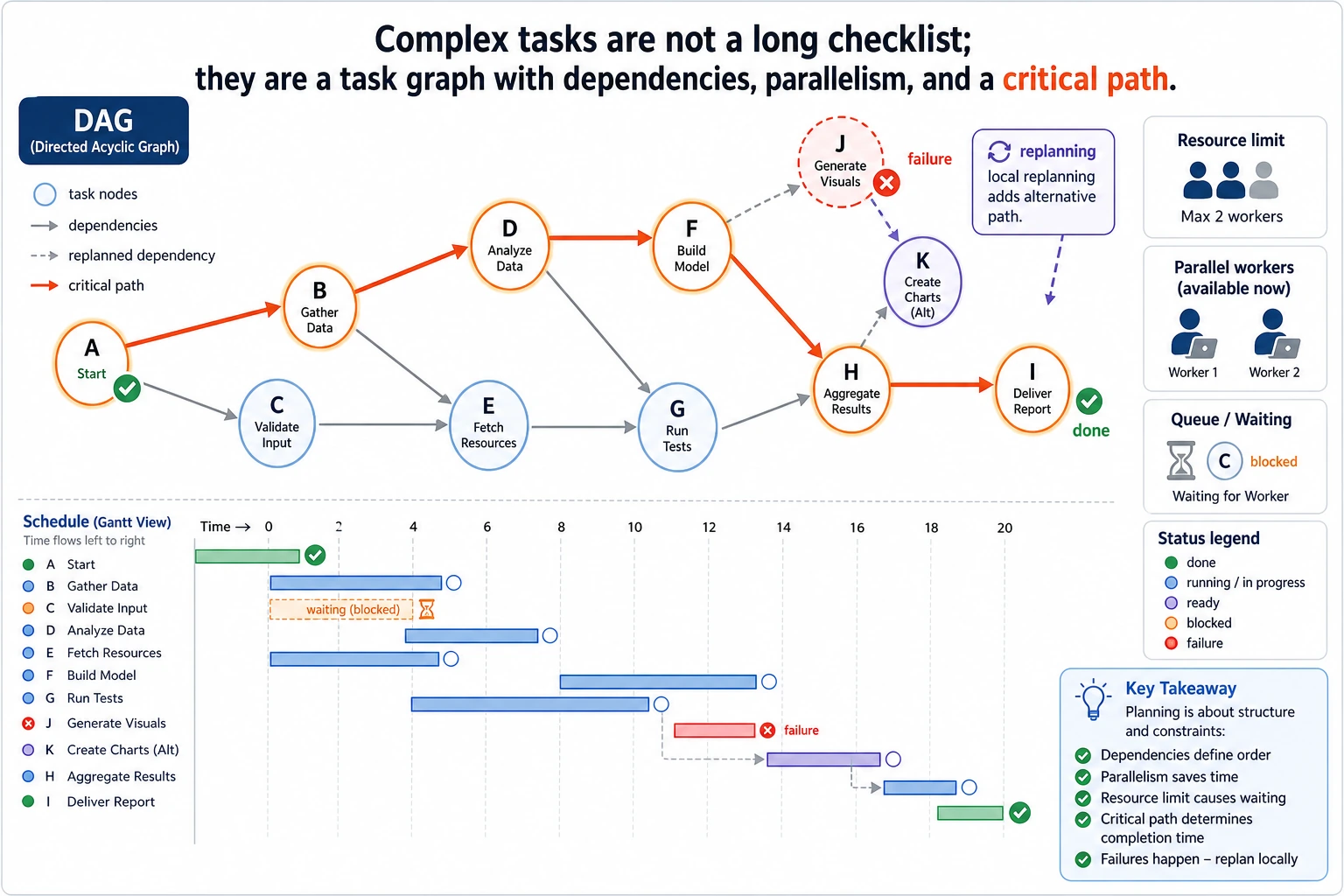
This diagram upgrades a “task list” into a “task graph”: nodes represent steps, arrows represent dependencies, and the thick line represents the critical path. Beginners can start by asking themselves: which tasks can run in parallel, and which ones must wait for prerequisite results?
When do you need advanced planning instead of ordinary planning?
When the task is naturally graph-shaped
For example:
- Research reports
- Multi-source data aggregation
- Complex code refactoring
- Multi-step business approvals
When parallelism can clearly bring benefits
If the task has many independent prerequisite steps, advanced planning can help you see:
- Which tasks should run in parallel
- Which waiting times are unavoidable
When failure recovery and replanning become important
In complex tasks, you often encounter:
- A node fails
- New observations overturn the original plan
- Some prerequisites are no longer valid
At this point, the system not only needs to “have a plan,” but also needs to be able to:
- Recompute locally
- Roll back locally
- Replan locally
Why is advanced planning more like “graph search” than “listing tasks”?
Because there is not always only one path
Many complex tasks do not have a unique solution. You may have:
- Multiple ways to break down tasks
- Multiple resource allocation strategies
- Multiple execution orders
Because you need to consider an objective function
Sometimes what you want to optimize is:
- Total time
- Total cost
- Minimum risk
Different goals will produce different plans.
Because the “best plan” changes with the environment
If one tool becomes slow or one resource is unavailable, the previously optimal graph may no longer be optimal.
That is also why advanced planning often relies on:
- Dynamic scheduling
- Online replanning
Common pitfalls in engineering practice
Mistake 1: Thinking that drawing the dependency graph solves everything
The graph is only the beginning. You still need to define:
- Node inputs and outputs
- Failure handling
- Node retry strategies
Mistake 2: More parallelism is always better
Parallelism brings:
- Scheduling complexity
- Resource contention
- State synchronization issues
Opening unlimited concurrency is not necessarily better.
Mistake 3: Advanced planning is always more advanced than simple planning
If the task itself is short and fixed, using advanced planning may actually be overengineering.
Summary
The most important thing in this section is not remembering the word DAG,
but building a more realistic judgment:
When a task involves dependencies, parallelism, and resource constraints, the core of planning is no longer writing a long checklist. It is organizing the tasks into a graph and scheduling around that graph.
Once you build this understanding, the following topics will feel much more natural:
- Multi-Agent collaboration
- Workflow orchestration
- Scheduler design
Exercises
- Change the number of workers in the example to
1and3, and compare the differences in the timeline. - Add a
review_reportnode to the task graph, place it afterdraft_report, and observe how the schedule changes. - Why does “can run in parallel” not mean “should be parallelized to the extreme”?
- Think of a complex task you are familiar with and try to draw it as a dependency graph.