6.2.4 Autograd
autograd is the engine that turns a forward computation into gradients. The important part is not memorizing backward(), but knowing what graph is recorded, where gradients are stored, when they accumulate, and when tracking should be disabled.
Learning Objectives
- Explain what
requires_grad=Truechanges. - Run
loss.backward()and inspect.grad. - Understand that
backward()computes gradients but does not update parameters. - Avoid gradient accumulation bugs with
zero_grad(). - Use
torch.no_grad()anddetach()in the right places.
Look at the Computation Graph First
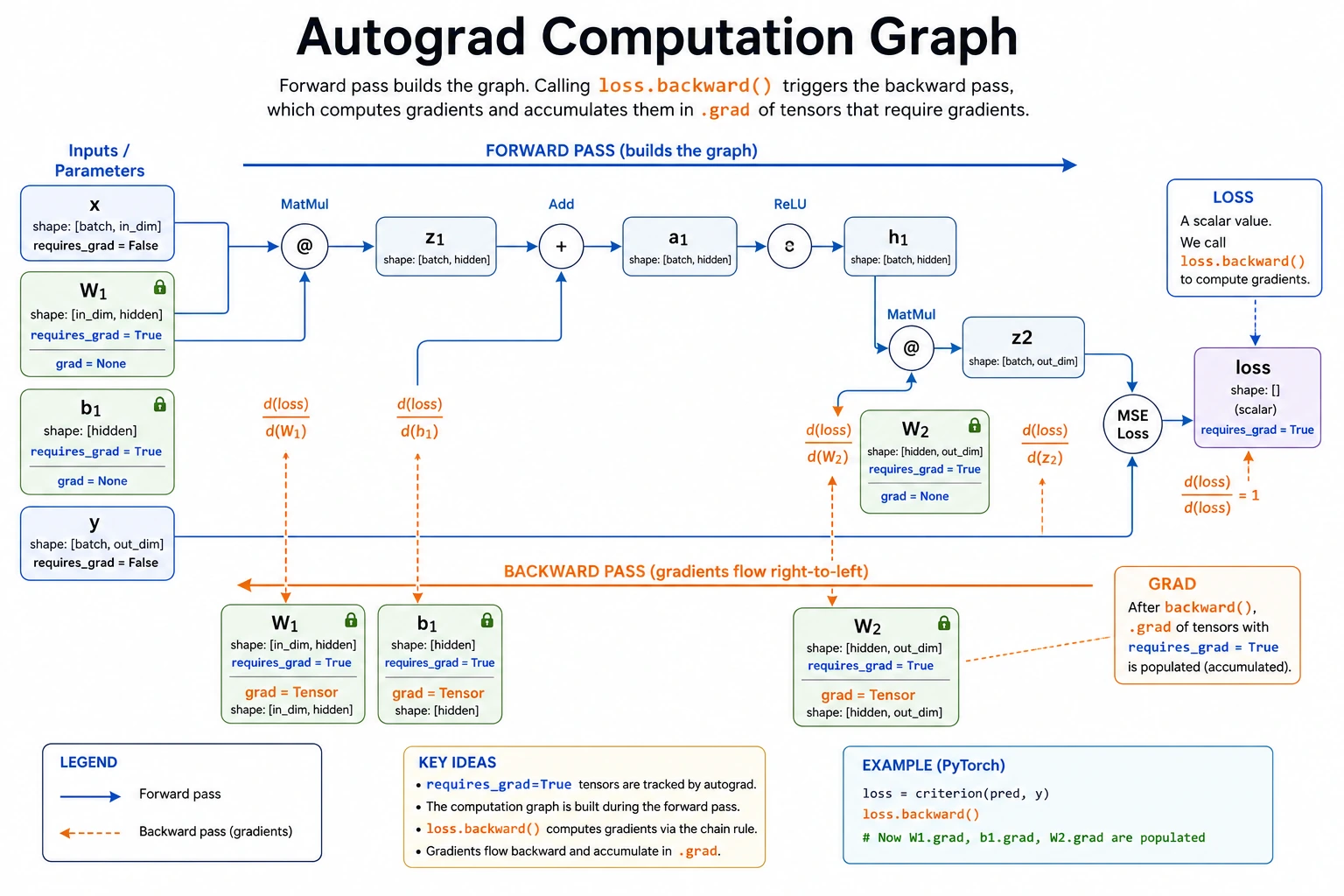
Read the graph like this:
parameter -> forward operations -> loss -> backward() -> parameter.grad -> optimizer step
Autograd records the operations that produce the loss. When you call backward(), PyTorch walks that recorded graph backward and applies the chain rule.
Lab 1: One Parameter, One Gradient
Start with one number so the mechanism is visible.
import torch

w = torch.tensor(2.0, requires_grad=True)
loss = (w * 3 - 10) ** 2

print("loss:", loss.item())
loss.backward()
print("w.grad:", w.grad.item())
Expected output:
loss: 16.0
w.grad: -24.0
What happened:
wis a learnable value becauserequires_grad=True.lossis built fromw, so PyTorch records the path fromwtoloss.loss.backward()computes how the loss changes ifwchanges.- The result is stored in
w.grad.
The chain is:
w -> w * 3 -> w * 3 - 10 -> square -> loss
Lab 2: Gradient Is Not the Update
backward() only computes gradients. You still need an update step.
import torch

w = torch.tensor(2.0, requires_grad=True)
lr = 0.1

print("single_parameter_training")
for step in range(1, 6):
    loss = (w * 3 - 10) ** 2
    loss.backward()

    with torch.no_grad():
        w -= lr * w.grad

    print(
        f"step={step} "
        f"w={w.item():.4f} "
        f"loss={loss.item():.4f} "
        f"grad={w.grad.item():.4f}"
    )

    w.grad.zero_()
Expected output:
single_parameter_training
step=1 w=4.4000 loss=16.0000 grad=-24.0000
step=2 w=2.4800 loss=10.2400 grad=19.2000
step=3 w=4.0160 loss=6.5536 grad=-15.3600
step=4 w=2.7872 loss=4.1943 grad=12.2880
step=5 w=3.7702 loss=2.6844 grad=-9.8304
The value jumps around because lr=0.1 is a little aggressive for this toy function. That is useful: gradients tell direction and scale, but the learning rate decides how far to move.
Why torch.no_grad() is needed:
- updating
wis not part of the next forward graph; - you do not want autograd to record the update itself;
- it saves memory and avoids graph-related errors.
Lab 3: See Gradient Accumulation
PyTorch accumulates gradients by default. It does not overwrite .grad automatically.
import torch

x = torch.tensor(3.0, requires_grad=True)

y1 = x ** 2
y1.backward()
print("after first backward:", x.grad.item())

y2 = 2 * x
y2.backward()
print("after second backward:", x.grad.item())

x.grad.zero_()
y3 = 2 * x
y3.backward()
print("after zero and third backward:", x.grad.item())
Expected output:
after first backward: 6.0
after second backward: 8.0
after zero and third backward: 2.0
Why:
- gradient of
x ** 2atx=3is6; - gradient of
2 * xis2; - after the second backward,
.gradbecomes6 + 2 = 8; - after
zero_(), the next gradient starts cleanly.
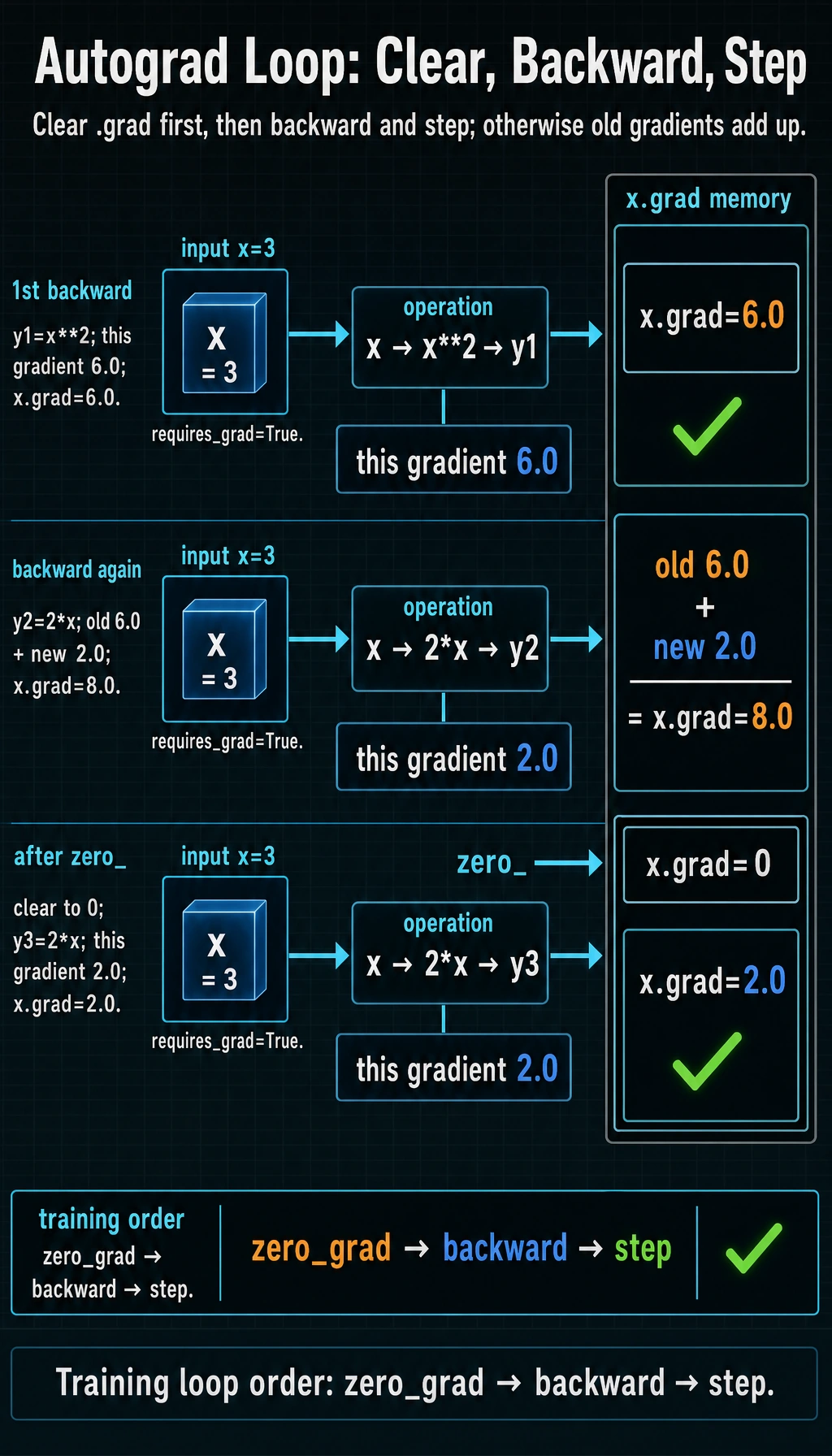
In normal training code, this is why each iteration uses:
optimizer.zero_grad()
loss.backward()
optimizer.step()
Lab 4: Fit Two Parameters by Hand
Now train a tiny linear model without nn.Linear or an optimizer. This makes the learning loop completely visible.
import torch

# Target rule: y = 2x + 1
x = torch.tensor([1.0, 2.0, 3.0, 4.0])
y_true = torch.tensor([3.0, 5.0, 7.0, 9.0])

w = torch.tensor(0.0, requires_grad=True)
b = torch.tensor(0.0, requires_grad=True)
lr = 0.05

print("two_parameter_fit")
for epoch in range(201):
    y_pred = w * x + b
    loss = ((y_pred - y_true) ** 2).mean()

    loss.backward()

    with torch.no_grad():
        w -= lr * w.grad
        b -= lr * b.grad

    if epoch % 50 == 0:
        print(
            f"epoch={epoch:3d} "
            f"loss={loss.item():.4f} "
            f"w={w.item():.4f} "
            f"b={b.item():.4f}"
        )

    w.grad.zero_()
    b.grad.zero_()
Expected output:
two_parameter_fit
epoch=  0 loss=41.0000 w=1.7500 b=0.6000
epoch= 50 loss=0.0030 w=2.0452 b=0.8672
epoch=100 loss=0.0007 w=2.0212 b=0.9375
epoch=150 loss=0.0001 w=2.0100 b=0.9706
epoch=200 loss=0.0000 w=2.0047 b=0.9862
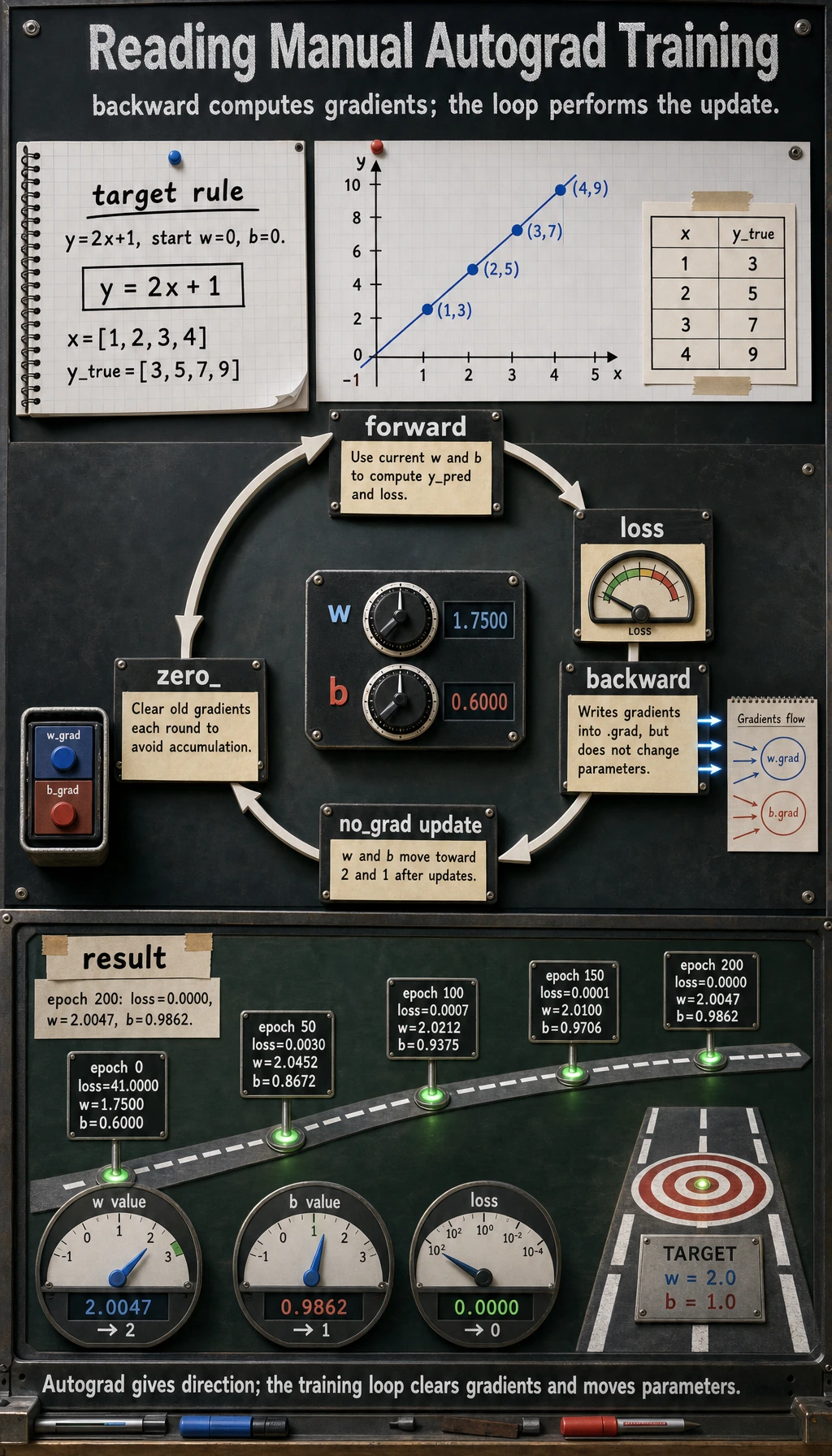
The parameters move toward w=2 and b=1. This is the same loop a neural network uses, only with millions of parameters instead of two.
requires_grad, no_grad, and detach
These three are related but not interchangeable.
| Tool | Use it when | Effect |
|---|---|---|
requires_grad=True | a tensor is a parameter or you need gradients for it | future operations are tracked |
torch.no_grad() | inference or manual parameter update | temporarily stops graph recording |
tensor.detach() | you want a tensor value without its graph history | returns a tensor disconnected from autograd |
Runnable check:
import torch

w = torch.tensor(5.0, requires_grad=True)

tracked = w * 2
detached = tracked.detach()

with torch.no_grad():
    untracked = w * 3

print("tracked.requires_grad:", tracked.requires_grad)
print("detached.requires_grad:", detached.requires_grad)
print("untracked.requires_grad:", untracked.requires_grad)
Expected output:
tracked.requires_grad: True
detached.requires_grad: False
untracked.requires_grad: False
Practical examples:
- Use
no_grad()during validation and prediction. - Use
detach()before logging tensors, converting to NumPy, or storing values that should not keep the whole graph alive. - Do not detach tensors that still need to contribute gradients to the loss.
Common Error Patterns
| Symptom | Likely cause | Fix |
|---|---|---|
.grad is None | tensor does not require gradients, or it is not a leaf tensor | check requires_grad, inspect model parameters |
| training becomes unstable | gradients were not cleared | call optimizer.zero_grad() before backward() |
RuntimeError: Trying to backward through the graph a second time | reused a graph after backward | recompute the forward pass, or use retain_graph=True only when you know why |
| memory keeps growing | storing graph-connected tensors in a list | store loss.item() or tensor.detach() |
| validation is slow and memory-heavy | gradients are tracked during evaluation | wrap validation in with torch.no_grad(): |
retain_graph=True CarefullyMost beginner code should not need retain_graph=True. If you reach for it, first ask: “Am I accidentally calling backward() twice on the same forward result instead of recomputing the forward pass?”
Quick Debug Checklist
Before backward():
print("loss requires_grad:", loss.requires_grad)
print("w requires_grad:", w.requires_grad)
After backward():
print("w.grad:", w.grad)
print("b.grad:", b.grad)
In a normal training loop, the order is:
forward -> loss -> zero_grad -> backward -> step
Some code uses zero_grad before forward, but the key rule is the same: clear old gradients before the next update.
Exercises
- Change Lab 4 to learn
y = 3x - 2. What shouldwandbapproach? - Remove
w.grad.zero_()andb.grad.zero_()in Lab 4. What happens? - Change
lrto0.5and0.005. Which one is unstable, and which one is slow? - Store
lossitself in a list for 200 epochs, then storeloss.item()instead. Why is the second safer?
Key Takeaways
- Autograd records the computation graph from parameters to loss.
backward()computes gradients; it does not update parameters.- Gradients accumulate by default, so clear them before the next update.
- Use
no_grad()for inference and manual updates; usedetach()when you need a value without graph history.