6.2.9 PyTorch + Matplotlib Hands-on Workshop
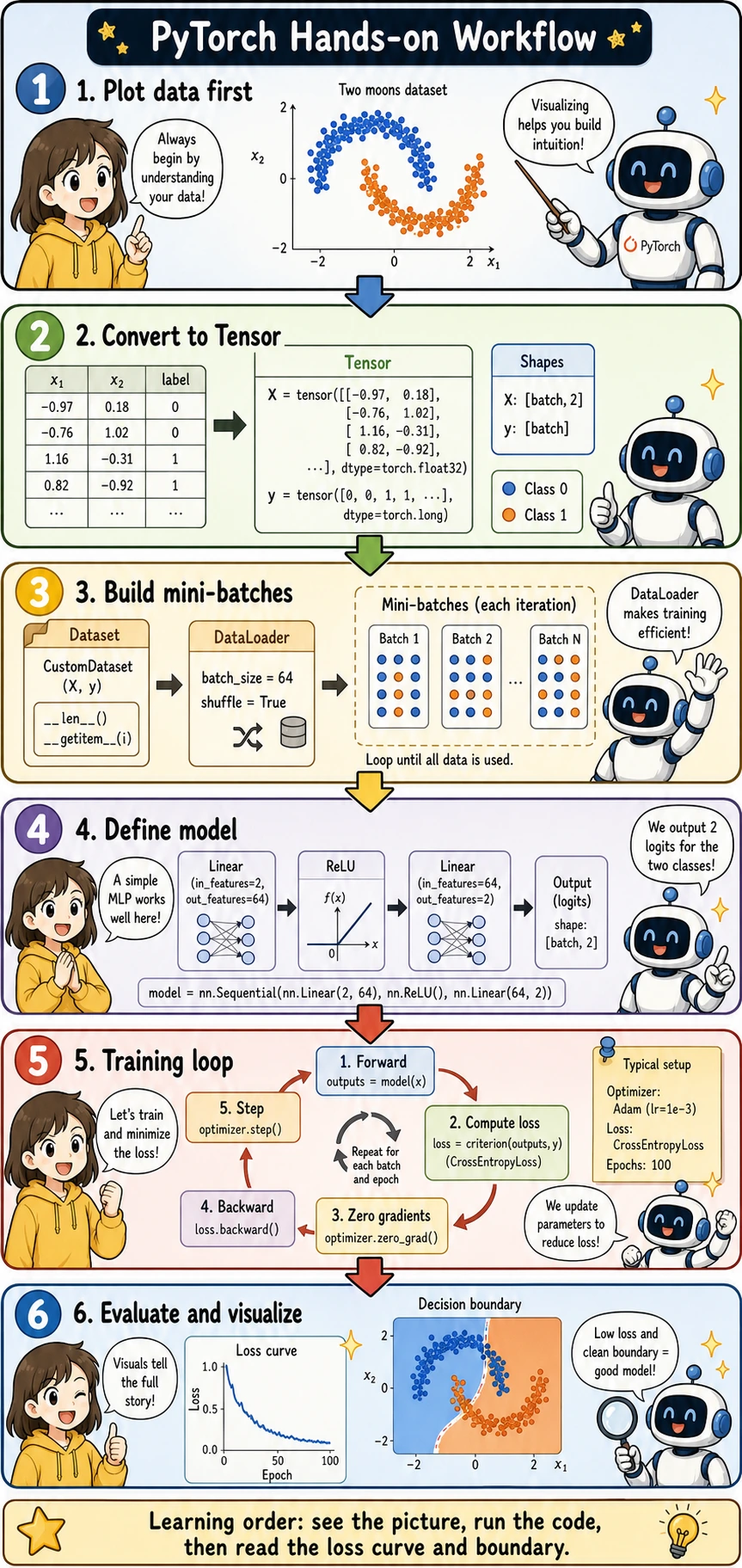
Use this section as your first complete PyTorch mini-project. The rhythm is: look at the picture → run the code → read the loss curve and decision boundary.
If this is your first Station 6 experiment, install the AI dependencies from the project root:
python -m pip install -r requirements-course-ai.txt
For this workshop alone, the minimum extra dependency is torch; matplotlib and scikit-learn are already included in the core course requirements.
What You Will Build
You will train a small neural network to classify two moon-shaped groups of points. This task is small enough to run quickly, but complete enough to include the core PyTorch workflow:
- Visualize the data with Matplotlib
- Convert NumPy arrays into PyTorch tensors
- Build
TensorDatasetandDataLoader - Define an
nn.Module - Train with
CrossEntropyLossandAdam - Evaluate accuracy
- Plot the loss curve and decision boundary
Keyword Decoder
| Term | Beginner-friendly meaning | Why it matters here |
|---|---|---|
| Matplotlib | Python's basic plotting library | Lets you see the dataset, loss curve, and decision boundary |
| Tensor | PyTorch's multidimensional array | The model can only train on tensor data |
Dataset | Defines what one sample looks like | Keeps data and labels paired correctly |
DataLoader | Turns samples into mini-batches | Feeds the training loop batch by batch |
| MLP | Multilayer Perceptron, a small fully connected neural network | Good first neural network for tabular or 2D toy data |
| logits | Raw model scores before probability conversion | CrossEntropyLoss expects logits, not softmax probabilities |
| epoch | One full pass through the training set | Helps you count how many training rounds were completed |
| decision boundary | The line or region where the model switches class | Makes classification behavior visible |
Create and Plot the Data First
Before writing a model, always look at the data. This prevents a common beginner mistake: training blindly without knowing what pattern the model is supposed to learn.
import matplotlib.pyplot as plt
from sklearn.datasets import make_moons

X_np, y_np = make_moons(n_samples=600, noise=0.18, random_state=42)

plt.figure(figsize=(6, 5))
plt.scatter(X_np[:, 0], X_np[:, 1], c=y_np, cmap="coolwarm", s=18, alpha=0.8)
plt.xlabel("x1")
plt.ylabel("x2")
plt.title("Two Moons Dataset")
plt.grid(True, alpha=0.3)
plt.show()
What you should notice:
- The two classes are not separable by a straight line
- This is why a small neural network with nonlinearity is useful
- The chart gives you a target picture for the decision boundary later
Convert Data to Tensors
PyTorch models expect tensors. For classification labels used with CrossEntropyLoss, y should be integer class IDs with type torch.long.
import torch

torch.manual_seed(42)

X = torch.tensor(X_np, dtype=torch.float32)
y = torch.tensor(y_np, dtype=torch.long)

print("X shape:", X.shape, "dtype:", X.dtype)
print("y shape:", y.shape, "dtype:", y.dtype)
Expected output:
X shape: torch.Size([600, 2]) dtype: torch.float32
y shape: torch.Size([600]) dtype: torch.int64
The meaning of the shapes is:
X:[batch, features], and each sample has 2 featuresy:[batch], and each value is a class label:0or1
Build Dataset and DataLoader
TensorDataset keeps X and y paired. DataLoader shuffles the data and creates mini-batches.
from torch.utils.data import DataLoader, TensorDataset, random_split

dataset = TensorDataset(X, y)
train_dataset, val_dataset = random_split(
    dataset,
    [480, 120],
    generator=torch.Generator().manual_seed(42)
)

train_loader = DataLoader(
    train_dataset,
    batch_size=64,
    shuffle=True,
    generator=torch.Generator().manual_seed(7)
)
val_loader = DataLoader(val_dataset, batch_size=128, shuffle=False)

batch_x, batch_y = next(iter(train_loader))
print("batch_x shape:", batch_x.shape)
print("batch_y shape:", batch_y.shape)
Why this matters:
batch_size=64means the model updates after seeing 64 samplesshuffle=Trueprevents the model from always seeing samples in the same order- Validation data does not need shuffling because it is only used for evaluation
Define a Small Neural Network
This model maps a 2D point to two logits, one score for each class.
from torch import nn

class MoonClassifier(nn.Module):
    def __init__(self):
        super().__init__()
        self.net = nn.Sequential(
            nn.Linear(2, 32),
            nn.ReLU(),
            nn.Linear(32, 32),
            nn.ReLU(),
            nn.Linear(32, 2),
        )

    def forward(self, x):
        return self.net(x)

model = MoonClassifier()
print(model)
Important detail:
- The final layer outputs
2values because this is a two-class task - Do not add
Softmaxhere becausenn.CrossEntropyLoss()expects raw logits
Train and Validate
The training loop follows the same rhythm you saw earlier:
forward → loss → zero_grad → backward → step
loss_fn = nn.CrossEntropyLoss()
optimizer = torch.optim.Adam(model.parameters(), lr=0.01)

train_losses = []
val_losses = []
val_accuracies = []

for epoch in range(1, 101):
    model.train()
    train_loss_sum = 0.0

    for batch_x, batch_y in train_loader:
        logits = model(batch_x)
        loss = loss_fn(logits, batch_y)

        optimizer.zero_grad()
        loss.backward()
        optimizer.step()

        train_loss_sum += loss.item() * len(batch_x)

    train_loss = train_loss_sum / len(train_dataset)
    train_losses.append(train_loss)

    model.eval()
    val_loss_sum = 0.0
    correct = 0

    with torch.no_grad():
        for batch_x, batch_y in val_loader:
            logits = model(batch_x)
            loss = loss_fn(logits, batch_y)
            val_loss_sum += loss.item() * len(batch_x)

            pred = logits.argmax(dim=1)
            correct += (pred == batch_y).sum().item()

    val_loss = val_loss_sum / len(val_dataset)
    val_acc = correct / len(val_dataset)
    val_losses.append(val_loss)
    val_accuracies.append(val_acc)

    if epoch == 1 or epoch % 20 == 0:
        print(
            f"epoch={epoch:3d}, "
            f"train_loss={train_loss:.4f}, "
            f"val_loss={val_loss:.4f}, "
            f"val_acc={val_acc:.1%}"
        )
Expected output:
epoch=  1, train_loss=0.5568, val_loss=0.3786, val_acc=84.2%
epoch= 20, train_loss=0.0755, val_loss=0.1064, val_acc=98.3%
epoch= 40, train_loss=0.0719, val_loss=0.1260, val_acc=98.3%
epoch= 60, train_loss=0.0657, val_loss=0.1290, val_acc=98.3%
epoch= 80, train_loss=0.0655, val_loss=0.1415, val_acc=98.3%
epoch=100, train_loss=0.0687, val_loss=0.1370, val_acc=98.3%
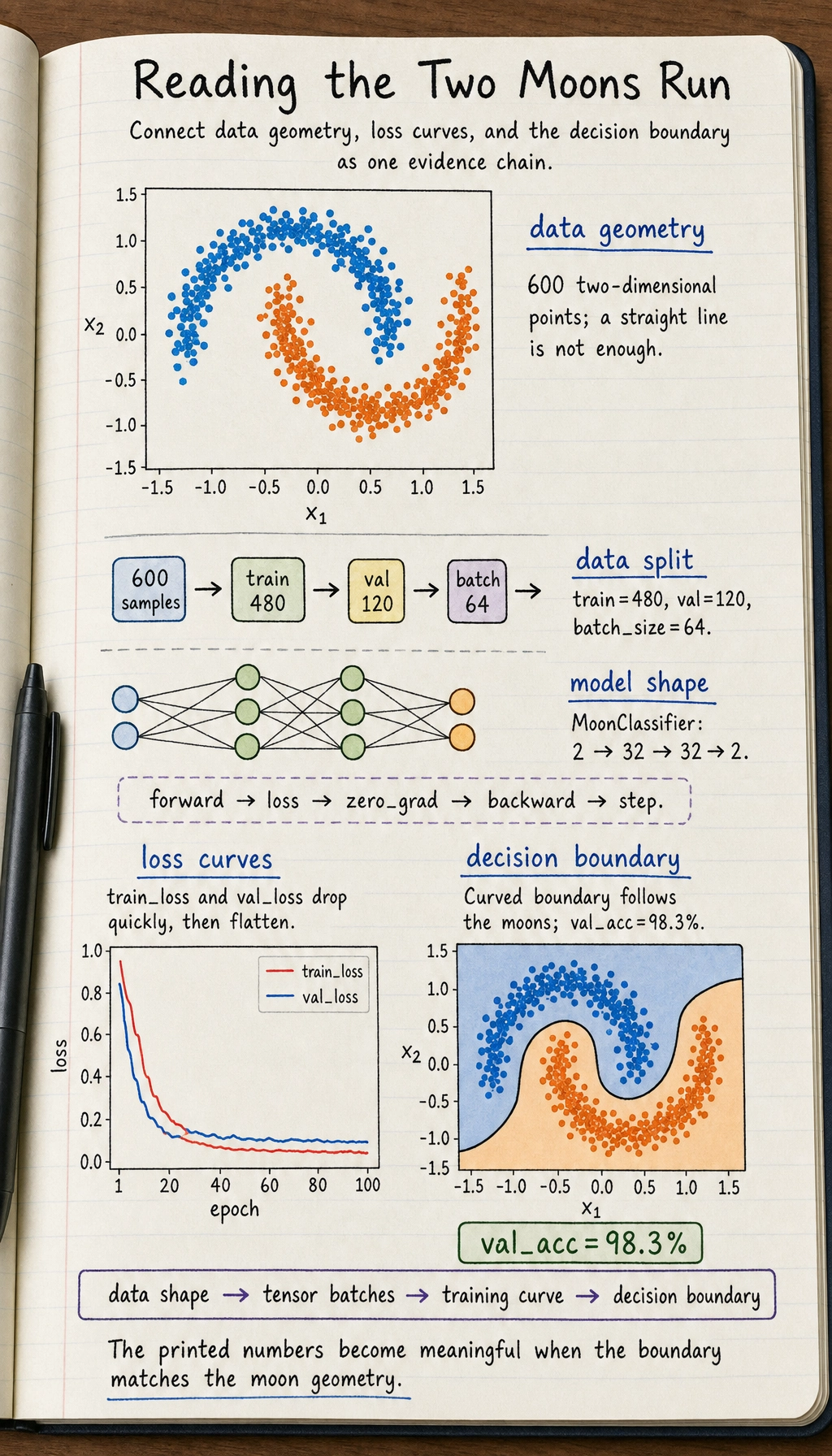
If your exact numbers are slightly different, that is fine. The important sign is that validation accuracy rises clearly above random guessing.
Plot the Loss Curve
The loss curve tells you whether training is moving in the right direction.
plt.figure(figsize=(7, 4))
plt.plot(train_losses, label="train loss")
plt.plot(val_losses, label="validation loss")
plt.xlabel("Epoch")
plt.ylabel("Loss")
plt.title("Training and Validation Loss")
plt.legend()
plt.grid(True, alpha=0.3)
plt.show()
How to read it:
- If both losses decrease, training is learning normally
- If training loss decreases but validation loss rises, watch for overfitting
- If neither decreases, check learning rate, labels, model output shape, and loss function
Plot the Decision Boundary
The decision boundary shows what the model has learned geometrically.
import numpy as np

x_min, x_max = X_np[:, 0].min() - 0.5, X_np[:, 0].max() + 0.5
y_min, y_max = X_np[:, 1].min() - 0.5, X_np[:, 1].max() + 0.5
xx, yy = np.meshgrid(
    np.linspace(x_min, x_max, 250),
    np.linspace(y_min, y_max, 250)
)

grid = np.c_[xx.ravel(), yy.ravel()]
grid_tensor = torch.tensor(grid, dtype=torch.float32)

model.eval()
with torch.no_grad():
    logits = model(grid_tensor)
    grid_pred = logits.argmax(dim=1).numpy().reshape(xx.shape)

plt.figure(figsize=(7, 5))
plt.contourf(xx, yy, grid_pred, alpha=0.25, cmap="coolwarm")
plt.scatter(X_np[:, 0], X_np[:, 1], c=y_np, cmap="coolwarm", s=16, edgecolors="k", linewidths=0.2)
plt.xlabel("x1")
plt.ylabel("x2")
plt.title(f"Decision Boundary (validation accuracy {val_accuracies[-1]:.1%})")
plt.grid(True, alpha=0.2)
plt.show()
This picture is usually the moment when PyTorch starts to feel concrete: the model is no longer just printing numbers; you can see how it divides the space.
Common Errors and Fixes
| Symptom | Likely cause | Fix |
|---|---|---|
expected scalar type Long | Labels are not torch.long | Use y = torch.tensor(y_np, dtype=torch.long) |
| Loss does not decrease | Learning rate too large or too small | Try lr=0.001 or lr=0.01 |
| Shape error in loss | Output or label shape is wrong | For CrossEntropyLoss, logits should be [batch, classes], labels should be [batch] |
| Validation uses too much memory | Gradients are recorded during validation | Use model.eval() and with torch.no_grad() |
Practice Tasks
- Change the hidden size from
32to16and64. Compare the decision boundary. - Change
noise=0.18tonoise=0.3. Observe how the task becomes harder. - Change the optimizer from
AdamtoSGD. Compare the loss curve. - Add a third hidden layer and check whether validation loss improves or overfits.
Passing Standard
After finishing this workshop, you should be able to explain a complete PyTorch workflow in your own words:
Data picture → Tensor → DataLoader → model → loss → optimizer → training loop → validation → visualization.
If you can also read the loss curve and decision boundary, you are no longer just copying PyTorch code. You are starting to understand what the training process is doing.