6.2.6 Data Loading
The model is ready, but it should not receive one giant pile of data. Dataset defines one sample, and DataLoader turns samples into shuffled mini-batches for the training loop.
Learning Objectives
- Write a small custom
Dataset. - Use
DataLoaderto create batches. - Read batch shapes before training.
- Split train and validation sets reproducibly.
- Connect a loader to a tiny training loop.
Look at the Batch Flow
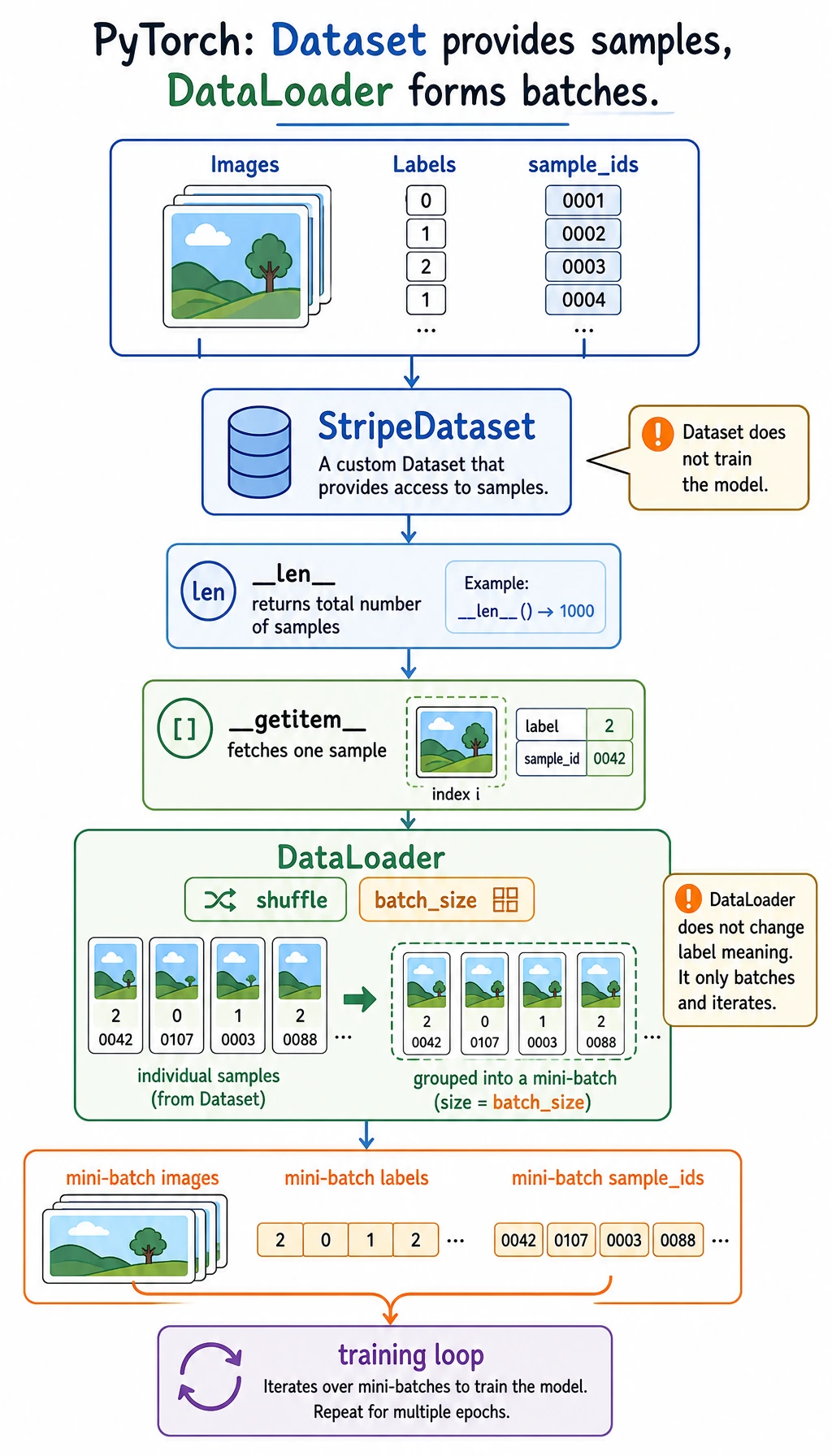
Read it like this:
raw samples -> Dataset returns one item -> DataLoader forms batches -> training loop consumes batches
The split is useful:
| Object | Job |
|---|---|
Dataset | define length and how to fetch one sample |
DataLoader | batch, shuffle, iterate, optionally parallel-load |
| training loop | read batch_x, batch_y and update the model |
Why Batches?
A batch is a small group of samples used for one parameter update.
We usually avoid:
pred = model(all_data_once)
and use:
for batch_x, batch_y in train_loader:
    pred = model(batch_x)
Reasons:
- memory stays manageable;
- parameter updates happen repeatedly;
- shuffling gives the model a more balanced stream of examples;
- the same loop works for small CSV files and large image folders.
Lab 1: Write the Smallest Useful Dataset
import torch
from torch.utils.data import Dataset


class StudentDataset(Dataset):
    def __init__(self):
        self.features = torch.tensor(
            [
                [2.0, 1.0],
                [3.0, 2.0],
                [4.0, 3.0],
                [5.0, 5.0],
                [6.0, 6.0],
                [7.0, 8.0],
                [8.0, 9.0],
                [9.0, 10.0],
            ]
        )
        self.labels = torch.tensor(
            [[55.0], [60.0], [68.0], [78.0], [85.0], [92.0], [96.0], [99.0]]
        ) / 100.0

    def __len__(self):
        return len(self.features)

    def __getitem__(self, idx):
        return self.features[idx], self.labels[idx]


dataset = StudentDataset()
x0, y0 = dataset[0]

print("dataset_lab")
print("dataset size:", len(dataset))
print("sample 0 shapes:", tuple(x0.shape), tuple(y0.shape))
print("sample 0:", x0, y0)
Expected output:
dataset_lab
dataset size: 8
sample 0 shapes: (2,) (1,)
sample 0: tensor([2., 1.]) tensor([0.5500])
The minimum custom dataset contract is:
__len__(): how many samples exist;__getitem__(idx): what one sample looks like.
Check this before creating a loader:
len(dataset)
dataset[0]
shape and dtype of x and y
Lab 2: Turn Samples Into Batches
import torch
from torch.utils.data import Dataset, DataLoader


class StudentDataset(Dataset):
    def __init__(self):
        self.features = torch.tensor(
            [
                [2.0, 1.0],
                [3.0, 2.0],
                [4.0, 3.0],
                [5.0, 5.0],
                [6.0, 6.0],
                [7.0, 8.0],
                [8.0, 9.0],
                [9.0, 10.0],
            ]
        )
        self.labels = torch.tensor(
            [[55.0], [60.0], [68.0], [78.0], [85.0], [92.0], [96.0], [99.0]]
        ) / 100.0

    def __len__(self):
        return len(self.features)

    def __getitem__(self, idx):
        return self.features[idx], self.labels[idx]


dataset = StudentDataset()
loader = DataLoader(dataset, batch_size=3, shuffle=False)

print("loader_lab")
for batch_idx, (batch_x, batch_y) in enumerate(loader):
    print(
        f"batch={batch_idx} "
        f"x_shape={tuple(batch_x.shape)} "
        f"y_shape={tuple(batch_y.shape)}"
    )
Expected output:
loader_lab
batch=0 x_shape=(3, 2) y_shape=(3, 1)
batch=1 x_shape=(3, 2) y_shape=(3, 1)
batch=2 x_shape=(2, 2) y_shape=(2, 1)
The last batch has only two samples because 8 is not divisible by 3. That is normal.
What the shapes mean:
batch_x:[batch, features]batch_y:[batch, target_dim]
Lab 3: Train/Validation Split
Use a seeded generator so the split is reproducible.
import torch
from torch.utils.data import DataLoader, random_split

dataset = StudentDataset()

train_dataset, val_dataset = random_split(
    dataset,
    [6, 2],
    generator=torch.Generator().manual_seed(42),
)

train_loader = DataLoader(
    train_dataset,
    batch_size=3,
    shuffle=True,
    generator=torch.Generator().manual_seed(7),
)
val_loader = DataLoader(val_dataset, batch_size=2, shuffle=False)

train_x, train_y = next(iter(train_loader))
val_x, val_y = next(iter(val_loader))

print("split_lab")
print("train size:", len(train_dataset), "val size:", len(val_dataset))
print("first train batch:", tuple(train_x.shape), tuple(train_y.shape))
print("first val batch:", tuple(val_x.shape), tuple(val_y.shape))
Expected output:
split_lab
train size: 6 val size: 2
first train batch: (3, 2) (3, 1)
first val batch: (2, 2) (2, 1)
Training data usually uses shuffle=True. Validation and test loaders usually use shuffle=False, because evaluation does not need random order.
Lab 4: Use the Loader in Training
This is still a tiny dataset, so validation loss can jump around. The goal here is not a production-quality evaluation; the goal is to see how a loader plugs into the loop.
import torch
from torch import nn
from torch.utils.data import DataLoader, Dataset, random_split


class StudentDataset(Dataset):
    def __init__(self):
        self.features = torch.tensor(
            [
                [2.0, 1.0],
                [3.0, 2.0],
                [4.0, 3.0],
                [5.0, 5.0],
                [6.0, 6.0],
                [7.0, 8.0],
                [8.0, 9.0],
                [9.0, 10.0],
            ]
        )
        self.labels = torch.tensor(
            [[55.0], [60.0], [68.0], [78.0], [85.0], [92.0], [96.0], [99.0]]
        ) / 100.0

    def __len__(self):
        return len(self.features)

    def __getitem__(self, idx):
        return self.features[idx], self.labels[idx]


class ScorePredictor(nn.Module):
    def __init__(self):
        super().__init__()
        self.net = nn.Sequential(
            nn.Linear(2, 16),
            nn.ReLU(),
            nn.Linear(16, 1),
        )

    def forward(self, x):
        return self.net(x)


dataset = StudentDataset()
train_dataset, val_dataset = random_split(
    dataset,
    [6, 2],
    generator=torch.Generator().manual_seed(42),
)
train_loader = DataLoader(
    train_dataset,
    batch_size=3,
    shuffle=True,
    generator=torch.Generator().manual_seed(7),
)
val_loader = DataLoader(val_dataset, batch_size=2, shuffle=False)

torch.manual_seed(42)
model = ScorePredictor()
loss_fn = nn.MSELoss()
optimizer = torch.optim.Adam(model.parameters(), lr=0.03)

print("training_with_loader")
for epoch in range(1, 4):
    model.train()
    total_train_loss = 0.0

    for batch_x, batch_y in train_loader:
        pred = model(batch_x)
        loss = loss_fn(pred, batch_y)

        optimizer.zero_grad()
        loss.backward()
        optimizer.step()

        total_train_loss += loss.item() * len(batch_x)

    avg_train_loss = total_train_loss / len(train_loader.dataset)

    model.eval()
    total_val_loss = 0.0
    with torch.no_grad():
        for batch_x, batch_y in val_loader:
            total_val_loss += loss_fn(model(batch_x), batch_y).item() * len(batch_x)

    avg_val_loss = total_val_loss / len(val_loader.dataset)
    print(
        f"epoch={epoch} "
        f"train_loss={avg_train_loss:.4f} "
        f"val_loss={avg_val_loss:.4f}"
    )
Expected output:
training_with_loader
epoch=1 train_loss=0.4641 val_loss=0.6458
epoch=2 train_loss=0.3653 val_loss=0.0059
epoch=3 train_loss=0.1147 val_loss=0.3121
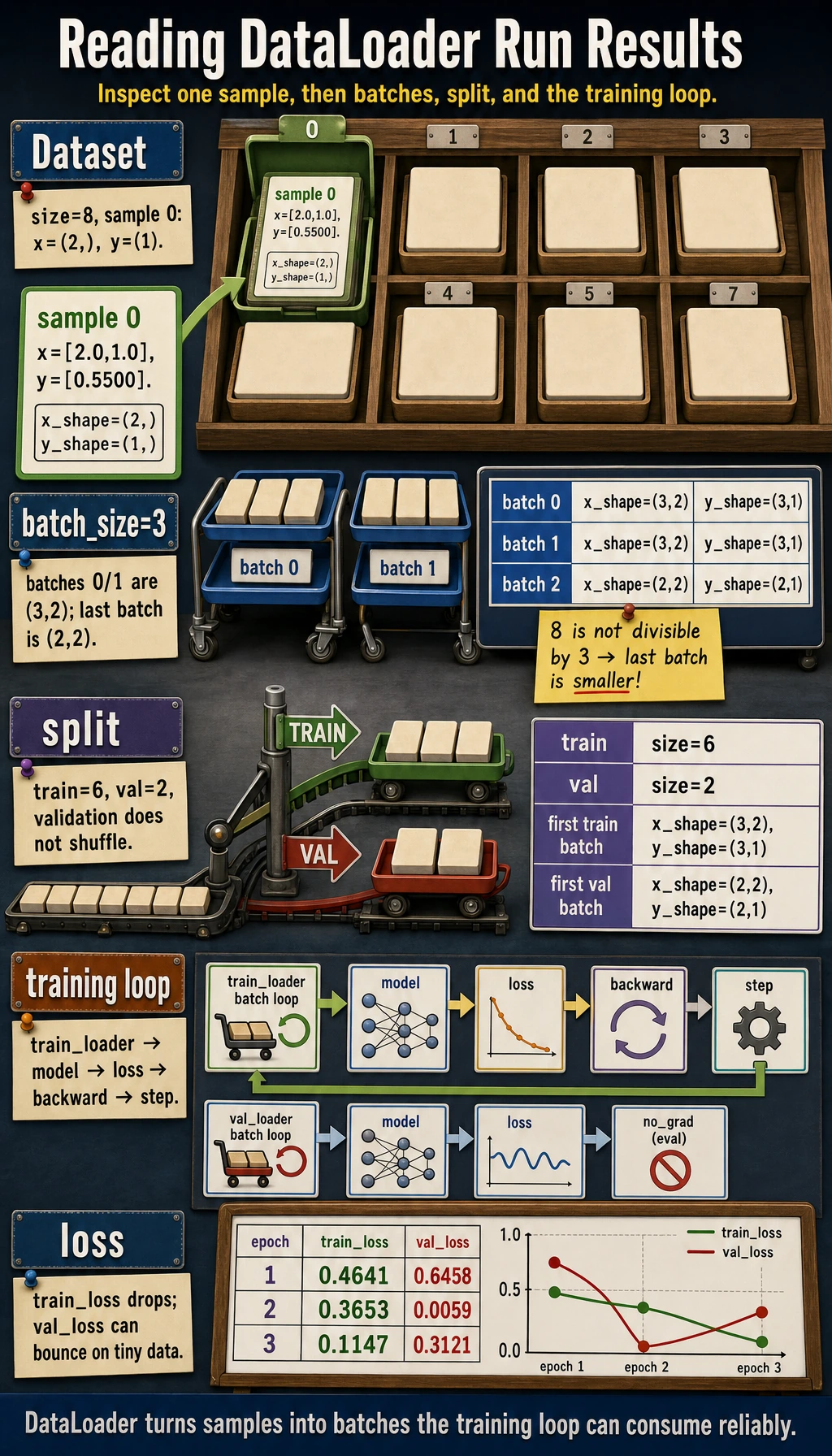
The full pattern is now visible:
Dataset -> DataLoader -> batch loop -> model -> loss -> backward -> step -> validation loop
Choosing batch_size
| Batch size | Strength | Tradeoff |
|---|---|---|
| small | frequent updates, lower memory | noisier loss |
| large | smoother estimate, better hardware use | more memory, sometimes less frequent updates |
For learning examples, 8, 16, and 32 are common starting points. In real projects, the best value depends on memory, throughput, and training stability.
Common Mistakes
| Mistake | Why it hurts | Fix |
|---|---|---|
assuming Dataset must load everything into memory | large projects usually read files lazily in __getitem__ | keep __getitem__ focused on one sample |
| not printing one batch before training | shape bugs appear later in the model | inspect next(iter(loader)) |
using shuffle=False for training data | ordered data can bias updates | use shuffle=True for training |
using shuffle=True for validation when you need stable inspection | examples appear in a different order each run | keep validation/test deterministic |
| forgetting target scaling | regression loss can become huge on tiny demos | scale targets when useful and explain it |
Quick Debug Checklist
After building a loader, run:
batch_x, batch_y = next(iter(train_loader))
print(batch_x.shape, batch_x.dtype)
print(batch_y.shape, batch_y.dtype)
Ask:
- Does one sample from
Datasetlook correct? - Does one batch from
DataLoaderlook correct? - Does
batch_xmatch the first layer of the model? - Does
batch_ymatch the loss function?
Exercises
- Expand
StudentDatasetto 12 samples, then split it into 9 training samples and 3 validation samples. - Change
batch_sizeto1,2, and4. How many batches are in each epoch? - Set
shuffle=True, print the first training batch in two epochs, and check whether the order changes. - Add a third feature to each sample. Which model layer must change?
Key Takeaways
Datasetdefines what one sample looks like.DataLoaderdefines how samples become batches.- Always inspect one sample and one batch before training.
- Train loaders usually shuffle; validation/test loaders usually do not.
- The next training-loop section is just this loader connected to model, loss, optimizer, and evaluation.