6.2.2 From sklearn to PyTorch
If scikit-learn is like an automatic car, then PyTorch is more like a manual car.
scikit-learnwraps up many details for youPyTorchlets you control the model, loss function, gradients, and training process yourself
By learning this section, you’ll know exactly where you are “shifting gears.”
Learning objectives
- Understand the difference in responsibilities between
sklearnandPyTorch - Build a mental model of data, model, loss function, optimizer, and training loop as a whole
- Run a minimal example in both
sklearnandPyTorch - Understand why deep learning needs a more “low-level” framework like PyTorch
Why learn PyTorch after learning sklearn?
In Station 5, you already used scikit-learn:
from sklearn.linear_model import LinearRegression

model = LinearRegression()
model.fit(X_train, y_train)
pred = model.predict(X_test)
This experience is very smooth, but it also means many things are being “hidden”:
| What you do | What sklearn does for you |
|---|---|
| Choose a model | Defines the parameter structure |
Call fit() | Automatically performs forward computation, computes loss, computes gradients, and updates parameters |
Call predict() | Automatically performs inference |
In PyTorch, these steps need to be written separately:
| Step | What you need to handle yourself |
|---|---|
| Prepare data | Convert data into Tensor |
| Define model | Write the network with nn.Module or nn.Sequential |
| Define loss function | For example, nn.MSELoss() |
| Define optimizer | For example, torch.optim.SGD() |
| Training loop | forward -> loss -> backward -> step |
This may look more troublesome, but the benefits are:
- You can define any network structure
- You can control every step of the training process
- You can do things that
sklearncan hardly cover, such as CNNs, RNNs, Transformers, and fine-tuning large models
Looking at both side by side
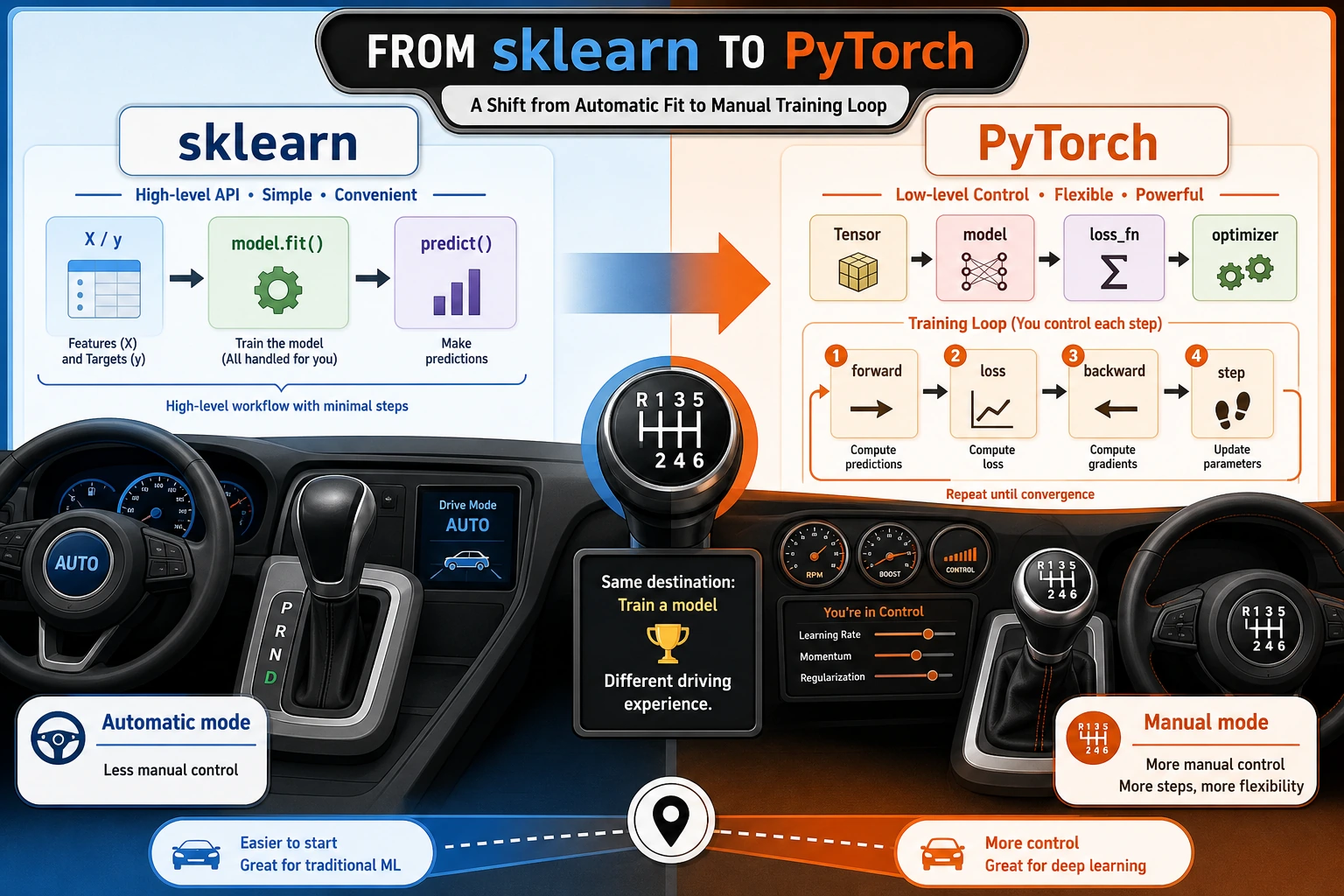
- In
sklearn, this whole chain is mostly wrapped insidefit() - In
PyTorch, this chain is fully exposed
So the key thing to learn in PyTorch is not “a few more APIs,” but: you start to truly work with the internal structure of model training.
A minimal comparison experiment
The following code can be run directly. If you have not installed the dependencies locally:
pip install numpy scikit-learn torch
Let’s do the simplest linear regression task: given study time, predict exam score.
Train with sklearn
import numpy as np
from sklearn.linear_model import LinearRegression

# Study time (hours)
X = np.array([[1.0], [2.0], [3.0], [4.0], [5.0]], dtype=np.float32)

# Corresponding scores
y = np.array([52.0, 59.0, 66.0, 73.0, 80.0], dtype=np.float32)

sk_model = LinearRegression()
sk_model.fit(X, y)

print("sklearn intercept:", round(float(sk_model.intercept_), 2))
print("sklearn weight:", round(float(sk_model.coef_[0]), 2))
print("Predicted score for 6 hours of study:", round(float(sk_model.predict([[6.0]])[0]), 2))
You will get a straight-line model, and the process is very smooth.
Train the same task with PyTorch
import torch
from torch import nn

torch.manual_seed(42)

# 1. Convert data to tensors
X_torch = torch.tensor([[1.0], [2.0], [3.0], [4.0], [5.0]])
y_torch = torch.tensor([[52.0], [59.0], [66.0], [73.0], [80.0]])

# 2. Define the model: a linear layer y = wx + b
model = nn.Linear(in_features=1, out_features=1)

# 3. Define the loss function
loss_fn = nn.MSELoss()

# 4. Define the optimizer
optimizer = torch.optim.SGD(model.parameters(), lr=0.01)

# 5. Training loop
for epoch in range(1000):
    pred = model(X_torch)                  # forward
    loss = loss_fn(pred, y_torch)          # compute loss

    optimizer.zero_grad()                  # clear old gradients
    loss.backward()                        # backward
    optimizer.step()                       # update parameters

    if epoch % 200 == 0:
        print(f"epoch={epoch:4d}, loss={loss.item():.4f}")

weight = model.weight.item()
bias = model.bias.item()
pred_6 = model(torch.tensor([[6.0]])).item()

print("PyTorch intercept:", round(bias, 2))
print("PyTorch weight:", round(weight, 2))
print("Predicted score for 6 hours of study:", round(pred_6, 2))
What did you actually learn here?
Although the PyTorch code is longer than sklearn, it reveals the five core components of deep learning:
| Component | Analogy | Role |
|---|---|---|
| Data | Ingredients | The input the model processes |
| Model | Chef | Decides how to turn input into output |
| Loss function | Score sheet | Judges how well the model performs |
| Optimizer | Parameter tuner | Changes parameters based on error |
| Training loop | Daily review | Repeats trial and error until performance improves |
Later, when you learn CNNs, Transformers, RAG fine-tuning, or local model training, the essence is still these five things—only the model structure becomes more complex.
When should you keep using sklearn, and when should you switch to PyTorch?
Cases better suited to sklearn
- Mainly tabular data
- Models such as linear regression, logistic regression, tree models, random forests, and XGBoost
- You care more about fast modeling and tuning
Cases better suited to PyTorch
- Unstructured data such as images, speech, and text
- Need to customize the network structure
- Need GPU training
- Need to fine-tune pretrained models
- Need to control training details yourself
A simple memory aid:
sklearnis good at the efficient application of “traditional machine learning,” whilePyTorchis good at the flexible construction of “deep learning.”
Common misconceptions
Misconception 1: PyTorch is just another modeling library
Not quite. It is more like a “deep learning development platform.” You are not just calling models—you are building a training system.
Misconception 2: PyTorch is more advanced than sklearn, so you should use it for everything
That is not true either. In engineering, the most important thing is to choose the right tool.
For many tabular tasks, sklearn and tree-based models are still the first choice.
Misconception 3: As long as you can write a training loop, you understand deep learning
The training loop is only the outer shell. You still need to understand:
- Tensors and automatic differentiation
nn.Module- Data loading
- Model debugging
- Training stability and evaluation methods
These are the topics that the next sections of this chapter will cover.
What you should be able to do after this chapter
After learning this section, you should be able to answer at least these three questions:
- What steps does
sklearn.fit()hide for you? - Why can’t PyTorch training avoid the loss function and optimizer?
- Why do “model + loss + optimizer + training loop” become the common structure of all later deep learning courses?
If you can explain these three questions clearly, then the bridge has been built.
Exercises
- Change the study time and scores in the example above to your own data, then train once with
sklearnand once withPyTorch. - Change the learning rate in PyTorch from
0.01to0.1and0.001, and observe how the loss decreases at different speeds. - Try printing
weightandbiasevery 100 epochs to see how the parameters gradually move toward the answer.