9.3.7 Advanced Tool Patterns [Optional]
When there are only two or three tools, direct registration and dispatch are often enough.
But once the number of tools grows, you’ll quickly run into new problems:
- The same tool keeps getting called repeatedly
- Some calls are better handled in batches
- Certain common workflows always use several tools together
At that point, you’ll realize the tool layer also needs “design patterns.”
What this section is about is:
How to turn tools from a pile of separate functions into a composable, reusable capability layer.
Learning Objectives
- Understand what problems caching, retries, batching, and composite tools each solve
- Understand why a “tool wrapper layer” matters
- Learn how a composable tool executor works through a runnable example
- Build the awareness that the tool layer should evolve from a “function collection” into a “system component”
Why Does the Tool Layer Need Patterns Too?
Because Many Problems Repeat
For example:
- Log every call
- Some APIs time out often and need retries
- The same query gets asked again and again, so caching makes sense
- Some tasks always follow the pattern “search first, then summarize”
If you hand-code this logic inside every tool, the system will quickly become unmanageable.
The Value of Patterns Is Not “Looking Advanced”
It is:
- Reuse
- Consistency
- Less repetitive engineering
This is very similar to the middleware idea in backend services.
An Analogy: The Tool Itself Is Like an Appliance, and the Pattern Is Like a Power Strip or Voltage Regulator
The appliance you buy can certainly be used on its own, but when you have more and more devices, you will naturally add:
- Power strips
- Voltage regulators
- Timers
Tool patterns do something similar for an Agent.
Four Common Advanced Tool Patterns
Retry Wrapping
Suitable for:
- Temporary failures
- Occasional upstream instability
Cache Wrapping
Suitable for:
- High-frequency repeated queries in a short time
- Read-only tools
Batch Tools
Suitable for:
- Asking many similar questions at once
- Combining a group of similar requests for processing
Composite Tools
Suitable for:
- Multiple tools that are commonly used together in a fixed sequence
For example:
- Search documents -> rerank -> summarize
In that case, instead of letting the Agent improvise every time, it is better to package it as a higher-level composite tool.
First, Run a “Composable Tool Wrapper” Example
The example below does three things:
- Wraps the underlying tool with caching
- Wraps the tool with retries
- Then combines them into a composite tool
from functools import wraps


def cache_tool(fn):
    cache = {}

    @wraps(fn)
    def wrapper(*args):
        if args in cache:
            return {"source": "cache", "value": cache[args]}
        value = fn(*args)
        cache[args] = value
        return {"source": "tool", "value": value}

    return wrapper


def retry_tool(fn, retries=2):
    @wraps(fn)
    def wrapper(*args):
        last_error = None
        for _ in range(retries + 1):
            try:
                return fn(*args)
            except Exception as e:
                last_error = str(e)
        return {"error": f"retry_failed:{last_error}"}

    return wrapper


@cache_tool
def search_docs(keyword):
    docs = {
        "refund": "Refunds require being within 7 days and having a learning progress below 20%.",
        "certificate": "You can receive a certificate after completing all required items and passing the test.",
    }
    return docs.get(keyword, "No relevant documents found")


def summarize(text):
    return f"Summary: {text[:18]}..."


def search_and_summarize(keyword):
    doc = search_docs(keyword)
    if "error" in doc:
        return doc
    return {
        "keyword": keyword,
        "raw": doc,
        "summary": summarize(doc["value"]),
    }


print(search_and_summarize("refund"))
print(search_and_summarize("refund"))
Expected output:
{'keyword': 'refund', 'raw': {'source': 'tool', 'value': 'Refunds require being within 7 days and having a learning progress below 20%.'}, 'summary': 'Summary: Refunds require be...'}
{'keyword': 'refund', 'raw': {'source': 'cache', 'value': 'Refunds require being within 7 days and having a learning progress below 20%.'}, 'summary': 'Summary: Refunds require be...'}
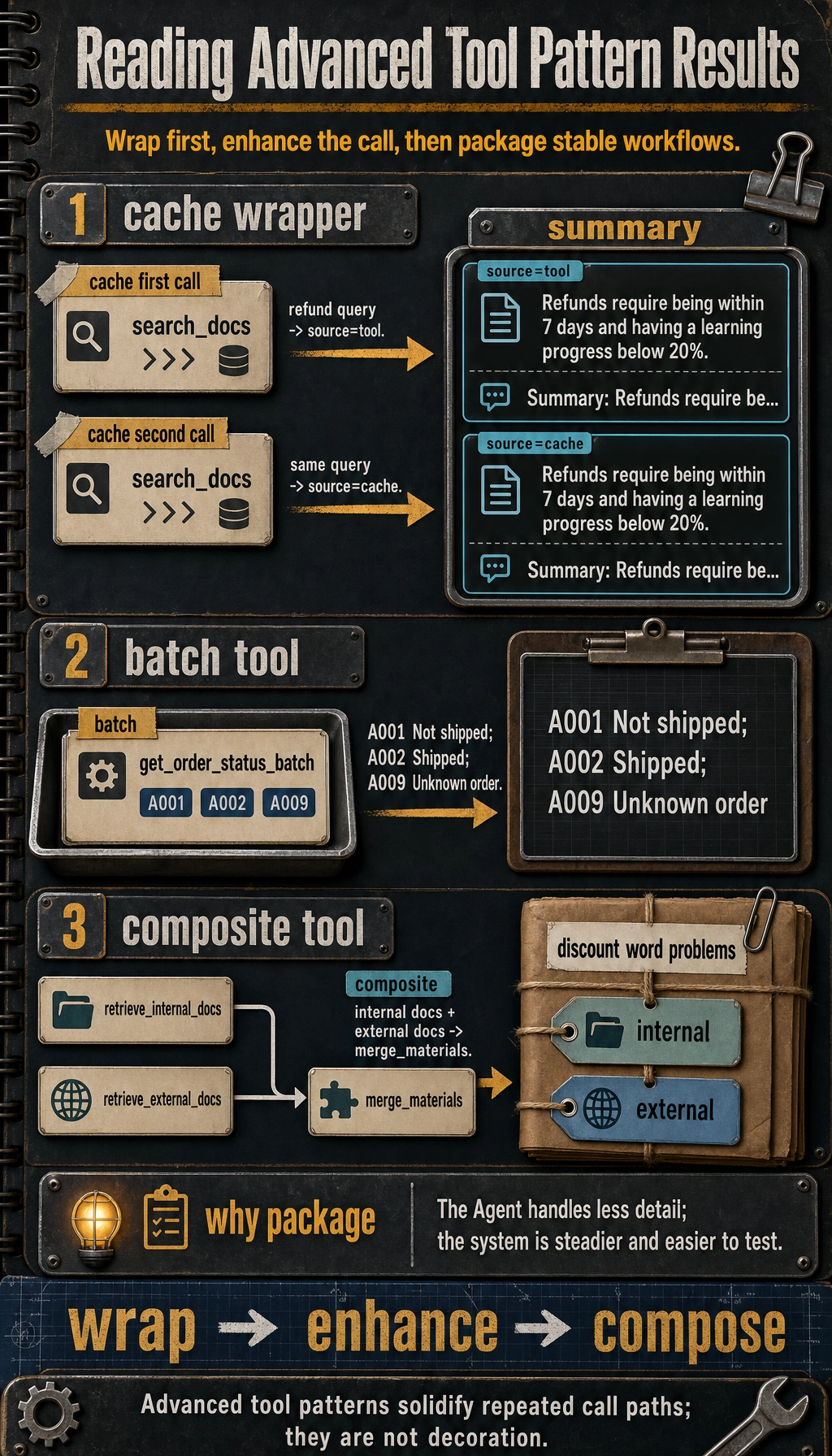
The first repeated query reaches the tool, the second comes from cache, and later examples show when to batch calls or package a stable internal-plus-external retrieval workflow.
What Is the Most Important Lesson in This Code?
It shows that the tool layer is not just the “tool itself.” In real systems, you often do this first:
- Wrap
- Enhance
- Compose
What the Agent finally calls is often the enhanced capability, not just the raw function.
Why Is Caching Suitable for Read-Only Tools?
Because when read-only tools are called repeatedly over a short time, their return values often do not change immediately.
For example:
- Checking refund policies
- Checking product documentation
Adding short-term caching to these tools can significantly reduce cost.
Why Is “Search + Summarize” Suitable as a Composite Tool?
Because it is a highly fixed combination. If you let the Agent figure it out every time:
- Search first
- Then summarize
it is both slower and more error-prone.
After packaging it as a composite tool, the system becomes more stable.
Why Are Batch Tools Important?
Because Many Requests Can Be Handled Together
For example:
- Check the status of 10 orders at once
- Calculate a batch of prices at once
- Fetch a set of document summaries at once
If you call them one by one, you will waste a lot of:
- Network round trips
- Model steps
- Scheduling overhead
A Minimal Batch Tool Example
def get_order_status_batch(order_ids):
    mock_db = {
        "A001": "Not shipped",
        "A002": "Shipped",
        "A003": "Delivered",
    }
    return {order_id: mock_db.get(order_id, "Unknown order") for order_id in order_ids}


print(get_order_status_batch(["A001", "A002", "A009"]))
Expected output:
{'A001': 'Not shipped', 'A002': 'Shipped', 'A009': 'Unknown order'}
This pattern is especially suitable when:
- The backend itself supports batch APIs
- The cost of a single call is relatively high
When Should You Package a Chain of Tools as an “Advanced Tool”?
When the Combination Is Stable Enough
If the workflow is always:
search -> rerank -> summarize
then it is a good fit for a composite tool.
When You Want the Agent to Think Less About Details
An Agent should not always stay at the level of low-level operations. If the basic actions are already stable, then after packaging them into a higher-level tool, the Agent can focus on:
- Higher-level decisions
When You Want the System to Be More Stable, Faster, and Easier to Test
Composite tools are usually easier for:
- Unit testing
- Observability
- Rate limiting
because the boundaries are clearer.
If Your Goal Is a “Knowledge-Base-Driven Courseware Generation Assistant,” Which Combinations Are Worth Packaging First?
In this kind of project, tools often naturally grow into these categories:
- Search internal materials
- Search external materials
- Deduplicate and reorder
- Generate courseware schema
- Export Word
If you let the Agent decide every step on the fly, the system will usually develop problems like:
- Unstable order
- Sometimes forgetting to search internal materials
- Sometimes exporting first and filling in content later
So when building it for the first time, the workflows that are more worth packaging first are often these high-frequency fixed processes:
| Composite Tool | What It Fixes for You |
|---|---|
retrieve_teaching_materials | Search internal sources first, then supplement with external sources, then merge and deduplicate |
build_courseware_outline | Extract concepts, examples, and exercises first, then organize the schema |
export_courseware_doc | Validate the schema first, then export Word using a template |
You can think of this first as:
Bundling actions that often appear together into one stable step in advance.
A Minimal Composite Tool Example That Feels Closer to a Real Project
def retrieve_internal_docs(topic):
    return [{"source": "internal", "text": f"Internal materials: key points and examples for {topic}"}]


def retrieve_external_docs(topic):
    return [{"source": "external", "text": f"External materials: supplementary notes for {topic}"}]


def merge_materials(internal_docs, external_docs):
    return internal_docs + external_docs


def retrieve_teaching_materials(topic):
    internal_docs = retrieve_internal_docs(topic)
    external_docs = retrieve_external_docs(topic)
    return merge_materials(internal_docs, external_docs)


print(retrieve_teaching_materials("discount word problems"))
Expected output:
[{'source': 'internal', 'text': 'Internal materials: key points and examples for discount word problems'}, {'source': 'external', 'text': 'External materials: supplementary notes for discount word problems'}]
The most important value of this example is not that the code is complicated, but that it helps beginners see:
- Advanced tool patterns are not “mystical design”
- They are about solidifying workflows that repeatedly appear in the project
The Most Common Misunderstandings
Misunderstanding 1: Advanced Patterns Just Mean “Writing More Decorators”
Not really. The key is not whether the implementation looks fancy, but whether it actually reduces repeated problems.
Misunderstanding 2: Caching Is Always Better Once You Have It
If data changes quickly, caching may instead create the risk of stale results.
Misunderstanding 3: The More Combinations You Have, the Stronger the System Must Be
Over-engineering can also make the system rigid. The key is whether the combination is stable and frequent enough.
Summary
The most important thing in this section is not remembering a few pattern names, but building a more engineering-oriented judgment:
As tools grow in number and problems become more repetitive, the tool layer needs caching, retries, batching, and composite packaging to upgrade from a “collection of functions” into a composable capability system.
Once this mindset is established, when you build code Agents and multi-tool systems later, you won’t just keep thinking, “Let’s add one more function.”
Exercises
- Add a
timeout_toolwrapper to the example and think about which layer it should belong to. - Why is caching more suitable for read-only tools than for write operations that change frequently?
- Think of an Agent task you have done before, and identify one fixed workflow that would be suitable to package as a composite tool.
- If a tool combination is unstable and often changes order, would you still package it as an advanced tool? Why?