9.3.5 Common Tool Integration
When talking about the tool layer, if we only stay at the abstract schema level, it can easily feel vague. In this section, we’ll zoom in a bit and look directly at:
What are the most common tools in Agent systems, and how are they connected?
You’ll find that although many tools have different names, their integration patterns are often very similar.
Learning objectives
- Recognize the most common types of tools in Agents
- Understand what problems each tool type is best suited for
- Read a unified example of tool registration and dispatch
- Understand the most common failure points and engineering considerations when integrating tools
Why classify tools by type?
Because the word “tool” is too broad
Search is a tool, a calculator is a tool, database queries are tools, and file operations are tools too. If you treat them all as “just a function,” you’ll quickly get confused.
A more practical approach is to divide them into categories first:
- Retrieval tools
- Computation tools
- Data access tools
- File / environment operation tools
- External service call tools
Why is classification helpful?
Because different tool types have different concerns:
- Search tools focus on recall quality
- Computation tools focus on accuracy and safety
- Database tools focus on permissions and filtering
- File tools focus on path boundaries
- External service tools focus on timeouts and retries
In other words:
Even though different tools are all called tools, their engineering risks are completely different.
The five most common tool types
Search / retrieval tools
Good for:
- Looking up documents
- Searching knowledge bases
- Searching web pages
Characteristics:
- The input is usually a query
- The output is usually a set of candidate results
Computation tools
Good for:
- Basic arithmetic
- Statistical metrics
- Small data transformations
Characteristics:
- Output must be stable and exact
- Safety risks need special attention
Data access tools
Good for:
- Querying databases
- Looking up orders
- Checking user status
Characteristics:
- Parameters and permissions are the key
- A lot of business logic is determined here
File / environment operation tools
Good for:
- Reading files
- Writing files
- Listing directories
- Executing code
Characteristics:
- High risk
- Boundary control is extremely important
External service call tools
Good for:
- Sending emails
- Calling third-party APIs
- Submitting tickets
Characteristics:
- Failures, timeouts, and retries are very common
A unified tool registry
In real systems, tools are often not scattered everywhere, but registered in one place.
Minimal runnable example
import ast
import operator

OPS = {
    ast.Add: operator.add,
    ast.Sub: operator.sub,
    ast.Mult: operator.mul,
    ast.Div: operator.truediv,
}


def safe_calculate(expression):
    def visit(node):
        if isinstance(node, ast.Expression):
            return visit(node.body)
        if isinstance(node, ast.Constant) and isinstance(node.value, (int, float)):
            return node.value
        if isinstance(node, ast.BinOp) and type(node.op) in OPS:
            return OPS[type(node.op)](visit(node.left), visit(node.right))
        if isinstance(node, ast.UnaryOp) and isinstance(node.op, ast.USub):
            return -visit(node.operand)
        raise ValueError("unsupported_expression")

    return visit(ast.parse(expression, mode="eval"))


def search_docs(keyword):
    docs = {
        "refund": "You can apply for a refund within 7 days after purchasing the course",
        "certificate": "You can receive a certificate after completing the project and passing the test"
    }
    return docs.get(keyword, "No relevant document found")

def calculator(expression):
    return safe_calculate(expression)

def get_user_status(user_id):
    mock_db = {
        1: {"name": "Alice", "progress": 0.15},
        2: {"name": "Bob", "progress": 0.35}
    }
    return mock_db.get(user_id, {"error": "user_not_found"})

TOOLS = {
    "search_docs": search_docs,
    "calculator": calculator,
    "get_user_status": get_user_status
}

print(TOOLS.keys())
Expected output:
dict_keys(['search_docs', 'calculator', 'get_user_status'])
Why is unified registration important?
Because later you will need to:
- Standardize schema descriptions
- Apply permission control uniformly
- Add logging consistently
- Dispatch and collect statistics in one place
If there is no tool registry, the system becomes harder and harder to maintain.
A unified dispatcher
Minimal dispatcher example
def dispatch(call):
    name = call["name"]
    arguments = call["arguments"]

    if name not in TOOLS:
        return {"error": "unknown_tool"}

    try:
        result = TOOLS[name](**arguments)
        return {"result": result}
    except Exception as e:
        return {"error": str(e)}

calls = [
    {"name": "search_docs", "arguments": {"keyword": "refund"}},
    {"name": "calculator", "arguments": {"expression": "12 * 7"}},
    {"name": "get_user_status", "arguments": {"user_id": 1}}
]

for call in calls:
    print(call, "->", dispatch(call))
Expected output:
{'name': 'search_docs', 'arguments': {'keyword': 'refund'}} -> {'result': 'You can apply for a refund within 7 days after purchasing the course'}
{'name': 'calculator', 'arguments': {'expression': '12 * 7'}} -> {'result': 84}
{'name': 'get_user_status', 'arguments': {'user_id': 1}} -> {'result': {'name': 'Alice', 'progress': 0.15}}
What does this code teach you?
It shows you that:
- Different tools can share a unified call entry point
- The program can handle errors in a consistent way
- When you expand tools later, the structure will not become messy
What should you pay attention to for different tool types?
Search tools
Key concerns:
- Whether the query should be rewritten
- How many results to return
- Whether the results need reranking
Computation tools
Key concerns:
- Safety
- Precision
- Whether the expression is valid
A simple safe calculator example:
import ast
import operator

OPS = {
    ast.Add: operator.add,
    ast.Sub: operator.sub,
    ast.Mult: operator.mul,
    ast.Div: operator.truediv,
}


def safe_calculate(expression):
    def visit(node):
        if isinstance(node, ast.Expression):
            return visit(node.body)
        if isinstance(node, ast.Constant) and isinstance(node.value, (int, float)):
            return node.value
        if isinstance(node, ast.BinOp) and type(node.op) in OPS:
            return OPS[type(node.op)](visit(node.left), visit(node.right))
        if isinstance(node, ast.UnaryOp) and isinstance(node.op, ast.USub):
            return -visit(node.operand)
        raise ValueError("unsupported_expression")

    return visit(ast.parse(expression, mode="eval"))


def safe_calculator(expression):
    allowed = set("0123456789+-*/(). ")
    if not set(expression) <= allowed:
        return {"error": "invalid_expression"}
    return {"result": safe_calculate(expression)}

print(safe_calculator("3 * (4 + 5)"))
print(safe_calculator("__import__('os').system('rm -rf /')"))
Expected output:
{'result': 27}
{'error': 'invalid_expression'}
Database tools
Key concerns:
- Permissions
- Parameter completeness
- Query boundaries
For example, do not let the model freely generate arbitrary SQL and execute it directly.
File tools
Key concerns:
- Path whitelists
- Write permissions
- Whether human confirmation is needed
External service tools
Key concerns:
- Timeouts
- Retries
- Idempotency
A more Agent-like tool combination example
Scenario: determine whether a user can get a refund
This task may require two tools:
- Check the user’s learning progress
- Check the refund policy
def refund_eligibility_agent(user_id):
    status = get_user_status(user_id)
    if "error" in status:
        return {"error": "user does not exist"}

    policy = search_docs("refund")
    progress = status["progress"]

    can_refund = progress < 0.2
    return {
        "user": status["name"],
        "progress": progress,
        "policy": policy,
        "can_refund": can_refund
    }

print(refund_eligibility_agent(1))
print(refund_eligibility_agent(2))
Expected output:
{'user': 'Alice', 'progress': 0.15, 'policy': 'You can apply for a refund within 7 days after purchasing the course', 'can_refund': True}
{'user': 'Bob', 'progress': 0.35, 'policy': 'You can apply for a refund within 7 days after purchasing the course', 'can_refund': False}
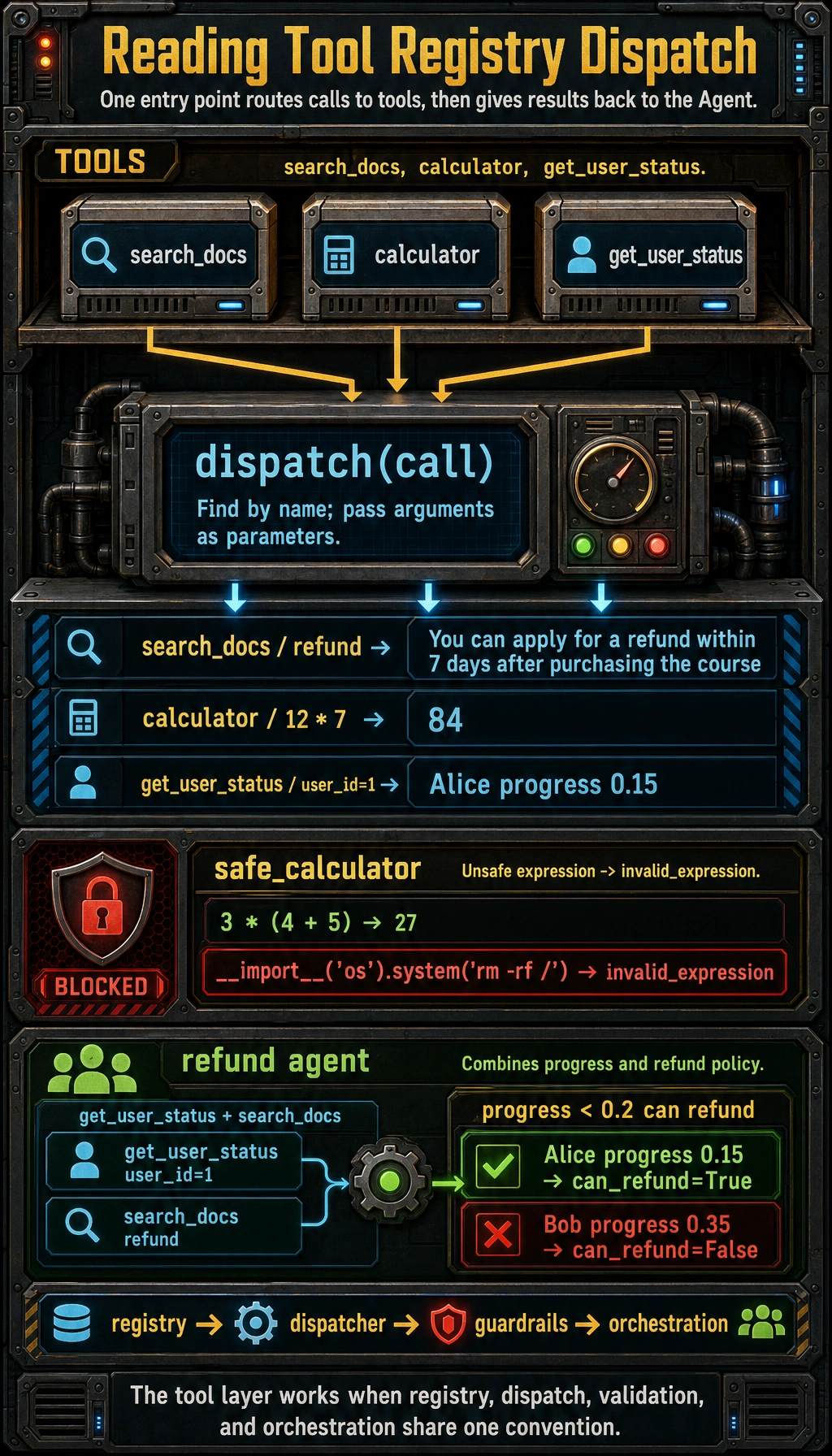
The same registry and dispatcher handle single-tool calls, safety checks, and multi-tool orchestration. When the final decision looks wrong, inspect the call name, arguments, tool result, and guardrail rule in that order.
What does this code really show?
It shows:
Tool integration does not mean each tool exists independently; more often, tools need to work together to complete a goal.
This is also why Agents will increasingly rely on tool orchestration ability.
The most common failure points in tool integration
Schema mismatch
For example:
- The tool expects
user_id - But the model passes
id
Inconsistent return formats
If one tool returns a string, another returns a dict, and a third returns a list, the system will become increasingly hard to connect.
No unified error handling
One tool returns None, another raises an exception, and a third returns "failed"; the downstream logic can easily become messy.
No logging or replay
When something goes wrong in production, it becomes very hard to know which type of tool caused the issue.
A practical suggestion: standardize the tool return format
One of the safest approaches is to standardize the output structure of tools, for example:
{
  "ok": True,
  "data": ...
}
Or:
{
  "ok": False,
  "error": ...
}
A small example:
def wrapped_search(keyword):
    try:
        result = search_docs(keyword)
        return {"ok": True, "data": result}
    except Exception as e:
        return {"ok": False, "error": str(e)}

print(wrapped_search("refund"))
Expected output:
{'ok': True, 'data': 'You can apply for a refund within 7 days after purchasing the course'}
This makes it easier for the Agent layer to make unified decisions later.
Common pitfalls for beginners
Connecting all tools first, then thinking later
The more tools you add, the more complex the system becomes. A safer approach is:
- Start with the 2–3 most necessary tools first
Not distinguishing between high-risk and low-risk tools
File deletion, payment operations, and database writes are not at the same risk level as searching documents.
No unified convention for tool interfaces
This is a direct reason why many Agent systems become messier and messier over time.
Summary
The most important thing in this section is not memorizing “what tools there are,” but understanding:
The key to common tool integration is not just connecting tools, but organizing them with a unified interface, unified error handling, and unified boundary constraints.
Only in this way can the tool layer become an amplifier of Agent capabilities, rather than a source of failures.
Exercises
- Add a
get_weather(city)tool to the tool registry in this section. - Standardize the return values of all tools to the format
{"ok": ..., "data": ..., "error": ...}. - Think about it: why should a database write tool and a search tool not be placed at the same permission level?
- Explain in your own words: why are a tool registry and a unified dispatcher two very important structures in Agent engineering?