9.3.6 Tool Safety and Error Handling
Tools turn an Agent from “able to talk” into “able to act,” but once it can act, the risk level rises immediately.
For example:
- Mistakenly querying bad data can often be fixed
- Writing the wrong file can cause immediate trouble
- Calling the wrong delete API can be even worse
So the core question in this section is not “can the tool run,” but:
When a tool fails, times out, is misused, or exceeds its permissions, can the system still handle it safely and reliably?
Learning Objectives
- Understand why tool-related risk is higher than plain text answers
- Learn how to design permission tiers, parameter validation, and error returns
- Understand what retries, timeouts, idempotency, and human approval each protect against
- Use a runnable example to understand a tool executor with safety guardrails
Why Is Tool Safety a Red Line for Agents?
If a pure answer is wrong, it is usually just “saying something wrong”
If the model only returns text, the consequences of an error are often:
- Incorrect information
- Misleading wording
These are still important, but in many scenarios they remain at the “output layer.”
If a tool call is wrong, it may become “doing the wrong thing”
Once a tool can execute actions, the risks become:
- Accessing data it should not access
- Writing a bad file
- Calling the wrong external API
- Placing duplicate orders or charging twice
In other words:
Tools amplify mistakes from the language layer into the action layer.
An analogy: a chatbot and an intern operator are not the same risk level
A robot that only explains procedures, and an operator who can actually click buttons, modify the database, and send emails, are completely different in risk level.
The same is true once an Agent enters the tool layer.
The Four Most Common Safety Lines for Tools
Parameter validation
First confirm:
- Are all parameters present?
- Are the types correct?
- Are the values valid?
Permission tiers
Different tools have different risk levels. A common breakdown is:
read_onlywrite_limiteddestructive
Execution constraints
For example:
- Timeout
- Maximum retry count
- Rate limiting
- Idempotency key
Auditing and replay
At a minimum, you should record:
- Who initiated the call
- Which tool was selected
- What the arguments were
- Whether it succeeded
- What it returned
First, Run a Minimal Executor with Guardrails
The following example simulates three types of tools:
- Low-risk read-only tool
- Medium-risk write tool
- High-risk delete tool
Then, before execution, it performs:
- Whitelist check
- Parameter validation
- Permission check
- Timeout simulation
ALLOWED_TOOLS = {
    "search_docs": {"risk": "read_only", "required_args": ["keyword"]},
    "update_profile": {"risk": "write_limited", "required_args": ["user_id", "city"]},
    "delete_file": {"risk": "destructive", "required_args": ["path"]},
}


def run_tool(name, arguments, user_role):
    if name not in ALLOWED_TOOLS:
        return {"ok": False, "error": "unknown_tool"}

    meta = ALLOWED_TOOLS[name]

    for field in meta["required_args"]:
        if field not in arguments:
            return {"ok": False, "error": f"missing_arg:{field}"}

    if meta["risk"] == "destructive" and user_role != "admin":
        return {"ok": False, "error": "permission_denied"}

    if name == "search_docs":
        return {"ok": True, "data": {"result": f"Found documents related to {arguments['keyword']}"}}

    if name == "update_profile":
        return {
            "ok": True,
            "data": {"message": f"Updated user {arguments['user_id']}'s city to {arguments['city']}"},
        }

    if name == "delete_file":
        return {"ok": True, "data": {"message": f"Deleted {arguments['path']}"}}

    return {"ok": False, "error": "tool_not_implemented"}


calls = [
    ("search_docs", {"keyword": "refund"}, "guest"),
    ("update_profile", {"user_id": 7, "city": "Taipei"}, "operator"),
    ("delete_file", {"path": "/tmp/a.txt"}, "operator"),
]

for call in calls:
    print(call, "->", run_tool(*call))
Expected output:
('search_docs', {'keyword': 'refund'}, 'guest') -> {'ok': True, 'data': {'result': 'Found documents related to refund'}}
('update_profile', {'user_id': 7, 'city': 'Taipei'}, 'operator') -> {'ok': True, 'data': {'message': "Updated user 7's city to Taipei"}}
('delete_file', {'path': '/tmp/a.txt'}, 'operator') -> {'ok': False, 'error': 'permission_denied'}
Why is this better than just checking whether the tool is in a whitelist?
Because it is not just a simple on/off check, but reflects the real multi-layer structure of tool safety:
- First confirm the tool exists
- Then confirm the parameters are complete
- Then confirm the permissions are sufficient
- Only then execute
That is what a real-world tool executor should do.
Why can’t permissions be based only on whether “the Agent can use it”?
Because risk is not uniform.
- Searching documents is very low risk
- Modifying user info is medium risk
- Deleting files is high risk
So permissions must be tied to tool risk, not just controlled by one global switch.
Why do high-risk tools often need human confirmation?
Because even if the model chooses correctly most of the time, high-risk actions should not be fully automated.
A typical approach is:
- First generate an execution plan
- Then ask the user or administrator to confirm
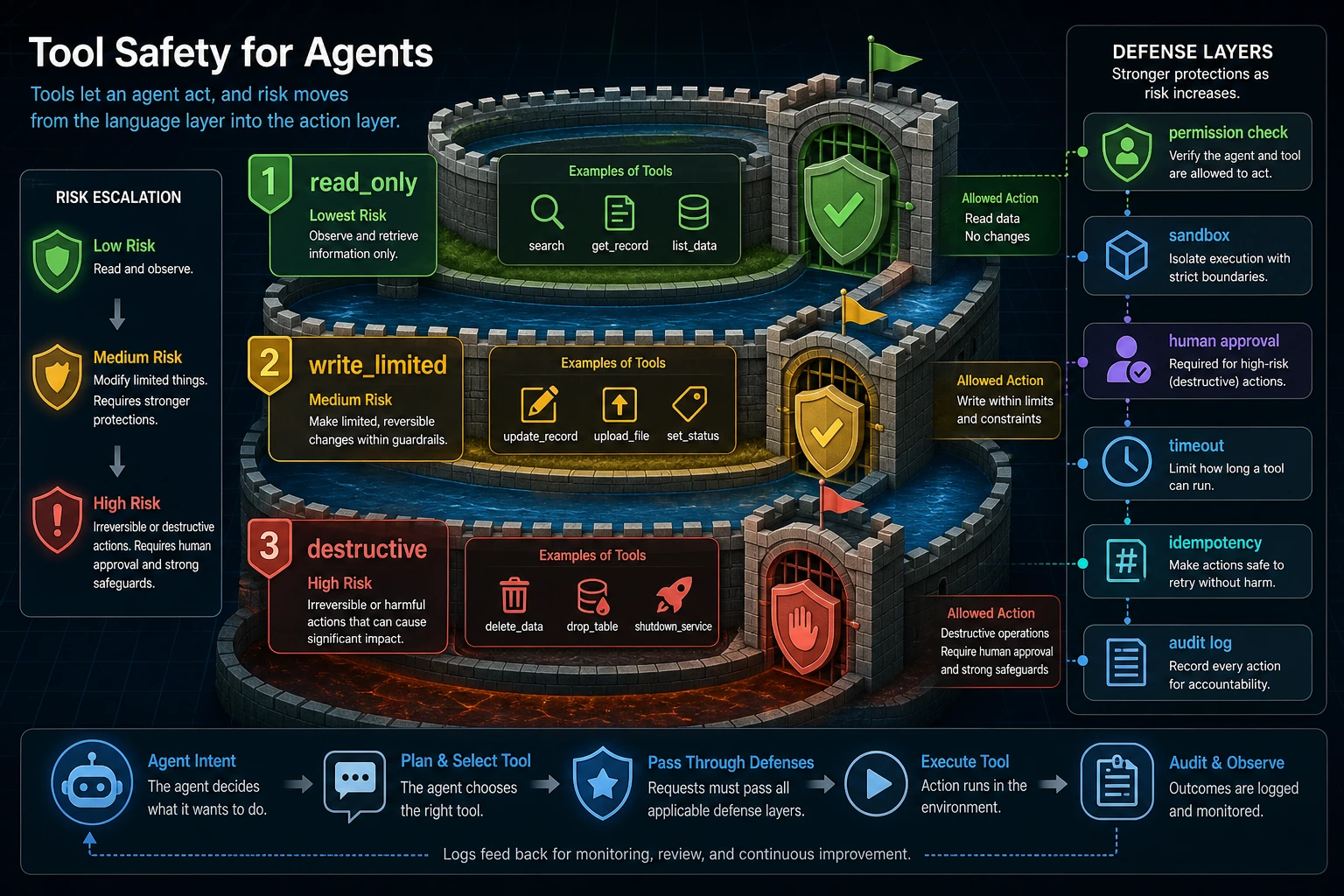
When reading this diagram, think of “tool call” as a real action: low-risk actions can be logged directly, while high-risk actions must go through permission checks, a sandbox, human confirmation, and an audit log. The more an Agent can act, the more important the guardrails become.
Why Can’t Error Handling Rely Only on try/except?
Because failures are not all the same
Common failure types include at least:
- Parameter errors
- Permission errors
- Tool timeouts
- External service failures
- Empty results
If every failure only returns:
something went wrong
then debugging and recovery later become nearly impossible.
A better approach: structured error types
def normalize_error(code, detail):
    return {
        "ok": False,
        "error": {
            "code": code,
            "detail": detail,
            "retryable": code in {"timeout", "temporary_unavailable"},
        },
    }


print(normalize_error("missing_arg", "keyword is missing"))
print(normalize_error("timeout", "Upstream API did not respond within 3 seconds"))
Expected output:
{'ok': False, 'error': {'code': 'missing_arg', 'detail': 'keyword is missing', 'retryable': False}}
{'ok': False, 'error': {'code': 'timeout', 'detail': 'Upstream API did not respond within 3 seconds', 'retryable': True}}
The benefits of structured errors are:
- The scheduler knows whether it should retry
- Logging systems can count and analyze errors more easily
- The frontend can show clearer feedback
Which errors are suitable for retry?
Usually, the errors more suitable for retry are:
- timeout
- temporary unavailable
- transient network error
Errors that are not suitable for retry include:
- missing arguments
- insufficient permissions
- logical validation failures
What Are Timeout, Retry, and Idempotency Protecting Against?
Timeout: preventing the system from hanging forever
If a tool never returns, the entire Agent chain is blocked.
So timeout is fundamentally protecting:
- Latency
- Resource usage
Retry: preventing a temporary glitch from becoming a hard failure
If the upstream service occasionally stumbles, a reasonable retry strategy can significantly improve stability.
But retries should also consider:
- Whether the error is temporary
- Whether the retry count is limited
Idempotency: preventing repeated execution from causing repeated side effects
For example:
- Double charging
- Sending duplicate emails
- Creating duplicate tickets
So write-type tools should pay special attention to:
- Whether repeated requests cause repeated side effects
Why Isn’t Auditing Something You “Add Later”?
Without auditing, it is hard to reconstruct what happened after something goes wrong
You should at least be able to answer:
- Who called which tool?
- What were the parameters at the time?
- Why did the system allow it to run?
- What was the final result?
A minimal audit record example
def audit_log(user_id, tool_name, arguments, result):
    return {
        "user_id": user_id,
        "tool_name": tool_name,
        "arguments": arguments,
        "ok": result["ok"],
        "error": result.get("error"),
    }


result = run_tool("search_docs", {"keyword": "refund"}, "guest")
print(audit_log("u_001", "search_docs", {"keyword": "refund"}, result))
Expected output:
{'user_id': 'u_001', 'tool_name': 'search_docs', 'arguments': {'keyword': 'refund'}, 'ok': True, 'error': None}
Although simple, this already captures the core of auditing:
- Record the action
- Record the context
- Record the result
The Most Common Misconceptions
Misconception 1: Tool safety can wait until just before launch
No. Tool safety should be part of the design phase.
Misconception 2: Just retry every failure
Parameter errors and permission errors will only waste resources if retried.
Misconception 3: Read-only operations are completely risk-free
Many read operations may still involve:
- Privacy
- Unauthorized access
- Sensitive information leakage
Summary
The most important thing in this section is not memorizing a few error codes, but building a basic safety mindset for the tool layer:
Once an Agent has action capabilities, the tool executor must handle permissions, validation, timeouts, idempotency, and auditing with the same seriousness as a core backend service, rather than treating it as “just a function behind the model.”
The earlier you build this mindset, the more stable your code Agents, multi-tool workflows, and real production systems will be later.
Exercises
- Add a
send_emailtool to the example and think about how to define its risk level. - Why should “whether retries are allowed” be part of the error structure?
- Think about it: why might a tool that reads from a database still need permission control?
- If you wanted to add human confirmation for a high-risk tool, would you place the confirmation before or after the call? Why?