
2.1.8 モジュールとパッケージ
このページを終えたら、この evidence card を残します。
- 概念
- 変数、型、演算子、入力/出力、分岐、ループ、構造、関数、またはモジュール
- コード
- この概念のための最小限の実行可能な Python スニペット
- 出力
- 印字値、型、branch結果、loop trace、または返り値
- 失敗確認
- 型不一致、インデント、オフバイワン、可変データ、または import パスの問題
- 期待される成果
- 概念が機能することを証明するコードと出力結果
この節の位置づけ
Section titled “この節の位置づけ”この節では、コードを複数のファイルに分けて、他の人が書いたライブラリを再利用する方法を学びます。モジュール、パッケージ、import、pip は Python エコシステムへの入口です。これらを理解すると、NumPy、Pandas、FastAPI、PyTorch などのツールをより自然に使えるようになります。
- モジュールとパッケージの概念を理解する
importのさまざまな使い方を身につける- Python のよく使う標準ライブラリを知る
pipを使ってサードパーティライブラリをインストールできるようになる- 自分のモジュールを作成して使えるようになる
モジュールとは?
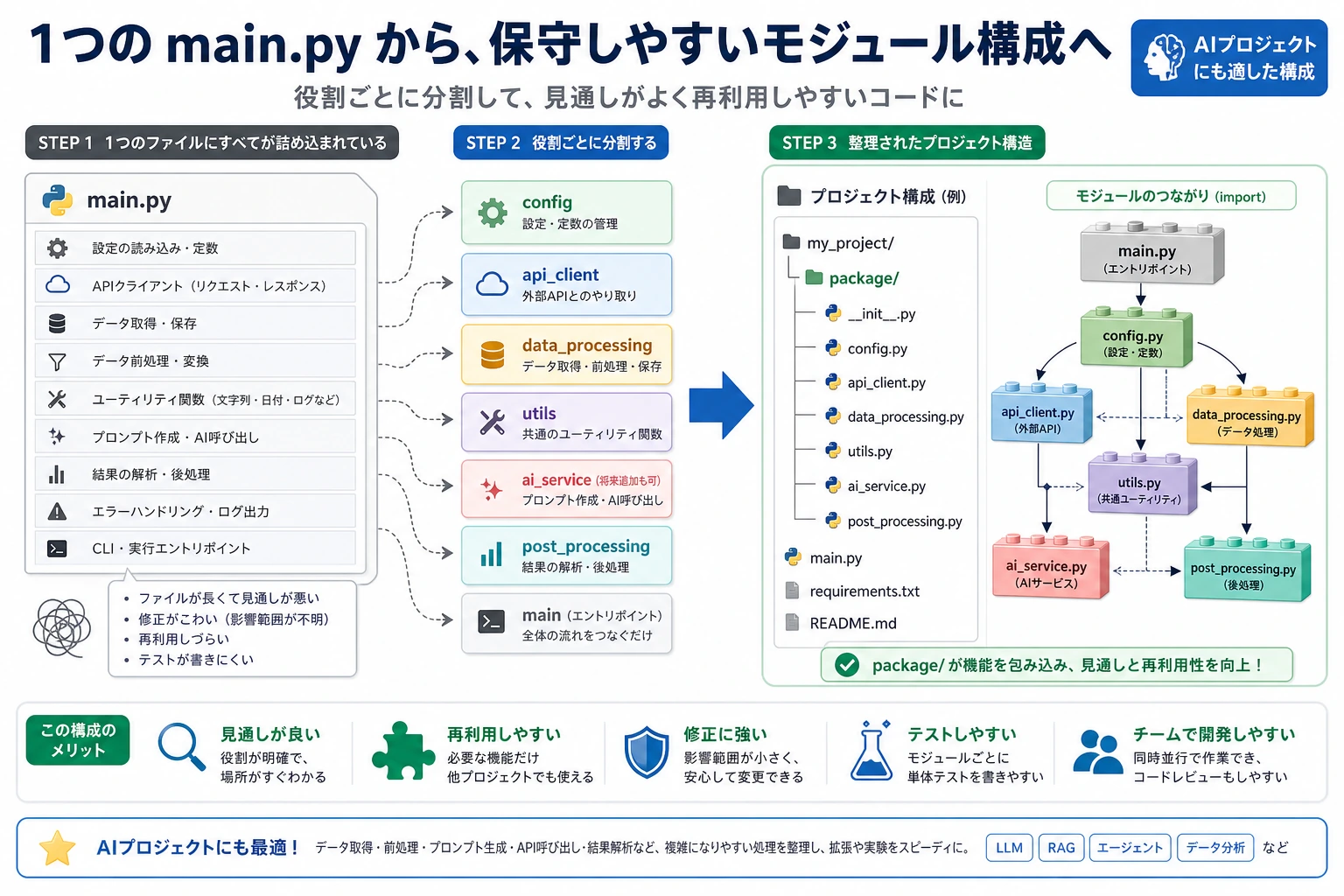
Section titled “モジュールとは?”ここまで、あなたのコードはすべて1つのファイルに書いてきました。でも、プロジェクトが大きくなると、1つのファイルに何千行も入ることがあります。これは管理がとても大変です。
モジュール(module)とは、1つの .py ファイルのことです。 関連する関数、クラス、変数を1つのモジュールにまとめて、他のファイルから import して使えます。
引っ越しを想像してみてください。
- 服を1つの箱に入れる(
clothes.py) - 本を1つの箱に入れる(
books.py) - 台所用品を1つの箱に入れる(
kitchen.py)
それぞれの箱がモジュールです。必要なときに、対応する箱を開ければよいのです。
import の基本的な使い方
Section titled “import の基本的な使い方”モジュール全体を import する
Section titled “モジュール全体を import する”import math
# 使うときはモジュール名の接頭辞が必要print(math.pi) # 3.141592653589793print(math.sqrt(16)) # 4.0print(math.ceil(3.2)) # 4(切り上げ)print(math.floor(3.8)) # 3(切り捨て)モジュールから特定の内容だけを import する
Section titled “モジュールから特定の内容だけを import する”from math import pi, sqrt
# そのまま使えるので、モジュール名の接頭辞は不要print(pi) # 3.141592653589793print(sqrt(16)) # 4.0import して別名をつける
Section titled “import して別名をつける”import numpy as np # numpy に短い別名をつけるimport pandas as pd # pandas の標準的な別名
# AI 分野でよく使う慣例的な別名import matplotlib.pyplot as pltimport tensorflow as tfimport torchモジュールの中身をすべて import する
Section titled “モジュールの中身をすべて import する”from math import *
# すべてを直接使えるprint(pi)print(sqrt(16))print(sin(0))Python のよく使う標準ライブラリ
Section titled “Python のよく使う標準ライブラリ”Python には便利なモジュールがたくさん最初から入っています。Python をインストールすれば、追加のインストールなしですぐ使えます。
math —— 数学計算
Section titled “math —— 数学計算”import math
print(math.pi) # 3.141592653589793print(math.e) # 2.718281828459045print(math.sqrt(144)) # 12.0print(math.pow(2, 10)) # 1024.0print(math.log(100, 10)) # 2.0(10 を底にした対数)print(math.sin(math.pi / 2)) # 1.0print(math.factorial(5)) # 120(5! = 5×4×3×2×1)random —— 乱数
Section titled “random —— 乱数”import random
# ランダムな整数print(random.randint(1, 100)) # 1 から 100 の間のランダムな整数
# ランダムな浮動小数点数print(random.random()) # 0 から 1 の間のランダムな浮動小数点数print(random.uniform(1.0, 10.0)) # 1.0 から 10.0 の間
# リストからランダムに選ぶcolors = ["赤", "緑", "青", "黄"]print(random.choice(colors)) # 1つをランダムに選ぶprint(random.sample(colors, 2)) # 2つをランダムに選ぶ(重複なし)
# リストをシャッフルするcards = list(range(1, 14))random.shuffle(cards)print(cards) # シャッフル後のリスト
# 乱数シードを設定する(結果を再現可能にする。AI 学習でよく使う)random.seed(42)print(random.randint(1, 100)) # 毎回同じ結果になるos —— OS とのやり取り
Section titled “os —— OS とのやり取り”import os
# 現在の作業ディレクトリを取得print(os.getcwd())
# ディレクトリ内のファイル一覧を表示print(os.listdir("."))
# ファイル/ディレクトリが存在するか確認print(os.path.exists("hello.py"))
# パスを結合する(クロスプラットフォーム対応)path = os.path.join("data", "train", "images")print(path) # data/train/images(macOS/Linux)または data\train\images(Windows)
# ファイル名と拡張子を取得filename = "model_v2.pth"name, ext = os.path.splitext(filename)print(f"ファイル名: {name}, 拡張子: {ext}") # ファイル名: model_v2, 拡張子: .pth
# ディレクトリを作成os.makedirs("output/results", exist_ok=True) # exist_ok=True は、すでに存在していてもエラーにしないdatetime —— 日付と時刻
Section titled “datetime —— 日付と時刻”from datetime import datetime, timedelta
# 現在時刻を取得now = datetime.now()print(now) # 2026-02-09 14:30:45.123456print(now.strftime("%Y-%m-%d")) # 2026-02-09print(now.strftime("%Y年%m月%d日")) # 2026年02月09日
# 時間の計算tomorrow = now + timedelta(days=1)last_week = now - timedelta(weeks=1)print(f"明日: {tomorrow.strftime('%Y-%m-%d')}")print(f"先週: {last_week.strftime('%Y-%m-%d')}")
# 時刻文字列を解析するdate_str = "2026-01-15"date = datetime.strptime(date_str, "%Y-%m-%d")print(date)json —— JSON データの処理
Section titled “json —— JSON データの処理”import json
# Python オブジェクト → JSON 文字列data = { "service": "ログイン API", "owner": "Mina", "latencies_ms": [120, 95, 180], "needs_review": False}
json_str = json.dumps(data, ensure_ascii=False, indent=2)print(json_str)
# JSON 文字列 → Python オブジェクトparsed = json.loads(json_str)print(parsed["service"]) # ログイン API
# JSON ファイルの読み書きwith open("data.json", "w", encoding="utf-8") as f: json.dump(data, f, ensure_ascii=False, indent=2)
with open("data.json", "r", encoding="utf-8") as f: loaded = json.load(f) print(loaded)標準ライブラリ早見表
Section titled “標準ライブラリ早見表”| モジュール | 用途 | よく使う機能 |
|---|---|---|
math | 数学計算 | sqrt, pi, sin, log |
random | 乱数 | randint, choice, shuffle |
os | OS | getcwd, listdir, path.join |
datetime | 日付と時刻 | now, strftime, timedelta |
json | JSON 処理 | dumps, loads, dump, load |
re | 正規表現 | search, findall, sub |
collections | 高度なコンテナ | Counter, defaultdict |
pathlib | パス操作 | Path, glob, mkdir |
sys | システム引数 | argv, path, exit |
time | 時間関連 | sleep, time |
サードパーティライブラリをインストールする
Section titled “サードパーティライブラリをインストールする”Python の強みは、サードパーティライブラリに大きく支えられています。つまり、他の人が作ったモジュールをそのままインストールして使えるのです。
pip でインストールする
Section titled “pip でインストールする”# 単体のライブラリをインストールpip install requests
# 特定のバージョンをインストールpip install requests==2.28.0
# 複数のライブラリをインストールpip install numpy pandas matplotlib
# すでにインストール済みのライブラリをアップグレードpip install --upgrade requests
# アンインストールpip uninstall requests
# インストール済みのライブラリを確認pip list
# インストール済みのライブラリをすべて出力する(自分の環境を再現しやすくする)pip freeze > requirements.txt
# ファイルからまとめてインストールpip install -r requirements.txtAI 開発でよく使うサードパーティライブラリ
Section titled “AI 開発でよく使うサードパーティライブラリ”| ライブラリ | インストールコマンド | 用途 |
|---|---|---|
| NumPy | pip install numpy | 数値計算の基礎ライブラリ |
| Pandas | pip install pandas | データ分析と処理 |
| Matplotlib | pip install matplotlib | データ可視化 |
| Requests | pip install requests | ネットワークリクエスト |
| scikit-learn | pip install scikit-learn | 伝統的な機械学習 |
| PyTorch | pip install torch | 深層学習フレームワーク |
| Transformers | pip install transformers | Hugging Face の事前学習済みモデル |
| FastAPI | pip install fastapi | Web API フレームワーク |
自分のモジュールを作る
Section titled “自分のモジュールを作る”基本的なモジュール
Section titled “基本的なモジュール”my_math.py というファイルを作ります:
PI = 3.14159
def circle_area(radius):    """円の面積を計算する"""    return PI * radius ** 2
def circle_perimeter(radius):    """円周を計算する"""    return 2 * PI * radius
def rectangle_area(width, height):    """長方形の面積を計算する"""    return width * height
別のファイルから使う場合:
import my_math
print(my_math.circle_area(5))       # 78.53975print(my_math.circle_perimeter(5))  # 31.4159
# またはfrom my_math import circle_area, PIprint(f"円の面積: {circle_area(3)}")print(f"PI = {PI}")
__name__ の役割
Section titled “__name__ の役割”他の人のコードで、次のような書き方を見たことがあるかもしれません。
if __name__ == "__main__": print("このファイルは直接実行されています。")これはどういう意味でしょうか?
def circle_area(radius):    return 3.14159 * radius ** 2
# このコードは my_math.py を直接実行したときだけ動く# 他のファイルから import されたときは実行されないif __name__ == "__main__": # テストコード print("circle_area をテストします:") print(circle_area(5)) # 78.53975 print("テスト完了!")# my_math.py を直接実行 → __name__ は "__main__" なのでテストコードが実行されるpython my_math.py# 出力:# circle_area をテストします:# 78.53975# テスト完了!
# main.py で my_math を import → __name__ は "my_math" なのでテストコードは実行されないこれは Python のうまい設計です。1つのファイルを、import 用にも単独実行用にも使えるようにしています。
パッケージ(Package)
Section titled “パッケージ(Package)”モジュールがたくさん増えたら、パッケージとして整理できます。パッケージとは、__init__.py を含むフォルダのことです。
my_project/├── main.py└── utils/ ← これがパッケージ ├── __init__.py ← このファイルで Python に utils がパッケージだと知らせる ├── math_utils.py ├── string_utils.py └── file_utils.py使い方:
from utils.math_utils import circle_areafrom utils.string_utils import clean_textfrom utils import file_utils
area = circle_area(5)text = clean_text("  Hello  ")file_utils.save_data(data, "output.json")
__init__.py は空でも構いませんし、パッケージを import したときのデフォルト動作を定義するためにも使えます。
from .math_utils import circle_area, rectangle_areafrom .string_utils import clean_text
# こうすると、利用者はパッケージから直接 import できる# from utils import circle_area
総合例:個人用ツールライブラリ
Section titled “総合例:個人用ツールライブラリ”複数の便利な関数を含むモジュールを作ってみましょう。
# tools.py —— 私の個人用ツールライブラリ
import randomimport stringfrom datetime import datetime
def generate_id(length=8):    """ランダムな ID を生成する"""    chars = string.ascii_letters + string.digits    return ''.join(random.choice(chars) for _ in range(length))
def timestamp():    """現在時刻のタイムスタンプ文字列を取得する"""    return datetime.now().strftime("%Y%m%d_%H%M%S")
def format_number(num):    """大きな数を3桁区切りで整形する"""    return f"{num:,.0f}"
def flatten_list(nested):    """ネストしたリストを平坦化する"""    result = []    for item in nested:        if isinstance(item, list):            result.extend(flatten_list(item))        else:            result.append(item)    return result
def timer(func):    """簡単な計測デコレーター"""    import time    def wrapper(*args, **kwargs):        start = time.time()        result = func(*args, **kwargs)        end = time.time()        print(f"{func.__name__} の実行時間: {end - start:.4f} 秒")        return result    return wrapper

if __name__ == "__main__":    # テスト    print(f"ランダム ID: {generate_id()}")    print(f"タイムスタンプ: {timestamp()}")    print(f"整形結果: {format_number(1234567890)}")    print(f"平坦化: {flatten_list([1, [2, 3], [4, [5, 6]]])}")
手を動かしてみよう
Section titled “手を動かしてみよう”練習 1:標準ライブラリを調べる
Section titled “練習 1:標準ライブラリを調べる”math、random、datetime を使って、次のタスクをそれぞれ実行してみましょう。
# 1. 100 の階乗が何桁かを求める# ヒント: math.factorial() と len(str(...))
# 2. 1〜100 の重複しないランダムな数を10個生成する# ヒント: random.sample()
# 3. 今日から 2027 年 1 月 1 日まであと何日あるかを計算する# ヒント: datetime
練習 2:自分のモジュールを作る
Section titled “練習 2:自分のモジュールを作る”string_tools.py というモジュールを作り、次の関数を含めてください。
def count_words(text):    """英語テキストの単語数を数える"""    return len(text.split())
def reverse_words(text):    """各単語の順番を逆にする(文字の順番ではない)"""    # "hello world" → "world hello"    return " ".join(reversed(text.split()))
def is_palindrome(text):    """回文かどうかを判定する(空白と大文字小文字を無視する)"""    # "A man a plan a canal Panama" → True    normalized = "".join(text.lower().split())    return normalized == normalized[::-1]
その後、別のファイルで import してテストしてみましょう。
練習 3:pip の操作練習
Section titled “練習 3:pip の操作練習”ターミナルで次の操作を実行してください。
# 1. requests ライブラリをインストールするpip install requests
# 2. requests をテストする簡単なスクリプトを書くpython -c "import requests; print(requests.get('https://httpbin.org/get').status_code)"
# 3. 現在の環境にどのライブラリが入っているか確認するpip list
# 4. 依存関係リストを出力するpip freeze > requirements.txt
操作例と確認ポイント
len(str(math.factorial(100)))の結果は158です。random.sample(range(1, 101), 10)は重複しない 10 個の数字を作ります。順序と値は実行ごとに変わります。- カウントダウンには
date(2027, 1, 1) - date.today()を使います。正確な日数は現在の日付で変わるため、固定値ではなくコードで計算します。 string_tools.pyは同じフォルダにある別スクリプトから import します。reverse_words("hello world") == "world hello"や、回文判定がTrueになる例で確認できます。requestsのテストは、ネットワークと SSL が正常ならステータスコード200を返します。失敗した場合は環境やネットワークのエラーを記録し、pip listまたはrequirements.txtも残します。
| 概念 | 説明 | 例 |
|---|---|---|
| モジュール | 1つの .py ファイル | import math |
| パッケージ | __init__.py を含むフォルダ | from utils import helper |
| import | モジュール全体を import する | import os |
| from…import | 特定の内容だけを import する | from math import pi |
| as | 別名をつける | import numpy as np |
| pip | サードパーティライブラリをインストールする | pip install requests |
__name__ | 直接実行されたかを判定する | if __name__ == "__main__": |