
6.7.4 モデル圧縮 [任意]
- quantization、pruning、distillation を「何を変えるか」で説明できる。
- parameter count と numeric precision から model size を見積もれる。
- 小さな例で quantization error を測れる。
- deployment bottleneck から圧縮ルートを選べる。
- model size だけで圧縮を評価しないようになる。
デプロイ上のボトルネックから始める
Section titled “デプロイ上のボトルネックから始める”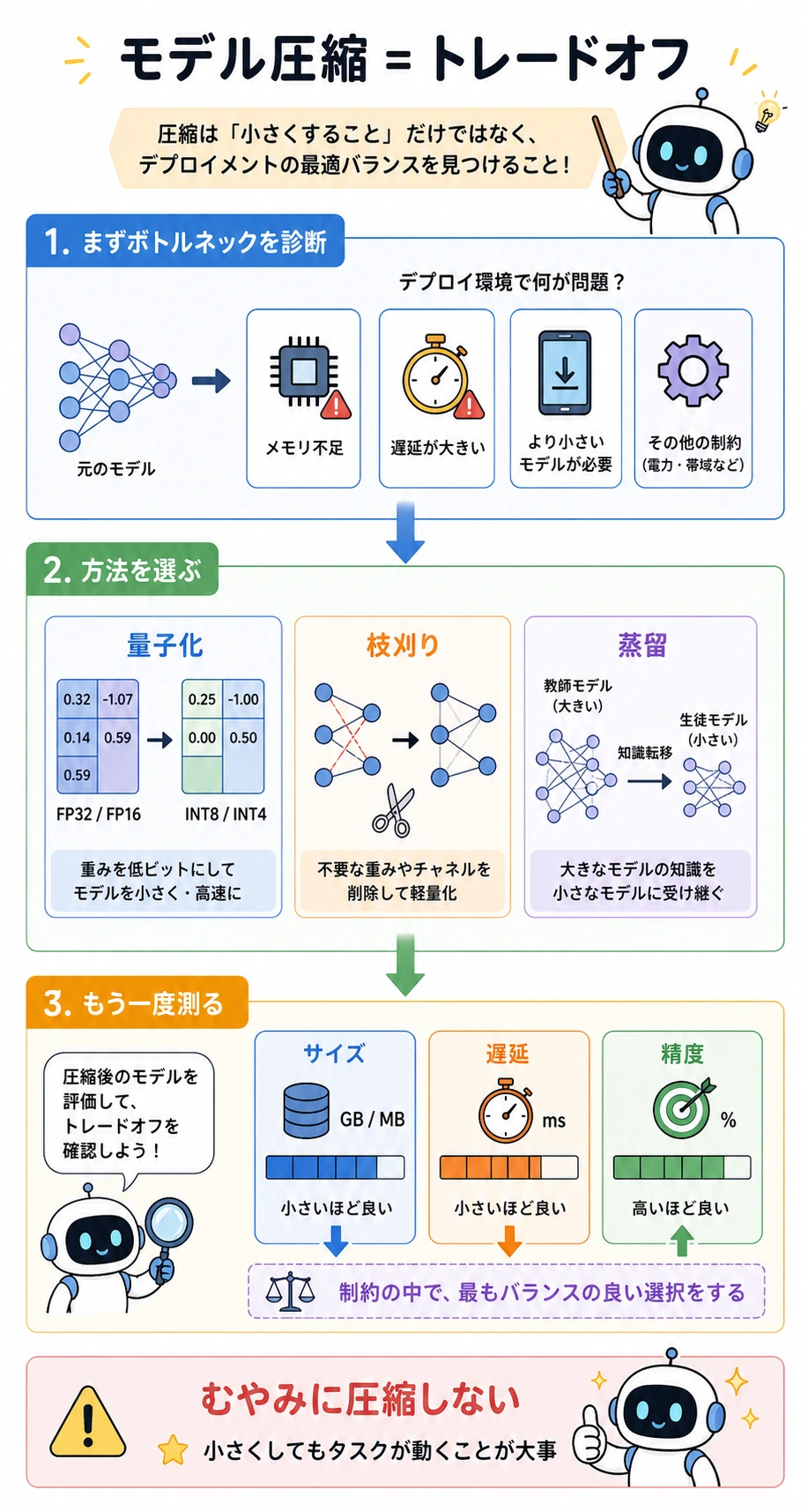
| ボトルネック | まず考える方法 | 理由 |
|---|---|---|
| memory が大きすぎる | quantization | parameter count は同じでも、1 値あたりの bit を減らせる |
| weight/channel に冗長性がある | pruning | ほとんど貢献しない structure を取り除く |
| 大きな teacher があり再学習できる | distillation | 小さな student に behavior をまねさせる |
| 圧縮後も latency が高い | まず profiling | data transfer や非対応 kernel が bottleneck かもしれない |
重要な習慣:
bottleneck を測る方法を選ぶsize, latency, metric を測り直す
3 つの圧縮ルート
Section titled “3 つの圧縮ルート”| 方法 | 何を変えるか | よくある benefit | 主な risk |
|---|---|---|---|
| Quantization | numeric precision | memory が小さくなり、推論が速くなることもある | accuracy drop、hardware support 問題 |
| Pruning | weights、channels、blocks | structure が本当に消えれば計算が減る | sparse speedup は全 hardware で出るわけではない |
| Distillation | training objective | teacher に近い小さな model | retraining と teacher outputs が必要 |
圧縮は、圧縮後も task が使える状態で初めて完了です。
実験 1:Quantization Error
Section titled “実験 1:Quantization Error”weights = [0.12, -1.87, 3.44, -0.03]
def fake_quantize(values, scale): return [round(v * scale) / scale for v in values]
def mae(a, b): return sum(abs(x - y) for x, y in zip(a, b)) / len(a)
q8_like = fake_quantize(weights, scale=16)q4_like = fake_quantize(weights, scale=4)
print("quant_error_lab")print("original:", weights)print("q8_like:", q8_like)print("q4_like:", q4_like)print("q8_mae:", round(mae(weights, q8_like), 4))print("q4_mae:", round(mae(weights, q4_like), 4))期待される出力:
quant_error_laboriginal: [0.12, -1.87, 3.44, -0.03]q8_like: [0.125, -1.875, 3.4375, 0.0]q4_like: [0.0, -1.75, 3.5, 0.0]q8_mae: 0.0106q4_mae: 0.0825より強い quantization は、ふつうより大きな numerical error を生みます。実務上の問いは、その後の task metric がまだ許容範囲かどうかです。
実験 2:Model Size を見積もる
Section titled “実験 2:Model Size を見積もる”import torchfrom torch import nn
model = nn.Sequential( nn.Linear(128, 64), nn.ReLU(), nn.Linear(64, 10),)
param_count = sum(p.numel() for p in model.parameters())
print("model_size_lab")print("params:", param_count)
for name, bits in [("fp32", 32), ("fp16", 16), ("int8", 8), ("int4", 4)]: mb = param_count * bits / 8 / 1024 / 1024 print(f"{name:>4}: {mb:.4f} MB")期待される出力:
model_size_labparams: 8906fp32: 0.0340 MBfp16: 0.0170 MBint8: 0.0085 MBint4: 0.0042 MB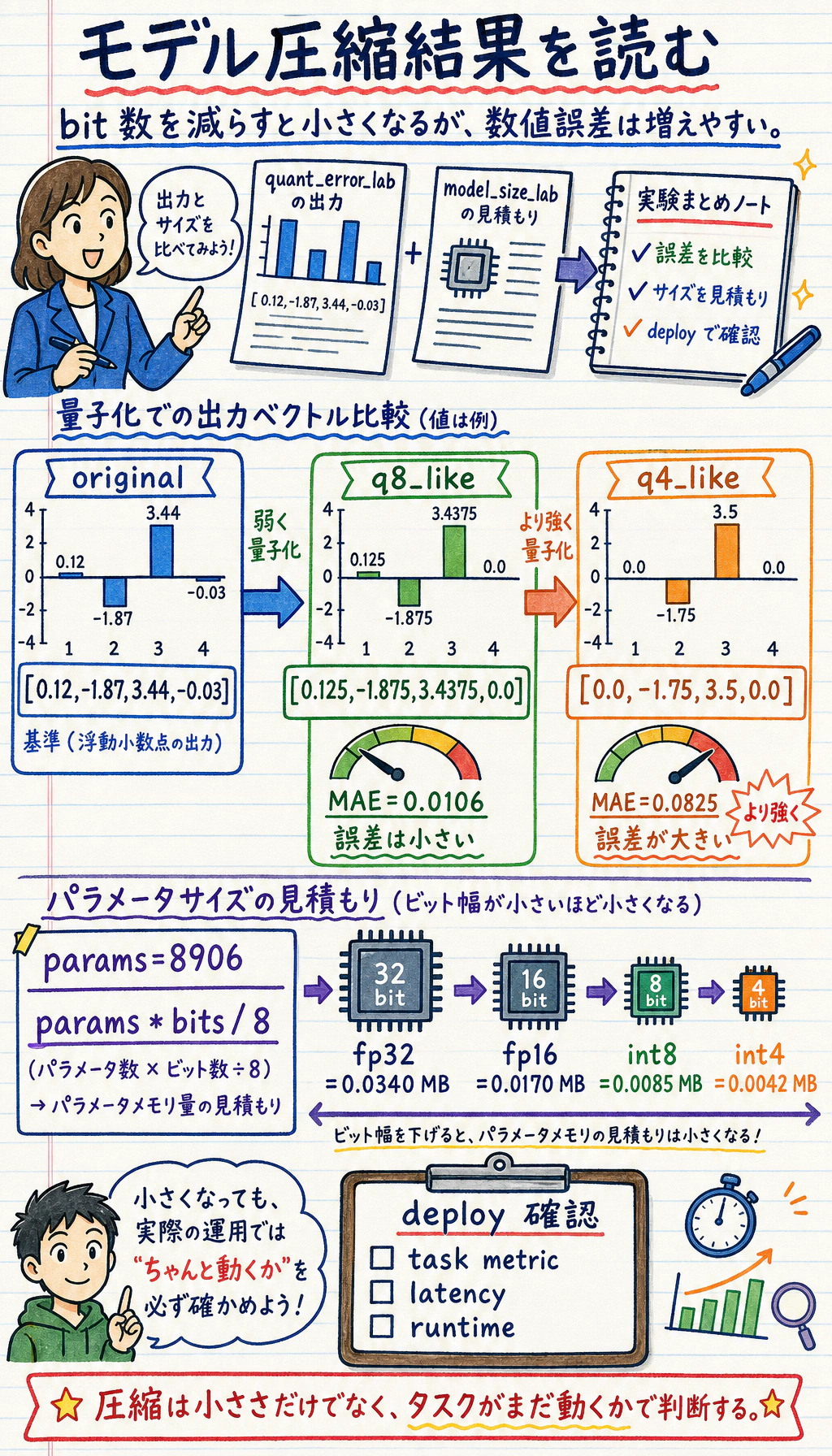
これは parameter size だけの概算です。実際の deploy size には metadata、tokenizer files、runtime overhead、engine-specific packaging も含まれる場合があります。
ルートの選び方
Section titled “ルートの選び方”| 状況 | 最初の action |
|---|---|
| model が memory に入らない | まず quantization を試す |
| model は入るが latency が高い | pruning 前に latency を profile する |
| channel に冗長性が多そう | structured pruning を考える |
| 小さい model に teacher の behavior を残したい | teacher model から distillation する |
| 圧縮後に metric が落ちすぎる | 圧縮を弱める、または fine-tune する |
pruning では、deploy では structured pruning が扱いやすいことが多いです。channel や block ごと取り除くほうが、random sparse weights より hardware に利用されやすいからです。
distillation のよくある pattern:
teacher logits or outputs -> student learns labels + teacher behavior圧縮実験で報告するもの
Section titled “圧縮実験で報告するもの”| Metric | Before | After | なぜ重要か |
|---|---|---|---|
| model size | 必須 | 必須 | memory は改善したか |
| latency | 必須 | 必須 | 推論は本当に速くなったか |
| throughput | あるとよい | あるとよい | service がより多くの request を扱えるか |
| task metric | 必須 | 必須 | quality は許容範囲か |
| hardware/runtime | 必須 | 必須 | compression は deployment stack に依存する |
task metric と latency なしに「int8 が動いた」とだけ報告しないでください。小さいことは、自動的に良いことではありません。
圧縮結果は before/after report として保存します。
- ベースラインサイズ
- 未記入
- 圧縮後サイズ
- 未記入
- ベースライン遅延
- 未記入
- 圧縮後レイテンシ
- 未記入
- ベースライン指標
- 未記入
- 圧縮後指標
- 未記入
- ランタイムハードウェア
- 未記入
- 判断
- 圧縮を維持、調整、却下する
よくある間違い
Section titled “よくある間違い”| 間違い | 直し方 |
|---|---|
| bottleneck を測る前に圧縮する | 先に memory、latency、metric を測る |
| quantization は必ず速くなると思う | hardware と runtime support を確認する |
| parameter size だけ数える | 必要なら tokenizer、runtime、packaging も含める |
| unstructured pruning で自動的な speedup を期待する | target hardware で benchmark する |
| 圧縮後の accuracy を無視する | task metric を before/after で比較する |
- 実験 1 で
scale=16をscale=32に変えてください。MAE は下がりますか。 - 実験 2 に 3 つ目の Linear layer を追加し、model size を再計算してください。
- memory には入るが latency が高すぎる model には、どの compression strategy を選びますか。
- size、latency、throughput、metric を含む before/after report template を書いてください。
- structured pruning が unstructured pruning より deploy しやすい理由を説明してください。
参考実装と解説
scale=32はより細かく量子化できるため MAE が下がる可能性があります。ただし weight distribution と scaling の設計に依存します。- Linear layer の parameter 数は
in_features x out_features + biasで計算し、層ごとに足します。model size は dtype の byte 数も掛けます。 - latency が問題なら、distillation、小さい architecture、operator fusion、batching、structured pruning などを優先します。ファイルサイズ削減だけでは速くなりません。
- report には圧縮前後の size、latency、throughput、主要 metric、hardware、測定方法を入れます。
- structured pruning は channel、head、layer などを丸ごと削るため、通常の hardware で速度向上に結びつきやすいです。unstructured sparsity は専用 kernel が必要です。
- 圧縮はデプロイ制約から始まります。
- Quantization は numeric precision を変えます。
- Pruning は model structure を変えます。
- Distillation は training process を変えます。
- 圧縮が成功したと言えるのは、deploy 後の quality と latency が要求を満たすときです。