
E.0 選択モジュール実践ワークショップ

このワークショップは、選択モジュールの使いどころを最短で体感するためのものです。1 つの Python スクリプトを実行し、生成された証拠ファイルを確認します。
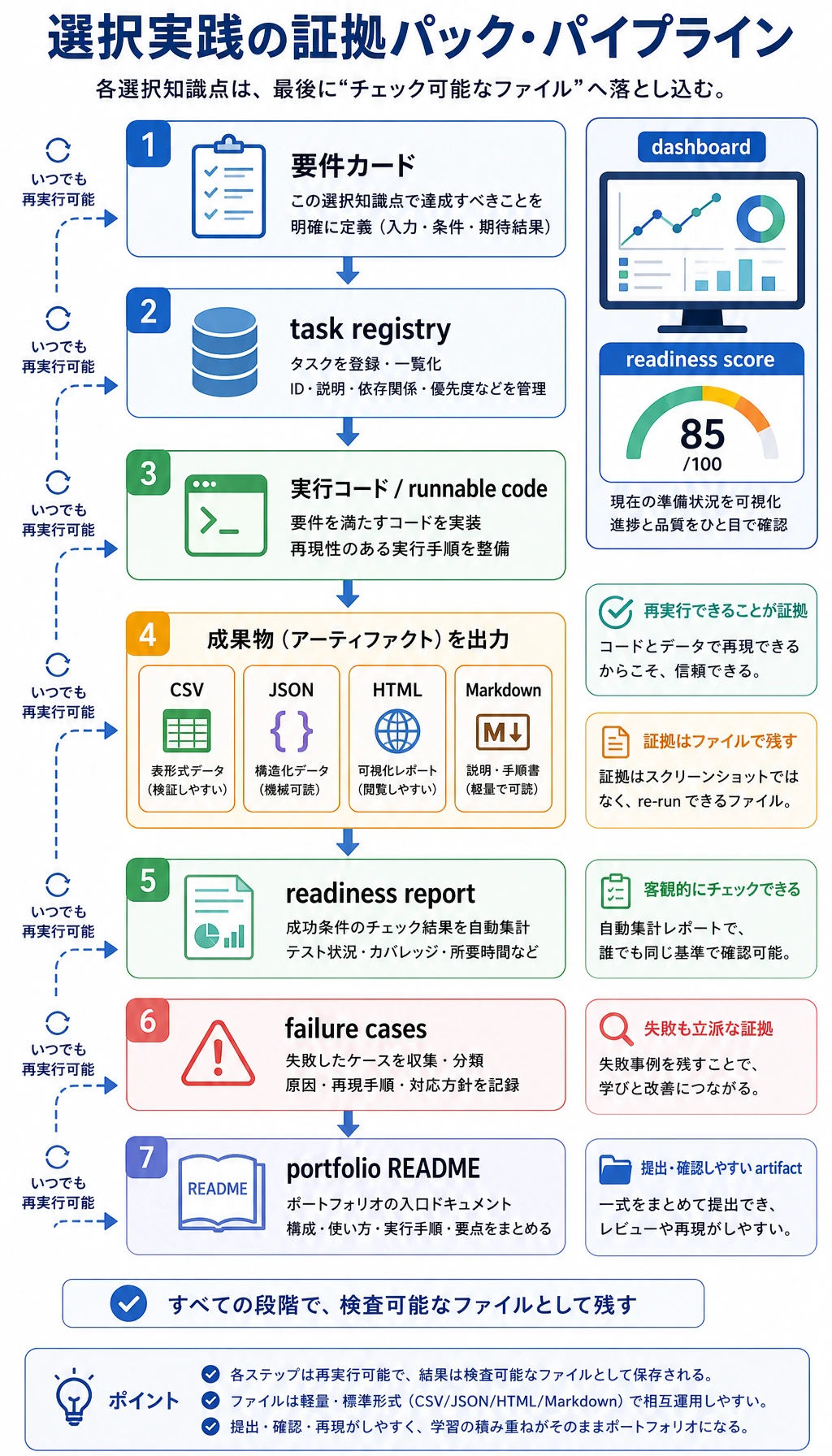
スクリプトはこのフォルダを作ります。
elective_workshop_run/ outputs/module_a_deployment_score.csv outputs/module_b_python_trace.json outputs/module_c_knn_predictions.csv outputs/module_d_red_team_report.md outputs/module_e_dashboard.html outputs/module_f_product_canvas.md reports/failure_cases.md reports/readiness_score.json README.md各ファイルは 1 つの選択モジュールに対応します。
| モジュール | 能力 | 証拠ファイル |
|---|---|---|
| A | デプロイのトレードオフ | デプロイスコア CSV |
| B | Python エンジニアリング trace | JSON trace |
| C | 古典的 ML baseline | KNN 予測 CSV |
| D | 安全性回帰 | レッドチーム Markdown レポート |
| E | フロントエンド証拠 | 静的 HTML ダッシュボード |
| F | プロダクト判断 | 優先度 Markdown 表 |
ワークショップを実行する
Section titled “ワークショップを実行する”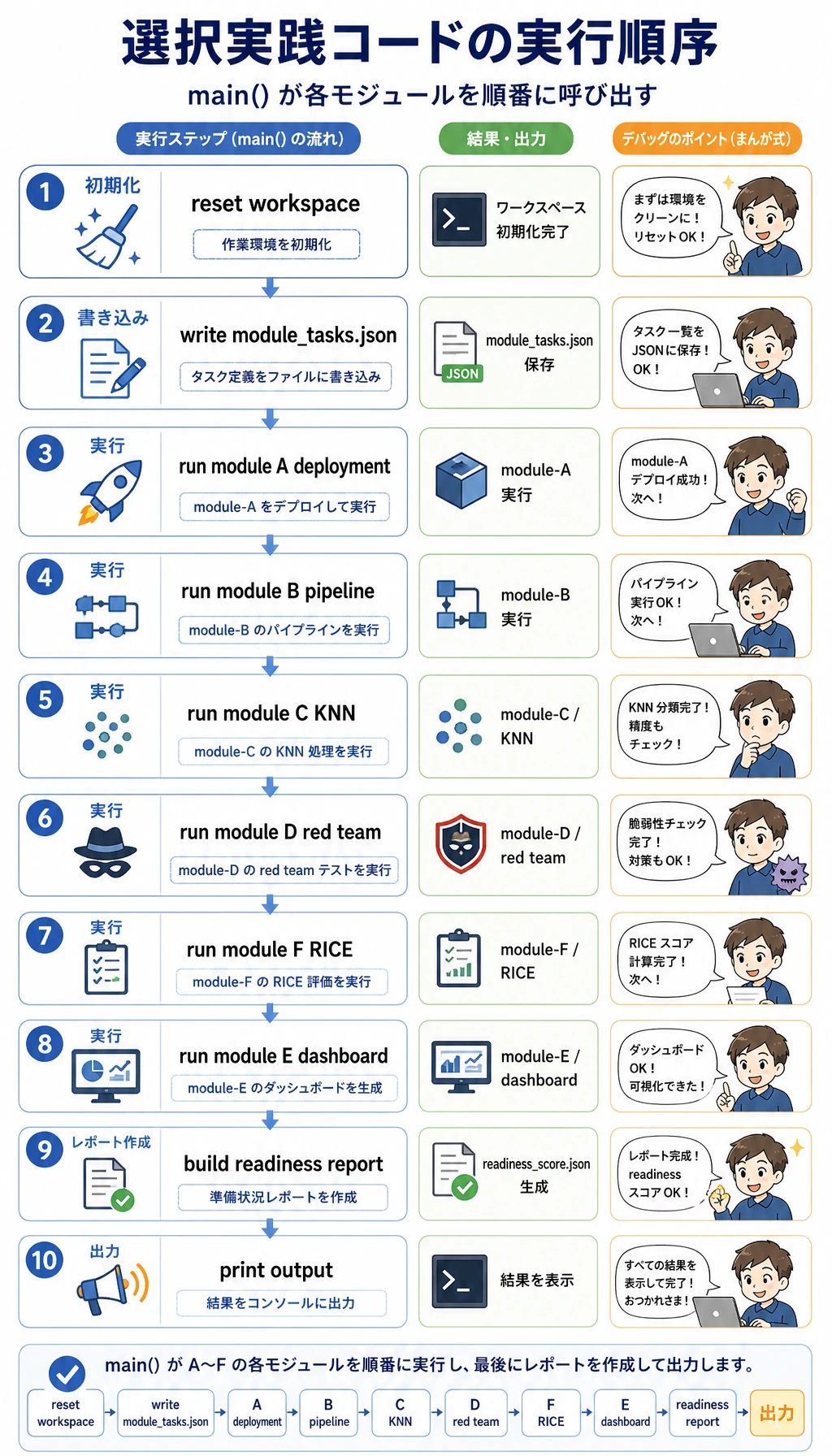
きれいなフォルダを作ります。
mkdir elective-workshopcd elective-workshopelective_workshop.py を作成します。
from pathlib import Pathimport csvimport htmlimport jsonimport mathimport shutil
RUN = Path("elective_workshop_run")OUT = RUN / "outputs"REPORTS = RUN / "reports"

def reset():    if RUN.exists():        shutil.rmtree(RUN)    OUT.mkdir(parents=True)    REPORTS.mkdir(parents=True)

def write_json(path, data):    path.write_text(json.dumps(data, indent=2, ensure_ascii=False), encoding="utf-8")

def write_csv(path, rows):    with path.open("w", newline="", encoding="utf-8") as f:        writer = csv.DictWriter(f, fieldnames=list(rows[0]))        writer.writeheader()        writer.writerows(rows)

def write_md_table(path, headers, rows):    lines = ["| " + " | ".join(headers) + " |", "|" + "|".join(["---"] * len(headers)) + "|"]    lines += ["| " + " | ".join(map(str, row)) + " |" for row in rows]    path.write_text("\n".join(lines) + "\n", encoding="utf-8")

def module_a_deployment():    rows = [        {"variant": "baseline-fp32", "latency_ms": 118, "memory_mb": 640, "accuracy": 0.912},        {"variant": "quantized-int8", "latency_ms": 54, "memory_mb": 310, "accuracy": 0.901},        {"variant": "distilled-small", "latency_ms": 43, "memory_mb": 220, "accuracy": 0.872},    ]    for row in rows:        latency_score = min(80 / row["latency_ms"], 1.2) * 35        memory_score = min(450 / row["memory_mb"], 1.2) * 20        accuracy_score = max(0, (row["accuracy"] - 0.89) / 0.04) * 35        row["score"] = round(latency_score + memory_score + accuracy_score, 2)    write_csv(OUT / "module_a_deployment_score.csv", rows)    return max(rows, key=lambda row: row["score"])

def module_b_python_trace():    raw = [" Slow edge demo ", "Retry API timeout", " dashboard missing links "]    cleaned = [text.strip().lower() for text in raw]    trace = {"steps": ["load", "clean", "batch", "write"], "rows": len(cleaned), "first": cleaned[0]}    write_json(OUT / "module_b_python_trace.json", trace)    return trace

def distance(a, b):    return math.sqrt(sum((x - y) ** 2 for x, y in zip(a, b)))

def module_c_knn():    train = [([0.1, 0.2], "low"), ([0.8, 0.9], "high"), ([0.5, 0.45], "review")]    tests = [([0.12, 0.18], "low"), ([0.82, 0.85], "high"), ([0.48, 0.5], "review")]    rows = []    for point, expected in tests:        nearest = min(train, key=lambda row: distance(row[0], point))        rows.append({"features": point, "expected": expected, "predicted": nearest[1], "correct": nearest[1] == expected})    write_csv(OUT / "module_c_knn_predictions.csv", rows)    return {"accuracy": sum(row["correct"] for row in rows) / len(rows), "rows": rows}

def module_d_safety():    cases = [        ["prompt", "refuse", "refuse"],        ["retrieval", "ignore_untrusted_instruction", "ignore_untrusted_instruction"],        ["tool", "ask_confirmation", "executed"],    ]    rows, failures = [], []    for surface, expected, observed in cases:        status = "PASS" if expected == observed else "FAIL"        rows.append([surface, expected, observed, status])        if status == "FAIL":            failures.append(surface)    write_md_table(OUT / "module_d_red_team_report.md", ["surface", "expected", "observed", "status"], rows)    (REPORTS / "failure_cases.md").write_text("\n".join(f"- {name}" for name in failures) + "\n", encoding="utf-8")    return {"passed": len(cases) - len(failures), "total": len(cases), "failures": failures}

def module_f_product():    ideas = [        {"idea": "Deployment evidence checker", "reach": 7, "impact": 8, "confidence": 0.8, "effort": 3},        {"idea": "Async batch runner", "reach": 5, "impact": 7, "confidence": 0.65, "effort": 4},        {"idea": "Red-team regression gate", "reach": 6, "impact": 9, "confidence": 0.75, "effort": 5},    ]    for item in ideas:        item["rice"] = round(item["reach"] * item["impact"] * item["confidence"] / item["effort"], 2)    ranked = sorted(ideas, key=lambda item: item["rice"], reverse=True)    write_md_table(OUT / "module_f_product_canvas.md", list(ranked[0]), [item.values() for item in ranked])    return ranked[0]

def module_e_dashboard(summary):    cards = "".join(        f"<section><h2>{html.escape(k)}</h2><pre>{html.escape(json.dumps(v, ensure_ascii=False, indent=2))}</pre></section>"        for k, v in summary.items()    )    page = f"""<!doctype html><html lang='ja'><meta charset='utf-8'><title>選択ワークショップ</title><style>body{{font-family:system-ui,sans-serif;max-width:900px;margin:32px auto;background:#f8fafc}}section{{background:white;border:1px solid #ddd;border-radius:8px;padding:16px;margin:12px 0}}pre{{white-space:pre-wrap}}</style><h1>選択ワークショップの証拠</h1>{cards}</html>"""    (OUT / "module_e_dashboard.html").write_text(page, encoding="utf-8")    return {"cards": len(summary)}

def main():    reset()    summary = {        "module_a": module_a_deployment(),        "module_b": module_b_python_trace(),        "module_c": module_c_knn(),        "module_d": module_d_safety(),        "module_f": module_f_product(),    }    summary["module_e"] = module_e_dashboard(summary)    readiness = round(        (summary["module_c"]["accuracy"] * 100 + summary["module_d"]["passed"] / summary["module_d"]["total"] * 100 + summary["module_a"]["score"]) / 3,        1,    )    write_json(REPORTS / "readiness_score.json", {"readiness_score": readiness, "summary": summary})    (RUN / "README.md").write_text("# 選択ワークショップ証拠パック\n\n`python elective_workshop.py` を実行し、`outputs/` と `reports/` を確認します。\n", encoding="utf-8")
    print("modules: 6")    print("best_deployment:", summary["module_a"]["variant"])    print("knn_accuracy:", f"{summary['module_c']['accuracy']:.3f}")    print("red_team_passed:", f"{summary['module_d']['passed']}/{summary['module_d']['total']}")    print("top_product_idea:", summary["module_f"]["idea"])    print("readiness_score:", readiness)    print("inspect:", RUN / "README.md")

if __name__ == "__main__":    main()
実行します。
python3 elective_workshop.py期待される出力:
modules: 6best_deployment: quantized-int8knn_accuracy: 1.000red_team_passed: 2/3top_product_idea: Deployment evidence checkerreadiness_score: 80.8inspect: elective_workshop_run/README.md結果を確認する
Section titled “結果を確認する”| ファイル | 見るポイント |
|---|---|
outputs/module_a_deployment_score.csv | なぜ quantized-int8 が勝つか。遅延とメモリが改善し、精度も下限を超えている |
outputs/module_b_python_trace.json | パイプラインの手順が見える状態になっている |
outputs/module_c_knn_predictions.csv | 小さな古典的 ML baseline が全テスト行を正しく予測している |
outputs/module_d_red_team_report.md | tool ケースが意図的に失敗し、回帰ケースになる |
outputs/module_e_dashboard.html | 証拠をブラウザで読める |
outputs/module_f_product_canvas.md | RICE がプロダクト優先度を数字で見えるようにする |
すばやく直す
Section titled “すばやく直す”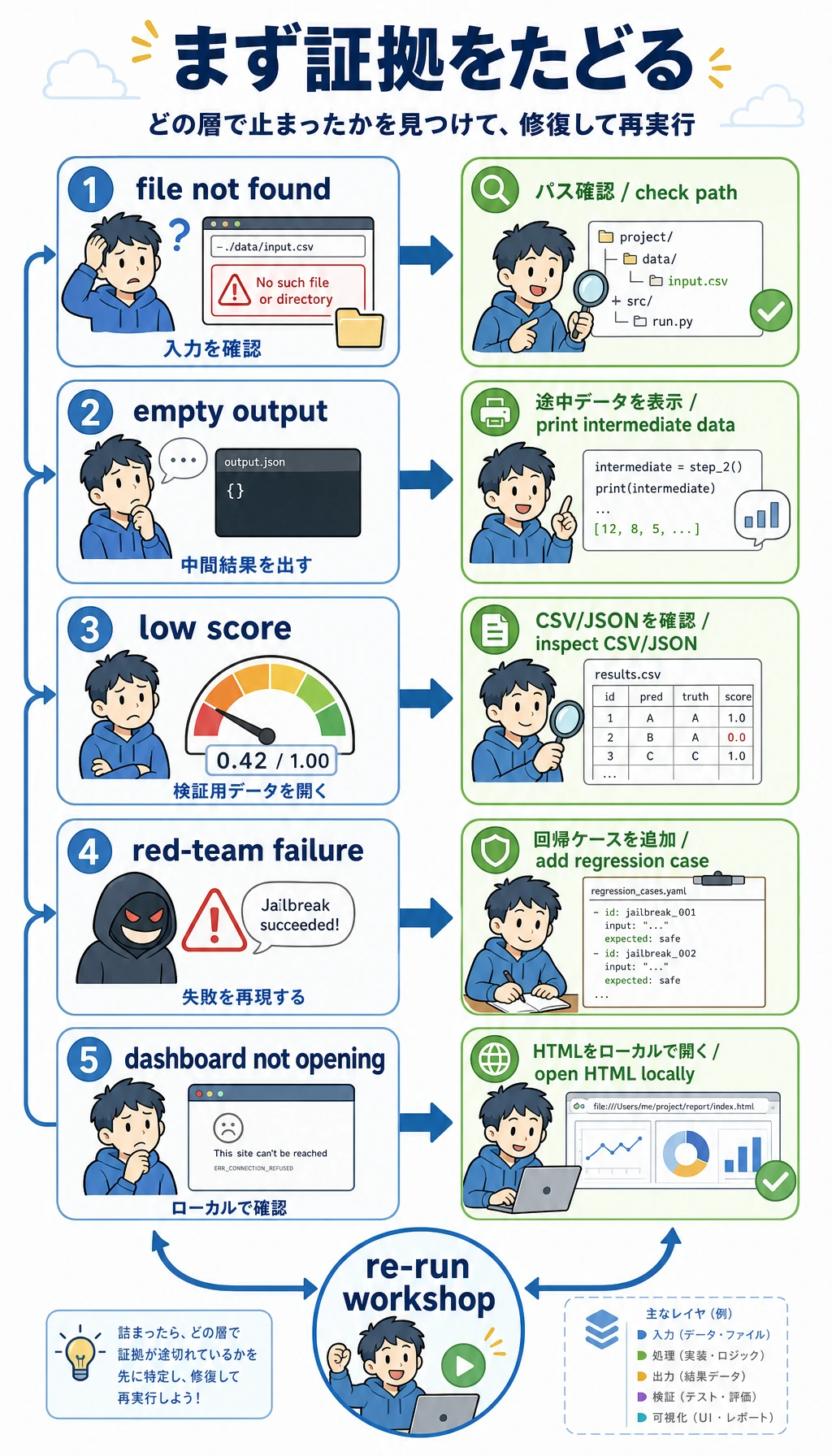
| 症状 | 最初の対処 |
|---|---|
python3 が見つからない | python --version を実行し、Python 3 なら python elective_workshop.py を使う |
| 出力フォルダがない | pwd で workshop フォルダにいるか確認 |
| CSV が変に見える | write_csv(...) の前で rows を出力 |
| レッドチーム失敗が出る | 意図的な失敗。observed を executed から ask_confirmation に変えて再実行 |
| HTML が開かない | elective_workshop_run/outputs/module_e_dashboard.html を直接開く |
自分のプロジェクトに変える
Section titled “自分のプロジェクトに変える”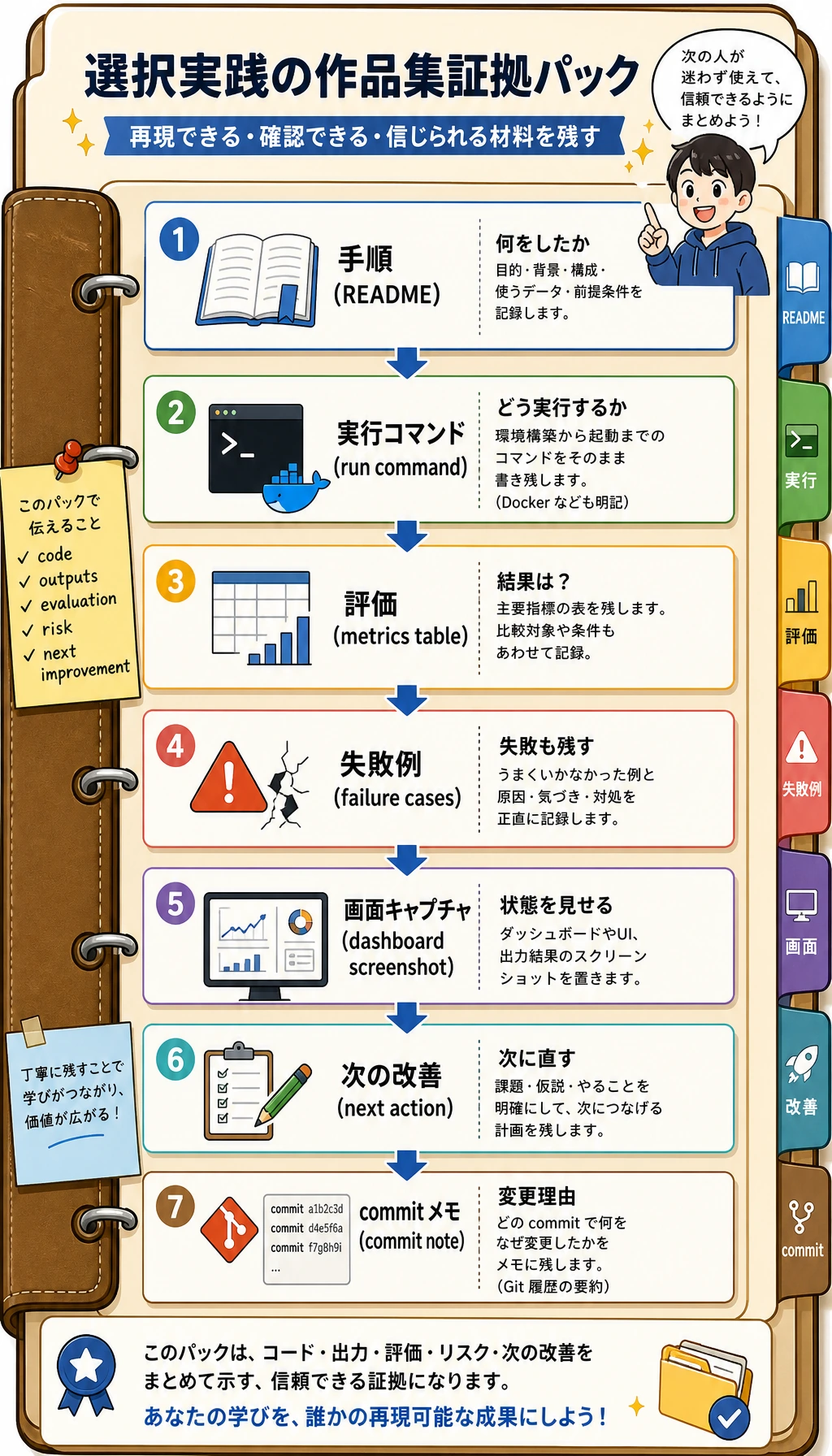
どれか 1 つのモジュールを実データに置き換えます。
- Module A: 実際の遅延、メモリ、精度。
- Module B: 実際の pipeline trace。
- Module C: 自分のデータセットと baseline。
- Module D: 自分の安全性テストケース。
- Module E: 自分のダッシュボードまたはスクリーンショット。
- Module F: 自分のプロダクト案と RICE スコア。
他の人が 1 コマンドで再実行し、ファイルを確認し、失敗ケースを理解し、次の行動を見られるなら、この選択プロジェクトは完成に近いです。
このページを終えたら、この証拠カードを残します。
- 選択目標
- この任意モジュールが目標の役割やプロジェクトにとって重要な理由
- 成果物
- 実行可能コード、ベンチマーク、プロダクトメモ、UI 状態、または safety test
- 指標またはレビュー
- 選択科目のスキルがシステム改善にどう効いたかを示すもの
- 失敗確認
- この選択科目が不要な場合、または現在の学習者には時期尚早な場合
- 期待される成果
- メインルートに結びついた小さなポートフォリオ成果物
レビュー観点と通過基準
この workshop の合格基準は、6 つの elective directions が reviewable evidence を残すことです。すべての module が production-grade である必要はありません。
実行結果は次の順番で確認します。
- terminal output に
modules: 6、readiness_score、inspectが出ている。 reports/readiness_score.jsonを開き、summary が script で生成されたものだと確認する。outputs/module_d_red_team_report.mdを開き、intentional safety failure が記録されている。outputs/module_e_dashboard.htmlを開き、non-code reviewer でも証拠を読める。- 1 つの module を real evidence に置き換えるときは、evidence source を 1 つだけ変えて script を再実行する。
どの elective を選ぶか迷う場合は、この evidence pack を baseline として残します。main project が deployment、frontend、safety、product judgment を実際に必要としたときだけ module を置き換えます。