
12.5.3 実践:再現可能なマルチモーダル・クリエイティブパッケージを作る
本物の画像、動画、音声モデルにつなぐ前に、まず小さなワークフローを作ります。入力、Prompt 設計、資産生成、バージョン記録、レビュー、書き出し、失敗例まで含むプロダクトの流れを確認します。
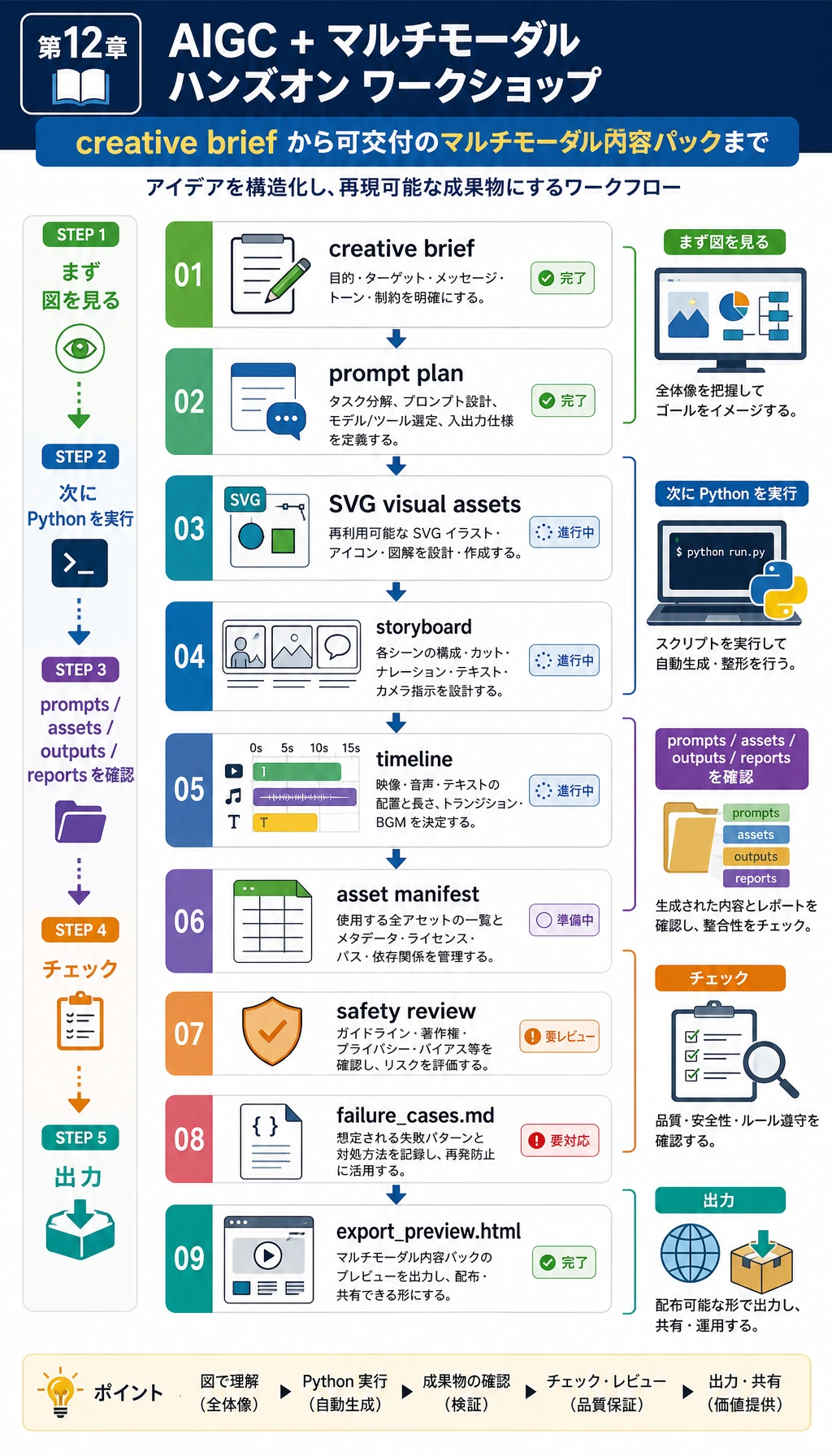
このワークショップは Python 標準ライブラリだけを使い、ローカルで SVG の仮資産を生成します。これは意図的です。SVG baseline を画像生成、TTS、動画生成、マルチモーダルモデル API に置き換える前に、まずワークフローを再現可能にすることが目的です。
次のフォルダを作ります。
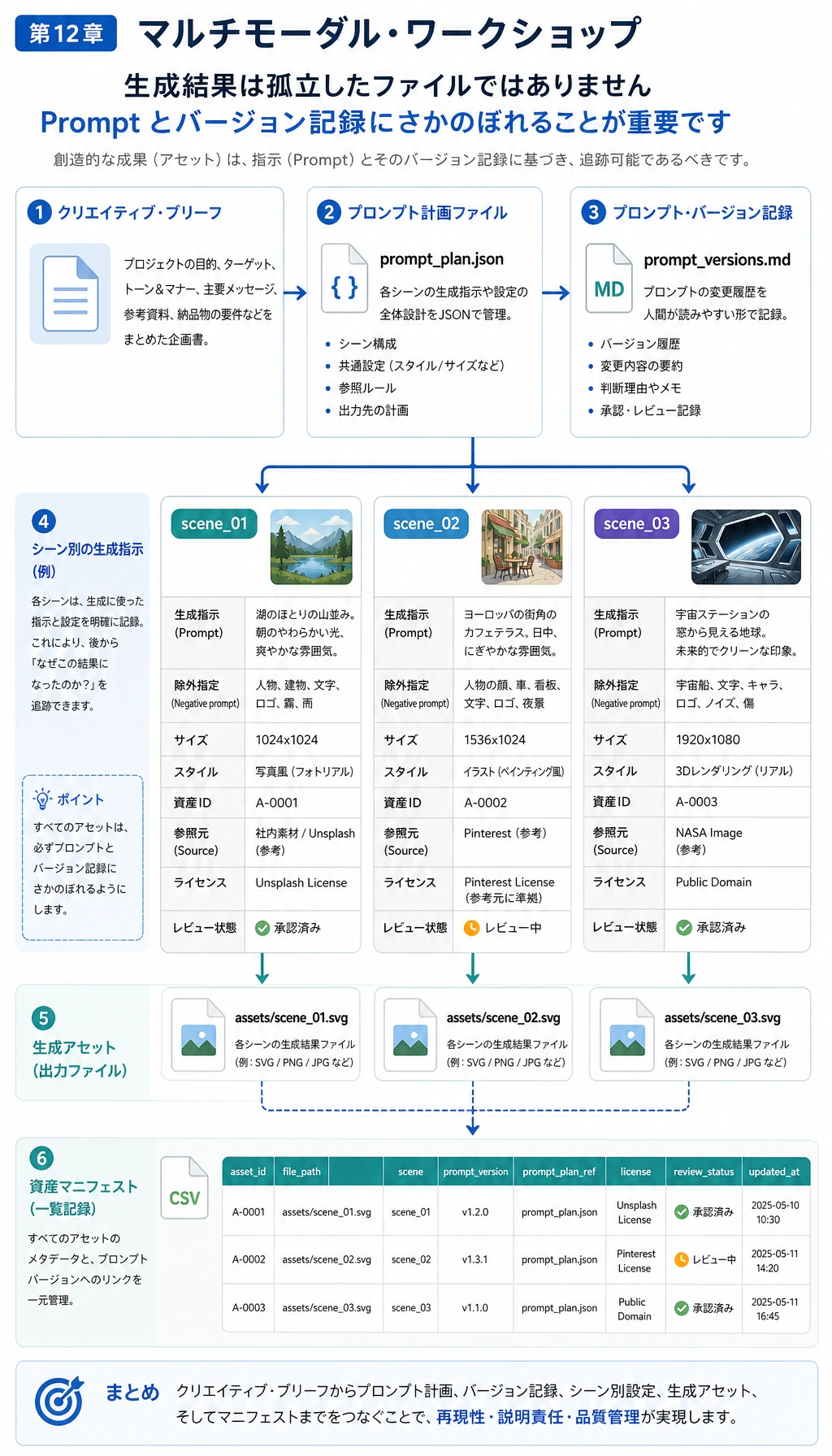
multimodal_workshop_run/ inputs/ creative_brief.json prompts/ prompt_plan.json prompt_versions.md assets/ scene_01.svg scene_02.svg scene_03.svg outputs/ storyboard.json timeline.csv content_package.json export_preview.html reports/ asset_manifest.csv safety_review.md failure_cases.md README.md一番大事なのは SVG そのものではありません。各生成資産に Prompt、出典記録、レビュー結果、書き出し境界、失敗メモが残ることです。
ステップ 0:プロダクトループを読む
Section titled “ステップ 0:プロダクトループを読む”実践ループは次の通りです。
- creative brief を書く。
- brief を scene ごとの Prompt に分ける。
- baseline のビジュアル資産を生成する。
- storyboard と timeline を作る。
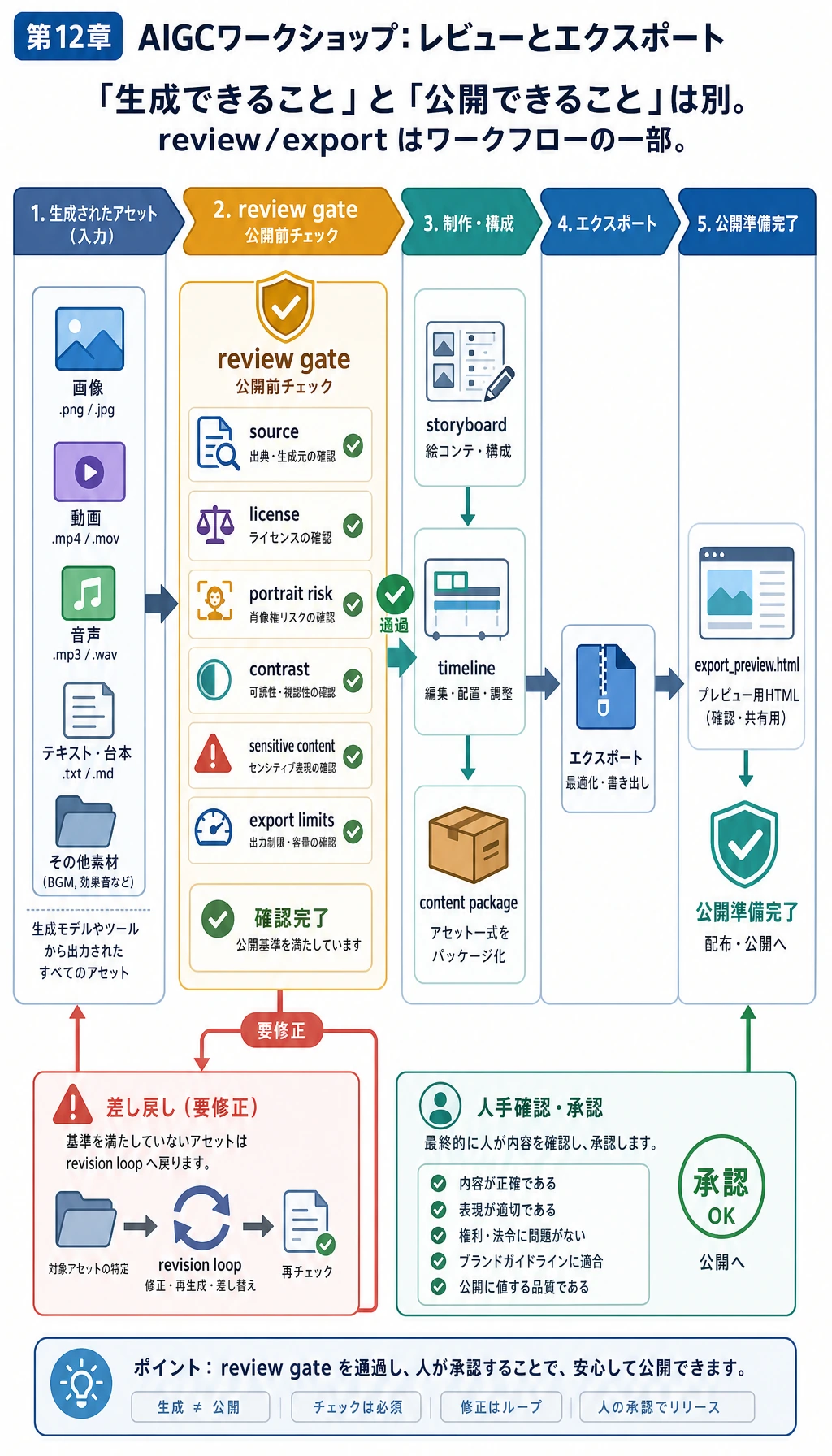
- 資産の出典、ライセンス、肖像リスク、コントラスト、書き出し制限を確認する。
- HTML プレビューと content package を書き出す。
- 次の改善のために失敗例を保存する。
ステップ 1:フォルダとスクリプトを作る
Section titled “ステップ 1:フォルダとスクリプトを作る”mkdir multimodal-workshopcd multimodal-workshoppython3 -m venv .venvsource .venv/bin/activatepip install は不要です。multimodal_workshop.py を作り、下の完全なスクリプトを貼り付けます。
ステップ 2:完全なスクリプトを実行する
Section titled “ステップ 2:完全なスクリプトを実行する”from __future__ import annotations
import csvimport htmlimport jsonimport shutilfrom pathlib import Path
RUN_DIR = Path("multimodal_workshop_run")if RUN_DIR.exists(): shutil.rmtree(RUN_DIR)INPUT_DIR = RUN_DIR / "inputs"PROMPT_DIR = RUN_DIR / "prompts"ASSET_DIR = RUN_DIR / "assets"OUTPUT_DIR = RUN_DIR / "outputs"REPORT_DIR = RUN_DIR / "reports"for folder in [INPUT_DIR, PROMPT_DIR, ASSET_DIR, OUTPUT_DIR, REPORT_DIR]: folder.mkdir(parents=True, exist_ok=True)
BRIEF = { "project_id": "course-launch-multimodal-kit", "topic": "AI learning assistant launch kit", "audience": "beginners learning AI full-stack development", "goal": "create a small content package for a course landing page and short video storyboard", "tone": "clear, practical, optimistic", "deliverables": ["poster SVG", "three-shot storyboard", "review checklist", "export preview HTML"], "constraints": ["no real person likeness", "no external copyrighted assets", "show source and review records"],}
SCENES = [ { "id": "scene_01", "title": "From scattered materials to one learning assistant", "visual_prompt": "A clean course dashboard combining text notes, screenshots, and voice notes into one AI learning assistant workspace.", "copy": "Turn scattered study materials into a guided AI learning workflow.", "duration_sec": 5, "background": "#f7f3e8", "accent": "#2563eb", "text_color": "#1f2937", "source": "script_generated_svg", "license": "generated_by_script_for_course_demo", "uses_real_person": False, }, { "id": "scene_02", "title": "Review before export", "visual_prompt": "A multimodal review desk with prompt versions, asset records, copyright checks, and export options.", "copy": "Save prompts, assets, human review, and export limits before sharing.", "duration_sec": 6, "background": "#e8eef7", "accent": "#93c5fd", "text_color": "#bfdbfe", "source": "script_generated_svg", "license": "generated_by_script_for_course_demo", "uses_real_person": False, }, { "id": "scene_03", "title": "Ready for a portfolio demo", "visual_prompt": "A final portfolio package showing poster, storyboard, safety checklist, and README ready for presentation.", "copy": "A usable AIGC project is a workflow, not a single pretty output.", "duration_sec": 5, "background": "#ecfdf5", "accent": "#059669", "text_color": "#064e3b", "source": "script_generated_svg", "license": "generated_by_script_for_course_demo", "uses_real_person": False, },]
REVIEW_RULES = [ "source_recorded", "license_recorded", "no_real_person_likeness", "sufficient_contrast", "export_limits_written",]
def write_json(path: Path, data: object) -> None: path.write_text(json.dumps(data, indent=2, ensure_ascii=False), encoding="utf-8")
def write_csv(path: Path, rows: list[dict[str, object]], fieldnames: list[str]) -> None: with path.open("w", newline="", encoding="utf-8") as f: writer = csv.DictWriter(f, fieldnames=fieldnames) writer.writeheader() writer.writerows(rows)
def hex_to_rgb(color: str) -> tuple[int, int, int]: color = color.lstrip("#") return tuple(int(color[i:i + 2], 16) for i in (0, 2, 4))
def relative_luminance(color: str) -> float: def channel(value: int) -> float: value = value / 255 return value / 12.92 if value <= 0.03928 else ((value + 0.055) / 1.055) ** 2.4
r, g, b = (channel(v) for v in hex_to_rgb(color)) return 0.2126 * r + 0.7152 * g + 0.0722 * b
def contrast_ratio(left: str, right: str) -> float: l1 = relative_luminance(left) l2 = relative_luminance(right) lighter = max(l1, l2) darker = min(l1, l2) return (lighter + 0.05) / (darker + 0.05)
def wrap_text(text: str, width: int = 46) -> list[str]: words = text.split() lines = [] current = "" for word in words: trial = f"{current} {word}".strip() if len(trial) > width and current: lines.append(current) current = word else: current = trial if current: lines.append(current) return lines
def svg_text_lines(lines: list[str], x: int, y: int, size: int, fill: str) -> str: chunks = [] for index, line in enumerate(lines): chunks.append( f'<text x="{x}" y="{y + index * int(size * 1.35)}" font-size="{size}" fill="{fill}" font-family="Arial, sans-serif">{html.escape(line)}</text>' ) return "\n".join(chunks)
def create_svg(scene: dict[str, object], path: Path) -> None: title_lines = wrap_text(str(scene["title"]), 30) copy_lines = wrap_text(str(scene["copy"]), 44) prompt_lines = wrap_text(str(scene["visual_prompt"]), 58) svg = f'''<svg xmlns="http://www.w3.org/2000/svg" width="1200" height="675" viewBox="0 0 1200 675"> <rect width="1200" height="675" fill="{scene['background']}"/> <rect x="64" y="64" width="1072" height="547" rx="24" fill="#ffffff" opacity="0.86"/> <circle cx="1000" cy="154" r="74" fill="{scene['accent']}" opacity="0.18"/> <circle cx="964" cy="204" r="42" fill="{scene['accent']}" opacity="0.28"/> <rect x="96" y="110" width="236" height="156" rx="18" fill="{scene['accent']}" opacity="0.16"/> <rect x="126" y="142" width="176" height="18" rx="9" fill="{scene['accent']}" opacity="0.62"/> <rect x="126" y="178" width="132" height="18" rx="9" fill="{scene['accent']}" opacity="0.42"/> <rect x="126" y="214" width="154" height="18" rx="9" fill="{scene['accent']}" opacity="0.42"/> <path d="M370 188 C470 104, 606 104, 706 188 S940 272, 1040 188" fill="none" stroke="{scene['accent']}" stroke-width="12" stroke-linecap="round" opacity="0.48"/> <rect x="762" y="112" width="256" height="176" rx="22" fill="{scene['accent']}" opacity="0.12"/> <path d="M806 230 L864 170 L916 222 L946 194 L990 244" fill="none" stroke="{scene['accent']}" stroke-width="10" stroke-linecap="round" stroke-linejoin="round" opacity="0.68"/> {svg_text_lines(title_lines, 96, 352, 42, scene['text_color'])} {svg_text_lines(copy_lines, 96, 458, 28, scene['text_color'])} <rect x="96" y="548" width="1008" height="38" rx="19" fill="#111827" opacity="0.06"/> {svg_text_lines(prompt_lines, 118, 574, 18, '#374151')}</svg>''' path.write_text(svg, encoding="utf-8")
def build_prompt_plan(brief: dict[str, object], scenes: list[dict[str, object]]) -> list[dict[str, object]]: plan = [] for index, scene in enumerate(scenes, start=1): plan.append({ "version": f"v{index}", "scene_id": scene["id"], "task": "image_generation_prompt", "prompt": scene["visual_prompt"], "negative_prompt": "no real person likeness, no brand logo, no copyrighted character, no unreadable text", "size": "1200x675", "style": brief["tone"], "status": "ready_for_model_or_svg_baseline", }) return plan
def review_scene(scene: dict[str, object]) -> tuple[dict[str, object], list[str]]: contrast = contrast_ratio(str(scene["background"]), str(scene["text_color"])) checks = { "source_recorded": bool(scene.get("source")), "license_recorded": bool(scene.get("license")), "no_real_person_likeness": not bool(scene.get("uses_real_person")), "sufficient_contrast": contrast >= 4.5, "export_limits_written": True, } failures = [name for name, passed in checks.items() if not passed] return { "scene_id": scene["id"], "title": scene["title"], "source": scene["source"], "license": scene["license"], "contrast_ratio": round(contrast, 2), "passed": not failures, **checks, }, failures
def build_storyboard(scenes: list[dict[str, object]]) -> list[dict[str, object]]: elapsed = 0 storyboard = [] for scene in scenes: start = elapsed end = start + int(scene["duration_sec"]) elapsed = end storyboard.append({ "scene_id": scene["id"], "start_sec": start, "end_sec": end, "visual": scene["visual_prompt"], "voiceover": scene["copy"], "asset_file": f"assets/{scene['id']}.svg", }) return storyboard
def build_html_preview(brief: dict[str, object], scenes: list[dict[str, object]], review_rows: list[dict[str, object]]) -> str: cards = [] for scene, review in zip(scenes, review_rows): status = "合格" if review["passed"] else "要確認" cards.append(f'''<section class="card"> <img src="../assets/{scene['id']}.svg" alt="{html.escape(str(scene['title']))}"> <h2>{html.escape(str(scene['title']))}</h2> <p>{html.escape(str(scene['copy']))}</p> <p><strong>レビュー:</strong> {status} | コントラスト {review['contrast_ratio']}</p></section>''') return f'''<!doctype html><html lang="ja"><head> <meta charset="utf-8"> <title>{html.escape(str(brief['topic']))}</title> <style> body {{ font-family: Arial, sans-serif; margin: 0; background: #f8fafc; color: #111827; }} main {{ max-width: 960px; margin: 0 auto; padding: 32px; }} .card {{ background: white; border: 1px solid #e5e7eb; border-radius: 8px; padding: 18px; margin-bottom: 18px; }} img {{ width: 100%; border-radius: 6px; border: 1px solid #e5e7eb; }} </style></head><body><main> <h1>{html.escape(str(brief['topic']))}</h1> <p>{html.escape(str(brief['goal']))}</p> {''.join(cards)}</main></body></html>'''
def main() -> None: write_json(INPUT_DIR / "creative_brief.json", BRIEF) prompt_plan = build_prompt_plan(BRIEF, SCENES) write_json(PROMPT_DIR / "prompt_plan.json", prompt_plan) prompt_md = ["# Prompt Versions", ""] for item in prompt_plan: prompt_md.append(f"## {item['version']} - {item['scene_id']}") prompt_md.append(f"- Prompt: {item['prompt']}") prompt_md.append(f"- Negative prompt: {item['negative_prompt']}") prompt_md.append(f"- Status: {item['status']}") prompt_md.append("") (PROMPT_DIR / "prompt_versions.md").write_text("\n".join(prompt_md), encoding="utf-8")
review_rows = [] failure_cases = [] for scene in SCENES: asset_path = ASSET_DIR / f"{scene['id']}.svg" create_svg(scene, asset_path) review, failures = review_scene(scene) review_rows.append(review) if failures: failure_cases.append({ "scene_id": scene["id"], "title": scene["title"], "failures": failures, "suspected_cause": "visual design or missing asset metadata does not meet export rules", "fix_action": "adjust colors, source records, license notes, or review thresholds, then rerun the script", })
write_csv(REPORT_DIR / "asset_manifest.csv", review_rows, ["scene_id", "title", "source", "license", "contrast_ratio", "passed", *REVIEW_RULES]) storyboard = build_storyboard(SCENES) write_json(OUTPUT_DIR / "storyboard.json", storyboard) write_csv(OUTPUT_DIR / "timeline.csv", storyboard, ["scene_id", "start_sec", "end_sec", "visual", "voiceover", "asset_file"]) write_json(OUTPUT_DIR / "content_package.json", {"brief": BRIEF, "prompts": prompt_plan, "storyboard": storyboard, "review": review_rows}) (OUTPUT_DIR / "export_preview.html").write_text(build_html_preview(BRIEF, SCENES, review_rows), encoding="utf-8")
safety_lines = ["# Safety Review", "", "| Scene | Source | License | Contrast | Result |", "|---|---|---|---:|---|"] for row in review_rows: result = "PASS" if row["passed"] else "NEEDS REVIEW" safety_lines.append(f"| {row['scene_id']} | {row['source']} | {row['license']} | {row['contrast_ratio']} | {result} |") safety_lines.append("") safety_lines.append("書き出し制限:コースデモ専用です。公開前に、SVG のベースライン素材をレビュー済みのモデル出力へ置き換えてください。") (REPORT_DIR / "safety_review.md").write_text("\n".join(safety_lines), encoding="utf-8")
failure_lines = ["# 失敗ケース", ""] if not failure_cases: failure_lines.append("失敗ケースは発生しませんでした。ポートフォリオ報告として使う前に、境界サンプルを追加してください。") for index, case in enumerate(failure_cases, start=1): failure_lines.append(f"## ケース {index}:{case['scene_id']}") failure_lines.append(f"- タイトル:{case['title']}") failure_lines.append(f"- 失敗項目:{', '.join(case['failures'])}") failure_lines.append(f"- 推定原因:{case['suspected_cause']}") failure_lines.append(f"- 修正アクション:{case['fix_action']}") failure_lines.append("") (REPORT_DIR / "failure_cases.md").write_text("\n".join(failure_lines), encoding="utf-8")
readme = f"""# マルチモーダルワークショップ実行
実行コマンド:
~~~bashpython multimodal_workshop.py~~~
成果物:
- inputs/creative_brief.json- prompts/prompt_plan.json and prompts/prompt_versions.md- assets/*.svg- outputs/storyboard.json- outputs/export_preview.html- reports/asset_manifest.csv- reports/safety_review.md- reports/failure_cases.md
Summary:
- scenes: {len(SCENES)}- generated_svg_assets: {len(list(ASSET_DIR.glob('*.svg')))}- review_passed: {sum(1 for row in review_rows if row['passed'])}/{len(review_rows)}- failure_cases: {len(failure_cases)}""" (RUN_DIR / "README.md").write_text(readme, encoding="utf-8")
print("STEP 1: project brief") print(f"topic: {BRIEF['topic']}") print(f"deliverables: {len(BRIEF['deliverables'])}") print("") print("STEP 2: generated assets") print(f"svg_assets: {len(list(ASSET_DIR.glob('*.svg')))}") print(f"storyboard_scenes: {len(storyboard)}") print(f"review_passed: {sum(1 for row in review_rows if row['passed'])}/{len(review_rows)}") print(f"failure_cases: {len(failure_cases)}") print("") print("STEP 3: files to inspect") print(f"prompt_plan: {PROMPT_DIR / 'prompt_plan.json'}") print(f"asset_manifest: {REPORT_DIR / 'asset_manifest.csv'}") print(f"safety_review: {REPORT_DIR / 'safety_review.md'}") print(f"export_preview: {OUTPUT_DIR / 'export_preview.html'}")
if __name__ == "__main__": main()実行します。
python multimodal_workshop.py期待される出力:
STEP 1: project brieftopic: AI learning assistant launch kitdeliverables: 4
STEP 2: generated assetssvg_assets: 3storyboard_scenes: 3review_passed: 2/3failure_cases: 1
STEP 3: files to inspectprompt_plan: multimodal_workshop_run/prompts/prompt_plan.jsonasset_manifest: multimodal_workshop_run/reports/asset_manifest.csvsafety_review: multimodal_workshop_run/reports/safety_review.mdexport_preview: multimodal_workshop_run/outputs/export_preview.html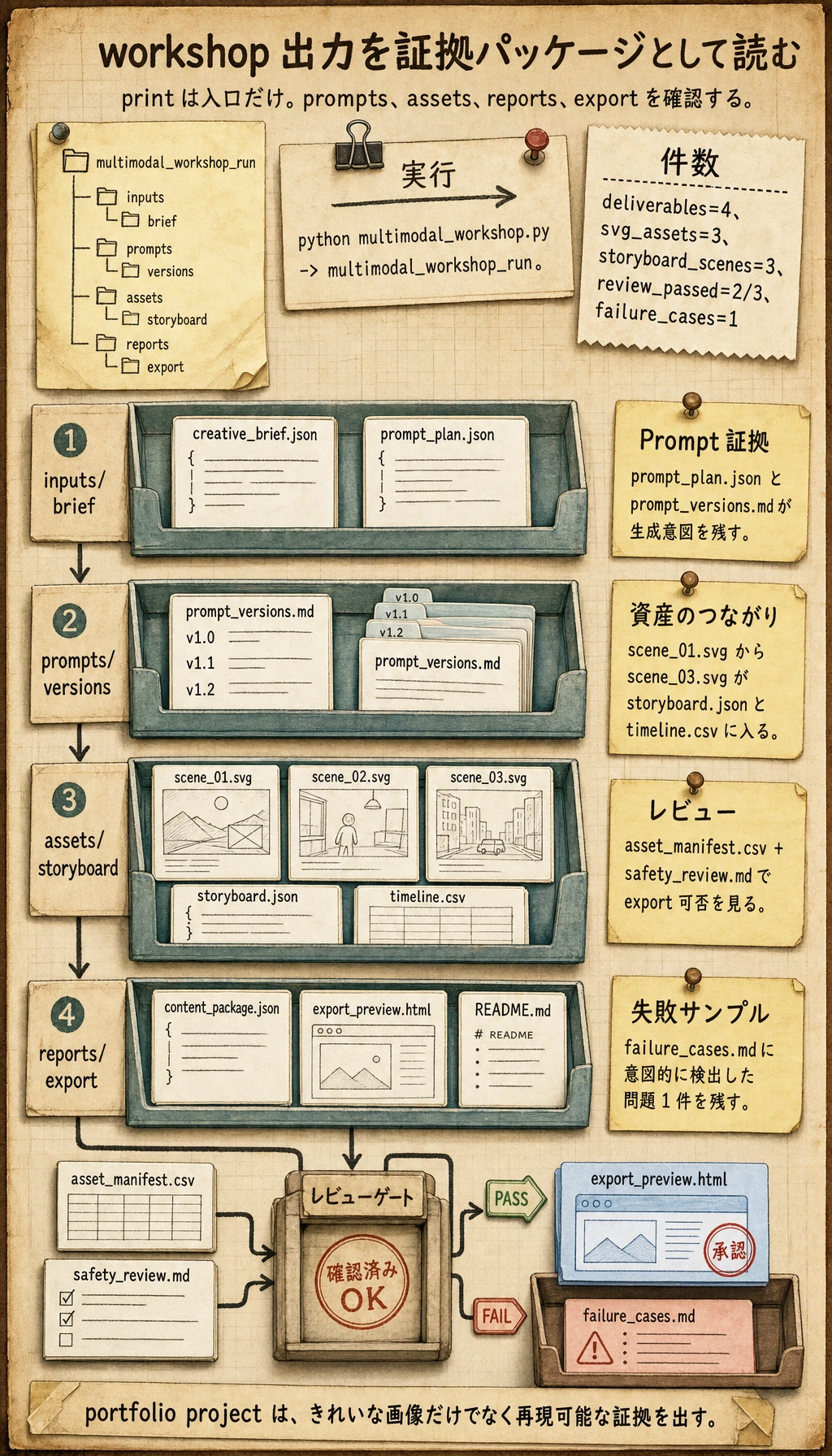
ステップ 3:Brief と Prompt 記録を確認する
Section titled “ステップ 3:Brief と Prompt 記録を確認する”inputs/creative_brief.json を開きます。これは構造化されたユーザー要件です。topic、audience、goal、tone、deliverables、constraints が入っています。
次に prompts/prompt_plan.json と prompts/prompt_versions.md を開きます。実際の AIGC プロジェクトでは、画像や動画を生成したあとに Prompt を失ってはいけません。Prompt もプロジェクト証拠の一部です。
ステップ 4:資産と storyboard を確認する
Section titled “ステップ 4:資産と storyboard を確認する”ブラウザで assets/scene_01.svg、assets/scene_02.svg、assets/scene_03.svg を開きます。これはスクリプトで生成した基線 SVG 素材で、ワークフロー上では生成資産として扱います。
outputs/storyboard.json と outputs/timeline.csv を開きます。これらのファイルは、ビジュアル資産が短い動画やランディングページの流れにどう変わるかを説明します。
ステップ 5:レビュー関連ファイルを読む
Section titled “ステップ 5:レビュー関連ファイルを読む”reports/asset_manifest.csv を開きます。各行には次が入っています。
| フィールド | 意味 |
|---|---|
source | 資産の出どころ |
license | このデモで使えるか |
contrast_ratio | テキストが十分に読めるか |
passed | 書き出しへ進めるか |
次に reports/safety_review.md を開きます。このファイルには、著作権、肖像権、コンテンツ安全性、書き出し境界を記録します。
ステップ 6:書き出しプレビューを開く
Section titled “ステップ 6:書き出しプレビューを開く”ブラウザで outputs/export_preview.html を開きます。完全なアプリではありませんが、creative requirement から書き出し可能な package まで進めたことを示せます。
実際に発展させるときは、次を置き換えられます。
| ベースラインモジュール | 実プロジェクトでの置き換え |
|---|---|
| 基線 SVG 素材 | 画像生成 API またはローカル画像モデル |
| Storyboard JSON | 動画生成ワークフロー |
| コピー文 | LLM 生成コピーと人間レビュー |
| 安全チェックリスト | 人間レビューとポリシーチェック |
| HTML preview | フロントエンドのクリエイティブワークスペース |
ステップ 7:失敗レポートを読む
Section titled “ステップ 7:失敗レポートを読む”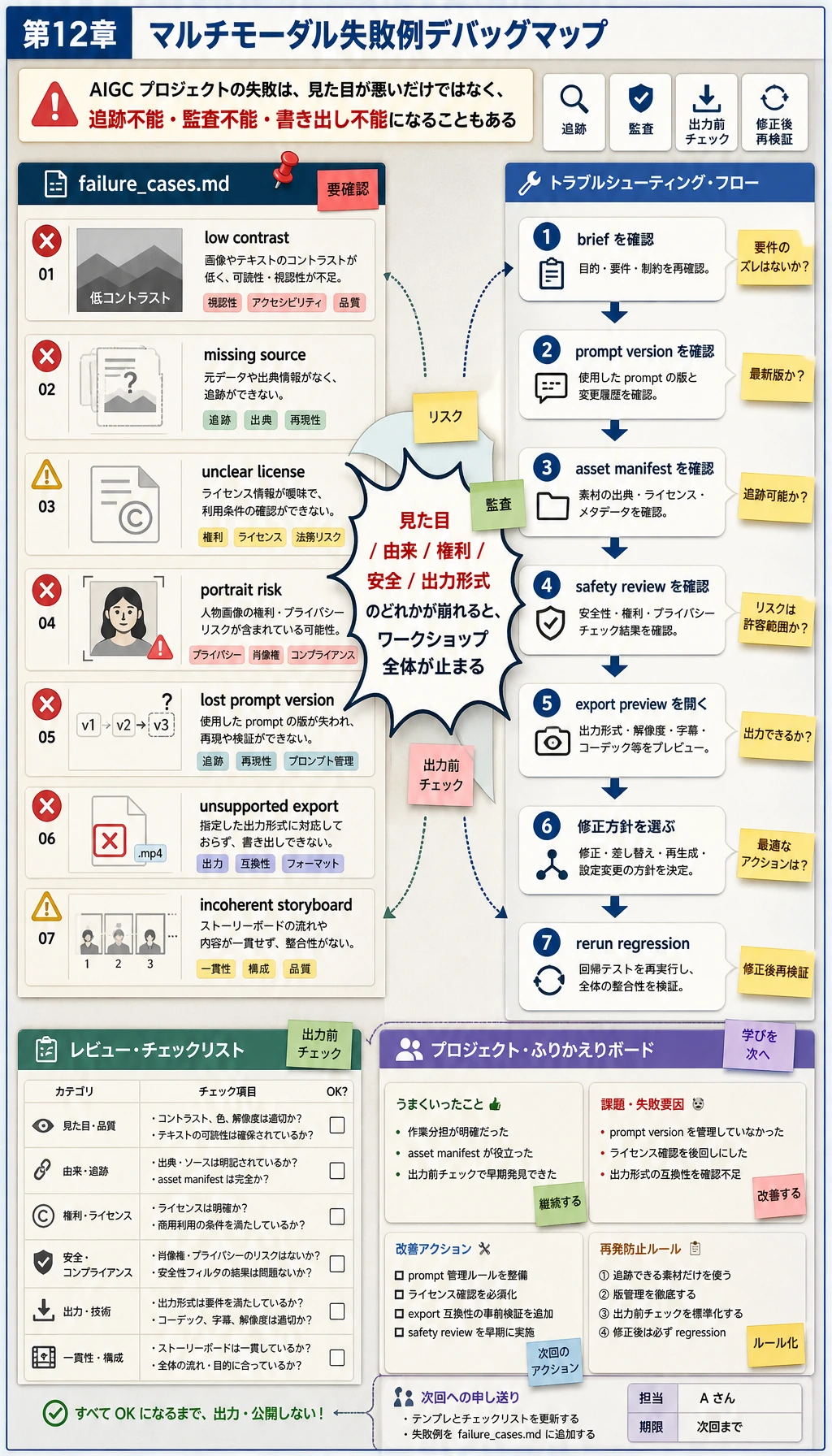
reports/failure_cases.md を開きます。このワークショップでは、1 つの scene がコントラストチェックに落ちるようにしています。ポートフォリオでは、きれいな出力だけでなく、問題をどう検出するかも見せるべきです。
各失敗について、次を確認します。
- 素材の出典は記録されているか。
- ライセンスや使用範囲は明確か。
- 実在人物やブランドのリスクはないか。
- 生成内容は読めて、書き出し可能か。
- 公開前に人間が確認すべき内容を書いているか。
このページを終えたら、この evidence card を残します。
- 要約
- ユーザーの目的、対象読者、素材、制約、出力形式
- 成果物
- ソースファイル、プロンプト、生成候補、選択出力、却下版
- レビュー
- 事実確認、著作権・肖像権・機微情報チェック、人の判断
- 統合
- RAG レコード、Agent トレース、クリエイティブパッケージ、ストーリーボード、またはエクスポートプレビュー
- 期待される成果
- README、レビュー用チェックリスト、失敗メモを含む再現可能なアセットパッケージ
よくあるエラー
Section titled “よくあるエラー”| 症状 | よくある原因 | 修正方向 |
|---|---|---|
| 生成資産を再利用できない | 出典やライセンス記録がない | asset_manifest.csv を追加し、各資産を確認する |
| Prompt バージョンが失われる | Prompt がチャット履歴にしかない | 生成前に prompt_plan.json を保存する |
| 動画スクリプトがつながらない | storyboard や timeline がない | 先に storyboard.json を書いてから生成する |
| 見た目は良いが公開できない | 著作権、肖像、安全レビューがない | safety_review.md と書き出し制限を追加する |
| ユーザーがバージョン比較できない | 資産が上書きされる | scene id、prompt version、出力フォルダを追加する |
scene_02の色を直し、すべての scene がコントラストレビューに合格するようにする。scene_04を追加し、storyboard timeline を拡張する。- safety review に
manual_reviewerフィールドを追加する。 - 好きな画像モデルで生成した画像を 1 つの SVG と置き換える。ただし manifest と review ファイルは同じ形で残す。
- 意図的にリスクのある資産を追加し、それが
failure_cases.mdに入ることを確認する。
操作例と確認ポイント
scene_02は、foreground/background contrast が他の scene と同じ review rule を満たし、その変更が manifest に記録されていれば合格です。scene_04は storyboard に追加し、id、目的、duration/order、必要 assets、prompt version、review result を持たせます。そうすることで timeline が再現可能になります。manual_reviewerは README のメモだけではなく safety review record に入れます。誰がレビューしたか、またはどの role が承認したかを示すべきです。- SVG を置き換える場合も、同じ manifest entry、source/prompt record、selected output path、review files を保つ必要があります。
- 意図的に危険な asset は静かに通過してはいけません。よい結果は、理由、risk category、next action とともに
failure_cases.mdに記録されることです。
このワークショップを終えたら、次を説明できるようになってください。
- creative brief が何を制御するのか。
- Prompt と資産になぜバージョン記録が必要なのか。
- storyboard が資産を動画やページの順番にどう変えるのか。
- safety review が後付けではなく、ワークフローの一部である理由。
- どのファイルがプロジェクトの再現性を証明するのか。
これは第 12 章の最小だが有用な baseline です。生成し、レビューし、書き出し、説明できるマルチモーダルプロジェクトになります。