
7.1.6 実践:Tokenizer と Embedding ラボ
Tokenizer と embedding は別々なら理解しやすいですが、初心者は「この 2 つがどうつながるのか」でつまずきやすいです。
このラボでは、最小の流れを一気に見ます。
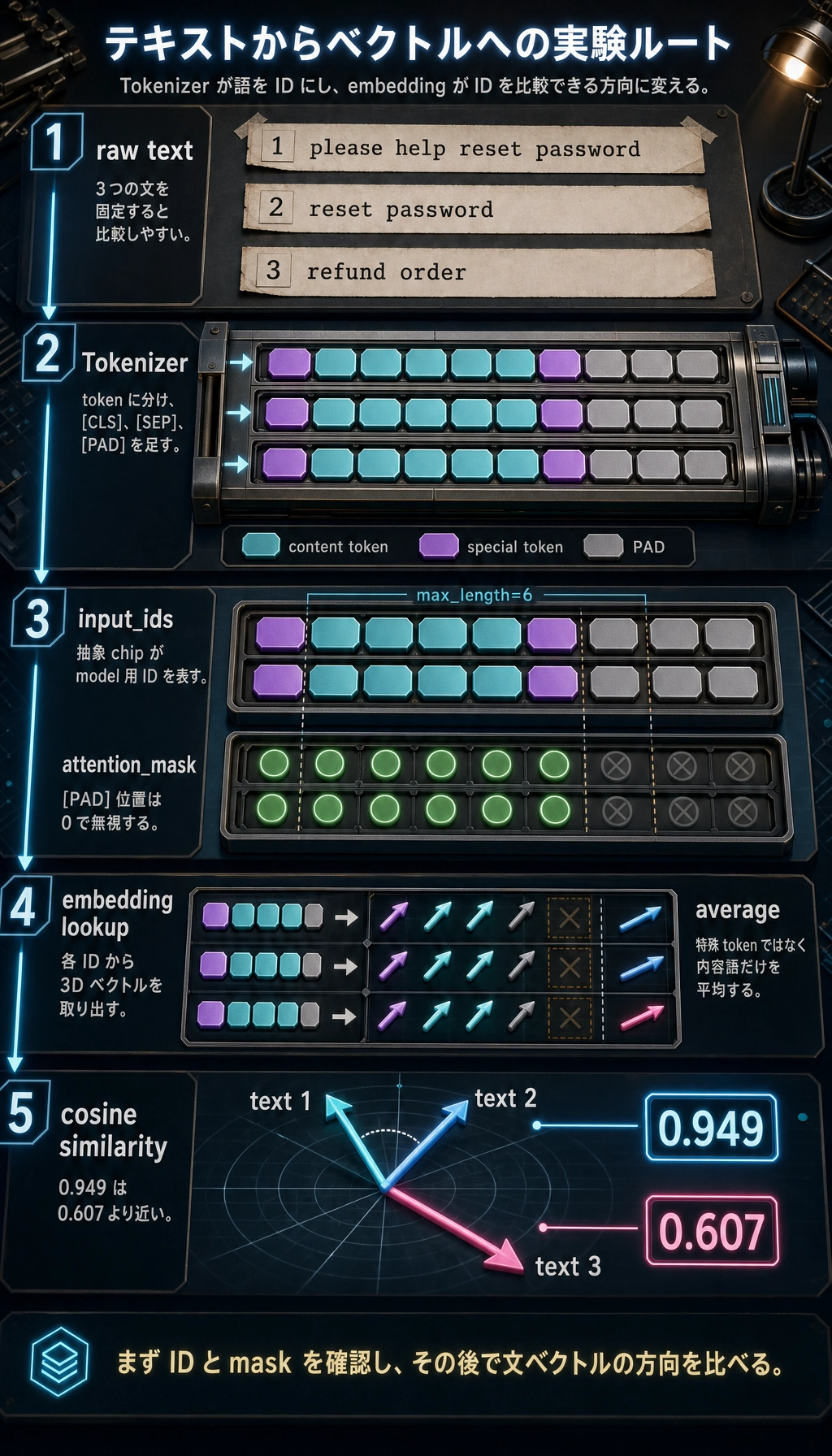
生の文章 -> tokens -> input_ids -> attention_mask -> embedding -> 類似度スコア
このラボで補うこと
Section titled “このラボで補うこと”前のページでは tokenizer と embedding を別々に説明しました。このラボでは、その 2 つをつなげます。
ここで見ることは次の通りです。
- 文章が token に分かれる
- token が整数 ID になる
- padding によって
attention_maskができる - token ID から embedding table のベクトルを引く
- 文ベクトルで類似度を比較する
動かす前に用語を整理する
Section titled “動かす前に用語を整理する”| 用語 | やさしい説明 | なぜ重要か |
|---|---|---|
token | 分割されたテキスト単位 | モデルは生の文を直接受け取らない |
input_ids | token に対応する整数 ID | ニューラルネットワークは文字列ではなく数値を処理する |
attention_mask | 実 token は 1、padding は 0 | どの位置を無視すべきかを伝える |
embedding | token のベクトル表現 | 記号 ID を連続的な意味特徴に変える |
| cosine similarity | ベクトル方向の近さを測るスコア | 検索や意味マッチングでよく使う |
ラボを実行する
Section titled “ラボを実行する”次のコードを tokenizer_embedding_lab.py として保存し、実行します。
python tokenizer_embedding_lab.pyfrom math import sqrt
vocab = { "[PAD]": 0, "[UNK]": 1, "[CLS]": 2, "[SEP]": 3, "reset": 4, "password": 5, "refund": 6, "order": 7, "please": 8, "help": 9,}
embedding_table = { 0: [0.00, 0.00, 0.00], 1: [0.10, 0.10, 0.10], 2: [0.20, 0.20, 0.20], 3: [0.20, 0.20, 0.20], 4: [0.12, 0.18, 0.92], 5: [0.10, 0.20, 0.95], 6: [0.90, 0.80, 0.10], 7: [0.75, 0.70, 0.15], 8: [0.40, 0.40, 0.40], 9: [0.42, 0.45, 0.38],}
special_token_ids = {vocab["[PAD]"], vocab["[CLS]"], vocab["[SEP]"]}
def tokenize(text): return text.lower().split()
def encode(text, max_length=6): tokens = ["[CLS]"] + tokenize(text) + ["[SEP]"] input_ids = [vocab.get(token, vocab["[UNK]"]) for token in tokens] input_ids = input_ids[:max_length] tokens = tokens[:max_length] attention_mask = [1] * len(input_ids)
if len(input_ids) < max_length: pad_count = max_length - len(input_ids) input_ids += [vocab["[PAD]"]] * pad_count tokens += ["[PAD]"] * pad_count attention_mask += [0] * pad_count
return tokens, input_ids, attention_mask
def average_embedding(input_ids, attention_mask): vectors = [ embedding_table[token_id] for token_id, keep in zip(input_ids, attention_mask) if keep == 1 and token_id not in special_token_ids ] dim = len(vectors[0]) return [sum(vector[i] for vector in vectors) / len(vectors) for i in range(dim)]
def cosine(a, b): dot = sum(x * y for x, y in zip(a, b)) norm_a = sqrt(sum(x * x for x in a)) norm_b = sqrt(sum(x * x for x in b)) return dot / (norm_a * norm_b)
texts = [ "please help reset password", "reset password", "refund order",]
sentence_vectors = []for text in texts: tokens, input_ids, attention_mask = encode(text) vector = average_embedding(input_ids, attention_mask) sentence_vectors.append(vector)
print("-" * 60) print("text :", text) print("tokens :", tokens) print("input_ids :", input_ids) print("attention_mask:", attention_mask) print("sentence_vec :", [round(x, 3) for x in vector])
print("-" * 60)print("similarity(text 1, text 2):", round(cosine(sentence_vectors[0], sentence_vectors[1]), 3))print("similarity(text 1, text 3):", round(cosine(sentence_vectors[0], sentence_vectors[2]), 3))期待される出力:
------------------------------------------------------------text : please help reset passwordtokens : ['[CLS]', 'please', 'help', 'reset', 'password', '[SEP]']input_ids : [2, 8, 9, 4, 5, 3]attention_mask: [1, 1, 1, 1, 1, 1]sentence_vec : [0.26, 0.307, 0.662]------------------------------------------------------------text : reset passwordtokens : ['[CLS]', 'reset', 'password', '[SEP]', '[PAD]', '[PAD]']input_ids : [2, 4, 5, 3, 0, 0]attention_mask: [1, 1, 1, 1, 0, 0]sentence_vec : [0.11, 0.19, 0.935]------------------------------------------------------------text : refund ordertokens : ['[CLS]', 'refund', 'order', '[SEP]', '[PAD]', '[PAD]']input_ids : [2, 6, 7, 3, 0, 0]attention_mask: [1, 1, 1, 1, 0, 0]sentence_vec : [0.825, 0.75, 0.125]------------------------------------------------------------similarity(text 1, text 2): 0.949similarity(text 1, text 3): 0.607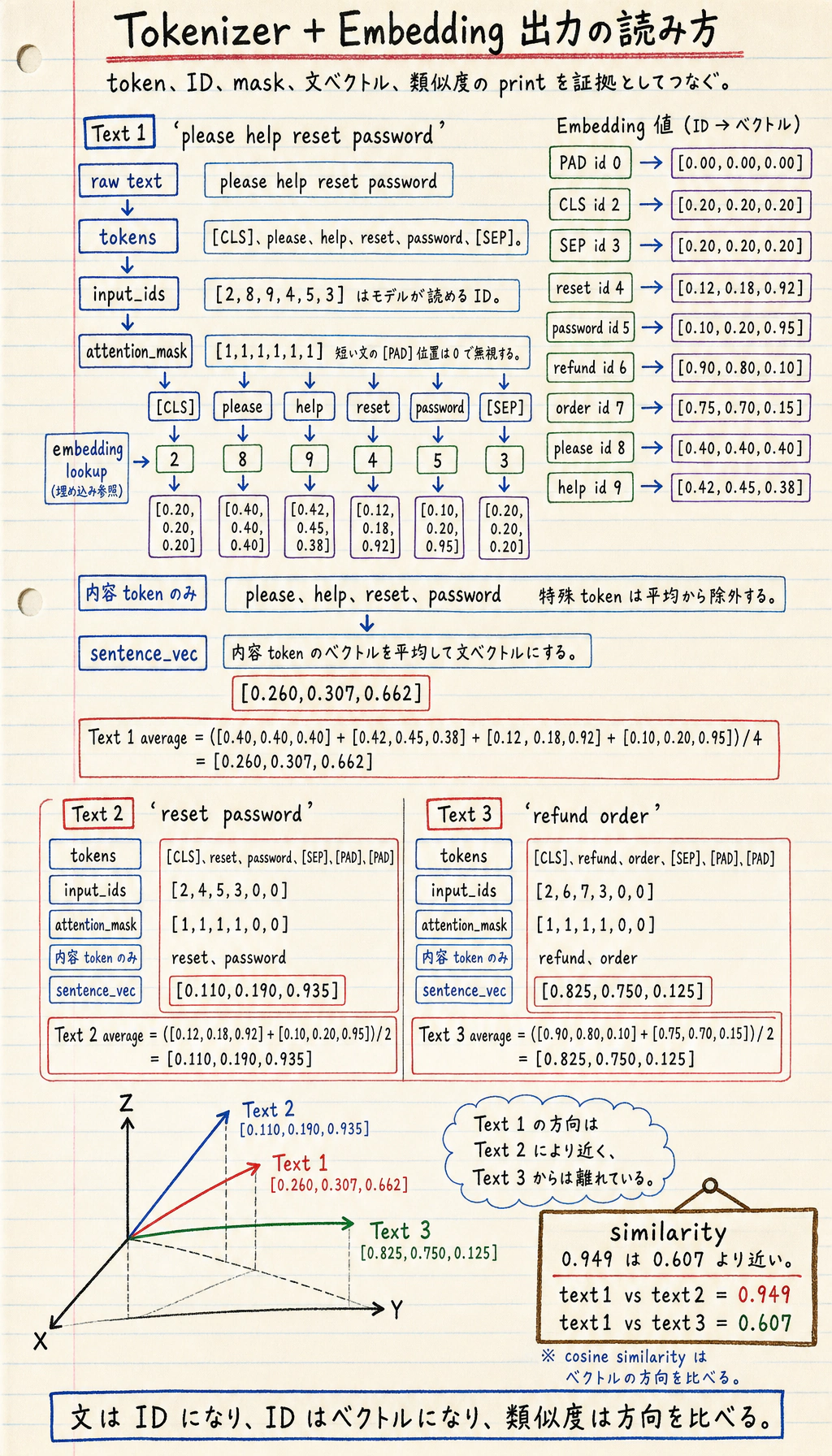
出力の読み方
Section titled “出力の読み方”tokens はまだ人間が読める
Section titled “tokens はまだ人間が読める”Tokenizer はまず次のようなリストを作ります。
["[CLS]", "please", "help", "reset", "password", "[SEP]"]この段階ではまだ人間にも読めます。
input_ids はモデルが処理できる形
Section titled “input_ids はモデルが処理できる形”次に token は数値になります。
[2, 8, 9, 4, 5, 3]モデルは password という単語を直接見ているわけではありません。ID 5 を見て、その ID に対応するベクトルを引きます。
attention_mask は padding を意味として扱わないためにある
Section titled “attention_mask は padding を意味として扱わないためにある”文が max_length より短い場合、コードは [PAD] を追加します。
mask は padding を 0 にして、実際の内容ではないことをモデルに伝えます。
Embedding は ID が意味特徴を持ち始める場所
Section titled “Embedding は ID が意味特徴を持ち始める場所”input_ids 自体はただの識別子です。
embedding table が各 ID をベクトルに変えます。
区別して覚えましょう。
- token ID は「どの記号か」を表す
- embedding vector は「その記号をどう表現するか」を表す
- この実験では、単純平均から special tokens を除外し、文 vector が内容語に集中するようにする
なぜこの例で類似度が働くのか
Section titled “なぜこの例で類似度が働くのか”please help reset password と reset password は、重要な password reset のベクトルを共有しているため近くなります。
please help reset password と refund order は、別の意味領域を指すため遠くなります。
これが、意味検索、検索、RAG の最小の直感です。
このページを終えたら、この証拠カードを残します。
- トークン追跡
- テキスト、トークン、ID、長さ
- 埋め込みトレース
- ベクトルまたは類似度の出力
- 検索デモ
- クエリ、上位一致、スコア
- 失敗ノート
- 類似度が誤解を招く1件
- 次の確認
- テキスト長、言語、または表現を変えて比較する
vocabとembedding_tableにinvoiceを追加する。refund invoiceという文を追加する。refund orderと類似度を比較する。max_lengthを6から4に変え、truncation が何を削るか観察する。- 未知語を 1 つ追加し、
[UNK]がベクトルにどう影響するか見る。
参考実装と解説
invoiceはvocabとembedding_tableの両方に追加します。片方だけだと encoding または vector lookup が壊れます。refund invoiceを追加すると、文は[UNK]に頼らず既知 token ID を得られるはずです。refund invoiceは refund intent を共有するためrefund orderに近いはずです。ただし 2 語目により、order status より billing 側へ少し動きます。- この toy setup では、
max_lengthを短くすると末尾 token が先に削られます。実 prompt では、似た request の違いが消えることがあります。 - 未知語は共通の
[UNK]vector に落ちるため、異なる未知語が区別できなくなります。robustness には役立ちますが、意味の精度は落ちます。
Tokenizer と embedding は、人間の言語がモデル計算に入る最初の 2 つの橋です。
- tokenizer はテキストを離散 ID に変える
- embedding は ID を意味ベクトルに変える
- similarity はそれらのベクトルを比較する
この流れが分かると、Transformer 入力、embedding API、検索、RAG がずっと理解しやすくなります。