
2.1.2 数据类型与变量
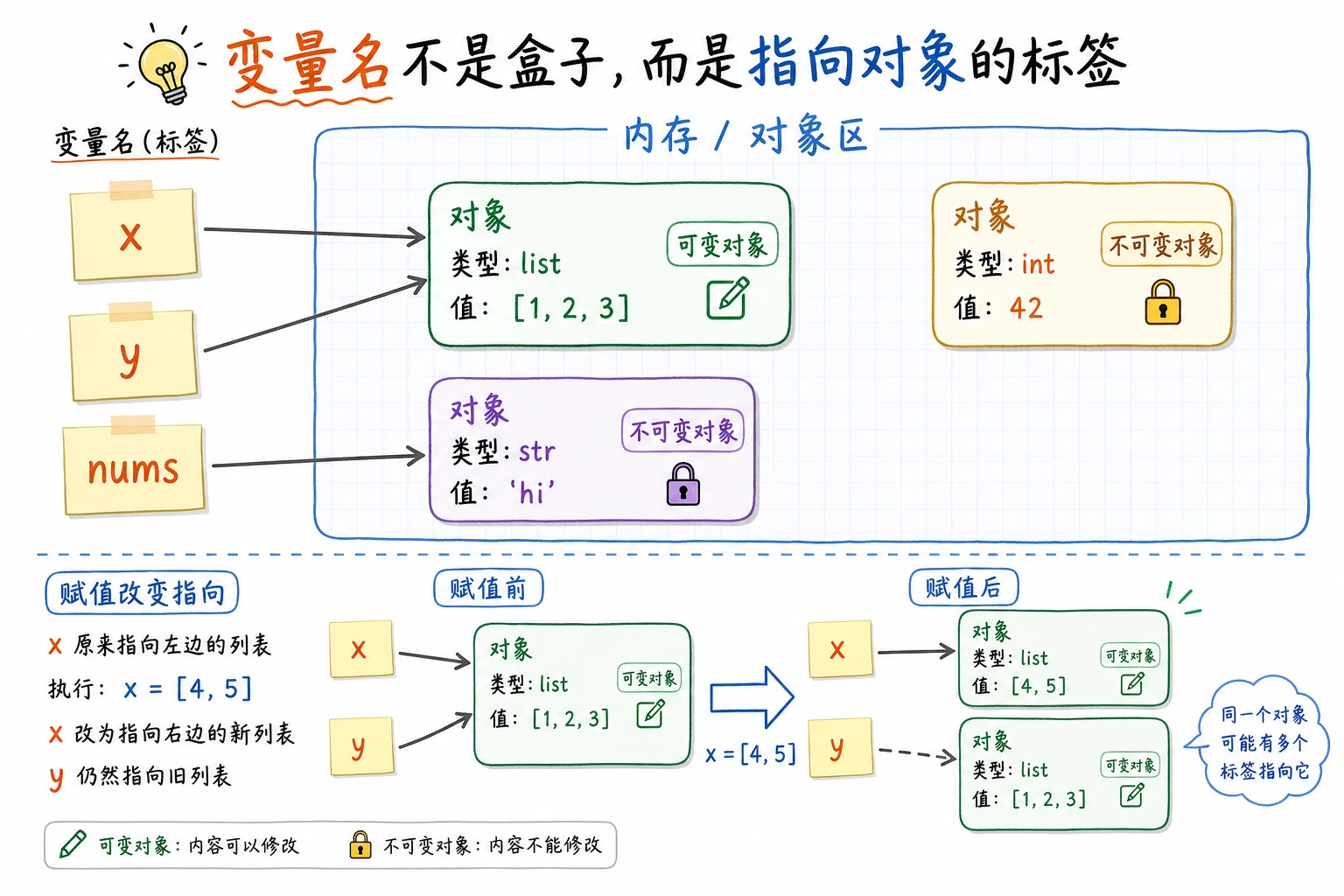
这一节让你理解 Python 如何表示和保存数据。变量、数字、字符串、布尔值和类型转换是后面写条件判断、处理表格数据、调用模型 API 的基础,先把这些“最小数据单位”用熟。
- 理解什么是变量,掌握变量的命名规则
- 掌握 Python 的基本数据类型:整数、浮点数、字符串、布尔值
- 学会数据类型之间的转换
- 理解动态类型的含义
什么是变量?
Section titled “什么是变量?”想象变量是一个贴了标签的盒子。你可以把东西放进去,用标签来找到它。
service_name = "登录 API" # 盒子上贴了"service_name"标签latency_ms = 185 # 盒子上贴了"latency_ms"标签timeout_seconds = 2.5 # 盒子上贴了"timeout_seconds"标签= 在 Python 里不是”等于”,而是赋值——把右边的值放进左边的盒子里。
# 赋值的方向:从右到左x = 10      # 把 10 放进 x 这个盒子
# 可以修改盒子里的内容x = 20      # 现在 x 里面是 20 了(10 被丢掉了)
# 可以用变量的值来计算y = x + 5   # y = 20 + 5 = 25print(y)    # 输出: 25
变量命名规则
Section titled “变量命名规则”Python 对变量名有一些规定:
| 规则 | 正确示例 | 错误示例 |
|---|---|---|
| 只能包含字母、数字、下划线 | service_name, task2 | service-name, task! |
| 不能以数字开头 | task1 | 1task |
| 不能用 Python 关键字 | my_class | class, if, for |
| 大小写敏感 | Service 和 service 是不同变量 | — |
命名惯例(不是强制的,但大家都这么做)
Section titled “命名惯例(不是强制的,但大家都这么做)”# 好的命名 ✅ —— 用小写字母加下划线(snake_case)service_name = "登录 API"learning_rate = 0.001max_epochs = 100
# 不好的命名 ❌ —— 不是不能用,而是不够清晰a = "登录 API" # 看不出来 a 是什么x1 = 0.001 # x1 代表什么?SN = "登录 API" # 缩写太短,别人看不懂整数(int)
Section titled “整数(int)”整数就是没有小数点的数字,可以是正数、负数或零。
retry_count = 3queue_delta = -10count = 0big_number = 1_000_000  # 下划线分隔,方便阅读,等同于 1000000
print(type(retry_count)) # <class 'int'>Python 的整数没有大小限制(不像 C/Java 有 int 范围限制):
huge = 99999999999999999999999999999999print(huge + 1) # 完全没问题浮点数(float)
Section titled “浮点数(float)”浮点数就是带小数点的数字。
pi = 3.14159timeout_seconds = 2.5negative = -0.001
print(type(pi)) # <class 'float'>注意浮点数的精度问题——这是所有编程语言都有的问题:
>>> 0.1 + 0.20.30000000000000004 # 不是精确的 0.3!这不是 Python 的 bug,而是计算机用二进制存储小数时的固有问题。在 AI 开发中,这个微小的误差通常不影响结果。但如果你做金融计算需要精确结果,可以用 decimal 模块。
整数和浮点数的运算
Section titled “整数和浮点数的运算”a = 10b = 3
print(a + b) # 13 加法print(a - b) # 7 减法print(a * b) # 30 乘法print(a / b) # 3.333... 除法(结果总是 float)print(a // b) # 3 整除(向下取整)print(a % b) # 1 取余数print(a ** b) # 1000 幂运算(10 的 3 次方)一个常见的坑:
# 除法 / 的结果永远是 float,即使能整除>>> 10 / 25.0         # 不是 5,而是 5.0
# 如果想得到整数结果,用 //>>> 10 // 25
字符串(str)
Section titled “字符串(str)”字符串就是文本——一串字符。用引号包裹。
# 单引号和双引号都可以,效果一样service = '登录 API'status = "ready"
# 如果字符串里有引号,用另一种引号包裹sentence = "评审说:'可以发布'"command = 'CLI 参数是 "--dry-run"'
# 三引号:可以写多行文本release_notes = """登录 API- 调整超时时间- 开启重试日志"""print(release_notes)
print(type(service)) # <class 'str'>module_name = "工单"endpoint_name = " API"
# 方法 1:用 + 拼接full_endpoint = module_name + endpoint_nameprint(full_endpoint) # 工单 API
# 方法 2:用 f-string(推荐!Python 3.6+)version = "v1"intro = f"{full_endpoint} 运行在 {version}"print(intro) # 工单 API 运行在 v1
# 方法 3:用 format()intro2 = "{} 运行在 {}".format(full_endpoint, version)print(intro2) # 工单 API 运行在 v1常用字符串操作
Section titled “常用字符串操作”text = "Hello, Python!"
# 获取长度print(len(text)) # 14
# 大小写转换print(text.upper()) # HELLO, PYTHON!print(text.lower()) # hello, python!
# 查找子字符串print(text.find("Python")) # 7(从第 7 个位置开始)print("Python" in text) # True
# 替换print(text.replace("Python", "AI")) # Hello, AI!
# 去除首尾空白messy = " hello "print(messy.strip()) # "hello"
# 分割csv_line = "登录 API,185,ready"parts = csv_line.split(",")print(parts) # ['登录 API', '185', 'ready']字符串索引和切片
Section titled “字符串索引和切片”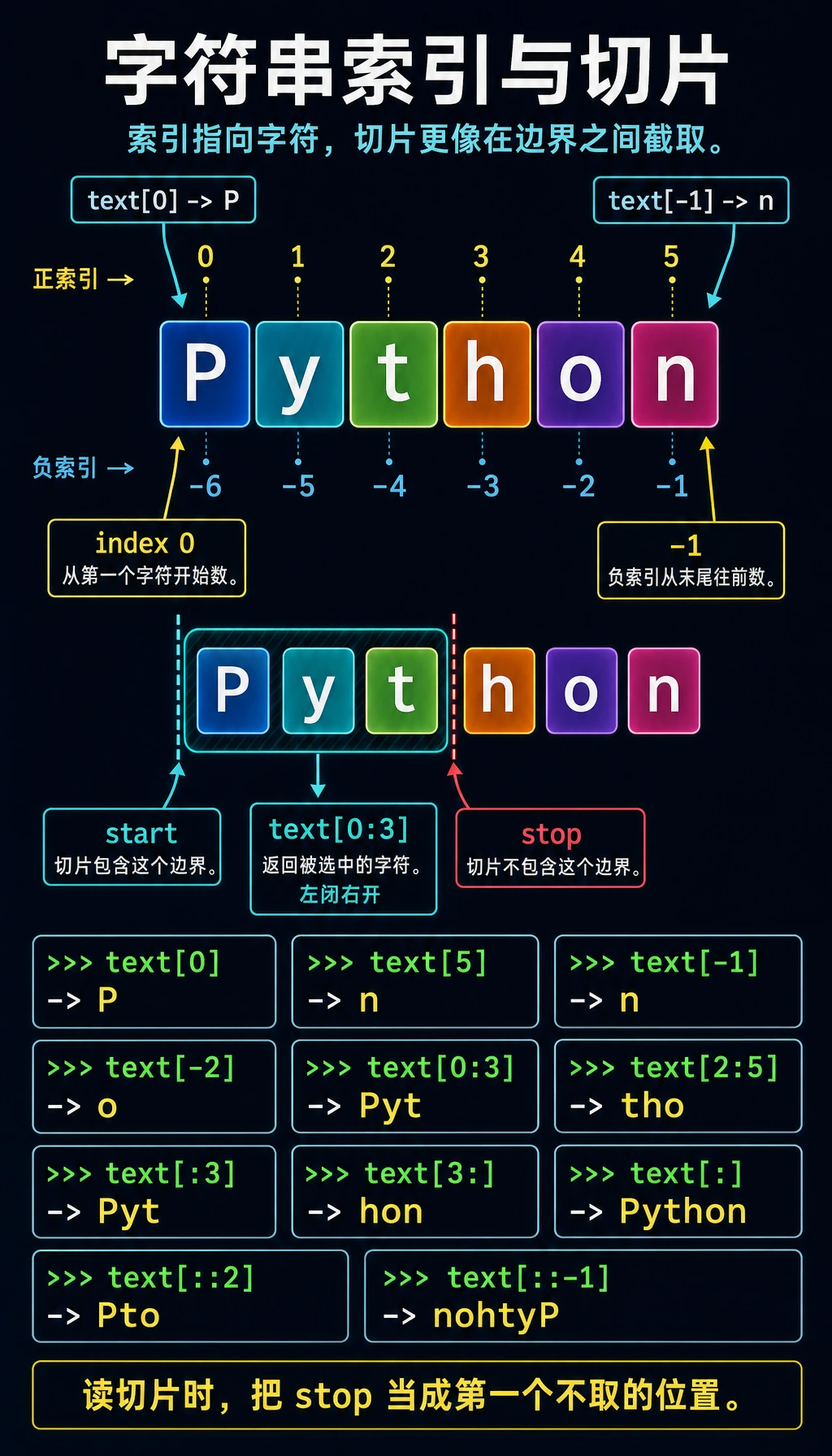
字符串里的每个字符都有一个位置编号(索引),从 0 开始:
text = "Python"#       P y t h o n# 索引: 0 1 2 3 4 5# 负索引: -6 -5 -4 -3 -2 -1
print(text[0]) # P(第一个字符)print(text[5]) # n(第六个字符)print(text[-1]) # n(最后一个字符)print(text[-2]) # o(倒数第二个字符)切片可以取出一段子字符串:
text = "Python"
print(text[0:3]) # Pyt(从索引0到索引3,不包含3)print(text[2:5]) # thoprint(text[:3]) # Pyt(从头开始,可以省略 0)print(text[3:]) # hon(到末尾,可以省略结束位置)print(text[:]) # Python(整个字符串的拷贝)print(text[::2]) # Pto(每隔一个字符取一个)print(text[::-1]) # nohtyP(反转字符串!)字符串是不可变的
Section titled “字符串是不可变的”text = "Hello"# text[0] = "h" # 报错!TypeError: 'str' object does not support item assignment
# 如果想修改,需要创建新字符串text = "h" + text[1:] # "hello"布尔值(bool)
Section titled “布尔值(bool)”布尔值只有两个:True(真)和 False(假)。注意首字母大写。
is_deployed = Truehas_errors = False
print(type(is_deployed)) # <class 'bool'>布尔值通常来自比较运算:
print(5 > 3) # Trueprint(5 < 3) # Falseprint(5 == 5) # True(注意是两个等号,一个等号是赋值)print(5 != 3) # True(!= 表示不等于)print("abc" == "abc") # True布尔值在后面学习流程控制(if/else)时会大量使用。
在 Python 中,很多东西可以被当作布尔值使用。以下值被认为是”假”:
# 以下都是 "假值"(Falsy)bool(0)        # Falsebool(0.0)      # Falsebool("")       # False(空字符串)bool([])       # False(空列表)bool(None)     # False
# 其他都是 "真值"(Truthy)bool(1)        # Truebool(-1)       # True(非零就是真)bool("hello")  # True(非空字符串就是真)bool([1, 2])   # True(非空列表就是真)
None 类型
Section titled “None 类型”None 是 Python 中的特殊值,表示**“什么都没有”**。
result = Noneprint(result) # Noneprint(type(result)) # <class 'NoneType'>None 常用来表示”还没有值”或”没有结果”:
# 函数没有返回值时,默认返回 Nonedef say_hello():    print("Hello!")
result = say_hello() # 打印 Hello!print(result) # None有时候你需要把一种类型转换成另一种。
# 字符串 → 数字latency_str = "185"latency_ms = int(latency_str)      # 字符串转整数print(latency_ms + 10)             # 195
timeout_str = "2.5"timeout_seconds = float(timeout_str)  # 字符串转浮点数print(timeout_seconds)                # 2.5
# 数字 → 字符串task_count = 12task_count_str = str(task_count)   # 整数转字符串print("任务数: " + task_count_str)  # 任务数: 12
# 整数 ↔ 浮点数x = int(3.7) # 3(直接截断小数部分,不是四舍五入)y = float(5) # 5.0常见错误:字符串和数字不能直接用 + 拼接
latency_ms = 185# print("延迟: " + latency_ms)  # 报错!TypeError
# 正确做法 1:转成字符串print("延迟: " + str(latency_ms))
# 正确做法 2:用 f-string(推荐)print(f"延迟: {latency_ms}")
# 正确做法 3:用逗号分隔(print 会自动加空格)print("延迟:", latency_ms)
类型转换速查表
Section titled “类型转换速查表”| 转换 | 函数 | 示例 | 结果 |
|---|---|---|---|
| → 整数 | int() | int("25") | 25 |
| → 浮点数 | float() | float("3.14") | 3.14 |
| → 字符串 | str() | str(100) | "100" |
| → 布尔值 | bool() | bool(0) | False |
Python 是动态类型语言——变量不需要提前声明类型,而且同一个变量可以随时换类型。
x = 10          # x 是整数print(type(x))  # <class 'int'>
x = "hello"     # 现在 x 变成字符串了print(type(x))  # <class 'str'>
x = True        # 现在 x 又变成布尔值了print(type(x))  # <class 'bool'>
这很灵活,但也要小心——别把一个本来存数字的变量意外改成了字符串。
对比一下 Java(静态类型语言):
int x = 10; // 声明 x 是整数x = "hello"; // 报错!Java 不允许改变类型Python 支持一些便捷的赋值方式:
# 同时给多个变量赋值a, b, c = 1, 2, 3print(a, b, c)  # 1 2 3
# 交换两个变量的值(Python 独有的简洁写法)a, b = b, aprint(a, b)  # 2 1
# 多个变量赋同一个值x = y = z = 0print(x, y, z)  # 0 0 0
交换变量这个写法非常 Pythonic(Python 风格),在其他语言里通常需要一个临时变量:
# 其他语言的写法temp = aa = bb = temp
# Python 的写法a, b = b, a # 一行搞定!练习 1:服务状态卡
Section titled “练习 1:服务状态卡”创建变量存储服务状态,然后用 f-string 打印出来:
service = "登录 API"latency_ms = 185timeout_seconds = 2.5is_ready = True
print(f"服务: {service}")print(f"延迟: {latency_ms} ms")print(f"超时: {timeout_seconds} 秒")print(f"能否演示: {is_ready}")print(f"告警阈值: {latency_ms + 15} ms")
练习 2:延迟单位转换器
Section titled “练习 2:延迟单位转换器”毫秒转秒的公式:seconds = milliseconds / 1000
latency_ms = 375.0latency_seconds = latency_ms / 1000print(f"{latency_ms} ms = {latency_seconds} 秒")试着修改 latency_ms 的值,算几个不同延迟的结果。
练习 3:字符串操作
Section titled “练习 3:字符串操作”
# 1. 去掉首尾空格# 2. 转成小写# 3. 找出 @ 的位置# 4. 取出用户名部分(@ 前面的部分)提示:可以组合使用 .strip()、.lower()、.find()、切片。
练习 4:类型侦探
Section titled “练习 4:类型侦探”用 type() 检查以下每个值的类型,先猜再验证:
print(type(42))print(type(3.14))print(type("3.14"))print(type(True))print(type(None))print(type(1 + 2))print(type(1 + 2.0)) # 整数 + 浮点数 = ?print(type("1" + "2")) # 字符串 + 字符串 = ?参考实现与讲解
- 服务状态卡应该用到
str、int、float和bool;f-string 里要展示变量值,也可以展示latency_ms + 15这样的表达式。 375.0ms 对应0.375秒。把公式保留在代码里,这样修改latency_ms时latency_seconds会自动变化。- 规范化后的邮箱是
[email protected];去空格并转小写后,@的索引是11,用户名是support.api。 - 类型输出依次是
int、float、str、bool、NoneType、int、float、str。 - 常见错误是把
"1" + "2"当作数学加法。它其实是字符串拼接,结果是"12"。
学完这一页,至少保留这张证据卡:
- 概念
- 变量、类型、运算符、输入/输出、分支、循环、结构、函数或模块
- 代码
- 用于说明该概念的最小可运行 Python 代码片段
- 输出
- 打印值、类型、分支结果、循环 trace,或返回值
- 失败检查
- 类型不匹配、缩进错误、越界、可变数据或导入路径问题
- 期望产出
- 代码和打印结果,证明概念可行
| 类型 | 关键字 | 示例 | 用途 |
|---|---|---|---|
| 整数 | int | 42, -10, 0 | 计数、索引 |
| 浮点数 | float | 3.14, -0.5 | 精确数值、科学计算 |
| 字符串 | str | "hello", 'world' | 文本数据 |
| 布尔值 | bool | True, False | 条件判断 |
| 空值 | NoneType | None | 表示”没有值” |