
2.1.8 模块与包
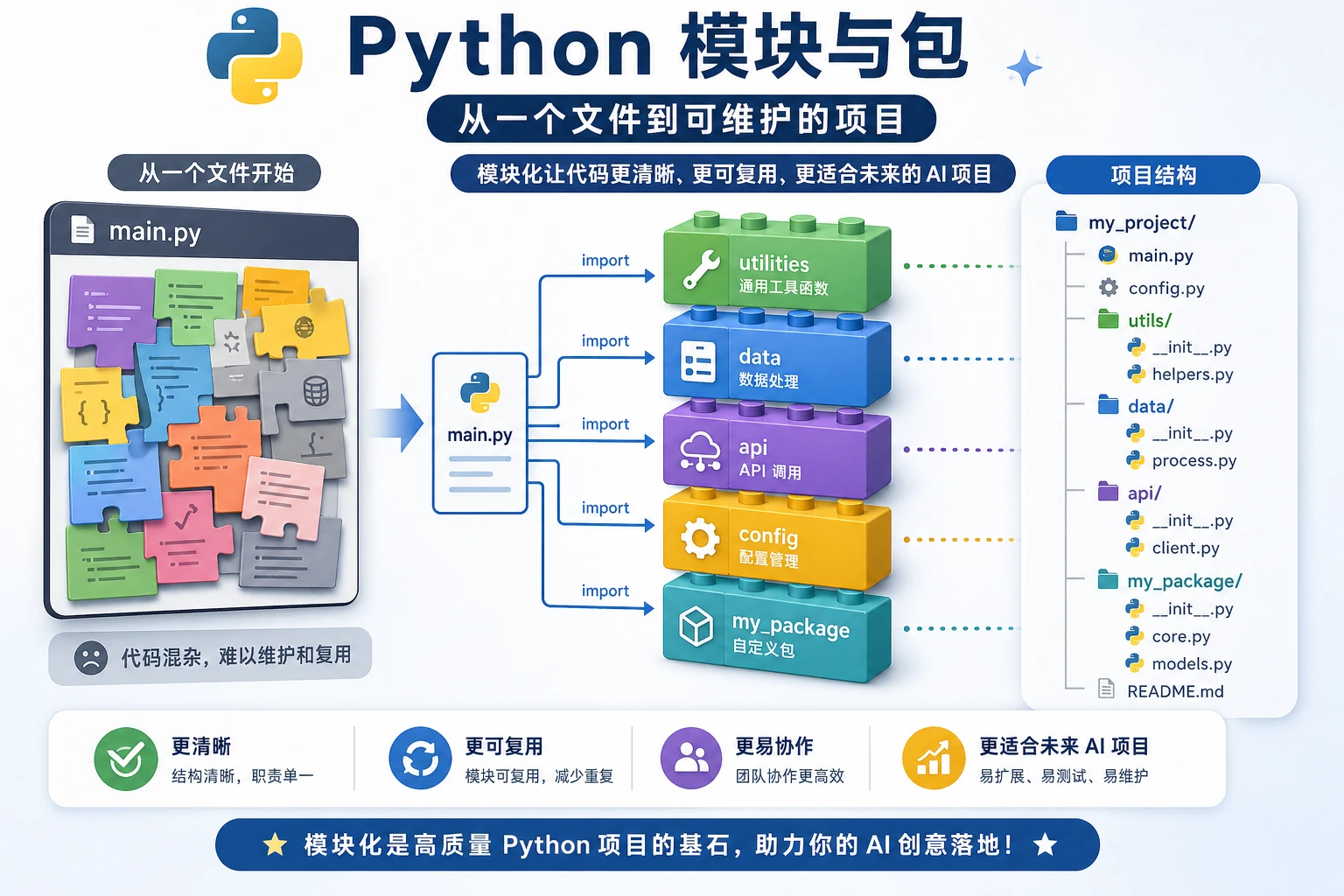
这一节学习如何把代码拆成多个文件,并复用别人写好的库。模块、包、import 和 pip 是 Python 生态的入口,理解它们后,你才能更自然地使用 NumPy、Pandas、FastAPI、PyTorch 等工具。
- 理解模块和包的概念
- 掌握
import的各种用法 - 了解 Python 常用标准库
- 学会使用
pip安装第三方库 - 能创建和使用自己的模块
什么是模块?
Section titled “什么是模块?”到目前为止,你的所有代码都写在一个文件里。但当项目变大后,一个文件可能有几千行代码——这太难管理了。
模块(module)就是一个 .py 文件。 你可以把相关的函数、类、变量放在一个模块里,然后在其他文件中导入使用。
想象你在搬家:
- 把衣服放一个箱子(
clothes.py) - 把书籍放一个箱子(
books.py) - 把厨具放一个箱子(
kitchen.py)
每个箱子就是一个模块,需要什么就打开对应的箱子。
import 的基本用法
Section titled “import 的基本用法”导入整个模块
Section titled “导入整个模块”import math
# 使用时需要加模块名前缀print(math.pi) # 3.141592653589793print(math.sqrt(16)) # 4.0print(math.ceil(3.2)) # 4(向上取整)print(math.floor(3.8)) # 3(向下取整)从模块中导入特定内容
Section titled “从模块中导入特定内容”from math import pi, sqrt
# 直接使用,不需要模块名前缀print(pi) # 3.141592653589793print(sqrt(16)) # 4.0导入并起别名
Section titled “导入并起别名”import numpy as np # 给 numpy 起个简短的别名import pandas as pd # pandas 的标准别名
# AI 领域的约定俗成的别名import matplotlib.pyplot as pltimport tensorflow as tfimport torch导入模块中的所有内容
Section titled “导入模块中的所有内容”from math import *
# 可以直接用所有内容print(pi)print(sqrt(16))print(sin(0))Python 常用标准库
Section titled “Python 常用标准库”Python 自带了很多实用的模块,安装 Python 后就能直接用,不需要额外安装。
math —— 数学运算
Section titled “math —— 数学运算”import math
print(math.pi) # 3.141592653589793print(math.e) # 2.718281828459045print(math.sqrt(144)) # 12.0print(math.pow(2, 10)) # 1024.0print(math.log(100, 10)) # 2.0(以 10 为底的对数)print(math.sin(math.pi / 2)) # 1.0print(math.factorial(5)) # 120(5! = 5×4×3×2×1)random —— 随机数
Section titled “random —— 随机数”import random
# 随机整数print(random.randint(1, 100)) # 1 到 100 之间的随机整数
# 随机浮点数print(random.random()) # 0 到 1 之间的随机浮点数print(random.uniform(1.0, 10.0)) # 1.0 到 10.0 之间
# 从列表中随机选择colors = ["红", "绿", "蓝", "黄"]print(random.choice(colors)) # 随机选一个print(random.sample(colors, 2)) # 随机选 2 个(不重复)
# 打乱列表cards = list(range(1, 14))random.shuffle(cards)print(cards) # 打乱后的列表
# 设置随机种子(让结果可复现——AI 训练中常用)random.seed(42)print(random.randint(1, 100)) # 每次运行结果都一样os —— 操作系统交互
Section titled “os —— 操作系统交互”import os
# 获取当前工作目录print(os.getcwd())
# 列出目录中的文件print(os.listdir("."))
# 检查文件/目录是否存在print(os.path.exists("hello.py"))
# 拼接路径(跨平台兼容)path = os.path.join("data", "train", "images")print(path) # data/train/images(macOS/Linux)或 data\train\images(Windows)
# 获取文件名和扩展名filename = "model_v2.pth"name, ext = os.path.splitext(filename)print(f"文件名: {name}, 扩展名: {ext}") # 文件名: model_v2, 扩展名: .pth
# 创建目录os.makedirs("output/results", exist_ok=True) # exist_ok=True 表示已存在时不报错datetime —— 日期时间
Section titled “datetime —— 日期时间”from datetime import datetime, timedelta
# 获取当前时间now = datetime.now()print(now) # 2026-02-09 14:30:45.123456print(now.strftime("%Y-%m-%d")) # 2026-02-09print(now.strftime("%Y年%m月%d日")) # 2026年02月09日
# 时间计算tomorrow = now + timedelta(days=1)last_week = now - timedelta(weeks=1)print(f"明天: {tomorrow.strftime('%Y-%m-%d')}")print(f"上周: {last_week.strftime('%Y-%m-%d')}")
# 解析时间字符串date_str = "2026-01-15"date = datetime.strptime(date_str, "%Y-%m-%d")print(date)json —— JSON 数据处理
Section titled “json —— JSON 数据处理”import json
# Python 对象 → JSON 字符串data = { "service": "登录 API", "owner": "Mina", "latencies_ms": [120, 95, 180], "needs_review": False}
json_str = json.dumps(data, ensure_ascii=False, indent=2)print(json_str)
# JSON 字符串 → Python 对象parsed = json.loads(json_str)print(parsed["service"]) # 登录 API
# 读写 JSON 文件with open("data.json", "w", encoding="utf-8") as f: json.dump(data, f, ensure_ascii=False, indent=2)
with open("data.json", "r", encoding="utf-8") as f: loaded = json.load(f) print(loaded)标准库速查表
Section titled “标准库速查表”| 模块 | 用途 | 常用功能 |
|---|---|---|
math | 数学运算 | sqrt, pi, sin, log |
random | 随机数 | randint, choice, shuffle |
os | 操作系统 | getcwd, listdir, path.join |
datetime | 日期时间 | now, strftime, timedelta |
json | JSON 处理 | dumps, loads, dump, load |
re | 正则表达式 | search, findall, sub |
collections | 高级容器 | Counter, defaultdict |
pathlib | 路径操作 | Path, glob, mkdir |
sys | 系统参数 | argv, path, exit |
time | 时间相关 | sleep, time |
安装第三方库
Section titled “安装第三方库”Python 的强大很大程度上来自第三方库——别人写好的模块,你可以直接安装使用。
用 pip 安装
Section titled “用 pip 安装”# 安装单个库pip install requests
# 安装指定版本pip install requests==2.28.0
# 安装多个库pip install numpy pandas matplotlib
# 升级已安装的库pip install --upgrade requests
# 卸载pip uninstall requests
# 查看已安装的库pip list
# 导出所有已安装的库(方便别人复现你的环境)pip freeze > requirements.txt
# 从文件批量安装pip install -r requirements.txtAI 开发常用第三方库
Section titled “AI 开发常用第三方库”| 库 | 安装命令 | 用途 |
|---|---|---|
| NumPy | pip install numpy | 数值计算基础库 |
| Pandas | pip install pandas | 数据分析和处理 |
| Matplotlib | pip install matplotlib | 数据可视化 |
| Requests | pip install requests | 网络请求 |
| scikit-learn | pip install scikit-learn | 传统机器学习 |
| PyTorch | pip install torch | 深度学习框架 |
| Transformers | pip install transformers | Hugging Face 预训练模型 |
| FastAPI | pip install fastapi | Web API 框架 |
创建自己的模块
Section titled “创建自己的模块”创建一个文件 my_math.py:
PI = 3.14159
def circle_area(radius):    """计算圆的面积"""    return PI * radius ** 2
def circle_perimeter(radius):    """计算圆的周长"""    return 2 * PI * radius
def rectangle_area(width, height):    """计算矩形面积"""    return width * height
在另一个文件中使用:
import my_math
print(my_math.circle_area(5))       # 78.53975print(my_math.circle_perimeter(5))  # 31.4159
# 或者from my_math import circle_area, PIprint(f"圆面积: {circle_area(3)}")print(f"PI = {PI}")
__name__ 的作用
Section titled “__name__ 的作用”你可能在别人的代码里见过这个神秘的写法:
if __name__ == "__main__": print("这个文件正在被直接运行。")这是什么意思?
def circle_area(radius):    return 3.14159 * radius ** 2
# 这段代码只在直接运行 my_math.py 时执行# 当它被其他文件 import 时,不会执行if __name__ == "__main__": # 测试代码 print("测试 circle_area:") print(circle_area(5)) # 78.53975 print("测试通过!")# 直接运行 my_math.py → __name__ 是 "__main__",测试代码会执行python my_math.py# 输出:# 测试 circle_area:# 78.53975# 测试通过!
# 在 main.py 中 import my_math → __name__ 是 "my_math",测试代码不会执行这是 Python 的一个巧妙设计:让一个文件既能被导入,又能单独运行。
包(Package)
Section titled “包(Package)”当你有很多模块时,可以把它们组织成包——就是一个包含 __init__.py 文件的文件夹。
my_project/├── main.py└── utils/ ← 这是一个包 ├── __init__.py ← 这个文件让 Python 知道 utils 是一个包 ├── math_utils.py ├── string_utils.py └── file_utils.py使用方式:
from utils.math_utils import circle_areafrom utils.string_utils import clean_textfrom utils import file_utils
area = circle_area(5)text = clean_text("  Hello  ")file_utils.save_data(data, "output.json")
__init__.py 可以是空文件,也可以用来定义包导入时的默认行为:
from .math_utils import circle_area, rectangle_areafrom .string_utils import clean_text
# 这样使用者可以直接从包导入# from utils import circle_area
综合案例:个人工具库
Section titled “综合案例:个人工具库”创建一个包含多个实用函数的模块:
# tools.py —— 我的个人工具库
import randomimport stringfrom datetime import datetime
def generate_id(length=8):    """生成随机 ID"""    chars = string.ascii_letters + string.digits    return ''.join(random.choice(chars) for _ in range(length))
def timestamp():    """获取当前时间戳字符串"""    return datetime.now().strftime("%Y%m%d_%H%M%S")
def format_number(num):    """格式化大数字,加千分位分隔"""    return f"{num:,.0f}"
def flatten_list(nested):    """展平嵌套列表"""    result = []    for item in nested:        if isinstance(item, list):            result.extend(flatten_list(item))        else:            result.append(item)    return result
def timer(func):    """简单的计时装饰器"""    import time    def wrapper(*args, **kwargs):        start = time.time()        result = func(*args, **kwargs)        end = time.time()        print(f"{func.__name__} 执行耗时: {end - start:.4f} 秒")        return result    return wrapper

if __name__ == "__main__": # 测试 print(f"随机 ID: {generate_id()}") print(f"时间戳: {timestamp()}") print(f"格式化: {format_number(1234567890)}") print(f"展平: {flatten_list([1, [2, 3], [4, [5, 6]]])}")练习 1:探索标准库
Section titled “练习 1:探索标准库”分别用 math、random、datetime 完成以下任务:
# 1. 计算 100 的阶乘有多少位数字# 提示:math.factorial() 和 len(str(...))
# 2. 生成 10 个 1-100 的不重复随机数# 提示:random.sample()
# 3. 计算从今天到 2027 年 1 月 1 日还有多少天# 提示:datetime
练习 2:创建自己的模块
Section titled “练习 2:创建自己的模块”创建一个 string_tools.py 模块,包含以下函数:
def count_words(text):    """统计英文文本的单词数"""    return len(text.split())
def reverse_words(text):    """反转每个单词的顺序(不是字母)"""    # "hello world" → "world hello"    return " ".join(reversed(text.split()))
def is_palindrome(text):    """判断是否是回文(忽略空格和大小写)"""    # "A man a plan a canal Panama" → True    normalized = "".join(text.lower().split())    return normalized == normalized[::-1]
然后在另一个文件中导入并测试。
练习 3:pip 操作练习
Section titled “练习 3:pip 操作练习”在终端中执行以下操作:
# 1. 安装 requests 库pip install requests
# 2. 写一个简单的脚本测试 requestspython -c "import requests; print(requests.get('https://httpbin.org/get').status_code)"
# 3. 查看当前环境安装了哪些库pip list
# 4. 导出依赖列表pip freeze > requirements.txt
操作参考与检查点
len(str(math.factorial(100)))的结果是158。random.sample(range(1, 101), 10)应生成 10 个不重复数字;顺序和具体数值每次可能不同。- 倒计时可用
date(2027, 1, 1) - date.today()。具体天数会随当前日期变化,所以应保留代码计算,不要硬编码。 string_tools.py应该从同文件夹的另一个脚本中导入。可以测试reverse_words("hello world") == "world hello",以及回文判断返回True的例子。requests测试在网络和 SSL 正常时应返回状态码200。如果失败,记录环境或网络错误,同时仍保留pip list或requirements.txt。
学完这一页,至少保留这张证据卡:
- 概念
- 变量、类型、运算符、输入/输出、分支、循环、结构、函数或模块
- 代码
- 用于说明该概念的最小可运行 Python 代码片段
- 输出
- 打印值、类型、分支结果、循环 trace,或返回值
- 失败检查
- 类型不匹配、缩进错误、越界、可变数据或导入路径问题
- 期望产出
- 代码和打印结果,证明概念可行
| 概念 | 说明 | 示例 |
|---|---|---|
| 模块 | 一个 .py 文件 | import math |
| 包 | 包含 __init__.py 的文件夹 | from utils import helper |
| import | 导入整个模块 | import os |
| from…import | 导入特定内容 | from math import pi |
| as | 起别名 | import numpy as np |
| pip | 安装第三方库 | pip install requests |
__name__ | 判断是否直接运行 | if __name__ == "__main__": |