
2.3.2 项目:网络爬虫
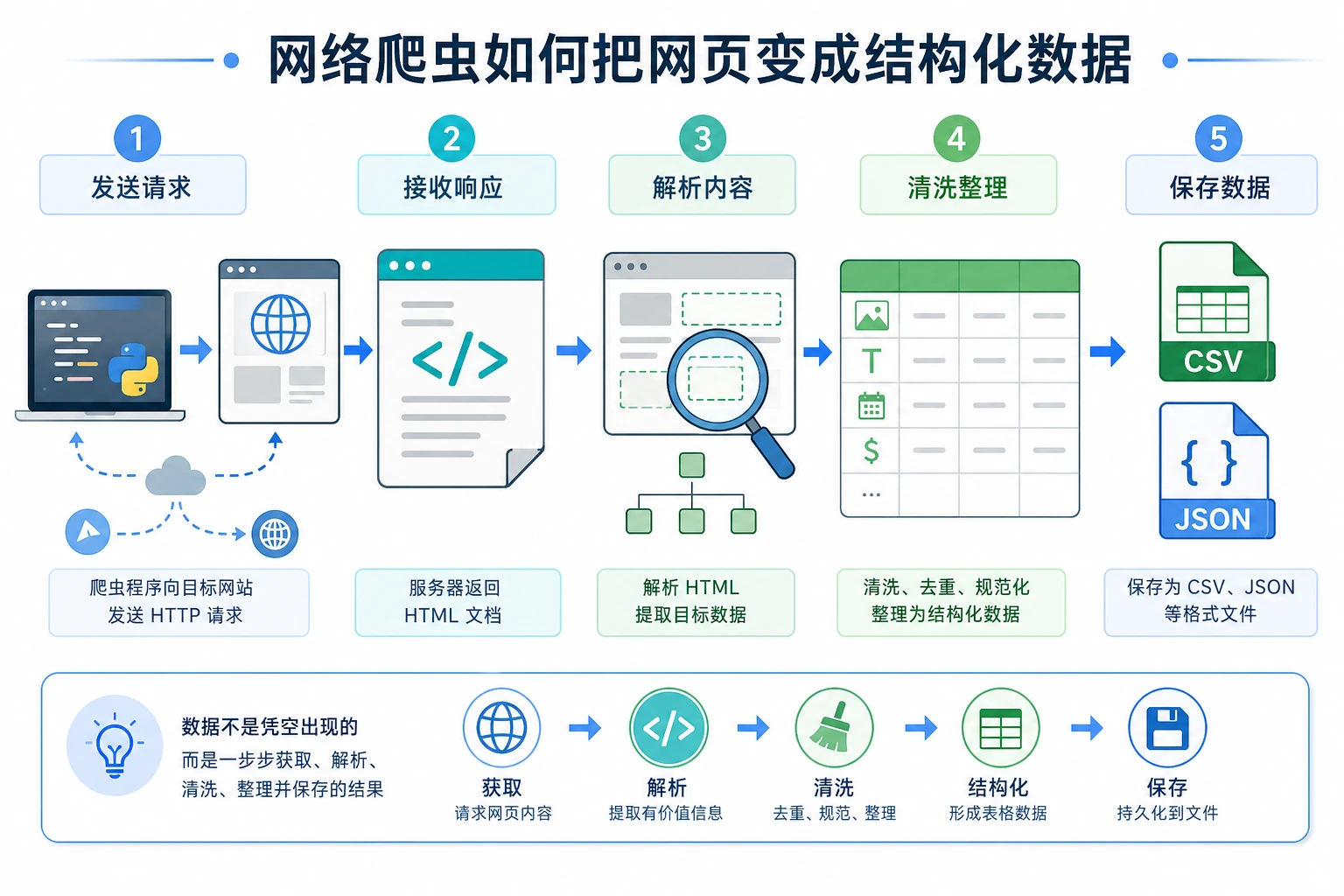
这个项目让你第一次用 Python 从互联网获取数据。你会把 HTTP 请求、HTML 解析、数据清洗和文件保存串起来,理解真实数据不是凭空出现的,而是需要采集、整理和结构化。
- 理解 HTTP 请求和网页结构的基本概念
- 学会使用
requests库发送 HTTP 请求 - 学会使用
BeautifulSoup解析 HTML - 构建一个实用的网络数据采集工具
网络爬虫(Web Scraper)是一个自动从网页上提取数据的程序。比如:
- 从招聘网站收集职位信息
- 从新闻网站抓取文章标题
- 从电商网站获取商品价格
- 收集数据用于 AI 模型训练
我们将构建一个能抓取网页信息并保存为结构化数据的爬虫。
前置知识:HTTP 和 HTML
Section titled “前置知识:HTTP 和 HTML”HTTP 请求是什么?
Section titled “HTTP 请求是什么?”当你在浏览器中输入一个网址并回车,浏览器会向服务器发送一个 HTTP 请求,服务器返回网页内容(HTTP 响应)。
你的浏览器 → HTTP 请求 → 服务器你的浏览器 ← HTTP 响应 ← 服务器(返回 HTML)Python 的 requests 库可以帮你做和浏览器一样的事——发送请求,获取网页内容。
HTML 是什么?
Section titled “HTML 是什么?”HTML(超文本标记语言)是网页的”骨架”。一个简单的 HTML 页面:
<html><head> <title>示例网页</title></head><body> <h1>欢迎来到我的网站</h1> <p class="intro">这是一段介绍文字。</p> <ul> <li>项目 1</li> <li>项目 2</li> <li>项目 3</li> </ul> <a href="https://example.com">点击这里</a></body></html>爬虫的工作就是:从这些 HTML 标签中提取你需要的数据。
第一步:安装依赖
Section titled “第一步:安装依赖”pip install requests beautifulsoup4| 库 | 作用 |
|---|---|
requests | 发送 HTTP 请求,获取网页内容 |
beautifulsoup4 | 解析 HTML,提取数据 |
第二步:发送 HTTP 请求
Section titled “第二步:发送 HTTP 请求”import requests
# 发送 GET 请求response = requests.get("https://httpbin.org/get")
# 查看响应状态print(f"状态码: {response.status_code}") # 200 表示成功print(f"编码: {response.encoding}")
# 查看响应内容print(response.text[:200]) # 文本内容(前 200 字符)
# 响应状态码含义# 200: 成功# 404: 页面不存在# 403: 禁止访问# 500: 服务器错误添加请求头(模拟浏览器)
Section titled “添加请求头(模拟浏览器)”有些网站会检查请求是否来自浏览器,需要设置 User-Agent:
headers = {    "User-Agent": "Mozilla/5.0 (Macintosh; Intel Mac OS X 10_15_7) "                  "AppleWebKit/537.36 (KHTML, like Gecko) "                  "Chrome/120.0.0.0 Safari/537.36"}
response = requests.get("https://example.com", headers=headers)print(response.status_code)
处理请求异常
Section titled “处理请求异常”import requests
def fetch_page(url: str) -> str | None: """安全地获取网页内容""" try: response = requests.get(url, headers=headers, timeout=10) response.raise_for_status() # 如果状态码不是 200,抛出异常 response.encoding = response.apparent_encoding # 自动检测编码 return response.text except requests.ConnectionError: print(f"❌ 无法连接到 {url}") except requests.Timeout: print(f"❌ 请求超时: {url}") except requests.HTTPError as e: print(f"❌ HTTP 错误: {e}") return None第三步:解析 HTML
Section titled “第三步:解析 HTML”from bs4 import BeautifulSoup
html = """<html><body> <h1>Python 课程列表</h1> <div class="course-list"> <div class="course"> <h2 class="title">Python 入门</h2> <span class="price">¥99</span> <span class="rating">4.8</span> </div> <div class="course"> <h2 class="title">Python 进阶</h2> <span class="price">¥199</span> <span class="rating">4.6</span> </div> <div class="course"> <h2 class="title">Python AI 实战</h2> <span class="price">¥399</span> <span class="rating">4.9</span> </div> </div></body></html>"""
# 创建 BeautifulSoup 对象soup = BeautifulSoup(html, "html.parser")
# 查找单个元素title = soup.find("h1")print(title.text) # Python 课程列表
# 查找所有匹配的元素courses = soup.find_all("div", class_="course")for course in courses: name = course.find("h2", class_="title").text price = course.find("span", class_="price").text rating = course.find("span", class_="rating").text print(f"{name} - {price} - 评分: {rating}")
# 输出:# Python 入门 - ¥99 - 评分: 4.8# Python 进阶 - ¥199 - 评分: 4.6# Python AI 实战 - ¥399 - 评分: 4.9BeautifulSoup 常用方法
Section titled “BeautifulSoup 常用方法”# 通过标签名查找soup.find("h1") # 找第一个 h1soup.find_all("p") # 找所有 p
# 通过 class 查找soup.find("div", class_="content")soup.find_all("span", class_="price")
# 通过 id 查找soup.find("div", id="main")
# CSS 选择器(功能更强大)soup.select("div.course h2") # div.course 下的所有 h2soup.select("ul > li") # ul 直接子元素 lisoup.select("a[href]") # 所有有 href 属性的 a 标签
# 获取文本和属性tag = soup.find("a")print(tag.text) # 链接文本print(tag.get("href")) # href 属性值print(tag["href"]) # 同上第四步:完整项目实战
Section titled “第四步:完整项目实战”项目:抓取名言网站
Section titled “项目:抓取名言网站”我们用一个专门供爬虫练习的网站 quotes.toscrape.com:
"""网络爬虫项目:抓取名言名句目标网站:https://quotes.toscrape.com"""
import requestsfrom bs4 import BeautifulSoupimport jsonimport time

def scrape_quotes(max_pages: int = 5) -> list[dict]:    """抓取名言数据"""    all_quotes = []    base_url = "https://quotes.toscrape.com"
    for page in range(1, max_pages + 1):        url = f"{base_url}/page/{page}/"        print(f"正在抓取第 {page} 页: {url}")
        try:            response = requests.get(url, timeout=10)            response.raise_for_status()        except requests.RequestException as e:            print(f"  ❌ 请求失败: {e}")            continue
        soup = BeautifulSoup(response.text, "html.parser")        quotes = soup.find_all("div", class_="quote")
        if not quotes:            print("  没有更多数据了")            break
        for quote in quotes:            text = quote.find("span", class_="text").text            author = quote.find("small", class_="author").text            tags = [tag.text for tag in quote.find_all("a", class_="tag")]
            all_quotes.append({                "text": text,                "author": author,                "tags": tags            })
        print(f"  ✅ 抓取了 {len(quotes)} 条名言")        time.sleep(1)  # 礼貌性等待,不要给服务器太大压力
    return all_quotes

def save_to_json(data: list[dict], filename: str = "quotes.json") -> None:    """保存为 JSON 文件"""    with open(filename, "w", encoding="utf-8") as f:        json.dump(data, f, ensure_ascii=False, indent=2)    print(f"\n💾 已保存 {len(data)} 条数据到 {filename}")

def save_to_csv(data: list[dict], filename: str = "quotes.csv") -> None:    """保存为 CSV 文件"""    import csv    with open(filename, "w", newline="", encoding="utf-8") as f:        writer = csv.DictWriter(f, fieldnames=["text", "author", "tags"])        writer.writeheader()        for item in data:            item_copy = item.copy()            item_copy["tags"] = ", ".join(item["tags"])            writer.writerow(item_copy)    print(f"💾 已保存到 {filename}")

def analyze_quotes(quotes: list[dict]) -> None:    """分析数据"""    print("\n📊 数据分析:")    print(f"  总名言数: {len(quotes)}")
    # 统计每位作者的名言数    author_count = {}    for q in quotes:        author = q["author"]        author_count[author] = author_count.get(author, 0) + 1
    # 按数量排序    sorted_authors = sorted(author_count.items(), key=lambda x: x[1], reverse=True)    print(f"  作者数: {len(sorted_authors)}")    print(f"\n  名言最多的 5 位作者:")    for author, count in sorted_authors[:5]:        print(f"    {author}: {count} 条")
    # 统计标签    all_tags = {}    for q in quotes:        for tag in q["tags"]:            all_tags[tag] = all_tags.get(tag, 0) + 1
    sorted_tags = sorted(all_tags.items(), key=lambda x: x[1], reverse=True)    print(f"\n  最热门的 10 个标签:")    for tag, count in sorted_tags[:10]:        print(f"    #{tag}: {count} 次")

def main():    print("=== 名言名句爬虫 ===\n")
    # 抓取数据    quotes = scrape_quotes(max_pages=5)
    if not quotes:        print("没有抓取到数据")        return
    # 保存数据    save_to_json(quotes)    save_to_csv(quotes)
    # 分析数据    analyze_quotes(quotes)

if __name__ == "__main__":    main()
爬虫注意事项
Section titled “爬虫注意事项”挑战 1:错误重试机制
Section titled “挑战 1:错误重试机制”给爬虫添加自动重试功能——如果请求失败,等待几秒后自动重试(最多 3 次)。
挑战 2:多页自动翻页
Section titled “挑战 2:多页自动翻页”让爬虫自动检测”下一页”按钮,持续抓取直到没有下一页。
挑战 3:数据去重
Section titled “挑战 3:数据去重”如果同一条数据被抓取了多次,自动去重。
挑战 4:命令行参数
Section titled “挑战 4:命令行参数”用 sys.argv 或 argparse 让用户通过命令行指定抓取页数和输出文件名:
python scraper.py --pages 10 --output data.json项目交付参考与讲解
- 在请求循环外加重试与退避,连续失败 3 次后停止。把重试次数打印出来,便于排查网络问题。
- 检测“下一页”链接并持续跟随,直到没有下一页。若担心循环,可记录已访问的 URL。
- 使用稳定键去重,例如 quote 文本 + author,或者目标站点提供的唯一 ID/URL。
- 为页数和输出路径增加
argparse参数,这样爬虫可以从命令行复用,而不是写死。 - 自查:确认爬虫能获取 HTML,能处理临时网络错误,能导出 JSON/CSV,并且没有重复行。
项目自查清单
Section titled “项目自查清单”- 能正常发送 HTTP 请求并获取响应
- 能解析 HTML 并提取目标数据
- 数据保存为 JSON 和/或 CSV 格式
- 有适当的错误处理(网络异常、解析异常)
- 请求之间有延时(
time.sleep) - 代码结构清晰,函数分工明确
- 有简单的数据分析和统计
版本路线建议
Section titled “版本路线建议”| 版本 | 目标 | 交付重点 |
|---|---|---|
| 基础版 | 跑通最小闭环 | 能输入、能处理、能输出,并保留一组示例 |
| 标准版 | 形成可展示项目 | 增加配置、日志、错误处理、README 和截图 |
| 挑战版 | 接近作品集质量 | 增加评估、对比实验、失败样本分析和下一步路线 |
建议先完成基础版,不要一开始就追求大而全。每提升一个版本,都要把“新增了什么能力、怎么验证、还有什么问题”写进 README。
学完这一页,至少保留这张证据卡:
- 项目目标
- CLI、爬虫、API、AI API 调用,或集成式 Python 工作坊目标
- 运行命令
- 启动项目时使用的准确命令
- 工件
- 输出文件、API 响应、JSON 记录、截图或 README 说明
- 失败检查
- 依赖、网络、解析、路由、输入验证或 API key 问题
- 期望产出
- 可复现的迷你项目文件夹,包含运行结果和一个失败案例