
3.2.5 数组变形与操作
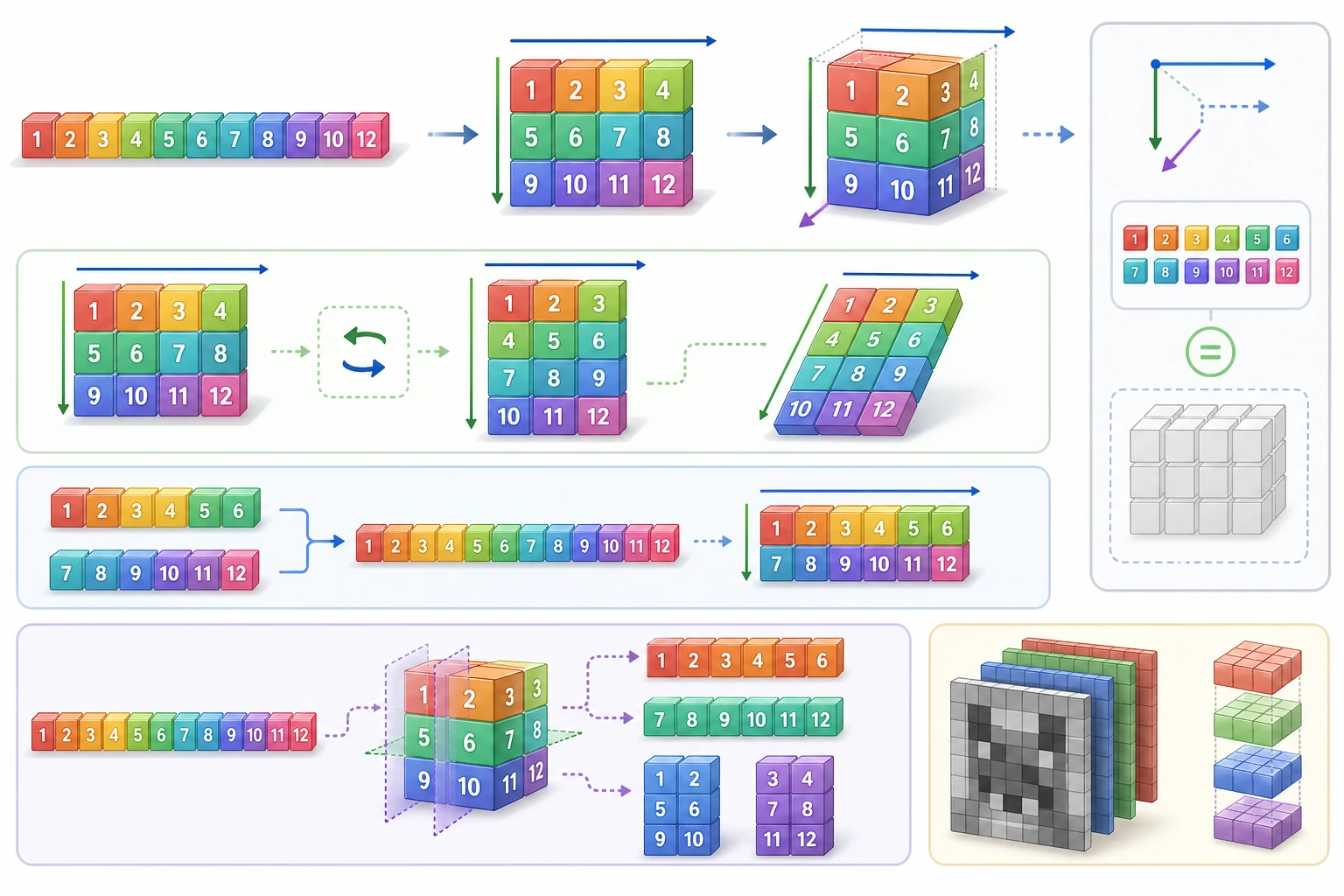
- 掌握 reshape、flatten、ravel 等变形操作
- 学会数组的拼接(concatenate、stack、hstack、vstack)
- 学会数组的分割(split、hsplit、vsplit)
- 理解转置和轴交换
reshape:改变形状
Section titled “reshape:改变形状”reshape 是最常用的变形操作——在不改变数据的前提下改变数组的形状。
import numpy as np
arr = np.arange(12)    # [ 0  1  2  3  4  5  6  7  8  9 10 11]print(arr.shape)       # (12,)
# 变成 3 行 4 列m1 = arr.reshape(3, 4)print(m1)# [[ 0  1  2  3]#  [ 4  5  6  7]#  [ 8  9 10 11]]
# 变成 4 行 3 列m2 = arr.reshape(4, 3)print(m2)# [[ 0  1  2]#  [ 3  4  5]#  [ 6  7  8]#  [ 9 10 11]]
# 变成 2×2×3 的三维数组m3 = arr.reshape(2, 2, 3)print(m3)# [[[ 0 1 2]# [ 3 4 5]]# [[ 6 7 8]# [ 9 10 11]]]用 -1 自动计算
Section titled “用 -1 自动计算”-1 表示”让 NumPy 自动计算这个维度”:
arr = np.arange(12)
# 我想要 3 行,列数你帮我算m1 = arr.reshape(3, -1)    # 自动算出 4 列print(m1.shape)             # (3, 4)
# 我想要 4 列,行数你帮我算m2 = arr.reshape(-1, 4)    # 自动算出 3 行print(m2.shape)             # (3, 4)
# 变成一列(列向量)col = arr.reshape(-1, 1)print(col.shape) # (12, 1)flatten 和 ravel:展平数组
Section titled “flatten 和 ravel:展平数组”把多维数组变回一维:
matrix = np.array([    [1, 2, 3],    [4, 5, 6]])
# flatten:返回拷贝(修改不影响原数组)flat = matrix.flatten()print(flat)          # [1 2 3 4 5 6]flat[0] = 99print(matrix[0, 0])  # 1  ← 原数组不变
# ravel:返回视图(修改会影响原数组)rav = matrix.ravel()print(rav) # [1 2 3 4 5 6]rav[0] = 99print(matrix[0, 0]) # 99 ← 原数组也变了!| 方法 | 返回类型 | 修改是否影响原数组 | 速度 |
|---|---|---|---|
flatten() | 拷贝 | 不影响 | 较慢(要复制数据) |
ravel() | 视图 | 影响 | 较快(不复制) |
reshape(-1) | 视图 | 影响 | 较快 |
concatenate:通用拼接
Section titled “concatenate:通用拼接”a = np.array([1, 2, 3])b = np.array([4, 5, 6])
# 一维拼接c = np.concatenate([a, b])print(c) # [1 2 3 4 5 6]二维拼接需要指定方向(axis):
m1 = np.array([[1, 2], [3, 4]])m2 = np.array([[5, 6], [7, 8]])
# axis=0:上下拼接(行数增加)v = np.concatenate([m1, m2], axis=0)print(v)# [[1 2]#  [3 4]#  [5 6]#  [7 8]]
# axis=1:左右拼接(列数增加)h = np.concatenate([m1, m2], axis=1)print(h)# [[1 2 5 6]#  [3 4 7 8]]
vstack 和 hstack:快捷拼接
Section titled “vstack 和 hstack:快捷拼接”m1 = np.array([[1, 2], [3, 4]])m2 = np.array([[5, 6], [7, 8]])
# vstack = vertical stack = 上下拼接 = concatenate(axis=0)print(np.vstack([m1, m2]))# [[1 2]# [3 4]# [5 6]# [7 8]]
# hstack = horizontal stack = 左右拼接 = concatenate(axis=1)print(np.hstack([m1, m2]))# [[1 2 5 6]# [3 4 7 8]]stack:创建新维度
Section titled “stack:创建新维度”stack 和 concatenate 的区别是——stack 会增加一个维度:
a = np.array([1, 2, 3])   # shape: (3,)b = np.array([4, 5, 6])   # shape: (3,)
# stack 沿新维度堆叠s0 = np.stack([a, b], axis=0)   # 相当于"横着放"print(s0)# [[1 2 3]#  [4 5 6]]print(s0.shape)  # (2, 3)
s1 = np.stack([a, b], axis=1)   # 相当于"竖着放"print(s1)# [[1 4]#  [2 5]#  [3 6]]print(s1.shape)  # (3, 2)
拼接方法总结
Section titled “拼接方法总结”| 函数 | 作用 | 维度变化 |
|---|---|---|
np.concatenate() | 沿已有轴拼接 | 维度不变,某个轴变长 |
np.vstack() | 上下拼接 | 行数增加 |
np.hstack() | 左右拼接 | 列数增加 |
np.stack() | 沿新轴堆叠 | 增加一个维度 |
split:均匀分割
Section titled “split:均匀分割”arr = np.arange(12) # [ 0 1 2 3 4 5 6 7 8 9 10 11]
# 均匀分成 3 份parts = np.split(arr, 3)print(parts[0]) # [0 1 2 3]print(parts[1]) # [4 5 6 7]print(parts[2]) # [8 9 10 11]
# 按指定位置分割parts2 = np.split(arr, [3, 7]) # 在索引 3 和 7 处切print(parts2[0]) # [0 1 2]print(parts2[1]) # [3 4 5 6]print(parts2[2]) # [7 8 9 10 11]matrix = np.arange(16).reshape(4, 4)print(matrix)# [[ 0 1 2 3]# [ 4 5 6 7]# [ 8 9 10 11]# [12 13 14 15]]
# vsplit:上下分割top, bottom = np.vsplit(matrix, 2)print(top)# [[0 1 2 3]# [4 5 6 7]]
# hsplit:左右分割left, right = np.hsplit(matrix, 2)print(left)# [[ 0 1]# [ 4 5]# [ 8 9]# [12 13]]转置与轴交换
Section titled “转置与轴交换”转置就是行变列,列变行:
matrix = np.array([    [1, 2, 3],    [4, 5, 6]])print(matrix.shape)  # (2, 3)
# 转置t = matrix.Tprint(t)# [[1 4]#  [2 5]#  [3 6]]print(t.shape)  # (3, 2)
# 也可以用 transposet2 = matrix.transpose()print(np.array_equal(t, t2))  # True
添加维度:np.newaxis 和 expand_dims
Section titled “添加维度:np.newaxis 和 expand_dims”有时候我们需要给数组增加一个维度(比如把行向量变成列向量):
arr = np.array([1, 2, 3])      # shape: (3,)
row = arr[np.newaxis, :]        # shape: (1, 3) 行向量col = arr[:, np.newaxis]        # shape: (3, 1) 列向量print(row)  # [[1 2 3]]print(col)# [[1]#  [2]#  [3]]
# 方法 2:np.expand_dimsrow2 = np.expand_dims(arr, axis=0)   # 在 axis=0 处添加维度 → (1, 3)col2 = np.expand_dims(arr, axis=1)   # 在 axis=1 处添加维度 → (3, 1)
# 方法 3:reshaperow3 = arr.reshape(1, -1)   # (1, 3)col3 = arr.reshape(-1, 1)   # (3, 1)
压缩维度:squeeze
Section titled “压缩维度:squeeze”去掉大小为 1 的维度:
arr = np.array([[[1, 2, 3]]])print(arr.shape)          # (1, 1, 3)
squeezed = arr.squeeze()print(squeezed.shape)     # (3,)print(squeezed)           # [1 2 3]
实战:数据重组
Section titled “实战:数据重组”import numpy as np
# 场景:你有 12 个月的销售数据(一维)monthly_sales = np.array([ 120, 135, 150, 180, 200, 210, 195, 188, 220, 250, 280, 310])
# 重组成 4 个季度 × 3 个月quarterly = monthly_sales.reshape(4, 3)print("季度数据:")print(quarterly)# [[120 135 150] Q1# [180 200 210] Q2# [195 188 220] Q3# [250 280 310]] Q4
# 每季度总销售额q_totals = quarterly.sum(axis=1)quarters = ["Q1", "Q2", "Q3", "Q4"]for q, total in zip(quarters, q_totals): print(f" {q}: {total}")
# 上半年 vs 下半年first_half, second_half = np.vsplit(quarterly, 2)print(f"\n上半年总额: {first_half.sum()}")print(f"下半年总额: {second_half.sum()}")学完这一页,至少保留这张证据卡:
- 数组状态
- 操作前的形状、dtype、轴和样本值
- 操作
- 索引、切片、广播、reshape、线性代数,或随机/统计函数
- 输出
- 结果数组形状、值,或统计量
- 失败检查
- 轴混淆、视图/副本陷阱、广播不匹配或形状错误
- 期望产出
- 打印的形状和值,便于检查数组运算
| 操作 | 函数 | 说明 |
|---|---|---|
| 改变形状 | reshape() | 元素总数不变,改变维度排列 |
| 展平 | flatten() / ravel() | 多维变一维 |
| 拼接 | concatenate() / vstack() / hstack() | 多个数组合并 |
| 堆叠 | stack() | 合并并增加一个维度 |
| 分割 | split() / vsplit() / hsplit() | 一个数组拆成多个 |
| 转置 | .T / transpose() | 行列互换 |
| 增加维度 | np.newaxis / expand_dims() | 添加 size=1 的维度 |
| 压缩维度 | squeeze() | 去掉 size=1 的维度 |
练习 1:reshape 练习
Section titled “练习 1:reshape 练习”arr = np.arange(24)
# 1. 变成 4×6 的矩阵# 2. 变成 2×3×4 的三维数组# 3. 变成 6 行(列数自动计算)# 4. 把 (2,3,4) 数组展平回一维练习 2:拼接与分割
Section titled “练习 2:拼接与分割”# 有 3 个班的成绩数据class_a = np.array([[85, 90], [78, 82], [92, 88]]) # 3 人 × 2 科class_b = np.array([[76, 80], [95, 91], [83, 87]]) # 3 人 × 2 科class_c = np.array([[88, 92], [71, 75], [90, 85]]) # 3 人 × 2 科
# 1. 把 3 个班的成绩合并成一个 9×2 的矩阵# 2. 如果有第 3 科成绩需要补充,怎么拼接?extra_scores = np.array([[70], [65], [80], [75], [90], [85], [78], [72], [88]])# 3. 把合并后的 9×3 矩阵按每 3 人分割回 3 组练习 3:数据重组
Section titled “练习 3:数据重组”# 一年 365 天的温度数据(假数据)rng = np.random.default_rng(seed=42)daily_temps = rng.uniform(low=-5, high=38, size=360) # 取 360 天方便分割
# 1. 重组成 12 个月 × 30 天# 2. 计算每月平均温度# 3. 找出最热和最冷的月份# 4. 计算上半年和下半年的平均温度差参考实现与讲解
- 同样 24 个值可以变成
(4, 6)、(2, 3, 4)或(6, -1),前提是元素总数仍为 24。-1只能用于一个维度,让 NumPy 自动推断。 - 班级成绩数据中,
np.vstack纵向叠班级,np.hstack横向加列,行数能对齐时np.split可以再拆回等大的数据块。 - 每日温度数据如果每月 30 个读数,可 reshape 成
(12, 30),再用axis=1算月均值,用argmax或argmin找最热或最冷月份。