
1.2.2 Git Core Operations
Where This Section Fits
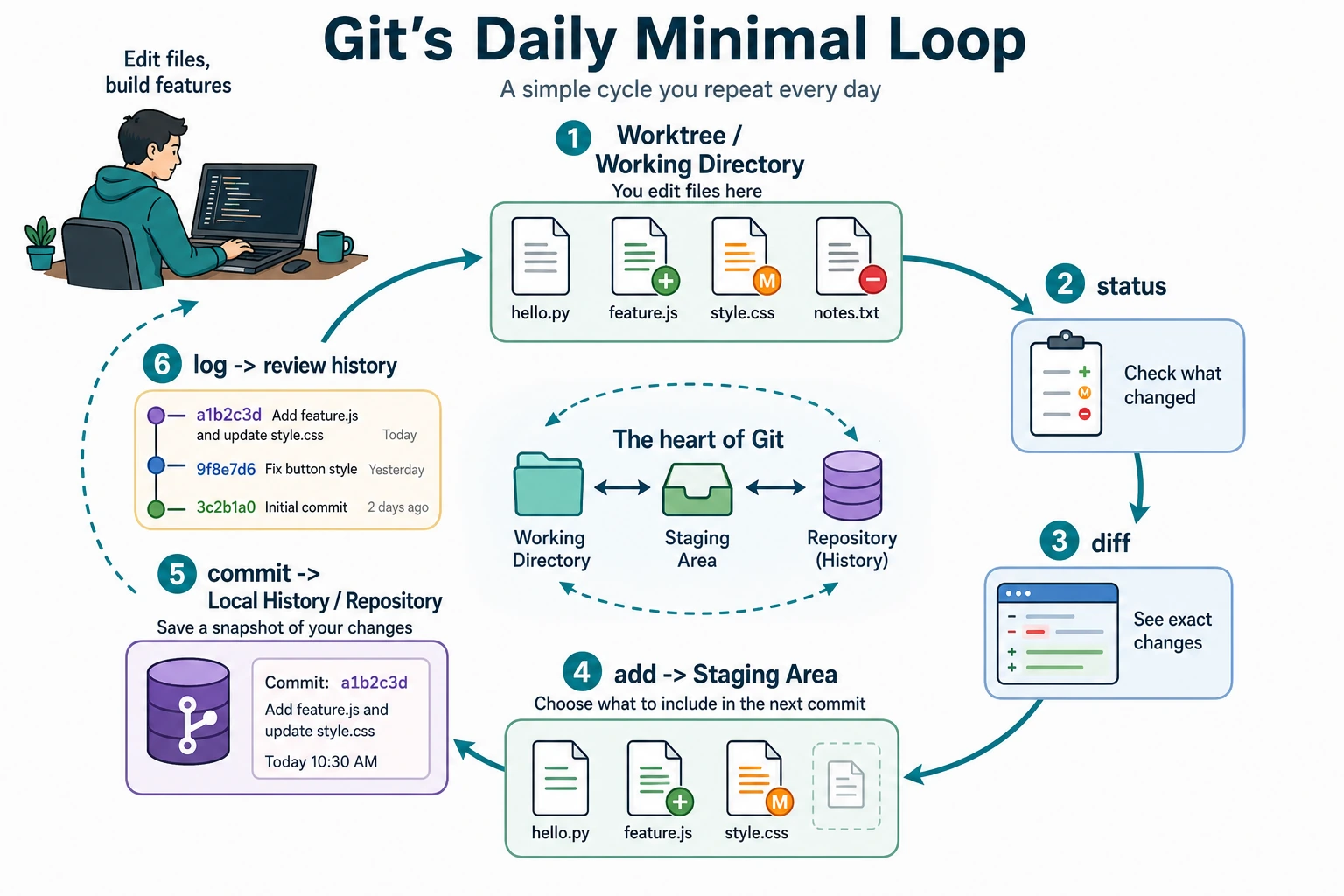
Section titled “Where This Section Fits”This section starts putting Git into practice. The focus is on mastering the add, commit, status, log, diff, and undo operations you will use every day, so you can build the basic development habit of “write a bit of code, check the status, and commit a record.”
Learning Objectives
Section titled “Learning Objectives”- Use
git add,git commit,git status, andgit logfluently - Learn to use
git diffto inspect changes - Be able to write a
.gitignorefile - Master several commonly used undo operations
Preparation
Section titled “Preparation”We will use a simulated AI project to practice all operations. First, create the project:
mkdir ai-image-classifiercd ai-image-classifiergit init
# Create the basic project structuremkdir data models srctouch src/train.py src/model.py src/utils.pytouch README.md requirements.txt
Check Status: git status
Section titled “Check Status: git status”git status is one of the commands you will use most often. It tells you the current state of the repository: which files have been modified? Which files are in the staging area? Which files are not yet tracked by Git?
git statusOutput:
On branch main
No commits yet
Untracked files:  (use "git add <file>..." to include in what will be committed)        README.md        requirements.txt        src/
nothing added to commit but untracked files present
Untracked files: Git can see these files, but it is not managing them yet. You need to use git add to tell Git, “please start tracking these files.”
Add to the Staging Area: git add
Section titled “Add to the Staging Area: git add”# Add a single filegit add README.md
# Add multiple filesgit add src/train.py src/model.py
# Add an entire foldergit add src/
# Add all files (most commonly used)git add .
# Add all modified tracked files (excluding new files)git add -uHands-on Example
Section titled “Hands-on Example”First, write some content into the files:
echo "# AI Image Classifier" > README.mdecho "torch>=2.0" > requirements.txt
cat > src/model.py << 'EOF'import torch.nn as nn
class SimpleCNN(nn.Module):    def __init__(self):        super().__init__()        self.conv1 = nn.Conv2d(3, 16, 3, padding=1)        self.pool = nn.MaxPool2d(2, 2)        self.fc1 = nn.Linear(16 * 16 * 16, 10)
    def forward(self, x):        x = self.pool(torch.relu(self.conv1(x)))        x = x.view(-1, 16 * 16 * 16)        x = self.fc1(x)        return xEOF
Now add all files and check the status:
git add .git statusOutput:
On branch main
No commits yet
Changes to be committed:  (use "git rm --cached <file>..." to unstage)        new file:   README.md        new file:   requirements.txt        new file:   src/model.py        new file:   src/train.py        new file:   src/utils.py
The files have turned green as “Changes to be committed”, which means they are now in the staging area and ready to be committed.
Commit: git commit
Section titled “Commit: git commit”git commit -m "Initialize project: add model definition and project structure"Output:
[main (root-commit) a1b2c3d] Initialize project: add model definition and project structure 5 files changed, 18 insertions(+) create mode 100644 README.md create mode 100644 requirements.txt create mode 100644 src/model.py create mode 100644 src/train.py create mode 100644 src/utils.pyHow Should You Write Commit Messages?
Section titled “How Should You Write Commit Messages?”Commit messages should be concise and clear, so people can immediately tell what changed.
Good commit messages:
git commit -m "Add CNN model definition"git commit -m "Fix bug where learning rate was not updated in the training loop"git commit -m "Add data augmentation: random flip and color jitter"git commit -m "Update README: add installation instructions"Bad commit messages:
git commit -m "update" # What was updated?git commit -m "fix" # What was fixed?git commit -m "aaa" # ???git commit -m "Changed some stuff" # Basically says nothingInspect Changes: git diff
Section titled “Inspect Changes: git diff”git diff tells you “what changed since the last commit.”
Example: Modifying the Model Code
Section titled “Example: Modifying the Model Code”# Add a new layer to model.pycat > src/model.py << 'EOF'import torchimport torch.nn as nn
class SimpleCNN(nn.Module): def __init__(self): super().__init__() self.conv1 = nn.Conv2d(3, 16, 3, padding=1) self.conv2 = nn.Conv2d(16, 32, 3, padding=1) # Newly added convolution layer self.pool = nn.MaxPool2d(2, 2) self.fc1 = nn.Linear(32 * 8 * 8, 10)
def forward(self, x): x = self.pool(torch.relu(self.conv1(x))) x = self.pool(torch.relu(self.conv2(x))) # Newly added x = x.view(-1, 32 * 8 * 8) x = self.fc1(x) return xEOFNow check the changes:
git diffThe output will highlight differences in red and green:
--- a/src/model.py+++ b/src/model.py@@ -1,4 +1,5 @@+import torch import torch.nn as nn
class SimpleCNN(nn.Module): def __init__(self): super().__init__() self.conv1 = nn.Conv2d(3, 16, 3, padding=1)+ self.conv2 = nn.Conv2d(16, 32, 3, padding=1) # Newly added convolution layer self.pool = nn.MaxPool2d(2, 2)- self.fc1 = nn.Linear(16 * 16 * 16, 10)+ self.fc1 = nn.Linear(32 * 8 * 8, 10)- Red (
-at the start): deleted lines - Green (
+at the start): newly added lines
Now commit this change:
git add src/model.pygit commit -m "Add a second convolution layer to improve model capacity"Common Ways to Use diff
Section titled “Common Ways to Use diff”git diff # View unstaged changes in the working directorygit diff --staged # View staged changes (added but not yet committed)git diff HEAD~1 # View what the most recent commit changedgit diff abc1234 def5678 # Compare differences between two commitsView History: git log
Section titled “View History: git log”git logOutput:
commit def5678... (HEAD -> main)Author: Zhang San <[email protected]>Date:   Mon Feb 9 10:30:00 2026
    Add a second convolution layer to improve model capacity
commit a1b2c3d...Author: Zhang San <[email protected]>Date:   Mon Feb 9 10:00:00 2026
    Initialize project: add model definition and project structure
A More Concise Way to View History
Section titled “A More Concise Way to View History”# One record per line (most commonly used)git log --oneline# Output:# def5678 Add a second convolution layer to improve model capacity# a1b2c3d Initialize project: add model definition and project structure
# With file change statisticsgit log --oneline --stat
# Show branches visually (very useful when branches exist)git log --oneline --graph --all.gitignore: Tell Git What to Ignore
Section titled “.gitignore: Tell Git What to Ignore”Some files should not be managed by Git:
- Data files (training data that is several GB)
- Model weight files (hundreds of MB)
- Virtual environment folders
- Temporary files generated by the system
- Sensitive information such as API keys and passwords
Create a .gitignore file to tell Git to ignore them:
cat > .gitignore << 'EOF'# Python cache__pycache__/*.pyc*.pyo
# Virtual environmentvenv/.venv/env/
# Jupyter Notebook checkpoints.ipynb_checkpoints/
# Data files (too large to put in Git)data/*.csvdata/*.jsondata/*.zip*.h5*.hdf5
# Model weight filesmodels/*.ptmodels/*.pthmodels/*.onnx*.bin
# Environment variable files (contain API keys and other sensitive information).env.env.local
# IDE settings.vscode/.idea/
# Operating system files.DS_StoreThumbs.db
# Logslogs/*.log
# Distribution / packagingdist/build/*.egg-info/EOFgit add .gitignoregit commit -m "Add .gitignore: ignore cache, data, model weights, and sensitive files"Verify That .gitignore Works
Section titled “Verify That .gitignore Works”# Create some files that should be ignoredmkdir -p __pycache__touch __pycache__/model.cpython-311.pyctouch .envecho "OPENAI_API_KEY=your_api_key_here" > .env
# Check the status — these files will not appeargit status# Output: nothing to commit, working tree clean.env and __pycache__/ are both ignored and will not be committed to Git. Your API key is safe.
Undo Operations: Safety Nets
Section titled “Undo Operations: Safety Nets”Git provides several different “safety nets,” and you choose one based on how far you want to go back.
For beginners, use this order of thinking:
flowchart TD A["Something looks wrong"] --> B["Run git status"] B --> C["Run git diff"] C --> D{"Have you committed it?"} D -->|"No, not staged"| E["git restore file<br/>discard local edits"] D -->|"Staged but not committed"| F["git restore --staged file<br/>keep edits, unstage"] D -->|"Committed"| G["Prefer a new fixing commit<br/>or use reset only in practice"]Scenario 1: You changed a file but have not run add yet, and want to restore it
Section titled “Scenario 1: You changed a file but have not run add yet, and want to restore it”# You changed src/utils.py, but you are not happy with the changes and want to restore it to the last committed stategit restore src/utils.py
# Restore all filesgit restore .Scenario 2: You already ran add and want to remove it from the staging area, but keep the changes
Section titled “Scenario 2: You already ran add and want to remove it from the staging area, but keep the changes”# You added model.py, but you do not want to commit it yetgit restore --staged src/model.py
# The file will move from the staging area back to the working directory, and your changes will remainScenario 3: You already committed and want to change the commit message
Section titled “Scenario 3: You already committed and want to change the commit message”# You just committed and realized the message was wronggit commit --amend -m "Corrected commit message"Scenario 4: You already committed and want to undo the entire commit
Section titled “Scenario 4: You already committed and want to undo the entire commit”# Undo the most recent commit, but keep the file changes (go back to before add)git reset HEAD~1
# Undo the most recent commit and discard all changes (full rollback, use with caution)git reset --hard HEAD~1For the first few weeks, treat git reset --hard as an emergency command, not a daily command. In team projects, rewriting history may also affect other people, so the safer habit is often to make a new commit that fixes the mistake.
Example: A Complete Undo Flow
Section titled “Example: A Complete Undo Flow”# Suppose you accidentally committed an API keyecho "API_KEY=your_api_key_here" > config.pygit add .git commit -m "Add configuration file"
# Oops! The key should not have been committed. Undo this commitgit reset HEAD~1
# The file is still there, but the commit has been undone. Now add it to .gitignoreecho "config.py" >> .gitignoregit add .gitignoregit commit -m "Update .gitignore: ignore config.py"Undo Quick Reference
Section titled “Undo Quick Reference”| What I want to undo | Command | Are the file changes still there? |
|---|---|---|
| Changes in the working directory (not yet added) | git restore file-name | ❌ Discarded |
| Files in the staging area (added but not committed) | git restore --staged file-name | ✅ Kept |
| The last commit message was wrong | git commit --amend -m "new message" | ✅ Kept |
| The most recent commit (keep changes) | git reset HEAD~1 | ✅ Kept |
| The most recent commit (discard changes) | git reset --hard HEAD~1 | ❌ Discarded |
Hands-on Practice: Simulate a Full Development Workflow
Section titled “Hands-on Practice: Simulate a Full Development Workflow”# 1. Write the training scriptcat > src/train.py << 'EOF'import torchfrom model import SimpleCNN
model = SimpleCNN()optimizer = torch.optim.Adam(model.parameters(), lr=0.001)print("Number of model parameters:", sum(p.numel() for p in model.parameters()))EOF
git add src/train.pygit commit -m "Add basic training script"
# 2. Write a utility functioncat > src/utils.py << 'EOF'def accuracy(predictions, labels): """Calculate accuracy""" correct = (predictions.argmax(dim=1) == labels).sum().item() return correct / len(labels)EOF
git add src/utils.pygit commit -m "Add accuracy calculation utility function"
# 3. Update the READMEcat > README.md << 'EOF'# AI Image Classifier
A simple image classification project using CNN.
## Installation
```bashpip install -r requirements.txt```
## Usage
```bashpython src/train.py```EOF
git add README.mdgit commit -m "Update README: add installation and usage instructions"
# 4. View the full historygit log --onelineYou should see something like these 5 commit records:
f6g7h8i Update README: add installation and usage instructionsd4e5f6g Add accuracy calculation utility functionb2c3d4e Add basic training script9a0b1c2 Add .gitignore: ignore cache, data, model weights, and sensitive filesa1b2c3d Initialize project: add model definition and project structureEach one is an archive point you can roll back to.
Project reference and review notes
- The final
git log --onelineshould show the three exercise commits plus the earlier setup commits. - Each commit should save one small idea: training script, utility function, or README update.
git statusafter the final commit should be clean, or it should show only intentional untracked files that you can explain.- If
src/train.pyfails becausetorchormodelis missing, that is separate from the Git exercise. Record the run failure, but keep the commit workflow evidence. - Good commit messages use action words and explain the change, such as
Add basic training script, not vague messages likeupdate stuff.
Evidence to Keep
Section titled “Evidence to Keep”Keep this page’s proof of learning as a small evidence card:
- Repo State
- git status before and after the operation
- Operation
- init, add, commit, branch, merge, remote, pull, or push command used
- History
- git log or branch graph showing what changed
- Failure Check
- untracked files, wrong branch, merge conflict, or remote/auth issue
- Expected Output
- a clean Git trace that another learner can replay safely
Summary
Section titled “Summary”| Command | Purpose | Frequency |
|---|---|---|
git status | Check the current status | ⭐⭐⭐⭐⭐ |
git add . | Stage all changes | ⭐⭐⭐⭐⭐ |
git commit -m "message" | Commit | ⭐⭐⭐⭐⭐ |
git log --oneline | View history | ⭐⭐⭐⭐ |
git diff | Inspect changes | ⭐⭐⭐⭐ |
git restore | Undo working-directory changes | ⭐⭐⭐ |
git reset | Undo commits | ⭐⭐ |