
2.1.3 Operators and Expressions
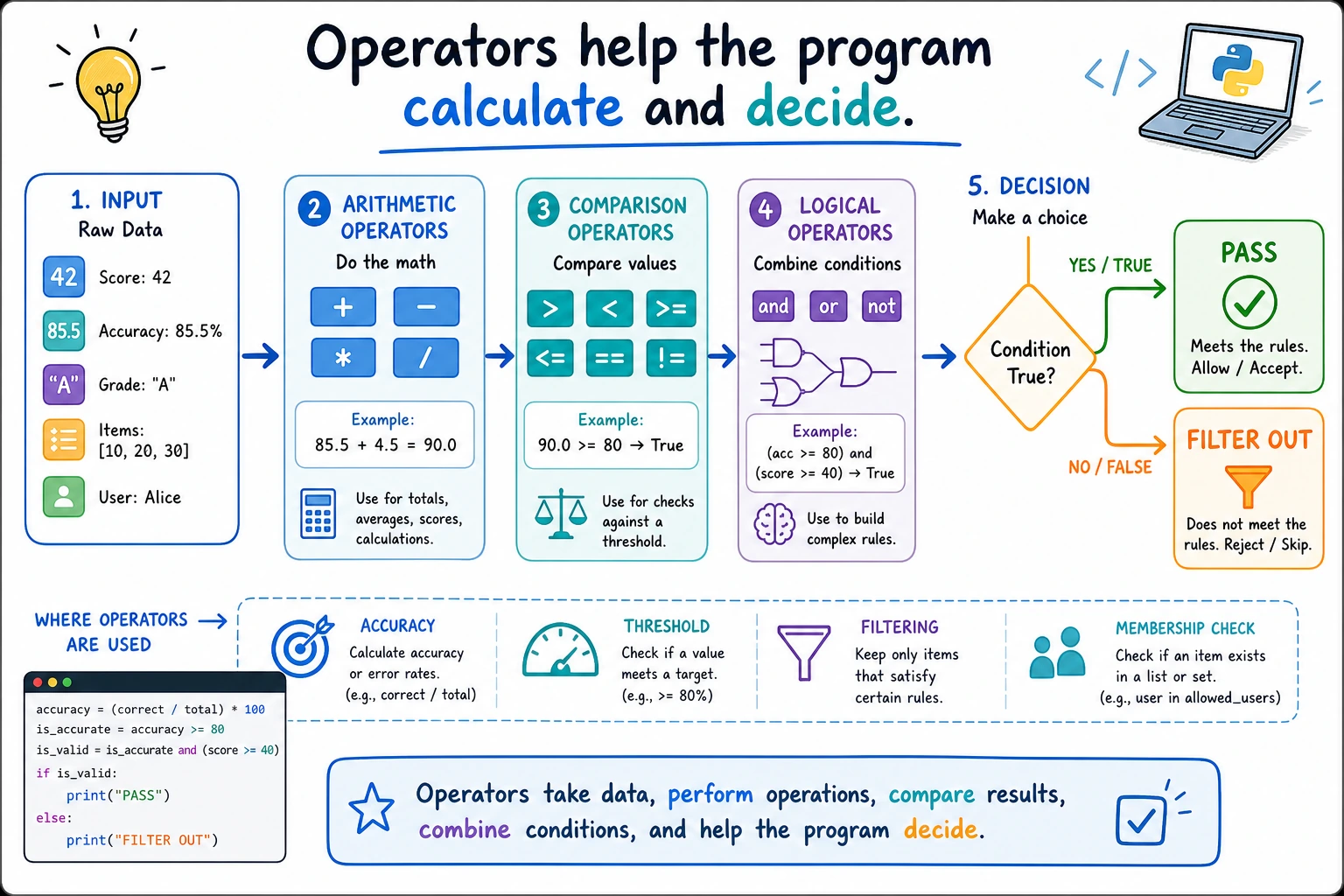
Read the picture first: every decision starts from an expression. Comparisons and logical operators turn that expression into True or False, and the result decides which branch the program takes.
What this section is about
Section titled “What this section is about”In this section, you’ll learn how to calculate and make decisions with data. Operators are not only used in math calculations; they also appear in model metric calculations, conditional filtering, loop decisions, and data cleaning logic. They are the first step in combining variables into program logic.
Learning goals
Section titled “Learning goals”- Master arithmetic operators, comparison operators, and logical operators
- Understand operator precedence
- Learn how to use assignment operators and membership operators
- Be able to write correct conditional expressions
| What you want to do | Common operators |
|---|---|
| Calculate values | +、-、*、/ |
| Compare values | >、>=、==、!= |
| Combine conditions | and、or、not |
| Check whether something is included | in、not in |
Let’s look at a scenario first
Section titled “Let’s look at a scenario first”You are developing an AI data processing script and need to:
- Calculate model accuracy:
correct / total * 100 - Check whether it meets the target:
accuracy >= 60 - Check two conditions:
accuracy >= 60 and loss < 0.5
All of these operations depend on operators. Operators are the symbols that tell Python “what to do with the data.”
Arithmetic operators
Section titled “Arithmetic operators”The most basic mathematical operations:
| Operator | Meaning | Example | Result |
|---|---|---|---|
+ | Addition | 5 + 3 | 8 |
- | Subtraction | 5 - 3 | 2 |
* | Multiplication | 5 * 3 | 15 |
/ | Division | 5 / 3 | 1.6667 |
// | Floor division | 5 // 3 | 1 |
% | Remainder | 5 % 3 | 2 |
** | Exponentiation | 5 ** 3 | 125 |
Real-world example
Section titled “Real-world example”# Scenario: calculate some metrics for AI model training
total_samples = 1000 # Total number of samplescorrect = 873 # Number of correct predictionsepochs = 50 # Number of training epochsbatch_size = 32 # Batch size
# Calculate accuracyaccuracy = correct / total_samples * 100print(f"Accuracy: {accuracy}%") # 87.3%
# Calculate how many batches are needed to finish one epochbatches_per_epoch = total_samples // batch_sizeremaining = total_samples % batch_size
print(f"There are {batches_per_epoch} full batches in each epoch") # 31print(f"The last batch has {remaining} samples") # 8
# Calculate an exponentially decayed learning rateinitial_lr = 0.01decay = 0.95current_lr = initial_lr * (decay ** epochs)print(f"Learning rate at epoch {epochs}: {current_lr:.6f}") # 0.000769Two forms of division
Section titled “Two forms of division”This is a common point of confusion for beginners:
print(7 / 2)    # 3.5   ← Normal division, result is floatprint(7 // 2)   # 3     ← Floor division, drops the decimal partprint(-7 // 2)  # -4    ← Note! Rounds down, not toward zero
# A useful trick with remainderprint(10 % 3)   # 1    ← 10 divided by 3 leaves remainder 1print(15 % 5)   # 0    ← Remainder is 0 when evenly divisible
# Check whether a number is odd or evennumber = 42if number % 2 == 0:    print(f"{number} is an even number")  # 42 is even
Comparison operators
Section titled “Comparison operators”The result of comparison operators is always a Boolean value (True or False):
| Operator | Meaning | Example | Result |
|---|---|---|---|
== | Equal to | 5 == 5 | True |
!= | Not equal to | 5 != 3 | True |
> | Greater than | 5 > 3 | True |
< | Less than | 5 < 3 | False |
>= | Greater than or equal to | 5 >= 5 | True |
<= | Less than or equal to | 5 <= 3 | False |
# Scenario: judge model performanceaccuracy = 87.3loss = 0.35
print(accuracy > 90) # False —— accuracy did not exceed 90print(accuracy >= 80) # True —— accuracy is at least 80print(loss < 0.5) # True —— loss is below 0.5print(accuracy == 87.3) # True —— accuracy is exactly 87.3Chained comparisons (Python-specific)
Section titled “Chained comparisons (Python-specific)”Python allows chained comparisons, which is not possible in many other languages:
latency_ms = 185
# Check whether latency is inside the acceptable API rangeprint(50 <= latency_ms <= 200)   # True
# Equivalent toprint(50 <= latency_ms and latency_ms <= 200)   # True, but the version above is more concise
# More examplesx = 5print(1 < x < 10)      # Trueprint(1 < x < 3)       # False
Logical operators
Section titled “Logical operators”Logical operators are used to combine multiple conditions:
| Operator | Meaning | Explanation |
|---|---|---|
and | And | Only both true is true |
or | Or | At least one true is true |
not | Not | Negates the value: true becomes false, false becomes true |
tests_passed = Truehas_review = Truehas_rollback_plan = False
# and: both conditions must be satisfiedcan_release = tests_passed and has_reviewprint(f"Can release: {can_release}")   # True (tests passed and review is done)
# or: at least one condition is satisfiedhas_safety_net = has_review or has_rollback_planprint(f"Has safety net: {has_safety_net}")  # True (review already provides one check)
# not: negateneeds_attention = not tests_passedprint(f"Needs attention: {needs_attention}")   # False
Real-world example: AI model evaluation
Section titled “Real-world example: AI model evaluation”accuracy = 92.5loss = 0.15training_time = 3.5 # hours
# Standard for a good model: accuracy > 90 and loss < 0.3is_good_model = accuracy > 90 and loss < 0.3print(f"Is it a good model: {is_good_model}") # True
# Need retraining: accuracy too low or loss too highneed_retrain = accuracy < 80 or loss > 1.0print(f"Needs retraining: {need_retrain}") # False
# Practical model: good model and training time is reasonableis_practical = is_good_model and not (training_time > 24)print(f"Is it practical: {is_practical}") # TrueShort-circuit evaluation
Section titled “Short-circuit evaluation”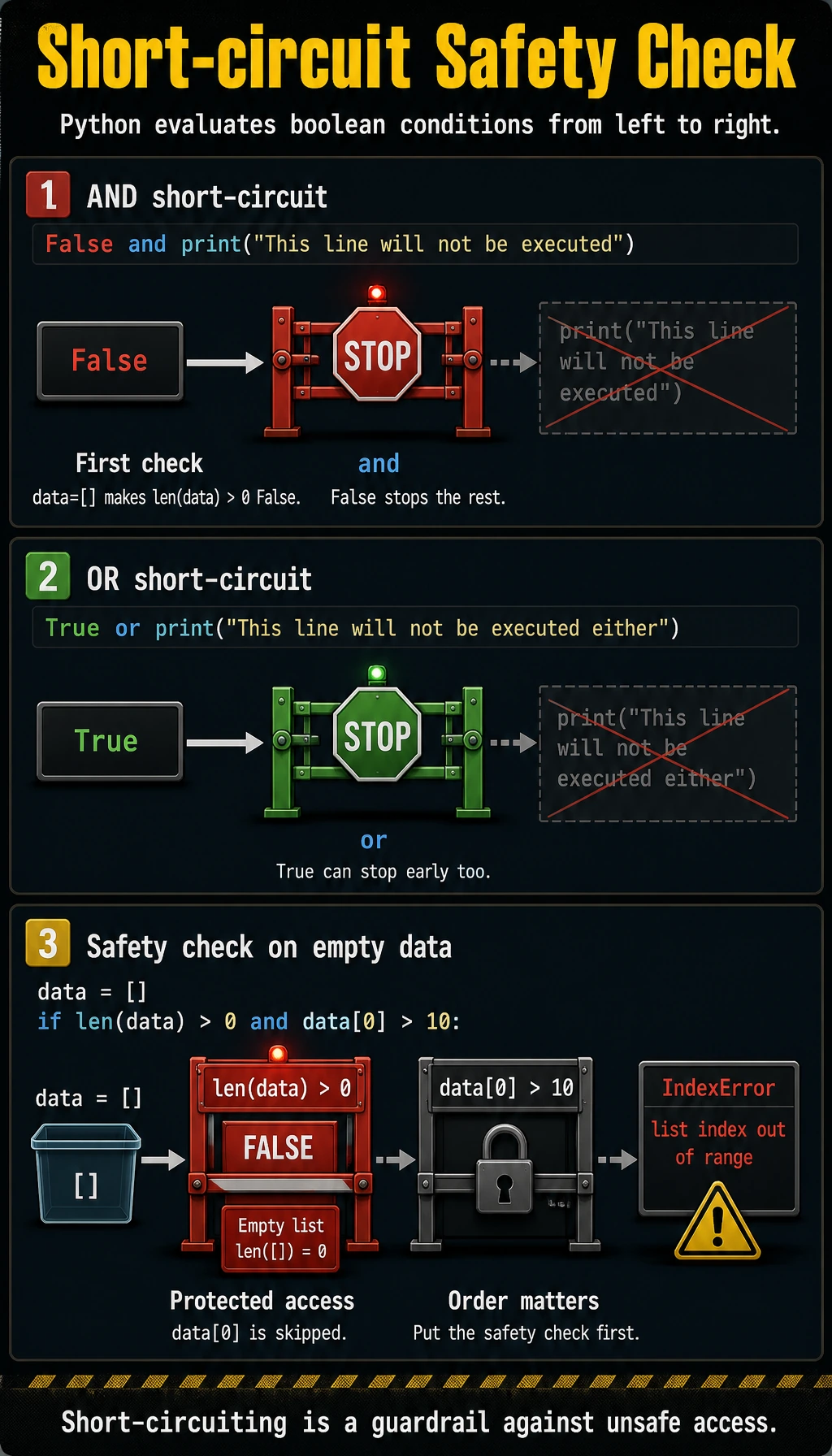
Python’s and and or have a smart feature called short-circuit evaluation:
# and: if the first condition is False, the second condition is not checked# because the result is already guaranteed to be FalseFalse and print("This line will not be executed")
# or: if the first condition is True, the second condition is not checked# because the result is already guaranteed to be TrueTrue or print("This line will not be executed either")
This feature is often used in real programming for safety checks:
# Check whether the list is empty before accessing an element (to avoid errors)data = []# If data is empty, len(data) > 0 is False, and the following part will not runif len(data) > 0 and data[0] > 10: print("The first element is greater than 10")When reading short-circuit expressions, order matters. Put the cheapest and safest check first, and put the operation that may fail or cost more later. You will reuse this habit when checking files, lists, dictionaries, API responses, and model outputs.
Assignment operators
Section titled “Assignment operators”In addition to the basic =, there are some shorthand forms:
| Operator | Equivalent to | Example |
|---|---|---|
+= | a = a + b | a += 5 |
-= | a = a - b | a -= 3 |
*= | a = a * b | a *= 2 |
/= | a = a / b | a /= 4 |
//= | a = a // b | a //= 3 |
%= | a = a % b | a %= 2 |
**= | a = a ** b | a **= 3 |
completed_tasks = 0
completed_tasks += 2   # completed_tasks = 0 + 2 = 2completed_tasks += 3   # completed_tasks = 2 + 3 = 5completed_tasks -= 1   # completed_tasks = 5 - 1 = 4completed_tasks *= 2   # completed_tasks = 4 * 2 = 8
print(f"Completed task points: {completed_tasks}")  # 8
These shorthand forms are especially common in loops:
# Add up numbers from 1 to 100total = 0for i in range(1, 101): total += iprint(f"The sum of 1 to 100 is: {total}") # 5050Membership operators
Section titled “Membership operators”in and not in are used to check whether a value is in a collection:
# Search in a stringprint("Python" in "I love Python")     # Trueprint("Java" in "I love Python")       # Falseprint("Java" not in "I love Python")   # True
# Search in a listservices = ["login-api", "search-api", "worker"]print("login-api" in services)      # Trueprint("billing-api" in services)    # False
# Real-world application: check file extensionfilename = "model.py"if ".py" in filename:    print("This is a Python file")
Identity operators
Section titled “Identity operators”is and is not are used to check whether two variables are the same object (not just equal in value, but the same thing in memory):
a = None
# Check whether it is None (recommended to use is, not ==)print(a is None)       # Trueprint(a is not None)   # False
# The difference between is and ==x = [1, 2, 3]y = [1, 2, 3]z = x
print(x == y) # True —— values are equalprint(x is y) # False —— not the same object (two different lists)print(x is z) # True —— z points to x, so they are the same objectOperator precedence
Section titled “Operator precedence”When an expression contains multiple operators, Python evaluates them according to precedence from high to low:
| Priority (high → low) | Operator |
|---|---|
| 1 (highest) | ** exponentiation |
| 2 | +x, -x positive/negative sign |
| 3 | *, /, //, % |
| 4 | +, - |
| 5 | ==, !=, >, <, >=, <= |
| 6 | not |
| 7 | and |
| 8 (lowest) | or |
# Without parenthesesresult = 2 + 3 * 4      # Multiply first, then add: 2 + 12 = 14result = 2 ** 3 ** 2     # Exponentiation is right-to-left: 2 ** 9 = 512
# Parentheses make it clearer (recommended)result = (2 + 3) * 4 # 20result = (2 ** 3) ** 2 # 64Expression Debugging Method
Section titled “Expression Debugging Method”When a condition is hard to understand, do not stare at the whole expression at once. Split it into named intermediate variables:
accuracy = 87.3loss = 0.35latency_ms = 185
is_accurate_enough = accuracy >= 80is_loss_ok = loss < 0.5is_latency_ok = latency_ms < 250
can_demo = is_accurate_enough and is_loss_ok and is_latency_okprint(is_accurate_enough, is_loss_ok, is_latency_ok, can_demo)
This gives you two benefits. First, the printed values show which small condition failed. Second, the variable names put business meaning into the code, which is easier to review than one long chain of symbols.
After you split the expression, you can print each intermediate variable as a minimal debugging trace. In data cleaning, model evaluation, and API monitoring, many bugs come from a reversed condition, a wrong threshold, or an and / or combination that does not match the intended rule.
Before trusting a condition, ask three quick questions:
- Did I compare values with
==, not assign with=? - Did I make the threshold direction clear, such as
latency_ms < 250instead of a vague variable name? - Did I test at least one passing case and one failing case?
This small habit prevents many beginner bugs. Operators look simple, but most real program decisions are built from them.
When Operators Become Project Logic
Section titled “When Operators Become Project Logic”In real projects, operators usually hide inside business rules. A model result may look good only when accuracy >= target, loss < limit, and latency_ms < budget are all true. A data row may be kept only when the label is not empty and the file extension is in the allowed list.
That is why this page is not only about symbols. Each operator should make a decision easier to read, test, and explain. When a condition matters to the product, give it a meaningful variable name and test both sides of the rule.
Before merging code that contains an important condition, read it out loud as a sentence. If the sentence sounds vague, split the expression into smaller variables. If the sentence sounds correct, create one example that should pass and one example that should fail.
This is also how you review beginner Python code. The syntax may be short, but the decision should still tell a clear story about the data and the intended rule.
If a teammate cannot predict the result from your variable names, the expression is doing too much work in one line.
The best operator code is not the shortest line. It is the line whose rule can be tested, reviewed, and changed without guessing.
Comprehensive example: API latency check
Section titled “Comprehensive example: API latency check”Let’s combine the operators we learned today:
# API latency checkservice = "Login API"db_latency = 70       # msapi_latency = 45      # msui_latency = 80       # ms
# Calculate average latencytotal_latency = db_latency + api_latency + ui_latencyaverage_latency = total_latency / 3print(f"{service} average latency: {average_latency:.1f} ms")  # 65.0
# Determine service statusis_fast = average_latency < 100is_acceptable = 100 <= average_latency < 250is_slow = 250 <= average_latency < 500is_incident_risk = average_latency >= 500
print(f"Fast: {is_fast}")                    # Trueprint(f"Acceptable: {is_acceptable}")        # Falseprint(f"Slow: {is_slow}")                    # Falseprint(f"Incident risk: {is_incident_risk}")  # False
# Combined judgmentis_ready = is_fast and not is_incident_riskprint(f"Ready to demo: {is_ready}")          # True
Hands-on exercises
Section titled “Hands-on exercises”Exercise 1: Latency status check
Section titled “Exercise 1: Latency status check”Use comparison operators and logical operators to determine latency status:
latency_ms = 185
is_fast = latency_ms < 100                         # Fastis_acceptable = latency_ms >= 100 and latency_ms < 250is_slow = latency_ms >= 250 and latency_ms < 500is_incident_risk = latency_ms >= 500
# Print resultsprint(f"Latency: {latency_ms} ms")print(f"Fast: {is_fast}")print(f"Acceptable: {is_acceptable}")print(f"Slow: {is_slow}")print(f"Incident risk: {is_incident_risk}")
Change the value of latency_ms and try different results.
Exercise 2: Leap year check
Section titled “Exercise 2: Leap year check”Leap year rule: divisible by 4 but not by 100, or divisible by 400.
year = 2024
# Hint: use % to check divisibility, and combine conditions with and, oris_leap = ___  # Complete this expression
print(f"Is {year} a leap year? {is_leap}")
Exercise 3: Triangle check
Section titled “Exercise 3: Triangle check”Determine whether three sides can form a triangle (the sum of any two sides is greater than the third side):
a, b, c = 3, 4, 5
# Complete the conditionis_triangle = ___
print(f"Can sides {a}, {b}, {c} form a triangle? {is_triangle}")
Reference implementation and walkthrough
- With
latency_ms = 185, only the “acceptable” branch should be true. Test80,320, and650to confirm the other branches. - A leap-year expression can be
year % 4 == 0 and year % 100 != 0 or year % 400 == 0. Parentheses can make it clearer. - The triangle condition is
a + b > c and a + c > b and b + c > a. - Test non-examples and examples:
1, 2, 3is false,3, 4, 5is true, and2, 2, 3is true. - Parentheses are worth using in longer logical expressions even when operator precedence would technically work.
Evidence to Keep
Section titled “Evidence to Keep”Keep this page’s proof of learning as a small evidence card:
- Concept
- variable, type, operator, input/output, branch, loop, structure, function, or module
- Code
- smallest runnable Python snippet for the concept
- Output
- printed value, type, branch result, loop trace, or returned value
- Failure Check
- type mismatch, indentation, off-by-one, mutable data, or import path issue
- Expected Output
- code plus printed result that proves the concept works
Summary
Section titled “Summary”| Operator type | Common symbols | Purpose |
|---|---|---|
| Arithmetic | +, -, *, /, //, %, ** | Mathematical calculation |
| Comparison | ==, !=, >, <, >=, <= | Conditional checks, result is True/False |
| Logical | and, or, not | Combine multiple conditions |
| Assignment | =, +=, -=, *= etc. | Assign values to variables |
| Membership | in, not in | Check whether an element is in a collection |
| Identity | is, is not | Check whether two references point to the same object |