
2.2.5 Iterators and Generators
Where this section fits
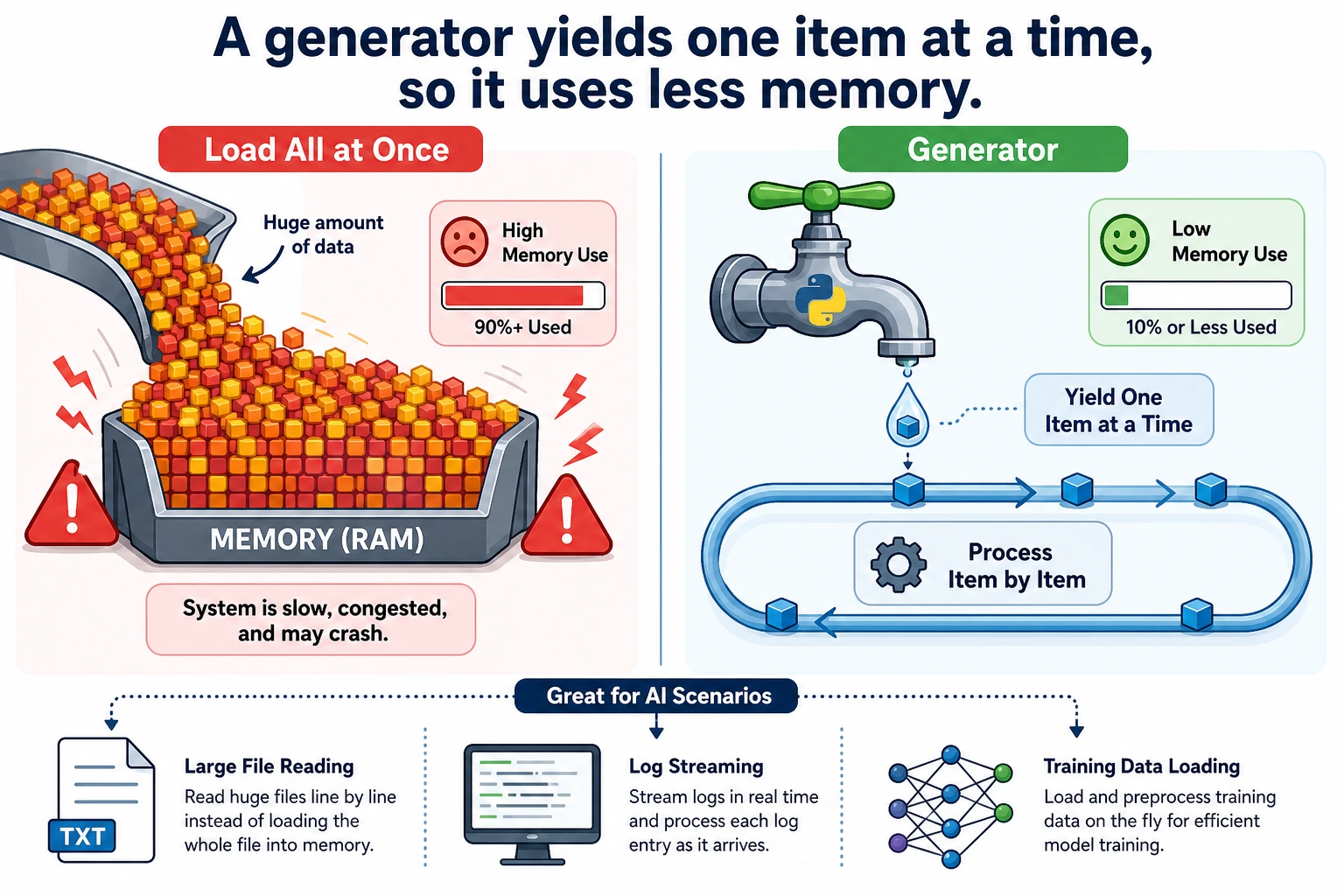
Section titled “Where this section fits”This section explains the mechanism behind for loops and introduces more memory-efficient data processing methods. Iterators and generators are very useful when handling large files, streaming data, and training data loading. First understand the idea, then master the most common yield syntax.
Learning objectives
Section titled “Learning objectives”- Understand the iterator protocol (
__iter__and__next__) - Master generator functions (
yield) - Understand generator expressions
- Learn why generators are so important for big data
What is iteration?
Section titled “What is iteration?”You have already used for loops many times:
for item in [1, 2, 3]:    print(item)
for char in "Hello":    print(char)
for key in {"a": 1, "b": 2}:    print(key)
for...in can iterate over these things because they are all iterable objects (Iterable). So the question is: what actually happens behind a for loop?
The iterator protocol
Section titled “The iterator protocol”Manual iteration
Section titled “Manual iteration”The essence of a for loop is this:
numbers = [10, 20, 30]
# for loop versionfor n in numbers:    print(n)
# Equivalent manual versioniterator = iter(numbers)   # 1. Get an iteratorprint(next(iterator))      # 2. Get the next element → 10print(next(iterator))      # 3. Get the next element → 20print(next(iterator))      # 4. Get the next element → 30# print(next(iterator))    # 5. No more elements → raises StopIteration
Iterator protocol:
iter(object)→ get an iteratornext(iterator)→ get the next element- When the elements are exhausted, raise a
StopIterationexception
Custom iterator
Section titled “Custom iterator”class Countdown: """Countdown iterator"""
def __init__(self, start): self.current = start
def __iter__(self): return self # Return self as the iterator
def __next__(self): if self.current <= 0: raise StopIteration value = self.current self.current -= 1 return value
# Usefor num in Countdown(5): print(num, end=" ")# Output: 5 4 3 2 1However, writing an iterator by hand is a bit cumbersome — the generator introduced next is a simpler approach.
Generator functions
Section titled “Generator functions”A generator is a special iterator that uses the yield keyword instead of return.
Basic usage
Section titled “Basic usage”def countdown(n): """Countdown generator""" while n > 0: yield n # Pause, return n, and continue from here next time n -= 1
# Use it the same way as an iteratorfor num in countdown(5): print(num, end=" ")# Output: 5 4 3 2 1yield vs return
Section titled “yield vs return”# return: the function finishes execution and returns all results at oncedef get_squares_return(n): result = [] for i in range(n): result.append(i ** 2) return result
# yield: return one result at a time, then pause until the next calldef get_squares_yield(n): for i in range(n): yield i ** 2
# The final effect is the sameprint(list(get_squares_return(5))) # [0, 1, 4, 9, 16]print(list(get_squares_yield(5))) # [0, 1, 4, 9, 16]Key differences:
| Feature | return | yield |
|---|---|---|
| Return style | Returns everything at once | Returns one item at a time |
| Memory usage | Loads everything into memory | Generates on demand, uses almost no memory |
| Execution style | Finishes execution | Pauses/resumes |
How generators execute
Section titled “How generators execute”def simple_gen(): print("Step 1") yield 1 print("Step 2") yield 2 print("Step 3") yield 3 print("Done")
gen = simple_gen() # Create the generator, but do not execute any code yet
print(next(gen)) # Executes to the first yield, prints "Step 1", returns 1print(next(gen)) # Continues from the last paused point, prints "Step 2", returns 2print(next(gen)) # Prints "Step 3", returns 3# next(gen) # Prints "Done", then raises StopIterationOutput:
Step 11Step 22Step 33Why do we need generators? — Handling big data
Section titled “Why do we need generators? — Handling big data”This is the most important use case for generators.
Problem: loading too much data at once
Section titled “Problem: loading too much data at once”# Suppose you need to process a 10GB file# Wrong approach: read all lines into memory at oncelines = open("huge_file.txt").readlines() # 💥 Memory explosion!
# Correct approach: process line by line with a generatordef read_large_file(filepath): with open(filepath, "r") as f: for line in f: # The file object itself is an iterator and reads line by line yield line.strip()
for line in read_large_file("huge_file.txt"): process(line) # Only one line is in memory at a timeMemory usage comparison
Section titled “Memory usage comparison”import sys
# List: all elements are stored in memorybig_list = [i ** 2 for i in range(1_000_000)]print(f"List memory usage: {sys.getsizeof(big_list):,} bytes") # ~8MB
# Generator: only remembers the current statebig_gen = (i ** 2 for i in range(1_000_000))print(f"Generator memory usage: {sys.getsizeof(big_gen):,} bytes") # ~200 bytes!8MB vs 200 bytes — a difference of 40,000 times! When the data gets even larger (for example, processing millions of training samples), this gap is the difference between “the program runs” and “out-of-memory crash.”
Generator expressions
Section titled “Generator expressions”If you replace the [] in a list comprehension with (), it becomes a generator expression:
# List comprehension → generate all elements immediatelysquares_list = [x ** 2 for x in range(10)]
# Generator expression → generate on demandsquares_gen = (x ** 2 for x in range(10))
print(type(squares_list))  # <class 'list'>print(type(squares_gen))   # <class 'generator'>
# Generator expressions are often used as function argumentstotal = sum(x ** 2 for x in range(1000))  # No extra parentheses neededprint(total)
tasks = [{"name": "Login API", "hours": 8}, {"name": "RAG demo", "hours": 12}]max_hours = max(task["hours"] for task in tasks)print(max_hours)
Practical generator patterns
Section titled “Practical generator patterns”Infinite sequence
Section titled “Infinite sequence”def infinite_counter(start=0, step=1): """Infinite counter""" n = start while True: yield n n += step
# Generate the first 10 even numberscounter = infinite_counter(0, 2)for _ in range(10): print(next(counter), end=" ")# 0 2 4 6 8 10 12 14 16 18Data pipeline
Section titled “Data pipeline”Generators can be chained together to form a data processing pipeline:
def read_lines(filename):    """Read each line from a file"""    with open(filename) as f:        for line in f:            yield line.strip()
def filter_comments(lines):    """Filter out comment lines"""    for line in lines:        if not line.startswith("#") and line:            yield line
def parse_numbers(lines):    """Convert each line to a number"""    for line in lines:        try:            yield float(line)        except ValueError:            continue  # Skip lines that cannot be converted
# Pipeline composition: read → filter → transform# There is always only one line of data in memory!sample = ["# note", "1", "2.5", "bad", "4"]numbers = parse_numbers(filter_comments(sample))total = sum(numbers)print(total)
Batch processing
Section titled “Batch processing”def batch(iterable, size): """Split data into fixed-size batches""" batch_data = [] for item in iterable: batch_data.append(item) if len(batch_data) == size: yield batch_data batch_data = [] if batch_data: # Remaining data that does not fill a full batch yield batch_data
# Simulate batch processing for training datadata = list(range(1, 11)) # [1, 2, 3, ..., 10]
for b in batch(data, 3): print(f"Processing batch: {b}")# Processing batch: [1, 2, 3]# Processing batch: [4, 5, 6]# Processing batch: [7, 8, 9]# Processing batch: [10]itertools: the iterator toolbox
Section titled “itertools: the iterator toolbox”Python’s standard library itertools provides many useful iterator tools:
import itertools
# chain: connect multiple iteratorsfor item in itertools.chain([1, 2], [3, 4], [5, 6]):    print(item, end=" ")  # 1 2 3 4 5 6
# islice: slice an iterator (very useful for generators)gen = (x ** 2 for x in range(100))first_five = list(itertools.islice(gen, 5))print(first_five)  # [0, 1, 4, 9, 16]
# zip_longest: fill when lengths differtasks = ["Login API", "RAG demo", "Chart view"]owners = ["Mina", "Kai"]for task, owner in itertools.zip_longest(tasks, owners, fillvalue="Unassigned"):    print(f"{task}: {owner}")# Login API: Mina, RAG demo: Kai, Chart view: Unassigned
# product: Cartesian productfor combo in itertools.product(["red", "blue"], ["large", "small"]):    print(combo)# ('red', 'large'), ('red', 'small'), ('blue', 'large'), ('blue', 'small')
# count: infinite countingfor i in itertools.islice(itertools.count(10, 5), 5):    print(i, end=" ")  # 10 15 20 25 30
Comprehensive example: AI data loader
Section titled “Comprehensive example: AI data loader”import random
def data_loader(dataset, batch_size=32, shuffle=True): """ Simulate a data loader for AI training. Implemented with a generator, so it is memory-friendly. """ indices = list(range(len(dataset)))
if shuffle: random.shuffle(indices)
for start in range(0, len(indices), batch_size): batch_indices = indices[start:start + batch_size] batch_data = [dataset[i] for i in batch_indices] yield batch_data
# Simulated datasetdataset = [f"sample_{i}" for i in range(100)]
# Training loopfor epoch in range(3): print(f"\n=== Epoch {epoch + 1} ===") for batch_idx, batch in enumerate(data_loader(dataset, batch_size=32)): print(f" Batch {batch_idx + 1}: {len(batch)} samples " f"(first: {batch[0]}, last: {batch[-1]})")Hands-on exercises
Section titled “Hands-on exercises”Exercise 1: Fibonacci generator
Section titled “Exercise 1: Fibonacci generator”def fibonacci(n=None): """Generate Fibonacci numbers. If n is None, generate forever.""" count = 0 a, b = 0, 1 while n is None or count < n: yield a a, b = b, a + b count += 1
for num in fibonacci(10): print(num, end=" ")# 0 1 1 2 3 5 8 13 21 34Exercise 2: File searcher
Section titled “Exercise 2: File searcher”from pathlib import Path
def search_files(directory, pattern): """Recursively yield files matching pattern.""" yield from Path(directory).rglob(pattern)
for filepath in search_files(".", "*.py"): print(filepath)Exercise 3: Sliding window
Section titled “Exercise 3: Sliding window”def sliding_window(data, window_size): """Yield fixed-size sliding windows.""" for index in range(len(data) - window_size + 1): yield data[index:index + window_size]
for window in sliding_window([1, 2, 3, 4, 5], 3): print(window)Reference implementation and walkthrough
fibonacci(n)shouldyieldvalues one by one and stop afternitems whennis provided. The sample loop should print the first ten Fibonacci numbers in order.search_filesshould usePath(directory).rglob(pattern)andyield fromso files are streamed lazily instead of collected all at once.sliding_windowshould yield contiguous slices of the requested size. Ifwindow_sizeis larger than the input, the loop body never runs, which is the correct empty result.
Evidence to Keep
Section titled “Evidence to Keep”Keep this page’s proof of learning as a small evidence card:
- Pattern
- class, exception, file IO, functional pipeline, generator, or type hint
- Code Artifact
- minimal runnable example and one realistic use case
- Output
- printed object state, caught error, saved file, yielded values, or type-check note
- Failure Check
- hidden mutation, swallowed exception, file path issue, lazy iterator confusion, or misleading annotation
- Expected Output
- small advanced-Python example with a debugging note
Summary
Section titled “Summary”| Concept | Description | Key point |
|---|---|---|
| Iterator | An object that implements __iter__ and __next__ | The underlying mechanism of for loops |
| Generator function | A function containing yield | A concise way to create iterators |
| Generator expression | (x for x in iterable) | The lazy version of a list comprehension |
yield | Pauses a function and returns a value | Resumes from the paused point on the next call |
itertools | The standard library iterator toolbox | chain, islice, product, and more |