
11.7.5 Semantic Graphs and AMR: Turning Sentences into Structured Meaning
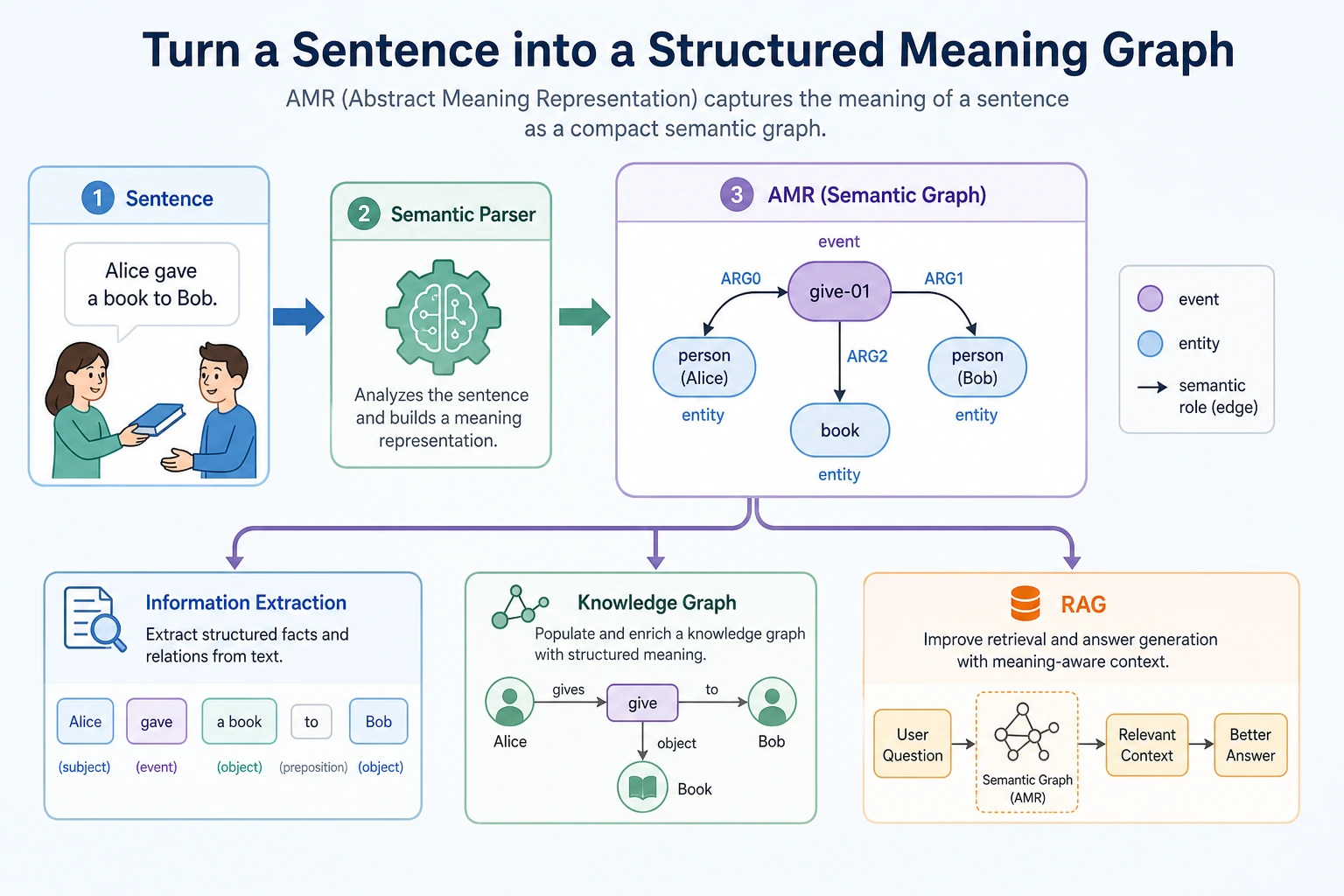
Why do we need semantic graphs?
Section titled “Why do we need semantic graphs?”Plain text representation often looks like this:
Jobs founded Apple.But information extraction and knowledge-base systems want a structure more like this:
Person: JobsRelation: foundedOrganization: AppleIf the sentence becomes more complex, it may contain time, place, cause, condition, negation, and reference. At that point, simple keyword matching is no longer enough.
The goal of semantic graphs is:
To turn meaning in natural language into a graph structure that machines can operate on more easily.
What is AMR?
Section titled “What is AMR?”AMR stands for Abstract Meaning Representation. You can first think of it as a kind of abstract semantic graph representation.
It does not just mark entities; it also tries to represent events and role relationships.
For example, “The analyst reads the incident report” can be imagined as:
read-01 ARG0: analyst ARG1: incident reportThis structure expresses:
- The core event is reading
- Who is reading: the analyst
- What is being read: the incident report
This is much closer to “what the sentence is really trying to say” than simple word segmentation.
For beginners, the easiest way to read this structure is:
flowchart LR E["read-01<br/>event"] --> A0["ARG0<br/>who reads?<br/>analyst"] E --> A1["ARG1<br/>what is read?<br/>incident report"]ARG0 and ARG1 do not mean “first word” and “second word.” They mean semantic roles. In many simple event sentences, you can first read them as:
ARG0: the doer of the actionARG1: the thing affected by the action
This small shift is important: semantic graphs care less about word order and more about meaning.
What is the relationship between semantic graphs and information extraction?
Section titled “What is the relationship between semantic graphs and information extraction?”Information extraction usually starts with more specific tasks:
- Entity extraction
- Relation extraction
- Event extraction
- Attribute extraction
Semantic graphs are more like a way to organize these results into a more complete meaning structure.
| Task | What the output looks like |
|---|---|
| NER | Which words are person names, organizations, or locations |
| Relation extraction | What relationship A and B have |
| Event extraction | Who did what at what time |
| AMR / semantic graph | The roles and semantic structure behind the whole sentence |
Why is this useful for RAG and knowledge-base projects?
Section titled “Why is this useful for RAG and knowledge-base projects?”The “automatically write Word course materials from a knowledge base” project you mentioned earlier can benefit a lot from semantic-graph ideas.
That is because course materials often contain:
- Definitions
- Example problems
- Steps
- Conditions
- Notes
- Cause-and-effect relationships
If the system only does vector retrieval, it may find similar paragraphs, but it may not understand the structure. If it can extract structured relationships, it can organize course materials more reliably:
This is the value of semantic graphs and information extraction for knowledge-base systems.
Relationship to syntactic parsing and recurrent neural networks
Section titled “Relationship to syntactic parsing and recurrent neural networks”Before Transformer became mainstream, NLP spent a long time studying syntactic structure and semantic structure.
This included:
- Dependency parsing
- Constituency parsing
- Semantic role labeling
- Explorations of recurrent neural networks for tree-structured representations
Together, these works show one thing:
Text understanding is not only about word-vector similarity, but also about structural relationships.
Today, many large models can implicitly handle a lot of structure, but in serious knowledge bases, law, medicine, and SOP document generation, explicit structure is still very valuable.
A minimal example of structured extraction
Section titled “A minimal example of structured extraction”The following is not a full AMR example. It is just a simulation of the feeling of “rewriting a sentence into structure”:
sentence = "Professor Andrew Ng teaches a machine learning course"
semantic_graph = {    "event": "teach",    "teacher": "Professor Andrew Ng",    "topic": "machine learning course",}
for role, value in semantic_graph.items():    print(role, "=>", value)
Expected output:
event => teachteacher => Professor Andrew Ngtopic => machine learning courseRead this as a role table first. The sentence is no longer only a string; it has become an event plus participants.
The main point is for you to first understand:
- Text can be broken into roles
- Roles can be connected into a graph
- Graph structures can support later generation and retrieval
From a sentence to SOP document structure
Section titled “From a sentence to SOP document structure”If your goal is to generate SOP documents from a knowledge base, a semantic graph can become an intermediate layer between “retrieved paragraph” and “final Word document.”
Here is a very small example:
sentence = "The refund escalation policy helps frontline support decide what to do after the standard window."
semantic_graph = {    "policy": "refund escalation",    "function": "decide what to do",    "scenario": "frontline support",    "condition": "after the standard window",}
sop_block = {    "title": semantic_graph["policy"],    "summary": "A rule for handling refund requests after the standard window.",    "why_it_matters": f"It helps {semantic_graph['scenario']} {semantic_graph['function']}.",    "draft_hint": f"Explain it as a clear rule for {semantic_graph['condition']}.",}
for key, value in sop_block.items():    print(f"{key}: {value}")
Expected output:
title: refund escalationsummary: A rule for handling refund requests after the standard window.why_it_matters: It helps frontline support decide what to do.draft_hint: Explain it as a clear rule for after the standard window.This is the practical value of semantic structure: once the roles are explicit, the next template can use them consistently.
The workflow becomes clearer:
flowchart LR A["Retrieved paragraph"] --> B["Extract roles and relations"] B --> C["Semantic graph"] C --> D["Courseware template"] D --> E["Definition + example + common mistake + practice"]This is why AMR is useful even if you do not implement a full AMR parser right away. It teaches you to ask better structural questions:
- What is the concept?
- What action or relation is being described?
- Who or what participates in that relation?
- What condition, cause, or result is attached?
Assigning historical milestones to course chapters
Section titled “Assigning historical milestones to course chapters”| Historical milestone | Problem it solved | Corresponding course chapter |
|---|---|---|
| Syntactic parsing / recurrent neural network explorations | Tree-structured language representation | Section 7.5, Section 5.2 Seq2Seq background |
| AMR | Representing sentence meaning as a semantic graph | Section 7.5, Section 7.4 information extraction project |
| Semantic role labeling | Who did what to whom | Section 7.4 information extraction, knowledge graph extensions |
| Knowledge Graph | Organizing extracted results into queryable knowledge | Chapter 8 RAG, knowledge-base systems |
The intuition you should have after learning this section
Section titled “The intuition you should have after learning this section”Vector retrieval tells you “which text is similar,” while semantic graphs care more about “what roles and relationships exist in this text.”
If you are building educational course materials, knowledge-base QA, or automatic Word document generation, this difference is very important:
- Vector retrieval helps you find materials
- Information extraction helps you capture key points
- Semantic graphs help you organize structure
- Large models help you generate content according to templates
This is also why modern knowledge-base applications increasingly value “retrieval + structure + generation.”
Evidence to Keep
Section titled “Evidence to Keep”Keep this page’s proof of learning as a small evidence card:
- Task Output
- label, entity fields, summary, answer, retrieval result, or semantic graph
- Artifacts
- raw text, processed text, predictions, metrics, and failure cases
- Metric
- accuracy/F1, precision/recall, retrieval hit rate, faithfulness, or schema validity
- Failure Check
- unclear labels, over-cleaning, boundary errors, hallucination, or unsupported answer
- Expected Output
- reproducible text pipeline folder with metrics and examples
Review notes and pass criteria
- A useful semantic graph is not a prettier summary. It should expose roles, relations, conditions, and missing fields that a downstream template can reuse.
- Check one raw paragraph, one extracted graph, and one generated block side by side. If a field cannot be traced back to the source text, mark it as unsupported.
- Keep at least one failure case where the graph loses a relation or invents one. That case is the best prompt or schema improvement target.
- The page is complete when the same graph fields can drive a structured SOP block, a QA answer, or a knowledge-base record without rewriting the whole pipeline.