
7.5.6 Hands-on: Prompt Evaluation Lab
At this point, you already know Prompt basics, advanced techniques, structured output, and prompt practice. The next step is to stop asking “does this prompt feel better?” and start asking a more engineering-oriented question:
When I run the same fixed test cases, which prompt version passes more reliably, and why?
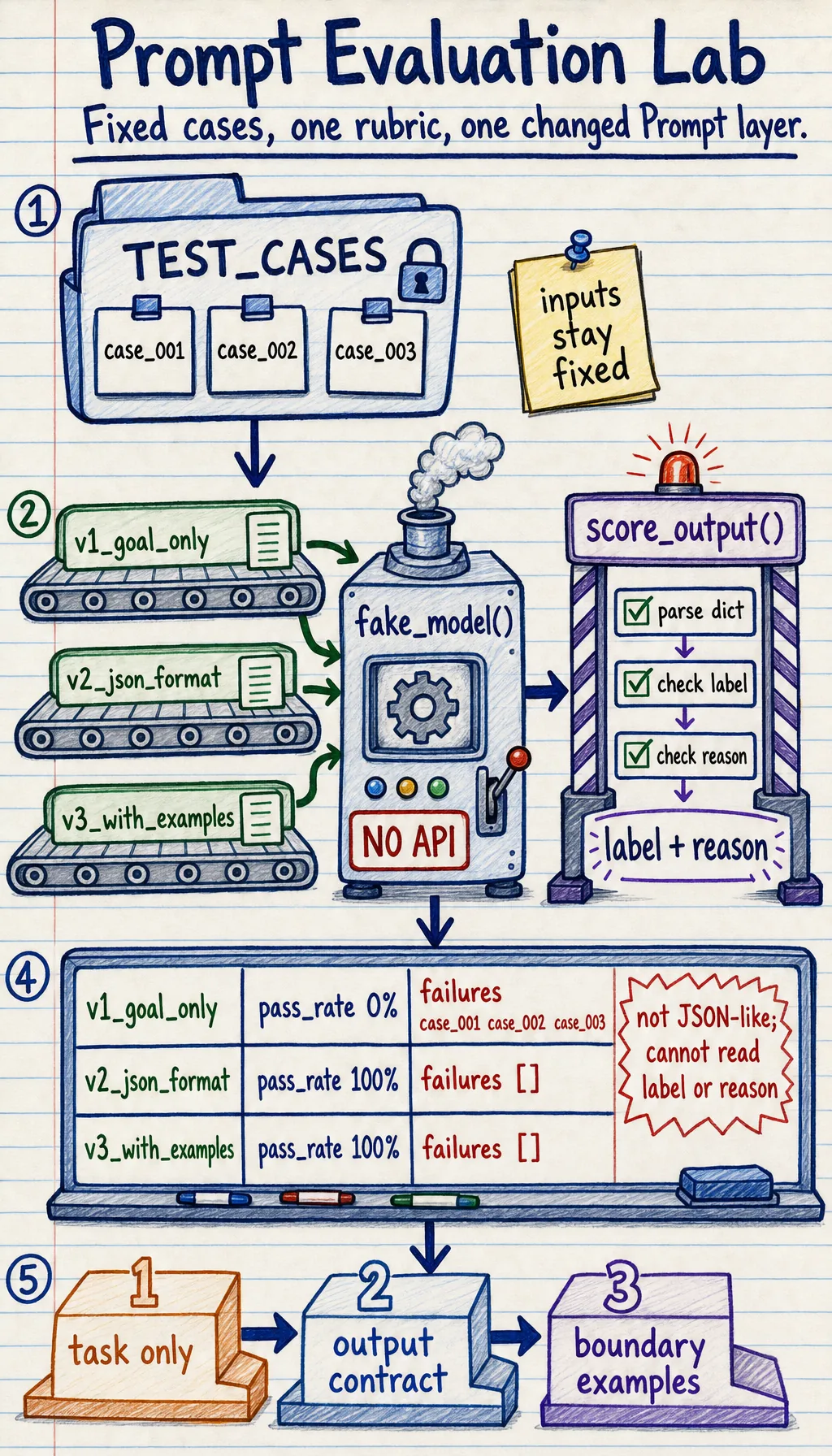
What this lab adds to the earlier Prompt lessons
Section titled “What this lab adds to the earlier Prompt lessons”Earlier sections taught you how to write clearer prompts. This lab teaches you how to evaluate them.
The core workflow is:
- Prepare fixed test cases.
- Prepare several prompt versions.
- Run the same test cases through every version.
- Score outputs with the same rubric.
- Record failure cases and decide the next fix.
This is the smallest practical version of prompt regression testing.
Terms worth clarifying first
Section titled “Terms worth clarifying first”| Term | Plain meaning | Why it matters |
|---|---|---|
| Test case | A fixed input plus expected behavior | Prevents you from judging a prompt by only one lucky example |
| Expected output | What a good answer should contain or satisfy | Turns “looks good” into checkable criteria |
| Rubric | The scoring rules | Keeps evaluation consistent across prompt versions |
| Pass rate | Passed cases divided by total cases | Lets you compare versions with a simple metric |
| Regression | A new prompt fixes one case but breaks an old case | This is why old test cases must stay in the set |
| Failure note | A short record of what failed and why | Converts mistakes into the next improvement direction |
Run a fully offline evaluation lab
Section titled “Run a fully offline evaluation lab”The following example does not call a real model. It uses a simulated model so you can focus on the evaluation loop itself. Save it as prompt_eval_lab.py, then run:
python prompt_eval_lab.pyTEST_CASES = [ { "id": "case_001", "user_input": "The course is clear and the examples are practical.", "expected_label": "positive", "must_be_json": True, }, { "id": "case_002", "user_input": "The chapter jumps too fast and I feel lost.", "expected_label": "negative", "must_be_json": True, }, { "id": "case_003", "user_input": "The explanation is okay, but the code example does not run.", "expected_label": "negative", "must_be_json": True, },]
PROMPT_VERSIONS = { "v1_goal_only": "Classify the sentiment of the review.", "v2_json_format": ( "Classify the sentiment of the review. " "Return JSON with fields: label, reason." ), "v3_with_examples": ( "Classify the sentiment of the review. " "Return JSON with fields: label, reason. " "Examples: clear and practical -> positive; too fast and lost -> negative." ),}
def fake_model(prompt_version, user_input): text = user_input.lower()
if prompt_version == "v1_goal_only": if "clear" in text or "practical" in text: return "positive" return "negative"
if prompt_version == "v2_json_format": if "clear" in text or "practical" in text: return {"label": "positive", "reason": "The review praises clarity or practicality."} return {"label": "negative", "reason": "The review describes a learning problem."}
if "does not run" in text: return {"label": "negative", "reason": "Broken code blocks learning progress."} if "clear" in text or "practical" in text: return {"label": "positive", "reason": "The review praises useful teaching design."} return {"label": "negative", "reason": "The review describes confusion or frustration."}
def score_output(case, output): format_ok = isinstance(output, dict) and "label" in output and "reason" in output if not format_ok: return { "passed": False, "format_ok": False, "label_ok": False, "reason": "Output is not parseable JSON-like data.", }
label_ok = output["label"] == case["expected_label"] reason_ok = isinstance(output["reason"], str) and len(output["reason"]) >= 10 passed = format_ok and label_ok and reason_ok
return { "passed": passed, "format_ok": format_ok, "label_ok": label_ok, "reason": "ok" if passed else "Label or explanation did not meet the rubric.", }
def run_eval(): report = []
for version in PROMPT_VERSIONS: passed = 0 failures = []
for case in TEST_CASES: output = fake_model(version, case["user_input"]) score = score_output(case, output) passed += int(score["passed"]) if not score["passed"]: failures.append( { "case_id": case["id"], "output": output, "reason": score["reason"], } )
pass_rate = passed / len(TEST_CASES) report.append({"version": version, "pass_rate": pass_rate, "failures": failures})
return report
for row in run_eval(): print("-" * 60) print("version :", row["version"]) print("pass_rate:", f"{row['pass_rate']:.0%}") print("failures :", row["failures"])Expected output:
------------------------------------------------------------version : v1_goal_onlypass_rate: 0%failures : [{'case_id': 'case_001', 'output': 'positive', 'reason': 'Output is not parseable JSON-like data.'}, {'case_id': 'case_002', 'output': 'negative', 'reason': 'Output is not parseable JSON-like data.'}, {'case_id': 'case_003', 'output': 'negative', 'reason': 'Output is not parseable JSON-like data.'}]------------------------------------------------------------version : v2_json_formatpass_rate: 100%failures : []------------------------------------------------------------version : v3_with_examplespass_rate: 100%failures : []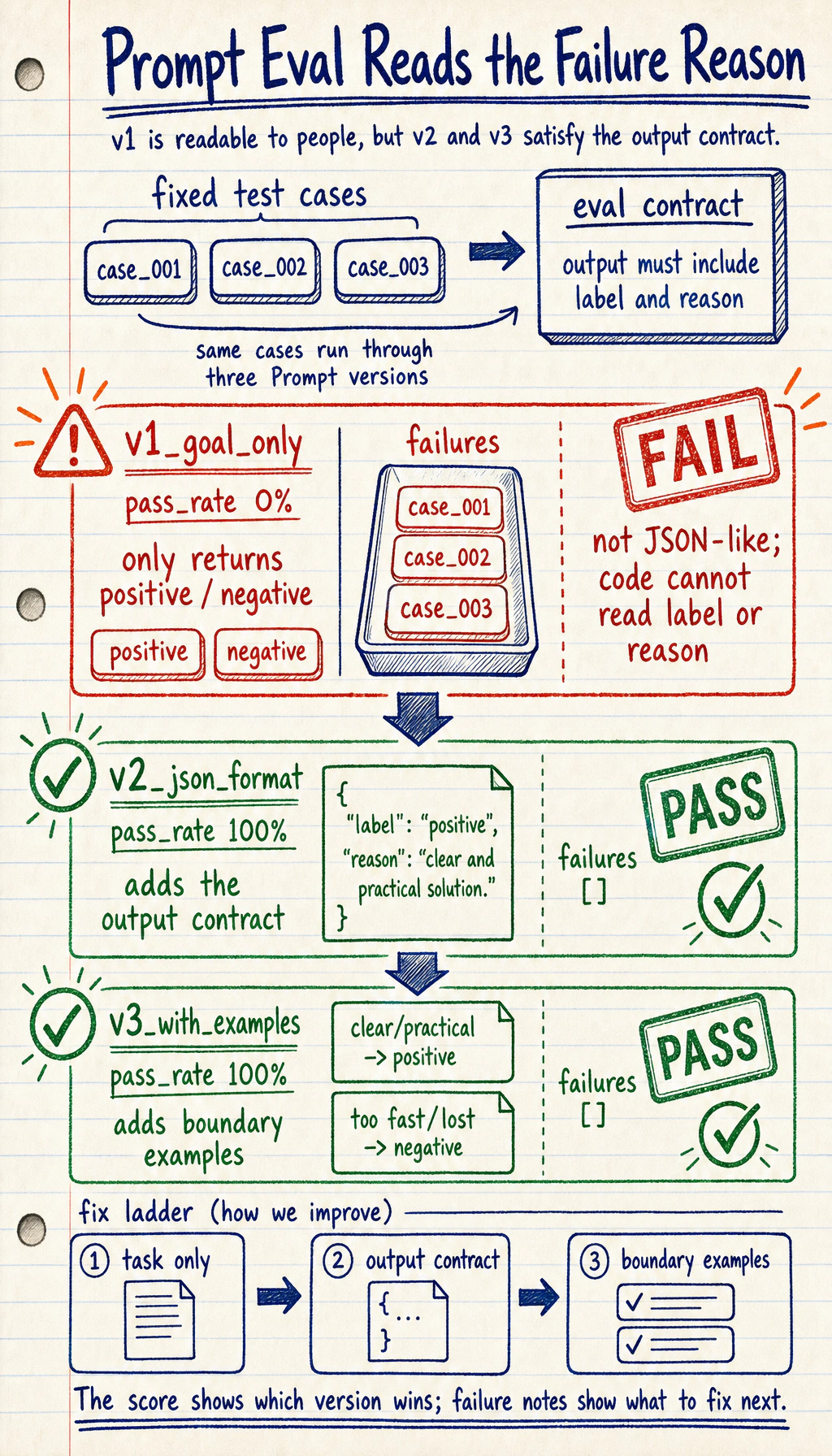
How to read the result
Section titled “How to read the result”v1 may classify correctly but still fail the product requirement
Section titled “v1 may classify correctly but still fail the product requirement”v1_goal_only returns labels, but it does not return parseable JSON-like data. If the downstream program needs label and reason, this output still fails even when the label is semantically correct.
This is an important engineering lesson:
A model answer can be human-readable but still program-unusable.
v2 fixes the format problem
Section titled “v2 fixes the format problem”v2_json_format adds output fields, so the program can read label and reason. This mirrors real prompt debugging: first make the task clear, then make the output contract clear.
v3 adds examples for boundary cases
Section titled “v3 adds examples for boundary cases”v3_with_examples is useful when the boundary is fuzzy. In real projects, examples are especially valuable when labels have subtle differences, such as bug_report vs. learning_confusion, or refund_policy vs. after_sales.
Add a failure note, not just a score
Section titled “Add a failure note, not just a score”A pass rate tells you which version is better, but a failure note tells you what to fix next.
Use a small table like this in your project README:
| Prompt version | Failure type | Evidence | Next fix |
|---|---|---|---|
| v1 | Format failure | Output was plain text | Require JSON fields |
| v2 | Boundary risk | Some mixed reviews may be mislabeled | Add 2-3 boundary examples |
| v3 | Still untested | No long-text cases yet | Add long and noisy inputs |
This habit matters because prompt work can otherwise become a fog of impressions.
How to turn this into a real model evaluation later
Section titled “How to turn this into a real model evaluation later”When you replace fake_model() with a real model call, keep the rest of the evaluation loop as stable as possible.
Do not change all of these at once:
- the model
- the prompt
- the test cases
- the scoring rules
- the output schema
If too many variables change together, you cannot explain the result.
Evidence to Keep
Section titled “Evidence to Keep”Keep this page’s proof of learning as a small evidence card:
- Eval Cases
- fixed input set
- Prompt Versions
- baseline and improved prompt
- Score Table
- pass rate or rubric score
- Failure Note
- one failed output with likely cause
- Next Step
- add harder cases or connect a real model
Practice tasks
Section titled “Practice tasks”- Add two more test cases: one very short input and one long mixed-review input.
- Add a new field called
confidence, then update the scoring function to require it. - Make
v2_json_formatfail on one edge case and write a failure note. - Replace
fake_model()with your own LLM call only after the offline loop is clear. - Save the report output into your project notes as prompt evaluation evidence.
Project reference and review notes
- The short case should test whether the prompt handles sparse input. The long mixed-review case should test whether it can separate multiple sentiments or topics.
- After adding
confidence, both the schema and scoring function should require it. Otherwise the model can omit an important uncertainty signal. - A useful failure note records the input, prompt version, wrong output, likely cause, and next change. The goal is learning from failure, not hiding it.
- Keeping
fake_model()first makes the evaluation loop deterministic. Add a real LLM call only after cases, scoring, and reporting are already stable. - The saved report should include test cases, prompt versions, scores, failed examples, and the next experiment. That is prompt-evaluation evidence.
Summary
Section titled “Summary”Prompt engineering is not only writing a better instruction. A more mature workflow is:
Keep the test set fixed, change one prompt layer at a time, score outputs with the same rubric, and record failure evidence.
Once you can do this, you are no longer tuning prompts by feeling. You are building a small, repeatable prompt evaluation system.