
2.3.1 Project: Command-Line Task Manager
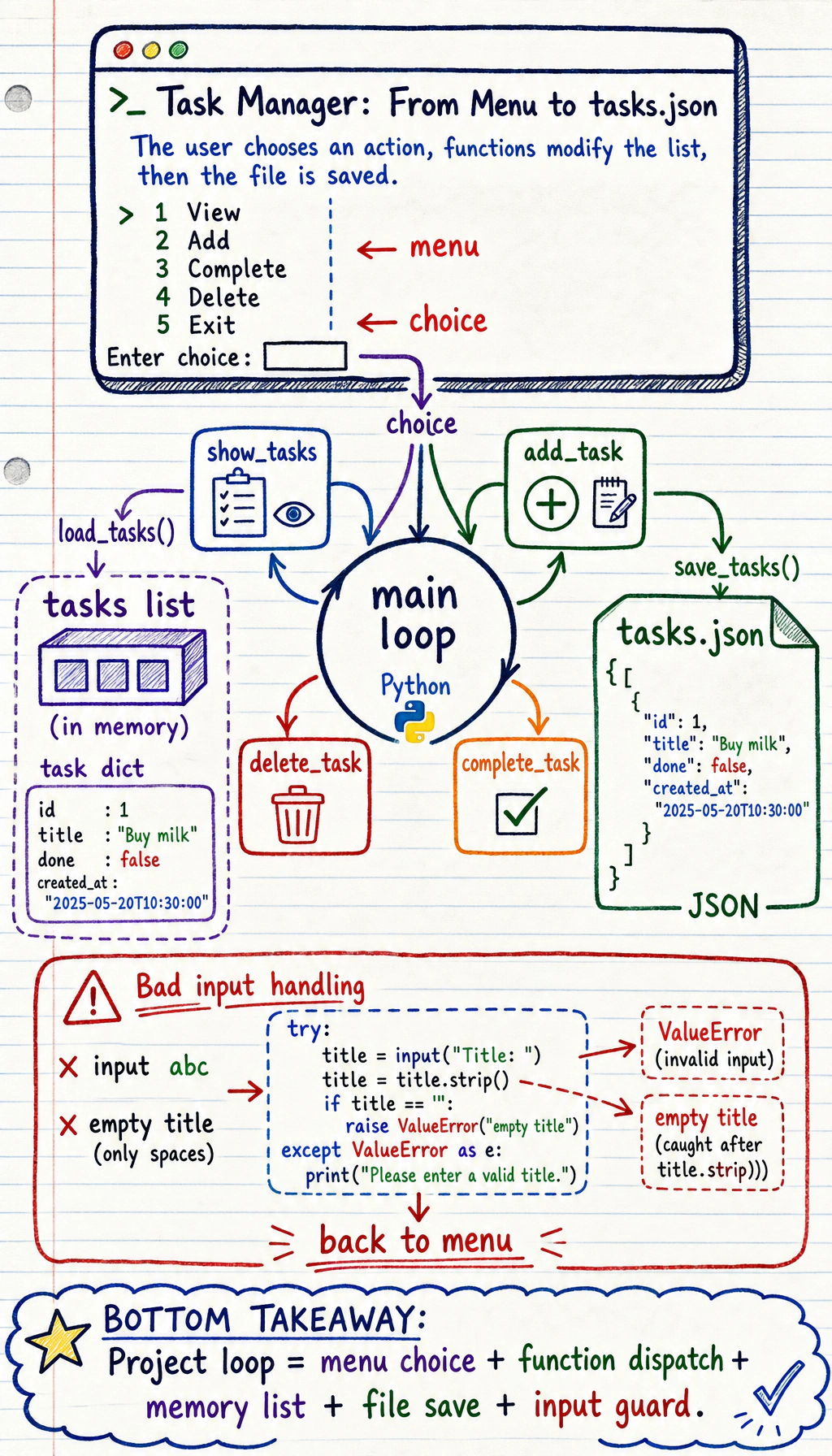
Project Overview
Section titled “Project Overview”This is the first complete mini-project in the Python fundamentals stage. You will combine data structures, functions, file I/O, and exception handling to build a real command-line tool that can save tasks, view tasks, and update task status.
Project Goals
Section titled “Project Goals”- Apply Python fundamentals in a comprehensive way (data structures, functions, file operations, exception handling)
- Experience the full project development workflow: requirements analysis → design → coding → testing
- Build a truly usable command-line tool
Project Introduction
Section titled “Project Introduction”We are going to build a command-line task manager (similar to a simplified Todoist) that supports:
- Adding tasks
- Viewing all tasks
- Marking tasks as complete
- Deleting tasks
- Data persistence (data will not be lost after the program closes)
Final result:
| Area | What the CLI shows |
|---|---|
| Menu | View, add, complete, delete, or exit |
| User action | Choose option 1 to view all tasks |
| Task list | Three tasks, with one marked complete |
| Summary | Total 3 tasks, 1 completed |
Step 1: Project Planning
Section titled “Step 1: Project Planning”Data Design
Section titled “Data Design”What information does each task need?
task = { "id": 1, "title": "Learn Python fundamentals", "done": False, "created_at": "2026-02-09 14:30:00"}All tasks are stored in a list and saved to a JSON file.
Functional Modules
Section titled “Functional Modules”| Module | Function |
|---|---|
| Data management | Load/save tasks to/from a file |
| Task operations | Create, read, update, delete |
| User interface | Menu display, input handling |
Step 2: Basic Version
Section titled “Step 2: Basic Version”First, implement the simplest version without file persistence:
# todo.py —— command-line task manager
from datetime import datetime

def show_menu():    """Display the menu"""    print("\n===== Task Manager =====")    print("1. View all tasks")    print("2. Add task")    print("3. Complete task")    print("4. Delete task")    print("5. Exit")    print()

def show_tasks(tasks: list[dict]) -> None:    """Display all tasks"""    if not tasks:        print("📭 No tasks yet. Go add one!")        return
    print("\n📋 Task List:")    for i, task in enumerate(tasks, 1):        status = "✓" if task["done"] else " "        print(f'  {i}. [{status}] {task["title"]}  '              f'(Created at: {task["created_at"][:10]})')
    done_count = sum(1 for t in tasks if t["done"])    print(f"\nTotal {len(tasks)} tasks, {done_count} completed")

def add_task(tasks: list[dict]) -> None:    """Add a new task"""    title = input("Enter task title: ").strip()    if not title:        print("❌ Task title cannot be empty!")        return
    task = {        "id": len(tasks) + 1,        "title": title,        "done": False,        "created_at": datetime.now().strftime("%Y-%m-%d %H:%M:%S")    }    tasks.append(task)    print(f"✅ Task '{title}' has been added!")

def complete_task(tasks: list[dict]) -> None:    """Mark a task as complete"""    show_tasks(tasks)    if not tasks:        return
    try:        num = int(input("Enter the task number to complete: "))        if 1 <= num <= len(tasks):            task = tasks[num - 1]            if task["done"]:                print(f"⚠️ Task '{task['title']}' has already been completed")            else:                task["done"] = True                print(f"✅ Task '{task['title']}' has been marked as complete!")        else:            print("❌ Invalid task number!")    except ValueError:        print("❌ Please enter a number!")

def delete_task(tasks: list[dict]) -> None:    """Delete a task"""    show_tasks(tasks)    if not tasks:        return
    try:        num = int(input("Enter the task number to delete: "))        if 1 <= num <= len(tasks):            removed = tasks.pop(num - 1)            print(f"🗑️ Task '{removed['title']}' has been deleted!")        else:            print("❌ Invalid task number!")    except ValueError:        print("❌ Please enter a number!")

def main():    """Main function"""    tasks = []
    print("Welcome to Task Manager!")
    while True:        show_menu()        choice = input("Choose an action (1-5): ").strip()
        if choice == "1":            show_tasks(tasks)        elif choice == "2":            add_task(tasks)        elif choice == "3":            complete_task(tasks)        elif choice == "4":            delete_task(tasks)        elif choice == "5":            print("👋 Goodbye!")            break        else:            print("❌ Invalid choice, please enter 1-5")

if __name__ == "__main__":    main()
Try it out: Save the code above as todo.py, then run python todo.py.
Step 3: Add File Persistence
Section titled “Step 3: Add File Persistence”Right now, the data disappears when the program closes. Let’s add file saving:
import jsonfrom pathlib import Path
DATA_FILE = Path("tasks.json")

def load_tasks() -> list[dict]:    """Load tasks from a file"""    if DATA_FILE.exists():        try:            with open(DATA_FILE, "r", encoding="utf-8") as f:                tasks = json.load(f)            print(f"📂 Loaded {len(tasks)} tasks")            return tasks        except (json.JSONDecodeError, IOError) as e:            print(f"⚠️ Failed to load data: {e}. An empty list will be used")    return []

def save_tasks(tasks: list[dict]) -> None:    """Save tasks to a file"""    try:        with open(DATA_FILE, "w", encoding="utf-8") as f:            json.dump(tasks, f, ensure_ascii=False, indent=2)    except IOError as e:        print(f"⚠️ Failed to save data: {e}")
Then update the main() function:
def main():    tasks = load_tasks()  # Load on startup
    print("Welcome to Task Manager!")
    while True:        show_menu()        choice = input("Choose an action (1-5): ").strip()
        if choice == "1":            show_tasks(tasks)        elif choice == "2":            add_task(tasks)            save_tasks(tasks)  # Save after adding        elif choice == "3":            complete_task(tasks)            save_tasks(tasks)  # Save after updating        elif choice == "4":            delete_task(tasks)            save_tasks(tasks)  # Save after deleting        elif choice == "5":            save_tasks(tasks)  # Save before exiting            print("👋 Goodbye!")            break        else:            print("❌ Invalid choice, please enter 1-5")
Step 4: Extension Challenges
Section titled “Step 4: Extension Challenges”After finishing the basic version, try adding the following features to improve it:
Challenge 1: Task Priority
Section titled “Challenge 1: Task Priority”Add priority levels to tasks (high/medium/low) and support sorting by priority when displaying tasks.
Challenge 2: Search Feature
Section titled “Challenge 2: Search Feature”Support searching task titles by keyword.
Challenge 3: Statistics
Section titled “Challenge 3: Statistics”Display statistics such as total task count, completion rate, and number of tasks added today.
Challenge 4: Refactor with Classes
Section titled “Challenge 4: Refactor with Classes”Refactor the whole project using object-oriented programming:
class Task:    """Single task"""    def __init__(self, title: str, priority: str = "medium"):        self.title = title        self.priority = priority        self.done = False        self.created_at = datetime.now()
class TaskManager:    """Task manager"""    def __init__(self, filename: str = "tasks.json"):        self.filename = filename        self.tasks: list[Task] = []        self.load()
    def add(self, title: str, priority: str = "medium") -> None:        self.tasks.append(Task(title, priority))
    def complete(self, index: int) -> None:        self.tasks[index].done = True
    def delete(self, index: int) -> None:        self.tasks.pop(index)
    def search(self, keyword: str) -> list[Task]:        return [task for task in self.tasks if keyword.lower() in task.title.lower()]
    def save(self) -> None:        import json        from pathlib import Path
        Path(self.filename).write_text(            json.dumps([task.__dict__ for task in self.tasks], ensure_ascii=False, indent=2),            encoding="utf-8",        )
    def load(self) -> None:        import json        from pathlib import Path
        path = Path(self.filename)        if not path.exists():            return        data = json.loads(path.read_text(encoding="utf-8"))        self.tasks = []        for item in data:            task = Task(item["title"], item.get("priority", "medium"))            task.done = item.get("done", False)            self.tasks.append(task)
Project reference and review notes
- Add a
priorityfield such ashigh,medium, orlow, then sort tasks by priority before display. If two tasks share the same priority, keep the earliercreated_atfirst. - Add a
search(keyword)helper that checks title, status text, and priority with case-insensitive matching. - Print totals for total tasks, completed tasks, pending tasks, and counts by priority. That gives a quick output check after each change.
- Refactor into a
Taskmodel plusTaskManagerclass. Let the class ownload,save,add,complete,delete, andsearch, while the CLI only handles input and printing. - For self-check, restart the program and confirm that a saved task still exists, search returns the right subset, and completing or deleting a task updates both the screen and
tasks.json.
Project Self-Check Checklist
Section titled “Project Self-Check Checklist”After completing the project, check the following:
- The program runs normally and does not crash because of invalid input
- Data is saved to a file and still exists after restarting
- The code is split into functions, not one giant block
- There is appropriate error handling (
try/except) - Functions have docstrings
- Variable names are clear (follow PEP 8)
- The project code is managed with Git
Recommended Version Roadmap
Section titled “Recommended Version Roadmap”| Version | Goal | Delivery Focus |
|---|---|---|
| Basic version | Get the minimum working loop running | Be able to input, process, output, and keep a sample set |
| Standard version | Turn it into a presentable project | Add configuration, logging, error handling, README, and screenshots |
| Challenge version | Get close to portfolio quality | Add evaluation, comparison experiments, failure-case analysis, and next-step roadmap |
It is recommended to finish the basic version first. Do not aim for something huge right from the start. With each version upgrade, make sure to write in the README what new capability was added, how it was verified, and what issues still remain.
Evidence to Keep
Section titled “Evidence to Keep”Keep this page’s proof of learning as a small evidence card:
- Project Goal
- CLI, scraper, API, AI API call, or integrated Python workshop target
- Run Command
- exact command used to start the project
- Artifact
- output file, API response, JSON record, screenshot, or README note
- Failure Check
- dependency, network, parsing, route, input validation, or API-key issue
- Expected Output
- reproducible mini project folder with run result and one failure case