
8.5.6 Hands-on: Full Chapter 8 RAG App Workshop
This workshop turns the whole Chapter 8 thread into one runnable mini project. You will not start with LangChain, a vector database, or a cloud API. First you will build a transparent RAG loop with plain Python, so every beginner can see what happens at each step.
The goal is not to build the most powerful system in one page. The goal is to build a small system that you can run, inspect, break, repair, and later replace piece by piece with real embeddings, a vector database, a model API, and deployment code.
What You Will Build
Section titled “What You Will Build”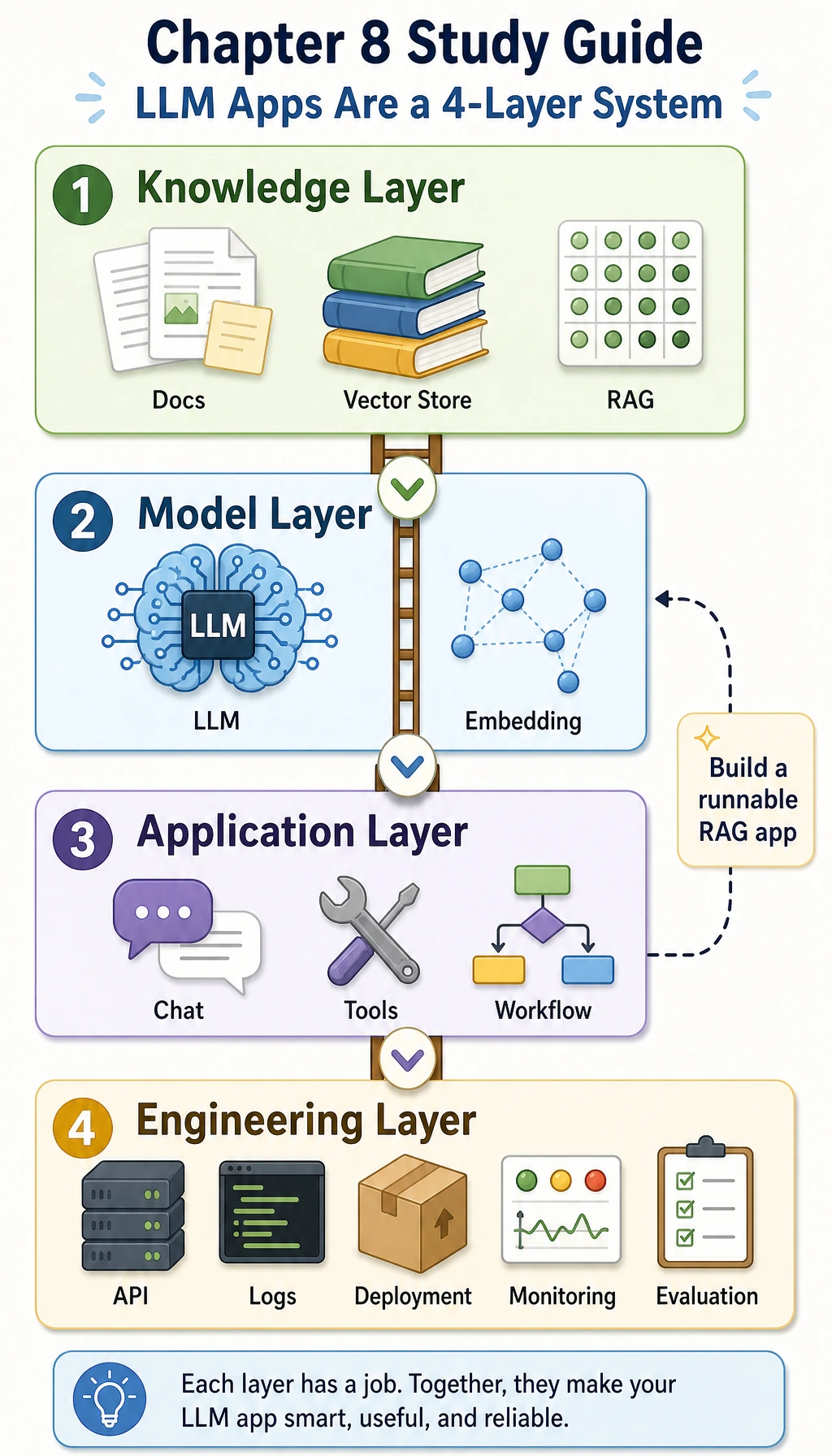
You will build a tiny knowledge base assistant with these abilities:
| Ability | What you will implement | Why it matters |
|---|---|---|
| Document ingestion | Store four small documents in structured records | RAG starts with controlled source material |
| Chunking | Split each document into searchable chunks | Retrieval works on chunks, not whole libraries |
| Metadata | Keep source, roles, title, and chunk_id | Citations and permission checks need metadata |
| Retrieval | Score chunks by keyword overlap | Beginners can inspect why a chunk was selected |
| Permission filtering | Hide employee-only chunks from public users | Enterprise RAG must not leak private knowledge |
| Answer generation | Answer only from retrieved evidence | The assistant should not invent unsupported facts |
| No-answer handling | Return a clear status when evidence is missing | Good RAG says “I do not know” when needed |
| Evaluation | Run three fixed test questions | You need repeatable checks before optimizing |
Step 0: Understand the RAG Loop Before Coding
Section titled “Step 0: Understand the RAG Loop Before Coding”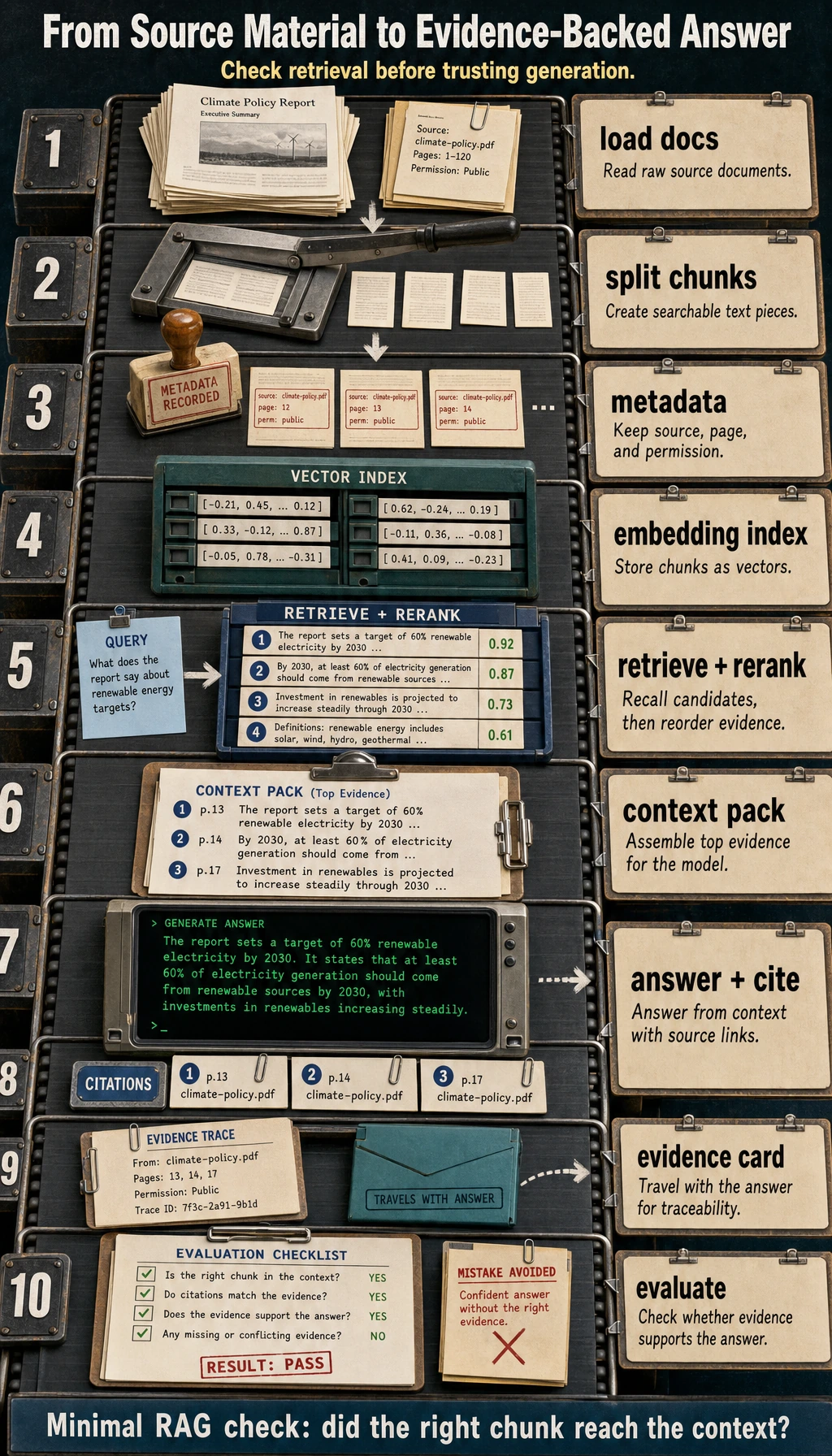
RAG means Retrieval-Augmented Generation. In plain language:
- The user asks a question.
- The system retrieves related document chunks.
- The system gives those chunks to the model.
- The model answers based on the chunks.
- The final answer shows citations so people can check the source.
The most important beginner idea is this: if the final answer is wrong, do not blame the model first. Print the retrieved chunks first. If retrieval is wrong, generation cannot save the result reliably.
Step 1: Create a Tiny Project Folder
Section titled “Step 1: Create a Tiny Project Folder”Open a terminal and run:
mkdir ch08_rag_workshopcd ch08_rag_workshoptouch rag_app_workshop.pyYou only need Python 3.10 or newer. This first script uses only the Python standard library.
Step 2: Copy the Full Offline RAG Script
Section titled “Step 2: Copy the Full Offline RAG Script”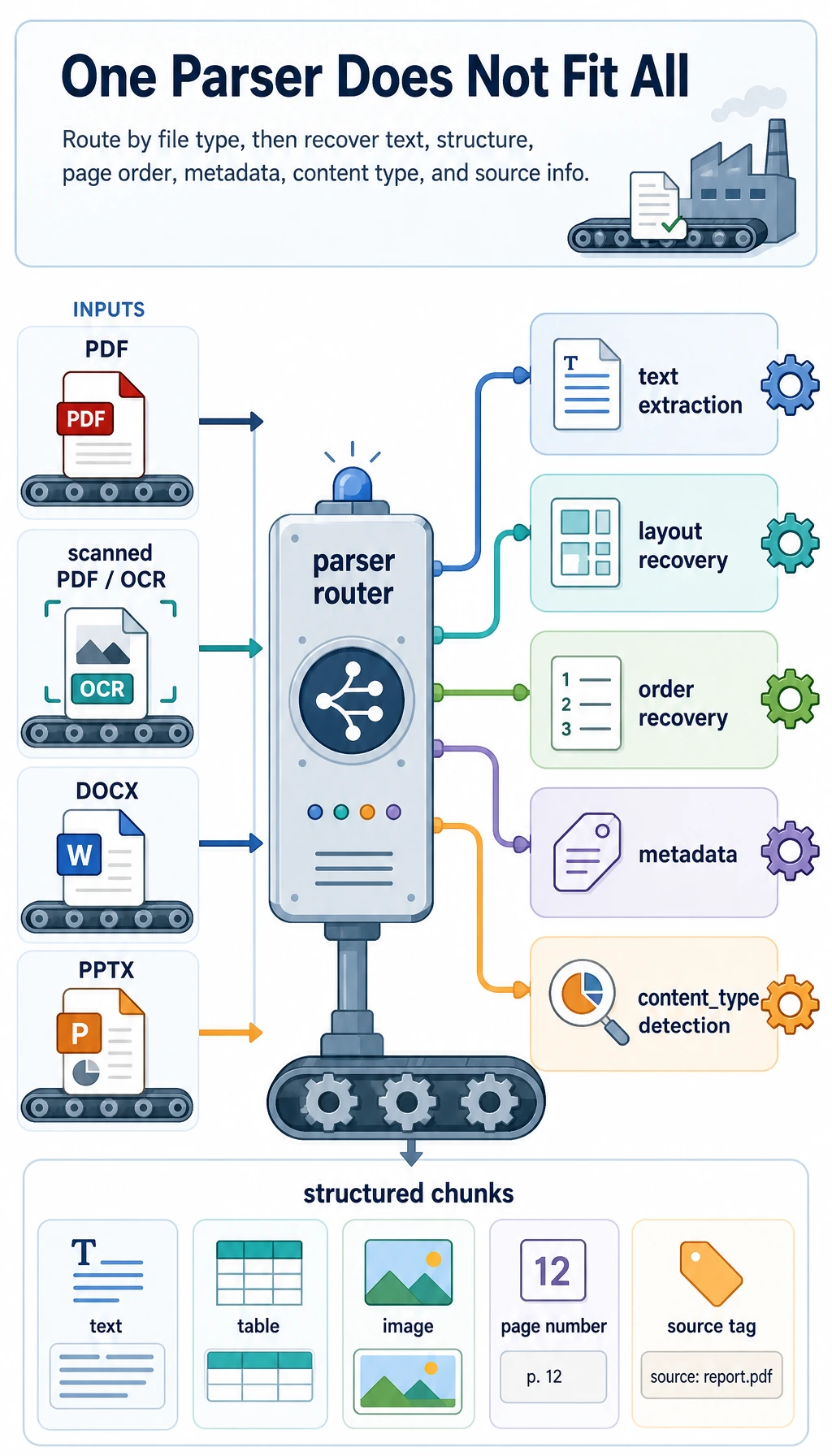
In a real project, documents may come from Markdown, PDF, Word, PPT, HTML, or databases. In this first workshop, we use four in-memory documents so the flow is easy to see. Each document already has metadata, because later citations, logs, permission checks, and evaluation all depend on it.
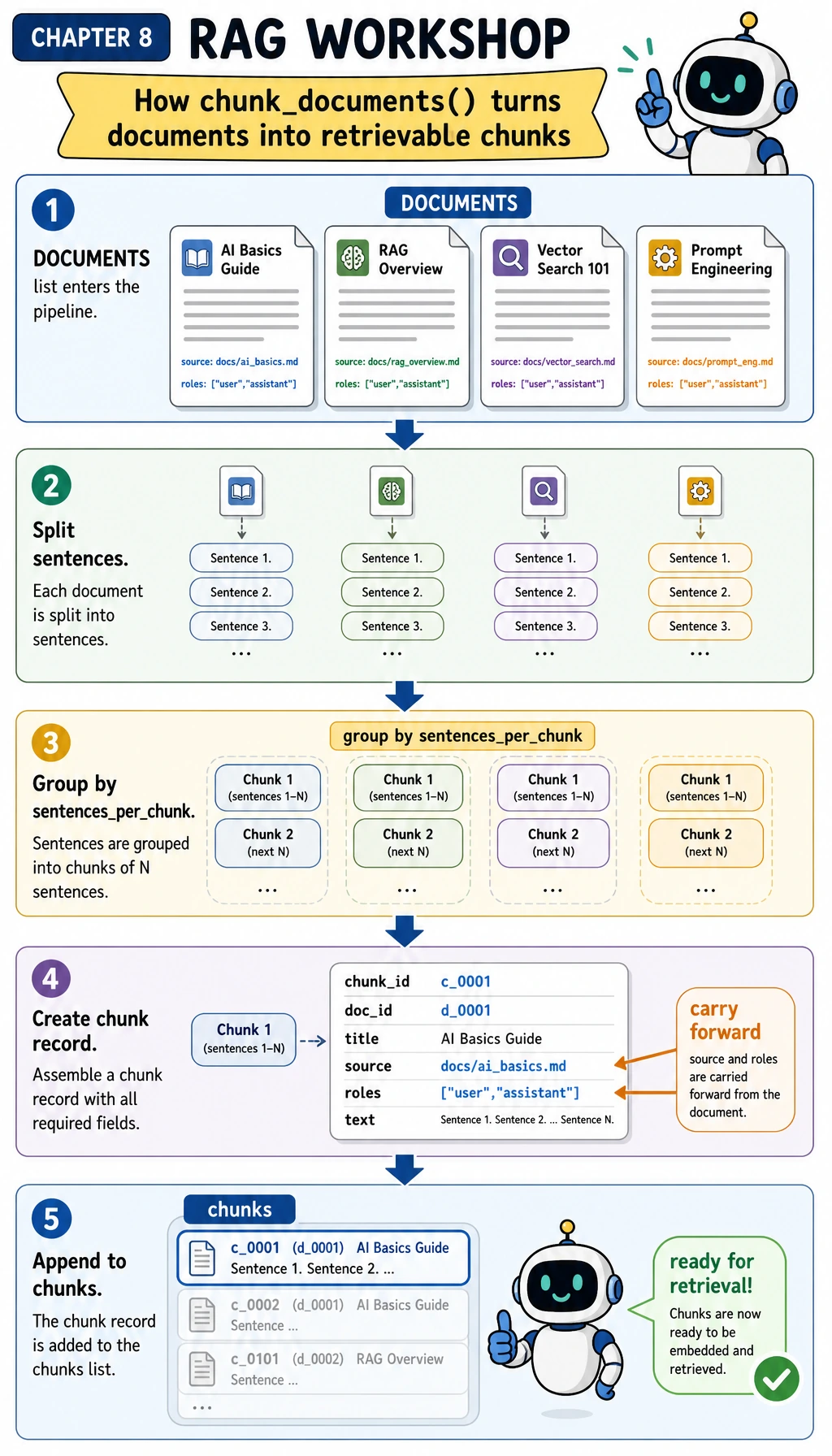
Before copying the full script, use the next diagram to follow only chunk_documents(). When you read the code, move your eyes from DOCUMENTS to sentences, then to each chunk record. The key habit is that source and roles travel with every chunk; retrieval and permission checks are safer when metadata is not reconstructed later.
Copy this into rag_app_workshop.py:
import refrom collections import Counter

DOCUMENTS = [    {        "doc_id": "refund-policy",        "title": "Course refund policy",        "source": "handbook.md#refund",        "roles": ["public"],        "text": (            "Refund requests are accepted within 14 days of enrollment when the learner has completed less than 20 percent of the course. "            "Approved refunds are returned to the original payment method within 5 business days."        ),    },    {        "doc_id": "api-key-setup",        "title": "API key setup guide",        "source": "setup.md#keys",        "roles": ["public"],        "text": (            "Store the API key in an environment variable named OPENAI_API_KEY before running the application. "            "Never paste production keys into Markdown files, browser screenshots, or public issue trackers."        ),    },    {        "doc_id": "office-hours",        "title": "Course support hours",        "source": "support.md#hours",        "roles": ["public"],        "text": (            "Live office hours happen every Wednesday at 19:00 Taipei time. "            "Learners should bring the question, the command they ran, and the exact error output."        ),    },    {        "doc_id": "private-roadmap",        "title": "Private product roadmap",        "source": "internal.md#roadmap",        "roles": ["employee"],        "text": (            "The beta roadmap targets a private release in Q4 after security review is complete. "            "Only employees may view roadmap dates before the public announcement."        ),    },]

STOPWORDS = {    "a", "an", "and", "are", "as", "at", "be", "before", "by", "do", "does",    "for", "from", "has", "have", "how", "in", "is", "it", "of", "on", "or",    "should", "the", "they", "to", "what", "when", "where", "which", "with",}

def normalize(text):    tokens = []    for token in re.findall(r"[a-z0-9]+", text.lower()):        if len(token) > 3 and token.endswith("s"):            token = token[:-1]        if token not in STOPWORDS:            tokens.append(token)    return tokens

def chunk_documents(documents, sentences_per_chunk=2):    chunks = []    for doc in documents:        sentences = [s.strip() for s in re.split(r"(?<=[.!?])\s+", doc["text"]) if s.strip()]        for start in range(0, len(sentences), sentences_per_chunk):            chunk_text = " ".join(sentences[start : start + sentences_per_chunk])            chunks.append(                {                    "chunk_id": f"{doc['doc_id']}#{start // sentences_per_chunk + 1}",                    "doc_id": doc["doc_id"],                    "title": doc["title"],                    "source": doc["source"],                    "roles": doc["roles"],                    "text": chunk_text,                }            )    return chunks

def keyword_score(query, chunk):    query_terms = set(normalize(query))    chunk_terms = Counter(normalize(chunk["title"] + " " + chunk["text"]))    return sum(chunk_terms[term] for term in query_terms)

def retrieve(query, chunks, role="public", top_k=2):    allowed_hits = []    blocked_hits = []    for chunk in chunks:        score = keyword_score(query, chunk)        if score == 0:            continue        hit = {**chunk, "score": score}        if "public" in chunk["roles"] or role in chunk["roles"]:            allowed_hits.append(hit)        else:            blocked_hits.append(hit)    allowed_hits.sort(key=lambda hit: (-hit["score"], hit["chunk_id"]))    blocked_hits.sort(key=lambda hit: (-hit["score"], hit["chunk_id"]))    return {"hits": allowed_hits[:top_k], "blocked": blocked_hits[:top_k]}

def build_answer(query, retrieval):    hits = retrieval["hits"]    if not hits:        status = "blocked_by_permission" if retrieval["blocked"] else "no_evidence"        return {            "status": status,            "answer": "I do not have enough permitted evidence to answer this question.",            "citations": [],        }    top = hits[0]    first_sentence = re.split(r"(?<=[.!?])\s+", top["text"])[0]    return {        "status": "answered",        "answer": f"Based on {top['source']}: {first_sentence}",        "citations": [top["source"]],    }

def rag_answer(query, chunks, role="public"):    retrieval = retrieve(query, chunks, role=role, top_k=2)    answer = build_answer(query, retrieval)    return {"query": query, "role": role, "retrieval": retrieval, **answer}

EVAL_CASES = [    {        "name": "refund_window",        "question": "How many days do learners have for refunds?",        "role": "public",        "expected_status": "answered",        "expected_source": "handbook.md#refund",    },    {        "name": "api_key_setup",        "question": "Where should I store the API key?",        "role": "public",        "expected_status": "answered",        "expected_source": "setup.md#keys",    },    {        "name": "private_block",        "question": "What is the private beta roadmap for Q4?",        "role": "public",        "expected_status": "blocked_by_permission",        "expected_source": None,    },]

def evaluate(chunks):    rows = []    passed = 0    for case in EVAL_CASES:        result = rag_answer(case["question"], chunks, role=case["role"])        status_ok = result["status"] == case["expected_status"]        citation_ok = case["expected_source"] is None or case["expected_source"] in result["citations"]        ok = status_ok and citation_ok        passed += int(ok)        rows.append({"name": case["name"], "ok": ok, "status": result["status"], "citations": result["citations"]})    return passed, rows

def main():    chunks = chunk_documents(DOCUMENTS)
    print("STEP 1: parse and chunk documents")    print(f"chunks: {len(chunks)}")    print(f"first_chunk: {chunks[0]['chunk_id']} -> {chunks[0]['title']}")    print()
    print("STEP 2: answer with citations")    result = rag_answer("How many days do learners have for refunds?", chunks)    print(f"question: {result['query']}")    print(f"status: {result['status']}")    print(f"answer: {result['answer']}")    print(f"citations: {', '.join(result['citations'])}")    print()
    print("STEP 3: permission and no-evidence checks")    private_result = rag_answer("What is the private beta roadmap for Q4?", chunks, role="public")    unknown_result = rag_answer("What is the cafeteria menu today?", chunks, role="public")    print(f"private_question_as_public: {private_result['status']}")    print(f"unknown_question: {unknown_result['status']}")    print()
    print("STEP 4: mini evaluation")    passed, rows = evaluate(chunks)    for row in rows:        mark = "PASS" if row["ok"] else "FAIL"        citations = ", ".join(row["citations"]) if row["citations"] else "none"        print(f"{row['name']}: {mark} ({row['status']}, {citations})")    print(f"passed: {passed}/{len(rows)}")

if __name__ == "__main__":    main()
Step 3: Run It and Compare the Output
Section titled “Step 3: Run It and Compare the Output”Run:
python3 rag_app_workshop.pyExpected output:
STEP 1: parse and chunk documentschunks: 4first_chunk: refund-policy#1 -> Course refund policy
STEP 2: answer with citationsquestion: How many days do learners have for refunds?status: answeredanswer: Based on handbook.md#refund: Refund requests are accepted within 14 days of enrollment when the learner has completed less than 20 percent of the course.citations: handbook.md#refund
STEP 3: permission and no-evidence checksprivate_question_as_public: blocked_by_permissionunknown_question: no_evidence
STEP 4: mini evaluationrefund_window: PASS (answered, handbook.md#refund)api_key_setup: PASS (answered, setup.md#keys)private_block: PASS (blocked_by_permission, none)passed: 3/3
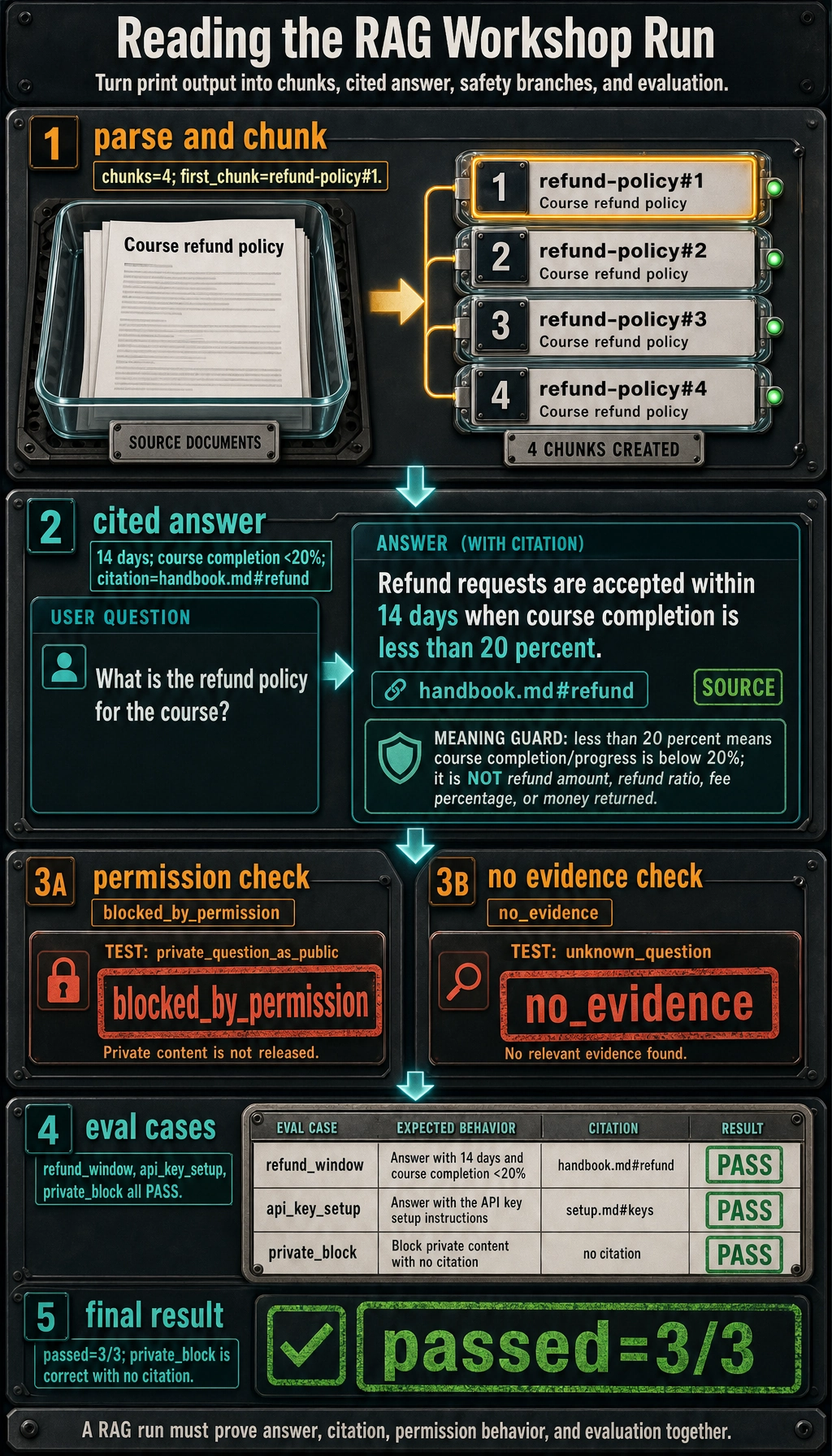
If your output matches, you have already completed the minimum Chapter 8 loop: data enters, chunks are created, retrieval happens, permission filtering runs, an answer is produced with citation, and evaluation verifies the behavior.
Read the evaluation part with this diagram. evaluate() does not judge answer quality by feeling; it runs each item in EVAL_CASES, checks status, checks citations, then counts pass/fail. Notice that private_block passes even with no citation because the expected behavior is blocked_by_permission.
Step 4: Read the Code Like a Pipeline
Section titled “Step 4: Read the Code Like a Pipeline”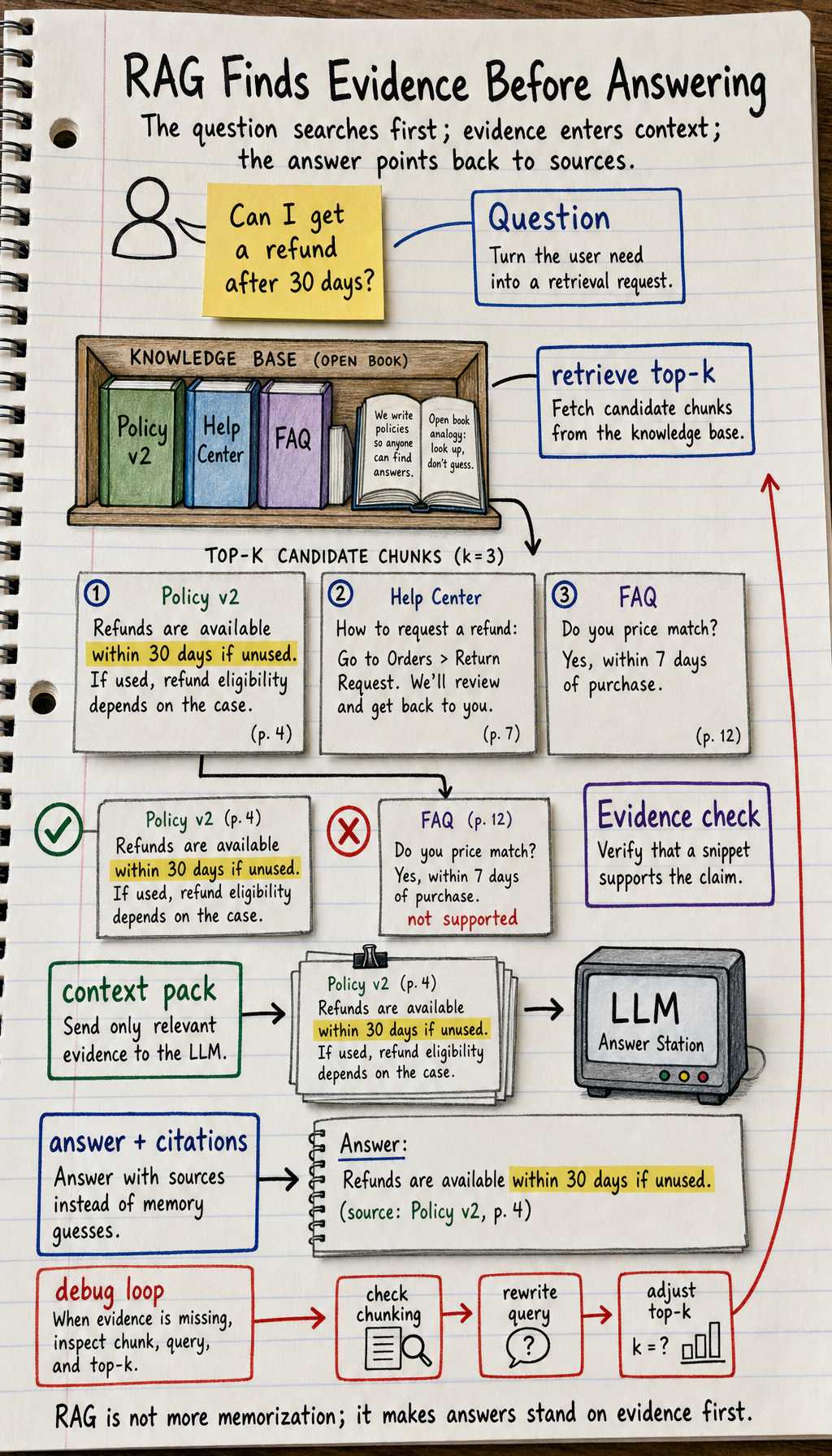
Read the script in this order:
| Code area | What to inspect | Beginner explanation |
|---|---|---|
DOCUMENTS | doc_id, source, roles, text | This is your tiny knowledge base |
chunk_documents() | How document text becomes chunk records | A chunk is the unit retrieved later |
normalize() | How text becomes comparable tokens | Retrieval needs a shared matching form |
keyword_score() | How a chunk gets a score | Higher score means more query terms matched |
retrieve() | Allowed hits and blocked hits | Retrieval quality and permission safety are separate concerns |
build_answer() | How no-answer and citations are handled | The system must avoid unsupported answers |
EVAL_CASES | Fixed questions and expected behavior | Evaluation turns “looks okay” into a repeatable check |
The current retrieval is deliberately simple. It is not a replacement for embeddings. It is a teaching tool that makes scoring visible. Later, when you replace keyword_score() with embeddings or hybrid search, the surrounding RAG structure can remain similar.
Step 5: Observe Permission and Citation Behavior
Section titled “Step 5: Observe Permission and Citation Behavior”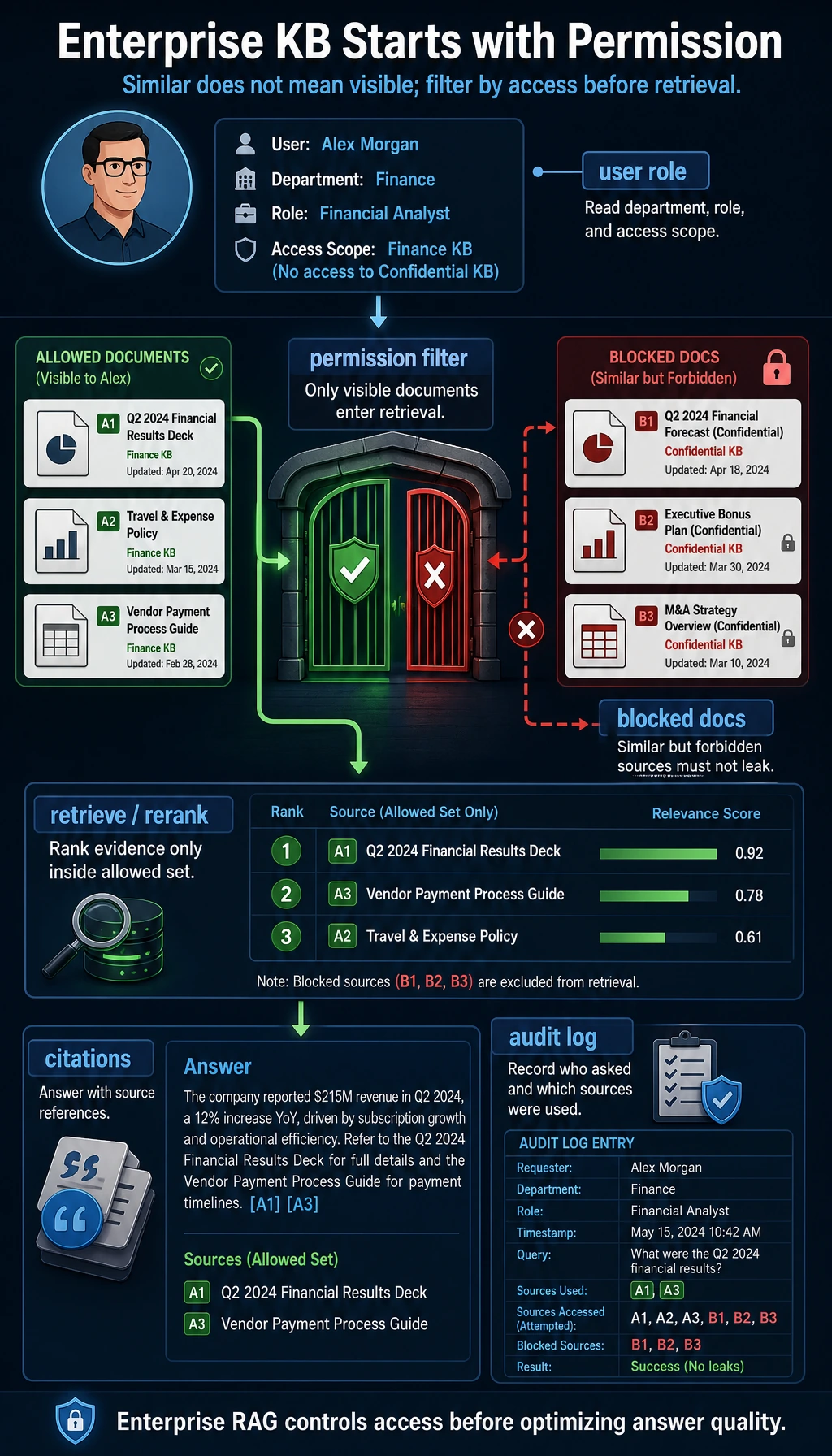
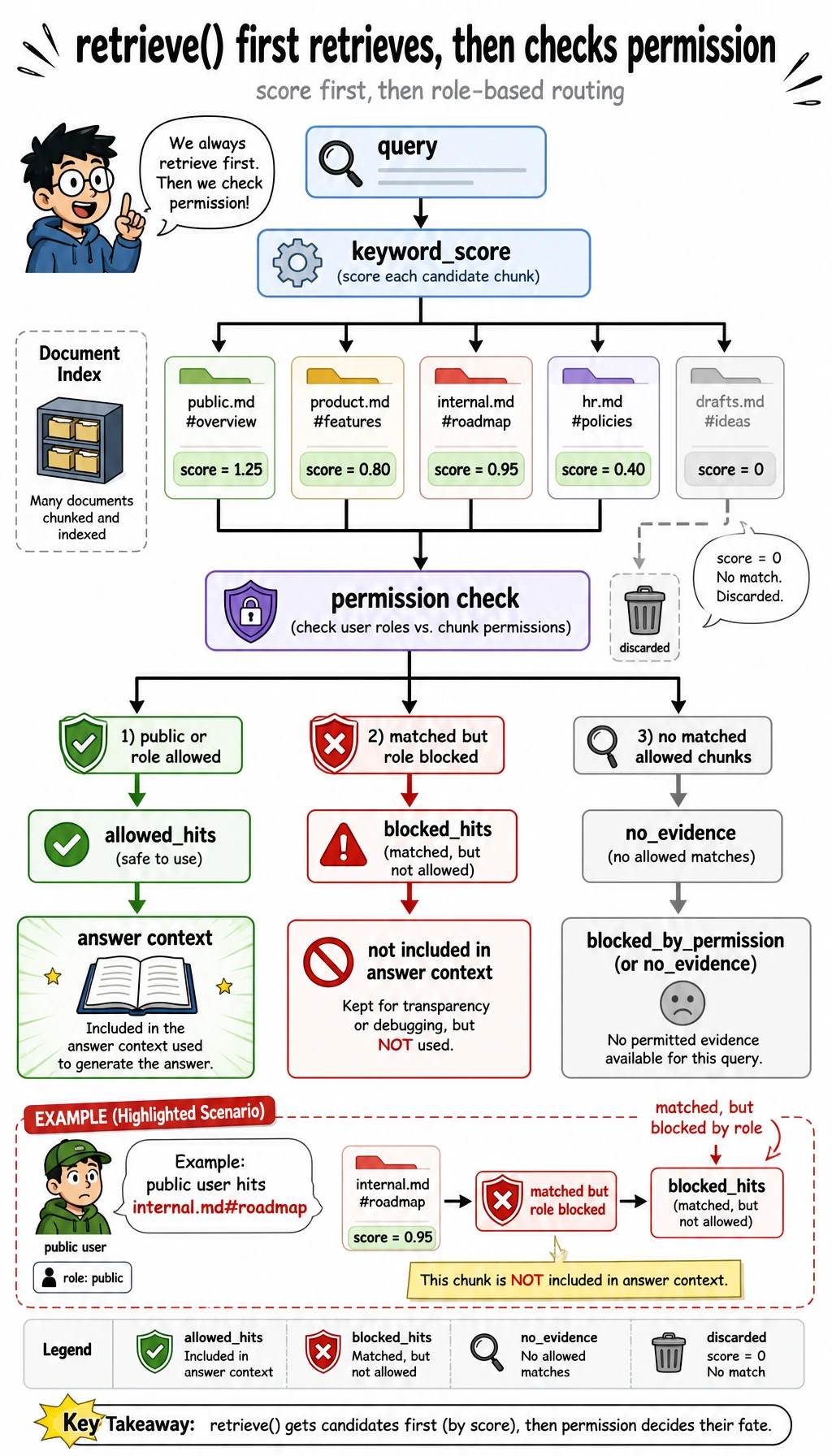
Now zoom into the decision branch inside retrieve(). A matched chunk is not automatically evidence. It first has to pass the role check. If it matches but is private for this user, it goes to blocked_hits, not into the answer context.
Look at this document:
{ "doc_id": "private-roadmap", "source": "internal.md#roadmap", "roles": ["employee"], "text": "The beta roadmap targets a private release in Q4 ..."}The public user asks:
What is the private beta roadmap for Q4?The keyword search can find a matching private chunk, but retrieve() puts it into blocked_hits, not allowed_hits. That is why the output is:
private_question_as_public: blocked_by_permissionThis distinction matters in real projects. no_evidence means the system did not find usable evidence. blocked_by_permission means evidence may exist, but this user is not allowed to see it. These statuses should be logged differently.
Step 6: Add Trace Thinking Before Adding Frameworks
Section titled “Step 6: Add Trace Thinking Before Adding Frameworks”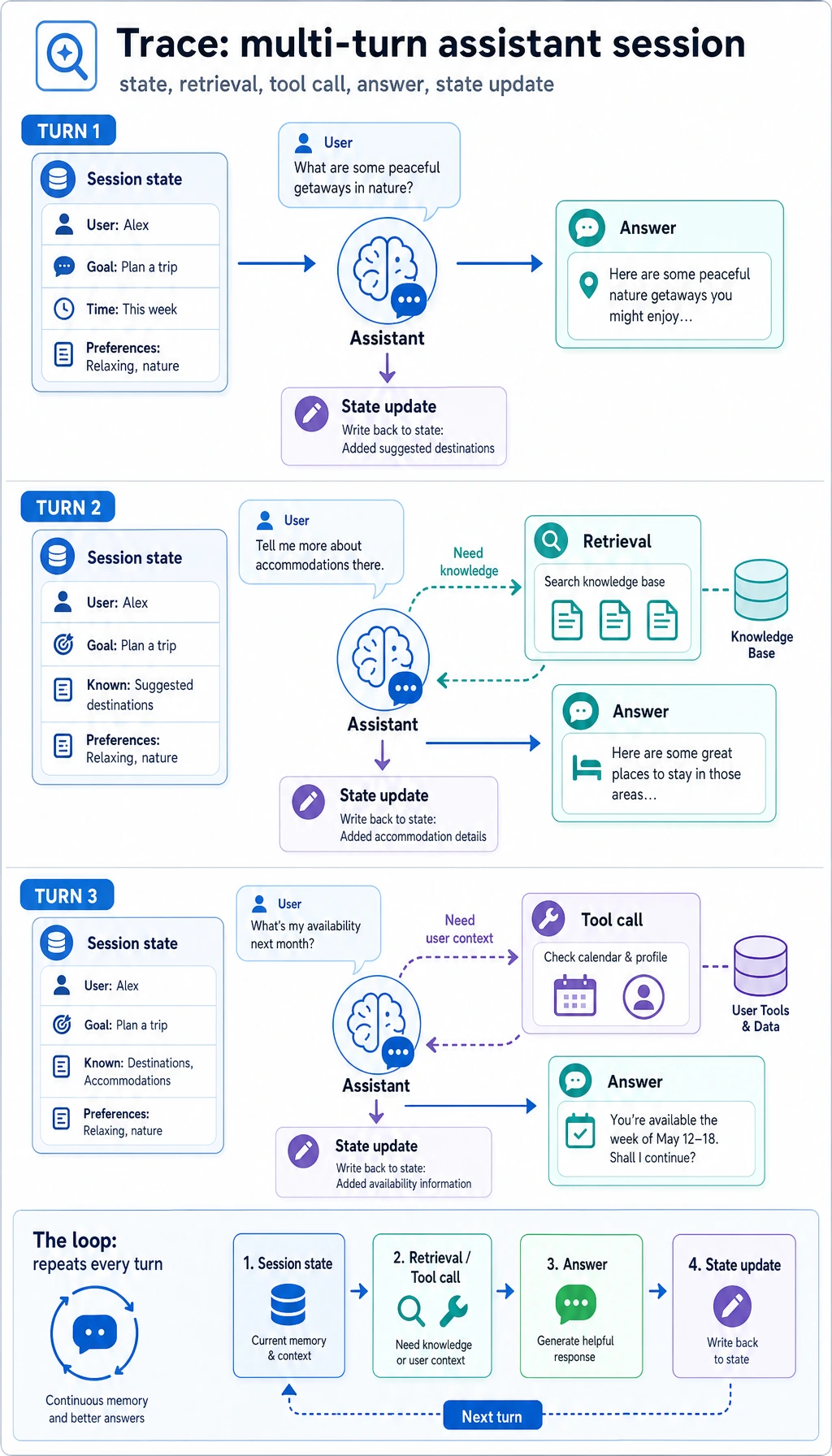
In real LLM applications, a trace is the record of what happened during one request. Even if you do not store a log file yet, you should be able to explain this sequence:
| Trace stage | In this script | What to log later |
|---|---|---|
| Input | query, role | User ID, session ID, request ID |
| Parse | chunk_documents() | Document version and parser name |
| Retrieve | retrieve() | Top-k chunks, scores, query rewrite |
| Permission | allowed_hits, blocked_hits | Role, policy, blocked source count |
| Answer | build_answer() | Status, citations, model name |
| Evaluate | evaluate() | Pass/fail, failure reason |
This is why Chapter 8 is application engineering, not just prompting. A reliable system needs visible intermediate states.
Step 7: Upgrade Path to Embeddings, Vector Databases, and APIs
Section titled “Step 7: Upgrade Path to Embeddings, Vector Databases, and APIs”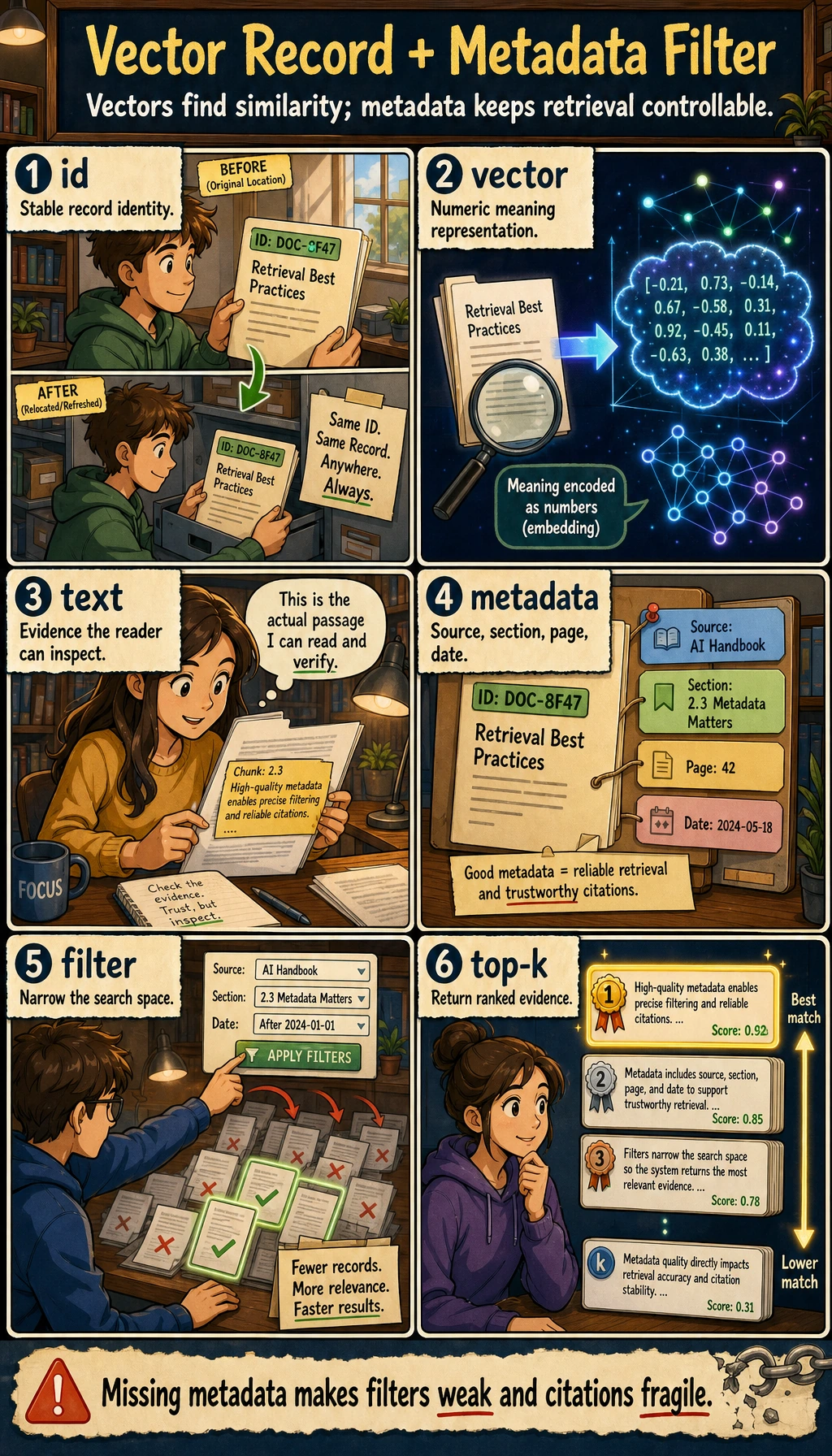
Once the offline script works, replace one part at a time:
| Current simple part | Later production part | Keep the same habit |
|---|---|---|
In-memory DOCUMENTS | Markdown/PDF/Word parser plus storage | Preserve source metadata |
| Sentence chunking | Heading-aware or token-aware chunking | Keep chunk IDs stable |
keyword_score() | Embeddings, hybrid search, or reranking | Print top-k and scores |
roles list | Real authentication and authorization | Filter before answering |
| Extractive answer | Model call with a grounded prompt | Require citations |
EVAL_CASES | Larger eval set and regression checks | Use the same questions after changes |
Do not replace everything at once. If you change parsing, embedding, vector database, prompt, and model in the same edit, you will not know what caused an improvement or regression.
Step 8: Optional OpenAI Responses API Upgrade
Section titled “Step 8: Optional OpenAI Responses API Upgrade”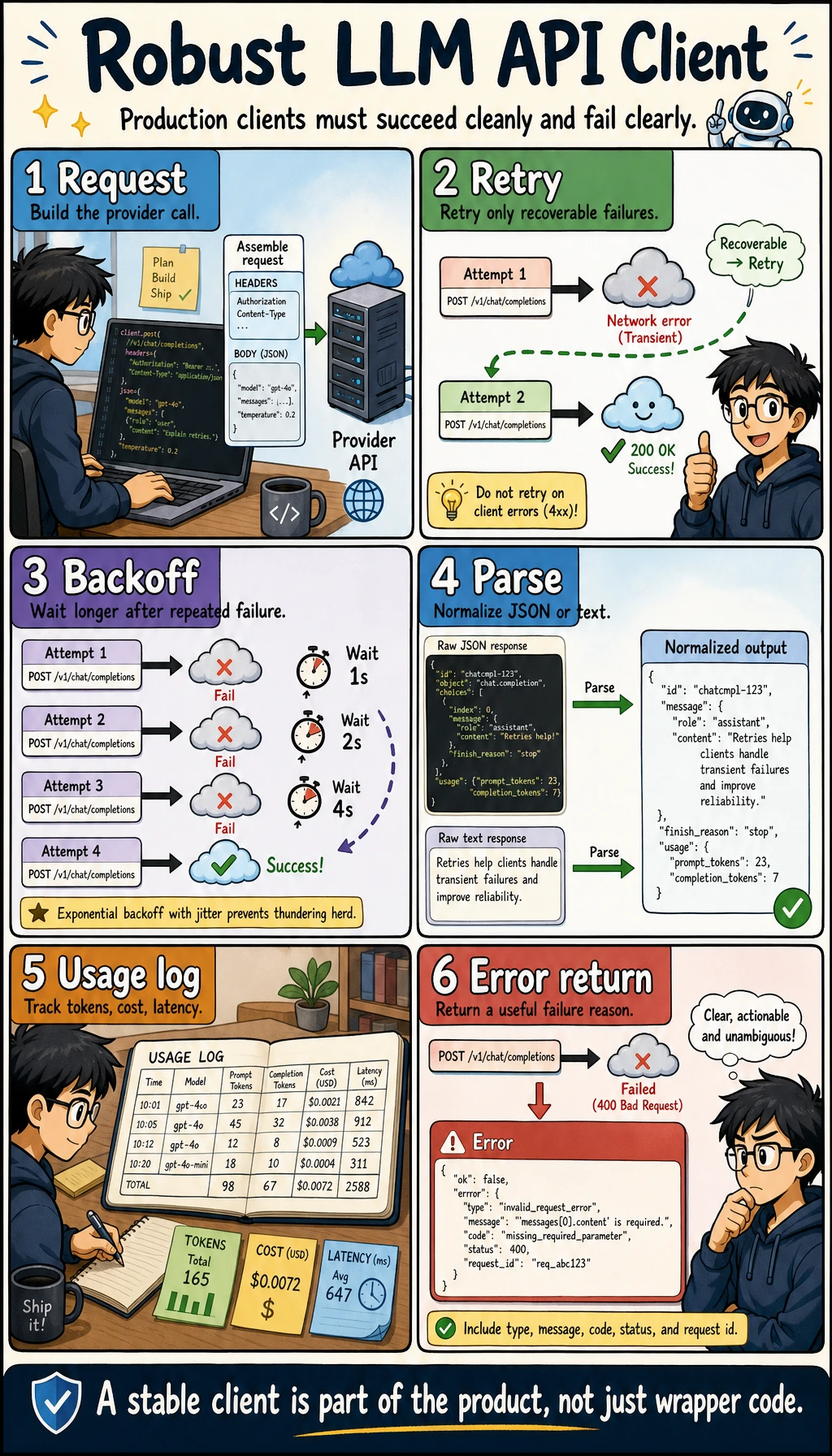
The offline script is the required beginner path. After it works, you can replace build_answer() with a real model call. Current OpenAI documentation recommends using the Responses API, and the models page currently points general complex reasoning and coding work to gpt-5.5. Keep the model configurable so you can switch to a cheaper or course-standard model later.
Install dependencies:
python3 -m venv .venvsource .venv/bin/activatepip install "openai>=2" "pydantic>=2"export OPENAI_API_KEY="your_api_key_here"export OPENAI_MODEL="gpt-5.5"Create ask_with_openai.py:
import jsonimport os
from openai import OpenAI

client = OpenAI()
query = "How many days do learners have for refunds?"context = [    {        "source": "handbook.md#refund",        "text": "Refund requests are accepted within 14 days of enrollment when the learner has completed less than 20 percent of the course.",    }]
response = client.responses.create(    model=os.getenv("OPENAI_MODEL", "gpt-5.5"),    input=[        {            "role": "system",            "content": (                "Answer only from the provided context. "                "If the context is insufficient, return status no_evidence. "                "Always include citations from the source fields."            ),        },        {            "role": "user",            "content": json.dumps({"question": query, "context": context}, ensure_ascii=False),        },    ],    text={        "format": {            "type": "json_schema",            "name": "rag_answer",            "strict": True,            "schema": {                "type": "object",                "additionalProperties": False,                "properties": {                    "status": {"type": "string", "enum": ["answered", "no_evidence"]},                    "answer": {"type": "string"},                    "citations": {"type": "array", "items": {"type": "string"}},                },                "required": ["status", "answer", "citations"],            },        }    },)
print(response.output_text)
Run:
python3 ask_with_openai.pyExpected shape:
{"status":"answered","answer":"Refund requests are accepted within 14 days of enrollment when the learner has completed less than 20 percent of the course.","citations":["handbook.md#refund"]}If the model returns text without citations, treat that as a failed check. In a production project, validate the output, retry with a stricter instruction, or return a controlled error instead of showing an unsupported answer.
Step 9: Function Calling and Structured Output Mental Model
Section titled “Step 9: Function Calling and Structured Output Mental Model”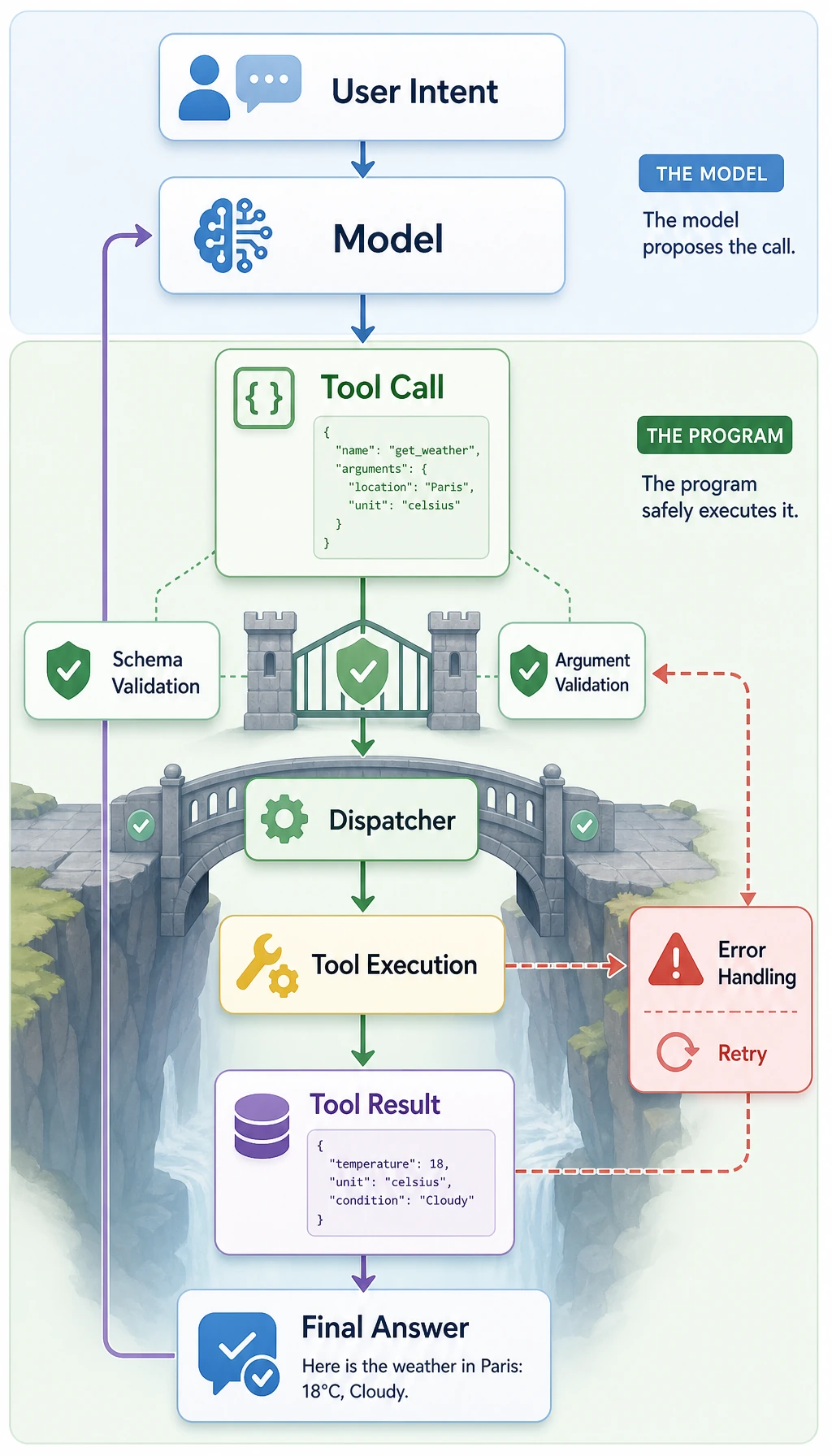
In this workshop, retrieve() is a normal Python function. In a model-driven application, a model may decide to call tools such as search_knowledge_base, get_user_profile, or create_ticket.
The safe pattern is:
| Stage | What happens | Safety point |
|---|---|---|
| Schema | Define the tool input fields | Reject missing or unknown fields |
| Validation | Check role, source, and allowed action | Do not trust model arguments blindly |
| Dispatch | Run the actual function | Keep side effects controlled |
| Observation | Return result to the model | Keep private data filtered |
| Final answer | Answer with citations or a no-answer status | Validate before displaying |
The offline script already teaches the same habit: retrieval, permission, answer, and evaluation are separate steps.
Step 10: Troubleshooting Checklist
Section titled “Step 10: Troubleshooting Checklist”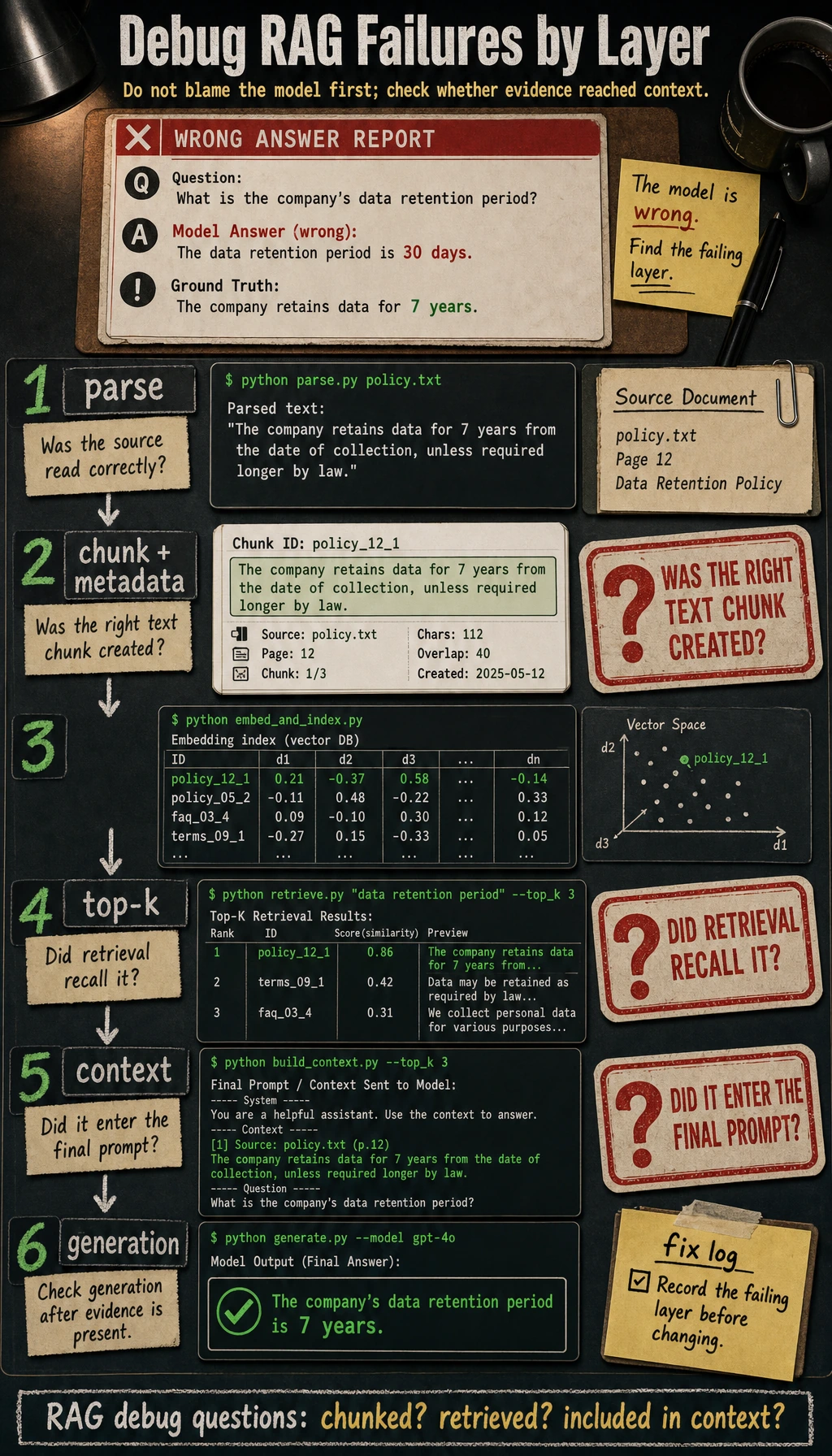
| Symptom | Likely cause | What to check | Fix |
|---|---|---|---|
chunks: 0 | Documents did not parse | Print DOCUMENTS and sentence split result | Fix input text or parser |
| Correct document exists but retrieval misses it | Query terms do not match chunk terms | Print normalize(query) and chunk tokens | Add synonyms, embeddings, or query rewrite |
| Answer has no citation | Source metadata was lost | Inspect chunk records | Keep source in every chunk |
| Private document appears in public answer | Permission filter is after answer generation | Inspect retrieve() order | Filter before prompt/model call |
| Unknown question gets a confident answer | No-answer handling is missing | Test What is the cafeteria menu today? | Return no_evidence when hits are empty |
| Evaluation gets worse after a change | Too many parts changed at once | Compare git diff and eval output | Change one layer at a time |
Step 11: Practice Tasks
Section titled “Step 11: Practice Tasks”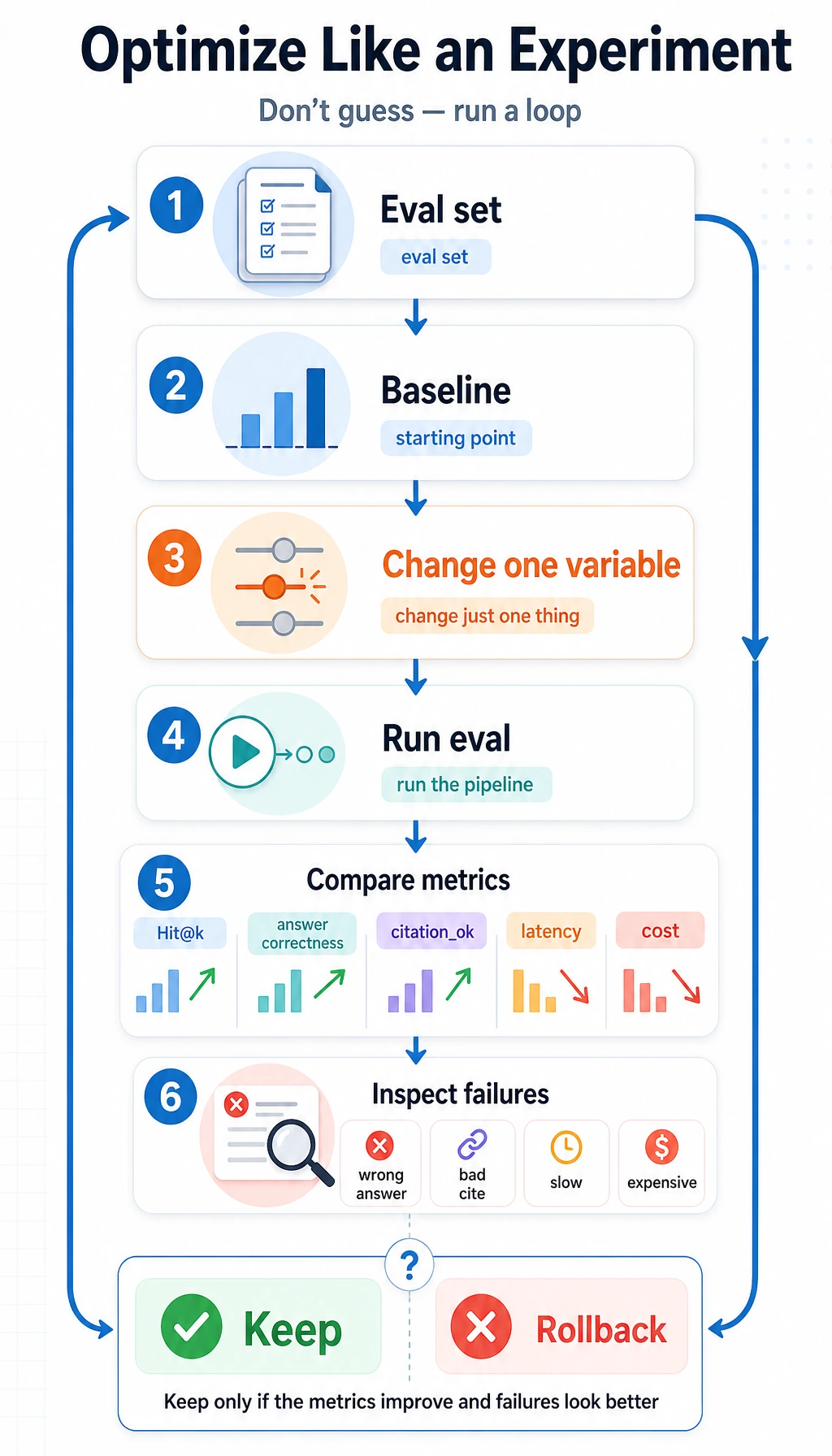
Complete these in order:
| Level | Task | Passing standard |
|---|---|---|
| Easy | Add one public document and one evaluation case | passed count increases and the new citation appears |
| Standard | Add logs/retrieval_logs.jsonl output | Each question records query, role, status, scores, and citations |
| Standard | Add a top_k configuration variable | You can compare top_k=1 and top_k=2 results |
| Challenge | Replace keyword_score() with embeddings | Evaluation still runs with the same cases |
| Challenge | Add a small FastAPI endpoint | /ask returns status, answer, citations, and trace ID |
Operation guide and checkpoints
- Easy pass: the new document is retrievable, cited, and covered by a new evaluation case.
- Logging pass: every request has enough trace data to debug retrieval and permissions.
top_kpass: the comparison explains the recall/noise trade-off, not just that the output changed.- Embedding/FastAPI challenge pass: evaluation still works and the API returns a stable schema with a trace ID.
- The completion standard is met only if README, run command, and evidence make the project reproducible.
Workshop Completion Standard
Section titled “Workshop Completion Standard”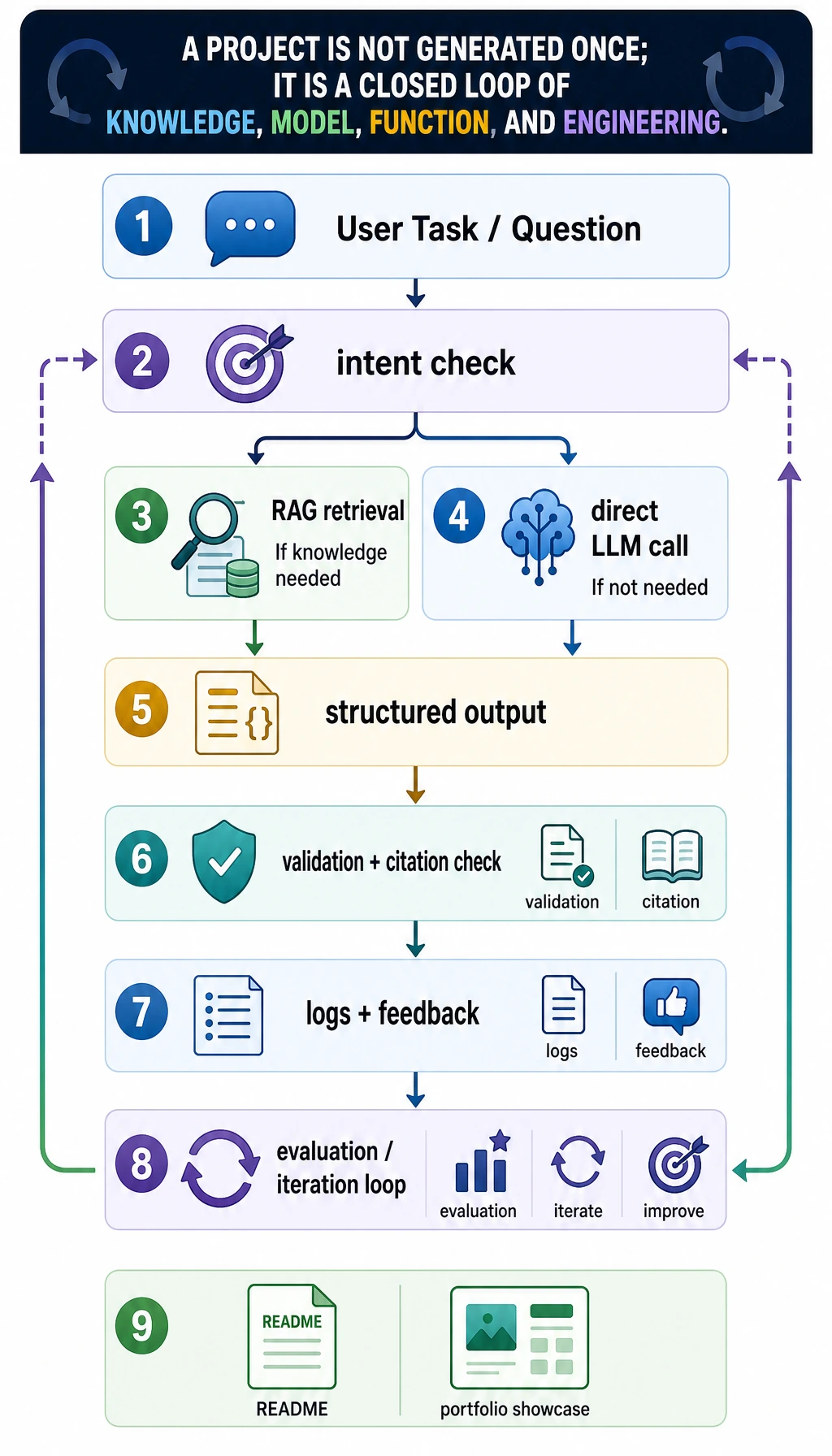
You have completed this Chapter 8 hands-on workshop when you can:
- Run
python3 rag_app_workshop.pyand get the expected output. - Explain what
chunk,metadata,top_k,citation,trace, andevaluation setmean. - Show why a public user cannot access
internal.md#roadmap. - Add one new document and one new evaluation case without breaking the existing tests.
- Explain which part you would replace first when moving to embeddings, a vector database, or a real model API.
Keep this small project as your Chapter 8 baseline. When later pages introduce LangChain, vector databases, deployment, monitoring, or Agent, compare them back to this script: what part did the framework replace, and what responsibility still belongs to your application code?
Evidence to Keep
Section titled “Evidence to Keep”Keep this page’s proof of learning as a small evidence card:
- Project Goal
- user task and business boundary
- Baseline
- simplest prompt/RAG/app version first
- Evaluation
- fixed cases, retrieval evidence, answer quality, and citation check
- Failure Log
- at least one failed case with likely cause
- Deliverable
- README, run command, screenshots/logs, next step