
3.3.5 Data Cleaning
Learning Objectives
Section titled “Learning Objectives”- Master strategies for detecting, deleting, and filling missing values
- Learn how to handle duplicate values
- Understand methods for outlier detection
- Master data type conversion and string processing
First, Build a Map
Section titled “First, Build a Map”Data cleaning is better understood as “check first, then decide how to handle it”:
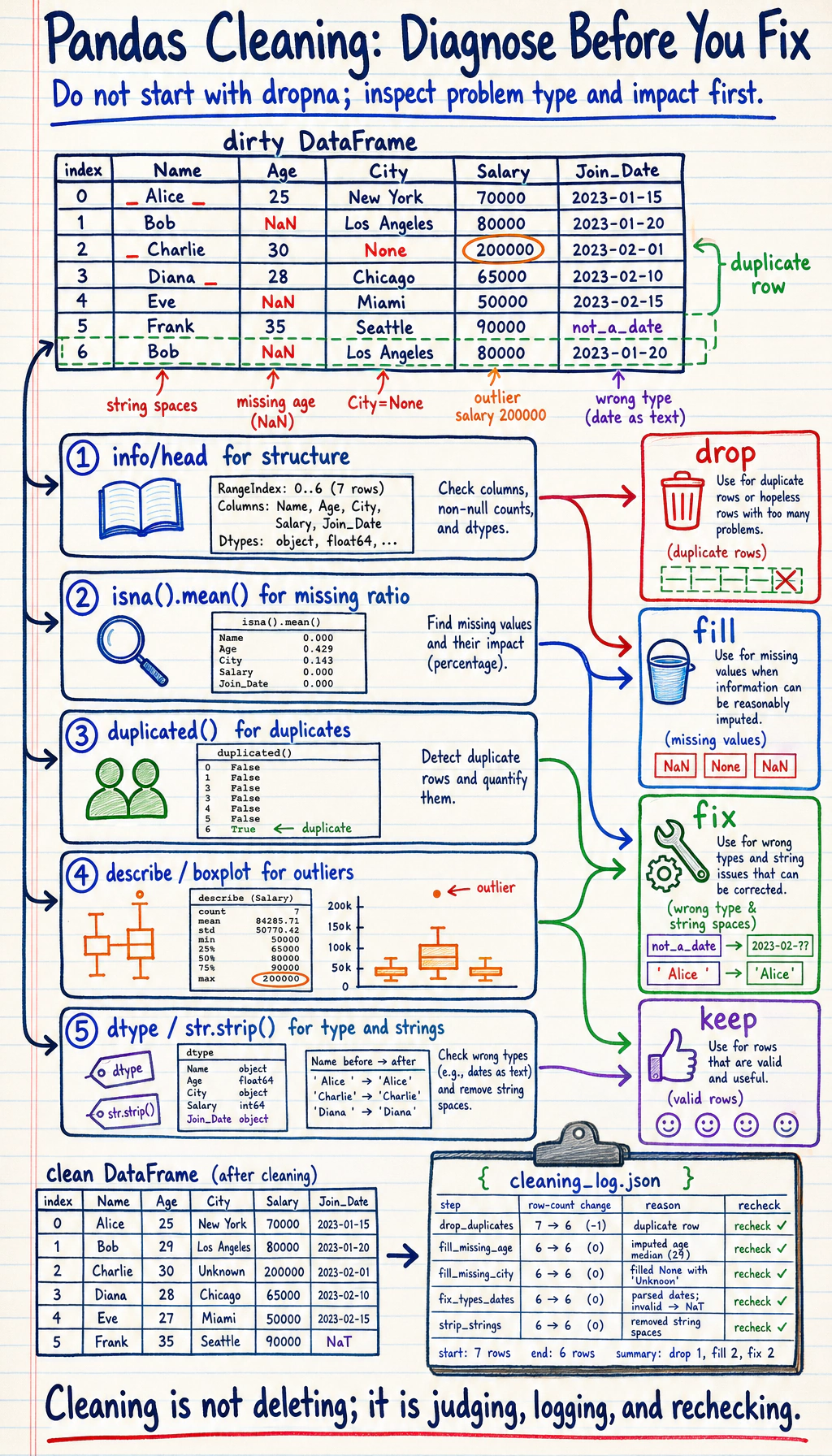
So what this section really wants to solve is:
- What are the most common problems in real data?
- When you first get dirty data, what is the safest order for checking it?
Why Do We Need Data Cleaning?
Section titled “Why Do We Need Data Cleaning?”Real-world data is very dirty — missing values, duplicate rows, inconsistent formats, outliers… If you analyze it directly without cleaning, the results will definitely be unreliable.
“Data scientists spend 80% of their time cleaning data and 20% of their time complaining about cleaning data.” — an industry saying
flowchart LR    A["Raw Data<br/>(Dirty)"] --> B["Data Cleaning"]    B --> C["Clean Data"]    C --> D["Analysis / Modeling"]
    B --> B1["Handle Missing Values"]    B --> B2["Remove Duplicate Values"]    B --> B3["Handle Outliers"]    B --> B4["Standardize Format"]
    style A fill:#f44336,color:#fff    style C fill:#4caf50,color:#fff
A Better Analogy for Beginners
Section titled “A Better Analogy for Beginners”You can think of data cleaning as:
- Washing, sorting, and preparing ingredients before cooking
You are not doing these steps just to make things “look neater”; you are doing them so that:
- when the real analysis starts later, you won’t be misled by broken, duplicated, or inconsistently formatted data
Handling Missing Values
Section titled “Handling Missing Values”Create Data with Missing Values
Section titled “Create Data with Missing Values”import pandas as pdimport numpy as np
df = pd.DataFrame({ "Name": ["Alice", "Bob", "Carol", "David", "Eve"], "Age": [22, np.nan, 25, 28, np.nan], "City": ["Beijing", "Shanghai", None, "Shenzhen", "Hangzhou"], "Salary": [15000, 22000, np.nan, 35000, 12000]})print(df)Detect Missing Values
Section titled “Detect Missing Values”# Check whether each position is missingprint(df.isna()) # True = missing (isnull() works the same)print(df.notna()) # True = not missing
# Number of missing values in each columnprint(df.isna().sum())# Name 0# Age 2# City 1# Salary 1
# Missing value ratioprint(df.isna().mean())# Age 0.4# City 0.2# Salary 0.2
# Rows with missing valuesprint(df[df.isna().any(axis=1)])Delete Missing Values
Section titled “Delete Missing Values”# Delete any row that contains missing valuesdf_cleaned = df.dropna()print(df_cleaned) # Only 2 rows remain (Alice, David)
# Delete rows where all values are missingdf.dropna(how="all")
# Look at specific columns onlydf.dropna(subset=["Age"]) # Delete rows where Age is missingdf.dropna(subset=["Age", "Salary"]) # Delete rows where Age or Salary is missing
# Keep rows with at least N non-missing valuesdf.dropna(thresh=3) # Keep only rows with at least 3 filled columnsFill Missing Values
Section titled “Fill Missing Values”# Fill with a fixed valuedf["City"].fillna("Unknown")
# Fill with mean (commonly used for numeric columns)df["Age"].fillna(df["Age"].mean())
# Fill with mediandf["Salary"].fillna(df["Salary"].median())
# Fill with the previous value (commonly used for time series)df["Age"].ffill() # forward fill
# Fill with the next valuedf["Age"].bfill() # backward fill
# Use different strategies for different columnsdf_filled = df.fillna({ "Age": df["Age"].median(), "City": "Unknown", "Salary": 0})print(df_filled)Missing Value Handling Strategies
Section titled “Missing Value Handling Strategies”| Strategy | Use Case | Method |
|---|---|---|
| Delete rows | Missing ratio is small (below 5%), data volume is large | dropna() |
| Fill with mean/median | Numeric data, symmetric distribution | fillna(mean/median) |
| Fill with mode | Categorical variables | fillna(mode()[0]) |
| Forward/backward fill | Time series data | ffill() / bfill() |
| Fill with fixed value | Business rule is clear | fillna(0) or fillna("Unknown") |
| Interpolation | Continuous data | interpolate() |
The Safest Default Order When Handling Missing Values for the First Time
Section titled “The Safest Default Order When Handling Missing Values for the First Time”A more reliable order is usually:
- First check the missing-value ratio
- Then decide whether the column is important
- If only a little is missing, consider deleting rows
- If a lot is missing, consider filling it
This is less likely to damage your data than calling dropna() immediately.
Handling Duplicate Values
Section titled “Handling Duplicate Values”df = pd.DataFrame({ "Name": ["Alice", "Bob", "Alice", "Carol", "Bob"], "Department": ["Tech", "Marketing", "Tech", "Tech", "Marketing"], "Salary": [15000, 18000, 15000, 22000, 18000]})
# Detect duplicate rowsprint(df.duplicated())# 0 False# 1 False# 2 True ← Exactly the same as row 0# 3 False# 4 True ← Exactly the same as row 1
# Number of duplicate rowsprint(f"Number of duplicate rows: {df.duplicated().sum()}") # 2
# Remove duplicate rowsdf_unique = df.drop_duplicates()print(df_unique) # 3 rows
# Detect duplicates based on specific columnsdf.drop_duplicates(subset=["Name"]) # Keep the first record for each namedf.drop_duplicates(subset=["Name"], keep="last") # Keep the last recordWhat Are Duplicate Values Most Easily Misunderstood As?
Section titled “What Are Duplicate Values Most Easily Misunderstood As?”Many beginners think “duplicate values = always delete them.” But a more careful way to think about it is:
- First confirm whether they are truly duplicates
- Or whether they are reasonable repeated records in the business context
For example:
- The same user placing multiple orders is not dirty data
- The same order being imported twice is the kind of duplicate that really needs cleaning
Handling Outliers
Section titled “Handling Outliers”Z-score Method
Section titled “Z-score Method”rng = np.random.default_rng(seed=42)df = pd.DataFrame({ "Salary": np.concatenate([ rng.normal(20000, 5000, 97), # normal data np.array([100000, 150000, 200000]) # outliers ])})
# Calculate Z-scorez_scores = (df["Salary"] - df["Salary"].mean()) / df["Salary"].std()
# |Z| > 3 is treated as an outlieroutliers = df[z_scores.abs() > 3]print(f"Detected {len(outliers)} outliers")print(outliers)
# Remove outliersdf_clean = df[z_scores.abs() <= 3]IQR Method (More Robust)
Section titled “IQR Method (More Robust)”Q1 = df["Salary"].quantile(0.25)Q3 = df["Salary"].quantile(0.75)IQR = Q3 - Q1
lower = Q1 - 1.5 * IQRupper = Q3 + 1.5 * IQR
print(f"Normal range: [{lower:.0f}, {upper:.0f}]")
# Remove data outside the rangedf_clean = df[(df["Salary"] >= lower) & (df["Salary"] <= upper)]
# Or clip outliers to the boundarydf["Salary_clipped"] = df["Salary"].clip(lower, upper)A Simple Judgment Table for Beginners
Section titled “A Simple Judgment Table for Beginners”| Phenomenon | Safer First Reaction |
|---|---|
| Many missing values | First check whether the column can still be kept |
| Extremely unreasonable numeric values | First check whether it is a data entry error |
| The same row appears multiple times | First confirm whether it was imported twice |
| A column should be numeric but is a string | First perform type conversion |
This table is especially useful for beginners because it breaks “dirty data” back down into several kinds of problems that can be handled separately.
Data Type Conversion
Section titled “Data Type Conversion”df = pd.DataFrame({ "ID": ["001", "002", "003"], "Price": ["12.5", "23.8", "15.0"], "Quantity": ["3", "5", "2"], "Date": ["2024-01-15", "2024-02-20", "2024-03-10"]})print(df.dtypes) # All object (strings)
# Convert data typesdf["Price"] = df["Price"].astype(float)df["Quantity"] = df["Quantity"].astype(int)df["Date"] = pd.to_datetime(df["Date"])print(df.dtypes)# ID object# Price float64# Quantity int64# Date datetime64[ns]
# Handle conversion errorsdirty = pd.Series(["10", "20", "abc", "40"])# dirty.astype(int) # ❌ Error
# Use to_numeric to handle it gracefullyclean = pd.to_numeric(dirty, errors="coerce") # Values that cannot be converted become NaNprint(clean)# 0 10.0# 1 20.0# 2 NaN# 3 40.0String Processing (str Accessor)
Section titled “String Processing (str Accessor)”Pandas .str accessor lets you perform batch operations on an entire string column:
df = pd.DataFrame({ "Name": [" Alice ", "Bob", " Carol "], "Phone": ["138-0000-1111", "139-2222-3333", "137-4444-5555"]})
# Remove spacesdf["Name"] = df["Name"].str.strip()
# Convert to lowercasedf["Email"] = df["Email"].str.lower()
# Replacedf["Phone_clean"] = df["Phone"].str.replace("-", "")
# Contains checkprint(df["Email"].str.contains("email")) # All True
# Extractdf["Phone_prefix"] = df["Phone"].str[:3]
# Splitdf["Email_username"] = df["Email"].str.split("@").str[0]
print(df)Common str Methods
Section titled “Common str Methods”| Method | Purpose | Example |
|---|---|---|
.str.strip() | Remove leading and trailing spaces | " hello " → "hello" |
.str.lower() | Convert to lowercase | "ABC" → "abc" |
.str.upper() | Convert to uppercase | "abc" → "ABC" |
.str.replace() | Replace text | "a-b".replace("-","") |
.str.contains() | Check whether it contains a pattern | Returns a boolean Series |
.str.startswith() | Check whether it starts with something | Returns a boolean Series |
.str.len() | String length | "hello" → 5 |
.str.split() | Split | "a,b".split(",") |
.str.extract() | Regex extraction | Extract the matched part |
Practice: Clean a Dirty Dataset
Section titled “Practice: Clean a Dirty Dataset”import pandas as pdimport numpy as np
# Create a "dirty" datasetdirty_data = pd.DataFrame({ "Name": [" Zhang San", "Li Si ", "Wang Wu", "Zhang San", " Zhao Liu", "Qian Qi", "Li Si"], "Age": [22, 28, np.nan, 22, "unknown", 150, 28], # Missing, non-numeric, outlier "City": ["Beijing", "Shanghai ", None, "Beijing", " Guangzhou", "Shenzhen", "Shanghai"], "Salary": [15000, 22000, 18000, 15000, 20000, -5000, 22000] # Negative value})
print("=== Original Data ===")print(dirty_data)print(f"\nNumber of rows: {len(dirty_data)}")
# Step 1: Remove spaces from stringsdirty_data["Name"] = dirty_data["Name"].str.strip()dirty_data["City"] = dirty_data["City"].str.strip()
# Step 2: Convert data typesdirty_data["Age"] = pd.to_numeric(dirty_data["Age"], errors="coerce")
# Step 3: Handle outliersdirty_data.loc[dirty_data["Age"] > 120, "Age"] = np.nan # Age > 120 is unreasonabledirty_data.loc[dirty_data["Salary"] < 0, "Salary"] = np.nan # Salary < 0 is unreasonable
# Step 4: Fill missing valuesdirty_data["Age"] = dirty_data["Age"].fillna(dirty_data["Age"].median())dirty_data["City"] = dirty_data["City"].fillna("Unknown")dirty_data["Salary"] = dirty_data["Salary"].fillna(dirty_data["Salary"].median())
# Step 5: Remove duplicate rowsdirty_data = dirty_data.drop_duplicates()
print("\n=== After Cleaning ===")print(dirty_data)print(f"\nNumber of rows: {len(dirty_data)}")What Is the Most Important Thing to Learn from This Mini Practice?
Section titled “What Is the Most Important Thing to Learn from This Mini Practice?”The most important thing is not the name of any single function, but the fact that cleaning usually follows a fairly reliable order:
- Standardize the format first
- Then convert types
- Then handle outliers
- Finally fill missing values and remove duplicates
Once the order is clear, many dirty-data problems become much easier to untangle.
A Data Cleaning Checklist Beginners Can Copy Directly
Section titled “A Data Cleaning Checklist Beginners Can Copy Directly”When you clean data for the first time, the safest checklist is usually:
- Are the data types in each column correct?
- Is the missing-value ratio high?
- Are there obvious outliers?
- Are there duplicate records?
- Can the cleaning rules be explained to others?
The last point is especially important, because cleaning is also a kind of decision-making. If you can’t clearly explain why you deleted something or filled something in a certain way, it will be hard to make your analysis convincing.
Evidence to Keep
Section titled “Evidence to Keep”Keep this page’s proof of learning as a small evidence card:
- Dataframe State
- columns, dtypes, row count, missing values, and sample rows
- Operation
- read/write, select/filter, clean, transform, groupby, merge, or time-series step
- Output
- resulting table, saved file, aggregation, join result, or time index view
- Failure Check
- dtype mismatch, missing data, duplicated keys, chained assignment, or wrong time frequency
- Expected Output
- before/after table sample with the transformation reason
Summary
Section titled “Summary”| Type | Detection | Handling Method |
|---|---|---|
| Missing values | isna(), info() | dropna(), fillna() |
| Duplicate values | duplicated() | drop_duplicates() |
| Outliers | Z-score, IQR | clip(), delete, replace with NaN |
| Type errors | dtypes | astype(), pd.to_numeric() |
| Dirty string data | Visual inspection, str.contains() | str.strip(), str.replace() |
Hands-on Exercises
Section titled “Hands-on Exercises”Exercise 1: Missing Value Handling
Section titled “Exercise 1: Missing Value Handling”# Create a DataFrame with missing values (at least 20 rows and 5 columns)# 1. Calculate the missing-value ratio for each column# 2. Fill numeric columns with the median# 3. Fill categorical columns with the mode# 4. Delete columns with more than 50% missing values (if any)Exercise 2: Complete Cleaning Workflow
Section titled “Exercise 2: Complete Cleaning Workflow”# Create a dataset with various problems, then complete the full cleaning workflow:# string spaces → type conversion → outlier handling → missing value filling → deduplicationReference implementation and walkthrough
- Start with a missing-value report using
isna().sum()andisna().mean(). Decide column by column whether to drop, fill with median or mode, or keep missingness as a meaningful signal. - Numeric columns usually use median when outliers are possible; categorical columns usually use mode or an explicit
Unknownvalue. Columns with very high missingness need a written reason before being used. - Keep a cleaning log: original row count, rows removed, values filled, duplicate rule, and any outlier rule. Without that log, the cleaned data is hard to trust.