
7.8.3 Project: Deliverables Kit
The last step in an LLM project is not just “it runs.”
It is:
Can another person understand the goal, reproduce the result, inspect the evaluation, and continue from where you stopped?
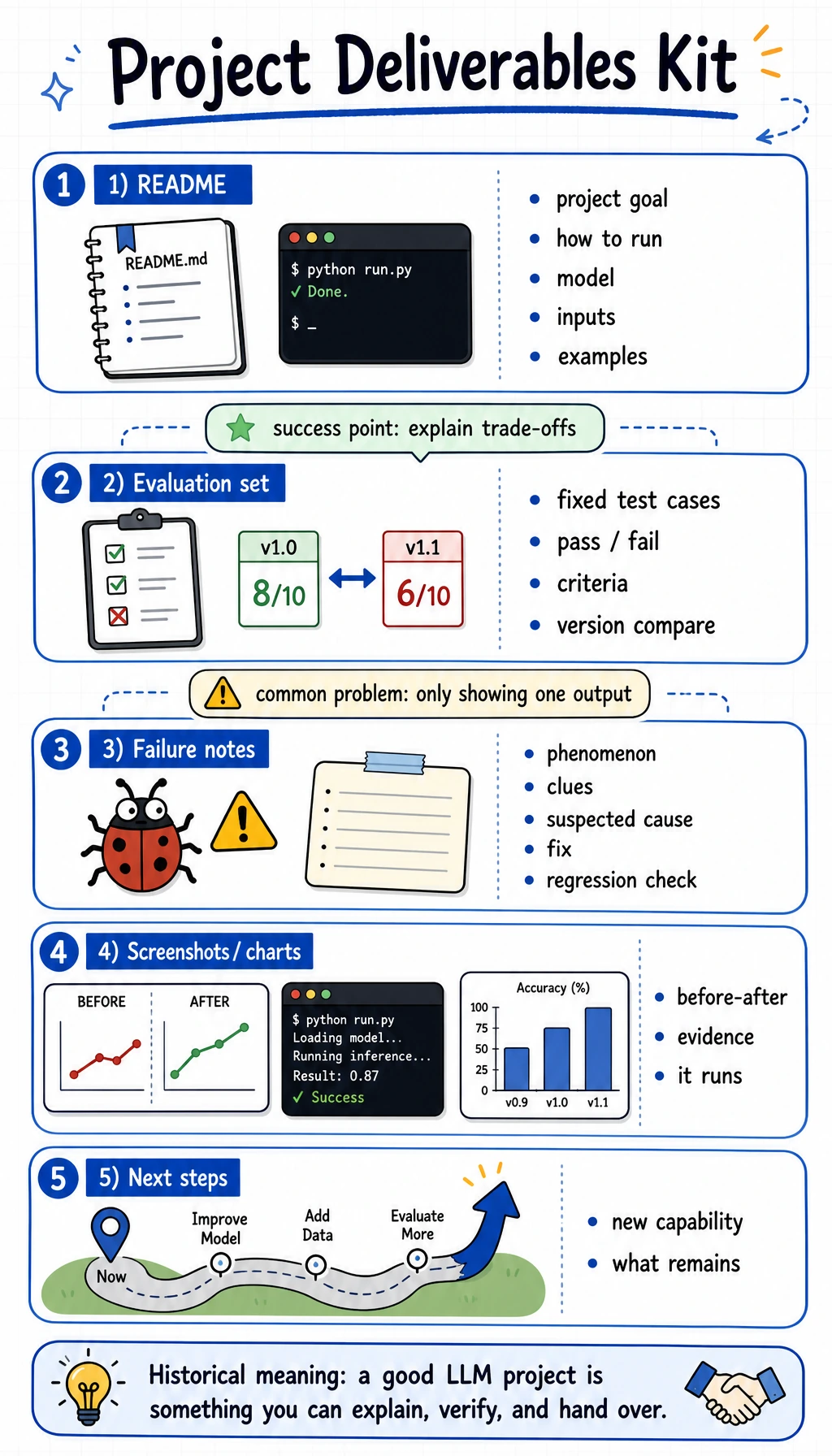
What should be in the final package?
Section titled “What should be in the final package?”At minimum, a good LLM project package should include:
README.md- one reproducible run command
- example inputs and outputs
- evaluation records
- one failure case analysis
- screenshots or charts
- a next-step plan
This is the smallest set that lets the project stand on its own.
The folder structure that makes review easy
Section titled “The folder structure that makes review easy”This structure is simple on purpose:
README.mdtells the storyexamples/input-01.jsonandexamples/output-01.jsonprove the taskreports/evaluation.mdandreports/failure_cases.mdprove evaluation and failure analysisscreenshots/run-01.pngandscreenshots/before-after.pngprove the project runssrc/keeps the runnable code
A README template you can reuse
Section titled “A README template you can reuse”Copy this outline and fill it with your own project content.
# Project Name
## 1. GoalWhat problem does this project solve?
## 2. Task ScopeWhat is in scope and what is not?
## 3. BaselineWhat is the simplest method you compared against?
## 4. DataWhere did the data come from? How many samples?
## 5. EvaluationWhat metrics or manual checks did you use?
## 6. ResultsWhat improved? What still failed?
## 7. Failure CasesShow one real failure and explain the cause.
## 8. Run InstructionsHow do I reproduce the result?
## 9. Next StepsWhat would you improve next?
A simple evaluation record template
Section titled “A simple evaluation record template”If your project has a fixed test set, keep the results in a small table like this:
| Case | Result | Note |
|---|---|---|
| 001 Refund request | Domain-aware answer passes | Covers policy points better than the generic baseline |
| 002 Address change | Rule-based reply passes | Structure is clearer than the baseline |
| 003 Invoice question | New method fails | Still misses a key detail; needs more data |
This makes it easy to compare versions later.
A failure note template that is actually useful
Section titled “A failure note template that is actually useful”Do not just write “the model is bad.”
Write a note like this:
# Failure Case: Missing JSON field
- Phenomenon: The output sometimes adds extra text before the JSON object.- Clues: This happens more often on long prompts.- Suspected cause: The prompt does not strongly constrain the output format.- Investigation: Compare prompt versions and inspect the raw outputs.- Fix action: Add a strict schema reminder and a short example.- Regression check: Run the same fixed test cases again.
That one note is often more valuable than ten screenshots.
Run a Package Completeness Check
Section titled “Run a Package Completeness Check”Before you call the project finished, put this small script in check_package.py at the project root:
from pathlib import Path
required = [    "README.md",    "examples/input-01.json",    "examples/output-01.json",    "reports/evaluation.md",    "reports/failure_cases.md",]
missing = [item for item in required if not Path(item).exists()]
if missing:    print("missing:")    for item in missing:        print("-", item)    raise SystemExit(1)
print("package_ready=true")print("checked_files=", len(required))
Run it:
python check_package.pyExpected output after the package is complete:
package_ready=truechecked_files= 5This script does not judge whether the model is good. It checks whether the reviewer has the minimum material needed to reproduce and inspect the work.
What a strong project handoff looks like
Section titled “What a strong project handoff looks like”The handoff should let another person answer three questions quickly:
- What problem does this project solve?
- How do I reproduce it?
- Why is the solution better than the baseline?
If those three questions are easy to answer, the project is ready for a portfolio or a team review.
Final checklist
Section titled “Final checklist”Before you close the project, check these items:
- README explains the goal and scope
- run command works
- baseline and new method are both shown
- evaluation set is fixed
- at least one failure case is included
- screenshots or charts are present
- next-step plan is written
Expected result: another person can open the package, run the command, inspect the examples and evaluation table, and understand the next action without asking you for missing context.
Evidence to Keep
Section titled “Evidence to Keep”Keep this page’s proof of learning as a small evidence card:
- Folder
- prompts, evals, outputs, data notes, README
- Run Command
- how someone reproduces the result
- Metric Table
- baseline and improved result
- Failure Notes
- known weak cases and next actions
- Review Ready
- another person can inspect evidence without asking you
Project review notes and pass criteria
- A strong package can be reviewed without a live demo: README, fixed eval table, failure note, and rerun command should tell the story.
- The evaluation table should compare against a baseline, not only show the final version. Otherwise the reviewer cannot see what changed.
- Keep one failure case even when the result looks good. It proves you know the boundary and gives the next contributor a starting point.
- The page is complete when another person can reproduce the run and name the next improvement in under ten minutes.
Summary
Section titled “Summary”A good LLM project is not just a working script.
It is a package that can be understood, reproduced, evaluated, and extended.
When you can do that, you are no longer just learning techniques. You are building something other people can actually use.