
6.2.6 Data Loading
Learning Objectives
Section titled “Learning Objectives”- Write a small custom
Dataset. - Use
DataLoaderto create batches. - Read batch shapes before training.
- Split train and validation sets reproducibly.
- Connect a loader to a tiny training loop.
Look at the Batch Flow
Section titled “Look at the Batch Flow”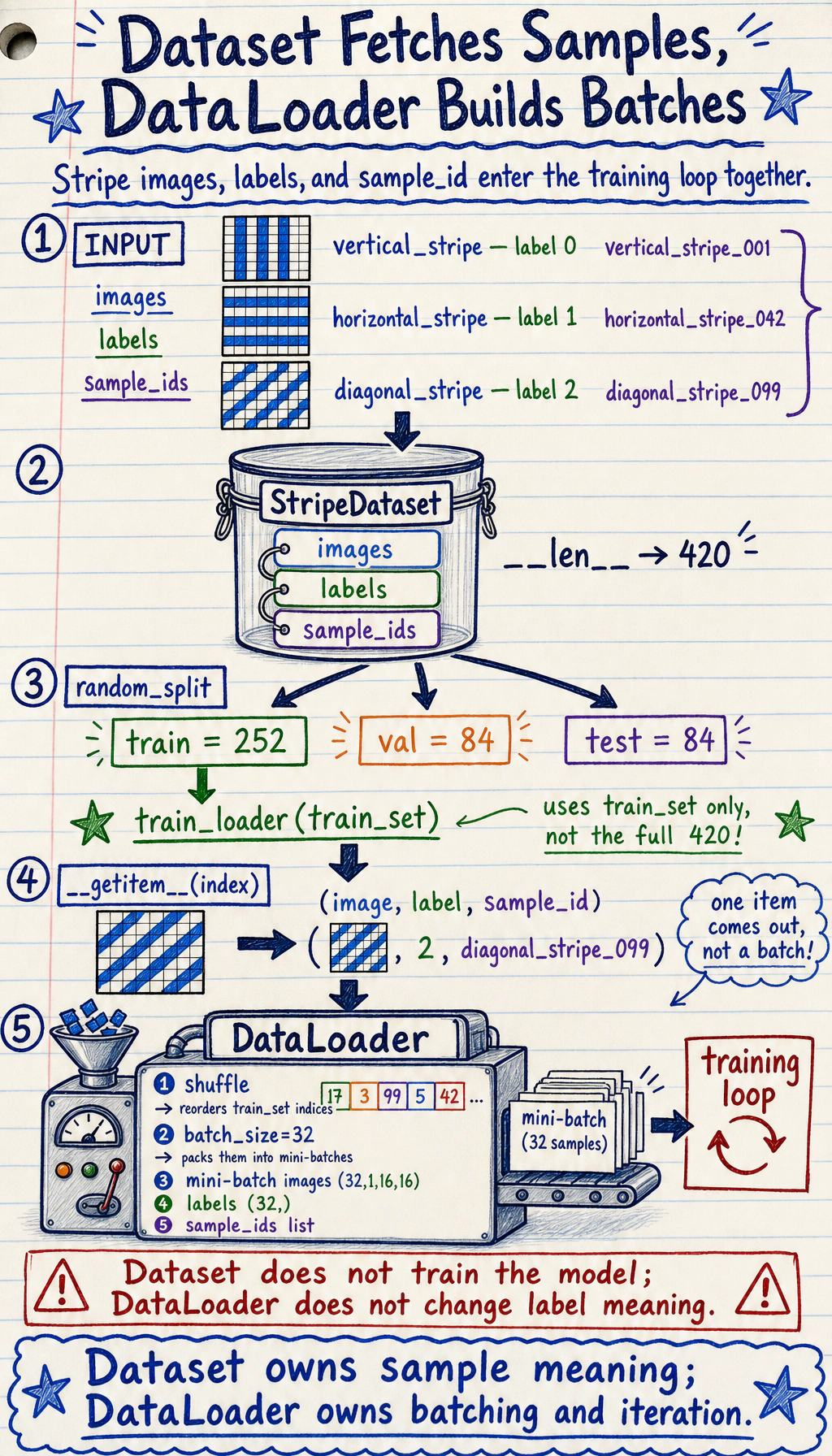
Read it like this:
The split is useful:
| Object | Job |
|---|---|
Dataset | define length and how to fetch one sample |
DataLoader | batch, shuffle, iterate, optionally parallel-load |
| training loop | read batch_x, batch_y and update the model |
Why Batches?
Section titled “Why Batches?”A batch is a small group of samples used for one parameter update.
We usually avoid:
pred = model(all_data_once)and use:
for batch_x, batch_y in train_loader: pred = model(batch_x)Reasons:
- memory stays manageable;
- parameter updates happen repeatedly;
- shuffling gives the model a more balanced stream of examples;
- the same loop works for small CSV files and large image folders.
Lab 1: Write the Smallest Useful Dataset
Section titled “Lab 1: Write the Smallest Useful Dataset”import torchfrom torch.utils.data import Dataset
class StudentDataset(Dataset): def __init__(self): self.features = torch.tensor( [ [2.0, 1.0], [3.0, 2.0], [4.0, 3.0], [5.0, 5.0], [6.0, 6.0], [7.0, 8.0], [8.0, 9.0], [9.0, 10.0], ] ) self.labels = torch.tensor( [[55.0], [60.0], [68.0], [78.0], [85.0], [92.0], [96.0], [99.0]] ) / 100.0
def __len__(self): return len(self.features)
def __getitem__(self, idx): return self.features[idx], self.labels[idx]
dataset = StudentDataset()x0, y0 = dataset[0]
print("dataset_lab")print("dataset size:", len(dataset))print("sample 0 shapes:", tuple(x0.shape), tuple(y0.shape))print("sample 0:", x0, y0)Expected output:
dataset_labdataset size: 8sample 0 shapes: (2,) (1,)sample 0: tensor([2., 1.]) tensor([0.5500])The minimum custom dataset contract is:
__len__(): how many samples exist;__getitem__(idx): what one sample looks like.
Check this before creating a loader:
len(dataset)dataset[0]shape and dtype of x and yLab 2: Turn Samples Into Batches
Section titled “Lab 2: Turn Samples Into Batches”import torchfrom torch.utils.data import Dataset, DataLoader
class StudentDataset(Dataset): def __init__(self): self.features = torch.tensor( [ [2.0, 1.0], [3.0, 2.0], [4.0, 3.0], [5.0, 5.0], [6.0, 6.0], [7.0, 8.0], [8.0, 9.0], [9.0, 10.0], ] ) self.labels = torch.tensor( [[55.0], [60.0], [68.0], [78.0], [85.0], [92.0], [96.0], [99.0]] ) / 100.0
def __len__(self): return len(self.features)
def __getitem__(self, idx): return self.features[idx], self.labels[idx]
dataset = StudentDataset()loader = DataLoader(dataset, batch_size=3, shuffle=False)
print("loader_lab")for batch_idx, (batch_x, batch_y) in enumerate(loader): print( f"batch={batch_idx} " f"x_shape={tuple(batch_x.shape)} " f"y_shape={tuple(batch_y.shape)}" )Expected output:
loader_labbatch=0 x_shape=(3, 2) y_shape=(3, 1)batch=1 x_shape=(3, 2) y_shape=(3, 1)batch=2 x_shape=(2, 2) y_shape=(2, 1)The last batch has only two samples because 8 is not divisible by 3. That is normal.
What the shapes mean:
batch_x:[batch, features]batch_y:[batch, target_dim]
Lab 3: Train/Validation Split
Section titled “Lab 3: Train/Validation Split”Use a seeded generator so the split is reproducible.
import torchfrom torch.utils.data import DataLoader, random_split
dataset = StudentDataset()
train_dataset, val_dataset = random_split(    dataset,    [6, 2],    generator=torch.Generator().manual_seed(42),)
train_loader = DataLoader(    train_dataset,    batch_size=3,    shuffle=True,    generator=torch.Generator().manual_seed(7),)val_loader = DataLoader(val_dataset, batch_size=2, shuffle=False)
train_x, train_y = next(iter(train_loader))val_x, val_y = next(iter(val_loader))
print("split_lab")print("train size:", len(train_dataset), "val size:", len(val_dataset))print("first train batch:", tuple(train_x.shape), tuple(train_y.shape))print("first val batch:", tuple(val_x.shape), tuple(val_y.shape))
Expected output:
split_labtrain size: 6 val size: 2first train batch: (3, 2) (3, 1)first val batch: (2, 2) (2, 1)Training data usually uses shuffle=True. Validation and test loaders usually use shuffle=False, because evaluation does not need random order.
Lab 4: Use the Loader in Training
Section titled “Lab 4: Use the Loader in Training”This is still a tiny dataset, so validation loss can jump around. The goal here is not a production-quality evaluation; the goal is to see how a loader plugs into the loop.
import torchfrom torch import nnfrom torch.utils.data import DataLoader, Dataset, random_split

class StudentDataset(Dataset):    def __init__(self):        self.features = torch.tensor(            [                [2.0, 1.0],                [3.0, 2.0],                [4.0, 3.0],                [5.0, 5.0],                [6.0, 6.0],                [7.0, 8.0],                [8.0, 9.0],                [9.0, 10.0],            ]        )        self.labels = torch.tensor(            [[55.0], [60.0], [68.0], [78.0], [85.0], [92.0], [96.0], [99.0]]        ) / 100.0
    def __len__(self):        return len(self.features)
    def __getitem__(self, idx):        return self.features[idx], self.labels[idx]

class ScorePredictor(nn.Module):    def __init__(self):        super().__init__()        self.net = nn.Sequential(            nn.Linear(2, 16),            nn.ReLU(),            nn.Linear(16, 1),        )
    def forward(self, x):        return self.net(x)

dataset = StudentDataset()train_dataset, val_dataset = random_split(    dataset,    [6, 2],    generator=torch.Generator().manual_seed(42),)train_loader = DataLoader(    train_dataset,    batch_size=3,    shuffle=True,    generator=torch.Generator().manual_seed(7),)val_loader = DataLoader(val_dataset, batch_size=2, shuffle=False)
torch.manual_seed(42)model = ScorePredictor()loss_fn = nn.MSELoss()optimizer = torch.optim.Adam(model.parameters(), lr=0.03)
print("training_with_loader")for epoch in range(1, 4):    model.train()    total_train_loss = 0.0
    for batch_x, batch_y in train_loader:        pred = model(batch_x)        loss = loss_fn(pred, batch_y)
        optimizer.zero_grad()        loss.backward()        optimizer.step()
        total_train_loss += loss.item() * len(batch_x)
    avg_train_loss = total_train_loss / len(train_loader.dataset)
    model.eval()    total_val_loss = 0.0    with torch.no_grad():        for batch_x, batch_y in val_loader:            total_val_loss += loss_fn(model(batch_x), batch_y).item() * len(batch_x)
    avg_val_loss = total_val_loss / len(val_loader.dataset)    print(        f"epoch={epoch} "        f"train_loss={avg_train_loss:.4f} "        f"val_loss={avg_val_loss:.4f}"    )
Expected output:
training_with_loaderepoch=1 train_loss=0.4641 val_loss=0.6458epoch=2 train_loss=0.3653 val_loss=0.0059epoch=3 train_loss=0.1147 val_loss=0.3121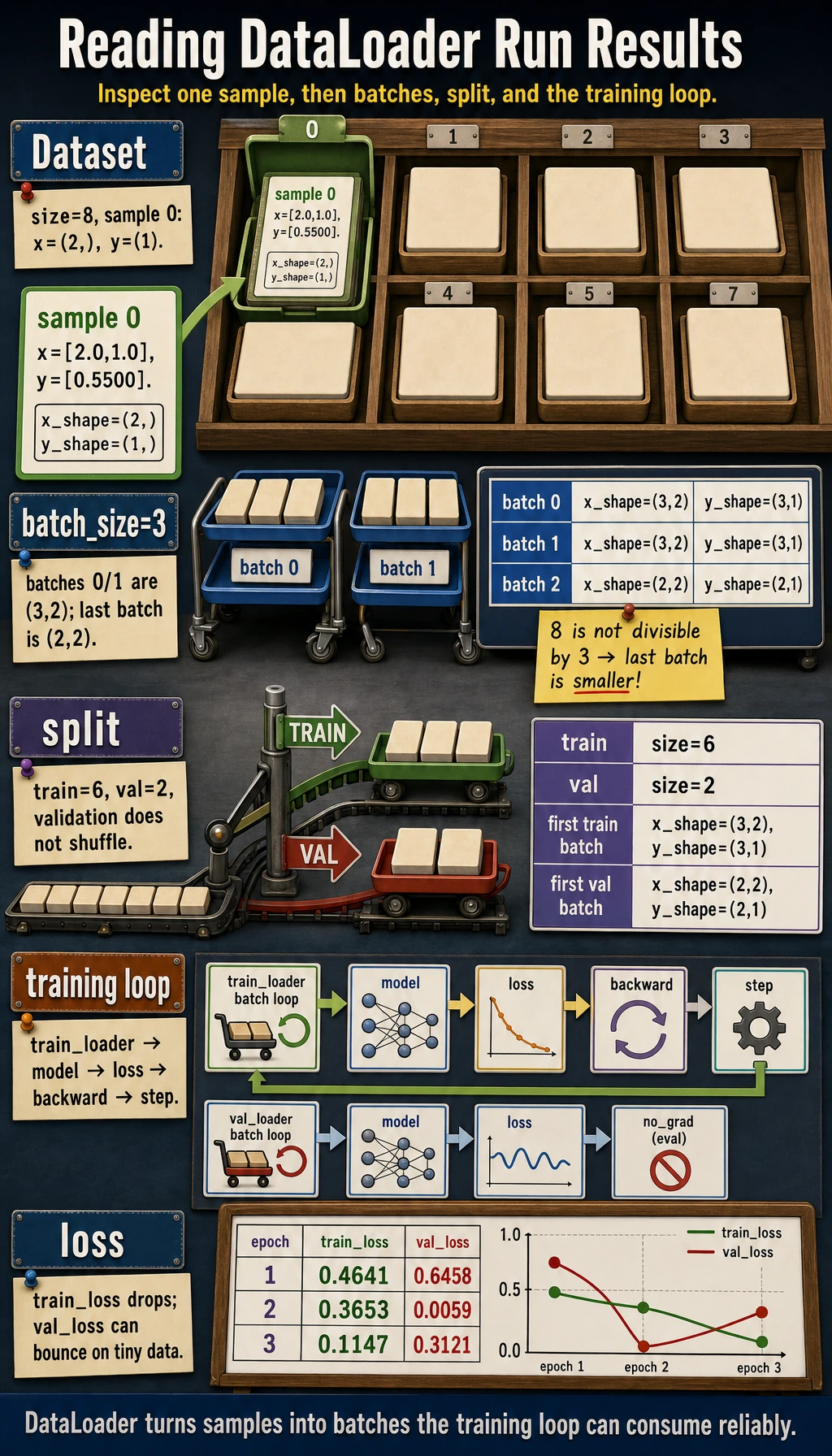
The full pattern is now visible:
Evidence to Keep
Section titled “Evidence to Keep”Save one batch inspection before every new training project:
- One Sample X Shape
- ...
- One Sample Y Shape
- ...
- Batch X Shape
- ...
- Batch Y Shape
- ...
- First Layer Expected Input
- ...
- Loss Expected Target Shape
- ...
If this record is correct, most DataLoader problems are already gone before training starts.
Choosing batch_size
Section titled “Choosing batch_size”| Batch size | Strength | Tradeoff |
|---|---|---|
| small | frequent updates, lower memory | noisier loss |
| large | smoother estimate, better hardware use | more memory, sometimes less frequent updates |
For learning examples, 8, 16, and 32 are common starting points. In real projects, the best value depends on memory, throughput, and training stability.
Common Mistakes
Section titled “Common Mistakes”| Mistake | Why it hurts | Fix |
|---|---|---|
assuming Dataset must load everything into memory | large projects usually read files lazily in __getitem__ | keep __getitem__ focused on one sample |
| not printing one batch before training | shape bugs appear later in the model | inspect next(iter(loader)) |
using shuffle=False for training data | ordered data can bias updates | use shuffle=True for training |
using shuffle=True for validation when you need stable inspection | examples appear in a different order each run | keep validation/test deterministic |
| forgetting target scaling | regression loss can become huge on tiny demos | scale targets when useful and explain it |
Quick Debug Checklist
Section titled “Quick Debug Checklist”After building a loader, run:
batch_x, batch_y = next(iter(train_loader))print(batch_x.shape, batch_x.dtype)print(batch_y.shape, batch_y.dtype)Ask:
- Does one sample from
Datasetlook correct? - Does one batch from
DataLoaderlook correct? - Does
batch_xmatch the first layer of the model? - Does
batch_ymatch the loss function?
Exercises
Section titled “Exercises”- Expand
StudentDatasetto 12 samples, then split it into 9 training samples and 3 validation samples. - Change
batch_sizeto1,2, and4. How many batches are in each epoch? - Set
shuffle=True, print the first training batch in two epochs, and check whether the order changes. - Add a third feature to each sample. Which model layer must change?
Reference implementation and walkthrough
- The training loader should see 9 samples, and the validation loader should see 3. Keep the split fixed while comparing models so the validation result stays meaningful.
- With 9 training samples and the default
drop_last=False, the batch counts are9,5, and3. The last batch is smaller when the sample count is not divisible bybatch_size. - With
shuffle=True, the first training batch will usually change between epochs. Validation data is usually not shuffled because evaluation should be easy to compare. - The first layer that consumes input features must change its
in_featuresfrom2to3; the dataset tensor shape and any normalization code must also agree.
Key Takeaways
Section titled “Key Takeaways”Datasetdefines what one sample looks like.DataLoaderdefines how samples become batches.- Always inspect one sample and one batch before training.
- Train loaders usually shuffle; validation/test loaders usually do not.
- The next training-loop section is just this loader connected to model, loss, optimizer, and evaluation.