
8.1.4 Vector Databases
Learning Objectives
Section titled “Learning Objectives”By the end of this section, you will be able to:
- Understand why RAG often needs a vector database
- Distinguish the relationship between “vectors”, “metadata”, and “similarity search”
- Run a minimal working vector retrieval example
- Know which dimensions to pay attention to when choosing a vector database
Why Aren’t Ordinary Databases Enough?
Section titled “Why Aren’t Ordinary Databases Enough?”In RAG, what we need is not “exactly the same”, but “semantically similar”
Section titled “In RAG, what we need is not “exactly the same”, but “semantically similar””Traditional databases are good at:
- Exact matching
- Conditional filtering
- Relational queries
But the more common problem in RAG is:
The user asks a question, and the system needs to find the text chunk with the “closest meaning”.
For example, the user asks:
“How do I drop a course?”
The knowledge base may say:
“A refund can be requested within 7 days after purchasing the course”
These two sentences are not exactly the same on the surface, but they are semantically related. This is the kind of scenario vector retrieval is good at handling.
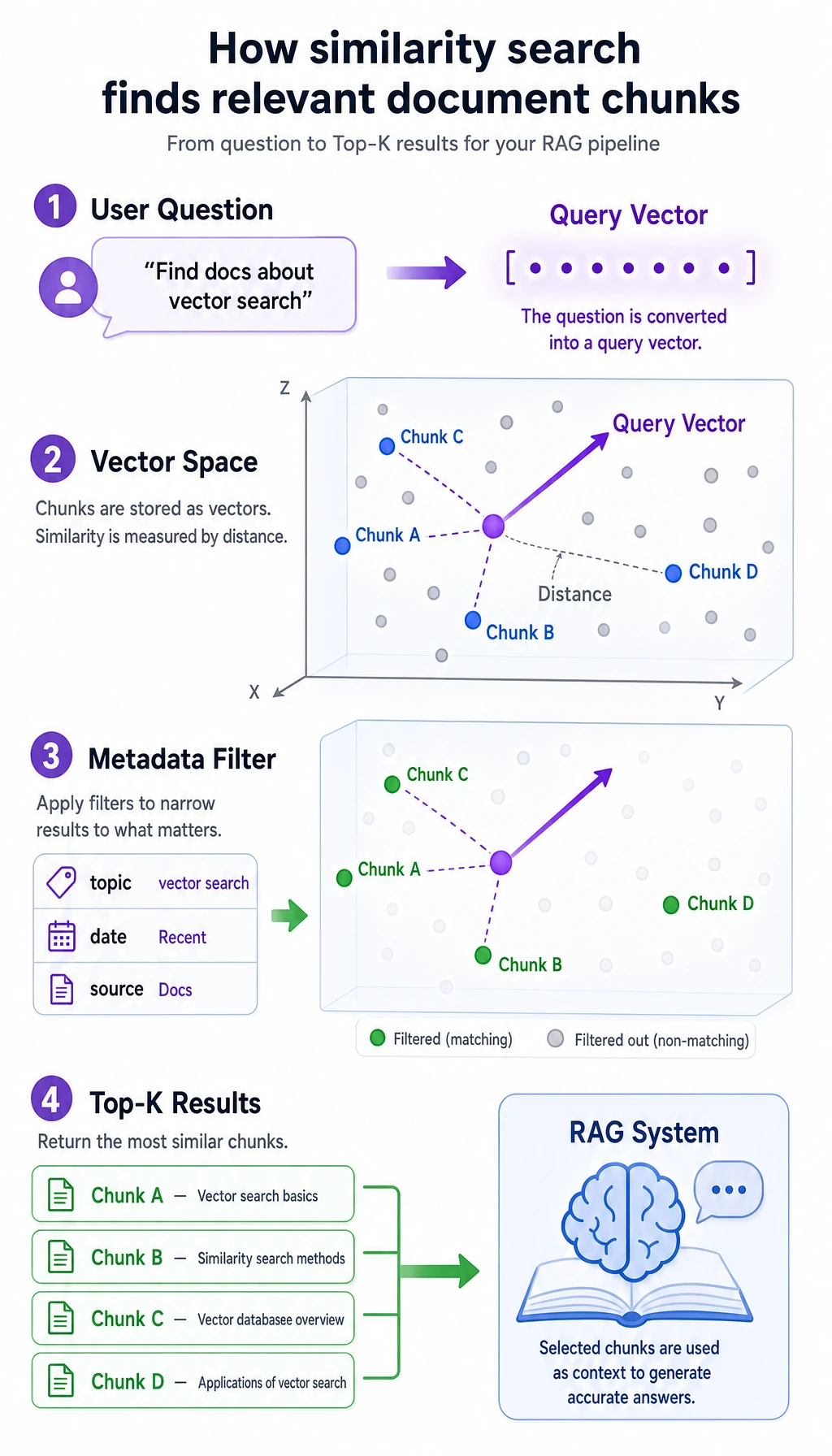
A vector database is essentially managing “semantic coordinates”
Section titled “A vector database is essentially managing “semantic coordinates””You can think of the embedding for each text chunk as a set of coordinates. What a vector database does is:
- Store these coordinates
- When a user submits a query, convert the question into coordinates too
- Find the nearest points
What Does a Vector Database Usually Store?
Section titled “What Does a Vector Database Usually Store?”It stores not only vectors, but also text and metadata
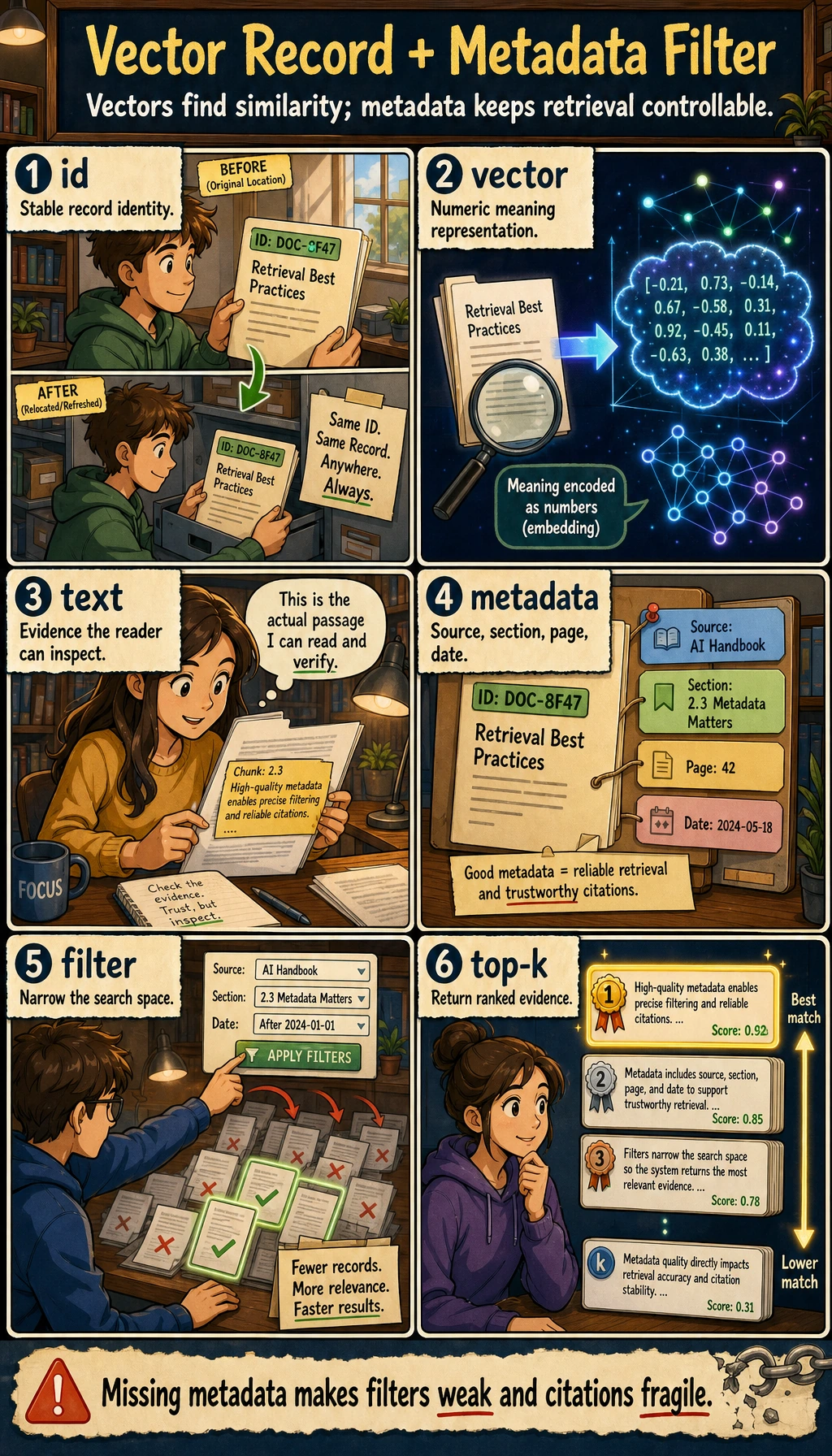
Section titled “It stores not only vectors, but also text and metadata”A record usually contains at least:
idvectortextmetadata
For example:
record = {    "id": "doc_001",    "vector": [0.2, 0.8, 0.1],    "text": "A refund can be requested within 7 days after purchasing the course",    "metadata": {"section": "refund policy", "source": "policy.pdf"}}
print(record)
Why is metadata important?
Section titled “Why is metadata important?”Because in many cases, you do not just want “semantically close”; you also want to “meet business filtering conditions”.
For example:
- Only search
section=refund policy - Only search a specific product version
- Only search documents from a specific department
So a vector database is not “vectors only”, but a combined management system for “vectors + text + metadata”.
A Minimal Working Vector Retriever
Section titled “A Minimal Working Vector Retriever”Below we will hand-write a tiny vector database with numpy so the principle is completely visible.
import numpy as np
records = [    {        "id": "r1",        "vector": np.array([0.95, 0.05, 0.10]),        "text": "A refund can be requested within 7 days after purchasing the course",        "metadata": {"section": "refund policy"}    },    {        "id": "r2",        "vector": np.array([0.10, 0.95, 0.05]),        "text": "You can receive a certificate after completing the course project",        "metadata": {"section": "certificate info"}    },    {        "id": "r3",        "vector": np.array([0.20, 0.80, 0.15]),        "text": "The system will issue a certificate after passing the final course test",        "metadata": {"section": "certificate info"}    }]
query_vector = np.array([0.90, 0.10, 0.10])
def cosine_similarity(a, b):    return float(np.dot(a, b) / (np.linalg.norm(a) * np.linalg.norm(b)))
results = []for item in records:    score = cosine_similarity(query_vector, item["vector"])    results.append((score, item["id"], item["text"]))
for score, rid, text in sorted(results, reverse=True):    print(rid, round(score, 4), text)
Expected output:
r1 0.9983 A refund can be requested within 7 days after purchasing the courser3 0.3601 The system will issue a certificate after passing the final course testr2 0.218 You can receive a certificate after completing the course projectHere, query_vector can be understood as the embedding of the user’s question.
Adding Metadata Filtering
Section titled “Adding Metadata Filtering”Why is filtering so common?
Section titled “Why is filtering so common?”Because many enterprise knowledge bases are not a pool of random search results, but have boundaries.
For example:
- Only search HR policies
- Only search a specific product document
- Only search versions after 2025
Runnable example
Section titled “Runnable example”import numpy as np
records = [ { "id": "r1", "vector": np.array([0.95, 0.05, 0.10]), "text": "A refund can be requested within 7 days after purchasing the course", "metadata": {"section": "refund policy"} }, { "id": "r2", "vector": np.array([0.10, 0.95, 0.05]), "text": "You can receive a certificate after completing the course project", "metadata": {"section": "certificate info"} }, { "id": "r3", "vector": np.array([0.20, 0.80, 0.15]), "text": "The system will issue a certificate after passing the final course test", "metadata": {"section": "certificate info"} }]
query_vector = np.array([0.15, 0.90, 0.10])
def cosine_similarity(a, b): return float(np.dot(a, b) / (np.linalg.norm(a) * np.linalg.norm(b)))
target_section = "certificate info"
filtered_results = []for item in records: if item["metadata"]["section"] != target_section: continue score = cosine_similarity(query_vector, item["vector"]) filtered_results.append((score, item["text"]))
for score, text in sorted(filtered_results, reverse=True): print(round(score, 4), "->", text)Expected output:
0.9966 -> You can receive a certificate after completing the course project0.9944 -> The system will issue a certificate after passing the final course testThis is the minimal form of “similarity search + business filtering”.
If Your Goal Is a “Knowledge-Base-Driven SOP Document Assistant”, What Metadata Should You Include at Minimum?
Section titled “If Your Goal Is a “Knowledge-Base-Driven SOP Document Assistant”, What Metadata Should You Include at Minimum?”In this kind of project, the vector database is not only used for “finding semantically similar content”; it also has to support:
- Filtering by topic
- Filtering by policy / case / checklist
- Filtering by internal / external sources
- Source traceability later on
So for beginners, a minimal metadata set often looks like this:
| Field | What it helps you do |
|---|---|
topic | Route by current topic |
content_type | Distinguish policies / handled cases / checklists |
source_origin | Distinguish internal / external materials |
page_or_slide | Cite the source during generation |
team | Filter by support team or audience |
A very small record object can be written like this first:
record = {    "id": "doc_001_chunk_03",    "text": "If duplicate billing is confirmed after the refund window, escalate to billing support with transaction evidence.",    "metadata": {        "topic": "refund escalation",        "content_type": "case",        "source_origin": "internal",        "page_or_slide": 3,        "team": "support ops",    },}
print(record)
The most important thing for beginners to notice here is:
- The vector database layer is already quietly deciding whether the later SOP document can be assembled reliably
What Is the Difference Between Exact Search and Approximate Search?
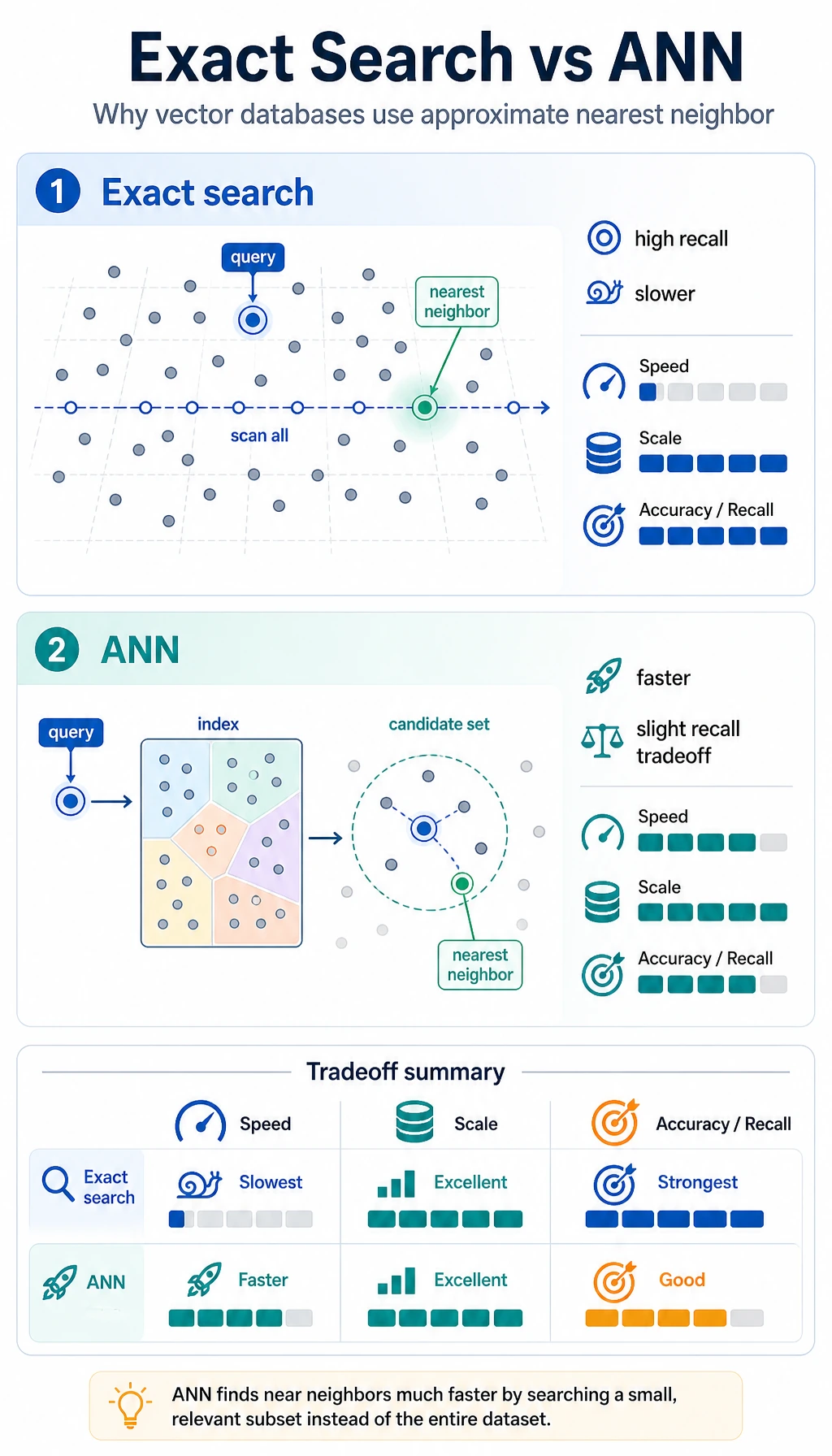
Section titled “What Is the Difference Between Exact Search and Approximate Search?”Exact search
Section titled “Exact search”This means comparing the query vector with every vector.
Pros:
- Accurate results
Cons:
- Slow when the data volume is large
Approximate Nearest Neighbor (ANN)
Section titled “Approximate Nearest Neighbor (ANN)”Real vector databases often use approximate methods to speed up search.
You can understand it like this:
Instead of comparing one by one in a brute-force way, first quickly narrow down the candidate set, then find the nearest neighbors.
Pros:
- Fast
Trade-off:
- It may not be the absolute best result, but it is usually good enough
The Roles of Common Vector Databases / Tools
Section titled “The Roles of Common Vector Databases / Tools”Lightweight local solutions
Section titled “Lightweight local solutions”Suitable for:
- Learning
- Prototype validation
- Small-scale projects
Common options include:
- FAISS
- Chroma
- SQLite + vector extensions
More complete service-based solutions
Section titled “More complete service-based solutions”Suitable for:
- Multi-user systems
- Large-scale data
- Online services
More focus is placed on:
- Persistence
- Concurrency
- Index management
- Access control
- Operations and maintenance capability
What Should You Look At When Choosing?
Section titled “What Should You Look At When Choosing?”First, look at business scale
Section titled “First, look at business scale”Key questions include:
- How much data is there?
- How frequent are updates?
- Is online incremental writing required?
- Do you need strong metadata filtering?
Then look at engineering constraints
Section titled “Then look at engineering constraints”For example:
- Can it be self-hosted?
- Does it support cloud hosting?
- How well does it integrate with existing systems?
- Is the maintenance cost high?
Often, the best choice is not “the most powerful one”, but “the one that causes the least trouble”.
Common Beginner Mistakes
Section titled “Common Beginner Mistakes”Thinking the vector database itself understands semantics
Section titled “Thinking the vector database itself understands semantics”It does not. What actually determines semantic quality first is the embedding model.
Thinking that once vectors are stored, RAG will definitely work well
Section titled “Thinking that once vectors are stored, RAG will definitely work well”Not enough. You also need document cleaning and chunking in the front, and prompt and answer constraints in the back.
Only looking at retrieval, and ignoring filtering and citations
Section titled “Only looking at retrieval, and ignoring filtering and citations”In many real projects, metadata filtering and source traceability are equally important.
Vector Database Debugging Checklist
Section titled “Vector Database Debugging Checklist”After a vector database is integrated, the first thing is not to connect the LLM right away, but to confirm that four things are reliable: “writing, filtering, retrieval, and citation”.
| Check item | What you should be able to see | Common risk |
|---|---|---|
| Write count | The raw chunk count matches the number of stored records, or there is a clear filtering reason | Document parsing failure, duplicate writes |
| Vector dimension | Records in the same batch have consistent dimensions | Inconsistent dimensions after switching embedding models |
| Metadata | Fields such as source, section, page, and topic are complete | Cannot cite or filter later |
| Similarity results | top-k results can print id, score, text, metadata | Looking only at the answer, not the matched content |
| Filtering conditions | The metadata filter can narrow the search range | Inconsistent filter field types, causing no results |
If you do not pass this table, do not rush to optimize the prompt. Many RAG issues are already planted at the vector database layer.
A Minimal Example for Verifying Ingestion Records
Section titled “A Minimal Example for Verifying Ingestion Records”records = [ { "id": "doc_001_chunk_01", "vector": [0.95, 0.05, 0.10], "text": "A refund can be requested within 7 days after purchasing the course", "metadata": {"source": "policy.md", "section": "refund policy", "page": 1}, }, { "id": "doc_001_chunk_02", "vector": [0.10, 0.90, 0.05], "text": "You can receive a certificate after completing the course project", "metadata": {"source": "policy.md", "section": "certificate info", "page": 2}, },]
required_meta = {"source", "section", "page"}vector_dim = len(records[0]["vector"])
for record in records: problems = [] if len(record["vector"]) != vector_dim: problems.append("vector_dim_mismatch") missing = required_meta - set(record["metadata"]) if missing: problems.append(f"missing_metadata={sorted(missing)}") if not record["text"].strip(): problems.append("empty_text") print(record["id"], problems or "ok")Expected output:
doc_001_chunk_01 okdoc_001_chunk_02 okYou can put this check before ingestion. In real projects, once metadata is missing, it becomes very hard to do citations, filtering, permissions, and evaluation later.
Vector Database Selection Decision Table
Section titled “Vector Database Selection Decision Table”| Scenario | Recommended starting point | Reason |
|---|---|---|
| Course learning, small demo | In-memory list, FAISS, Chroma | Simple, visible, easy to debug |
| Local prototype, needs persistence | Chroma, SQLite vector extension | Easy to save and rerun |
| Enterprise knowledge base | Service-based vector database with metadata filtering and permissions | Needs concurrency, access control, monitoring, and operations |
| Multi-tenant SaaS | Managed vector database or mature search service | Focus on isolation, scaling, backups, and cost |
Do not start from “which one is the most popular”; start from data volume, update frequency, filtering needs, deployment method, and maintenance cost.
Evidence to Keep
Section titled “Evidence to Keep”Keep this page’s proof of learning as a small evidence card:
- Query
- one user question or test case
- Retrieved Chunks
- chunk ids, scores, and source titles
- Answer
- final response with citation or source note
- Failure Check
- missing evidence, wrong chunk, stale doc, or unsupported claim
- Next Action
- chunking, embedding, reranking, prompt, or eval change
Summary
Section titled “Summary”The most important insight in this section is:
A vector database is not a “magic black box”; it is essentially an efficient manager of semantic vectors and their attached information.
What you really need to care about is:
- Whether vector quality is good enough
- Whether retrieval is fast enough
- Whether metadata can support business needs
Exercises
Section titled “Exercises”- Add two more records to the mini vector database, then manually create a new
query_vectorto test the ranking. - Add a
sourcemetadata field and try double-condition filtering. - Think about this: if the embedding model is poor, can a powerful vector database still save the result?
Reference implementation and walkthrough
- The ranking should favor records whose vectors are closest to the query vector. If the top result feels semantically wrong, inspect whether the vector representation, not the database, is the weak point.
- Double-condition filtering should combine semantic similarity with business constraints, such as
role=internalandsource=policy. This is how metadata prevents plausible but unauthorized or irrelevant chunks from entering the answer. - A vector database can index, filter, and search efficiently, but it cannot create semantic meaning that the embedding model failed to encode. Bad embeddings usually produce bad retrieval even on strong infrastructure.