
6.3.2 Convolution Basics
Learning Objectives
Section titled “Learning Objectives”- Explain why flattening an image too early is wasteful.
- Compute one convolution output value by hand.
- Understand kernel, stride, padding, channel, and feature map.
- Verify output shapes with PyTorch.
- Explain why stacking convolutions grows the receptive field.
Look at the Sliding Window First
Section titled “Look at the Sliding Window First”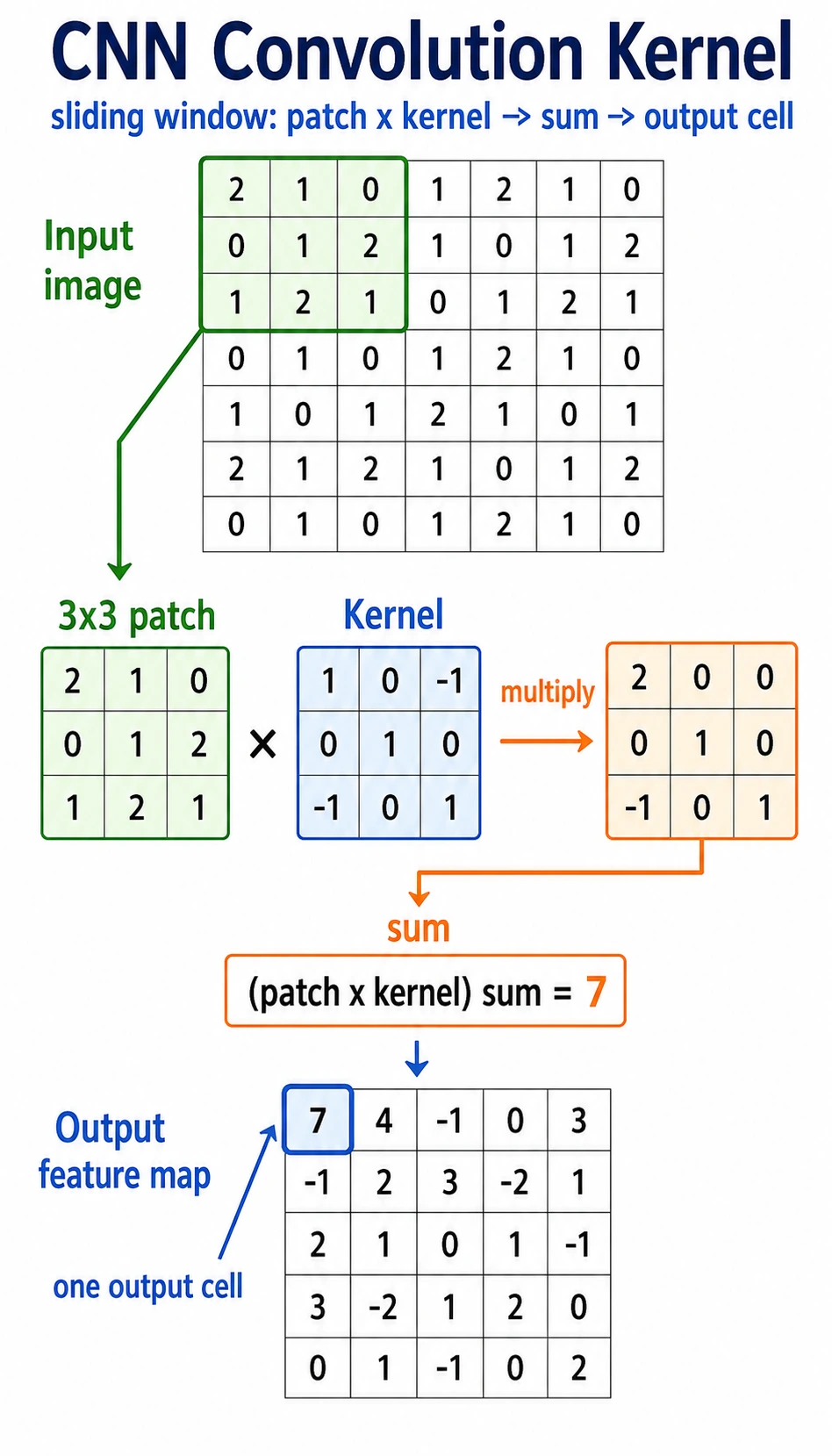
Read the picture like this:
A convolution kernel is a small pattern detector. It does not look at the whole image at once. It scans local regions and writes a score into a feature map.
Why Not Flatten the Image First?
Section titled “Why Not Flatten the Image First?”A 32 x 32 grayscale image has 1024 pixels. A fully connected layer with 512 outputs would need:
1024 * 512 = 524288 weightsA 224 x 224 x 3 color image has 150528 input values. A naive fully connected layer explodes in parameters and ignores where pixels are located.
Convolution fixes two problems:
| Problem with early flattening | Convolution idea |
|---|---|
| nearby pixels lose their spatial relationship | look at local windows |
| every position needs separate weights | reuse the same kernel everywhere |
| parameter count grows quickly | share parameters across the image |
The two core terms are:
- local connection: each output looks at a small area;
- parameter sharing: the same kernel scans many positions.
Lab 1: Compute Convolution by Hand
Section titled “Lab 1: Compute Convolution by Hand”import numpy as np
image = np.array( [ [1, 2, 0, 0], [5, 3, 0, 4], [2, 1, 3, 1], [0, 2, 1, 2], ], dtype=np.float32,)
kernel = np.array( [ [1, 0], [0, -1], ], dtype=np.float32,)
out = np.zeros((3, 3), dtype=np.float32)for i in range(3): for j in range(3): patch = image[i : i + 2, j : j + 2] out[i, j] = np.sum(patch * kernel)
print("manual_conv_lab")print(out)Expected output:
manual_conv_lab[[-2. 2. -4.] [ 4. 0. -1.] [ 0. 0. 1.]]Top-left output value:
patch = [[1, 2],         [5, 3]]
kernel = [[ 1,  0],          [ 0, -1]]
score = 1*1 + 2*0 + 5*0 + 3*(-1) = -2
That is the whole core of convolution.
Lab 2: Use a Kernel as an Edge Detector
Section titled “Lab 2: Use a Kernel as an Edge Detector”This horizontal kernel compares neighboring pixels from left to right.
import numpy as np
image = np.array(    [        [0, 0, 0, 0, 0],        [0, 0, 1, 1, 1],        [0, 0, 1, 1, 1],        [0, 0, 1, 1, 1],        [0, 0, 0, 0, 0],    ],    dtype=np.float32,)
kernel = np.array([[-1, 1]], dtype=np.float32)
out = np.zeros((5, 4), dtype=np.float32)for i in range(5):    for j in range(4):        patch = image[i : i + 1, j : j + 2]        out[i, j] = np.sum(patch * kernel)
print("edge_lab")print(out)
Expected output:
edge_lab[[0. 0. 0. 0.] [0. 1. 0. 0.] [0. 1. 0. 0.] [0. 1. 0. 0.] [0. 0. 0. 0.]]The 1 values appear where the image changes from 0 to 1. That is why early CNN layers often learn edge-like filters.
Stride, Padding, and Output Size
Section titled “Stride, Padding, and Output Size”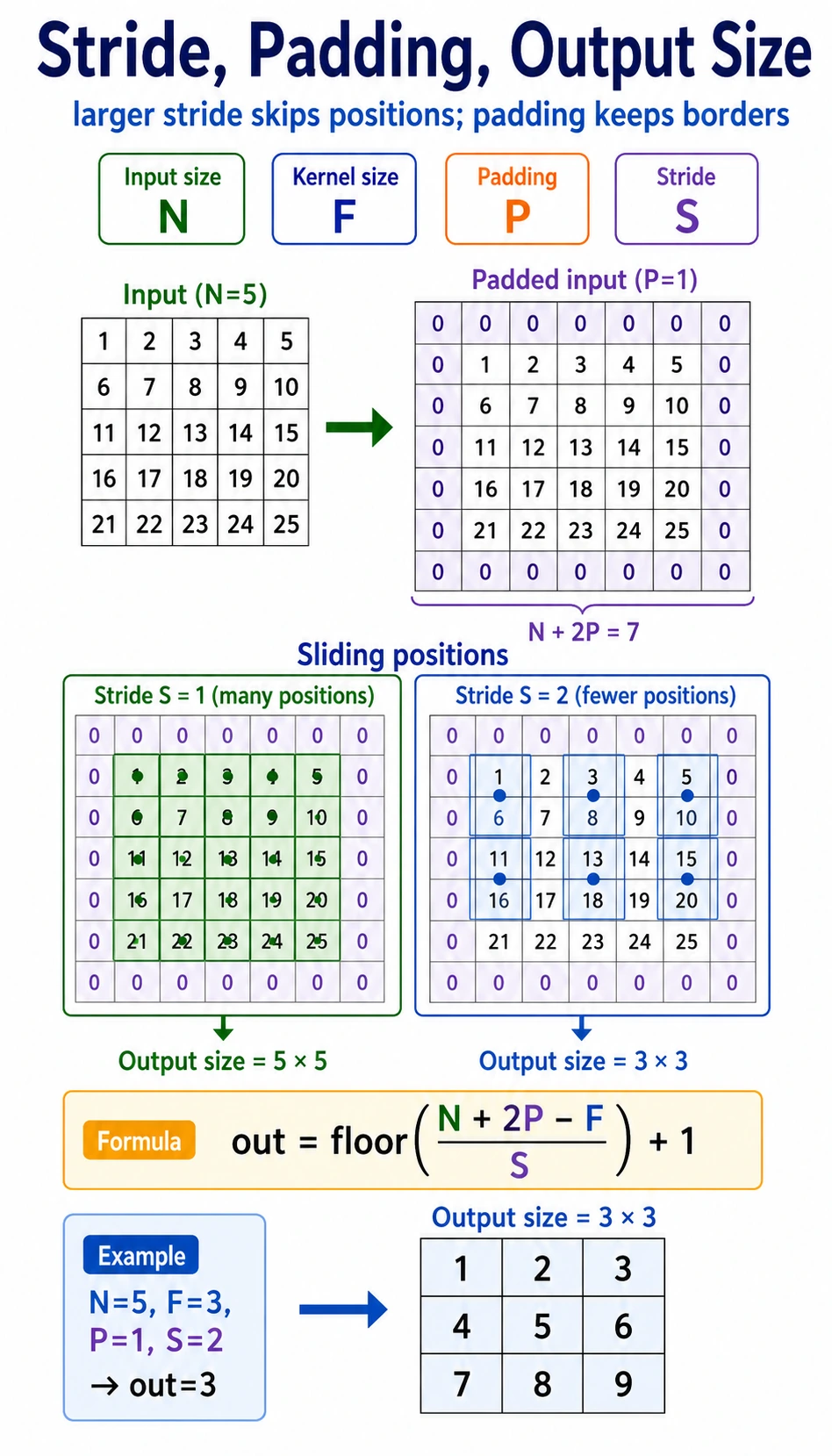
| Term | Meaning | Effect |
|---|---|---|
kernel_size | window size | larger kernel sees more local area |
stride | how far the kernel moves each step | larger stride makes output smaller |
padding | border added around input | preserves edge information and controls size |
Output size for one spatial dimension:
output = floor((input + 2*padding - kernel_size) / stride) + 1Example:
input=6, kernel_size=3, padding=1, stride=2output = floor((6 + 2*1 - 3) / 2) + 1 = 3Verify in PyTorch:
import torchfrom torch import nn
x = torch.randn(1, 1, 6, 6)conv = nn.Conv2d(    in_channels=1,    out_channels=2,    kernel_size=3,    stride=2,    padding=1,)y = conv(x)
print("size_lab")print("input:", tuple(x.shape))print("output:", tuple(y.shape))
Expected output:
size_labinput: (1, 1, 6, 6)output: (1, 2, 3, 3)Read the shape as [batch, channels, height, width].
Multi-Channel Convolution
Section titled “Multi-Channel Convolution”Color images have three input channels: red, green, and blue. In PyTorch, a batch of RGB images usually has shape:
[batch, 3, height, width]A 3 x 3 convolution over an RGB image actually has kernel shape:
[out_channels, in_channels, kernel_height, kernel_width]Run it:
import torchfrom torch import nn
x = torch.randn(2, 3, 32, 32)conv = nn.Conv2d(in_channels=3, out_channels=8, kernel_size=3, padding=1)y = conv(x)
print("channel_lab")print("input:", tuple(x.shape))print("output:", tuple(y.shape))print("weight:", tuple(conv.weight.shape))print("bias:", tuple(conv.bias.shape))
Expected output:
channel_labinput: (2, 3, 32, 32)output: (2, 8, 32, 32)weight: (8, 3, 3, 3)bias: (8,)Interpretation:
2: two images in the batch;3: RGB input channels;8: eight learned output feature maps;(8, 3, 3, 3): eight kernels, each looking across three input channels.
Receptive Field: How CNNs See More Over Depth
Section titled “Receptive Field: How CNNs See More Over Depth”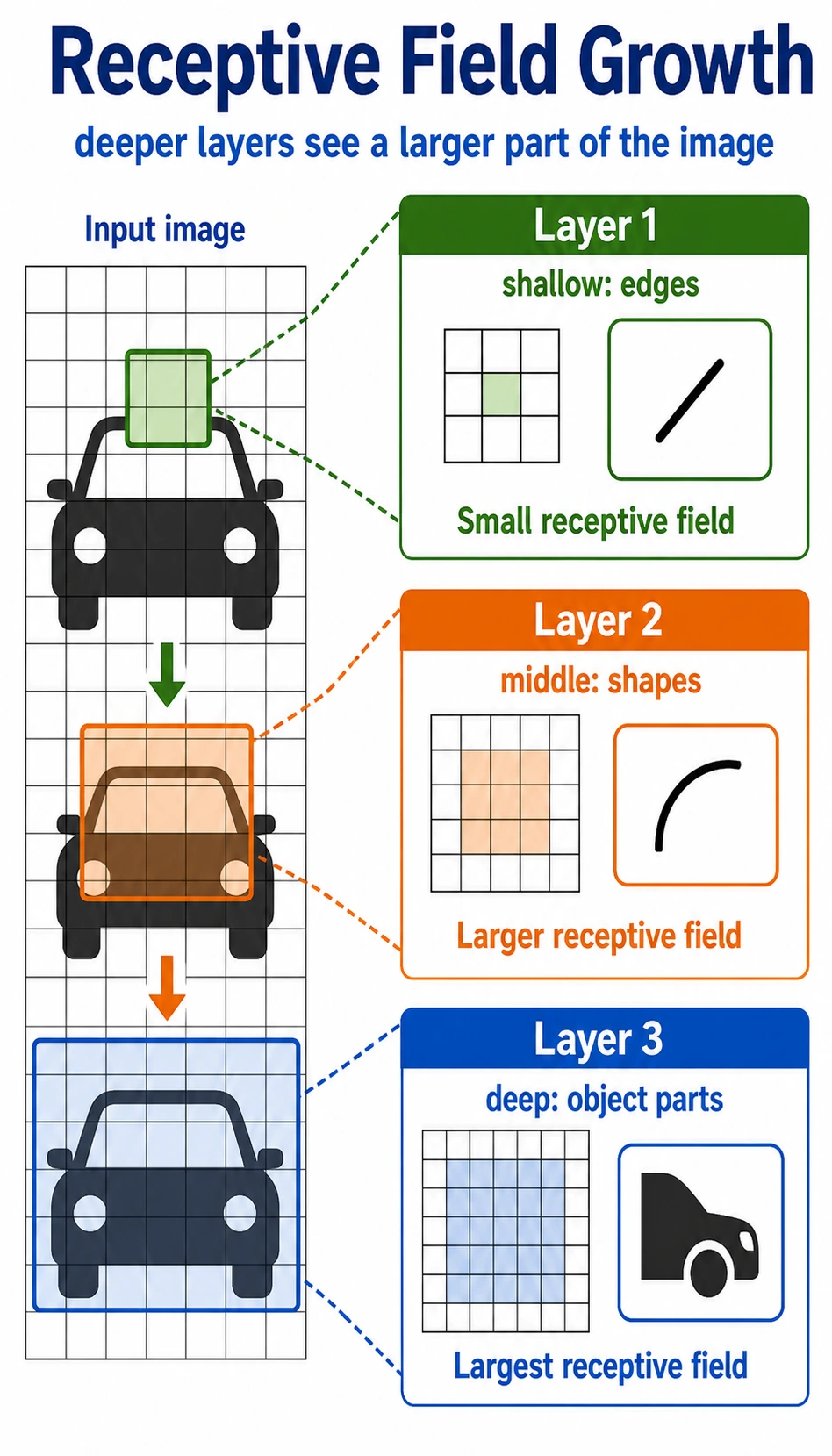
One 3 x 3 convolution sees a small local region. If you stack layers, later features indirectly depend on larger regions of the original image.
Intuition:
| Layer depth | What it often learns |
|---|---|
| shallow | edges, color changes, textures |
| middle | corners, simple shapes, parts |
| deep | larger object parts and semantic patterns |
This hierarchy is why CNNs work well for images: small local clues can be composed into larger visual ideas.
Basic Conv2d Checklist
Section titled “Basic Conv2d Checklist”import torchfrom torch import nn
x = torch.randn(1, 1, 8, 8)conv = nn.Conv2d( in_channels=1, out_channels=4, kernel_size=3, stride=1, padding=1,)y = conv(x)
print("conv2d_lab")print("input:", tuple(x.shape))print("output:", tuple(y.shape))print("weight:", tuple(conv.weight.shape))print("bias:", tuple(conv.bias.shape))Expected output:
conv2d_labinput: (1, 1, 8, 8)output: (1, 4, 8, 8)weight: (4, 1, 3, 3)bias: (4,)When you read any Conv2d, ask:
- What is the input shape
[N, C, H, W]? - Does
in_channelsequal the inputC? - How many feature maps does
out_channelscreate? - How do
kernel_size,stride, andpaddingchangeHandW?
Evidence to Keep
Section titled “Evidence to Keep”For every convolution lab, save one shape equation:
- Input Shape
- [N, C_in, H, W]
- Kernel
- [C_out, C_in, kH, kW]
- Output Shape
- [N, C_out, H_out, W_out]
- Meaning
- C_out feature maps scan local regions
If this record is clear, convolution becomes a shape-and-pattern operation rather than a mysterious image layer.
Common Mistakes
Section titled “Common Mistakes”| Mistake | Why it hurts | Fix |
|---|---|---|
using image shape [H, W, C] in PyTorch | PyTorch expects [N, C, H, W] | use permute when converting from image libraries |
wrong in_channels | Conv2d cannot match the input | print x.shape before the layer |
| forgetting padding | feature maps shrink unexpectedly | calculate output size or print shapes |
| treating convolution as magic | hard to debug features | remember patch * kernel -> sum |
| flattening too early | spatial structure is lost | use conv blocks before classifier head |
Exercises
Section titled “Exercises”- Change the hand-written
2 x 2kernel and observe how the output changes. - Manually compute
out[1, 0]in Lab 1 and compare with the printed output. - Change
stride=1in the size lab. What output shape do you get? - Change
out_channels=16in the channel lab. Which shapes change? - Convert an image-like tensor from
[N, H, W, C]to[N, C, H, W]withpermute.
Reference implementation and walkthrough
- Changing the kernel changes which local pattern is emphasized. Edge-like kernels, averaging kernels, and sharpening kernels produce visibly different output maps.
- Manual computation should multiply the selected
2 x 2patch element by element with the kernel and sum the results. If it differs, recheck row and column position. - Reducing stride from
2to1makes the kernel move one pixel at a time, so the output becomes spatially larger. - Changing
out_channelschanges the number of produced feature maps. The batch size and spatial dimensions follow the input, kernel, stride, and padding settings. - Use
x = x.permute(0, 3, 1, 2)for[N, H, W, C] -> [N, C, H, W]. PyTorch convolution layers expect channels before height and width.
Key Takeaways
Section titled “Key Takeaways”- Convolution preserves local spatial structure better than early flattening.
- A kernel is a small pattern detector shared across positions.
strideandpaddingcontrol how the kernel moves and how output size changes.- Multi-channel convolution combines information across input channels.
- Stacked convolution layers grow receptive field and build visual hierarchy.