
11.1.2 NLP Overview
Learning Objectives
Section titled “Learning Objectives”By the end of this section, you will be able to:
- Explain what problems NLP solves
- Understand the most common kinds of tasks in NLP
- Understand a basic NLP workflow
- Know why text processing is often more “awkward” than tables and images
- Build intuition for “text -> structured result” through a minimal example
What is NLP actually doing?
Section titled “What is NLP actually doing?”NLP stands for Natural Language Processing.
Put more plainly:
NLP is about making computers process human language.
“Language” here includes many forms:
- Chat messages
- Comments
- News articles
- Contracts
- Support tickets
- Emails
- Search queries
- Meeting notes
What it ultimately aims to solve is not just “recognizing words,” but going further:
- Understanding meaning
- Extracting information
- Generating answers
- Completing tasks
What are the most common tasks in NLP?
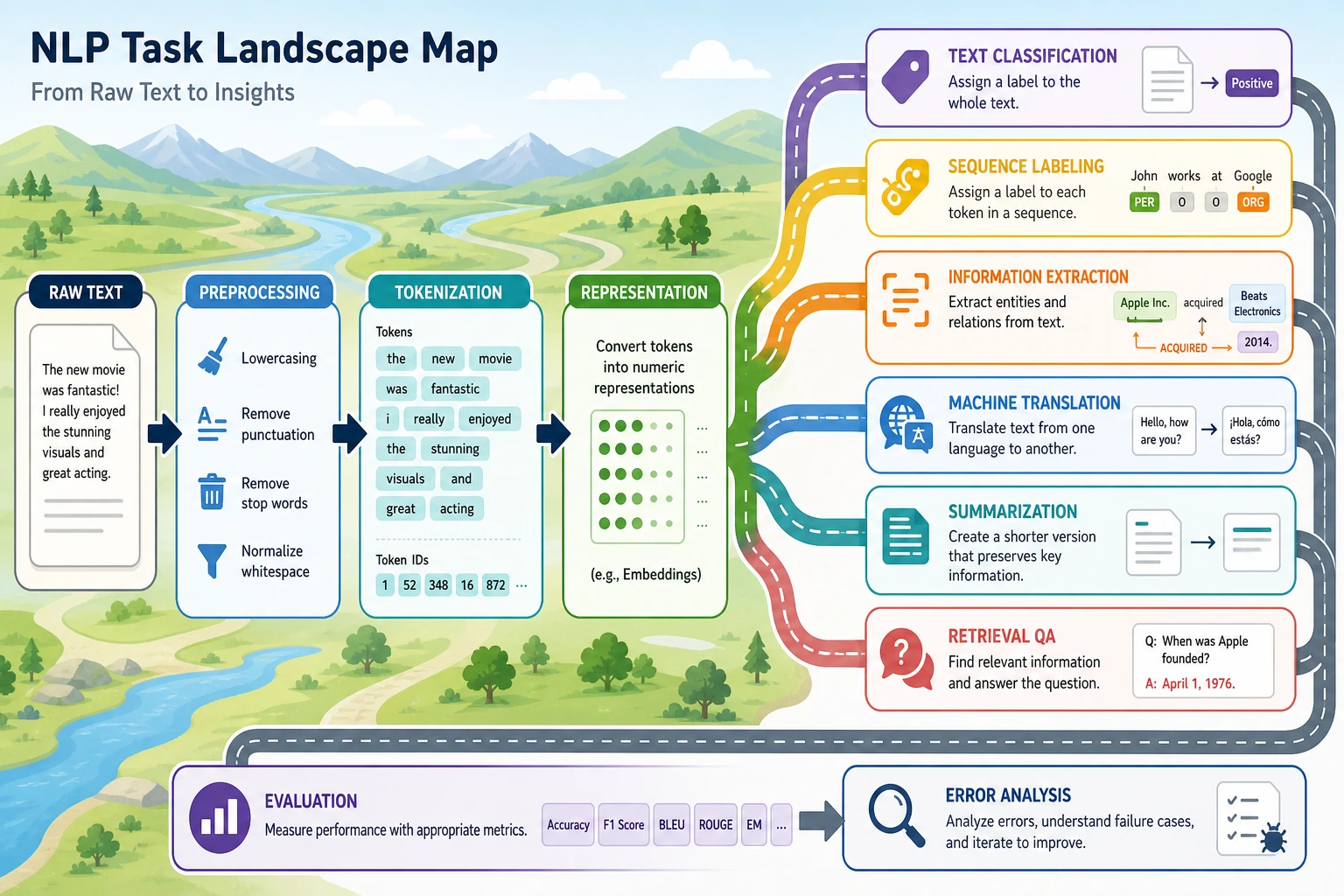
Section titled “What are the most common tasks in NLP?”You can first think of NLP tasks in four major categories:
Sentence-level judgment
Section titled “Sentence-level judgment”Input: a piece of text; output: one overall result.
For example:
- Text classification “Is this a refund issue or an invoice issue?”
- Sentiment analysis “Is this review positive or negative?”
Span localization
Section titled “Span localization”Input: a piece of text; output: some key spans within it.
For example:
- Named entity recognition
Extract
John SmithandBeijingfrom “John Smith works in Beijing” - Information extraction Extract time, place, and people from an announcement
Text-to-text
Section titled “Text-to-text”Input: a piece of text; output: another piece of text.
For example:
- Machine translation
- Text summarization
- Paraphrasing
- Question answering generation
Interactive and system-level tasks
Section titled “Interactive and system-level tasks”Input is not necessarily just single-turn text; it may also include state, history, and tool outputs.
For example:
- Chatbots
- RAG question-answering systems
- Agents
These tasks combine the capabilities above.
Why is text processing usually harder than tabular data?
Section titled “Why is text processing usually harder than tabular data?”Text is ambiguous
Section titled “Text is ambiguous”One sentence can have multiple interpretations.
For example:
“This phone is not cheap, but the camera is really strong.”
If you only look at “not cheap,” it is easy to misjudge it as negative; but the whole sentence is actually more of a positive evaluation.
Text depends heavily on context
Section titled “Text depends heavily on context”Many words do not mean much on their own; they gain specific meaning in context.
For example:
bankcan mean a financial institution or the side of a river
Text expression is not standardized
Section titled “Text expression is not standardized”Users may describe the same thing in many different ways.
For example:
- “How do I get a refund?”
- “How do I handle a refund?”
- “Can I still refund this order?”
These texts look very different on the surface, but their intent is similar.
Text is naturally unstructured
Section titled “Text is naturally unstructured”Tabular data often has clear column meanings:
- Age
- Income
- City
But text is usually free-form human expression. The model must first turn it into a computable structure.
What does a typical NLP workflow look like?
Section titled “What does a typical NLP workflow look like?”The most basic pipeline can be understood as:
flowchart LR A["Raw text"] --> B["Preprocessing"] B --> C["Text representation"] C --> D["Model"] D --> E["Result / structured output"]Each step here matters:
- Preprocessing Clean up noisy text so it fits the current task better
- Text representation Convert words into numbers
- Model Learn the relationship between inputs and targets
- Output Turn it into labels, answers, summaries, or entity spans
Most of the later chapters in Chapter 11 Natural Language Processing (elective track) are actually built by expanding this pipeline step by step.
Let’s run a minimal NLP example
Section titled “Let’s run a minimal NLP example”The example below is very simple, but it already fully shows the core NLP workflow:
- The input is text
- Do a minimal amount of preprocessing
- Use rules to recognize intent
- Output a structured result
import re
texts = [    "Help me check today's weather in Beijing",    "Please help me book a flight to Shanghai",    "Calculate what 25 times 4 is",    "Will it rain in Shenzhen tomorrow",]

def classify_intent(text):    text = re.sub(r"\s+", "", text)
    if "weather" in text or "rain" in text:        return "weather_query"    if "flight" in text or "book_ticket" in text:        return "ticket_booking"    if "calculate" in text or "times" in text:        return "calculation"    return "unknown"

for text in texts:    print(text, "->", classify_intent(text))
Expected output:
Help me check today's weather in Beijing -> weather_queryPlease help me book a flight to Shanghai -> ticket_bookingCalculate what 25 times 4 is -> calculationWill it rain in Shenzhen tomorrow -> weather_queryThe output is structured: every free-form sentence is converted into a task label. Later models can be more powerful, but the project still needs this clear output boundary.
What should you really take away from this example?
Section titled “What should you really take away from this example?”It shows that the smallest NLP loop is actually quite straightforward:
- The input is natural language
- The system recognizes patterns in it
- The final output is structured
Even though this example only uses rules, it is already the most basic NLP system.
Three major development paths in NLP
Section titled “Three major development paths in NLP”Rule-based systems
Section titled “Rule-based systems”Use manually written rules and logic.
Pros:
- Easy to explain
- Quick to start for small tasks
Cons:
- Hard to maintain
- Poor generalization
Traditional machine learning
Section titled “Traditional machine learning”First design features, then train a classifier.
For example:
- BoW
- TF-IDF
- SVM
- Logistic regression
Deep learning and pre-trained models
Section titled “Deep learning and pre-trained models”Let the model learn representations and contextual relationships directly.
For example:
- RNN / LSTM
- Transformer
- BERT
- GPT
So many things you will learn later are essentially answering the same question:
How can we make machines process human language more and more reliably?
Why is NLP so closely related to LLMs, RAG, and Agents?
Section titled “Why is NLP so closely related to LLMs, RAG, and Agents?”Because LLMs are still fundamentally processing text. If you do not understand these basic concepts:
- token
- semantic representation
- context
- classification
- extraction
- generation
then when you later learn about LLMs, RAG, and Agents, it is easy to stop at:
- Knowing how to call an API
instead of:
- Really understanding what they are doing
So Chapter 11 Natural Language Processing (elective track) is not a detour; it is laying the foundation for what comes next.
Evidence to Keep
Section titled “Evidence to Keep”Keep this page’s proof of learning as a small evidence card:
- Raw Text
- original examples before cleaning or tokenization
- Processed Text
- cleaned text, tokens, normalization notes, and removed items
- Task Boundary
- classification, extraction, retrieval, generation, or QA output
- Failure Check
- lost meaning, bad token split, language issue, or ambiguous label
- Expected Output
- before/after text samples plus token or representation output
Common beginner misconceptions
Section titled “Common beginner misconceptions”Thinking NLP is the same as chatbots
Section titled “Thinking NLP is the same as chatbots”Chat is only one application scenario of NLP, not the whole field.
Thinking preprocessing is just a minor detail
Section titled “Thinking preprocessing is just a minor detail”In many tasks, preprocessing quality directly affects the upper bound of performance.
Thinking only deep learning counts as NLP
Section titled “Thinking only deep learning counts as NLP”Rule-based systems and traditional machine learning are still very valuable in many small and medium-sized tasks.
Thinking that if humans “understand” text, machines can process it directly
Section titled “Thinking that if humans “understand” text, machines can process it directly”For machines, text must first be converted into a computable form.
Summary
Section titled “Summary”The most important sentence to remember from this lesson is:
The essence of NLP is turning natural language into something computable, modelable, and reason-able.
Later you will see:
- Preprocessing solves “how to organize text”
- Text representation solves “how to turn text into numbers”
- Models solve “how to learn patterns from numbers”
As long as this map is clear in your mind, the later content in Chapter 11 Natural Language Processing (elective track) will be much easier to follow.
Exercises
Section titled “Exercises”- Explain in your own words: why is text processing often harder than tabular data?
- Extend the rule in the example to add a
hotel_bookingintent classification. - Think about it: why is a chatbot only one application of NLP, not the whole field?
- Can you break down one AI product you are familiar with into the NLP tasks it uses behind the scenes?
Reference implementation and walkthrough
- Text is harder than tabular data because meaning depends on order, context, ambiguity, missing punctuation, spelling variation, and domain wording, while tabular columns usually already define the feature boundary.
- A reasonable
hotel_bookingrule might look for words such ashotel,room,check-in,reservation, orstay; the important part is to test both positive examples and near misses such as restaurant booking. - A chatbot is only one NLP application because NLP also includes classification, search, extraction, summarization, translation, moderation, and document analysis.
- For a familiar AI product, decompose it into inputs, NLP tasks, outputs, and metrics. For example, a support assistant may use intent classification, retrieval QA, summarization, and refusal checks.