
2.2.3 File Operations and Serialization
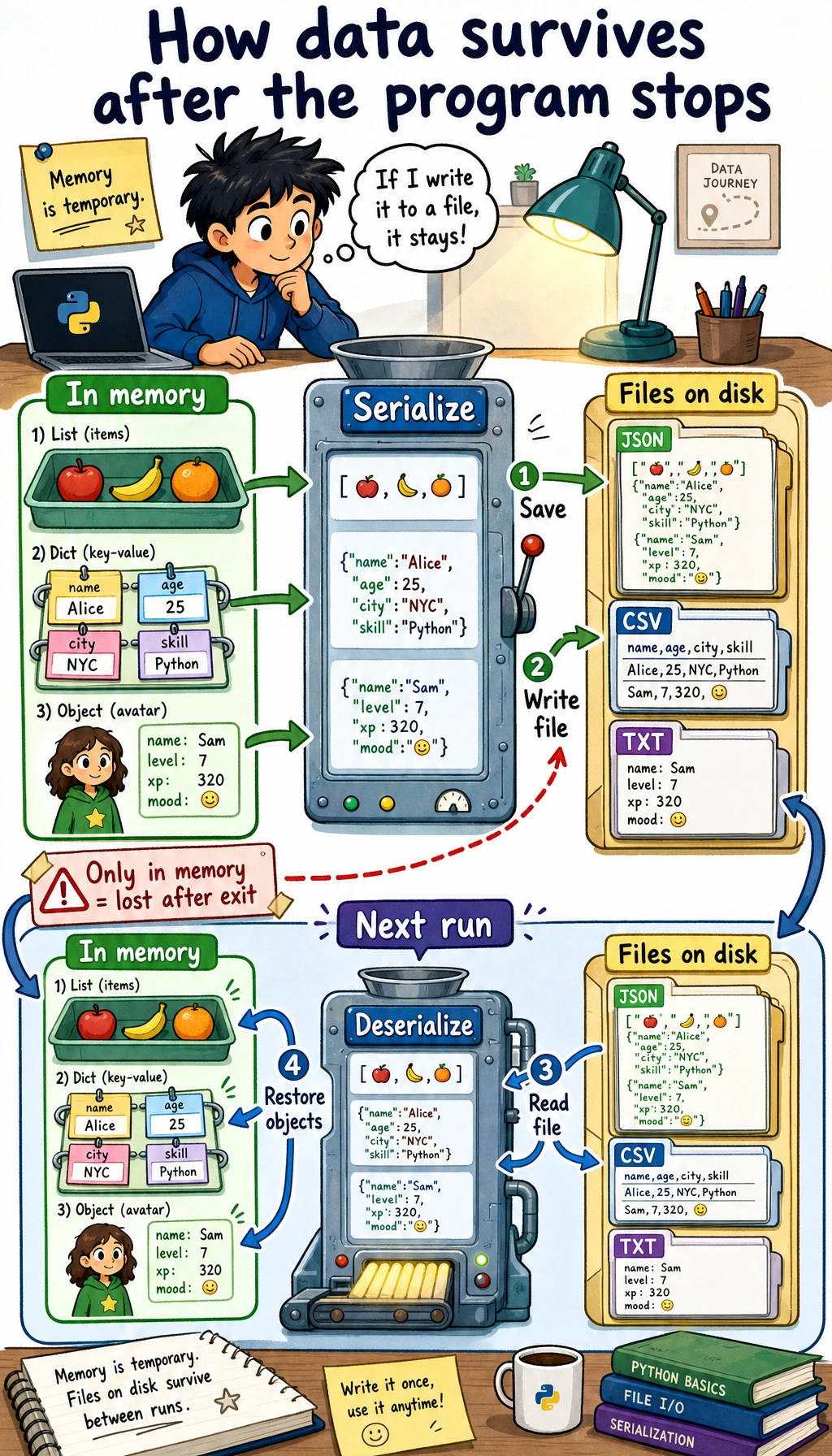
Where this section fits
Section titled “Where this section fits”This section shows how program data can be saved and loaded again later. File reading and writing, CSV, JSON, and serialization are the foundation for dataset processing, training logs, configuration files, and saving model results. They are also a key step from temporary code in memory to real projects.
Learning objectives
Section titled “Learning objectives”- Master basic file reading and writing operations (
open,read,write) - Understand the role and benefits of the
withstatement - Learn how to handle common data formats such as CSV and JSON
- Understand the concepts of serialization and deserialization
Why do we need file operations?
Section titled “Why do we need file operations?”So far, the data in your programs has lived in memory — once the program closes, the data is gone. But in real-world scenarios:
- Trained AI models need to be saved to a file so they can be loaded later
- Datasets are stored in CSV files and need to be read into the program
- Training logs need to be written to files for later analysis
- Configuration parameters are stored in JSON files and need to be loaded at startup
File operations let your program persist data.
File I/O basics
Section titled “File I/O basics”Open a file: open()
Section titled “Open a file: open()”# Basic syntaxfile = open("file_path", "mode", encoding="encoding")Common modes:
| Mode | Meaning | When the file does not exist |
|---|---|---|
"r" | Read (default) | Error |
"w" | Write (overwrite) | Create automatically |
"a" | Append (add to the end) | Create automatically |
"x" | Create (error if file already exists) | Create automatically |
"rb" | Read binary file | Error |
"wb" | Write binary file | Create automatically |
Write to a file
Section titled “Write to a file”# Method 1: Manually open and close (not recommended)file = open("hello.txt", "w", encoding="utf-8")file.write("Hello, world!\n")file.write("I am learning Python file operations.\n")file.close() # Don't forget to close the file!
# Method 2: Use the with statement (recommended!)with open("hello.txt", "w", encoding="utf-8") as file: file.write("Hello, world!\n") file.write("I am learning Python file operations.\n")# When you leave the with block, the file is closed automatically, so no manual close() is neededRead a file
Section titled “Read a file”# Read the entire contentwith open("hello.txt", "r", encoding="utf-8") as file: content = file.read() print(content)
# Read line by linewith open("hello.txt", "r", encoding="utf-8") as file: for line in file: print(line.strip()) # strip() removes the newline at the end of the line
# Read all lines into a listwith open("hello.txt", "r", encoding="utf-8") as file: lines = file.readlines() print(lines) # ['Hello, world!\n', 'I am learning Python file operations.\n']Append content
Section titled “Append content”# "a" mode: append to the end of the file without overwriting existing contentwith open("log.txt", "a", encoding="utf-8") as file: file.write("2026-02-09: Started learning\n") file.write("2026-02-09: Finished Chapter 1\n")Write multiple lines
Section titled “Write multiple lines”lines = ["Line 1\n", "Line 2\n", "Line 3\n"]
with open("output.txt", "w", encoding="utf-8") as file: file.writelines(lines) # Write a list of strings
# Or use print to write to a filewith open("output.txt", "w", encoding="utf-8") as file: print("Line 1", file=file) # print can direct output to a file print("Line 2", file=file) print("Line 3", file=file)Real-world examples: working with different file formats
Section titled “Real-world examples: working with different file formats”CSV files
Section titled “CSV files”CSV (Comma-Separated Values) is one of the most common data file formats:
import csv
# Write CSVtasks = [    ["Feature", "Owner", "Hours"],    ["Login API", "Mina", 8],    ["RAG demo", "Kai", 12],    ["Chart view", "Noah", 5],]
with open("tasks.csv", "w", newline="", encoding="utf-8") as file:    writer = csv.writer(file)    writer.writerows(tasks)
# Read CSVwith open("tasks.csv", "r", encoding="utf-8") as file:    reader = csv.reader(file)    header = next(reader)  # Read the header row    print(f"Column names: {header}")
    for row in reader:        feature, owner, hours = row        print(f"{feature}, owner: {owner}, estimate: {hours} hours")
# Read as dictionaries (more convenient)with open("tasks.csv", "r", encoding="utf-8") as file:    reader = csv.DictReader(file)    for row in reader:        print(f"{row['Feature']} is owned by {row['Owner']}")
JSON files
Section titled “JSON files”JSON is the most common data format in web development and APIs:
import json
# Write JSONconfig = {    "model": "ResNet-50",    "learning_rate": 0.001,    "epochs": 100,    "batch_size": 32,    "classes": ["cat", "dog", "bird"],    "use_gpu": True}
with open("config.json", "w", encoding="utf-8") as file:    json.dump(config, file, ensure_ascii=False, indent=2)
# Read JSONwith open("config.json", "r", encoding="utf-8") as file:    loaded_config = json.load(file)
print(f"Model: {loaded_config['model']}")print(f"Learning rate: {loaded_config['learning_rate']}")print(f"Classes: {loaded_config['classes']}")
Generated config.json content:
{ "model": "ResNet-50", "learning_rate": 0.001, "epochs": 100, "batch_size": 32, "classes": ["cat", "dog", "bird"], "use_gpu": true}Text log files
Section titled “Text log files”from datetime import datetime
def log(message, filename="app.log"): """Write a log entry""" timestamp = datetime.now().strftime("%Y-%m-%d %H:%M:%S") with open(filename, "a", encoding="utf-8") as file: file.write(f"[{timestamp}] {message}\n")
# Use itlog("Program started")log("Loaded dataset: train.csv")log("Started training model")log("Training complete, accuracy: 92.5%")Generated log file:
[2026-02-09 14:30:01] Program started[2026-02-09 14:30:02] Loaded dataset: train.csv[2026-02-09 14:30:03] Started training model[2026-02-09 14:35:15] Training complete, accuracy: 92.5%Path handling: pathlib
Section titled “Path handling: pathlib”pathlib is the recommended way to handle paths in Python 3. It is more modern and easier to use than os.path:
from pathlib import Path
# Create Path objectsdata_dir = Path("data")train_file = data_dir / "train" / "data.csv"  # Use / to join paths!print(train_file)  # data/train/data.csv
# Check pathsprint(train_file.exists())    # Whether the file existsprint(train_file.is_file())   # Whether it is a fileprint(data_dir.is_dir())      # Whether it is a directory
# Get file informationpath = Path("model.pth")print(path.name)       # model.pth (file name)print(path.stem)       # model (without extension)print(path.suffix)     # .pth (extension)print(path.parent)     # . (parent directory)
# Create directoriesPath("output/results").mkdir(parents=True, exist_ok=True)
# List files in a directoryfor file in Path(".").glob("*.py"):    print(file)
# Recursively find all CSV filesfor csv_file in Path("data").rglob("*.csv"):    print(csv_file)
# Convenient file read/write methodsPath("note.txt").write_text("Hello!", encoding="utf-8")content = Path("note.txt").read_text(encoding="utf-8")print(content)  # Hello!
Serialization: saving Python objects
Section titled “Serialization: saving Python objects”What is serialization?
Section titled “What is serialization?”Serialization means converting Python objects (lists, dictionaries, class instances, and so on) into a format that can be saved to a file. Deserialization means doing the reverse: restoring Python objects from a file.
Choose the format by what you want to save:
| Need | Recommended format |
|---|---|
| Configuration, API response, small structured data | JSON with the json module |
| Rows and columns that can open in a spreadsheet | CSV with the csv module |
| A Python-only object that you fully trust | pickle with the pickle module |
The important trade-off is safety. JSON and CSV are readable and safe for normal learning projects. pickle is fast and convenient, but it is binary and unsafe when the file comes from someone else.
pickle: save any Python object
Section titled “pickle: save any Python object”import pickle
# Save Python objectdata = { "hours": [2, 5, 1, 3], "features": ["Login API", "RAG demo", "Chart view", "Deploy script"], "metadata": {"module": "portfolio backend", "year": 2026}}
with open("data.pkl", "wb") as file: # Note: "wb" (binary write) pickle.dump(data, file)
# Load Python objectwith open("data.pkl", "rb") as file: # Note: "rb" (binary read) loaded_data = pickle.load(file)
print(loaded_data["features"]) # ['Login API', 'RAG demo', 'Chart view', 'Deploy script']Comprehensive example: task log persistence system
Section titled “Comprehensive example: task log persistence system”import jsonfrom pathlib import Path
class TaskLog: """Task work log with file persistence"""
def __init__(self, filename="task_log.json"): self.filename = Path(filename) self.tasks = {} self.load() # Load data at startup
def load(self): """Load data from a file""" if self.filename.exists(): with open(self.filename, "r", encoding="utf-8") as f: self.tasks = json.load(f) print(f"✅ Loaded data for {len(self.tasks)} tasks") else: print("📝 Creating a new task log")
def save(self): """Save data to a file""" with open(self.filename, "w", encoding="utf-8") as f: json.dump(self.tasks, f, ensure_ascii=False, indent=2)
def add_work(self, task_name, stage, hours): """Add a work-hour entry""" if task_name not in self.tasks: self.tasks[task_name] = {} self.tasks[task_name][stage] = hours self.save() print(f"✅ Saved {task_name}'s {stage} hours ({hours})")
def get_report(self, task_name): """Get a task report""" if task_name not in self.tasks: print(f"❌ Task not found: {task_name}") return
stages = self.tasks[task_name] print(f"\n{'='*30}") print(f" {task_name} Work Report") print(f"{'='*30}") for stage, hours in stages.items(): print(f" {stage}: {hours} hours") total = sum(stages.values()) print(f"{'─'*30}") print(f" Total hours: {total:.1f}") print(f"{'='*30}")
def export_csv(self, filename="task_hours.csv"): """Export as CSV""" import csv stages = set() for task_stages in self.tasks.values(): stages.update(task_stages.keys()) stages = sorted(stages)
with open(filename, "w", newline="", encoding="utf-8") as f: writer = csv.writer(f) writer.writerow(["Task"] + stages) for task_name, task_stages in self.tasks.items(): row = [task_name] + [task_stages.get(s, "") for s in stages] writer.writerow(row) print(f"✅ Exported to {filename}")
# Use itlog = TaskLog()log.add_work("Login API", "design", 2)log.add_work("Login API", "implementation", 5)log.add_work("Login API", "tests", 1)log.add_work("RAG demo", "implementation", 7)log.add_work("RAG demo", "docs", 2)log.get_report("Login API")log.export_csv()Hands-on exercises
Section titled “Hands-on exercises”Exercise 1: File statistics tool
Section titled “Exercise 1: File statistics tool”from pathlib import Path
def file_stats(filename): """Return line, character, word, and longest-line statistics.""" path = Path(filename) lines = path.read_text(encoding="utf-8").splitlines() longest_index, longest_line = max( enumerate(lines, start=1), key=lambda item: len(item[1]), default=(0, ""), ) return { "lines": len(lines), "characters": sum(len(line) for line in lines), "words": sum(len(line.split()) for line in lines), "longest_line_number": longest_index, "longest_line": longest_line, }
Path("sample.txt").write_text("hello world\nthis is Python\n", encoding="utf-8")print(file_stats("sample.txt"))Exercise 2: Diary app
Section titled “Exercise 2: Diary app”Write a simple diary app:
- Support writing new diary entries (automatically add a timestamp)
- Support viewing all diary entries
- Store diary entries in a text file so data is not lost after the program closes
Exercise 3: Configuration file manager
Section titled “Exercise 3: Configuration file manager”import jsonfrom pathlib import Path
DEFAULT_CONFIG = {"theme": "light", "language": "en", "page_size": 20}
def load_config(filename="config.json"): """Load a configuration file, or create a default config if it does not exist.""" path = Path(filename) if not path.exists(): save_config(DEFAULT_CONFIG.copy(), filename) return json.loads(path.read_text(encoding="utf-8"))
def save_config(config, filename="config.json"): """Save the config to a file.""" Path(filename).write_text(json.dumps(config, indent=2), encoding="utf-8")
def update_config(key, value, filename="config.json"): """Update a configuration item.""" config = load_config(filename) config[key] = value save_config(config, filename) return config
print(update_config("theme", "dark"))Reference implementation and walkthrough
file_statsshould report line count, character count, word count, and the longest line. Thedefault=(0, "")inmax()is important because it keeps empty files from crashing the code.- The diary app should append timestamped entries to a text file, list them back in order, and keep the storage format simple enough to inspect by hand.
- The config manager should load JSON, create a default file if none exists, update one key, and save the result back with pretty-printed JSON. Using
Pathkeeps the file paths portable.
Evidence to Keep
Section titled “Evidence to Keep”Keep this page’s proof of learning as a small evidence card:
- Pattern
- class, exception, file IO, functional pipeline, generator, or type hint
- Code Artifact
- minimal runnable example and one realistic use case
- Output
- printed object state, caught error, saved file, yielded values, or type-check note
- Failure Check
- hidden mutation, swallowed exception, file path issue, lazy iterator confusion, or misleading annotation
- Expected Output
- small advanced-Python example with a debugging note
Summary
Section titled “Summary”| Operation | Code | Notes |
|---|---|---|
| Write file | with open("f.txt", "w") as f: | "w" overwrites, "a" appends |
| Read file | with open("f.txt", "r") as f: | .read(), .readlines() |
| Write JSON | json.dump(data, file) | Dictionary → JSON file |
| Read JSON | json.load(file) | JSON file → Dictionary |
| Write CSV | csv.writer(file).writerow() | List → CSV row |
| Read CSV | csv.reader(file) | CSV row → List |
| Path handling | Path("data") / "file.txt" | pathlib is recommended |