
0.5 Capstone Project Thread: Course Knowledge Assistant
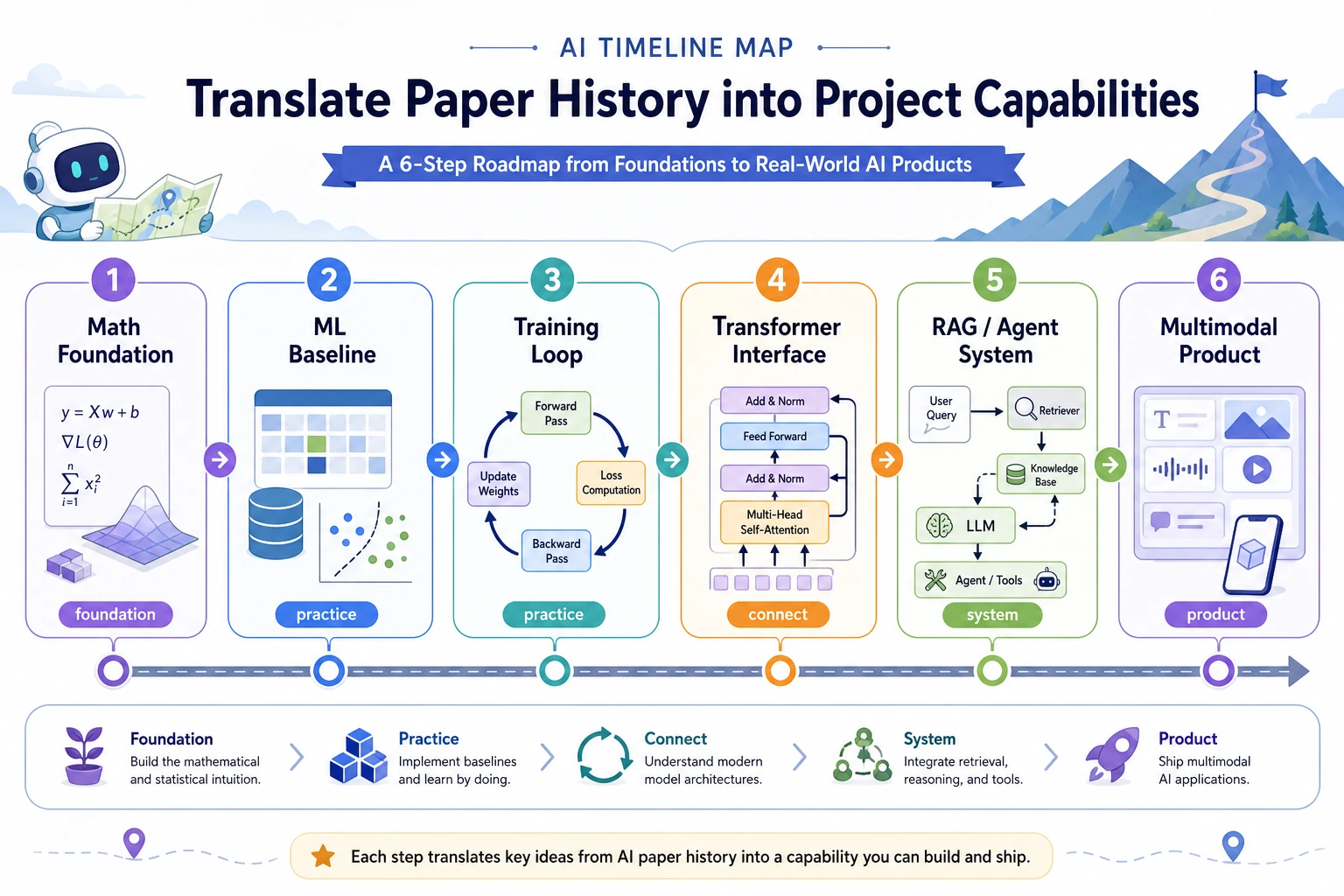
If you do not have your own project yet, default to a course knowledge assistant. It is not extra homework. It is one portfolio thread that grows through the course: each chapter adds one layer of capability until you have an AI application that can be explained, rerun, evaluated, and deployed.
Final Shape
Section titled “Final Shape”By the end, this project should be able to:
- read course notes, PDFs, web excerpts, or your own learning records;
- clean data while preserving source, time, fields, and quality notes;
- answer with Prompt, RAG, or Agent workflows while keeping retrieval and tool traces;
- keep fixed eval questions, failure samples, cost/latency notes, and safety boundaries;
- optionally connect images, OCR, multimodal assets, or a local open-source model runtime;
- let a reviewer rerun the core path from the README.
Directory Template
Section titled “Directory Template”capstone-course-assistant/ README.md data/ raw/ processed/ notebooks/ src/ cli.py data_pipeline.py evals.py rag.py agent_tools.py reports/ evidence_log.md failure_cases.md eval_results.csv runtime_notes.mdOn day one, only create the folder and README. The other files should appear naturally as the chapters add capability.
Portfolio Submission Template
Section titled “Portfolio Submission Template”Use the same final package format after every major stage. This keeps the project reviewable instead of becoming a pile of demos.
README.md what it does, how to run, what is not supportedrun.sh or commands.md exact rerun pathdata_note.md source, fields, cleaning rules, privacy noteseval_cases.csv fixed questions or inputs used for comparisonfailure_cases.md at least one honest failure and suspected causescreenshots/ or outputs/ visible result, chart, trace, or API responserelease_note.md what changed this chapter and what to test nextMinimum version: README, one run command, one output, and one failure note. Strong portfolio version: fixed eval set, before/after comparison, cost or latency note, safety boundary, and a short demo script.
Growth By Chapter
Section titled “Growth By Chapter”Chapters 1-3: reproducible workbench Keep environment commands, Git commits, a Python CLI, sample data, cleaning rules, charts, and data quality notes.
Chapters 4-6: model evidence Use a small classification, regression, or representation experiment to practice baselines, metrics, failure samples, and training diagnosis. The goal is not a high score; the goal is evidence-based model judgment.
Chapter 7: LLM behavior control Fix 5-10 questions, then compare prompts, structured outputs, token/context limits, and failure samples. Optionally run mini GPT-2 to understand training and generation.
Chapter 8: RAG grounded answers Chunk course material, add metadata, retrieve evidence, and generate cited answers. Save top-k chunks before reading the final answer.
Chapter 9: Agent tool loop Expose only a few safe tools, such as reading files, listing folders, or generating reports. Keep tool schemas, traces, safety blocks, and rollback notes.
Chapters 10-12: product-specific extensions Use Chapter 10 for images or OCR, Chapter 11 for labels, extraction, or summaries, and Chapter 12 for PDF, image, audio, video, or creative-package workflows.
Chapter 13: open-source model runtime Start with a small model to run local inference, evaluation, and an OpenAI-style API. With GPU access, try vLLM or SGLang. Keep the model license, environment report, first run, eval table, and stop procedure.
Change One Thing Per Chapter
Section titled “Change One Thing Per Chapter”At the end of each chapter, answer four questions:
- What new capability did the project gain?
- What command reruns it?
- What evidence proves it works?
- What failure sample keeps the claim honest?
If you cannot answer, add evidence before adding features.
Evidence to Keep
Section titled “Evidence to Keep”Keep this page’s proof of learning as a project-thread evidence card:
- Project Name
- course knowledge assistant or your own replacement project
- Chapter Growth Rule
- add one capability per chapter, not a pile of demos
- Rerun Path
- README command, script, notebook cell, or service endpoint
- Review Bundle
- data note, eval cases, trace, failure note, and release note
- Expected Output
- one project thread that grows from setup to RAG, Agent, and runtime evidence
Minimum Pass Standard
Section titled “Minimum Pass Standard”After the main route, this project should include:
- a runnable README;
- a small dataset or document set;
- fixed evaluation questions;
- a Prompt/RAG/Agent trace;
- failure cases and an improvement plan;
- a note explaining when to use a cloud API and when to use an open-source model runtime.
The goal is not the largest system. The goal is a system that makes another person believe you understand the AI engineering loop.
Pass Check
Section titled “Pass Check”You pass this planning page when your project thread has one rerun command, one evaluation artifact, and one known failure case.