
9.5.6 MCP Ecosystem and Practice
Learning Objectives
Section titled “Learning Objectives”- Understand what an MCP ecosystem is
- Understand how tool servers, clients, and connectors form a network
- Recognize several typical real-world MCP use cases
- Understand why value grows after a protocol becomes ecosystemized
What Does “Ecosystem” Mean?
Section titled “What Does “Ecosystem” Mean?”A protocol only becomes truly valuable when everyone uses it
Section titled “A protocol only becomes truly valuable when everyone uses it”If there is only one client and one server, the protocol’s value is still limited. But once it becomes:
- multiple clients
- multiple servers
- multiple connectors
- multiple tool providers
then MCP’s value changes from “reducing a little glue code” into:
enabling more capabilities to interoperate in a unified way.
A real-life analogy
Section titled “A real-life analogy”Why is USB valuable? Not because “one device can plug in,” but because:
- many devices can use it
- many computers support it
- it lowers the cost of bringing new devices online
MCP’s ecosystem value is similar.
Common Participants in the MCP Ecosystem
Section titled “Common Participants in the MCP Ecosystem”Tool providers
Section titled “Tool providers”Responsible for offering:
- document retrieval
- file system access
- database queries
- browser automation
Client integrators
Section titled “Client integrators”Responsible for bringing these capabilities into:
- IDEs
- desktop applications
- Agent frameworks
- internal enterprise platforms
Connectors and bridge layers
Section titled “Connectors and bridge layers”Responsible for:
- wrapping existing systems as MCP servers
- connecting different environments through a unified protocol
So the ecosystem is not “one tool library,” but rather:
a capability network connected by a protocol.
A Very Common Ecosystem Shape
Section titled “A Very Common Ecosystem Shape”ecosystem = { "clients": ["IDE assistant", "desktop Agent", "enterprise workspace"], "servers": ["file system server", "database server", "browser server"], "connectors": ["filesystem", "database", "browser"]}
print(ecosystem)Expected output:
{'clients': ['IDE assistant', 'desktop Agent', 'enterprise workspace'], 'servers': ['file system server', 'database server', 'browser server'], 'connectors': ['filesystem', 'database', 'browser']}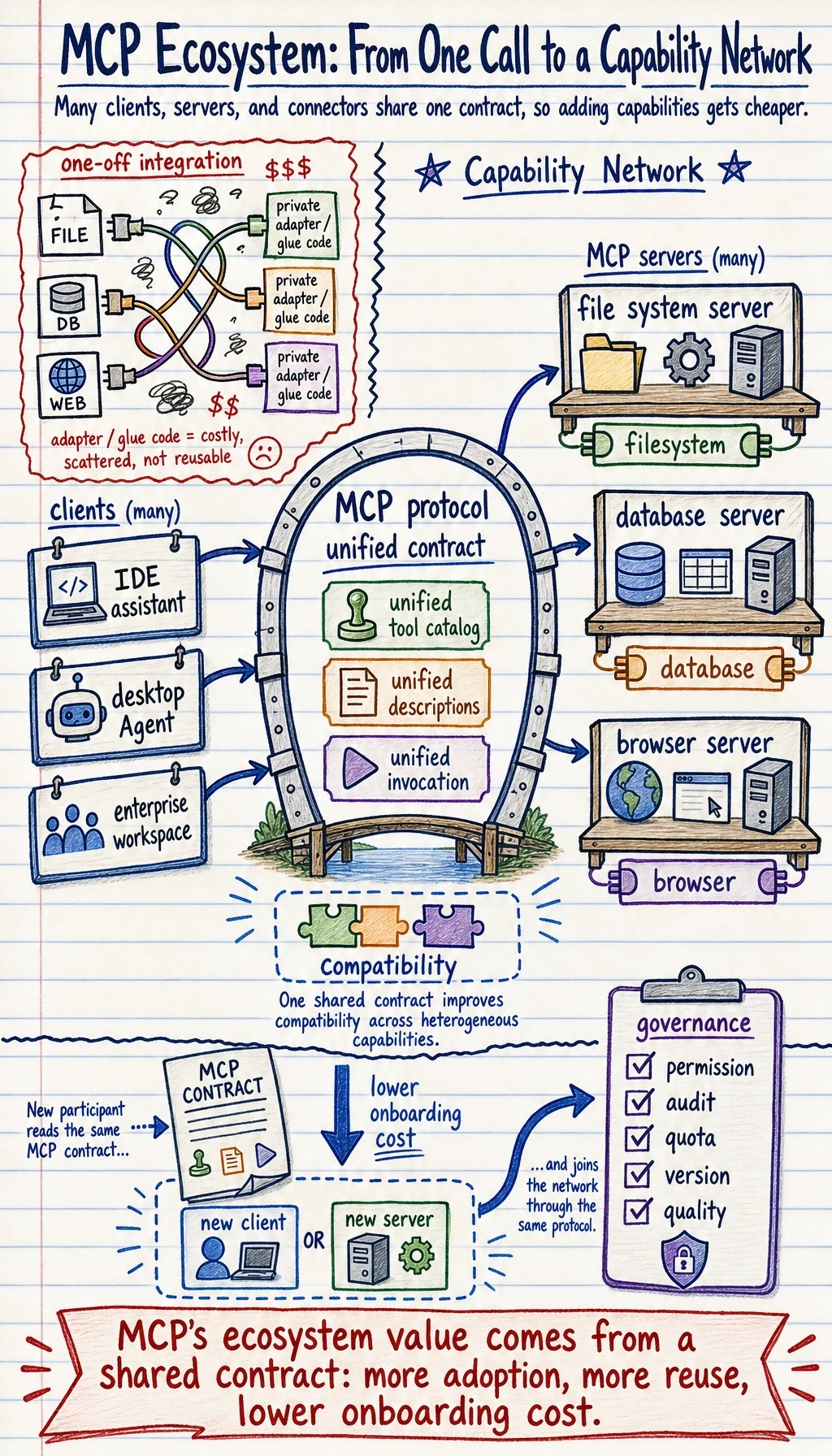
Although this code is simple, it shows the three layers in the ecosystem:
- who uses it
- who provides it
- how they connect
Why Is MCP Especially Suitable for “Tool Ecosystemization”?
Section titled “Why Is MCP Especially Suitable for “Tool Ecosystemization”?”Because the tool world is naturally heterogeneous
Section titled “Because the tool world is naturally heterogeneous”Tools in the real world may come from:
- local processes
- Web services
- enterprise systems
- personal scripts
Without a unified protocol, connecting each tool means writing a new adapter layer.
After you have a unified protocol
Section titled “After you have a unified protocol”You can more naturally build:
- a unified tool catalog
- a unified description format
- a unified invocation flow
This significantly lowers the cost of onboarding new tools.
Typical Use Case 1: IDEs and Developer Tools
Section titled “Typical Use Case 1: IDEs and Developer Tools”Why is this scenario especially suitable?
Section titled “Why is this scenario especially suitable?”Development tools naturally need many external capabilities:
- read files
- inspect codebases
- check terminal state
- look up documentation
If each of these capabilities is connected through a different interface, the system becomes messy very quickly. So the benefits of protocol-based design are very obvious here.
A simple example
Section titled “A simple example”ide_use_case = { "query": "Help me locate the refund logic code", "needed_servers": ["filesystem_server", "code_search_server"]}
print(ide_use_case)Expected output:
{'query': 'Help me locate the refund logic code', 'needed_servers': ['filesystem_server', 'code_search_server']}Here you can already see:
One client can consume the capabilities of multiple different MCP servers at the same time.
Typical Use Case 2: Internal Enterprise Tool Platforms
Section titled “Typical Use Case 2: Internal Enterprise Tool Platforms”In enterprise settings, there are often many internal systems:
- HR systems
- CRM
- ticketing systems
- spreadsheets
Without a unified protocol, an Agent must write a separate adapter for each system. But once these systems are organized in a more unified way, it becomes easier to implement:
- unified permission management
- unified tool descriptions
- unified invocation auditing
This is also a major practical value of protocol ecosystems.
Typical Use Case 3: Personal Toolkits and Automation
Section titled “Typical Use Case 3: Personal Toolkits and Automation”MCP is not only for large companies. It is also a great fit for individual developers building:
- their own toolkits
- automation script collections
- local knowledge systems
Because once the number of capabilities keeps growing, a unified organizational method becomes very important.
In an Ecosystem, Compatibility Matters More Than “Quantity”
Section titled “In an Ecosystem, Compatibility Matters More Than “Quantity””The most important value of a protocol ecosystem
Section titled “The most important value of a protocol ecosystem”It is not “how many tools there are,” but:
- can new tools be connected easily?
- can new clients consume them easily?
- are there too many proprietary adaptation layers in between?
Why is this critical?
Section titled “Why is this critical?”Because if every new tool still requires a lot of private code, then an ecosystem has not really formed.
A sign of a mature protocol ecosystem is usually:
the marginal cost of adding new participants keeps getting lower.
The Most Common Pitfalls in MCP Ecosystem Practice
Section titled “The Most Common Pitfalls in MCP Ecosystem Practice”Assuming that protocol unification automatically solves permissions
Section titled “Assuming that protocol unification automatically solves permissions”It does not. Permissions, auditing, and quotas still need to be designed separately.
Inconsistent tool descriptions, making interoperability difficult despite using the same protocol
Section titled “Inconsistent tool descriptions, making interoperability difficult despite using the same protocol”The protocol is only the foundation; description standards are equally important.
No governance in the ecosystem, leading to uneven tool quality
Section titled “No governance in the ecosystem, leading to uneven tool quality”Once there are many servers, quality control and version management become important.
Evidence to Keep
Section titled “Evidence to Keep”Keep this page’s proof of learning as a small evidence card:
- Capability
- resource, prompt, or tool exposed by server
- Contract
- schema, transport, permissions, and error shape
- Call Trace
- discovery, invocation, response, and failure handling
- Failure Check
- incompatible schema, missing auth, unsafe tool, or server error
- Integration Action
- validate server contract before adding autonomy
Summary
Section titled “Summary”The most important thing in this section is not memorizing the word “ecosystem,” but understanding:
The long-term value of MCP is not just one client calling one tool. It is enabling more capabilities and more clients to form an extensible network in a unified way.
Only at this stage does the protocol’s value truly become amplified.
Exercises
Section titled “Exercises”- Think of a scenario you are familiar with and list 3 types of tools that could become MCP servers in that scenario.
- Explain in your own words: why is “low onboarding cost for new participants” an important signal of ecosystem maturity?
- Think about why protocol unification does not mean governance is automatically completed.
- In your own words, describe the biggest difference between the MCP ecosystem and a “single tool invocation.”
Solution approach and explanation
- For a team knowledge-work scenario, useful MCP servers might include document search, calendar/task management, and repository or database access. The exact answer can vary, but each server should expose a coherent capability boundary.
- Low onboarding cost matters because ecosystems grow when new servers and clients can join without bespoke integration work every time. It is a sign that the contract is understandable and reusable.
- Protocol unification does not automatically solve governance. You still need permission policy, review rules, versioning, security audits, and decisions about which servers are trusted.
- A single tool call is one action. An ecosystem is a reusable network of clients, servers, contracts, discovery, permissions, and shared practices that can evolve over time.