
6.2.3 PyTorch Basics
Learning Objectives
Section titled “Learning Objectives”- Create tensors from Python and NumPy data.
- Read
shape,dtype,device, and dimension meaning. - Distinguish element-wise operations from matrix multiplication.
- Use broadcasting intentionally instead of accidentally.
- Run a tiny forward pass that produces logits, probabilities, predictions, and loss.
Look at the Tensor Lifecycle
Section titled “Look at the Tensor Lifecycle”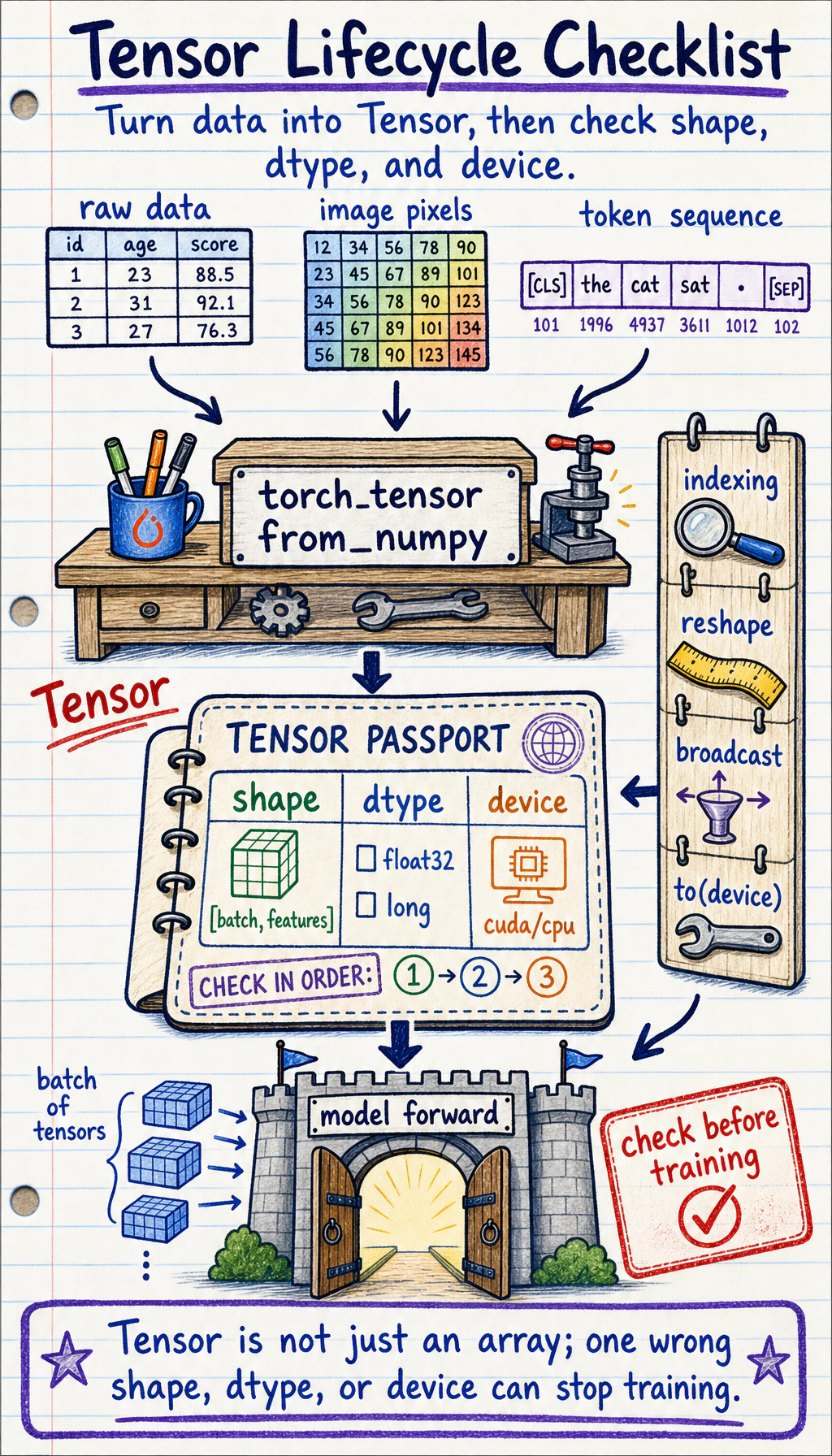
Most PyTorch data follows this path:
The beginner mistake is to jump straight to the model. A safer habit is to inspect the tensor before it enters the model.
Tensor Means Data With Training Metadata
Section titled “Tensor Means Data With Training Metadata”The shortest useful definition is:
A tensor is a multi-dimensional array that PyTorch can compute with, move across devices, and track for gradients when needed.
Compared with NumPy arrays, PyTorch tensors add two deep learning features:
device: the tensor can live on CPU, GPU, or Apple MPS.requires_grad: the tensor can join automatic differentiation.
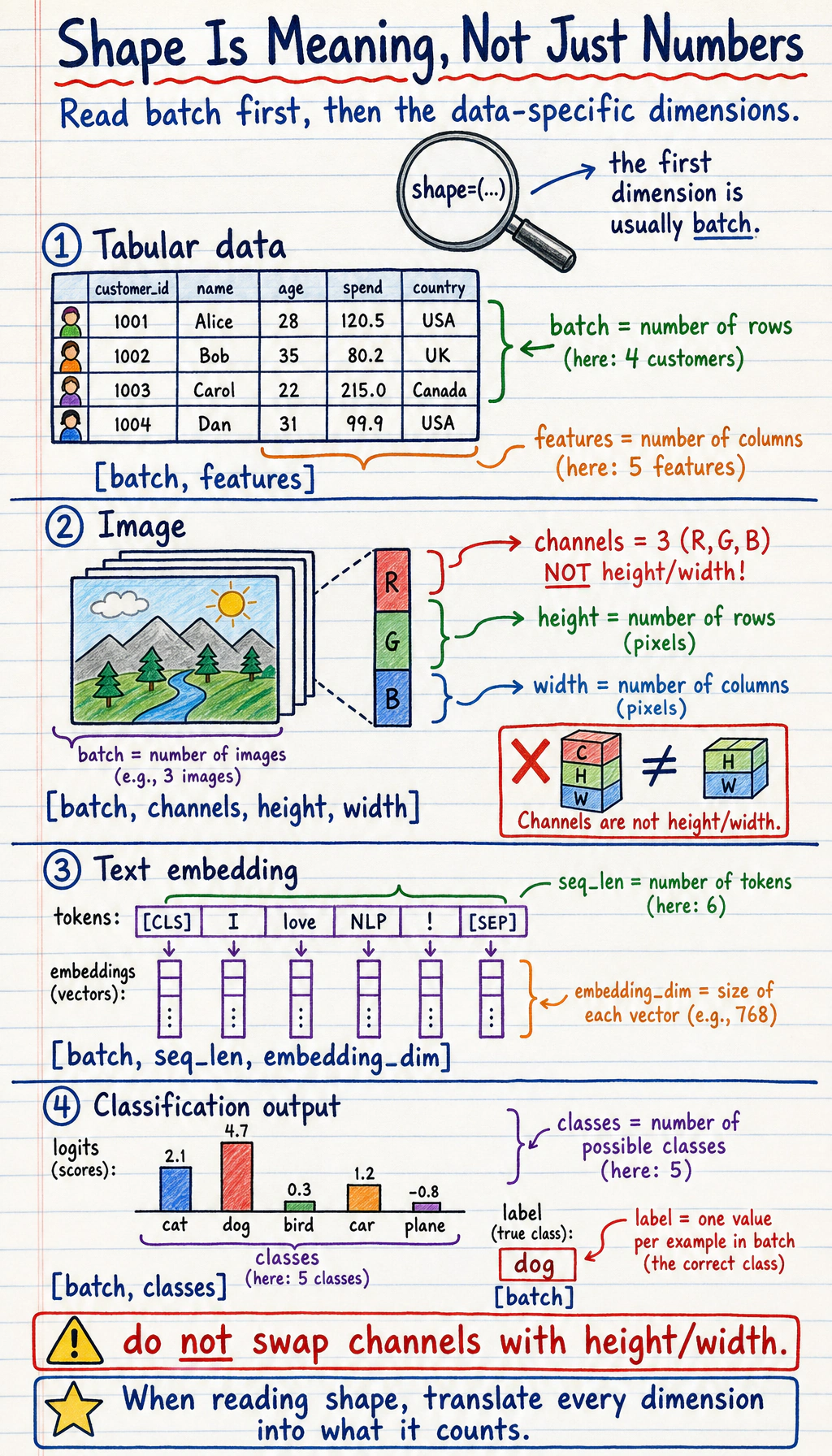
Common shapes:
| Data | Common shape | Meaning |
|---|---|---|
| tabular batch | [batch, features] | rows are samples, columns are features |
| class labels | [batch] | one integer class id per sample |
| image batch | [batch, channels, height, width] | PyTorch image convention |
| text embeddings | [batch, seq_len, embedding_dim] | tokens with vector representations |
| logits | [batch, classes] | raw class scores before softmax |
Lab 1: Inspect Tensors Before Doing Math
Section titled “Lab 1: Inspect Tensors Before Doing Math”Run this first. It builds the inspection habit you will use in every later training loop.
import torch

def describe(name, tensor, meaning):    print(        f"{name}: shape={tuple(tensor.shape)} "        f"dtype={tensor.dtype} "        f"device={tensor.device} "        f"meaning={meaning}"    )

X = torch.tensor(    [        [1.0, 2.0, 3.0],        [4.0, 5.0, 6.0],    ])y = torch.tensor([0, 1], dtype=torch.long)
describe("X", X, "[batch, features]")describe("y", y, "[batch]")
print("ndim:", X.ndim)print("numel:", X.numel())print("first row:", X[0])print("feature means:", X.mean(dim=0))
Expected output:
X: shape=(2, 3) dtype=torch.float32 device=cpu meaning=[batch, features]y: shape=(2,) dtype=torch.int64 device=cpu meaning=[batch]ndim: 2numel: 6first row: tensor([1., 2., 3.])feature means: tensor([2.5000, 3.5000, 4.5000])What to notice:
Xisfloat32, which is the usual type for model inputs.yisint64, also shown astorch.long, which is whatCrossEntropyLossexpects for class labels.dim=0aggregates down the batch dimension, producing one mean per feature.
Lab 2: From Features to Logits
Section titled “Lab 2: From Features to Logits”Now make one tiny classification-style forward pass by hand. This mirrors what nn.Linear does internally.
import torchimport torch.nn as nn

def describe(name, tensor, meaning):    print(        f"{name}: shape={tuple(tensor.shape)} "        f"dtype={tensor.dtype} "        f"device={tensor.device} "        f"meaning={meaning}"    )

X = torch.tensor(    [        [1.0, 2.0, 3.0],        [4.0, 5.0, 6.0],    ])y = torch.tensor([0, 1], dtype=torch.long)
W = torch.tensor(    [        [0.1, 0.2],        [0.3, -0.1],        [0.5, 0.4],    ])b = torch.tensor([0.01, -0.02])
logits = X @ W + bprobs = torch.softmax(logits, dim=1)pred = probs.argmax(dim=1)loss = nn.CrossEntropyLoss()(logits, y)
describe("logits", logits, "[batch, classes]")print("logits:", torch.round(logits * 100) / 100)print("probabilities:", torch.round(probs * 1000) / 1000)print("prediction:", pred)print("loss:", round(loss.item(), 3))
Expected output:
logits: shape=(2, 2) dtype=torch.float32 device=cpu meaning=[batch, classes]logits: tensor([[2.2100, 1.1800], [4.9100, 2.6800]])probabilities: tensor([[0.7370, 0.2630], [0.9030, 0.0970]])prediction: tensor([0, 0])loss: 1.319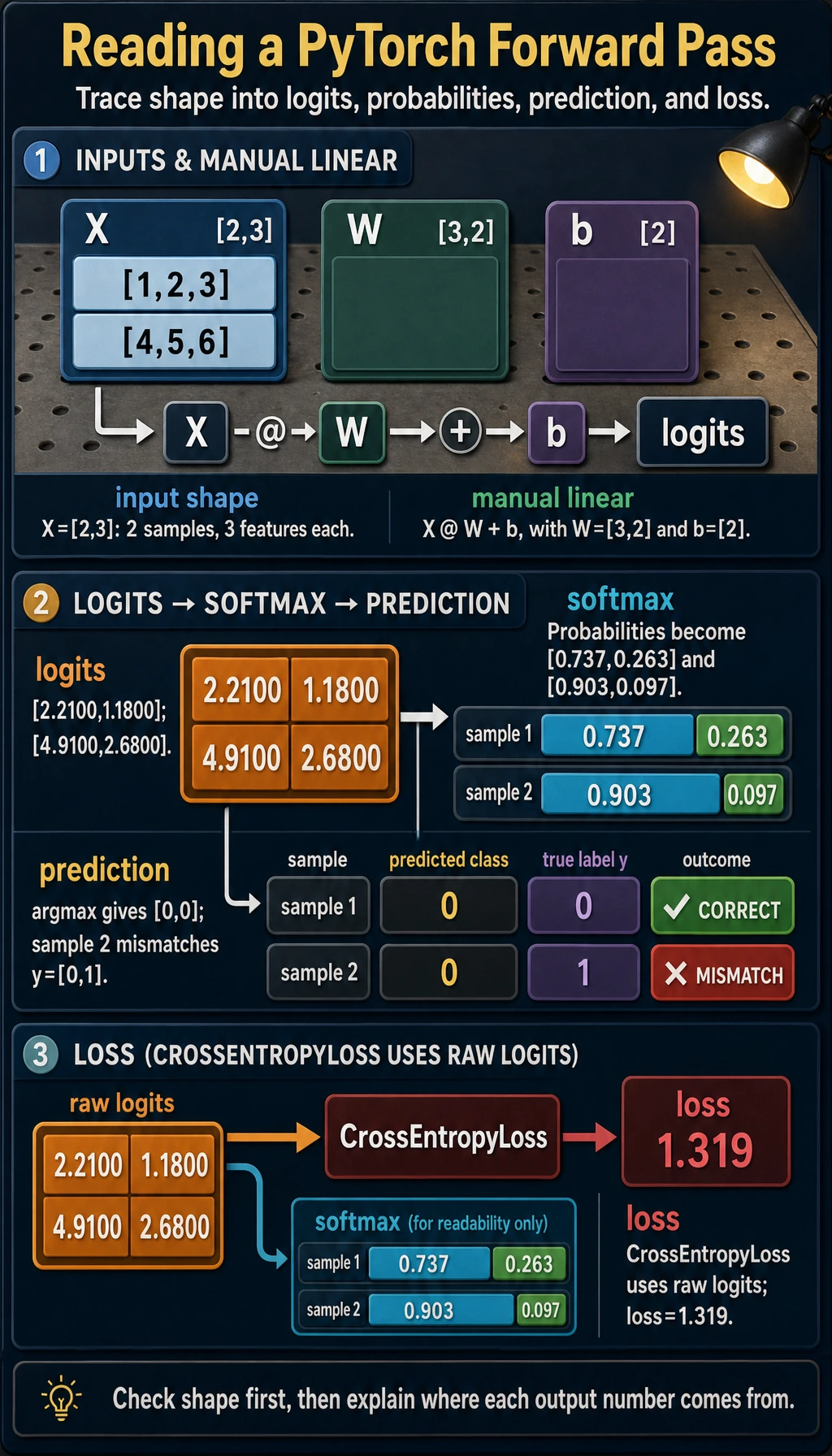
Read the shapes carefully:
Xis[2, 3]: two samples, three features.Wis[3, 2]: three input features, two output classes.X @ Wbecomes[2, 2]: one score vector per sample.bis[2]and is broadcast across the batch.CrossEntropyLossreceives rawlogits, not softmax probabilities.
Shape Operations You Actually Need
Section titled “Shape Operations You Actually Need”Use reshape, unsqueeze, and squeeze to make shapes match what the next operation expects.
import torch
x = torch.arange(12)grid = x.reshape(3, 4)batch = grid.unsqueeze(0)restored = batch.squeeze(0)
print("x:", tuple(x.shape))print("grid:", tuple(grid.shape))print("batch:", tuple(batch.shape))print("restored:", tuple(restored.shape))
Expected output:
x: (12,)grid: (3, 4)batch: (1, 3, 4)restored: (3, 4)Practical meanings:
reshape(3, 4): reorganize the same 12 elements into a table.unsqueeze(0): add a batch dimension.squeeze(0): remove a size-1 batch dimension.
Use reshape unless you specifically know why you need view. reshape is more forgiving when memory layout is not contiguous.
Broadcasting: Useful, But Check Direction
Section titled “Broadcasting: Useful, But Check Direction”Broadcasting means PyTorch expands a smaller tensor to match a larger tensor when the shapes are compatible.
import torch
X = torch.tensor(    [        [1.0, 2.0, 3.0],        [4.0, 5.0, 6.0],    ])
feature_mean = X.mean(dim=0)centered = X - feature_mean
print("feature_mean:", feature_mean)print("centered:", centered)
Expected output:
feature_mean: tensor([2.5000, 3.5000, 4.5000])centered: tensor([[-1.5000, -1.5000, -1.5000], [ 1.5000, 1.5000, 1.5000]])Here feature_mean has shape [3], and X has shape [2, 3]. PyTorch subtracts the same feature mean from each row.
Before relying on broadcasting, write the shapes next to the code:
# X: [batch, features]# feature_mean: [features]centered = X - feature_meanThat tiny note prevents many silent logic bugs.
Device and NumPy Conversion
Section titled “Device and NumPy Conversion”Real training code must keep tensors on the same device. This helper works on CPU, CUDA, or Apple Silicon MPS.
import torch
if torch.cuda.is_available():    device = torch.device("cuda")elif torch.backends.mps.is_available():    device = torch.device("mps")else:    device = torch.device("cpu")
X = torch.tensor([[1.0, 2.0, 3.0]])X = X.to(device)
print("device:", X.device)
When converting back to NumPy for plotting or analysis, detach and move to CPU first:
arr = X.detach().cpu().numpy()print(type(arr), arr.shape)Why this order matters:
.detach()leaves the gradient graph..cpu()ensures NumPy can read the data..numpy()converts to a NumPy array.
Common Error Patterns
Section titled “Common Error Patterns”| Symptom | Likely cause | Fix |
|---|---|---|
mat1 and mat2 shapes cannot be multiplied | wrong matrix multiplication dimensions | print both shapes before @ or nn.Linear |
expected scalar type Long | labels are float for classification loss | use y = y.long() |
Expected all tensors to be on the same device | model and data live on different devices | move both model and data with .to(device) |
| loss runs but result is strange | broadcasting happened in the wrong direction | write both shapes and verify expansion |
| NumPy conversion fails | tensor is on GPU or still attached to graph | use tensor.detach().cpu().numpy() |
Quick Debug Checklist
Section titled “Quick Debug Checklist”Before a tensor enters a model, print this:
print("shape:", tuple(X.shape))print("dtype:", X.dtype)print("device:", X.device)print("meaning: [batch, features]")Before a loss function, check this:
print("logits:", tuple(logits.shape), logits.dtype)print("labels:", tuple(y.shape), y.dtype)For multi-class classification, the common pair is:
logits: [batch, classes], float32labels: [batch], int64 / longEvidence to Keep
Section titled “Evidence to Keep”Before moving on, save a small tensor inspection note:
- Input Shape
- [batch, features]
- Logits Shape
- [batch, classes]
- Label Shape
- [batch]
- Label Dtype
- torch.long for CrossEntropyLoss
- Device Check
- model and data are on the same device
This is the fastest way to debug later PyTorch code. Most early errors are shape, dtype, device, or broadcasting errors hiding behind a long stack trace.
Exercises
Section titled “Exercises”- Change
Xin Lab 2 from two samples to three samples. Which shapes change, and which shapes stay the same? - Create labels with shape
[batch, 1], then fix them withsqueeze(1)soCrossEntropyLossaccepts them. - Move
X,W, andbtodevice. What error do you get if you move only one of them? - Replace
X @ WwithX * W. Why does it fail or produce a different meaning?
Reference implementation and walkthrough
- The batch dimension changes from
2to3. Feature size, class count, and parameter shapes stay the same unless you also change the input feature count or number of output classes. CrossEntropyLossexpects class labels shaped like[batch]and usually stored astorch.long.squeeze(1)removes the extra singleton dimension so the loss sees one class id per sample.- You get a device mismatch error, such as tensors being on both CPU and GPU. In PyTorch, the model parameters and the input tensors used in the same operation must live on the same device.
@performs matrix multiplication and produces class logits.*performs element-wise multiplication, so it either fails because shapes do not align or computes a different operation through broadcasting.
Key Takeaways
Section titled “Key Takeaways”- PyTorch basics are not about memorizing many functions; they are about matching shape, dtype, device, and operation.
@means matrix multiplication;*means element-wise multiplication.CrossEntropyLosswants raw logits andlonglabels.- Broadcasting is powerful, but you should always know which dimension is being expanded.