
2.1.7 Function Basics
Where This Section Fits
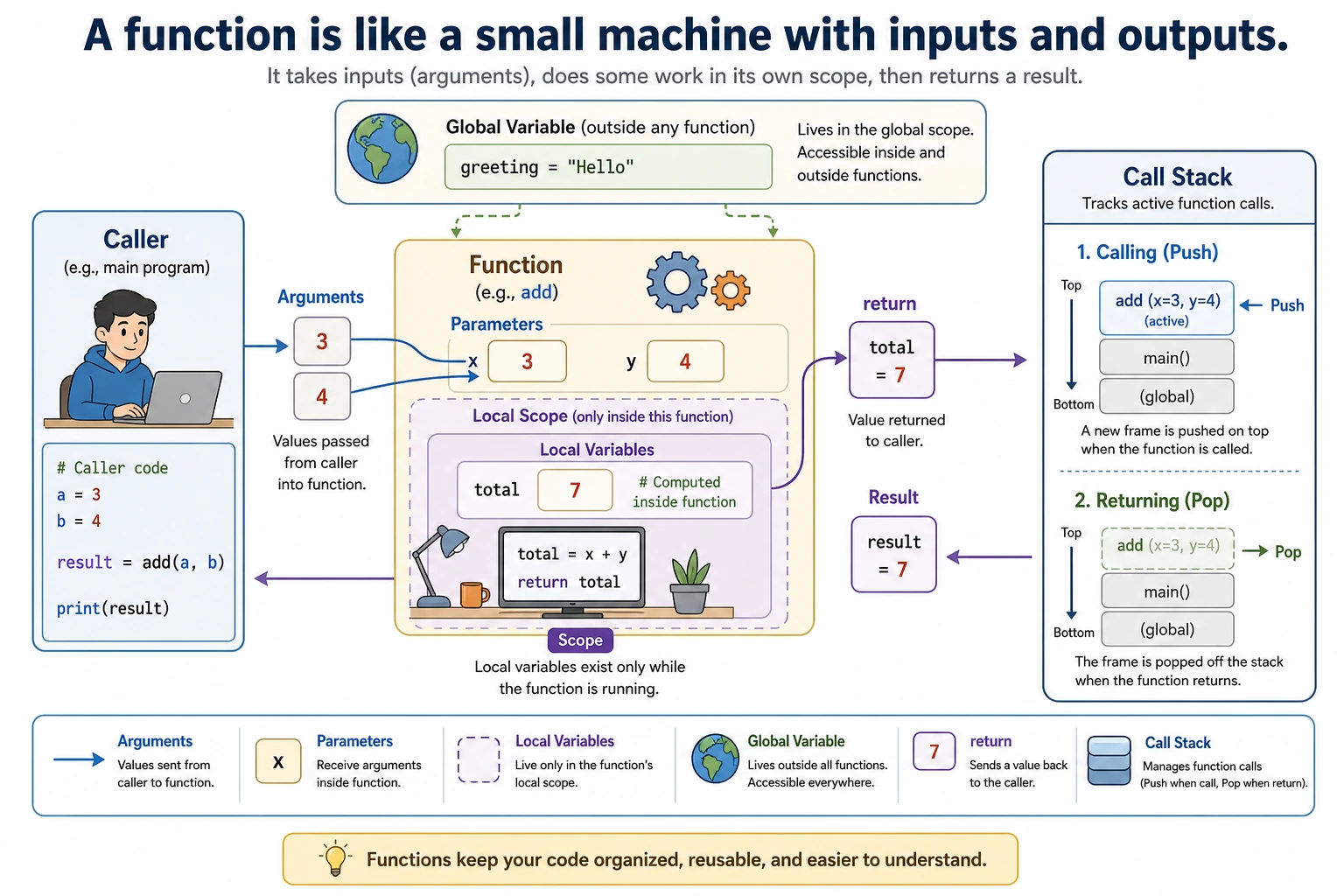
Section titled “Where This Section Fits”This section teaches you how to package repeated logic into functions. Functions are the key step from “writing scripts” to “writing maintainable programs,” and they are also the foundation for organizing data processing pipelines, model training workflows, and Web API logic later on.
Learning Objectives
Section titled “Learning Objectives”- Understand what functions are and why we need them
- Master function definition and calling
- Understand parameters (positional parameters, default parameters, keyword parameters)
- Master the use of return values
- Understand variable scope
Why Do We Need Functions?
Section titled “Why Do We Need Functions?”Suppose you are writing a data processing script and need to calculate average API latency multiple times:
# First calculationapi_latencies = [120, 95, 240, 180, 310]total1 = sum(api_latencies)avg1 = total1 / len(api_latencies)print(f"Average latency: {avg1:.1f} ms")
# Second calculation (writing the exact same logic again)worker_latencies = [80, 76, 95, 110, 140, 90]total2 = sum(worker_latencies)avg2 = total2 / len(worker_latencies)print(f"Average latency: {avg2:.1f} ms")
# Third calculation (writing it again...)batch_latencies = [450, 510, 480, 530, 470]total3 = sum(batch_latencies)avg3 = total3 / len(batch_latencies)print(f"Average latency: {avg3:.1f} ms")
The same logic is written 3 times. If you later need to change the calculation method (for example, remove the highest and lowest readings), you would have to change it in 3 places.
Use a function instead:
def calculate_average(values):    """Calculate the average value"""    return sum(values) / len(values)
# Now it can be done in one lineprint(f"Average latency: {calculate_average([120, 95, 240, 180, 310]):.1f} ms")print(f"Average latency: {calculate_average([80, 76, 95, 110, 140, 90]):.1f} ms")print(f"Average latency: {calculate_average([450, 510, 480, 530, 470]):.1f} ms")
The core value of functions:
| Benefit | Description |
|---|---|
| Reuse | Write once, use many times |
| Abstraction | Hide complex logic behind a function name; when calling it, you only need to know “what it does,” not “how it does it” |
| Maintainability | Change the logic in one place only |
| Readability | The function name acts like a comment; calculate_average(latencies_ms) is immediately clear |
Defining and Calling Functions
Section titled “Defining and Calling Functions”Basic Syntax
Section titled “Basic Syntax”def greet(name): """Greet someone""" # Docstring, describes what the function does print(f"Hello, {name}! Welcome to the project workspace!")
# Call the functiongreet("Mina") # Hello, Mina! Welcome to the project workspace!greet("Kai") # Hello, Kai! Welcome to the project workspace!Syntax breakdown:
- The
defkeyword means “define a function” greetis the function name (naming rules are the same as variables: lowercase with underscores)(name)is the parameter list- Don’t forget the
:colon - The function body must be indented
"""..."""is a docstring, used to describe the function’s purpose
Functions with No Parameters
Section titled “Functions with No Parameters”def say_hello(): print("Hello, World!")
say_hello() # Hello, World!Functions with Multiple Parameters
Section titled “Functions with Multiple Parameters”def add(a, b): result = a + b print(f"{a} + {b} = {result}")
add(3, 5) # 3 + 5 = 8add(10, 20) # 10 + 20 = 30Return Values
Section titled “Return Values”A function can use return to send a result back to the caller:
def add(a, b):    return a + b
# The function's return value can be assigned to a variableresult = add(3, 5)print(result)       # 8
# You can also use the return value directlyprint(add(10, 20))  # 30
# Use it inside an expressiontotal = add(1, 2) + add(3, 4)print(total)  # 10
Returning Multiple Values
Section titled “Returning Multiple Values”def get_min_max(numbers): """Return the minimum and maximum values in a list""" return min(numbers), max(numbers)
# Receive them with tuple unpackingsmallest, largest = get_min_max([3, 1, 4, 1, 5, 9])print(f"Minimum: {smallest}, Maximum: {largest}")# Minimum: 1, Maximum: 9Functions Without return
Section titled “Functions Without return”If a function has no return statement, or return has no value after it, the function returns None:
def greet(name):    print(f"Hello, {name}!")    # No return
result = greet("Mina")        # Prints: Hello, Mina!print(result)                 # None
Another Use of return: Exiting Early
Section titled “Another Use of return: Exiting Early”def divide(a, b): if b == 0: print("Error: The divisor cannot be 0!") return None # Exit the function early return a / b
print(divide(10, 3)) # 3.333...print(divide(10, 0)) # Error: The divisor cannot be 0! Then returns NoneParameter Details
Section titled “Parameter Details”Positional Parameters
Section titled “Positional Parameters”Parameters are supplied in order:
def describe_task(task, owner):    print(f"{task} is assigned to {owner}")
describe_task("Login API", "Mina")   # Login API is assigned to Minadescribe_task("Mina", "Login API")   # Mina is assigned to Login API — the order is wrong!
Keyword Parameters
Section titled “Keyword Parameters”Pass values using parameter names, so order does not matter:
def describe_task(task, owner):    print(f"{task} is assigned to {owner}")
# With keyword parameters, order does not matterdescribe_task(owner="Mina", task="Login API")   # Login API is assigned to Minadescribe_task(task="Dashboard UI", owner="Kai") # Dashboard UI is assigned to Kai
Default Parameters
Section titled “Default Parameters”Give a parameter a default value so it can be omitted when calling the function:
def train_model(epochs=10, lr=0.001, batch_size=32):    print(f"Training parameters: epochs={epochs}, lr={lr}, batch_size={batch_size}")
# Use all default valuestrain_model()# Training parameters: epochs=10, lr=0.001, batch_size=32
# Change only some parameterstrain_model(epochs=50)# Training parameters: epochs=50, lr=0.001, batch_size=32
train_model(epochs=100, lr=0.01)# Training parameters: epochs=100, lr=0.01, batch_size=32*args: Accept Any Number of Positional Arguments
Section titled “*args: Accept Any Number of Positional Arguments”def calculate_sum(*numbers): """Calculate the sum of any number of values""" total = 0 for num in numbers: total += num return total
print(calculate_sum(1, 2)) # 3print(calculate_sum(1, 2, 3, 4, 5)) # 15print(calculate_sum(10)) # 10**kwargs: Accept Any Number of Keyword Arguments
Section titled “**kwargs: Accept Any Number of Keyword Arguments”def print_info(**info): """Print any number of pieces of information""" for key, value in info.items(): print(f"{key}: {value}")
print_info(name="Login API", owner="Mina", status="in_progress")# name: Login API# owner: Mina# status: in_progressParameter Order Rules
Section titled “Parameter Order Rules”When mixing different kinds of parameters, the order is:
def func(pos_arg, default_arg=10, *args, **kwargs):    print(f"pos_arg={pos_arg}")    print(f"default_arg={default_arg}")    print(f"args={args}")    print(f"kwargs={kwargs}")
func(1, 2, 3, 4, name="test")# pos_arg=1# default_arg=2# args=(3, 4)# kwargs={'name': 'test'}
Variable Scope
Section titled “Variable Scope”A variable’s “scope” is its range of validity.
Local Variables vs Global Variables
Section titled “Local Variables vs Global Variables”# Global variable: defined outside the functionmessage = "I am a global variable"
def my_function(): # Local variable: defined inside the function local_var = "I am a local variable" print(message) # Can read the global variable print(local_var) # Can read the local variable
my_function()print(message) # Can access the global variable# print(local_var) # Error! The local variable does not exist outside the functionVariables with the Same Name
Section titled “Variables with the Same Name”x = 10 # Global variable
def my_function(): x = 20 # This is a new local variable, not a modification of the global variable print(f"x inside the function: {x}") # 20
my_function()print(f"x outside the function: {x}") # 10 (the global variable was not modified)The global Keyword
Section titled “The global Keyword”If you really need to modify a global variable inside a function (generally not recommended):
count = 0
def increment():    global count   # Declare that we want to use the global variable count    count += 1
increment()increment()increment()print(count) # 3Docstrings
Section titled “Docstrings”Good functions should have clear documentation:
def calculate_success_rate(success_count, total_count):    """    Calculate the success rate for a task or API check.
    Parameters:        success_count (int): number of successful runs        total_count (int): total number of runs
    Returns:        float: success rate between 0 and 1
    Example:        >>> calculate_success_rate(18, 20)        0.9    """    if total_count == 0:        return 0    return success_count / total_count
# View the function's documentationhelp(calculate_success_rate)
Comprehensive Examples
Section titled “Comprehensive Examples”Example 1: API Latency Analysis Tool
Section titled “Example 1: API Latency Analysis Tool”def analyze_latencies(latencies_ms, service="Unknown Service"): """ Analyze a list of API latencies and return statistics.
Parameters: latencies_ms: list of latency measurements in milliseconds service: service name Returns: A dictionary containing statistics """ if not latencies_ms: return {"error": "The latency list is empty"}
avg = sum(latencies_ms) / len(latencies_ms) slow = [ms for ms in latencies_ms if ms >= 200] normal = [ms for ms in latencies_ms if ms < 200]
return { "service": service, "count": len(latencies_ms), "average_ms": round(avg, 1), "max_ms": max(latencies_ms), "min_ms": min(latencies_ms), "slow_rate": f"{len(slow) / len(latencies_ms):.1%}", "slow_requests": len(slow), "normal_requests": len(normal) }
def print_report(stats): """Print a formatted latency report""" print(f"\n{'='*30}") print(f" {stats['service']} Latency Report") print(f"{'='*30}") print(f" Samples: {stats['count']}") print(f" Average latency: {stats['average_ms']} ms") print(f" Highest latency: {stats['max_ms']} ms") print(f" Lowest latency: {stats['min_ms']} ms") print(f" Slow rate: {stats['slow_rate']}") print(f" Slow requests: {stats['slow_requests']}") print(f" Normal requests: {stats['normal_requests']}") print(f"{'='*30}")
# Use itlogin_latencies = [120, 95, 240, 180, 310, 150, 88, 205, 260, 170]worker_latencies = [80, 76, 95, 110, 140, 90, 105, 118, 130, 85]
login_stats = analyze_latencies(login_latencies, "Login API")worker_stats = analyze_latencies(worker_latencies, "Background Worker")
print_report(login_stats)print_report(worker_stats)Example 2: A Simple Password Generator
Section titled “Example 2: A Simple Password Generator”import randomimport string
def generate_password(length=12, use_upper=True, use_digits=True, use_special=True): """ Generate a random password.
Parameters: length: password length, default 12 use_upper: whether to include uppercase letters use_digits: whether to include digits use_special: whether to include special characters """ chars = string.ascii_lowercase # Lowercase letters
if use_upper: chars += string.ascii_uppercase if use_digits: chars += string.digits if use_special: chars += "!@#$%^&*"
password = ''.join(random.choice(chars) for _ in range(length)) return password
# Generate different kinds of passwordsprint(f"Default password: {generate_password()}")print(f"Letters only: {generate_password(length=8, use_digits=False, use_special=False)}")print(f"Strong password: {generate_password(length=20)}")Hands-On Exercises
Section titled “Hands-On Exercises”Exercise 1: Latency Conversion Functions
Section titled “Exercise 1: Latency Conversion Functions”Write two functions to convert between milliseconds and seconds:
def ms_to_seconds(milliseconds):    """Milliseconds → seconds"""    return milliseconds / 1000
def seconds_to_ms(seconds):    """Seconds → milliseconds"""    return seconds * 1000
# Testprint(ms_to_seconds(2500))  # Should output 2.5print(seconds_to_ms(1.2))   # Should output 1200.0
Exercise 2: List Statistics Function
Section titled “Exercise 2: List Statistics Function”Write a function that accepts a list of numbers and returns the maximum value, minimum value, average, and median:
def list_stats(numbers):    """    Return statistics for a list.    Do not use the built-in functions max(), min(), sum(); implement them yourself!    """    if not numbers:        return None
    maximum = numbers[0]    minimum = numbers[0]    total = 0    for value in numbers:        if value > maximum:            maximum = value        if value < minimum:            minimum = value        total += value
    sorted_numbers = sorted(numbers)    n = len(sorted_numbers)    if n % 2 == 1:        median = sorted_numbers[n // 2]    else:        median = (sorted_numbers[n // 2 - 1] + sorted_numbers[n // 2]) / 2
    average = total / len(numbers)    return {        "max": maximum,        "min": minimum,        "average": average,        "median": median,    }
# Teststats = list_stats([3, 1, 4, 1, 5, 9, 2, 6, 5])print(stats)
Exercise 3: Latency Threshold Checker
Section titled “Exercise 3: Latency Threshold Checker”Wrap a reusable latency check in a function:
def check_latency(service, latency_ms, threshold_ms=200):    """Return whether a service is within the latency threshold."""    is_ok = latency_ms <= threshold_ms    status = "ok" if is_ok else "slow"    return {        "service": service,        "latency_ms": latency_ms,        "threshold_ms": threshold_ms,        "status": status,        "within_threshold": is_ok,    }
# Test several servicesprint(check_latency("Login API", 185))print(check_latency("Search API", 260, threshold_ms=250))
Try changing the threshold to see how the returned status changes.
Reference implementation and walkthrough
- Latency conversion tests should produce
2.5seconds for2500ms and1200.0ms for1.2seconds. Add a round-trip test such as375ms. list_stats([3, 1, 4, 1, 5, 9, 2, 6, 5])should report max9, min1, average4.0, and median4.- Returning
Nonefor an empty list is acceptable if the caller checks it. RaisingValueErroris another reasonable design. - The latency checker should return a dictionary so tests can inspect both the human-readable
statusand the booleanwithin_threshold. - Good functions avoid hidden input and output unless user interaction is the point. Pure functions like
check_latency()are easier to test.
Evidence to Keep
Section titled “Evidence to Keep”Keep this page’s proof of learning as a small evidence card:
- Concept
- variable, type, operator, input/output, branch, loop, structure, function, or module
- Code
- smallest runnable Python snippet for the concept
- Output
- printed value, type, branch result, loop trace, or returned value
- Failure Check
- type mismatch, indentation, off-by-one, mutable data, or import path issue
- Expected Output
- code plus printed result that proves the concept works
Summary
Section titled “Summary”| Concept | Description | Example |
|---|---|---|
| Define a function | def function_name(parameters): | def add(a, b): |
| Return value | return value | return a + b |
| Default parameters | Parameters with default values | def f(x=10): |
| Keyword arguments | Pass arguments by name | f(x=5, y=10) |
*args | Accept any number of positional arguments | def f(*args): |
**kwargs | Accept any number of keyword arguments | def f(**kwargs): |
| Local variables | Defined inside a function, not available outside | — |
| Global variables | Defined outside a function, readable inside | — |