
11.6.6 Practical Transformers Library Usage
Learning objectives
Section titled “Learning objectives”- Understand what the most common objects in the
transformerslibrary do - Learn to distinguish the roles of tokenizer, config, model, and pipeline
- Run a minimal offline example with tokenizer + model
- Understand how real projects move from “it runs” to “it is maintainable”
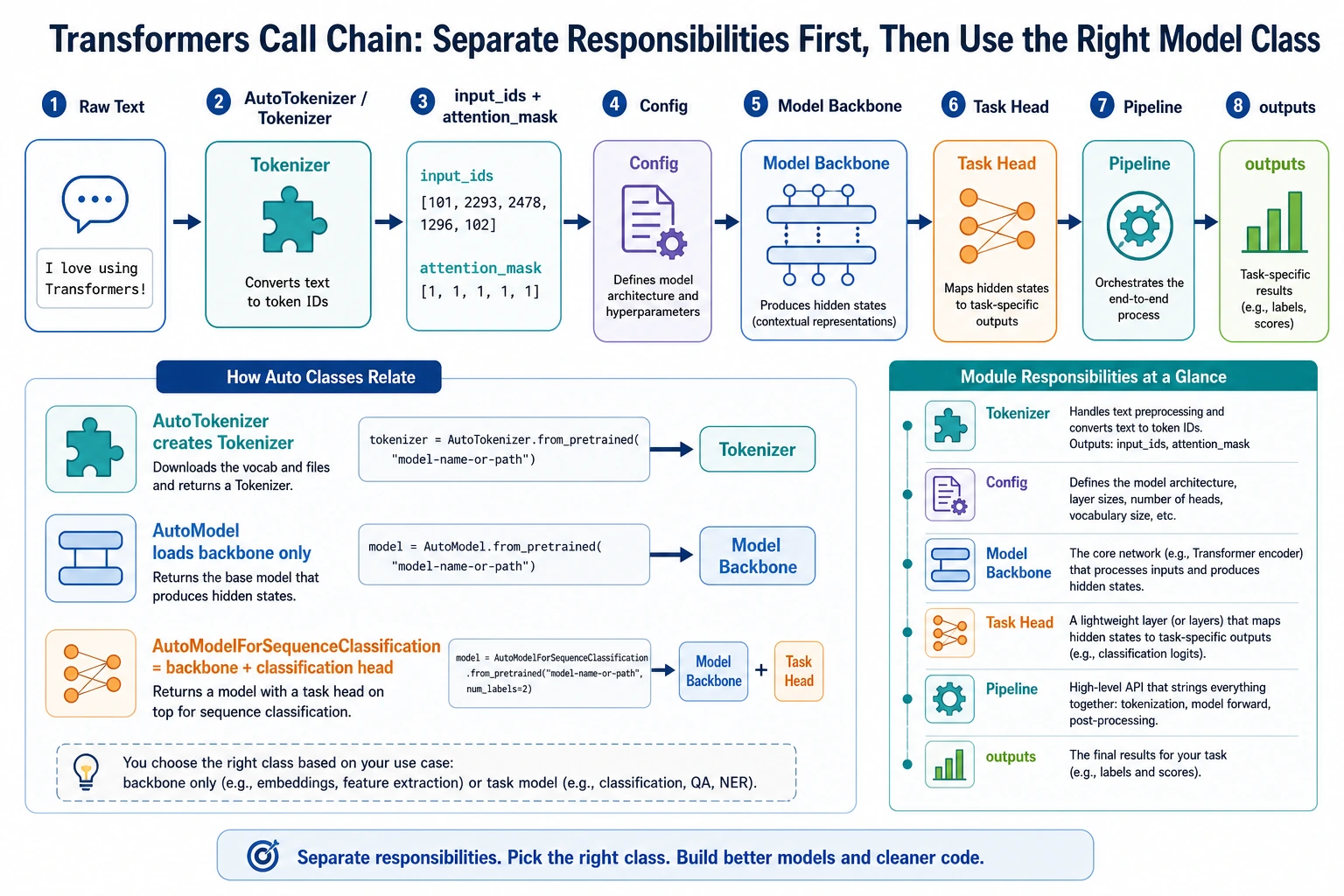
First, let’s separate the main characters in the library
Section titled “First, let’s separate the main characters in the library”Tokenizer
Section titled “Tokenizer”Responsible for turning text into a sequence of numbers that the model can process.
Config
Section titled “Config”Responsible for describing model architecture parameters, such as:
- hidden size
- number of layers
- number of heads
Responsible for the actual forward computation.
Pipeline
Section titled “Pipeline”A higher-level wrapper that helps you combine:
- tokenization
- forward pass
- post-processing
into a more convenient interface.
Remember this in one sentence:
tokenizer handles entry, model handles computation, and pipeline stitches the whole thing together.
Why do many people get confused the first time they use transformers?
Section titled “Why do many people get confused the first time they use transformers?”Because it has two layers:
Concept layer
Section titled “Concept layer”You know things like:
- BERT is encoder-only
- GPT is decoder-only
Tool layer
Section titled “Tool layer”Then you run into:
AutoTokenizerAutoModelAutoModelForSequenceClassificationpipelinefrom_pretrained
Beginners often get stuck here:
There are too many names, but I do not know what each interface actually solves.
So the key goal of this section is not memorizing APIs, but building a map of the call sequence.
First, build a minimal tokenizer offline
Section titled “First, build a minimal tokenizer offline”Why not just download an existing model?
Section titled “Why not just download an existing model?”Because the tutorial should try to ensure that you can still run it even without internet access.
So here we manually prepare a tiny vocab.txt so that you can truly understand what a tokenizer does.
Runnable example
Section titled “Runnable example”from pathlib import Pathfrom tempfile import TemporaryDirectoryfrom transformers import BertTokenizer
vocab_tokens = [ "[PAD]", "[UNK]", "[CLS]", "[SEP]", "[MASK]", "I", "love", "natural", "language", "processing", "Beijing"]
with TemporaryDirectory() as tmpdir: vocab_path = Path(tmpdir) / "vocab.txt" vocab_path.write_text("\n".join(vocab_tokens), encoding="utf-8")
tokenizer = BertTokenizer.from_pretrained(tmpdir, do_lower_case=False)
encoded = tokenizer("I love natural language processing", return_tensors="pt")
print(encoded) print("tokens:", tokenizer.convert_ids_to_tokens(encoded["input_ids"][0]))Expected output:
{'input_ids': tensor([[2, 5, 6, 7, 8, 9, 3]]), 'token_type_ids': tensor([[0, 0, 0, 0, 0, 0, 0]]), 'attention_mask': tensor([[1, 1, 1, 1, 1, 1, 1]])}tokens: ['[CLS]', 'I', 'love', 'natural', 'language', 'processing', '[SEP]']The temporary directory keeps this practice run from leaving vocab.txt in your project. input_ids are the token numbers, while attention_mask marks the valid positions.
What is this code teaching you?
Section titled “What is this code teaching you?”It is teaching you that:
- a tokenizer is not a magical black box
- it is essentially “vocabulary + splitting rules + encoding rules”
- the most important outputs are
input_idsandattention_mask
Evidence to Keep
Section titled “Evidence to Keep”Keep this page’s proof of learning as a small evidence card:
- Model Choice
- BERT, GPT, T5, Transformers pipeline, or other pretrained baseline
- Tokenizer Output
- ids, masks, decoded text, or batch shape
- Task Result
- classification, generation, extraction, or text-to-text output
- Failure Check
- wrong model family, token limit, domain mismatch, cost, or latency
- Expected Output
- model call result plus a short choice rationale
Next, build a minimal BERT model offline
Section titled “Next, build a minimal BERT model offline”Why use a randomly initialized model?
Section titled “Why use a randomly initialized model?”Because our goal right now is not to chase performance, but to:
truly understand how a model object in the
transformerslibrary receives input and produces output.
Runnable example
Section titled “Runnable example”import torchfrom transformers import BertConfig, BertModel
config = BertConfig( vocab_size=15, hidden_size=32, num_hidden_layers=2, num_attention_heads=4, intermediate_size=64)
model = BertModel(config)
input_ids = torch.tensor([[2, 5, 6, 7, 8, 9, 10, 11, 12, 3]])attention_mask = torch.ones_like(input_ids)
outputs = model(input_ids=input_ids, attention_mask=attention_mask)
print("last_hidden_state shape:", outputs.last_hidden_state.shape)print("pooler_output shape :", outputs.pooler_output.shape)Expected output:
- Last Hidden State Shape
- torch.Size([1, 10, 32])
- Pooler Output Shape
- torch.Size([1, 32])
The random model is useful for interface learning, not accuracy. The first shape says: 1 sample, 10 token positions, 32 hidden dimensions.
What should you really understand here?
Section titled “What should you really understand here?”input_idsare token IDsattention_masktells the model which positions are validlast_hidden_stateis the contextualized representation of each positionpooler_outputis one kind of sentence-level representation
Once you understand these, it becomes much easier to add a classification head, matching head, or generation head later.
Connect tokenizer and model together
Section titled “Connect tokenizer and model together”Runnable example
Section titled “Runnable example”from pathlib import Pathfrom tempfile import TemporaryDirectoryimport torchfrom transformers import BertTokenizer, BertConfig, BertModel
vocab_tokens = [ "[PAD]", "[UNK]", "[CLS]", "[SEP]", "[MASK]", "I", "love", "natural", "language", "processing"]
with TemporaryDirectory() as tmpdir: vocab_path = Path(tmpdir) / "vocab.txt" vocab_path.write_text("\n".join(vocab_tokens), encoding="utf-8")
tokenizer = BertTokenizer.from_pretrained(tmpdir, do_lower_case=False)
config = BertConfig( vocab_size=len(vocab_tokens), hidden_size=32, num_hidden_layers=2, num_attention_heads=4, intermediate_size=64 ) model = BertModel(config)
batch = tokenizer(["I love natural language processing", "I love language"], padding=True, return_tensors="pt") outputs = model(**batch)
print("input_ids shape :", batch["input_ids"].shape) print("attention_mask shape :", batch["attention_mask"].shape) print("last_hidden_state shape:", outputs.last_hidden_state.shape)Expected output:
input_ids shape : torch.Size([2, 7])attention_mask shape : torch.Size([2, 7])last_hidden_state shape: torch.Size([2, 7, 32])The tokenizer padded the shorter sentence to the same length as the longer one. That is why the batch becomes a neat rectangular tensor.
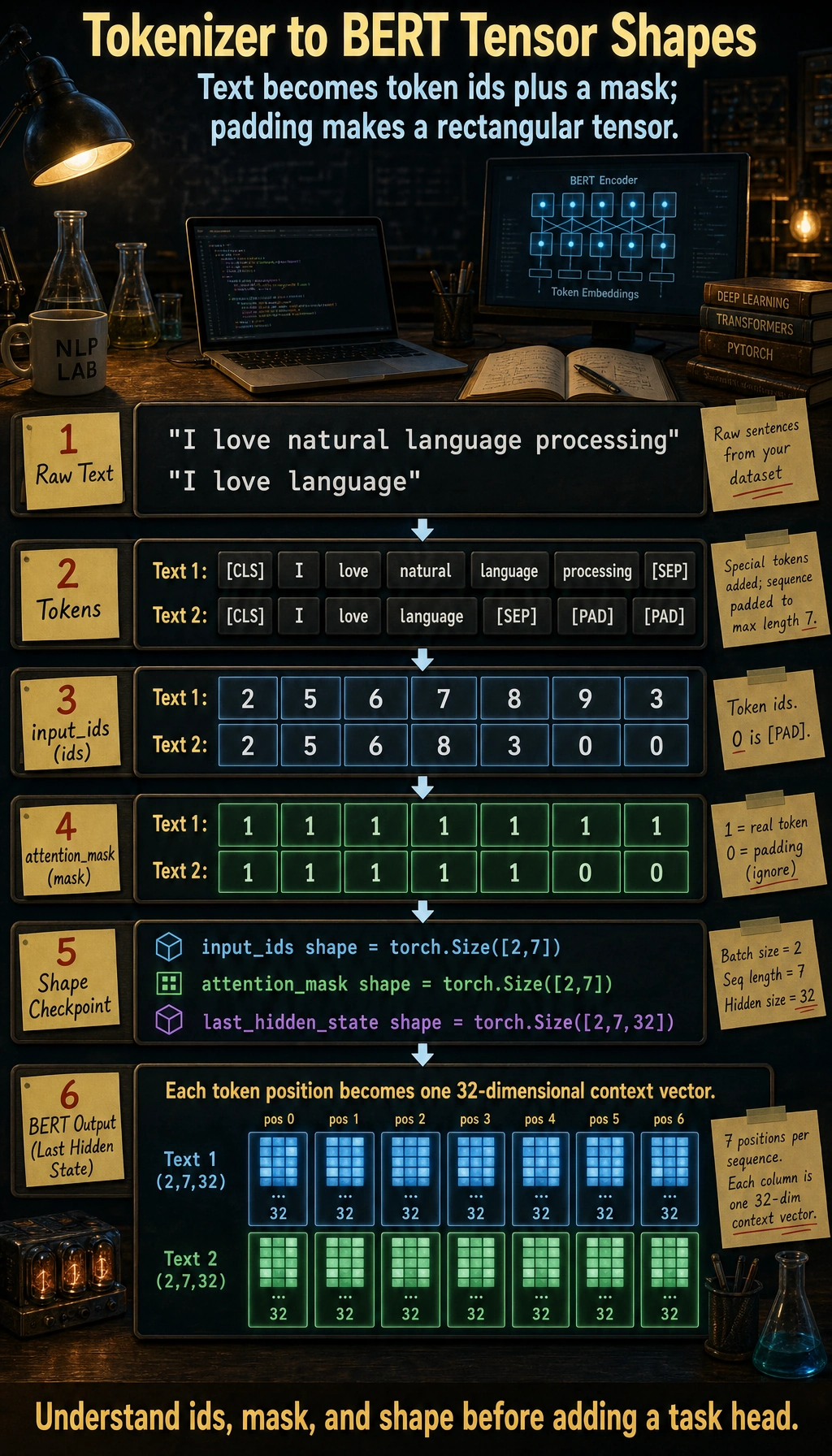
This is the most basic real call chain
Section titled “This is the most basic real call chain”In real projects, the most common low-level flow is:
- text -> tokenizer
- tokenizer -> tensor
- tensor -> model
- model output -> post-processing or task head
You have already run through this chain.
What are the Auto* interfaces for?
Section titled “What are the Auto* interfaces for?”Why does the library have so many AutoModel variants?
Section titled “Why does the library have so many AutoModel variants?”Because transformers wants to save you from writing lots of model-type conditionals by hand.
For example:
AutoTokenizerAutoModelAutoModelForSequenceClassificationAutoModelForCausalLM
Their design goal is:
Give a model name or config, and automatically pick the right class.
An offline AutoModel.from_config example
Section titled “An offline AutoModel.from_config example”from transformers import AutoModel, BertConfig
config = BertConfig( vocab_size=20, hidden_size=16, num_hidden_layers=1, num_attention_heads=4, intermediate_size=32)
model = AutoModel.from_config(config)print(type(model))Expected output:
<class 'transformers.models.bert.modeling_bert.BertModel'>AutoModel inspected the BERT config and instantiated the matching BERT model class. This is the same idea used when loading real pretrained checkpoints by name.
This shows that:
AutoModeldoes not necessarily need to download anything online- it is essentially “automatically instantiate the correct model based on the config”
Is pipeline worth learning?
Section titled “Is pipeline worth learning?”Yes, but you need to know when it is appropriate
Section titled “Yes, but you need to know when it is appropriate”Advantages of pipeline:
- quick to get started
- fast for demos
- less boilerplate code
It is better suited for:
- learning
- quick validation
- small experiments
But in engineering, you cannot rely on it alone
Section titled “But in engineering, you cannot rely on it alone”Because real projects often still need control over:
- batch
- device
- output format
- logging
- error handling
So the mature approach is usually:
- learn
pipeline - but also understand the underlying tokenizer + model call chain
The most common task heads in the Transformers library
Section titled “The most common task heads in the Transformers library”Here are some high-frequency interfaces to remember:
| Interface | Suitable for |
|---|---|
AutoModel | Getting basic representations only |
AutoModelForSequenceClassification | Text classification |
AutoModelForTokenClassification | Sequence labeling |
AutoModelForQuestionAnswering | Extractive QA |
AutoModelForCausalLM | Generation tasks |
The logic behind this is actually simple:
the same backbone model + different task heads.
Common pitfalls for beginners
Section titled “Common pitfalls for beginners”Only knowing pipeline, not the underlying calls
Section titled “Only knowing pipeline, not the underlying calls”This makes it easy to get stuck in engineering scenarios.
Not understanding tokenizer output fields
Section titled “Not understanding tokenizer output fields”At minimum, you should understand:
input_idsattention_mask
Mixing up “model concepts” and “library interfaces”
Section titled “Mixing up “model concepts” and “library interfaces””You need to clearly distinguish:
- BERT / GPT are model families
AutoModel/pipelineare library interfaces
Summary
Section titled “Summary”The most important thing in this section is not memorizing APIs, but understanding:
The core call chain of the Transformers library is: tokenizer encodes text into tensors, model performs the forward computation on those tensors, and then a task head or post-processing step produces the final result.
Once this chain is clear, your thinking will become much more stable when you later do classification, extraction, generation, or fine-tuning.
Exercises
Section titled “Exercises”- Modify the mini vocab in this section, add a few of your own words, and see how the tokenizer output changes.
- Change
hidden_sizeinBertConfigto 64 and see how the output shape changes. - Explain in your own words: why can’t you just learn
pipelinewhen studying thetransformerslibrary? - Think about this: if you want to do text classification, should you start with
AutoModelorAutoModelForSequenceClassification?
Reference implementation and walkthrough
- Changing the mini vocab should change token IDs and may introduce unknown tokens if a word is missing from the vocabulary.
- Changing
hidden_sizeto 64 should change the hidden representation dimension, not the sequence length or batch size. pipelineis useful, but you also need to understand tokenizers, configs, model classes, tensors, labels, and evaluation to debug real projects.- For text classification, start with
AutoModelForSequenceClassificationwhen you need a ready classification head; useAutoModelwhen you plan to build the head yourself.