
3.5.2 Basics of Relational Databases
Learning Objectives
Section titled “Learning Objectives”- Understand what a database is and why we need it
- Master the core concepts of relational databases
- Understand the meaning of tables, rows, columns, primary keys, and foreign keys
- Learn about common database management systems
Why do AI engineers need to learn databases?
Section titled “Why do AI engineers need to learn databases?”You may be thinking: “I already know how to use Pandas to read CSV files, so why do I still need to learn databases?”
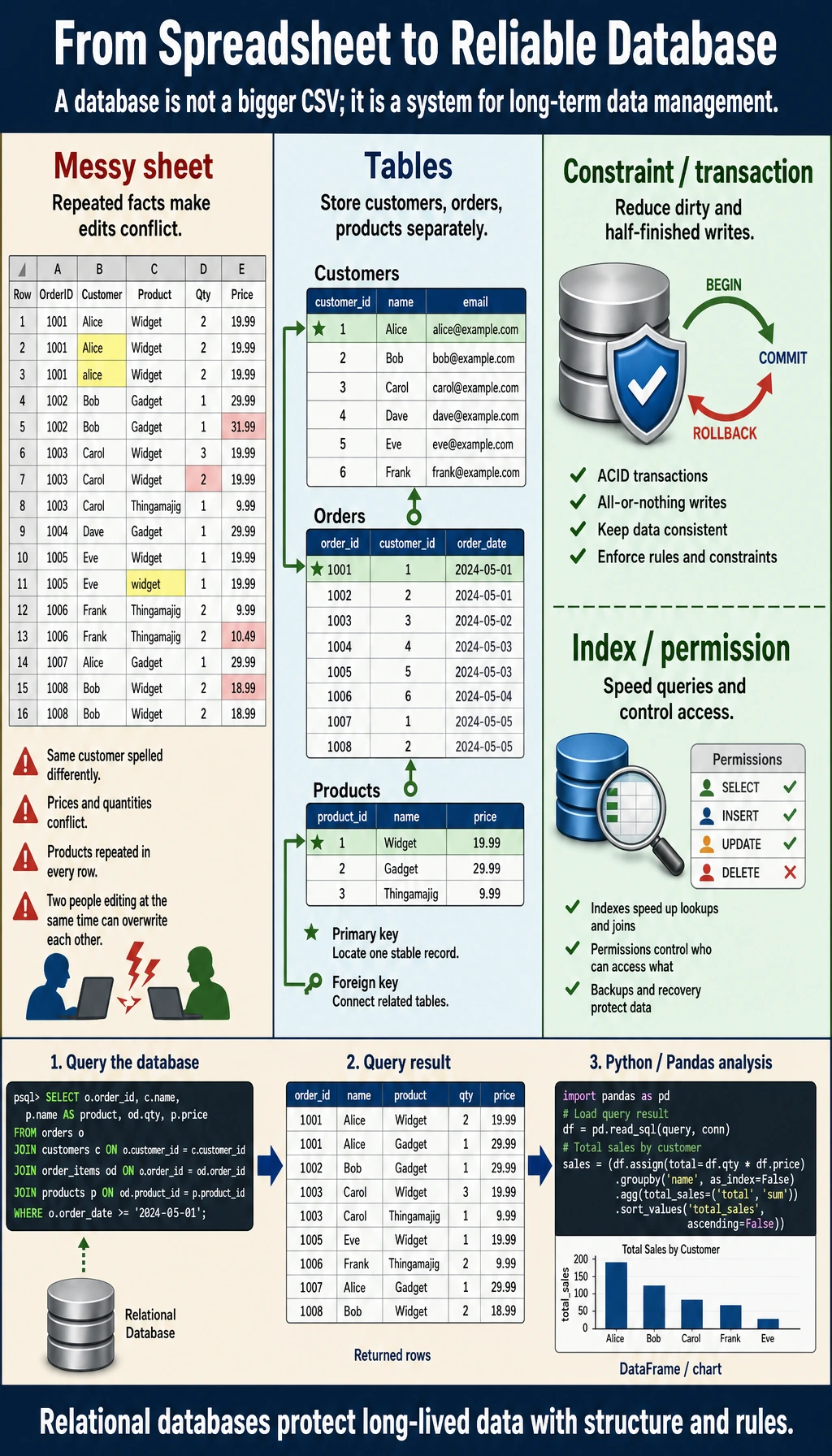
flowchart LR    A["CSV / Excel files"] --> B{"Data size"}    B -->|"tens of thousands of rows"| C["Pandas is enough"]    B -->|"millions of rows"| D["Need a database"]    B -->|"multiple people use it at the same time"| D    B -->|"need secure storage"| D
style C fill:#e8f5e9,stroke:#2e7d32,color:#333 style D fill:#fff3e0,stroke:#e65100,color:#333| Scenario | CSV files | Database |
|---|---|---|
| Data size | Okay for tens of thousands of rows, slows to a crawl at millions | Easily handles hundreds of millions of rows |
| Collaboration | Hard to know who changed what, easy to conflict | Supports concurrent read/write with access control |
| Data security | If the file is deleted, it is gone | Has backups, transactions, and crash recovery |
| Query speed | Must scan everything each time | Has indexes, millisecond-level queries |
| Data relationships | Manually merge multiple files | Use one SQL JOIN to get it done |
Real-world examples:
- Building a RAG system → user Q&A records need to be stored in a database
- Building an AI Agent → the memory system needs persistent storage
- Building a recommendation system → user behavior data lives in the database
- Doing data analysis → 99% of enterprise data is stored in databases
What is a relational database?
Section titled “What is a relational database?”A comparison with Excel
Section titled “A comparison with Excel”If you have used Excel before, you already understand 80% of the concepts of relational databases:
| Excel concept | Database concept | Explanation |
|---|---|---|
| One Excel file | One database | A container that stores all data |
| One Sheet | One table | Stores one type of data |
| One row | One record (Row / Record) | One specific data entity |
| One column | One field (Column / Field) | One attribute of the data |
| Column header | Column name | The attribute name |
| Cell data type | Data type | Integer, text, date, and so on |
Understand it with an example
Section titled “Understand it with an example”Suppose you run an online store and need to manage users and orders:
Users table (users):
id=1: Zhang San, 28, Beijing,[email protected]id=2: Li Si, 35, Shanghai,[email protected]id=3: Wang Wu, 22, Guangzhou,[email protected]
Orders table (orders):
order_id=101:user_id=1, iPhone 16, 7999, 2024-11-01order_id=102:user_id=1, AirPods, 999, 2024-11-05order_id=103:user_id=2, MacBook, 14999, 2024-11-10
These two tables are connected through user_id—this is where the name relational database comes from: tables have relationships with each other.
Core concepts
Section titled “Core concepts”Primary Key
Section titled “Primary Key”A primary key is the unique identifier for each record, like an ID card number: it cannot be repeated and cannot be empty.
In the users table: id is the primary key → each user has a unique idIn the orders table: order_id is the primary key → each order has a unique order_idForeign Key
Section titled “Foreign Key”A foreign key is a field that references the primary key of another table and is used to build relationships between tables.
flowchart LR    subgraph users["users table"]        U["id (primary key) | name | email"]    end
    subgraph orders["orders table"]        O["order_id (primary key) | user_id (foreign key) | product"]    end
    orders -->|"user_id references"| users
    style users fill:#e3f2fd,stroke:#1565c0,color:#333    style orders fill:#fff3e0,stroke:#e65100,color:#333
The user_id in the orders table is the foreign key—it points to the id in the users table and indicates “which user this order belongs to.”
Common data types
Section titled “Common data types”| Type | Explanation | Example |
|---|---|---|
INTEGER | Integer | 1, 42, -100 |
REAL / FLOAT | Floating-point number | 3.14, 99.9 |
TEXT / VARCHAR | Text string | ”Zhang San”, “hello” |
DATE | Date | 2024-11-01 |
DATETIME | Date and time | 2024-11-01 14:30:00 |
BOOLEAN | Boolean value | TRUE / FALSE |
BLOB | Binary data | Images, files (less commonly used) |
Constraints
Section titled “Constraints”Constraints are rules for data that help ensure data quality:
| Constraint | Purpose | Example |
|---|---|---|
PRIMARY KEY | Primary key, unique and not null | id |
NOT NULL | Cannot be empty | name NOT NULL |
UNIQUE | Value cannot be duplicated | email UNIQUE |
DEFAULT | Default value | city DEFAULT 'Unknown' |
FOREIGN KEY | Foreign key, references another table | user_id REFERENCES users(id) |
Evidence to Keep
Section titled “Evidence to Keep”Keep this page’s proof of learning as a small evidence card:
- Schema
- table names, keys, relationships, and sample rows
- Query
- SQL or Python database code used
- Output
- result rows, row count, or saved extract
- Failure Check
- wrong join key, unsafe query, missing transaction, or schema mismatch
- Expected Output
- query plus result table and one data-quality note
Common database management systems
Section titled “Common database management systems”| Database | Features | Use cases |
|---|---|---|
| SQLite | Zero configuration, stored in a single file | Learning, small apps, mobile apps |
| MySQL | The most popular open-source database | Web applications, small to medium projects |
| PostgreSQL | The most powerful open-source database | Large projects, AI applications (supports vector search) |
| SQL Server | Made by Microsoft | Enterprise Windows environments |
The safest default order when learning databases for the first time
Section titled “The safest default order when learning databases for the first time”A more stable order is usually:
- First get familiar with “tables, primary keys, and foreign keys”
- Then learn SQL queries
- Then connect Python to the database
- Finally, learn database design
This is less confusing than trying to memorize a lot of SQL details right from the start.
Hands-on: Create your first database
Section titled “Hands-on: Create your first database”import sqlite3
# 1. Connect to the database (it will be created automatically if it does not exist)conn = sqlite3.connect("my_shop.db")cursor = conn.cursor()
# 2. Create the users tablecursor.execute(""" CREATE TABLE IF NOT EXISTS users ( id INTEGER PRIMARY KEY AUTOINCREMENT, name TEXT NOT NULL, email TEXT UNIQUE, age INTEGER, city TEXT DEFAULT 'Unknown' )""")
# 3. Insert datacursor.execute("INSERT INTO users (name, email, age, city) VALUES ('Zhang San', '[email protected]', 28, 'Beijing')")cursor.execute("INSERT INTO users (name, email, age, city) VALUES ('Li Si', '[email protected]', 35, 'Shanghai')")cursor.execute("INSERT INTO users (name, email, age, city) VALUES ('Wang Wu', '[email protected]', 22, 'Guangzhou')")
# 4. Commit changesconn.commit()
# 5. Query datacursor.execute("SELECT * FROM users")rows = cursor.fetchall()for row in rows: print(row)# (1, 'Zhang San', '[email protected]', 28, 'Beijing')# (2, 'Li Si', '[email protected]', 35, 'Shanghai')# (3, 'Wang Wu', '[email protected]', 22, 'Guangzhou')
# 6. Close the connectionconn.close()Congratulations! You just created a database, created a table, and inserted 3 rows of data.
What is the most important thing to learn from this small example first?
Section titled “What is the most important thing to learn from this small example first?”The most important thing is not every SQL keyword, but that the smallest database workflow is actually very straightforward:
- Connect to the database
- Create a table
- Insert data
- Query the results
Once this flow makes sense, learning SQL and Python database connections later will feel much less abstract.
Summary
Section titled “Summary” root(("Relational Database")) Core concepts Database Table Row Column Key mechanisms Primary Key PK Foreign Key FK Constraints Data types Common databases SQLite (for learning) MySQL PostgreSQL SQL Server| Concept | One-sentence understanding |
|---|---|
| Database | A “folder” that stores all tables |
| Table | An “Excel worksheet” for one kind of data |
| Primary key | The “ID card number” of each record |
| Foreign key | The “link” connecting two tables |
| Constraint | A “rule” that ensures data quality |
What should you take away from this lesson?
Section titled “What should you take away from this lesson?”- The most important thing about relational databases is not “storing many tables,” but that tables can establish relationships through keys
- Primary keys uniquely identify records, and foreign keys connect tables
- Once this foundation is clear, SQL and multi-table analysis will make much more sense
Hands-on practice
Section titled “Hands-on practice”Exercise 1: Design table structures
Section titled “Exercise 1: Design table structures”Design two tables for a library management system:- books table: title, author, publication year, price, category- borrows table: borrowing records (who borrowed which book, borrow date, return date)
Think about:1. What is the primary key of each table?2. Which foreign keys does the borrows table need?3. Which fields should have NOT NULL constraints?Exercise 2: Practice with SQLite
Section titled “Exercise 2: Practice with SQLite”# Use sqlite3 to create the books table and borrows table designed above# Insert 5 books and 3 borrowing records# Query all data and print itReference implementation and walkthrough
- A simple library database usually needs a
bookstable withbook_idas primary key and a borrowing table with its ownborrow_idplus foreign keys to the book and borrower. - Use
NOT NULLfor required fields such as title, author, borrower, and borrow date. Optional fields, such as return date, can be nullable because they are not known at checkout time. - After creating tables, insert two or three rows and run a join query. Schema design is only convincing when a realistic question can be answered from it.