
E.B.2 Advanced Iterators and Generators
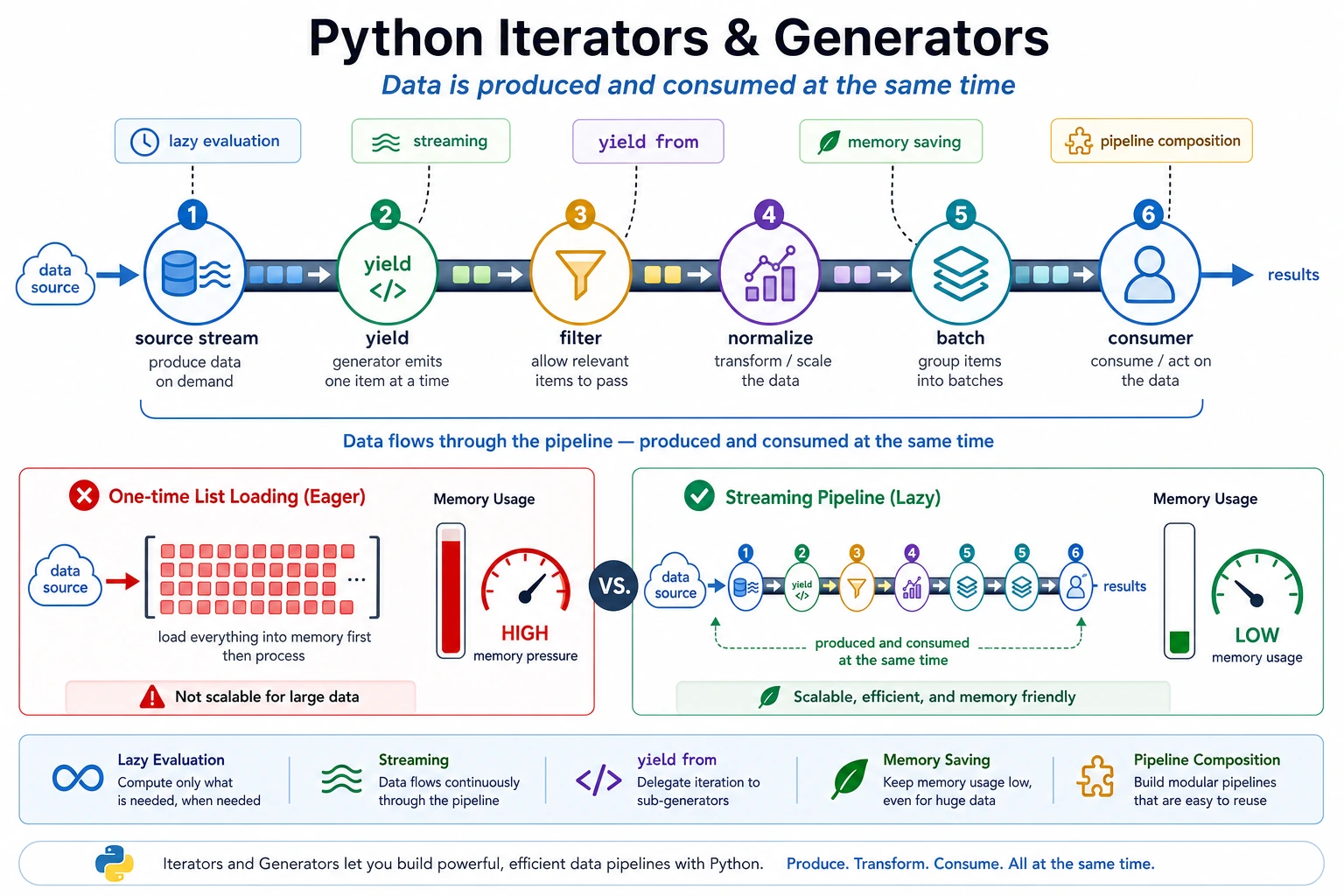
Generators are useful when data arrives as a stream: logs, files, API pages, sample batches, retrieval results, or model outputs. They produce one item at a time, so you avoid building unnecessary intermediate lists.
What You Need
Section titled “What You Need”- Python 3.10+
- No external packages
- Basic understanding of
forloops
Key Terms
Section titled “Key Terms”- Iterator: an object that can produce the next value.
- Generator: a function that uses
yieldto produce values lazily. - Lazy evaluation: compute the next value only when needed.
- Pipeline: small processing steps chained together.
yield from: forward values from another iterable.
Run A Streaming Pipeline
Section titled “Run A Streaming Pipeline”Create generator_pipeline.py:
def read_events():    events = [        "INFO request ok",        "ERROR db timeout",        "INFO cache hit",        "ERROR auth failed",        "ERROR model busy",    ]    for event in events:        yield event

def filter_errors(events):    for event in events:        if event.startswith("ERROR"):            yield event

def normalize(events):    for event in events:        yield event.lower()

def batch(items, size):    group = []    for item in items:        group.append(item)        if len(group) == size:            yield group            group = []    if group:        yield group

pipeline = batch(normalize(filter_errors(read_events())), size=2)
for group in pipeline:    print(group)
Run it:
python generator_pipeline.pyExpected output:
['error db timeout', 'error auth failed']['error model busy']The pipeline reads, filters, normalizes, and batches without creating a full list at every step.
Pipeline Review
Section titled “Pipeline Review”Review a generator pipeline by following one item from source to output. In this example, an event is read, filtered, normalized, batched, and printed. If you cannot explain one item’s path, the pipeline is probably too clever or missing names.
Generators are especially useful for logs, RAG chunks, dataset rows, and streamed model output. The project evidence should show both the final output and the pipeline shape, because the main benefit is controlled data movement rather than a fancy syntax trick.
Use yield from
Section titled “Use yield from”Run this small standalone demo:
def flatten(groups):    for group in groups:        yield from group
pipeline = [    ["error db timeout", "error auth failed"],    ["error model busy"],]
for item in flatten(pipeline):    print(item)
Expected output:
error db timeouterror auth failederror model busyThis expresses “send every item inside each group outward” more clearly than a nested loop.
When Generators Help
Section titled “When Generators Help”Use generators when:
- The input may be large.
- You process records one by one.
- You want to connect read/filter/transform/batch steps.
- You do not need random access to all items.
Prefer a list when the data is small and repeated access makes the code simpler.
Pipeline Review
Section titled “Pipeline Review”Review an iterator pipeline by checking three moments: the first item, a middle item, and the final count. This catches empty streams, skipped rows, and generators that are consumed once and then silently produce nothing.
In AI data work, iterators are valuable because they let you inspect a stream without loading everything into memory. Keep a short trace that shows which rows were read, which rows were filtered, and which rows reached the model or evaluator.
Evidence to Keep
Section titled “Evidence to Keep”Keep this page’s proof of learning as a small evidence card:
- Python Pattern
- decorator, iterator, generator, concurrency primitive, or metaprogramming hook
- Code Artifact
- minimal runnable example plus printed output
- Use Case
- where this pattern improves an AI app, pipeline, tool, or server
- Failure Check
- hidden side effects, unreadable abstraction, race condition, or overengineering
- Expected Output
- small advanced-Python example with a practical AI-system use note
Common Mistakes
Section titled “Common Mistakes”- Expecting a generator to be reusable after it has been consumed.
- Assuming generators are always faster; their main benefit is often memory and structure.
- Making a simple list transformation harder to read by forcing
yieldeverywhere.
Practice
Section titled “Practice”Modify batch so it also prints batch_id. Then change the input events and confirm the pipeline still works without changing the later steps.
Reference implementation and walkthrough
One acceptable answer is to enumerate batches at the output edge:
for batch_id, group in enumerate(batch(normalized, size=2), start=1): print(batch_id, group)This keeps the earlier reader, filter, and normalizer unchanged. If changing input events only changes the printed groups, while the pipeline structure stays intact, the exercise worked. The core lesson is that generator pipelines should let you swap data without rewriting every downstream step.