
9.0 Learning Checklist: AI Agents and Agent Systems
Use this page as a printable checklist. If you need the full explanation, return to the Chapter 9 entry page.
Two-Hour First Pass
Section titled “Two-Hour First Pass”| Time box | Do this | Stop when you can say |
|---|---|---|
| 20 min | Read the execution loop on the entry page | ”An Agent is a goal-state-tool-observation loop.” |
| 25 min | Run the trace script | ”I can replay every action and observation.” |
| 25 min | Skim 9.1 and 9.2 | ”I can separate Agent, workflow, RAG, ReAct, and Plan-and-Execute.” |
| 25 min | Skim 9.3 tool safety | ”Tool schema and permissions matter more than clever prompting.” |
| 25 min | Read the boundary map | ”I know when not to use an Agent.” |
Required Evidence
Section titled “Required Evidence”| Evidence | Minimum version |
|---|---|
tools_schema.md | 1-2 tools with name, purpose, parameters, return value, errors, and risk level |
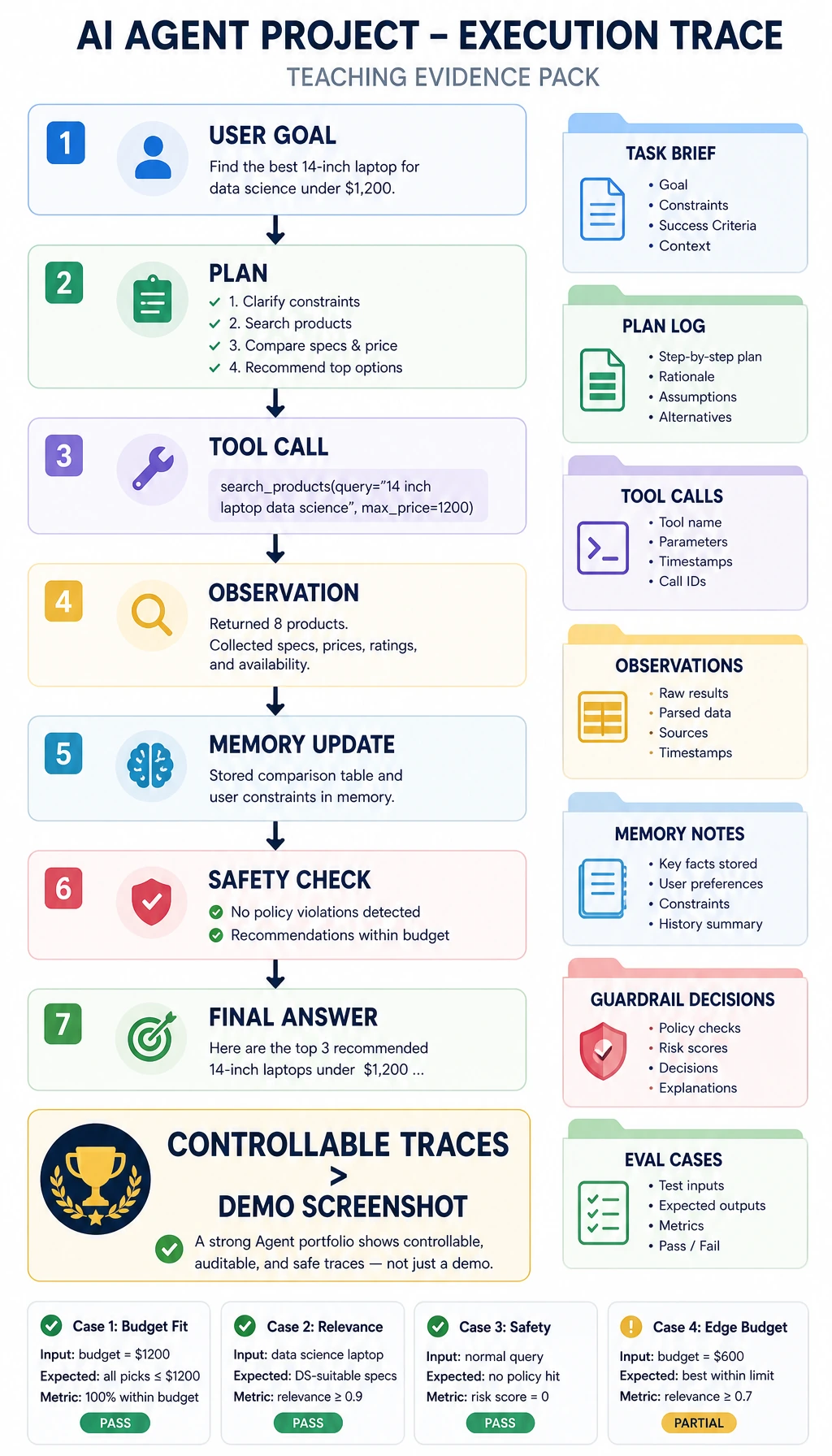
agent_traces.jsonl | at least three runs with goal, step, action, input, observation, and result |
safety_boundary.md | maximum steps, tool whitelist, blocked actions, human approval rules |
protocol_card.md | MCP/server capability, peer-agent handoff fields, authorization rule, trace fields |
agent_sandbox_trace.json | allow/confirm/deny decisions with at least one blocked injection or tool-poisoning case |
failure_cases.md | at least three failures: wrong tool, bad parameter, loop, blocked permission, unsupported answer |
eval_tasks.csv | 3-5 fixed tasks with expected outcome and success criteria |
README.md | run command, trace example, safety example, evaluation result, limitation |
Evidence to Keep
Section titled “Evidence to Keep”Keep this page’s proof of learning as a small evidence card:
- Single Agent Trace
- one complete goal-plan-action-observation loop
- Tool Contract
- schema, permission, protocol card, error behavior, and observation
- Memory Note
- what is written, retrieved, forgotten, or updated
- Eval Note
- success score, safety check, sandbox trace, and failure reason
- Project Readme
- run command, trace, limitations, and next action
Quality Gates
Section titled “Quality Gates”| Gate | Pass condition |
|---|---|
| Tool schema | Each tool has purpose, parameters, return value, errors, and risk level. |
| Trace replay | A reviewer can replay why every tool call happened. |
| Safety boundary | Non-whitelisted or risky actions are blocked or routed to human approval. |
| Stop control | Max steps and stop conditions prevent loops and cost spikes. |
Expected result: your Chapter 9 project folder contains tool schemas, replayable traces, safety boundaries, fixed eval tasks, failure notes, and a README that explains why the design stays single-Agent until the loop is reliable.
Exit Questions
Section titled “Exit Questions”- Can you explain why an Agent is different from a normal LLM application?
- Can you show a trace and explain why each tool call happened?
- Can you block a risky or non-whitelisted tool?
- Can you separate tool discovery from authorization and agent handoff?
- Can you define a stop condition and maximum step count?
- Can you explain why multi-agent should come after single-Agent reliability?
Check reasoning and explanation
- An Agent keeps a goal-plan-tool-observation loop, so the system can act, inspect the result, and decide the next step instead of only generating one reply.
- A useful trace shows the goal, planned step, tool call, input, observation, and why the next step followed from that observation.
- Block risky or non-whitelisted tools with a tool allowlist, schema checks, risk labels, maximum step limits, and human approval when needed.
- Good stop conditions include success, no progress, max steps reached, or risk escalation.
- Single-Agent stability comes first because multi-agent systems are harder to trace, debug, and control safely.
If the answer is yes, continue to the next direction: deployment, multimodal Agents, or the final course project.
Evidence to Keep
Section titled “Evidence to Keep”Keep this page’s proof of learning as a small evidence card:
- Single Agent Trace
- one complete goal-plan-action-observation loop
- Tool Contract
- schema, permission, error behavior, and observation
- Memory Note
- what is written, retrieved, forgotten, or updated
- Eval Note
- success score, safety check, and failure reason
- Project Readme
- run command, trace, limitations, and next action