
2.3.3 Project: Web API Development
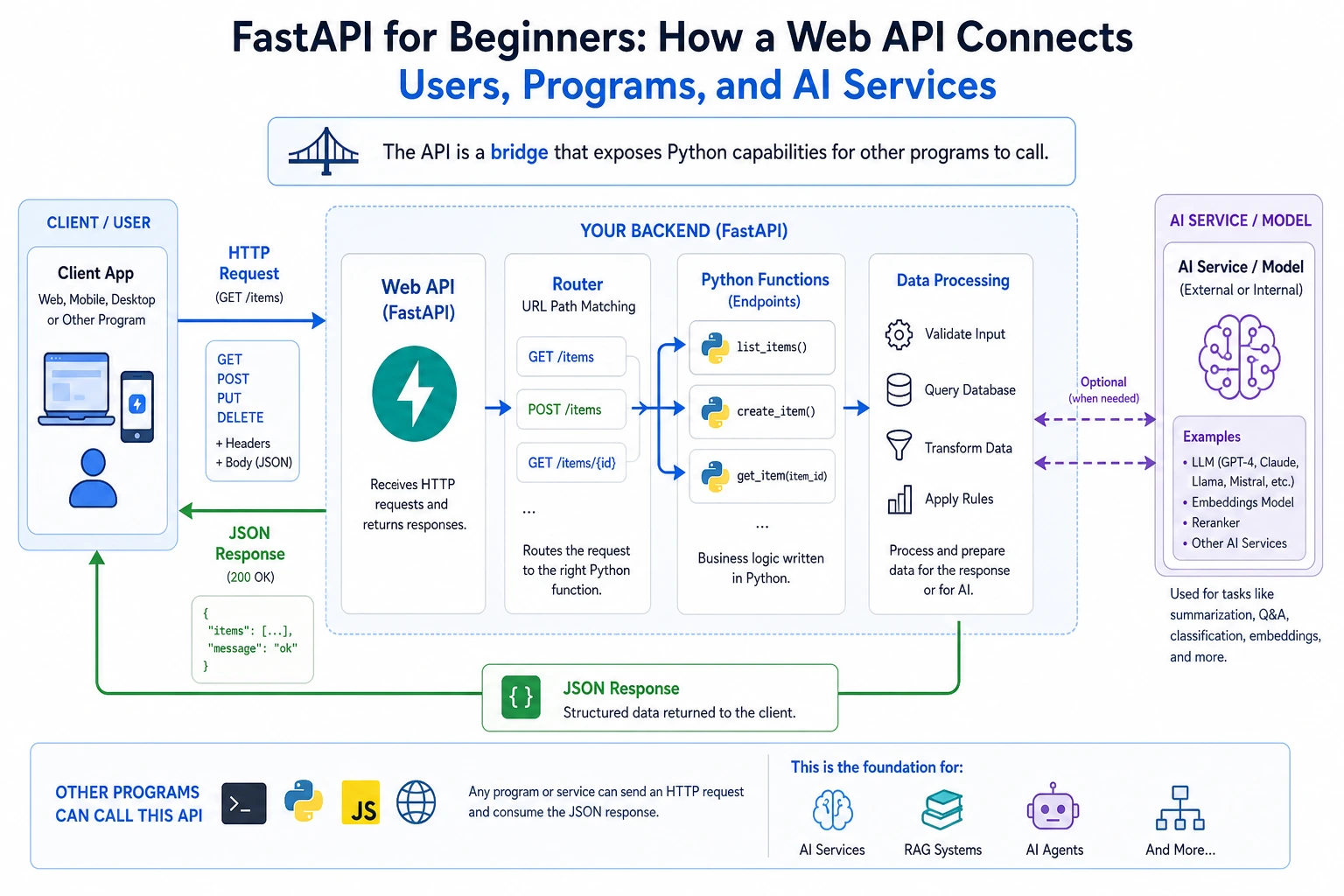
Project Overview
Section titled “Project Overview”This project takes Python from scripts to the server side. You will use FastAPI to wrap functionality into interfaces that other programs can call, understand how APIs connect models, applications, and users, and lay the groundwork for later AI application development.
Project Goals
Section titled “Project Goals”- Understand what an API is and why AI engineers need to know how to write APIs
- Learn how to use the FastAPI framework to build a Web API
- Master the basic design principles of RESTful APIs
- Build an AI service interface that can be called by other programs
Why do AI engineers need to know how to write APIs?
Section titled “Why do AI engineers need to know how to write APIs?”You trained a great AI model — then what?
Training the model is only the first step. To let others use your model, you need to wrap it as an API service:
Your AI model  →  wrapped as an API  →  called by mobile apps / websites / other programs
Examples:- ChatGPT model → provide service through an API → called by various apps- Image recognition model → through an API → users upload images and get recognition results- Recommendation algorithm → through an API → e-commerce websites show recommended products
So APIs are the bridge between AI models and the real world.
What is an API?
Section titled “What is an API?”API (Application Programming Interface) = Application Programming Interface.
Simply put, an API is a “conversation window” between programs.
Going to a restaurant to eat is just like making an API call:
You (client) → tell the server (API) "one bowl of beef noodles" (request)The server → passes it to the kitchen (server)The kitchen → makes the noodlesThe server → brings the noodles to you (response)You do not need to know how the kitchen makes the noodles. You only need to know how to order (send a request) and how to receive the food (get a response).
Core concepts of Web APIs
Section titled “Core concepts of Web APIs”| Concept | Description | Analogy |
|---|---|---|
| URL (endpoint) | The address of the API | Restaurant address |
| HTTP method | Type of operation | Ordering / returning a dish / adding a dish |
| Request body | The data you send | The dish you want |
| Response | The returned result | The dish served to you |
| Status code | Whether the operation succeeded | 200 = success, 404 = no such dish |
HTTP methods
Section titled “HTTP methods”| Method | Use | Example |
|---|---|---|
GET | Retrieve data | Get task list |
POST | Create data | Add a new task |
PUT | Update data (entirely) | Modify all task information |
DELETE | Delete data | Delete a task |
Step 1: Install FastAPI
Section titled “Step 1: Install FastAPI”pip install fastapi uvicorn| Library | Purpose |
|---|---|
fastapi | Web framework for writing APIs |
uvicorn | ASGI server for running FastAPI apps |
Step 2: Hello World API
Section titled “Step 2: Hello World API”Create the file main.py:
from fastapi import FastAPI
# Create the app instanceapp = FastAPI(title="My First API", version="1.0")
# Define an endpoint@app.get("/")def root():    return {"message": "Hello, World!", "status": "running"}
@app.get("/hello/{name}")def hello(name: str):    return {"message": f"Hello, {name}!", "name": name}
Start the server:
uvicorn main:app --reloadmain= file name (main.py)app= FastAPI instance name--reload= automatically restart after code changes (for development)
Open your browser and visit:
http://127.0.0.1:8000→ see Hello Worldhttp://127.0.0.1:8000/hello/Xiaoming→ see a personalized greetinghttp://127.0.0.1:8000/docs→ automatically generated interactive API documentation!
Step 3: Build a task management API
Section titled “Step 3: Build a task management API”Let’s turn the task manager from the previous command line project into a Web API:
"""Task Management APIRun: uvicorn main:app --reloadDocs: http://127.0.0.1:8000/docs"""
from fastapi import FastAPI, HTTPExceptionfrom pydantic import BaseModelfrom datetime import datetime
# Create the appapp = FastAPI(    title="Task Management API",    description="A simple RESTful task management interface",    version="1.0")
# ---------- Data models ----------
class TaskCreate(BaseModel):    """Request body for creating a task"""    title: str    priority: str = "medium"
class TaskUpdate(BaseModel):    """Request body for updating a task"""    title: str | None = None    priority: str | None = None    done: bool | None = None
class Task(BaseModel):    """Full task data"""    id: int    title: str    priority: str    done: bool    created_at: str
# ---------- Mock database (in-memory storage) ----------
tasks_db: list[dict] = []next_id: int = 1
# ---------- API endpoints ----------
@app.get("/")def root():    """API homepage"""    return {        "name": "Task Management API",        "version": "1.0",        "endpoints": {            "View all tasks": "GET /tasks",            "Create a task": "POST /tasks",            "View a single task": "GET /tasks/{task_id}",            "Update a task": "PUT /tasks/{task_id}",            "Delete a task": "DELETE /tasks/{task_id}",            "API documentation": "GET /docs"        }    }

@app.get("/tasks")def get_tasks(done: bool | None = None):    """    Get all tasks.
    Optional parameter:    - done: filter completed (true) or incomplete (false) tasks    """    if done is not None:        filtered = [t for t in tasks_db if t["done"] == done]        return {"count": len(filtered), "tasks": filtered}    return {"count": len(tasks_db), "tasks": tasks_db}

@app.post("/tasks", status_code=201)def create_task(task: TaskCreate):    """Create a new task"""    global next_id
    new_task = {        "id": next_id,        "title": task.title,        "priority": task.priority,        "done": False,        "created_at": datetime.now().strftime("%Y-%m-%d %H:%M:%S")    }    tasks_db.append(new_task)    next_id += 1
    return {"message": "Task created successfully", "task": new_task}

@app.get("/tasks/{task_id}")def get_task(task_id: int):    """Get a task by its ID"""    for task in tasks_db:        if task["id"] == task_id:            return task
    # Task not found, return 404    raise HTTPException(status_code=404, detail=f"Task {task_id} does not exist")

@app.put("/tasks/{task_id}")def update_task(task_id: int, task_update: TaskUpdate):    """Update a task"""    for task in tasks_db:        if task["id"] == task_id:            if task_update.title is not None:                task["title"] = task_update.title            if task_update.priority is not None:                task["priority"] = task_update.priority            if task_update.done is not None:                task["done"] = task_update.done            return {"message": "Update successful", "task": task}
    raise HTTPException(status_code=404, detail=f"Task {task_id} does not exist")

@app.delete("/tasks/{task_id}")def delete_task(task_id: int):    """Delete a task"""    for i, task in enumerate(tasks_db):        if task["id"] == task_id:            removed = tasks_db.pop(i)            return {"message": "Delete successful", "task": removed}
    raise HTTPException(status_code=404, detail=f"Task {task_id} does not exist")

@app.get("/stats")def get_stats():    """Get task statistics"""    total = len(tasks_db)    done = sum(1 for t in tasks_db if t["done"])    return {        "total": total,        "done": done,        "pending": total - done,        "completion_rate": f"{done/total:.1%}" if total > 0 else "0%"    }
Run and test
Section titled “Run and test”# Start the serveruvicorn main:app --reloadThen open http://127.0.0.1:8000/docs, and you can test all APIs directly in the browser.
You can also test with the command line:
# Create a taskcurl -X POST http://127.0.0.1:8000/tasks \  -H "Content-Type: application/json" \  -d '{"title": "Learn FastAPI", "priority": "high"}'
# View all taskscurl http://127.0.0.1:8000/tasks
# Complete a taskcurl -X PUT http://127.0.0.1:8000/tasks/1 \  -H "Content-Type: application/json" \  -d '{"done": true}'
# Delete a taskcurl -X DELETE http://127.0.0.1:8000/tasks/1
Or use Python’s requests library:
import requests
BASE_URL = "http://127.0.0.1:8000"
# Create a taskresp = requests.post(f"{BASE_URL}/tasks", json={"title": "Learn Python", "priority": "high"})print(resp.json())
# Get all tasksresp = requests.get(f"{BASE_URL}/tasks")print(resp.json())
Understanding Pydantic data models
Section titled “Understanding Pydantic data models”FastAPI uses Pydantic to validate request data — you define the data model, and FastAPI checks it automatically:
from pydantic import BaseModel, Field
class TaskCreate(BaseModel):    title: str = Field(..., min_length=1, max_length=100, description="Task title")    priority: str = Field(default="medium", description="Priority: high/medium/low")
# If the user sends invalid data# POST /tasks {"title": ""} → automatically returns a 422 error (title too short)# POST /tasks {} → automatically returns a 422 error (missing title)# POST /tasks {"title": "OK"} → success, priority uses the default value "medium"
You do not need to write validation code by hand — Pydantic and FastAPI handle it for you.
Extension challenges
Section titled “Extension challenges”Challenge 1: Add file persistence
Section titled “Challenge 1: Add file persistence”Right now the data is stored in memory, so it disappears when the server restarts. Change it to save data in a JSON file.
Challenge 2: Add search
Section titled “Challenge 2: Add search”@app.get("/tasks/search")def search_tasks(keyword: str): """Search tasks by keyword""" keyword_lower = keyword.lower() return [task for task in tasks if keyword_lower in task.title.lower()]Challenge 3: Add pagination
Section titled “Challenge 3: Add pagination”When there are many tasks, support paginated responses:
GET /tasks?page=1&size=10Challenge 4: Connect an AI model
Section titled “Challenge 4: Connect an AI model”Preview for later: create a /predict endpoint that accepts text input and returns sentiment analysis results.
Project reference and review notes
- Add persistence by loading tasks at startup and saving after each create, update, or delete. Keeping the stored JSON shape close to the response shape makes debugging simpler.
- Add
/tasks/searchwith case-insensitive substring matching on the title. - Add pagination by accepting
pageandsize, then slicing the task list before returning the response. - Treat the AI endpoint as an extension only after the CRUD API is stable. Reuse the same validation and error-handling style so the new route behaves predictably.
- Self-check: open
/docs, test each endpoint withcurl, and confirm that invalid payloads produce FastAPI’s automatic 422 validation errors.
Project self-checklist
Section titled “Project self-checklist”- The API can start and be accessed normally
- Full CRUD (create, read, update, delete) operations are implemented
- Pydantic is used for data validation
- Proper error handling is in place (HTTPException)
- The automatically generated API docs (
/docs) work correctly - All endpoints can be tested with curl or requests
Suggested version roadmap
Section titled “Suggested version roadmap”| Version | Goal | Delivery focus |
|---|---|---|
| Basic version | Make the minimal loop run end to end | Can input, process, and output, and keep a set of examples |
| Standard version | Shape it into a presentable project | Add configuration, logs, error handling, a README, and screenshots |
| Challenge version | Approach portfolio quality | Add evaluation, comparison experiments, failure sample analysis, and next-step roadmap |
It is recommended to finish the basic version first. Do not chase a huge, all-in-one project at the beginning. Each time you upgrade to a new version, write down in the README what new capability was added, how it was verified, and what problems remain.
Evidence to Keep
Section titled “Evidence to Keep”Keep this page’s proof of learning as a small evidence card:
- Project Goal
- CLI, scraper, API, AI API call, or integrated Python workshop target
- Run Command
- exact command used to start the project
- Artifact
- output file, API response, JSON record, screenshot, or README note
- Failure Check
- dependency, network, parsing, route, input validation, or API-key issue
- Expected Output
- reproducible mini project folder with run result and one failure case