
2.2.2 Exception Handling
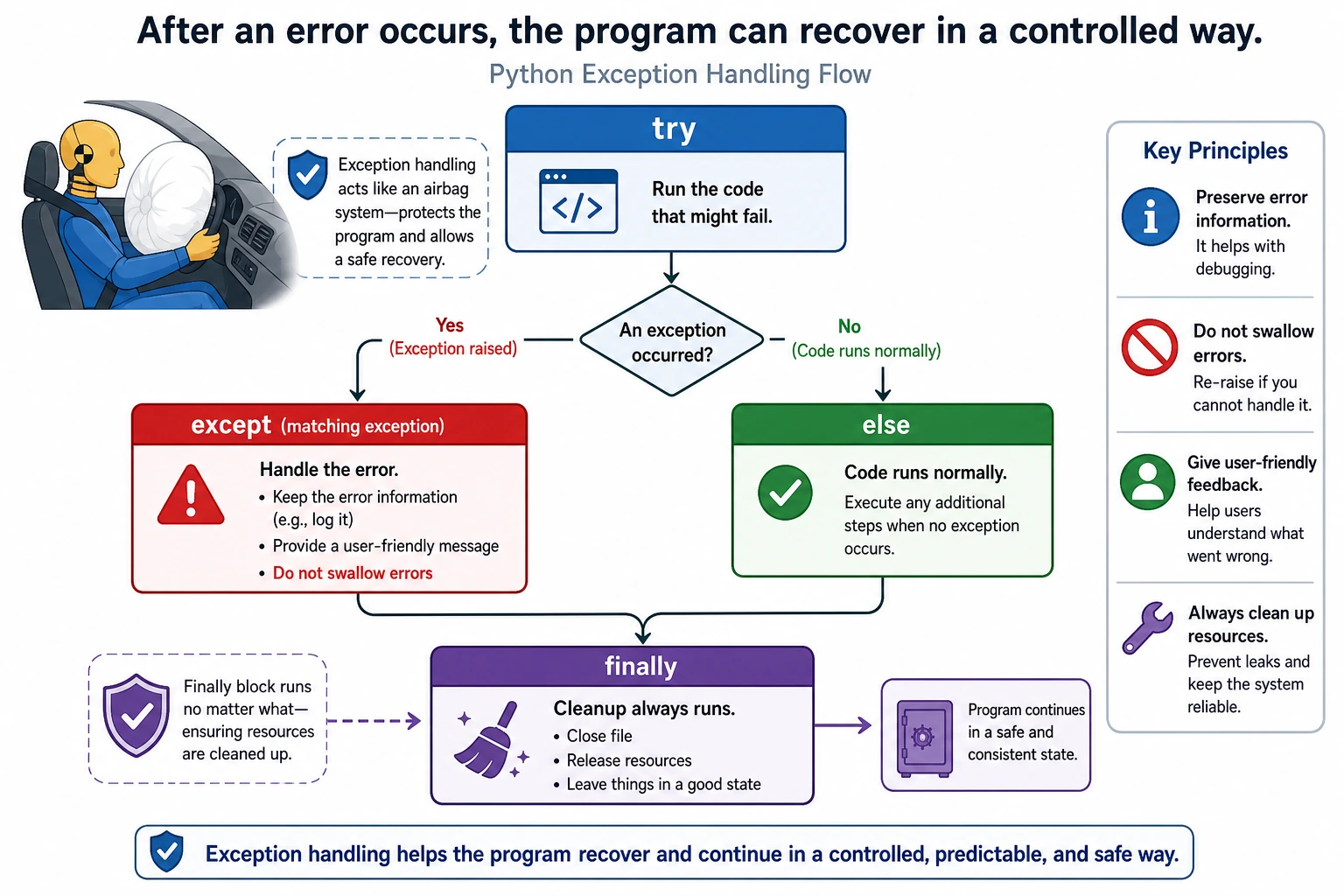
Where this section fits
Section titled “Where this section fits”This section helps your program avoid crashing immediately when something goes wrong. Exception handling comes up again and again in file I/O, network requests, API calls, data cleaning, and model inference. The key is to learn how to anticipate errors, catch errors, and provide recoverable handling.
Learning objectives
Section titled “Learning objectives”- Understand what exceptions are and why they need to be handled
- Master the use of
try/except/else/finally - Learn how to catch different types of exceptions
- Write robust programs that do not crash easily
What is an exception?
Section titled “What is an exception?”An exception is an error that occurs while a program is running. A program without exception handling will crash immediately when it encounters an error:
# These lines will all crash the programprint(10 / 0)           # ZeroDivisionError: division by zeroprint(int("abc"))        # ValueError: cannot convertprint([1, 2, 3][10])     # IndexError: list index out of rangeprint({"a": 1}["b"])     # KeyError: key does not exist
# If the program crashes, the code below will never runprint("This line will never be executed")
In real programs, errors are unavoidable — users may enter invalid data, files may not exist, and networks may disconnect. Exception handling lets you respond to these problems gracefully instead of letting the program crash.
Evidence to Keep
Section titled “Evidence to Keep”Keep this page’s proof of learning as a small evidence card:
- Pattern
- class, exception, file IO, functional pipeline, generator, or type hint
- Code Artifact
- minimal runnable example and one realistic use case
- Output
- printed object state, caught error, saved file, yielded values, or type-check note
- Failure Check
- hidden mutation, swallowed exception, file path issue, lazy iterator confusion, or misleading annotation
- Expected Output
- small advanced-Python example with a debugging note
Common exception types
Section titled “Common exception types”| Exception type | Trigger scenario | Example |
|---|---|---|
ZeroDivisionError | Division by zero | 1 / 0 |
TypeError | Mismatched operation types | "hello" + 5 |
ValueError | Invalid value | int("abc") |
IndexError | List index out of range | [1, 2][5] |
KeyError | Dictionary key does not exist | {"a": 1}["b"] |
FileNotFoundError | File does not exist | open("nonexistent.txt") |
AttributeError | Attribute does not exist | "hello".foo() |
NameError | Variable is not defined | print(xyz) |
ImportError | Import failed | import nonexistent_module |
Basic try / except usage
Section titled “Basic try / except usage”The logic of try/except is: try to run the code, and if something goes wrong, run an alternative plan.
try:    number = int(input("Please enter a number: "))    print(f"You entered: {number}")except ValueError:    print("Invalid input! Please enter a number.")
print("The program continues running...")  # This line runs whether or not there was an exception
Output behavior:
| Input | What happens |
|---|---|
42 | Prints You entered: 42, then continues. |
abc | Prints the invalid-input message, then continues. |
Key point: with try/except, the program will not crash because of an error.
Catching different types of exceptions
Section titled “Catching different types of exceptions”Catching multiple exceptions
Section titled “Catching multiple exceptions”def safe_divide(a, b): try: result = a / b return result except ZeroDivisionError: print("Error: cannot divide by zero!") return None except TypeError: print("Error: please pass numbers!") return None
print(safe_divide(10, 3)) # 3.333...print(safe_divide(10, 0)) # Error: cannot divide by zero! → Noneprint(safe_divide("10", 3)) # Error: please pass numbers! → NoneCatching multiple exceptions (combined form)
Section titled “Catching multiple exceptions (combined form)”try: # Code that may fail value = int(input("Please enter a number: ")) result = 100 / value print(f"Result: {result}")except (ValueError, ZeroDivisionError) as e: print(f"An error occurred: {e}")else: print("Input was valid and division succeeded.")Getting exception information
Section titled “Getting exception information”try: number = int("abc")except ValueError as e: print(f"Exception type: {type(e).__name__}") # ValueError print(f"Exception message: {e}") # invalid literal for int() with base 10: 'abc'Catching all exceptions (use with caution)
Section titled “Catching all exceptions (use with caution)”try: # Some code result = risky_operation()except Exception as e: print(f"An unexpected error occurred: {type(e).__name__}: {e}")else: print(f"Operation succeeded: {result}")try / except / else / finally
Section titled “try / except / else / finally”A complete exception-handling structure has four parts:
try: # Code to try file = open("data.txt", "r") content = file.read()except FileNotFoundError: # Runs when an error occurs print("File not found!")else: # Runs when no error occurs print(f"File content: {content}")finally: # Runs whether or not an error occurs (usually for cleanup) print("Operation complete")| Clause | When it runs | Purpose |
|---|---|---|
try | Always | Put code that may fail here |
except | Only when an error occurs | Handle the error |
else | Only when no error occurs | Put success logic here |
finally | Always, regardless of errors | Clean up resources (close files, disconnect connections) |
Typical use of finally
Section titled “Typical use of finally”file = Nonetry: file = open("data.txt", "r") data = file.read() data = data.strip() print(data)except FileNotFoundError: print("File not found")finally: if file: file.close() # Always close the file, whether or not there was an error print("File closed")Raising exceptions
Section titled “Raising exceptions”In addition to handling exceptions, you can also raise exceptions proactively — when you detect an invalid state, you tell the caller that “something is wrong.”
The raise statement
Section titled “The raise statement”def set_age(age): if not isinstance(age, int): raise TypeError("Age must be an integer") if age < 0 or age > 150: raise ValueError(f"Age {age} is invalid and should be between 0 and 150") return age
# Normal useprint(set_age(25)) # 25
# Trigger an exceptiontry: set_age(-5)except ValueError as e: print(f"Error: {e}") # Error: Age -5 is invalid and should be between 0 and 150
try: set_age("twenty")except TypeError as e: print(f"Error: {e}") # Error: Age must be an integerCustom exceptions
Section titled “Custom exceptions”When built-in exception types are not enough, you can define your own:
class InsufficientFundsError(Exception):    """Insufficient funds error"""    def __init__(self, balance, amount):        self.balance = balance        self.amount = amount        super().__init__(f"Insufficient funds: current balance {balance}, attempted withdrawal {amount}")
class BankAccount:    def __init__(self, balance=0):        self.balance = balance
    def withdraw(self, amount):        if amount > self.balance:            raise InsufficientFundsError(self.balance, amount)        self.balance -= amount        return self.balance
# Use itaccount = BankAccount(1000)try:    account.withdraw(1500)except InsufficientFundsError as e:    print(f"Transaction failed: {e}")    print(f"Current balance: {e.balance}, requested amount: {e.amount}")
Practical patterns
Section titled “Practical patterns”Pattern 1: LBYL vs EAFP
Section titled “Pattern 1: LBYL vs EAFP”The Python community prefers EAFP (Easier to Ask Forgiveness than Permission, try first and handle errors) over LBYL (Look Before You Leap, check first and then act):
# LBYL style (check before acting) — not very Pythonicif key in my_dict:    value = my_dict[key]else:    value = default_value
# EAFP style (act first, handle errors later) — more Pythonictry:    value = my_dict[key]except KeyError:    value = default_value
# Of course, dictionaries have an even better wayvalue = my_dict.get(key, default_value)
Pattern 2: Retry mechanism
Section titled “Pattern 2: Retry mechanism”import time
def fetch_data_with_retry(url, max_retries=3): """Fetch data with retries""" for attempt in range(1, max_retries + 1): try: print(f"Attempt {attempt}...") # Simulate a network request import random if random.random() < 0.5: raise ConnectionError("Network connection failed") return "Fetched data" except ConnectionError as e: print(f" Failed: {e}") if attempt < max_retries: wait = attempt * 2 # Increasing wait time print(f" Retrying in {wait} seconds...") time.sleep(wait) else: print(" All retries failed!") raise # If the last retry fails, re-raise the exception
try: data = fetch_data_with_retry("https://api.example.com") print(f"Success: {data}")except ConnectionError: print("Failed to fetch data საბოლო")Pattern 3: Safe user input
Section titled “Pattern 3: Safe user input”def get_number(prompt, min_val=None, max_val=None): """Safely get a number from user input""" while True: try: value = float(input(prompt)) if min_val is not None and value < min_val: print(f"Please enter a number no less than {min_val}") continue if max_val is not None and value > max_val: print(f"Please enter a number no greater than {max_val}") continue return value except ValueError: print("Please enter a valid number!")
# Use itage = get_number("Please enter your age: ", min_val=0, max_val=150)print(f"Your age is: {age}")Comprehensive example: a safe task estimate manager
Section titled “Comprehensive example: a safe task estimate manager”class TaskEstimateManager: def __init__(self): self.tasks = {}
def add_task(self, name, hours): """Add a task estimate""" if not isinstance(name, str) or not name.strip(): raise ValueError("Task name cannot be empty") if not isinstance(hours, (int, float)): raise TypeError(f"Hours must be a number, got: {type(hours).__name__}") if not 0 <= hours <= 80: raise ValueError(f"Hours {hours} is out of range (0-80)")
self.tasks[name] = hours print(f"✅ Added successfully: {name} - {hours} hours")
def get_average_hours(self): """Get the average estimate""" if not self.tasks: raise RuntimeError("No task data available, cannot calculate average") return sum(self.tasks.values()) / len(self.tasks)
def get_task(self, name): """Look up a task estimate""" if name not in self.tasks: raise KeyError(f"Cannot find task: {name}") return self.tasks[name]
# Use itmanager = TaskEstimateManager()
# Safely add task estimatestest_data = [ ("Login API", 8), ("RAG demo", 12), ("Chart view", "soon"), # Type error ("Data import", 120), # Range error ("", 6), # Empty name ("Deploy script", 5),]
for name, hours in test_data: try: manager.add_task(name, hours) except (ValueError, TypeError) as e: print(f"❌ Add failed: {e}")
# Queryprint(f"\nAverage estimate: {manager.get_average_hours():.1f} hours")
try: print(manager.get_task("Payment flow"))except KeyError as e: print(f"Lookup failed: {e}")Hands-on exercises
Section titled “Hands-on exercises”Exercise 1: Safe calculator
Section titled “Exercise 1: Safe calculator”def safe_calculator(inputs=None): """A safe calculator that can handle invalid input and division by zero.""" inputs = iter(inputs or ["10", "0", "/", "n"])
while True: try: a = float(next(inputs) if inputs else input("First number: ")) b = float(next(inputs) if inputs else input("Second number: ")) op = next(inputs) if inputs else input("Operator (+, -, *, /): ")
if op == "+": result = a + b elif op == "-": result = a - b elif op == "*": result = a * b elif op == "/": result = a / b else: raise ValueError(f"Unsupported operator: {op}")
print(f"Result: {result}") except ZeroDivisionError: print("Cannot divide by zero.") except ValueError as error: print(f"Invalid input: {error}") except StopIteration: break
again = next(inputs, "n") if inputs else input("Continue? (y/n): ") if again.lower() != "y": break
safe_calculator()Exercise 2: File reader
Section titled “Exercise 2: File reader”def read_file_safely(filename): """Safely read file contents.""" try: with open(filename, "r", encoding="utf-8") as file: return file.read() except FileNotFoundError: print(f"File not found: {filename}") except PermissionError: print(f"No permission to read: {filename}") except OSError as error: print(f"Read failed: {error}") return None
content = read_file_safely("test.txt")if content: print(content)Exercise 3: Batch type conversion
Section titled “Exercise 3: Batch type conversion”def convert_to_numbers(data_list): """Convert strings to numbers; keep errors for later inspection.""" numbers = [] errors = [] for item in data_list: try: numbers.append(float(item)) except ValueError: numbers.append(None) errors.append(f"{item} cannot be converted") return numbers, errors
values, errors = convert_to_numbers(["10", "20.5", "abc", "30", "xyz"])print(values)print(errors)Reference implementation and walkthrough
safe_calculatorshould parse each input, branch on the operator, and catchZeroDivisionError,ValueError, andStopIteration. With the default sample input, it will hit the divide-by-zero path once, print the friendly error, and then exit on the finaln.read_file_safelyshould use awithblock, catchFileNotFoundError,PermissionError, and otherOSErrors, and returnNonewhen reading fails so callers can decide the next step.convert_to_numbersshould return two parallel lists: parsed numbers and conversion failures. PuttingNonein the numeric list keeps the batch aligned while still exposing bad records.
Summary
Section titled “Summary”| Syntax | Purpose | When to use |
|---|---|---|
try | Wrap code that may fail | Anywhere errors may occur |
except | Catch and handle exceptions | For specific exception types |
else | Runs when no exception occurs | Success logic |
finally | Always runs | Resource cleanup |
raise | Raise an exception proactively | When input is invalid or state is wrong |
| Custom exceptions | Create business-specific exceptions | When built-in exceptions are not descriptive enough |