
2.3.5 Follow-Along Workshop: Build a Local Learning Task Assistant
What you will build
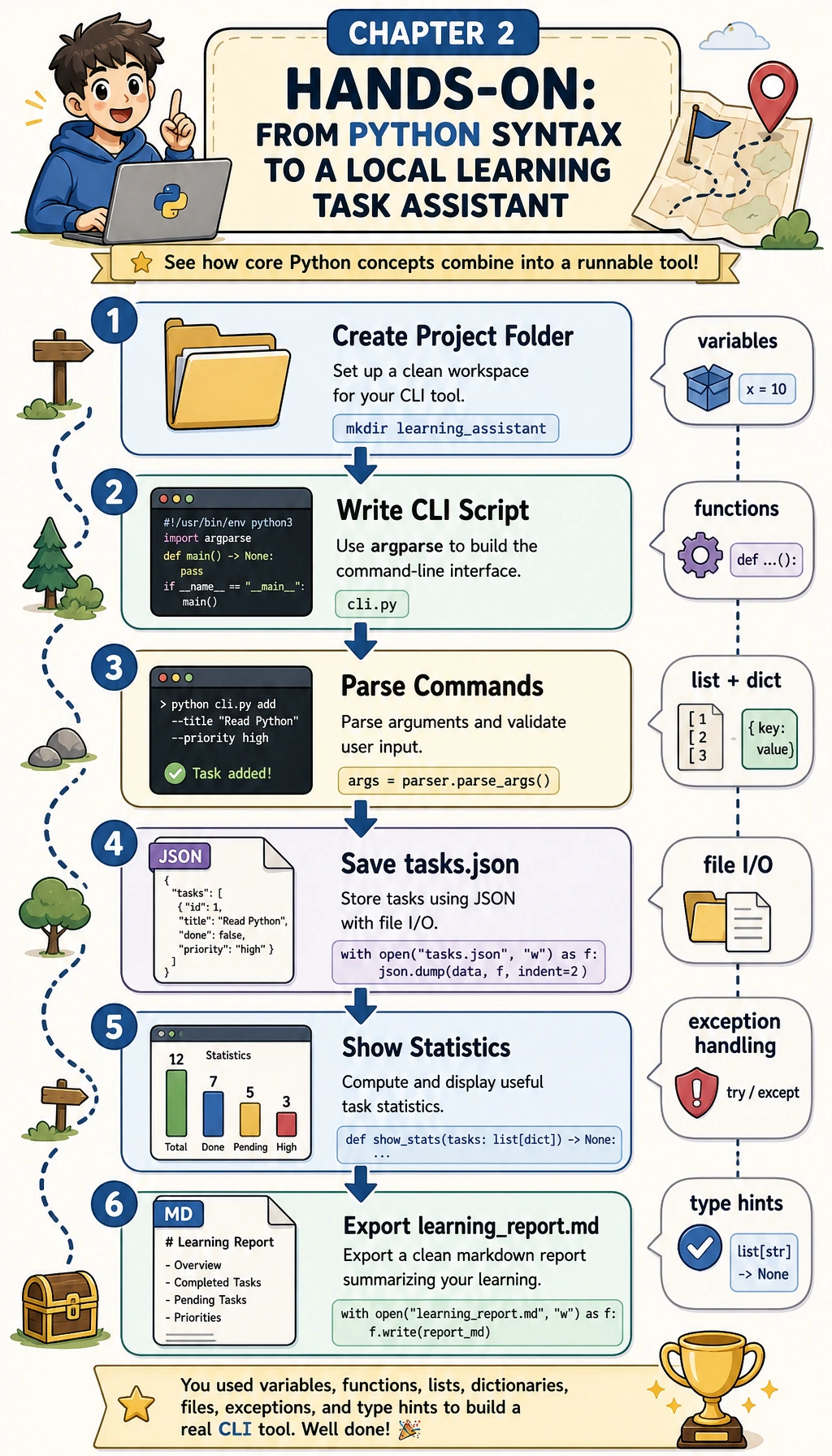
Section titled “What you will build”You will build a command-line learning task assistant named learning_assistant_cli.py. It uses only the Python standard library, so you do not need to install third-party packages.
After following the steps, you will be able to run commands like:
python3 learning_assistant_cli.py seedpython3 learning_assistant_cli.py listpython3 learning_assistant_cli.py add "Practice command-line arguments" --stage 2.3 --tag argparsepython3 learning_assistant_cli.py done 2python3 learning_assistant_cli.py statspython3 learning_assistant_cli.py exportThe project will create:
| File | Purpose |
|---|---|
learning_assistant_cli.py | The runnable Python program |
ch02_output/tasks.json | Saved learning tasks |
ch02_output/learning_report.md | Exported portfolio evidence |
Step 0: Create a clean practice folder
Section titled “Step 0: Create a clean practice folder”Run these commands in a terminal:
mkdir ch02-learning-assistant-workshopcd ch02-learning-assistant-workshoppython3 --versionExpected output looks like this. The exact version number can be different.
Python 3.12.3This workshop uses modern Python standard-library features such as dataclass, list[str], and str | None. Use Python 3.10 or newer.
Step 1: See the whole program before typing
Section titled “Step 1: See the whole program before typing”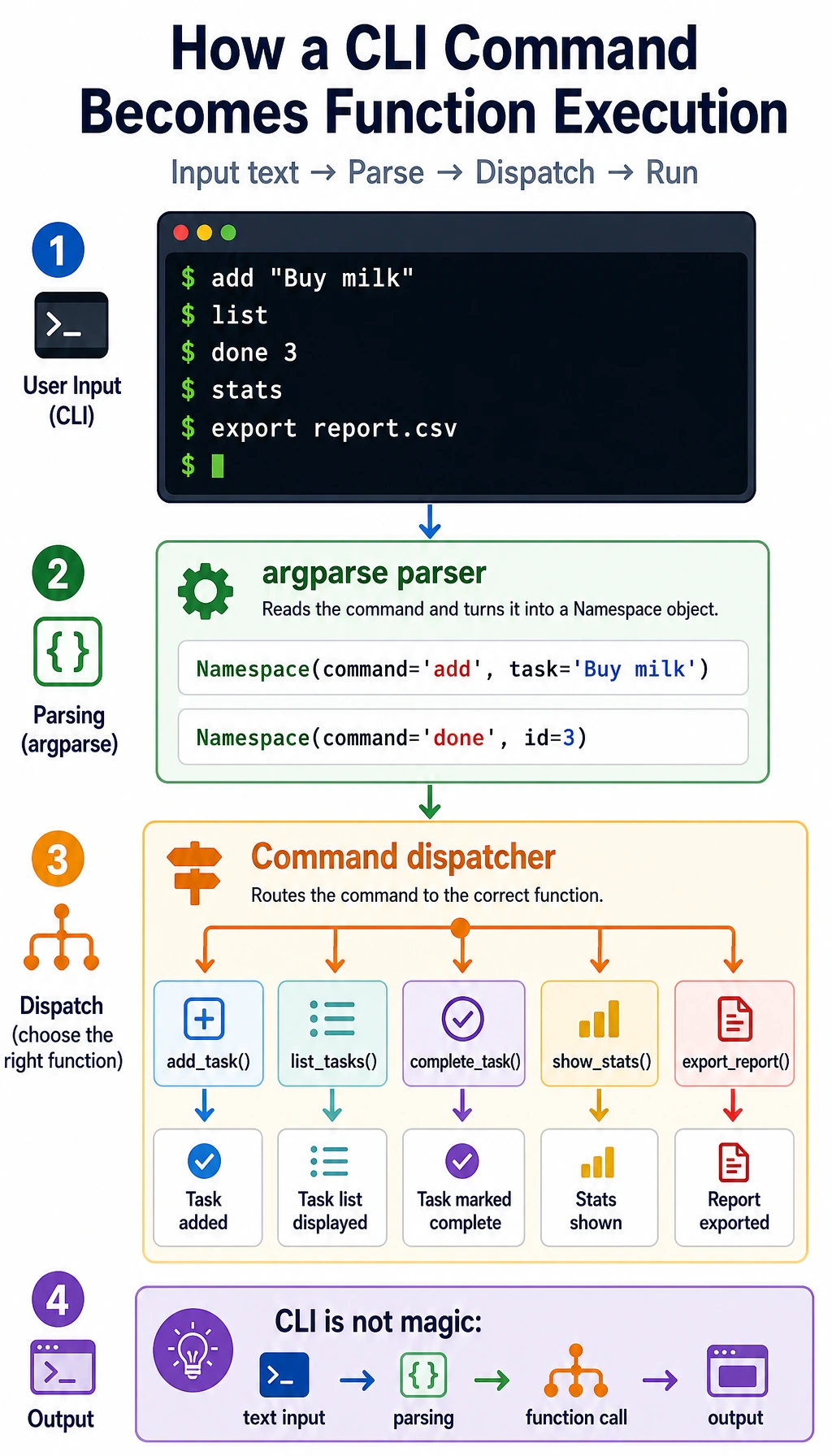
The program follows one simple route:
| Step | What happens | Python concept |
|---|---|---|
| User types a command | add, list, done, stats, or export | command-line arguments |
argparse parses it | The command becomes structured data | functions and modules |
| The program loads JSON | Existing tasks are read from disk | file I/O and exceptions |
| A command function runs | Data is changed or summarized | lists, dictionaries, loops |
| The program saves output | JSON or Markdown is written back | persistence |
Keep this picture in mind while reading the code. You are building a small but complete program, not just practicing isolated syntax.
Step 2: Create the full script
Section titled “Step 2: Create the full script”Create a file named learning_assistant_cli.py, then paste the code below.
from __future__ import annotations
import argparseimport jsonfrom dataclasses import asdict, dataclass, fieldfrom datetime import datetime, timezonefrom pathlib import Path
OUTPUT_DIR = Path("ch02_output")DATA_FILE = OUTPUT_DIR / "tasks.json"REPORT_FILE = OUTPUT_DIR / "learning_report.md"

def utc_now() -> str:    return datetime.now(timezone.utc).replace(microsecond=0).isoformat()

@dataclassclass Task:    id: int    title: str    stage: str    tags: list[str]    done: bool = False    created_at: str = field(default_factory=utc_now)    completed_at: str | None = None

def ensure_output_dir() -> None:    OUTPUT_DIR.mkdir(exist_ok=True)

def load_tasks() -> list[Task]:    if not DATA_FILE.exists():        return []    try:        raw_tasks = json.loads(DATA_FILE.read_text(encoding="utf-8"))    except json.JSONDecodeError as exc:        raise SystemExit(f"Cannot read {DATA_FILE}: invalid JSON at line {exc.lineno}. Fix or remove the file, then rerun.") from exc    return [Task(**item) for item in raw_tasks]

def save_tasks(tasks: list[Task]) -> None:    ensure_output_dir()    data = [asdict(task) for task in tasks]    DATA_FILE.write_text(json.dumps(data, ensure_ascii=False, indent=2), encoding="utf-8")

def next_id(tasks: list[Task]) -> int:    if not tasks:        return 1    return max(task.id for task in tasks) + 1

def seed_tasks(_: argparse.Namespace) -> None:    tasks = [        Task(id=1, title="Read Python functions", stage="2.1", tags=["functions"]),        Task(id=2, title="Practice JSON file saving", stage="2.2", tags=["json", "file-io"]),        Task(id=3, title="Build the first CLI command", stage="2.3", tags=["cli"]),    ]    save_tasks(tasks)    print(f"Wrote {len(tasks)} sample tasks to {DATA_FILE}")

def add_task(args: argparse.Namespace) -> None:    title = args.title.strip()    if not title:        raise SystemExit("Task title cannot be empty.")    tasks = load_tasks()    task = Task(id=next_id(tasks), title=title, stage=args.stage, tags=args.tag)    tasks.append(task)    save_tasks(tasks)    print(f"Added task #{task.id}: {task.title}")

def list_tasks(_: argparse.Namespace) -> None:    tasks = load_tasks()    if not tasks:        print("No tasks yet. Run: python learning_assistant_cli.py add \"Read functions\"")        return    print("ID  Status  Stage  Title")    print("--  ------  -----  -----")    for task in tasks:        status = "done" if task.done else "todo"        print(f"{task.id:<2}  {status:<6}  {task.stage:<5}  {task.title}")

def complete_task(args: argparse.Namespace) -> None:    tasks = load_tasks()    for task in tasks:        if task.id == args.id:            task.done = True            task.completed_at = utc_now()            save_tasks(tasks)            print(f"Completed task #{task.id}: {task.title}")            return    raise SystemExit(f"Task #{args.id} was not found.")

def show_stats(_: argparse.Namespace) -> None:    tasks = load_tasks()    total = len(tasks)    done = sum(task.done for task in tasks)    todo = total - done    by_stage: dict[str, int] = {}    for task in tasks:        by_stage[task.stage] = by_stage.get(task.stage, 0) + 1    rate = (done / total * 100) if total else 0    print(f"Total tasks: {total}")    print(f"Done: {done}")    print(f"Todo: {todo}")    print(f"Completion rate: {rate:.1f}%")    print("Tasks by stage:")    for stage, count in sorted(by_stage.items()):        print(f"- {stage}: {count}")

def export_report(_: argparse.Namespace) -> None:    tasks = load_tasks()    done = sum(task.done for task in tasks)    total = len(tasks)    lines = [        "# Python Learning Assistant Report",        "",        f"Generated at: {utc_now()}",        f"Total tasks: {total}",        f"Completed tasks: {done}",        "",        "## Tasks",        "",    ]    for task in tasks:        checkbox = "x" if task.done else " "        tags = ", ".join(task.tags) if task.tags else "-"        lines.append(f"- [{checkbox}] #{task.id} {task.title} (stage {task.stage}; tags: {tags})")    ensure_output_dir()    REPORT_FILE.write_text("\n".join(lines) + "\n", encoding="utf-8")    print(f"Exported report to {REPORT_FILE}")

def build_parser() -> argparse.ArgumentParser:    parser = argparse.ArgumentParser(description="Local learning-task assistant for Chapter 2 Python practice.")    subparsers = parser.add_subparsers(dest="command", required=True)
    seed_parser = subparsers.add_parser("seed", help="Create sample tasks.")    seed_parser.set_defaults(func=seed_tasks)
    add_parser = subparsers.add_parser("add", help="Add one learning task.")    add_parser.add_argument("title", help="Task title, wrapped in quotes if it contains spaces.")    add_parser.add_argument("--stage", default="2.1", help="Course stage or section, such as 2.1 or 2.3.")    add_parser.add_argument("--tag", action="append", default=[], help="Repeatable tag, such as --tag functions --tag json.")    add_parser.set_defaults(func=add_task)
    list_parser = subparsers.add_parser("list", help="List tasks.")    list_parser.set_defaults(func=list_tasks)
    done_parser = subparsers.add_parser("done", help="Mark one task as complete.")    done_parser.add_argument("id", type=int, help="Task id to complete.")    done_parser.set_defaults(func=complete_task)
    stats_parser = subparsers.add_parser("stats", help="Show task statistics.")    stats_parser.set_defaults(func=show_stats)
    export_parser = subparsers.add_parser("export", help="Export a Markdown report.")    export_parser.set_defaults(func=export_report)    return parser

def main() -> None:    parser = build_parser()    args = parser.parse_args()    args.func(args)

if __name__ == "__main__":    main()
Step 3: Run the first command
Section titled “Step 3: Run the first command”python3 learning_assistant_cli.py seedExpected output:
Wrote 3 sample tasks to ch02_output/tasks.jsonNow list the tasks:
python3 learning_assistant_cli.py listExpected output:
ID Status Stage Title-- ------ ----- -----1 todo 2.1 Read Python functions2 todo 2.2 Practice JSON file saving3 todo 2.3 Build the first CLI commandStep 4: Add and complete a task
Section titled “Step 4: Add and complete a task”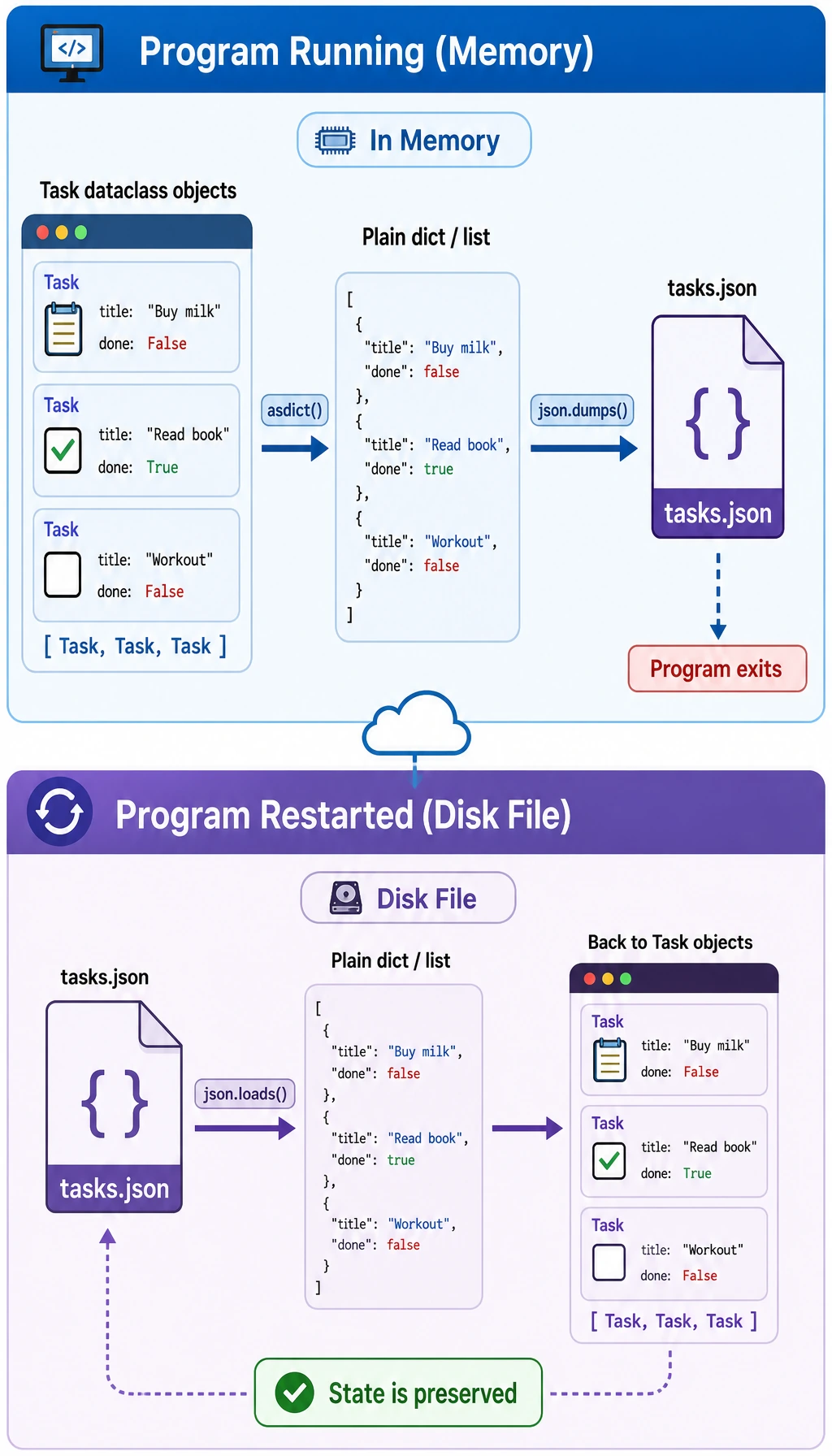
Add a new task:
python3 learning_assistant_cli.py add "Practice command-line arguments" --stage 2.3 --tag argparseExpected output:
Added task #4: Practice command-line argumentsMark task 2 as complete:
python3 learning_assistant_cli.py done 2Expected output:
Completed task #2: Practice JSON file savingAt this point, open ch02_output/tasks.json. You should see normal JSON data. The exact timestamps will be different, but the done field for task 2 should be true.
Step 5: Show statistics and export a report
Section titled “Step 5: Show statistics and export a report”python3 learning_assistant_cli.py statsExpected output:
Total tasks: 4Done: 1Todo: 3Completion rate: 25.0%Tasks by stage:- 2.1: 1- 2.2: 1- 2.3: 2Export a Markdown report:
python3 learning_assistant_cli.py exportExpected output:
Exported report to ch02_output/learning_report.mdYou now have a runnable project and a small report that can be used as portfolio evidence.
Step 6: Understand the important parts
Section titled “Step 6: Understand the important parts”| Code piece | What it teaches | Why it matters later |
|---|---|---|
argparse | Convert terminal commands into structured values | Every CLI, script, and automation tool needs clear inputs |
@dataclass | Describe one task with fields | Later API models, database rows, and config objects use the same idea |
load_tasks() | Read saved JSON and handle bad JSON | Real programs must survive missing or broken files |
save_tasks() | Convert Python objects into JSON | This is the minimum version of persistence |
| command functions | Keep each command in one function | Larger projects rely on clear function boundaries |
export_report() | Turn internal data into user-facing output | AI and data tools often need reports, logs, and evidence |
Evidence to Keep
Section titled “Evidence to Keep”Keep this page’s proof of learning as a small evidence card:
- Project Goal
- CLI, scraper, API, AI API call, or integrated Python workshop target
- Run Command
- exact command used to start the project
- Artifact
- output file, API response, JSON record, screenshot, or README note
- Failure Check
- dependency, network, parsing, route, input validation, or API-key issue
- Expected Output
- reproducible mini project folder with run result and one failure case
Common mistakes and fixes
Section titled “Common mistakes and fixes”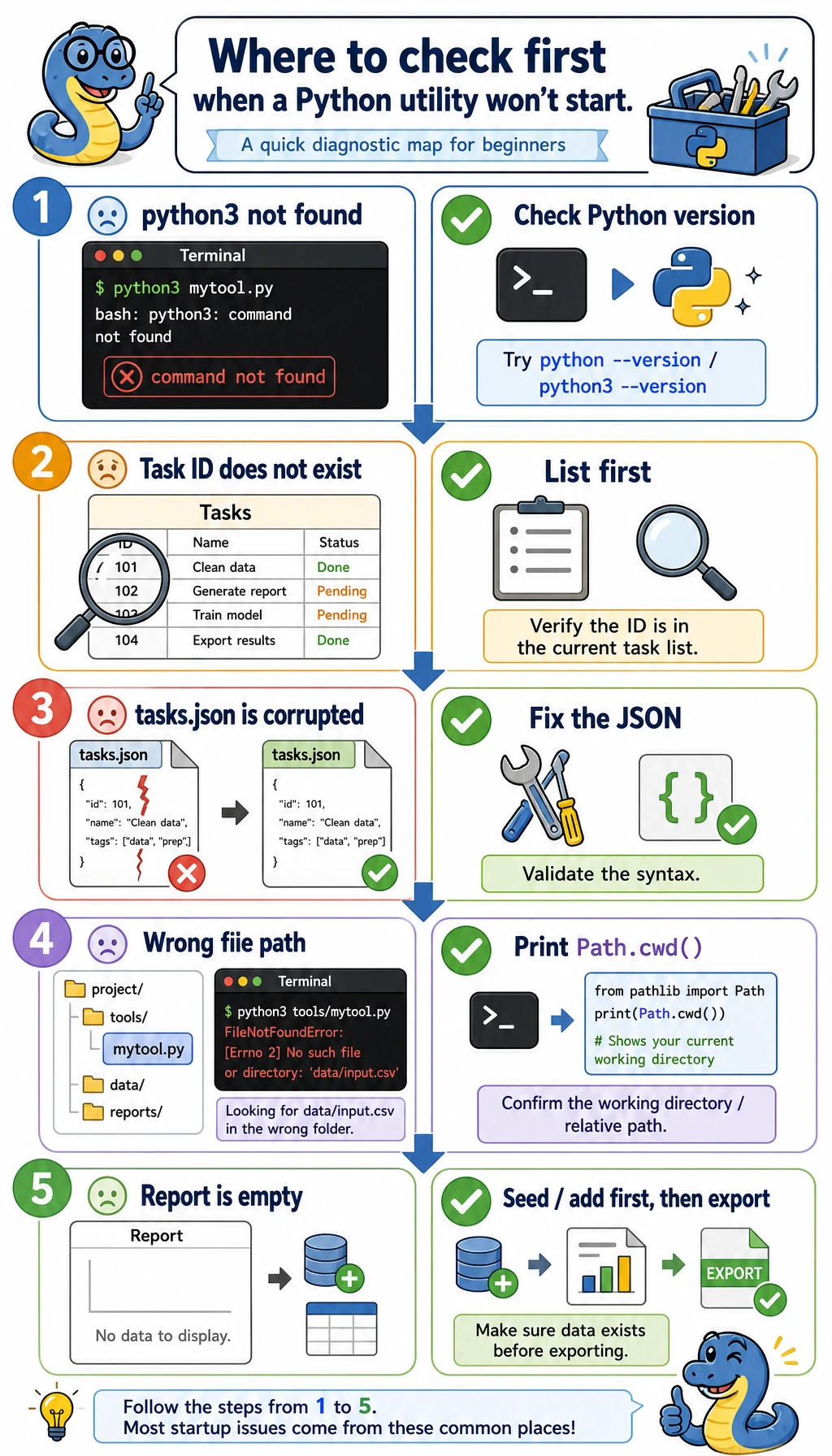
| Problem | Likely cause | Fix |
|---|---|---|
python3: command not found | Your system uses python instead of python3 | Try python --version, then run python learning_assistant_cli.py seed |
Task #99 was not found. | You tried to complete a task id that does not exist | Run python3 learning_assistant_cli.py list first |
invalid JSON error | tasks.json was edited manually and broken | Fix the JSON file or delete it and run seed again |
| The report is empty | No tasks were created yet | Run seed or add before export |
| You understand the code but cannot modify it | The whole script feels too large | Change only one command at a time, then rerun the matching command |
Mini exercises
Section titled “Mini exercises”- Add a
deletecommand that removes a task by id. - Add a
searchcommand that finds tasks containing a keyword. - Add a
--tagfilter tolist. - Change
export_report()to include unfinished tasks first. - Deliberately break
tasks.json, runlist, then write down the error message and your fix.
Operation guide and checkpoints
deleteshould accept an id, remove the matching item fromtasks.json, and print a clear confirmation. Runlistagain to verify that the row is gone.searchshould filter by keyword overtitleand optionallytags, using case-insensitive matching, then print only the matches.--tagworks best as anargparsefilter onlist, because it keeps the command reusable without editing the saved data.export_report()can sort unfinished tasks before completed ones if you want the report to highlight current work first. Keep the format stable so diffs stay readable.- Break
tasks.jsondeliberately, runlist, and confirm the script prints a clear JSON error instead of crashing. Then fix or delete the file and rerunseed.
Portfolio evidence checklist
Section titled “Portfolio evidence checklist”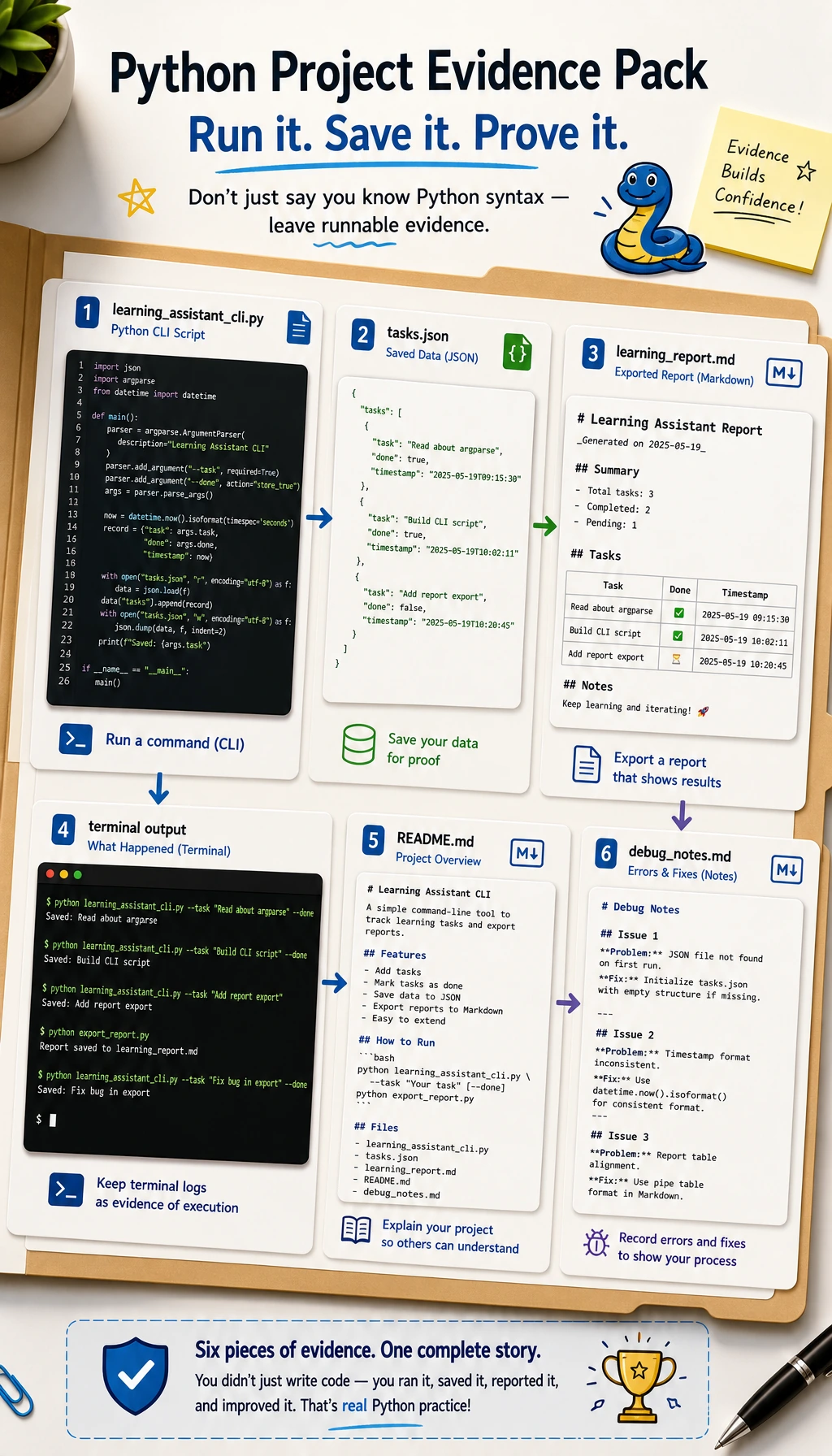
Keep these files as evidence:
learning_assistant_cli.pych02_output/tasks.jsonch02_output/learning_report.md- A screenshot or copied terminal output showing
seed,list,done,stats, andexport - A short
README.mdexplaining how to run the tool and what errors you handled
This is the core habit of Chapter 2: do not stop at syntax. Turn syntax into a small tool that runs, saves data, handles errors, and can be explained.