
2.2.1 Object-Oriented Programming
Section Overview
Section titled “Section Overview”This section introduces an important way to organize complex code in Python. You do not need to master object-oriented programming right away, but understanding classes, objects, attributes, and methods will help you read later code for model classes, dataset classes, API service classes, and third-party library source code.
Learning Objectives
Section titled “Learning Objectives”- Understand the basic idea of object-oriented programming (OOP)
- Master how to define and use classes and objects
- Understand attributes and methods
- Learn the basic use of inheritance and encapsulation
- Get to know commonly used magic methods
Why do we need object-oriented programming?
Section titled “Why do we need object-oriented programming?”Suppose you are building a small project tracker for your AI portfolio app and need to record each feature’s owner and work sessions:
# Using variables and dictionariesfeature1_name = "Login API"feature1_owner = "Mina"feature1_hours = [2, 5, 1]
feature2_name = "RAG demo"feature2_owner = "Kai"feature2_hours = [3, 4, 2]
# Or using dictionariesfeature1 = {"name": "Login API", "owner": "Mina", "hours": [2, 5, 1]}feature2 = {"name": "RAG demo", "owner": "Kai", "hours": [3, 4, 2]}
# Function to calculate total work timedef total_hours(feature):    return sum(feature["hours"])
This approach has several problems:
- Data and operations are separated (feature data is in dictionaries, while the calculation function is outside)
- There is no constraint (anyone can add strange keys to the dictionary or remove required keys)
- As features have more and more attributes, the code becomes messier and messier
The idea behind object-oriented programming is: bundle data and operations together to form an “object”.
class FeatureTask:    def __init__(self, name, owner, hours):        self.name = name        self.owner = owner        self.hours = hours
    def total_hours(self):        return sum(self.hours)
# Create feature task objectstask1 = FeatureTask("Login API", "Mina", [2, 5, 1])task2 = FeatureTask("RAG demo", "Kai", [3, 4, 2])
# Data and operations are tied together, which feels more natural to useprint(f"{task1.name} total hours: {task1.total_hours():.1f}")print(f"{task2.name} total hours: {task2.total_hours():.1f}")
Basic concepts of classes and objects
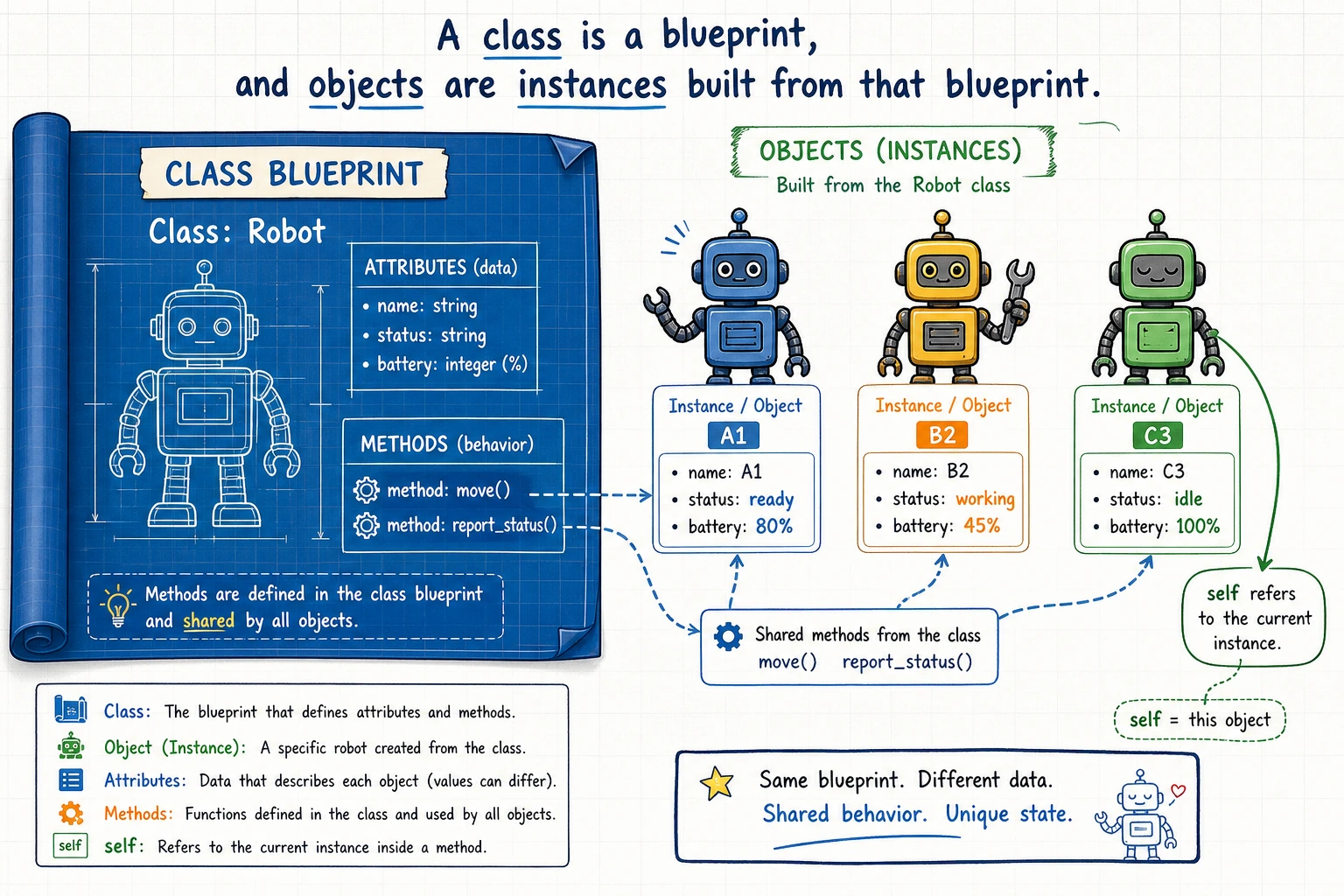
Section titled “Basic concepts of classes and objects”A simple real-world analogy:
- Class = blueprint/template. For example, “phone” is a concept/category
- Object/Instance = the real thing built from the blueprint. For example, “the iPhone 15 in your hand”
Class: FeatureTask (a template for feature tasks)    └── Attributes: name, owner, hours    └── Methods: total_hours(), is_over_budget()
Objects (instances):    └── task1 = FeatureTask("Login API", "Mina", [2, 5, 1])    └── task2 = FeatureTask("RAG demo", "Kai", [3, 4, 2])
Defining a class
Section titled “Defining a class”The simplest class
Section titled “The simplest class”class Dog: """A dog"""
def __init__(self, name, breed): """Initialization method, called automatically when an object is created""" self.name = name # instance attribute self.breed = breed # instance attribute
def bark(self): """Method: dog barks""" print(f"{self.name} says: Woof woof woof!")
def info(self): """Method: display information""" print(f"Name: {self.name}, Breed: {self.breed}")
# Create objects (instantiation)my_dog = Dog("Wangcai", "Golden Retriever")your_dog = Dog("Xiaohei", "Labrador")
# Access attributesprint(my_dog.name) # Wangcaiprint(your_dog.breed) # Labrador
# Call methodsmy_dog.bark() # Wangcai says: Woof woof woof!your_dog.info() # Name: Xiaohei, Breed: LabradorKey points explained
Section titled “Key points explained”1. __init__ method (constructor)
__init__ is called automatically when you create an object, and it is used to initialize the object’s attributes.
my_dog = Dog("Wangcai", "Golden Retriever")# Python automatically does the following:# 1. Create a new Dog object# 2. Call __init__(self, "Wangcai", "Golden Retriever")# 3. self.name = "Wangcai"# 4. self.breed = "Golden Retriever"# 5. Return this object to my_dog2. What is self?
self represents the object itself. When you call my_dog.bark(), Python automatically passes my_dog as self to the bark method.
my_dog.bark()# Equivalent toDog.bark(my_dog)So self.name means “the name of this object.”
Attributes and methods
Section titled “Attributes and methods”Instance attributes vs class attributes
Section titled “Instance attributes vs class attributes”class FeatureTask: # Class attributes: shared by all instances project = "AI Portfolio" task_count = 0
def __init__(self, name, owner): # Instance attributes: unique to each instance self.name = name self.owner = owner FeatureTask.task_count += 1 # Add 1 for each task created
t1 = FeatureTask("Login API", "Mina")t2 = FeatureTask("RAG demo", "Kai")
# Class attributes can be accessed through the class name or an instanceprint(FeatureTask.project) # AI Portfolioprint(t1.project) # AI Portfolioprint(FeatureTask.task_count) # 2
# Instance attributes belong only to their own instancesprint(t1.name) # Login APIprint(t2.owner) # KaiMethods
Section titled “Methods”class Circle: def __init__(self, radius): self.radius = radius
def area(self): """Calculate area""" return 3.14159 * self.radius ** 2
def perimeter(self): """Calculate perimeter""" return 2 * 3.14159 * self.radius
def scale(self, factor): """Scale the radius""" self.radius *= factor # Modify attribute
c = Circle(5)print(f"Area: {c.area():.2f}") # 78.54print(f"Perimeter: {c.perimeter():.2f}") # 31.42
c.scale(2) # Radius becomes 10print(f"Area after scaling: {c.area():.2f}") # 314.16Magic methods (double-underscore methods)
Section titled “Magic methods (double-underscore methods)”In Python, methods that start and end with __ are called magic methods. They allow your class to behave like built-in types.
__str__: define the output of print
Section titled “__str__: define the output of print”class FeatureTask: def __init__(self, name, owner): self.name = name self.owner = owner
def __str__(self): return f"FeatureTask({self.name}, owner={self.owner})"
task = FeatureTask("Login API", "Mina")print(task) # FeatureTask(Login API, owner=Mina)# If there is no `__str__`, print will output <__main__.FeatureTask object at 0x...>__repr__: define the representation developers see
Section titled “__repr__: define the representation developers see”class FeatureTask: def __init__(self, name, owner): self.name = name self.owner = owner
def __repr__(self): return f"FeatureTask('{self.name}', '{self.owner}')"
task = FeatureTask("Login API", "Mina")print(repr(task)) # FeatureTask('Login API', 'Mina')# In interactive mode, typing task directly will also show this__len__: define the behavior of len()
Section titled “__len__: define the behavior of len()”class Playlist: def __init__(self, name, songs): self.name = name self.songs = songs
def __len__(self): return len(self.songs)
my_playlist = Playlist("Study Music", ["Song A", "Song B", "Song C"])print(len(my_playlist)) # 3__eq__: define the behavior of ==
Section titled “__eq__: define the behavior of ==”class Point: def __init__(self, x, y): self.x = x self.y = y
def __eq__(self, other): return self.x == other.x and self.y == other.y
p1 = Point(3, 4)p2 = Point(3, 4)p3 = Point(1, 2)
print(p1 == p2) # Trueprint(p1 == p3) # FalseInheritance
Section titled “Inheritance”Inheritance lets you create a new class based on an existing class, so you can reuse code.
Basic inheritance
Section titled “Basic inheritance”# Parent class (base class)class Animal: def __init__(self, name, age): self.name = name self.age = age
def speak(self): print(f"{self.name} made a sound")
def info(self): print(f"{self.name}, {self.age} years old")
# Child class (derived class)class Dog(Animal): def __init__(self, name, age, breed): super().__init__(name, age) # Call the parent class's __init__ self.breed = breed
def speak(self): # Override the parent class method print(f"{self.name} says: Woof woof woof!")
def fetch(self): # Method unique to the child class print(f"{self.name} brought the ball back!")
class Cat(Animal): def speak(self): # Override the parent class method print(f"{self.name} says: Meow meow meow~")
# Usedog = Dog("Wangcai", 3, "Golden Retriever")cat = Cat("Mimi", 2)
dog.info() # Wangcai, 3 years old (inherited from Animal)dog.speak() # Wangcai says: Woof woof woof! (Dog's own implementation)dog.fetch() # Wangcai brought the ball back! (unique to Dog)
cat.info() # Mimi, 2 years oldcat.speak() # Mimi says: Meow meow meow~What super() does
Section titled “What super() does”super() is used to call a parent class method. The most common use is in __init__:
class Animal:    def __init__(self, name):        self.name = name
class Dog(Animal):    def __init__(self, name, breed):        super().__init__(name)   # Let the parent class initialize name for me        self.breed = breed       # Initialize breed myself
Using isinstance() to check types
Section titled “Using isinstance() to check types”dog = Dog("Wangcai", 3, "Golden Retriever")
print(isinstance(dog, Dog)) # True —— is a Dogprint(isinstance(dog, Animal)) # True —— also an Animal (because of inheritance)print(isinstance(dog, Cat)) # False —— not a CatEncapsulation
Section titled “Encapsulation”The idea of encapsulation is: hide internal details and expose only the necessary interface.
Private attributes (by convention)
Section titled “Private attributes (by convention)”Python does not have truly private attributes, but it has naming conventions:
class BankAccount:    def __init__(self, owner, balance=0):        self.owner = owner        self._balance = balance  # Single underscore: conventionally "internal use"
    def deposit(self, amount):        if amount > 0:            self._balance += amount            print(f"Deposited {amount} yuan, balance: {self._balance}")
    def withdraw(self, amount):        if 0 < amount <= self._balance:            self._balance -= amount            print(f"Withdrew {amount} yuan, balance: {self._balance}")        else:            print("Insufficient balance!")
    def get_balance(self):        return self._balance
account = BankAccount("Portfolio Owner", 1000)account.deposit(500)     # Deposited 500 yuan, balance: 1500account.withdraw(200)    # Withdrew 200 yuan, balance: 1300print(account.get_balance())  # 1300
# Although you can technically access _balance directly, this is not recommended# print(account._balance) # It works, but you should not do this| Naming convention | Meaning | Example |
|---|---|---|
name | Public attribute | self.name |
_name | Internal use (by convention) | self._balance |
__name | Name mangling (strongly hidden) | self.__secret |
Comprehensive example: AI model manager
Section titled “Comprehensive example: AI model manager”class AIModel: """Base class for AI models""" model_count = 0
def __init__(self, name, version="1.0"): self.name = name self.version = version self.is_trained = False self._accuracy = 0.0 self._history = [] AIModel.model_count += 1
def train(self, epochs=10): """Train the model (simulation)""" import random print(f"Starting training {self.name} v{self.version}...") for epoch in range(1, epochs + 1): acc = min(0.5 + epoch * 0.05 + random.uniform(-0.02, 0.02), 1.0) self._history.append(acc) if epoch % 5 == 0 or epoch == epochs: print(f" Epoch {epoch}/{epochs} - Accuracy: {acc:.2%}") self._accuracy = self._history[-1] self.is_trained = True print(f"Training complete! Final accuracy: {self._accuracy:.2%}")
def predict(self, data): """Predict""" if not self.is_trained: print("Error: the model has not been trained yet!") return None print(f"{self.name} is predicting {len(data)} samples...") return [f"prediction_{i}" for i in range(len(data))]
def __str__(self): status = "trained" if self.is_trained else "untrained" return f"Model({self.name} v{self.version}, {status}, acc={self._accuracy:.2%})"
class ImageClassifier(AIModel): """Image classification model""" def __init__(self, name, version="1.0", num_classes=10): super().__init__(name, version) self.num_classes = num_classes
def predict(self, images): if not self.is_trained: print("Error: the model has not been trained yet!") return None print(f"Classifying {len(images)} images ({self.num_classes} classes)...") import random return [random.randint(0, self.num_classes - 1) for _ in images]
# Usemodel = ImageClassifier("ResNet-50", "2.0", num_classes=100)print(model) # Model(ResNet-50 v2.0, untrained, acc=0.00%)
model.train(epochs=10)predictions = model.predict(["img1.jpg", "img2.jpg", "img3.jpg"])print(f"Predicted classes: {predictions}")print(model)print(f"Current total number of models: {AIModel.model_count}")Hands-on practice
Section titled “Hands-on practice”Exercise 1: Book management
Section titled “Exercise 1: Book management”Create a Book class:
class Book:    def __init__(self, title, author, pages):        self.title = title        self.author = author        self.pages = pages        self.current_page = 0
    def read(self, pages):        self.current_page = min(self.current_page + pages, self.pages)
    def progress(self):        return self.current_page / self.pages * 100
    def __str__(self):        return f"{self.title} by {self.author}: {self.current_page}/{self.pages} pages"
# Testbook = Book("Python Basics", "Course Team", 300)book.read(50)print(f"{book.progress():.1f}%")  # 16.7%print(book)
Exercise 2: A simple inference job queue
Section titled “Exercise 2: A simple inference job queue”class InferenceJob: def __init__(self, name, tokens): self.name = name self.tokens = tokens
class JobQueue: def __init__(self): self.jobs = {}
def add(self, job, replicas=1): self.jobs[job.name] = self.jobs.get(job.name, [job, 0]) self.jobs[job.name][1] += replicas
def remove(self, job_name): self.jobs.pop(job_name, None)
def estimated_tokens(self): return sum(job.tokens * replicas for job, replicas in self.jobs.values())
def __str__(self): lines = [f"{job.name} x {replicas}" for job, replicas in self.jobs.values()] return "\n".join(lines) or "Job queue is empty"
queue = JobQueue()queue.add(InferenceJob("embed-docs", 800), 2)queue.add(InferenceJob("answer-query", 1200), 1)print(queue)print(f"Estimated tokens: {queue.estimated_tokens()}")Exercise 3: Zoo
Section titled “Exercise 3: Zoo”Implement this using inheritance:
class Animal:    def __init__(self, name, age):        self.name = name        self.age = age
    def speak(self):        return "..."
class Dog(Animal):    def speak(self):        return "Woof woof"
class Cat(Animal):    def speak(self):        return "Meow meow"
class Duck(Animal):    def speak(self):        return "Quack quack"
animals = [Dog("Buddy", 3), Cat("Mimi", 2), Duck("Ducky", 1)]for animal in animals:    print(f"{animal.name}: {animal.speak()}")
Reference implementation and walkthrough
Bookshould keep the current page as state, cap progress at the total page count, and report derived progress throughprogress(). The sample should print about16.7%after reading 50 of 300 pages, then show50/300in the object string.ShoppingCartshould store the product object together with quantity sototal()can multiply them correctly.remove()should be safe when the item is missing, and__str__()should return a clear empty-cart message when nothing has been added.Animalprovides the shared fields and a placeholderspeak(), while the subclasses override only their own sounds. The loop should print each animal name with its own sound, which confirms inheritance and polymorphism.
Evidence to Keep
Section titled “Evidence to Keep”Keep this page’s proof of learning as a small evidence card:
- Pattern
- class, exception, file IO, functional pipeline, generator, or type hint
- Code Artifact
- minimal runnable example and one realistic use case
- Output
- printed object state, caught error, saved file, yielded values, or type-check note
- Failure Check
- hidden mutation, swallowed exception, file path issue, lazy iterator confusion, or misleading annotation
- Expected Output
- small advanced-Python example with a debugging note
Summary
Section titled “Summary”| Concept | Description | Syntax |
|---|---|---|
| Class | Template/blueprint for objects | class MyClass: |
| Object | An instance of a class | obj = MyClass() |
__init__ | Constructor method, initializes attributes | def __init__(self): |
| self | Points to the current object itself | self.name = name |
| Inheritance | Child class reuses parent class code | class Dog(Animal): |
| super() | Call a parent class method | super().__init__() |
| Magic methods | Customize object behavior | __str__, __len__, __eq__ |