
E.E Web Front-End Basics in Fast Track
An AI feature needs a surface users can operate. The smallest useful front end shows input, loading, success, empty input, error, and retry states clearly.
See the Interaction Stack First
Section titled “See the Interaction Stack First”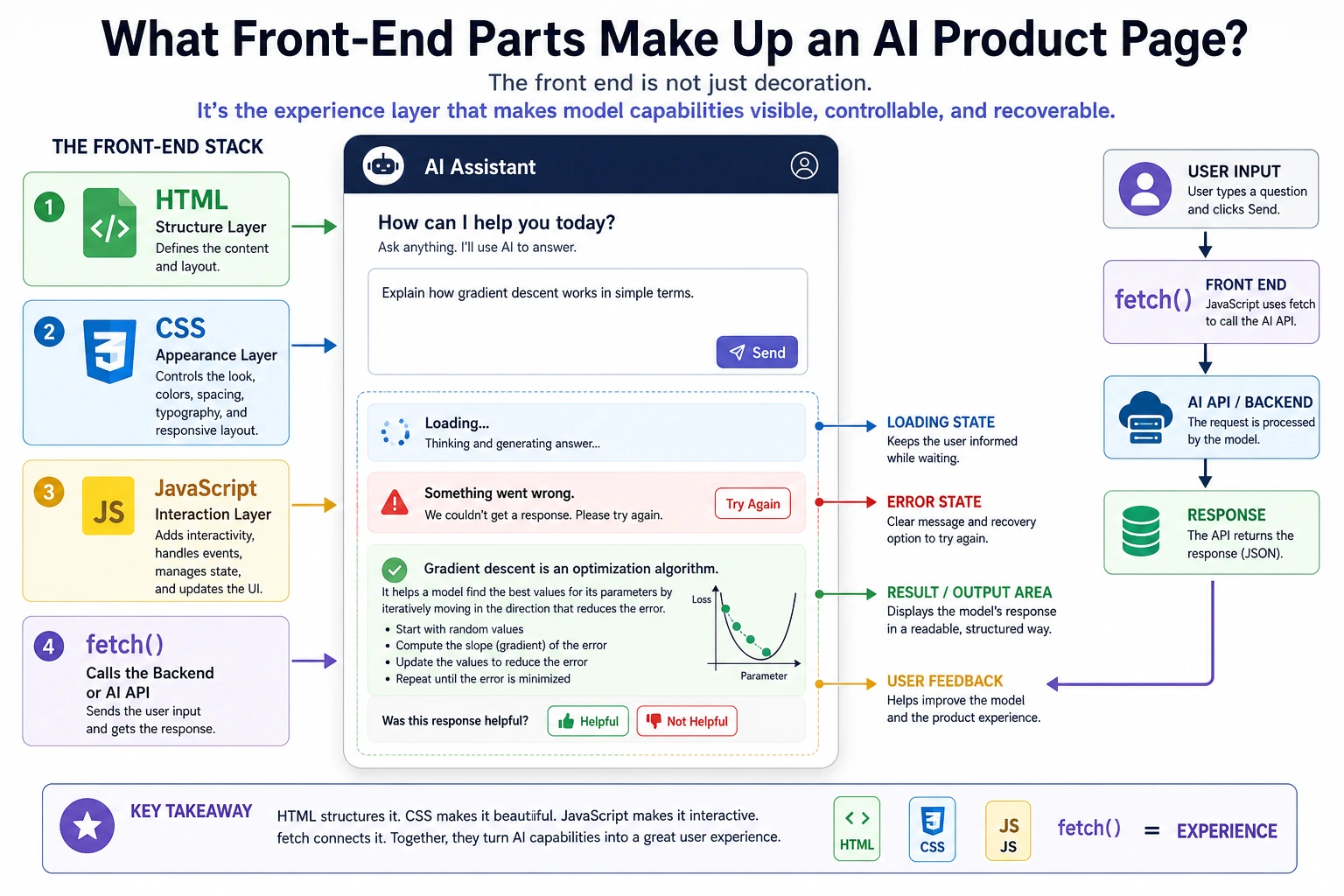
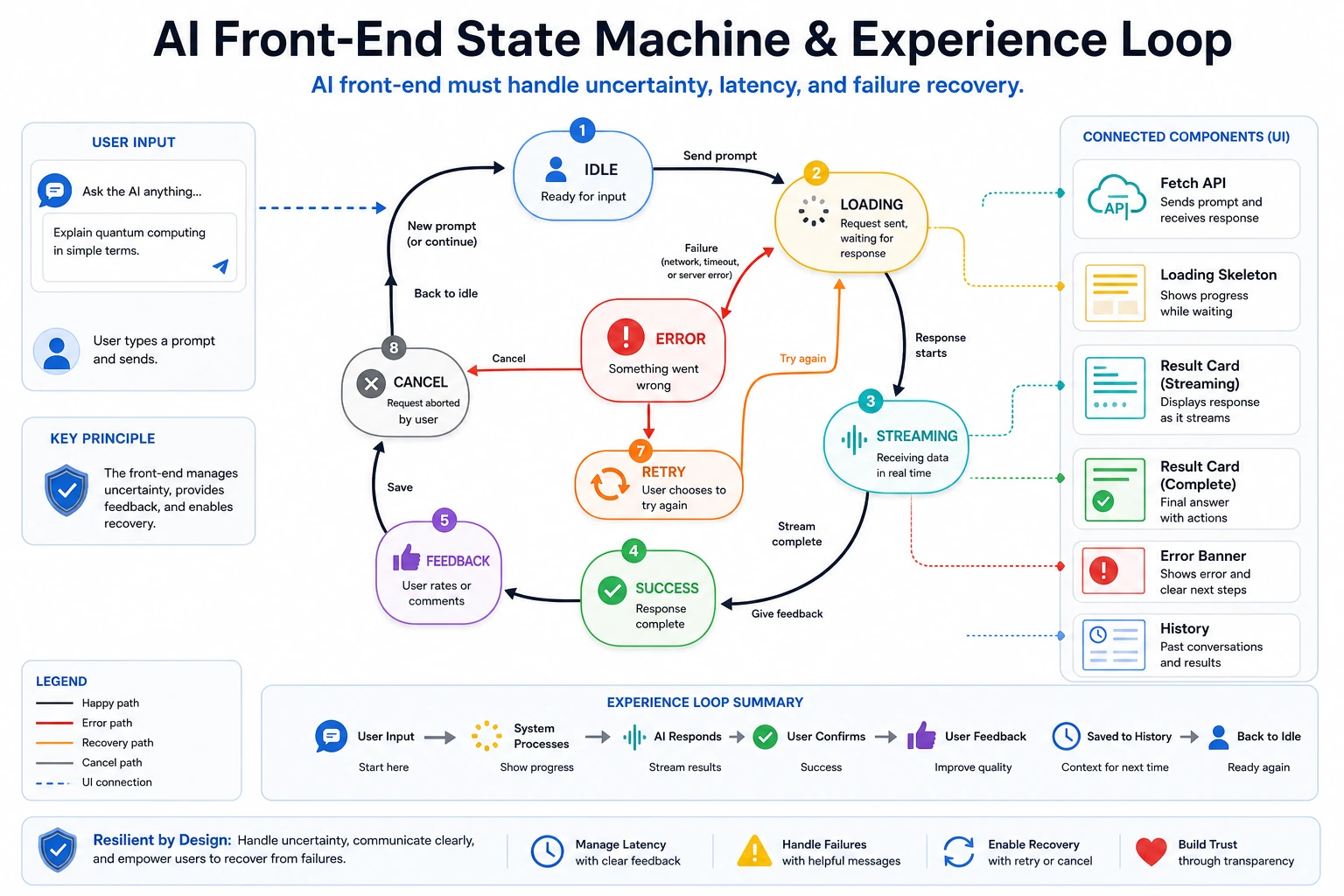
Treat every model call as uncertain: it may be slow, fail, return partial output, or need a retry.
Run the Smallest Static AI Page
Section titled “Run the Smallest Static AI Page”Save this as ai-demo.html and open it in a browser:
<!doctype html><html lang="en"><meta charset="utf-8" /><title>AI Demo</title><style>  body { font-family: system-ui, sans-serif; max-width: 720px; margin: 40px auto; }  textarea, button, pre { width: 100%; box-sizing: border-box; margin-top: 12px; }  textarea { min-height: 100px; padding: 12px; }  button { padding: 10px; }  pre { min-height: 80px; padding: 12px; background: #f3f4f6; white-space: pre-wrap; }</style><h1>AI Feature Demo</h1><textarea id="prompt" placeholder="Ask a question"></textarea><button id="run">Run</button><p id="status">idle</p><pre id="result">result appears here</pre><script>  const promptEl = document.querySelector("#prompt");  const statusEl = document.querySelector("#status");  const resultEl = document.querySelector("#result");
  document.querySelector("#run").addEventListener("click", async () => {    const text = promptEl.value.trim();    if (!text) {      statusEl.textContent = "empty";      resultEl.textContent = "Please enter a prompt first.";      return;    }
    try {      statusEl.textContent = "loading";      resultEl.textContent = "Please wait...";      await new Promise((resolve) => setTimeout(resolve, 500));      if (text.toLowerCase().includes("fail")) {        throw new Error("simulated backend error");      }      statusEl.textContent = "success";      resultEl.textContent = "Simulated answer: " + text;    } catch (error) {      statusEl.textContent = "error";      resultEl.textContent = error.message + ". Try again.";    }  });</script></html>
Expected browser behavior:
- Empty prompt: status becomes
empty. - Normal prompt: status goes
loadingthensuccess. - Prompt containing
fail: status becomeserror.
Test the UI States Deliberately
Section titled “Test the UI States Deliberately”Do not only click the happy path once. A useful AI UI test records the state transition and visible message for each path:
| Test input | Expected state | Evidence to keep |
|---|---|---|
| empty text box | empty | screenshot or note that the UI asks for input |
summarize this note | loading then success | before/after screenshot or event trace |
please fail | error | screenshot showing the recovery message |
This is the front-end version of model evaluation. The model may be fake in this page, but the user experience contract is real: every uncertain call needs progress, a result, and a recovery path.
UI Review
Section titled “UI Review”Review the page as a state machine, not as a pretty screenshot. For each user action, write down the starting state, the visible feedback, the final state, and the recovery path if something fails.
This habit keeps AI interfaces honest. A model call can be slow, empty, partial, or wrong, so the UI should show progress, avoid silent failure, and give the user a next action. The smallest useful evidence is a screenshot or note for empty input, success, and error.
Before connecting a real backend, finish the fake-state version first. That gives you a stable contract for copy, layout, loading behavior, error recovery, and retry. When the backend arrives, you are replacing the data source, not inventing the whole user experience at the same time.
Replace the Fake Call Later
Section titled “Replace the Fake Call Later”When your backend exists, replace the simulated wait with fetch:
const response = await fetch("/api/chat", { method: "POST", headers: {"Content-Type": "application/json"}, body: JSON.stringify({prompt: text}),});const data = await response.json();resultEl.textContent = data.answer;Evidence to Keep
Section titled “Evidence to Keep”Keep this page’s proof of learning as a small evidence card:
- Frontend Surface
- chat, dashboard, editor, review panel, or workflow UI
- State Model
- loading, streaming, success, empty, error, retry, and review states
- Artifact
- UI sketch, component behavior, event trace, or screenshot
- Failure Check
- hiding latency, missing error states, unclear citations, or weak review controls
- Expected Output
- AI frontend interaction note with states and evidence display
Pass Check
Section titled “Pass Check”You pass this elective when one AI page handles input, loading, success, empty input, error, and retry states without confusing the user.
Check reasoning and explanation
A passing UI test should exercise at least three paths: empty input, normal prompt, and simulated failure. The evidence can be a short table showing the prompt, expected state, actual state, and visible message.
The explanation should mention why these states matter: model calls are uncertain, so the UI must show progress, recover from errors, and avoid leaving the user wondering whether anything happened.