
8.3.5 Deep Dive into the HuggingFace Ecosystem
Learning Objectives
Section titled “Learning Objectives”- Understand the most important layers in the HuggingFace ecosystem
- Distinguish the roles of models, data, tokenizers, pipelines, and the hub
- Understand why it has become the “infrastructure ecosystem” for LLM applications
- Learn how to judge when to use only a pipeline and when to go deeper into the lower layers
Why Is HuggingFace More Than Just a Model Library?
Section titled “Why Is HuggingFace More Than Just a Model Library?”Many People’s First Impression
Section titled “Many People’s First Impression”Usually, it is:
- You can download models
- You can do inference quickly
That is true, but it is not complete.
A More Accurate Understanding
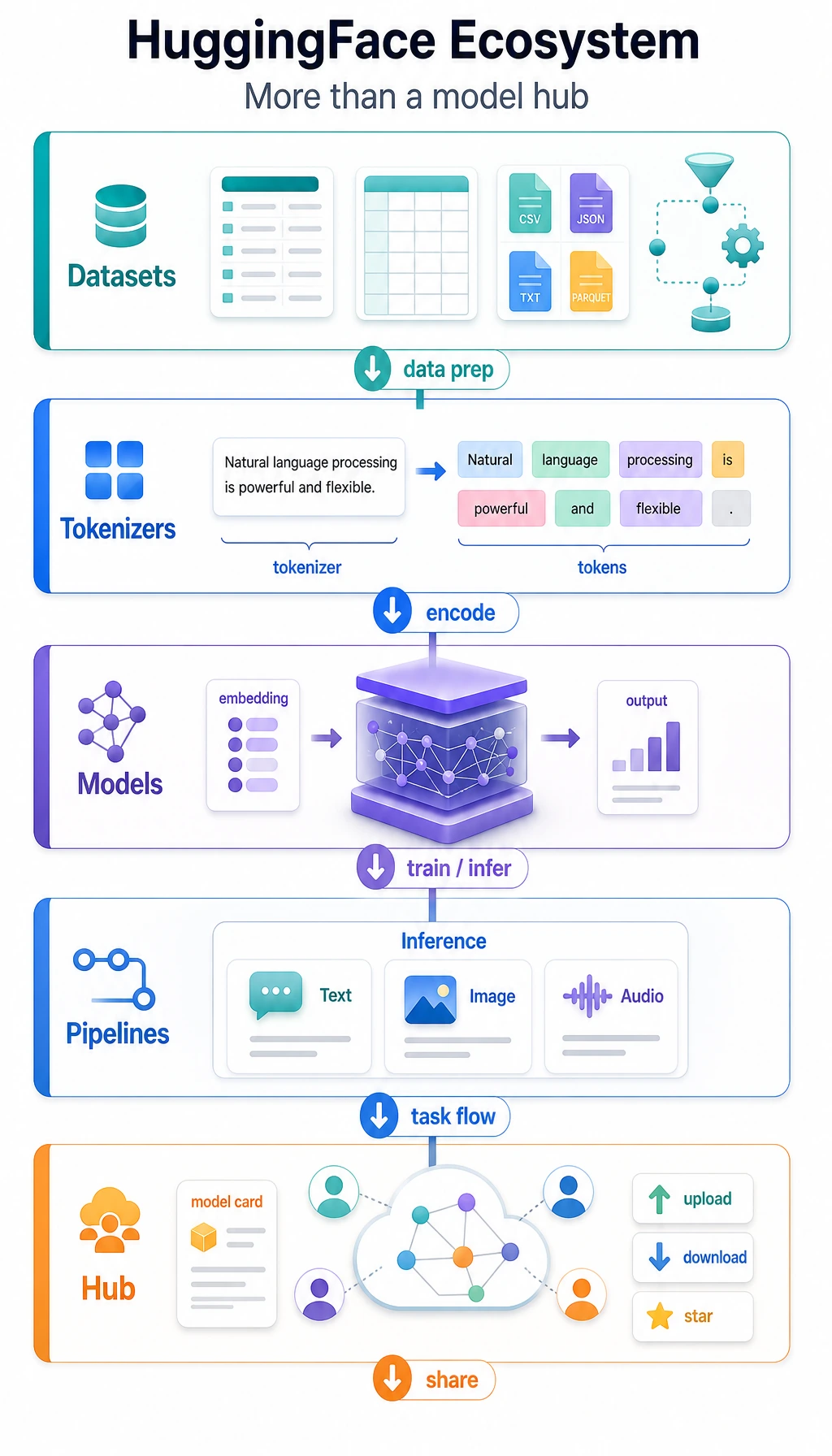
Section titled “A More Accurate Understanding”HuggingFace is more like a complete ecosystem centered around model usage:
- Model repository
- Dataset tools
- Tokenizer tools
- Inference interfaces
- Basic components for training and fine-tuning
So its importance is not just “it has many models,” but rather:
It makes the entire path from research to real-world use much smoother.
First, Separate the Key Layers in the Ecosystem
Section titled “First, Separate the Key Layers in the Ecosystem”Tokenizers
Section titled “Tokenizers”Responsible for turning text into tokens that the model can process.
Models
Section titled “Models”Responsible for the actual forward computation.
Datasets
Section titled “Datasets”Responsible for organizing and processing training / evaluation data.
Pipelines
Section titled “Pipelines”Responsible for packaging common tasks into one-click interfaces.
Responsible for:
- Hosting models
- Hosting datasets
- Sharing configurations and model cards
One sentence to remember:
HuggingFace is not a single-point tool, but an ecosystem covering the entire model usage chain.
Why Are Tokenizers Especially Important in Engineering?
Section titled “Why Are Tokenizers Especially Important in Engineering?”Because models do not directly understand raw text. What they see first is:
- token ids
So the tokenizer determines:
- How text is split
- How special symbols are handled
- How lengths are truncated or padded
This means the tokenizer is not a small detail, but a key rule in the model input layer.
A Small Illustration
Section titled “A Small Illustration”tokenizer_layer = { "text": "What is the refund policy?", "tokens": ["What", "is", "the", "refund", "policy", "?"], "input_ids": [101, 23, 45, 67, 89]}
print(tokenizer_layer)Expected output:
{'text': 'What is the refund policy?', 'tokens': ['What', 'is', 'the', 'refund', 'policy', '?'], 'input_ids': [101, 23, 45, 67, 89]}When you later use a real tokenizer from transformers, the token ids will be generated by the model vocabulary instead of being typed by hand. The engineering point is the same: the model receives ids and masks, not raw sentences.
Why Is pipeline So Popular?
Section titled “Why Is pipeline So Popular?”Because It Is Great for Quick Validation
Section titled “Because It Is Great for Quick Validation”For example, if you just want to quickly try:
- Sentiment classification
- Text summarization
- Text generation
pipeline lets you write much less boilerplate code.
A Minimal Example
Section titled “A Minimal Example”class MockPipeline: def __call__(self, text): return [{"label": "positive", "score": 0.91, "text": text}]
pipe = MockPipeline()print(pipe("This support reply is very clear"))Expected output:
[{'label': 'positive', 'score': 0.91, 'text': 'This support reply is very clear'}]The most important thing in this example is not the result itself, but the idea that:
pipeline is more like a “task-level shortcut.”
Its value is speed, but that also means it is usually not the lowest-level or most controllable layer.
When Can You Not Rely on pipeline Alone?
Section titled “When Can You Not Rely on pipeline Alone?”If you start needing:
- Custom batches
- More fine-grained preprocessing and postprocessing
- Custom training or evaluation
- More complex system integration
Then you usually need to move from:
- pipeline
down to:
- tokenizer + model
This is also a very important engineering judgment:
Pipelines are great for getting started quickly, but they are not always suitable for every complex production scenario.
Why Is the Model Hub So Important?
Section titled “Why Is the Model Hub So Important?”Because it solves:
- How to share models
- How to share datasets
- How to align configurations
- How to attach documentation
This turns many model ecosystems from:
- Names in papers
into:
- Resources that others can actually download and try
So a big part of HuggingFace’s value is not in a single API, but in:
Organizing the model world into a collaborative public infrastructure.
Why Can’t We Ignore Datasets?
Section titled “Why Can’t We Ignore Datasets?”Many beginners focus only on models and ignore the data layer. But in real engineering:
- How data is read
- How it is split
- How it is filtered
are all major concerns as well.
So the reason HuggingFace is so powerful is not just because it has many models, but because:
- The model and data chains are both organized together
A Practical Way to Judge the Usage Level
Section titled “A Practical Way to Judge the Usage Level”You can remember it like this:
- Want to test results quickly: start with pipeline
- Want fine-grained control: look at tokenizer + model
- Want to train / fine-tune: go further and look at the data and training workflow
This order matters, because many people dive straight into the lower layers at the beginning and end up being overwhelmed by details.
Hands-on: Choose the Right HuggingFace Layer Before Writing Code
Section titled “Hands-on: Choose the Right HuggingFace Layer Before Writing Code”Before you import a large library or download a model, write down the goal and choose the shallowest layer that can solve it. This saves time and keeps the project easier to debug.
def choose_hf_layer(goal):    rules = [        ("quick sentiment", "pipeline", "use a task shortcut to validate the idea quickly"),        ("custom preprocessing", "tokenizer + model", "control truncation, padding, batches, and postprocessing"),        ("fine-tune", "datasets + trainer", "control examples, splits, metrics, and training"),        ("share", "hub", "publish artifacts with model cards and configuration"),    ]
    for keyword, layer, reason in rules:        if keyword in goal:            return {"goal": goal, "layer": layer, "reason": reason}
    return {"goal": goal, "layer": "start with pipeline", "reason": "validate the task first, then move lower only when blocked"}

goals = [    "quick sentiment classification demo",    "custom preprocessing for long support tickets",    "fine-tune a domain classifier",    "share an SOP draft helper model",]
for item in goals:    plan = choose_hf_layer(item)    print(f"{plan['goal']} -> {plan['layer']} | {plan['reason']}")
Expected output:
quick sentiment classification demo -> pipeline | use a task shortcut to validate the idea quicklycustom preprocessing for long support tickets -> tokenizer + model | control truncation, padding, batches, and postprocessingfine-tune a domain classifier -> datasets + trainer | control examples, splits, metrics, and trainingshare an SOP draft helper model -> hub | publish artifacts with model cards and configurationThis small exercise is useful in real projects: if you cannot explain why you are moving from pipeline down to tokenizer + model, you are probably adding complexity too early.
Common Pitfalls for Beginners
Section titled “Common Pitfalls for Beginners”Thinking HuggingFace Is Only a Model Repository
Section titled “Thinking HuggingFace Is Only a Model Repository”In fact, it is more like a complete ecosystem.
Only Knowing pipeline, Without Understanding the Lower-Level Chain
Section titled “Only Knowing pipeline, Without Understanding the Lower-Level Chain”You can easily get stuck once the project becomes complex.
Looking Only at the Model, Without Looking at the Tokenizer and Data
Section titled “Looking Only at the Model, Without Looking at the Tokenizer and Data”This will keep your understanding of the system stuck at a surface level.
Evidence to Keep
Section titled “Evidence to Keep”Keep this page’s proof of learning as a small evidence card:
- Request
- input, state, tools/context, and expected output contract
- Validated Output
- parser/schema or business-rule check result
- Trace
- model call, tool/function call, document parse, or dialogue state
- Failure Check
- invalid format, missing field, stale state, or wrong tool
- Next Action
- prompt, schema, state, API, or parsing improvement
Summary
Section titled “Summary”The most important thing in this section is not to remember a few library names, but to understand:
The real value of HuggingFace is that it organizes models, data, tokenizers, inference interfaces, and sharing mechanisms into a complete ecosystem chain.
Once you understand this, when you later look at model applications and fine-tuning, you will have a much clearer idea of why HuggingFace is so important.
Exercises
Section titled “Exercises”- Explain in your own words: why is HuggingFace more than just a model repository?
- Think about it: why is pipeline suitable for quick validation, but not always suitable for complex production systems?
- If you are building a real project, why must the tokenizer and data layers also be included in your view?
- Summarize in your own words: what problems do the Hub, pipeline, model, and tokenizer each mainly solve?
Project reference and review notes
- HuggingFace includes the Hub, datasets, tokenizers, Transformers, pipelines, Spaces, and community evaluation/sharing workflows.
pipelineis great for a quick end-to-end smoke test, but production often needs batching, custom preprocessing, model loading control, monitoring, and error handling.- Tokenizer and data layers define what the model can ingest and how training/inference inputs are formed.
- Hub shares artifacts,
pipelineoffers a quick task wrapper, model performs inference/training, and tokenizer maps text to IDs and back.