
E.B.3 Concurrent Programming (Including asyncio)
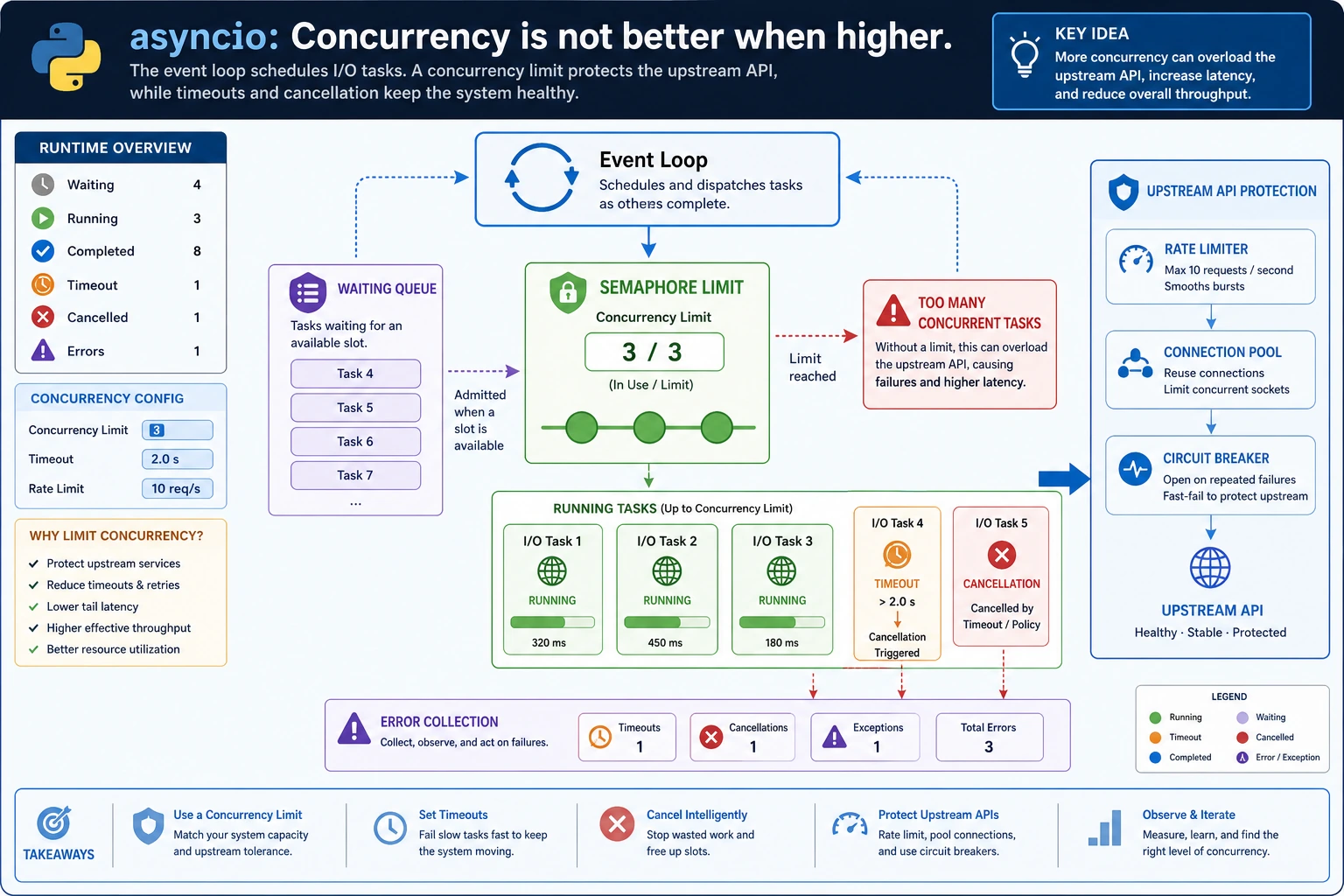
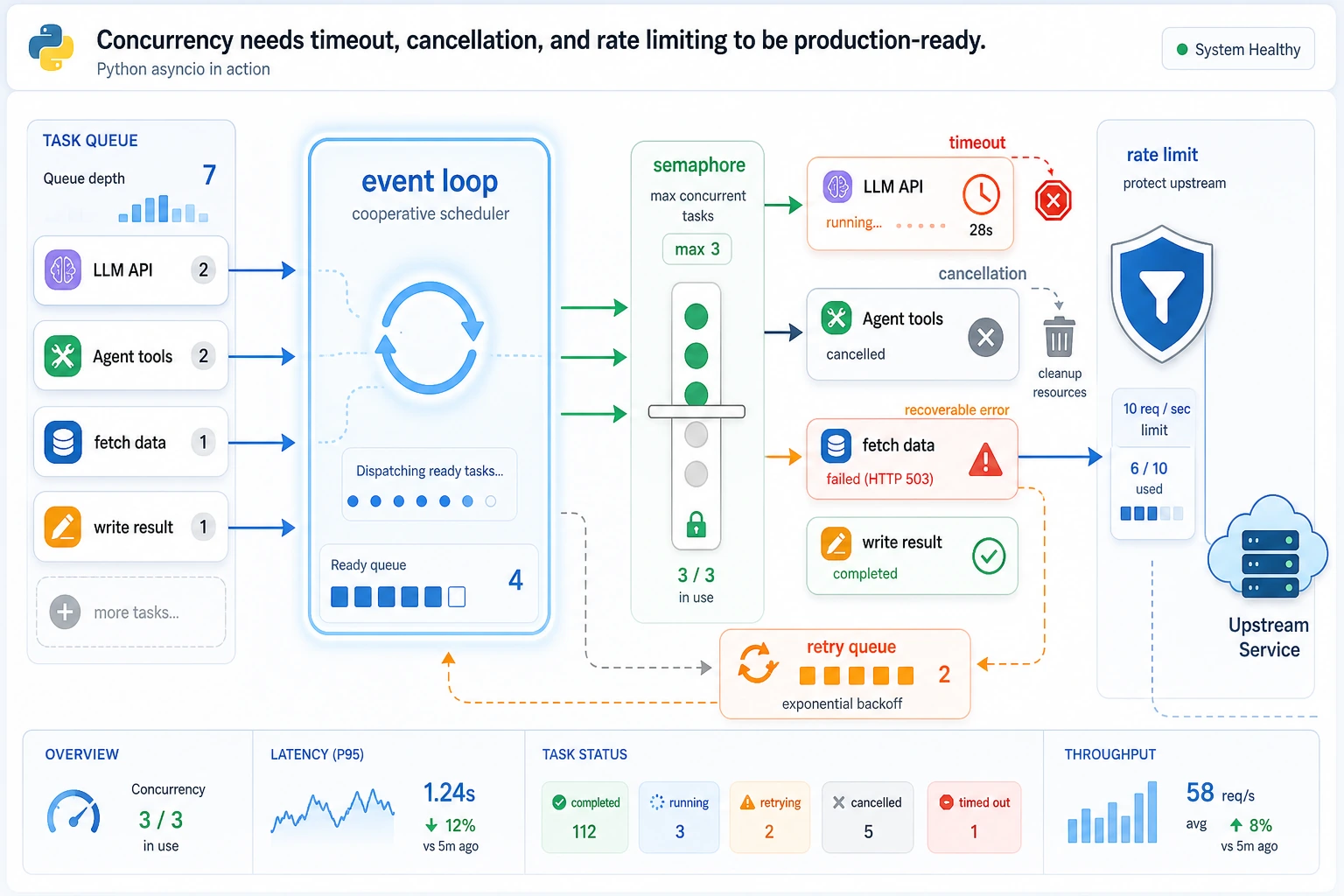
Concurrency helps when the program is mostly waiting: HTTP calls, database calls, file I/O, scraping, RAG retrieval, or Agent tool calls. It is not a magic speed button for CPU-heavy work.
What You Need
Section titled “What You Need”- Python 3.10+
- No external packages
- A terminal that can run
python
Key Terms
Section titled “Key Terms”- I/O-bound: most time is spent waiting for another system.
- CPU-bound: most time is spent computing.
- Coroutine: an async function that can pause with
await. asyncio.gather: run multiple awaitables and collect results.- Semaphore: limit how many tasks can run at the same time.
- Timeout: stop waiting after a fixed limit.
Run A Controlled Async Batch
Section titled “Run A Controlled Async Batch”Create async_batch.py:
import asyncio

async def call_tool(name, delay):    await asyncio.sleep(delay)    return f"{name}:ok"

async def guarded_call(semaphore, name, delay, timeout):    async with semaphore:        try:            return await asyncio.wait_for(call_tool(name, delay), timeout=timeout)        except asyncio.TimeoutError:            return f"{name}:timeout"

async def main():    semaphore = asyncio.Semaphore(2)    results = await asyncio.gather(        guarded_call(semaphore, "search", 0.1, 0.5),        guarded_call(semaphore, "database", 0.2, 0.5),        guarded_call(semaphore, "slow_tool", 1.0, 0.3),    )    print(results)

asyncio.run(main())
Run it:
python async_batch.pyExpected output:
['search:ok', 'database:ok', 'slow_tool:timeout']The important pattern is not just gather. It is gather plus a concurrency limit plus timeout handling.
Concurrency Review
Section titled “Concurrency Review”Review async code by asking what is allowed to wait, how many tasks may run at once, and what happens when one task is too slow. If those three answers are not visible, the code may work in a demo but fail under real traffic.
For AI apps, this applies to retrieval, reranking, tool calls, file uploads, and remote model APIs. Keep a trace that names each task and result. A list like ['search:ok', 'slow_tool:timeout'] is small, but it proves timeout behavior better than a paragraph of explanation.
Change The Limit
Section titled “Change The Limit”Run this tiny check to see the two possible limits:
import asyncio
for limit in [2, 1]:    semaphore = asyncio.Semaphore(limit)    print("limit:", limit, "semaphore:", type(semaphore).__name__)
Expected output:
limit: 2 semaphore: Semaphorelimit: 1 semaphore: SemaphoreThe final result stays the same, but tasks run more conservatively. In real services, this protects upstream APIs from sudden request bursts.
When To Use Asyncio
Section titled “When To Use Asyncio”Good fit:
- Many network requests
- Multiple tool calls
- RAG retrieval from several sources
- Waiting on databases or queues
Poor first choice:
- Heavy numerical computation
- Large image transformations
- Code that must stay very simple and has no waiting bottleneck
Evidence to Keep
Section titled “Evidence to Keep”Keep this page’s proof of learning as a small evidence card:
- Python Pattern
- decorator, iterator, generator, concurrency primitive, or metaprogramming hook
- Code Artifact
- minimal runnable example plus printed output
- Use Case
- where this pattern improves an AI app, pipeline, tool, or server
- Failure Check
- hidden side effects, unreadable abstraction, race condition, or overengineering
- Expected Output
- small advanced-Python example with a practical AI-system use note
Common Mistakes
Section titled “Common Mistakes”- Adding
asynceverywhere without checking whether the task is I/O-bound. - Using
gatherwithout a concurrency limit. - Forgetting timeouts, so one slow upstream blocks the whole workflow.
- Swallowing exceptions without logging which task failed.
Practice
Section titled “Practice”Add five more tool calls and set Semaphore(3). Then count how many return :timeout when you lower the timeout to 0.15.
Reference implementation and walkthrough
The exact timeout count depends on the delays you assign, so the answer should report the observed count instead of inventing a fixed number. A solid solution prints both the full result list and a count such as:
timeouts = sum(result.endswith(":timeout") for result in results)print("timeouts:", timeouts)The explanation should mention that Semaphore(3) limits pressure on upstream tools, while the lower timeout exposes slow calls. In production, you would log which tool timed out, not only the total number.